
Asana vs Soffront CRM vs Bigin by Zoho CRM vs Creatio CRM Comparison

Asana
Starting at $6.92 /user/month
- Free Trial
- Free Version
- Large Enterprises
- Medium Business
Asana is built for the way you work. It gives teams a single place to track work across projects and organize the full stream of activities—from brainstorming new ideas, to moving tasks forward, to updating colleagues ar…

Soffront CRM
Starting at $15 /Month
- Freelancers / Consultants
- Large Enterprises
Soffront is a flexible CRM for small to mid-sized businesses that need to run marketing campaigns, manage sales pipelines, and track workflows without requiring separate tools. Multi-language support, including Spanish,…

Bigin by Zoho CRM
Starting at $7 /User/Month
- Free Trial
- Free Version
- Small Business
Bigin is Zoho's lightweight CRM designed for small teams under 50 people running straightforward sales cycles. Its drag-and-drop pipeline and email sync with Gmail and Outlook allow reps to get productive within a day wi…
Creatio CRM
Starting at $40 /user/month
- Large Enterprises
- Medium Business
Creatio is an AI-native, no-code CRM and workflow automation platform designed to help organizations manage customer relationships and business processes on a single unified system. It brings together sales, marketing, c…
Asana leads on user satisfaction with a 4.6-star rating across 2,428 reviews.
Consider monday.com
Comparing Asana, Soffront CRM, Bigin by Zoho CRM and Creatio CRM? monday.com is another option worth a look: visual boards, 200+ templates and a free plan for up to 2 seats.
We may earn a commission. Affiliate disclosure
Asana vs Soffront CRM vs Bigin by Zoho CRM vs Creatio CRM — at a glance
| Feature | Asana | Soffront CRM | Bigin by Zoho CRM | Creatio CRM |
|---|---|---|---|---|
| Rating | 4.6 / 5 | 4.2 / 5 | 4.6 / 5 | — |
| Reviews | 2,428 | 17 | 243 | — |
| Starting price | $6.92 /user/month | $15 /Month | $7 /User/Month | $40 /user/month |
| Free trial | Yes | No | Yes | No |
| Free version | Yes | No | Yes | No |
| Best for | Large Enterprises, Medium Business, Small Business | Freelancers / Consultants, Large Enterprises, Medium Business | Small Business | Large Enterprises, Medium Business |
| Category | Project Management Software | CRM Software | CRM Software | CRM Software |
| Integrations | — | — | — | 5+ apps |
| Platforms | SaaS/Web/Cloud, Mobile - Android, Mobile - iOS, Installed - Windows, Installed - Mac | SaaS/Web/Cloud, Mobile - Android, Mobile - iOS, Installed - Windows, Installed - Mac | SaaS/Web/Cloud, Mobile - Android, Mobile - iOS | SaaS/Web/Cloud, Mobile - Android, Mobile - iOS, Installed - Windows, Installed - Mac, Browser Based (Cloud), Mobile - Windows |
| API | Available | Available | Available | Available |
| Support modes | Business Hours, Online | 24/7 (Live rep), Business Hours, Online | Business Hours, Online | Online |
Key differences between Asana and Soffront CRM
- Pricing: Asana starts at $6.92 /user/month, while Soffront CRM starts at $15 /Month.
- Free trial: Asana offers a free trial; Soffront CRM does not.
- Target audience: Asana is built for Large Enterprises and Medium Business, while Soffront CRM targets Freelancers / Consultants and Large Enterprises.
- User satisfaction: Asana scores higher with a 4.6-star average.
- Deployment: Asana supports SaaS/Web/Cloud, Mobile - Android, Mobile - iOS, Installed - Windows, Installed - Mac; Soffront CRM supports SaaS/Web/Cloud, Mobile - Android, Mobile - iOS, Installed - Windows, Installed - Mac.
Compare Asana vs Soffront CRM vs Bigin by Zoho CRM vs Creatio CRM — and walk away knowing which one fits.
Which tool fits your team best
Which is actually cheaper for your team size
Where each product wins, per real buyers
Most Project Management Software tools look identical on paper. This comparison cuts to the differences that matter — pricing structure, team fit, and what real buyers found after signing up.
Biggest differences
Features
Pricing
Buying details
Security
Buyer feedback
Integrations
Product tour
Other options
Talk to an expert Talk to an expert |
Free PDF comparison
Download this Asana vs Soffront CRM vs Bigin by Zoho CRM vs Creatio CRM comparison
Get the full side-by-side as a PDF — these picks plus the top Project Management Software tools, with verified ratings, pricing and features.
- Side-by-side on pricing, features & ratings
- Plus the category top 10, scored & ranked
- Emailed to you — no on-screen download
No file downloads on screen — we email it to you. One-click unsubscribe anytime.
Asana, Soffront CRM, Bigin by Zoho CRM vs Creatio CRM: Biggest differences
Start here before you go deeper into features.
Best for teams needing flexible, intuitive project and task management.
- You want a highly customizable workflow adaptable to diverse team needs.
- Your team values strong collaboration tools like comments and real-time updates.
- You need multiple project views including lists, boards, and timelines.
- Your organization requires advanced Agile reporting like BurnUps and sprint metrics.
- You are a very large enterprise needing highly scalable, performance-optimized solutions.
Freelancers / Consultants, Large Enterprises, Medium Business
Small Business
Large Enterprises, Medium Business
Asana typically suits Large Enterprises and Medium Business. Soffront CRM tends to fit Freelancers / Consultants and Large Enterprises better. The right choice depends on your team size, workflow, and whether a free trial matters.
Description | Asana is built for the way you work. It gives teams a single place to track work across projects and organize the full stream of activities—from brainstorming new ideas, to moving tasks ... Read More about Asana | Soffront is a flexible CRM for small to mid-sized businesses that need to run marketing campaigns, manage sales pipelines, and track workflows without requiring separate tools. ... Read More about Soffront CRM | Bigin is Zoho's lightweight CRM designed for small teams under 50 people running straightforward sales cycles. Its drag-and-drop pipeline and email sync with Gmail and Outlook allow reps to ... Read More about Bigin by Zoho CRM | Creatio is an AI-native, no-code CRM and workflow automation platform designed to help organizations manage customer relationships and business processes on a single unified system. It ... Read More about Creatio CRM |
|---|---|---|---|---|
Entry Level Pricing |
|
|
|
|
Free Trial Availability |
|
| ||
SpotScoreWhat's this? ↗ | 9.7/10 | 8.5/10 | 9.0/10 | Not Available |
User RatingsBased on verified Spotsaas reviews | ||||
Best Company Size | 10-50 employees51-1000 employees | — | — | 50–10,000+ employees |
Get pricing help | Get pricing help |
Where each option fits best
See where each product is strongest, which teams it fits, and what causes buyers to keep looking — before you commit.
Based on buyer reviews and verified product data collected by Spotsaas.
Key strengths
- Project Management: Asana helps teams organize their tasks and projects in one central location, letting managers track progress and meet deadlines without scattered communications.
- With features like task assignments, comments, and file attachments, Asana helps team members communicate effectively, improving productivity and innovation.
- Customizable Workflows: Whether you're managing marketing campaigns or software development sprints, Asana lets you design workflows that fit your team's specific needs, keeping everyone aligned on project goals.
- Advanced Workflow Automation: Creatio supports end-to-end workflow automation through triggers, rules, approvals, and task orchestration. Repetitive actions such as follow-ups, lead routing, and status updates can run automatically. This reduces manual effort, minimizes errors, and keeps processes following defined standards, improving efficiency across departments.
- AI-Driven Insights and Analytics: Creatio uses AI-driven analytics to surface trends, predict outcomes, and recommend next actions. Teams can monitor performance, forecast revenue, and identify bottlenecks using real-time dashboards. These insights help decision-makers prioritize tasks, improve planning accuracy, and adjust strategies based on actual operational data rather than assumptions.
- Scalable for Growing Organizations: Creatio is designed to support growing teams, complex workflows, and increasing data volumes. Organizations can expand usage across departments, regions, and business units without changing platforms. Its modular structure allows teams to add features, integrations, and automation gradually as operational needs become more advanced.
Best fit
- 10 to 1,000 employees
- SaaS, Consulting, Marketing Technology (Martech), Project Management, and E-commerce
- Project Managers, Marketing Coordinators, Product Managers, Team Leads, and Operations Managers
- 50–10,000+ employees
- Banking & Financial Services, Insurance, Telecommunications, Healthcare, Manufacturing, Real Estate, Professional Services, IT Services, Public Sector, Education
- Sales Manager, CRM Manager, Revenue Operations Manager, Marketing Operations Manager, Customer Service Manager, Business Process Manager, Digital Transformation Lead, CIO
Reasons buyers look elsewhere
- Users may seek alternatives to Asana due to its pricing model, as some teams find it expensive compared to other project management tools that offer similar features at a lower cost.
- Teams requiring more advanced reporting capabilities might explore alternatives, as Asana's reporting features can be limited for larger projects or organizations needing in-depth analytics.
- Organizations with specific workflow needs may look for alternatives that offer greater customization options.
- While Creatio has integrations and a marketplace, users who require deep connectivity with certain niche tools or large ecosystems (e.g., extensive third-party apps) may choose alternatives with broader out-of-the-box integrations.
- Creatio’s pricing and feature tiers are structured for mid-sized to larger businesses. Smaller teams or budget-constrained startups may opt for alternatives offering essential CRM capabilities at lower costs without advanced automation overhead.
- Though no-code, Creatio’s workflow builder and extensive features can feel overwhelming without training. Teams with limited CRM experience might gravitate toward platforms with more intuitive interfaces or guided onboarding to reduce ramp-up time.
Software Demo
Demo |
|---|
Need a second opinion?
Get decision help from a software advisor
Share your priorities, budget, and team needs, and we’ll help you narrow the options and understand the tradeoffs before you talk to vendors.

- Independent advice — matched to your business
- Understand the tradeoffs before you talk to vendors
- Free 15-min call with a software advisor.
Step 1 of 4
How big is your team?
We tailor recommendations to companies your size.















How do Asana, Soffront CRM, Bigin by Zoho CRM and Creatio CRM Compare on Features?
Total Features | 18 Features | 8 Features | 10 Features | 78 Features |
|---|---|---|---|---|
Unique Features | No unique features | No unique features | No unique features | No unique features |
Get Quote | Get Quote |
Compare Asana, Soffront CRM, Bigin by Zoho CRM and Creatio CRM on pricing
Review starting price, plan structure, and free-trial access side by side so you can see which option fits your budget and buying process.
Pricing Option | ||||
|---|---|---|---|---|
Starting From |
|
|
|
|
Pricing Plans |
|
|
|
|
Pricing Page | 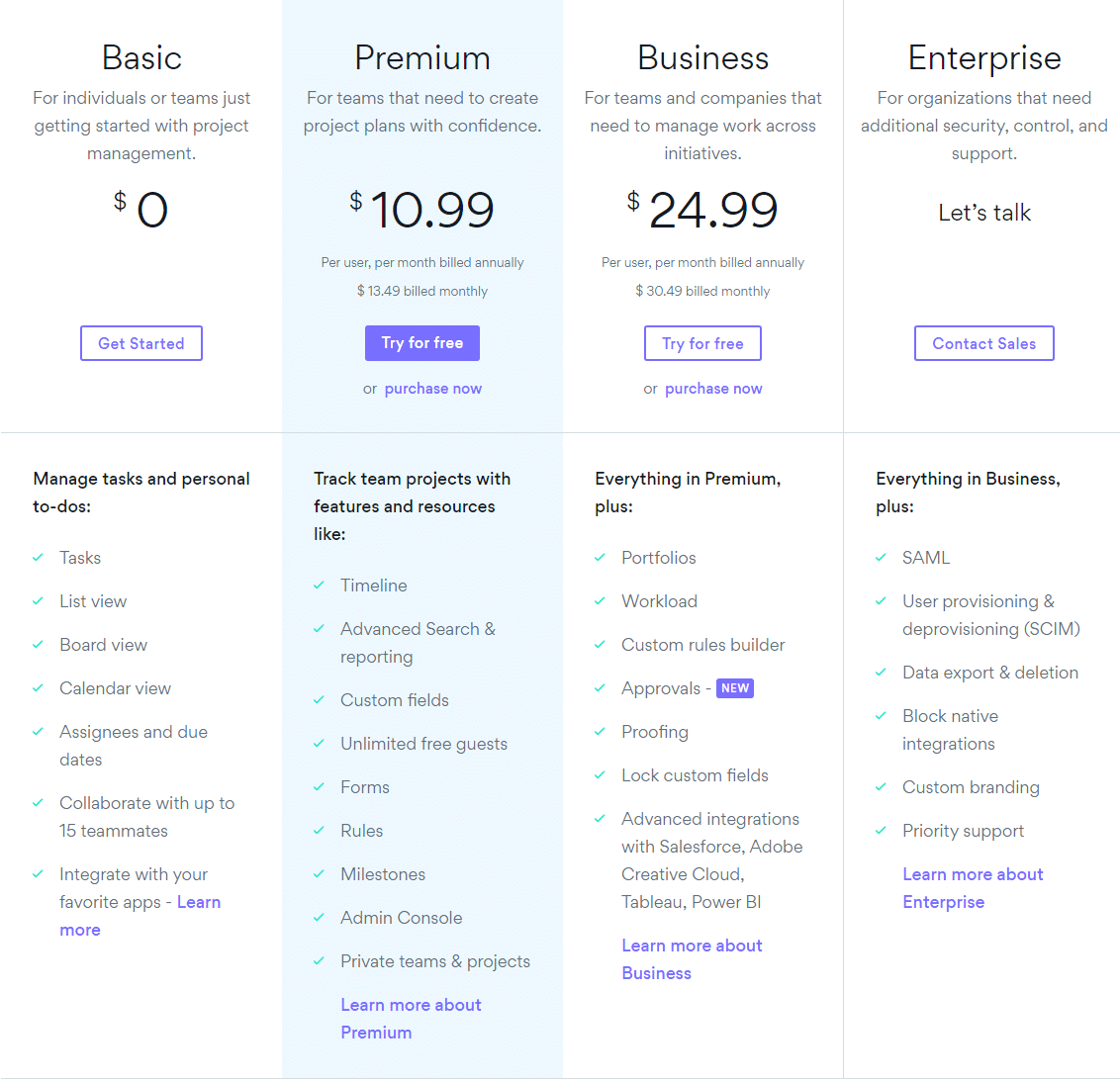 |  |  | 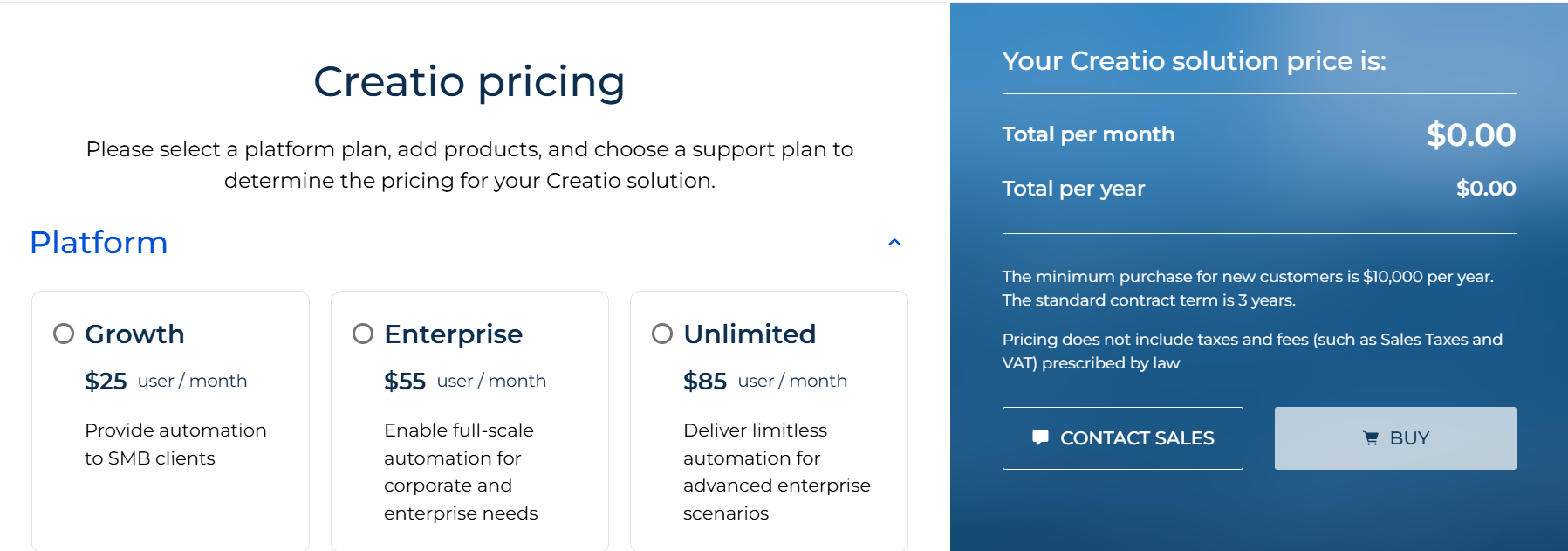 |
Asana, Soffront CRM, Bigin by Zoho CRM vs Creatio CRM: Other Details
Organization Types supported |
|
|
|
|
|---|---|---|---|---|
Platforms Supported |
|
|
|
|
Modes of support |
|
|
|
|
API Support |
|
|
|
|
Get help choosing | Get help choosing |
Asana vs Soffront CRM vs Bigin by Zoho CRM User Reviews & Rating Comparison
User Ratings | No reviews available for the product | |||
|---|---|---|---|---|
Rating Distribution | No reviews available for this product | |||
Spotsaas Editor’s POV generated by AI | Buyer sentiment Overall positive sentiment highlights ease of use, collaboration features, and workflow customization, tempered by concerns over learning curve and pricing. What buyers like
Common complaints
| Buyer sentiment Buyer sentiment is positive across 17 reviews, with strong overall satisfaction. What buyers like
Common complaints
| Buyer sentiment Buyer sentiment is very strong across 279 reviews, with consistently positive feedback. What buyers like
Common complaints
| What buyers like
Common complaints
|
Pros and Cons |
|
|
|
|
Positive Reviews | No reviews available for the product | No reviews available for the product | No reviews available for the product | No reviews available for the product |
Integrations
Integration with other apps | No Integration information available. | No Integration information available. | No Integration information available. |
|---|



Asana, Soffront CRM, Bigin by Zoho CRM and Creatio CRM Customers
Customers |  Vodafone  Deloitte  |  American Security Programs  Diefendorf Capital Planning  StoneEagle Group |  Antech Microsystem Pvt.Ltd  Investacc  Hire |  Nasdaq  Colgate-Palmolive  ENT Credit Union |
|---|
Media and Screenshots
Screenshots | 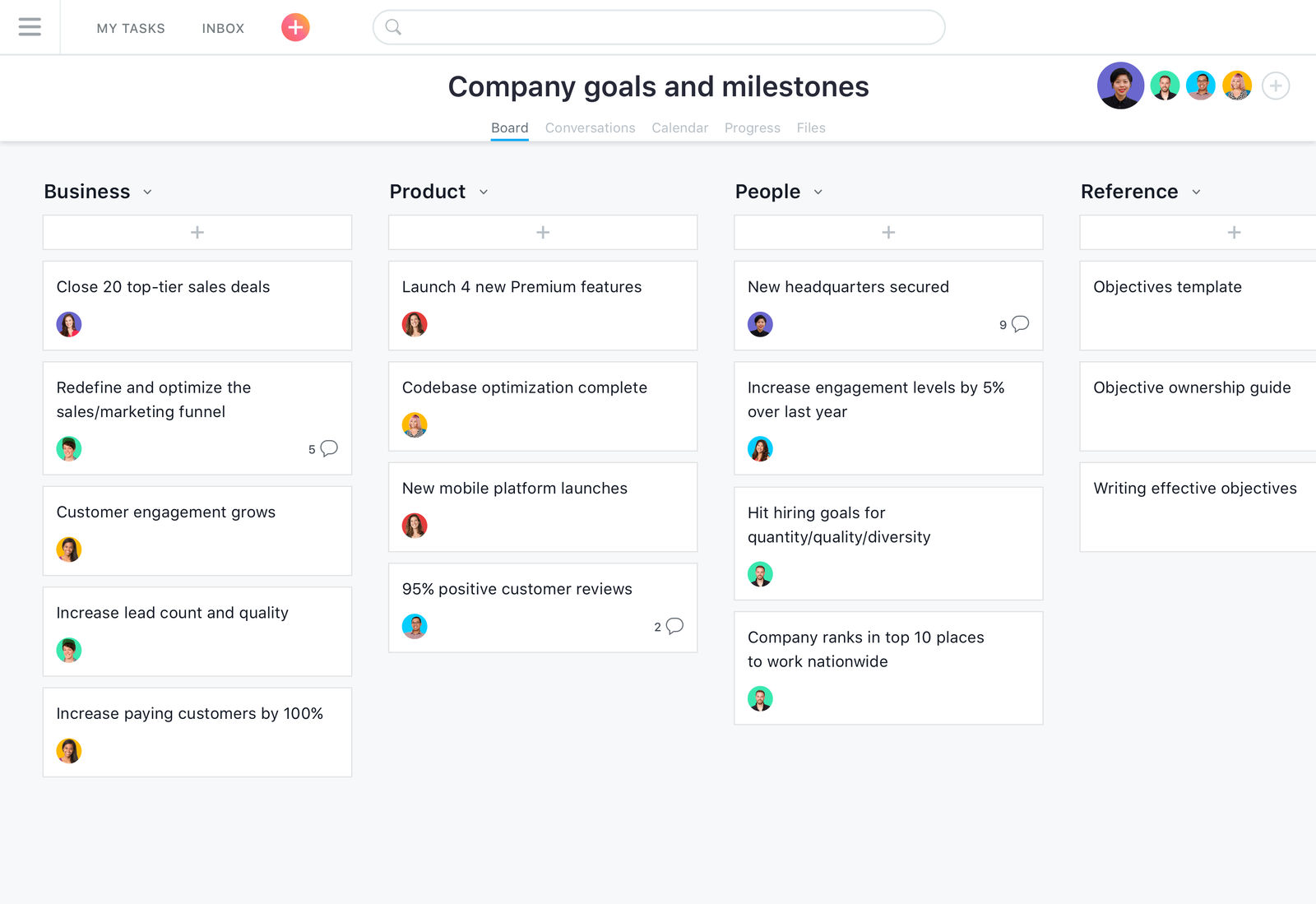 5 Screenshots | No screenshots available. |
|---|---|---|
Videos |  3 Videos |  3 Videos |
Alternatives to Asana, Soffront CRM, Bigin by Zoho CRM, Creatio CRM
Alternatives |
|---|




Add another option to compare side by side
Search by product name to compare pricing, fit, and buyer feedback in one view.Compare similar software options


Related Blogs and Articles for Crm Software
Disclaimer: This research has been collated from a variety of authoritative sources. We welcome your feedback at [email protected].
Frequently asked questions
- Which is better, Asana or Soffront CRM?
- Asana edges out the other on user ratings (4.6 vs 4.2). That said, the best pick depends on your use case, so use the comparison tables above to evaluate each dimension.
- Do Asana and Soffront CRM offer a free trial?
- Asana offers a free trial. Soffront CRM does not.
- What is the starting price of Asana vs Soffront CRM?
- Asana starts at $6.92 /user/month. Soffront CRM starts at $15 /Month.
- What are the top alternatives to Asana?
- Top alternatives to Asana include Quickbase, monday Work Management, Smartsheet, ClickUp, Clarizen One.
- What are the top alternatives to Soffront CRM?
- Top alternatives to Soffront CRM include Bigin by Zoho CRM, Creatio CRM, Clientjoy, webCRM, Saleswah CRM.
- What should I watch out for with Asana?
- Asana is credited with the following: intuitive and simple user interface enabling quick adoption; reliable task and project management features including timelines, recurring tasks, and milestones. The recurring reservations: steep learning curve for new users due to feature richness; key advanced features locked behind premium pricing, increasing cost for smaller teams. It does not include Accounts Payable and Bank Reconciliation.
- What are the common complaints about Soffront CRM?
- It depends what you need. In its favour: highly flexible, adapting to various business needs; strong focus on data security ensures user trust. Against it: may lack advanced features for larger businesses; basic analytics may not suffice for in-depth insights. Note that it does not include Billing and Invoicing and Cash Management.
More CRM Software comparisons
Side by side breakdowns of the same products against other options in this category.