
Staying organized can feel impossible when tasks and deadlines never stop coming. An estimated 80% of smartphone users already rely on at least one productivity app every day, which says a lot about how central these tools have become to getting things done.
This article is your guide to the best organization apps that will streamline your workflow efficiently in 2023, whether you’re managing your own to-do list or coordinating a whole team.
Key Takeaways
- The top 10 organization apps in 2023 are ClickUp, Evernote, 24Me, Fellow, Calendly, Todoist, Taskque, Flow, HiTask, and Trello.
- Between them, these apps cover goal setting, task management, project progress tracking, communication tools, and note-taking.
- Pricing varies by app — some offer free versions, while others require monthly or yearly subscriptions starting from $4.99 per month.
- ClickUp and Evernote are two of the most popular picks on this list, each offering a distinct set of features to improve productivity.
- Pricing across the list ranges from free versions to paid subscriptions starting at $4.99 per month.
- The right app depends on your specific needs, whether that’s goal setting, scheduling, note-taking, or team collaboration.
What Are Organization Apps?

Organization apps are tools that help you stay on top of tasks. They give you ways to manage projects, plan your day, and track time spent working. These digital aids can hold notes, set reminders, and even support team chats, often replacing a whole stack of sticky notes and separate spreadsheets.
Some let you share files with others, too, which makes it easier to keep a project moving without switching over to a separate file-sharing tool.
New organization apps show up every year. In 2023, a few stand out more than others, like ClickUp and Evernote. Some cost real money each month — the business version of ClickUp runs $25 per user every month.
Others have free options that hold up just as well. Organization apps differ based on what they’re built to do best, so the key is finding one that fits your needs at home or in the office, rather than assuming the most popular option is automatically the right one for you.
Top 10 Organization Apps
In 2023, the top 10 organization apps that will help users stay productive and efficient are ClickUp, Evernote, 24Me, Fellow, Calendly, Todoist, Taskque, Flow, HiTask, and Trello.
ClickUp
ClickUp is one of the best organization apps in 2023. It helps you track tasks and goals, set up agendas, and see your team’s progress, and it delivers a lot of value for a relatively low cost.
For its cheapest paid plan, Core, ClickUp charges $9 per user each month billed annually (ClickUp pricing, checked October 2026).
Plenty of people rely on ClickUp because it makes work feel easier and smoother. It’s an efficient project management tool that brings all your tasks into one place, cutting down on the time you’d otherwise spend jumping between separate apps. That said, it won’t be the perfect fit for everyone.
You’ll want to try it yourself to see whether it works for you.
Evernote
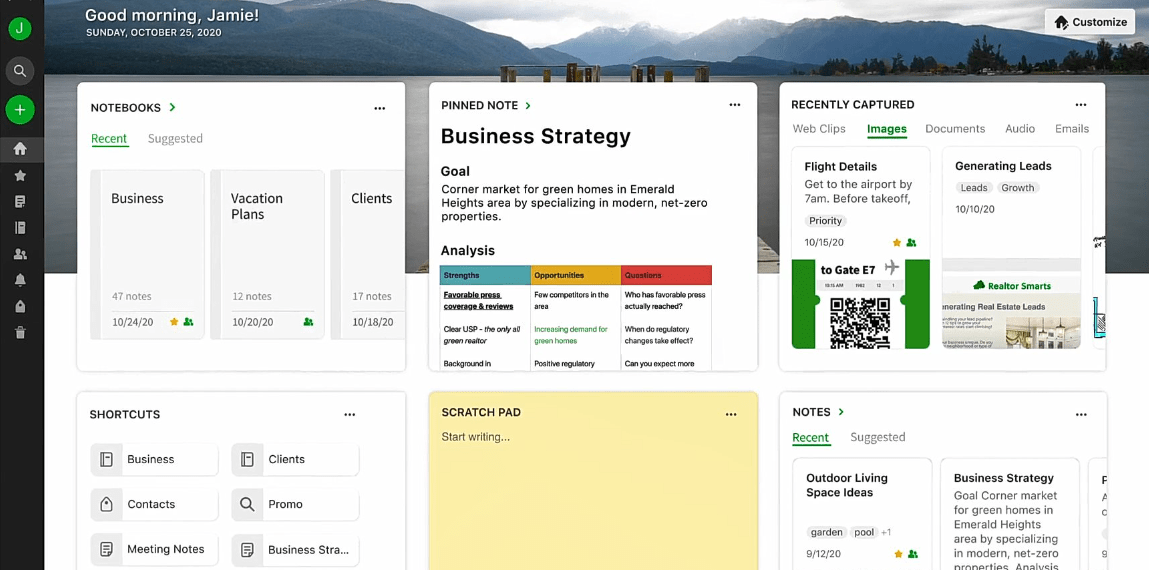
Evernote is a solid app for saving ideas. You can write notes, save photos, and even record voice clips. It’s also useful for making lists or plans, and tags make it easy to find old notes quickly.
Evernote works well on both phones and computers, so your notes stay synced no matter which device you reach for. The basic version is free, but paid versions add extra features.
24Me
24Me is one of the top organization apps in 2023. It helps users stay organized by combining to-do lists, calendars, and reminders in one place. With 24Me, you can easily manage your tasks and appointments, set reminders for important deadlines, and sync with other platforms like Google Calendar.
One standout feature is voice recognition, which lets you add tasks and reminders just by speaking, without pausing to type them out. On the downside, some users find the interface a bit complex to navigate at first.
On pricing, the basic version of 24Me is free to use with limited features. Premium plans start at $4.99 per month or $39.99 per year, and add extras like location-based alerts and unlimited task attachments.
Fellow
Fellow is one of the top 10 organization apps in 2023. It’s a collaboration and productivity tool built to help teams stay organized and work together more efficiently. With Fellow, users can build meeting agendas, set goals, track progress, and communicate with team members without friction.
One key feature is its ability to integrate with other communication platforms like Slack and Microsoft Teams, so users can reach all their important information from one place.
While Fellow offers real benefits for team organization, it has some drawbacks too — some users find the interface a bit much at first, given the wide range of features on offer.
Calendly
Calendly is a scheduling app that helps people manage their time more efficiently. With Calendly, you can schedule meetings and appointments without the back-and-forth of emails.
It integrates with popular calendar apps like Google Calendar and Outlook, so your schedule stays in one place instead of scattered across several tools.
One of the benefits of Calendly is its user-friendly interface. It’s simple to set up and navigate, even if you’re not particularly tech-savvy. You can customize your availability and share a unique scheduling link, letting others book meetings based on your open time slots.
One drawback is that some advanced features, like team scheduling and reminders, are locked behind the paid plans. The pricing for Calendly starts at $8 per user per month for the Premium plan, which adds features like email notifications and integration with payment processors.
Todoist
Todoist is one of the top organization apps in 2023. It’s a task management app that helps users stay organized and productive. With Todoist, you can create to-do lists, set due dates, and prioritize tasks.
One of its strengths is a simple, user-friendly interface that’s easy to navigate. It’s also available across different devices, so you can reach your tasks from your computer, phone, or tablet without losing anything in between.
Worth noting: some advanced features, like reminders and project templates, are only available in the premium version of Todoist, priced at $4 per user per month.
Taskque
Taskque is one of the top organization apps of 2023. It’s a powerful task management tool that helps users stay organized and on track with their work. With Taskque, you can create tasks, assign them to team members, set deadlines, and track progress, all in one place.
The app supports easy collaboration and communication among team members, making it a strong choice for project management. Taskque also offers file sharing and integrated calendars to streamline workflow and boost productivity.
Pricing for Taskque starts at $5 per user per month, which makes it an affordable option for businesses of any size, from small teams to larger organizations.
Flow
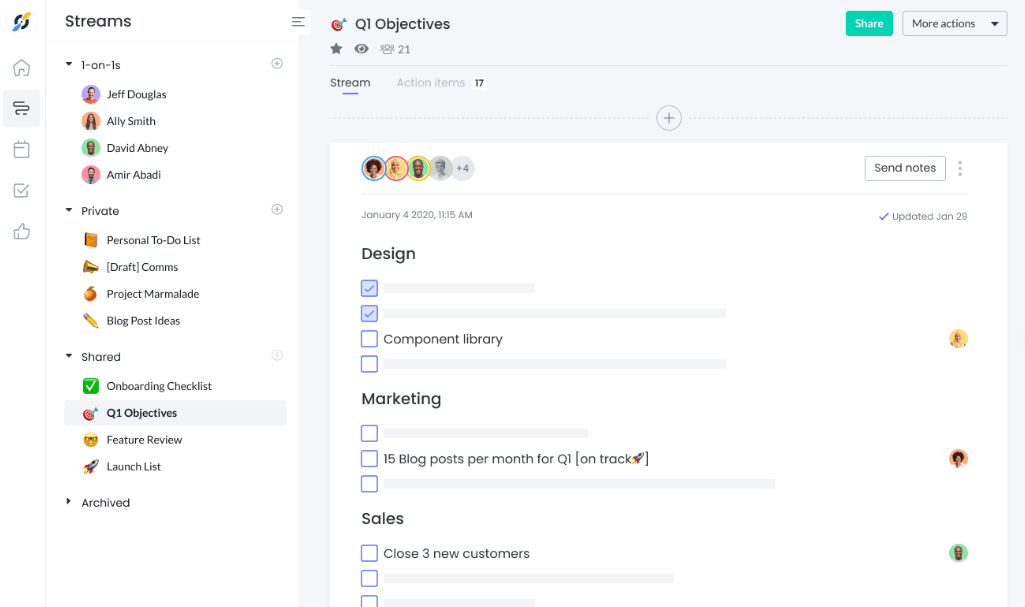
Flow is one of the top organization apps in 2023. It helps users manage tasks and projects efficiently — you can build to-do lists, set due dates, and track progress on your work.
It also supports collaboration with team members through task assignments and comments. Flow’s interface is user-friendly and easy to navigate, though it doesn’t offer a free version — it requires a monthly subscription starting at $6 per user per month.
Even so, Flow remains a popular choice for anyone looking for an effective task management app with advanced features for streamlined workflow and collaboration.
HiTask
HiTask is one of the top organization apps in 2023. It’s a task management app that helps users stay organized and productive. With HiTask, you can create to-do lists, set deadlines, assign tasks to team members, and track progress.
One benefit is its user-friendly interface, which makes it easy for anyone to navigate and use effectively. Another is its collaboration feature, letting team members communicate and work together without friction.
Some users have noted that HiTask lacks the advanced features found in other organization apps on this list. On pricing, HiTask offers a free version with limited features and a paid version starting at $7 per user per month for more advanced functionality.
Trello
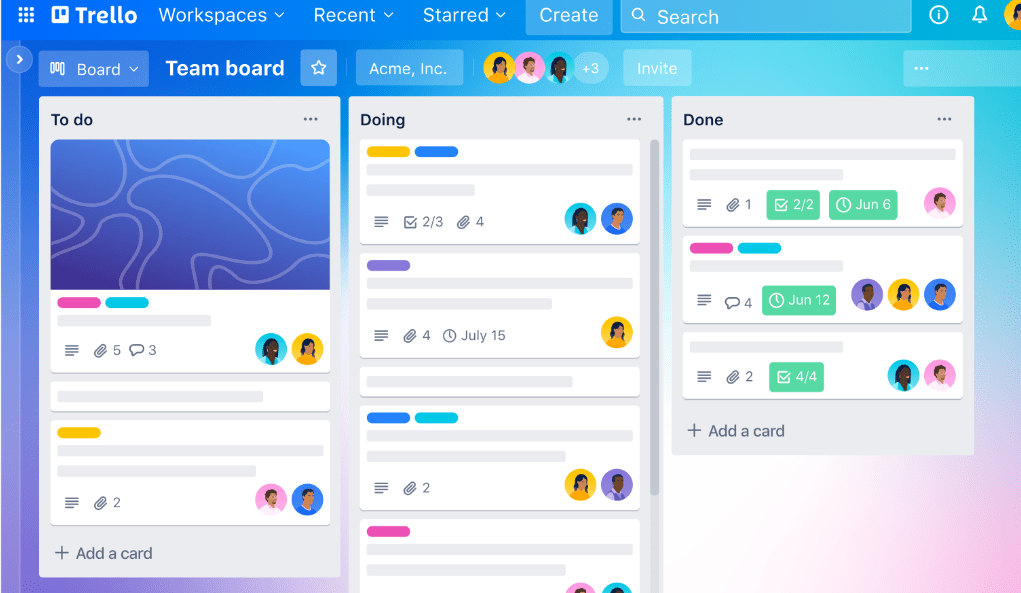
Trello is an organization app that helps users manage tasks and projects in a visual, collaborative way. It lets you build boards, lists, and cards to organize your work.
With Trello, you can see at a glance what needs to be done, who’s responsible for each task, and how a project is progressing. You can also add due dates, attachments, labels, and comments to keep everything in one place.
Trello is known for its user-friendly interface and flexibility, working equally well for individuals or teams of any size. The basic features are free, with paid plans adding functionality starting at $5 per user per month for the Standard plan when billed annually (Trello pricing, checked October 2026).
Pros, Cons, and Pricing of the Top 10 Apps
Here’s a closer look at the pros, cons, and pricing of the top 10 organization apps, covering their features, benefits, drawbacks, and costs.
Features
The top organization apps in 2023 come with a range of features that can help improve productivity and efficiency. Here are some key features worth knowing about:
| Feature | Description |
|---|---|
| Goal Setting | Set and track personal and team goals for improved focus on tasks. |
| Agendas and Task Management | Create, prioritize, assign, and manage tasks for better organization. |
| Project Progress Tracking | Monitor project status through visual dashboards and progress tracking tools. |
| Communication Streamlining | Facilitate collaboration with chat, comments, and notifications features. |
| Note-Taking Capabilities | Take notes, create to-do lists, and save information for easy access. |
| Calendar Integration | Schedule meetings, appointments, and reminders with calendar integration. |
| Workflow Automation | Automate repetitive tasks and workflows within teams or organizations. |
| File Sharing and Collaboration | Collaborate efficiently by sharing files, documents, and resources. |
| Time Tracking | Monitor and track time spent during the workday for productivity analysis. |
| Mobile Accessibility | Access and organize tasks on the go with mobile versions of the app. |
Benefits
- Improved productivity and efficiency in managing tasks and projects.
- Better organization and the ability to set goals, create agendas, and prioritize tasks.
- Streamlined communication within teams and improved collaboration on projects.
- Better time management and scheduling to help you hit deadlines.
- Stronger note-taking features for capturing ideas, meeting notes, and important information.
- Access across devices, with seamless integration and syncing of data.
- Customizable workflows and project management tools that fit individual needs.
- Centralized storage for files, documents, and resources, so everything is easy to find and share.
- Automated reminders and notifications to keep you on top of deadlines and upcoming events.
- Data analytics and reporting features to track progress, monitor productivity, and make informed decisions.
Drawbacks
Some organization apps come with drawbacks worth knowing about ahead of time. Here are a few potential ones to consider:
| Drawback | Description |
|---|---|
| Limited Features | Some apps may lack advanced features required for specific tasks or projects. |
| Steep Learning Curve | Complex interfaces can make it challenging for new users to navigate and use effectively. |
| Compatibility Issues | Limited integration with other tools or platforms can lead to workflow disruptions. |
| Costly Subscriptions | Monthly fees or premium plans may not fit everyone’s budget. |
| Privacy Concerns | Potential data exposure to breaches or unauthorized access if security is inadequate. |
| Dependence on Technology | Relying heavily on an app makes users dependent on technology, with downtime potentially disrupting productivity. |
| Overwhelming Customization | Excessive customization options can overwhelm users during setup and management. |
| Incomplete Syncing | Some apps may fail to sync properly across multiple devices, leading to data inconsistencies and confusion. |
| Lack of Offline Functionality | Not all apps offer offline access, potentially causing users to lose access to important tasks and information without an internet connection. |
| User Interface Limitations | Apps with unappealing or non-intuitive user interfaces can be less enjoyable to use and navigate. |
Cost
Pricing for organization apps varies quite a bit — some offer free versions, others charge monthly fees. Here’s a quick look at the pricing of the top 10 organization apps of 2023.
| Organization App | Pricing |
|---|---|
| ClickUp | $9/user/month (Core plan, billed annually — ClickUp pricing, checked October 2026) |
| Evernote | Pricing varies |
| 24Me | Free, with in-app purchases |
| Fellow | Pricing varies |
| Calendly | Free basic version, pricing varies for advanced features |
| Todoist | Free, with in-app purchases |
| Taskque | Pricing varies |
| Flow | Pricing varies |
| HiTask | Pricing varies |
| Trello | Free basic version, pricing varies for advanced features |
Keep in mind that cost is just one factor when choosing the best organization app for your needs. Weigh the features, ease of use, and team collaboration capabilities as well, since the cheapest option isn’t always the one that saves you the most time.
Bonus: A Comprehensive Alternative to Multiple Organization Apps
Motion is an all-in-one organization app that pulls together the best features of multiple apps into one platform. Here’s how it can streamline your productivity and workflow.
Motion
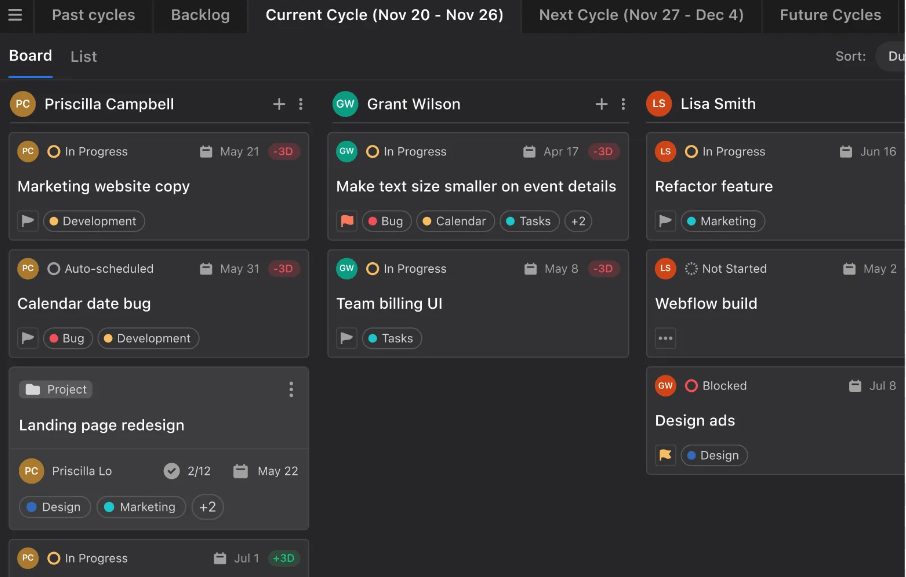
Motion is a comprehensive alternative to running multiple organization apps at once. It combines the features of productivity, task management, note-taking, calendar, project management, and collaboration tools into a single platform.
With Motion, users can set goals, build agendas, track team and project progress, and streamline communication, all in one place. Its user-friendly interface allows for smooth navigation and efficient workflow management.
One advantage of Motion is its versatility — it works for individuals and teams across a range of industries. On pricing, Motion offers different subscription plans based on the needs of the user or organization.
Conclusion
This article has walked through the top 10 organization apps in 2023, each offering its own distinct set of features and benefits for anyone looking to improve their productivity and efficiency.
Every app has its pros and cons, so the right pick ultimately comes down to your individual needs and preferences. Weighing the pricing against the pros and cons will help you land on the organization app that works best for you and how your team actually operates.
Frequently Asked Questions
What are organization apps and what can they help me with?
Organization apps are digital tools that can assist you in managing your tasks, schedules, and information more efficiently. They can help you stay organized, set reminders, prioritize tasks, track progress, and collaborate with others.
Can I use organization apps on any device?
Most organization apps are designed to be compatible with various devices such as smartphones, tablets, and computers. However, it’s always a good idea to check the app’s specifications or requirements before downloading or purchasing.
How do I choose the best organization app for my needs?
When selecting an organization app, consider factors like your specific goals or needs (e.g., task management vs calendar scheduling), user interface preference (e.g., simple vs advanced), integration options (e.g., syncing with other apps), pricing structure (e.g., free trial vs subscription), and user reviews or ratings.
Are there any drawbacks to using organization apps?
While organization apps can be highly beneficial, some potential drawbacks include a learning curve if the app has complex features/interface for beginners; reliance on technology which may lead to distractions; potential privacy concerns if sensitive data is stored; and possible costs associated with premium features or subscriptions.
How much does an average organization app cost?
The cost of an organization app varies depending on several factors such as its features/functionalities offered in the free version versus paid versions/subscriptions plans; discounts/special promotions available at certain times; and additional add-ons/complementary services provided by the developer/company. It’s recommended to research different options and compare prices before making a decision based on your budget and requirements.
Compare alternatives to the tools in this post

- Independent picks for exactly what you just read about
- Matched to your team size & needs
- Vendors don't pay for placement
Step 1 of 4
How big is your team?
We tailor recommendations to companies your size.















Related Articles
Applicant Tracking Software
monday.com for HR and Recruiting (2026): Hiring Pipelines, Onboarding and When You Need an ATS
Continue reading →
Project Management
monday.com for Remote Teams (2026): Async Updates, Dashboards and Slack, Zoom and Teams Setup
Continue reading →
Project Management
monday.com for Nonprofits (2026): Programs, Grants, Volunteers and Donor Tracking
Continue reading →
Project Management
monday.com for Construction (2026): What It Covers and Where Procore or Buildertrend Fit Better
Continue reading →