
Jira Service Desk vs Suptask Comparison

Jira Service Desk
Starting at $20 /user/month
- Free Trial
- Large Enterprises
- Medium Business
Jira Service Desk software offers the features that companies need to successfully deliver service desk applications, including issue management, change management, knowledge management and more. Jira Service Desk suppor…

Suptask
Starting at $18 /Month
- Large Enterprises
- Medium Business
Suptask revolutionizes ticketing in teams. Our platform facilitates a seamless transition between conversation on Slack to a comprehensive ticketing system without needing to exit the app. We promote inter-team collabora…
Suptask leads on user satisfaction with a 4.8-star rating across 24 reviews.
Jira Service Desk vs Suptask — at a glance
| Feature | Jira Service Desk | Suptask |
|---|---|---|
| Rating | 4.1 / 5 | 4.8 / 5 |
| Reviews | 1,068 | 24 |
| Starting price | $20 /user/month | $18 /Month |
| Free trial | Yes | No |
| Free version | No | No |
| Best for | Large Enterprises, Medium Business, Small Business | Large Enterprises, Medium Business, Small Business |
| Category | Service Desk Software | Service Desk Software |
| Integrations | 8+ apps | — |
| Platforms | SaaS/Web/Cloud, Installed - Windows, Installed - Mac | SaaS/Web/Cloud |
| API | Available | — |
| Support modes | Online | Online |
| Certifications | SOC 2, HIPAA, GDPR, ISO 27001 | — |
| Data residency | Global | US |
Key differences between Jira Service Desk and Suptask
- Pricing: Jira Service Desk starts at $20 /user/month, while Suptask starts at $18 /Month.
- Free trial: Jira Service Desk offers a free trial; Suptask does not.
- User satisfaction: Suptask scores higher with a 4.8-star average.
- Deployment: Jira Service Desk supports SaaS/Web/Cloud, Installed - Windows, Installed - Mac; Suptask supports SaaS/Web/Cloud.
Jira Service Desk vs Suptask — find the better fit before you commit.
Which tool fits your team best
Which is actually cheaper for your team size
Where each product wins, per real buyers
Most Service Desk Software tools look identical on paper. This comparison cuts to the differences that matter — pricing structure, team fit, and what real buyers found after signing up.
Biggest differences
Features
Pricing
Buying details
Security
Buyer feedback
Integrations
Product tour
Other options
Talk to an expert Talk to an expert |
Free PDF comparison
Download this Jira Service Desk vs Suptask comparison
Get the full side-by-side as a PDF — these picks plus the top Service Desk Software tools, with verified ratings, pricing and features.
- Side-by-side on pricing, features & ratings
- Plus the category top 10, scored & ranked
- Emailed to you — no on-screen download
No file downloads on screen — we email it to you. One-click unsubscribe anytime.
Biggest differences
Start here before you go deeper into features.
Large Enterprises, Medium Business, Small Business
Best for teams needing deep Slack-integrated ticketing and customizable workflows.
- You want seamless ticket management directly within Slack without switching apps.
- Your team requires flexible, configurable workflows tailored to specific project needs.
- You operate in medium to large companies (50-500 employees) with multiple teams.
- Your organization needs extensive third-party integrations beyond the Slack ecosystem.
- You prefer a very simple, minimalistic task or ticket management tool.
Jira Service Desk typically suits Large Enterprises and Medium Business. Suptask tends to fit Large Enterprises and Medium Business better. The right choice depends on your team size, workflow, and whether a free trial matters.
Description | Jira Service Desk software offers the features that companies need to successfully deliver service desk applications, including issue management, change management, knowledge management and ... Read More about Jira Service Desk | Suptask revolutionizes ticketing in teams. Our platform facilitates a seamless transition between conversation on Slack to a comprehensive ticketing system without needing to exit the app. ... Read More about Suptask |
|---|---|---|
Entry Level Pricing |
|
|
Free Trial Availability |
| |
User RatingsBased on verified Spotsaas reviews | ||
Best Company Size | 50–10,000+ | 50-500 employeesMedium to Large Enterprises |
Get pricing help | Get pricing help |
Where each option fits best
See where each product is strongest, which teams it fits, and what causes buyers to keep looking — before you commit.
Based on buyer reviews and verified product data collected by Spotsaas.
Key strengths
- Knowledge-Centered Support: With native Confluence integration, Jira Service Management supports self-service through searchable knowledge bases. Users can resolve common issues independently, reducing ticket volume and improving satisfaction. Agents benefit from contextual knowledge suggestions while handling requests. Over time, this creates a more efficient support environment where documentation and service delivery reinforce each other.
- Flexible Automation & Workflow Control: The platform offers powerful automation rules, customizable request types, and SLA configurations. Teams can route tickets automatically, trigger notifications, escalate issues, and enforce response targets without manual effort. This flexibility allows organizations to model real-world service processes across IT, HR, and operations, helping teams scale support without increasing administrative overhead.
- ITSM & DevOps Alignment: Jira Service Management connects service desks and development teams. Incidents, bugs, and change requests link directly to Jira issues, improving visibility and resolution speed. This connection supports DevOps practices by reducing handoff delays and moving service issues directly into engineering backlogs. Teams share context, respond to incidents faster, and collaborate better across technical and service functions.
- Simplified Task Management: Suptask simplifies the way teams manage projects by letting you assign, track, and prioritize tasks easily. Your team can focus more on execution rather than managing complex workflows.
- Collaboration: Suptask's real-time updates and communication tools keep managers and team members informed. Team members can share ideas openly, so everyone stays on the same page.
- Customizable Workflows: Every organization has unique needs. Suptask offers customizable templates and workflows, letting you design the platform to fit your specific processes. This adaptability means you won't have to compromise on how your team works best.
Best fit
- 50–10,000+
- Information technology, Software development, Finance, Healthcare, Telecommunications, Education, Retail
- IT manager, Service desk manager, DevOps engineer, Support lead, Operations manager, Systems administrator
- 50 to 500 employees.
- Industries include SaaS, Consulting, Project Management, Marketing Technology (Martech), and Sales Automation.
- Typical users are Project Managers, Operations Managers, Team Leaders, and Business Analysts.
Reasons buyers look elsewhere
- Organizations without dedicated administrators may find ongoing configuration, permission management, and workflow tuning challenging. Alternatives with opinionated setups and faster out-of-the-box usability can feel easier to manage for less technical teams.
- Teams focused primarily on external customer support may choose alternatives designed around customer experience, live chat, and omnichannel engagement. Jira Service Management is optimized for internal service workflows rather than high-touch customer-facing support.
- Smaller teams or organizations with basic ticketing needs may prefer simpler service desk platforms. Jira Service Management’s configuration depth and administrative overhead can feel excessive when only basic request tracking and email-based support are required.
- Users may seek alternatives to Suptask if they require more advanced project management features, such as Gantt charts or resource allocation tools, which may not be fully supported by Suptask's current offerings.
- Organizations with specific industry needs might look for alternatives that provide tailored functionalities, ensuring compliance and efficiency that align with their unique workflows and processes.
- Teams that prioritize collaboration may explore options with enhanced communication tools or integrations with popular platforms, enabling seamless interaction among team members and stakeholders.
Software Demo
Demo |
|---|
Need a second opinion?
Get shortlist help from a software advisor
Share your priorities, budget, and team needs, and we’ll help you narrow the options and understand the tradeoffs before you talk to vendors.

- Independent advice — matched to your business
- Understand the tradeoffs before you talk to vendors
- Free 15-min call with a software advisor.
Step 1 of 4
How big is your team?
We tailor recommendations to companies your size.















How do Jira Service Desk and Suptask Compare on Features?
Total Features | 8 Features | 6 Features |
|---|---|---|
Unique Features | No unique features | No unique features |
Get Quote | Get Quote |
Compare Jira Service Desk and Suptask on pricing
Review starting price, plan structure, and free-trial access side by side so you can see which option fits your budget and buying process.
Pricing Option | ||
|---|---|---|
Starting From |
|
|
Pricing Plans |
|
|
Pricing Page | 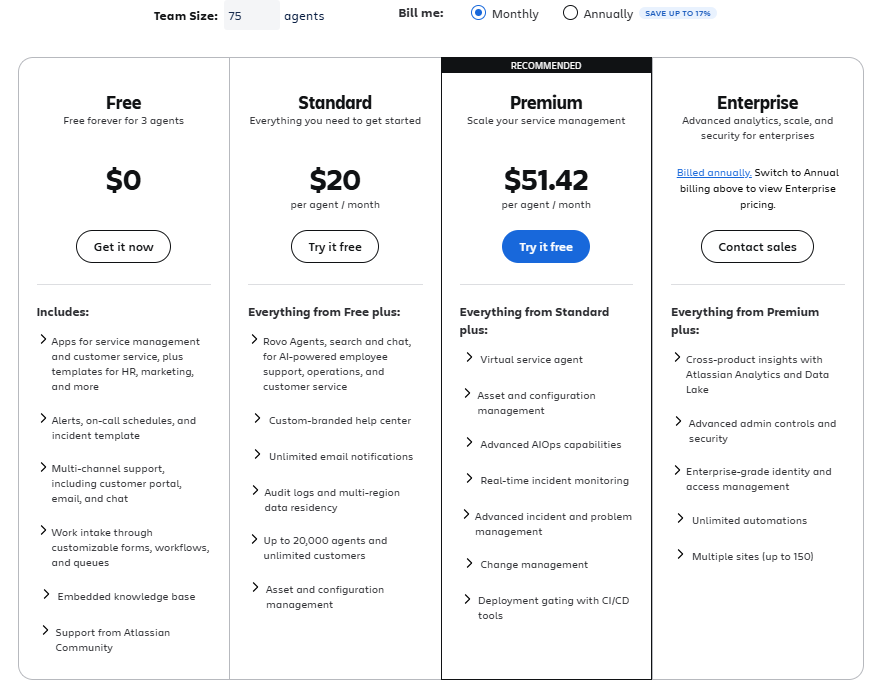 |  |
Other Details
Organization Types supported |
|
|
|---|---|---|
Platforms Supported |
|
|
Modes of support |
|
|
API Support |
|
|
Get help choosing | Get help choosing |
Security & Compliance
Certifications, data handling, and security controls for IT and compliance evaluators.
SOC 2 | ✓ Yes | — |
|---|---|---|
HIPAA | ✓ Yes | — |
GDPR | ✓ Yes | — |
ISO 27001 | ✓ Yes | — |
Single Sign-On (SSO) | ✓ Yes | — |
Multi-Factor Auth (MFA) | ✓ Yes | — |
Data Encryption | ✓ Yes | — |
Audit Logs | ✓ Yes | — |
Data Residency | 🌐 Global | 🇺🇸 US |
Jira Service Desk User Reviews & Rating Comparison
User Ratings | ||
|---|---|---|
Rating Distribution | ||
Spotsaas Editor’s POV generated by AI | Buyer sentiment Buyer sentiment is positive across 269 reviews, with strong overall satisfaction. What buyers like
Common complaints
| Buyer sentiment Users highly appreciate Suptask’s intuitive interface and Slack integration, though some find the feature set complex and desire more integration options. What buyers like
Common complaints
|
Pros and Cons |
|
|
Positive Reviews | No reviews available for the product | No reviews available for the product |
Integrations
Integration with other apps | No Integration information available. |
|---|


List of Customers
Customers |  Domino's  Airbnb  Sony Music |  Mobilitywork  ONVI  Nagios |
|---|
Media and Screenshots
Screenshots |  5 Screenshots |  5 Screenshots |
|---|---|---|
Videos |  1 Videos |  1 Videos |
Top Alternatives to Jira Service Desk and Suptask in 2026
Alternatives |
|---|
Add another option to compare side by side
Search by product name to compare pricing, fit, and buyer feedback in one view.Compare similar software options


Related Blogs and Articles for Service Desk Software

Disclaimer: This research has been collated from a variety of authoritative sources. We welcome your feedback at [email protected].
Frequently asked questions
- Which is better, Jira Service Desk or Suptask?
- Suptask edges out the other on user ratings (4.8 vs 4.1). That said, the best pick depends on your use case — use the comparison tables above to evaluate each dimension.
- Do Jira Service Desk and Suptask offer a free trial?
- Jira Service Desk offers a free trial. Suptask does not.
- What is the starting price of Jira Service Desk vs Suptask?
- Jira Service Desk starts at $20 /user/month. Suptask starts at $18 /Month.
- What are the top alternatives to Jira Service Desk?
- Top alternatives to Jira Service Desk include Freshservice, ManageEngine ServiceDesk Plus, SolarWinds Service Desk, Mint Service Desk, Symantec ServiceDesk.
- What are the top alternatives to Suptask?
- Top alternatives to Suptask include Freshservice, ManageEngine ServiceDesk Plus, SolarWinds Service Desk, Jira Service Desk, Teamwork Desk.