
Asana vs Jobma Comparison

Asana
Starting at $6.92 /user/month
- Free Trial
- Large Enterprises
- Medium Business
Asana is built for the way you work. It gives teams a single place to track work across projects and organize the full stream of activities—from brainstorming new ideas, to moving tasks forward, to updating colleagues ar…

Jobma
Starting at Contact Sales /year
- Free Trial
- Large Enterprises
- Medium Business
Intelligent, Human-first Hiring Systesm: Jobma is built to elevate hiring experiences, streamline screening, and reduce hiring costs and time. The platform offers a comprehensive suite of hiring automation tools, includ…
Jobma leads on user satisfaction with a 4.9-star rating across 94 reviews.
Consider monday.com
Comparing Asana and Jobma? monday.com is another option worth a look: visual boards, 200+ templates and a free plan for up to 2 seats.
We may earn a commission. Affiliate disclosure
Asana vs Jobma — at a glance
| Feature | Asana | Jobma |
|---|---|---|
| Rating | 4.6 / 5 | 4.9 / 5 |
| Reviews | 2,428 | 94 |
| Starting price | $6.92 /user/month | Contact Sales /year |
| Free trial | Yes | Yes |
| Free version | No | No |
| Best for | Large Enterprises, Medium Business, Small Business | Large Enterprises, Medium Business |
| Category | Project Management Software | Video Interviewing Software |
| Integrations | — | 28+ apps |
| Platforms | SaaS/Web/Cloud, Mobile - Android, Mobile - iOS, Installed - Windows, Installed - Mac | SaaS/Web/Cloud, Mobile - Android, Mobile - iOS, Browser Based (Cloud) |
| API | Available | — |
| Support modes | Business Hours, Online | Business Hours, Online |
Key differences between Asana and Jobma
- Pricing: Asana starts at $6.92 /user/month, while Jobma starts at Contact Sales /year.
- User satisfaction: Jobma scores higher with a 4.9-star average.
- Deployment: Asana supports SaaS/Web/Cloud, Mobile - Android, Mobile - iOS, Installed - Windows, Installed - Mac; Jobma supports SaaS/Web/Cloud, Mobile - Android, Mobile - iOS, Browser Based (Cloud).
Asana vs Jobma — find the better fit before you commit.
Which tool fits your team best
Which is actually cheaper for your team size
Where each product wins, per real buyers
Most Project Management Software tools look identical on paper. This comparison cuts to the differences that matter — pricing structure, team fit, and what real buyers found after signing up.
Biggest differences
Features
Pricing
Buying details
Security
Buyer feedback
Integrations
Product tour
Other options
Free PDF comparison
Download this Asana vs Jobma comparison
Get the full side-by-side as a PDF — these picks plus the top Project Management Software tools, with verified ratings, pricing and features.
- Side-by-side on pricing, features & ratings
- Plus the category top 10, scored & ranked
- Emailed to you — no on-screen download
No file downloads on screen — we email it to you. One-click unsubscribe anytime.
Asana vs Jobma: Biggest differences
Start here before you go deeper into features.
Best for teams needing flexible, intuitive project and task management.
- You want a highly customizable workflow adaptable to diverse team needs.
- Your team values strong collaboration tools like comments and real-time updates.
- You need multiple project views including lists, boards, and timelines.
- Your organization requires advanced Agile reporting like BurnUps and sprint metrics.
- You are a very large enterprise needing highly scalable, performance-optimized solutions.
Best for streamlined, easy-to-use video interviewing in mid to large companies.
- You need a simple, low-complexity video interview platform for recruiters and HR teams.
- You want candidate-friendly features like question retakes to improve interview quality.
- You value time-saving tools such as one-click scheduling and built-in analytics.
- Your organization requires advanced customization and extensive integrations.
- You depend heavily on a broad app marketplace and connector ecosystem.
Asana: Best for teams needing flexible, intuitive project and task management. Jobma: Best for streamlined, easy-to-use video interviewing in mid to large companies.
Description | Asana is built for the way you work. It gives teams a single place to track work across projects and organize the full stream of activities—from brainstorming new ideas, to moving tasks ... Read More about Asana | Intelligent, Human-first Hiring Systesm: Jobma is built to elevate hiring experiences, streamline screening, and reduce hiring costs and time. The platform offers a comprehensive suite of ... Read More about Jobma |
|---|---|---|
Entry Level Pricing |
|
|
Free Trial Availability | ||
SpotScoreWhat's this? ↗ | 9.7/10 | 9.5/10 |
User RatingsBased on verified Spotsaas reviews | ||
Best Company Size | 10-50 employees51-1000 employees | 51-500 employees500+ employees |
Get pricing help | Get pricing help |
Where each option fits best
See where each product is strongest, which teams it fits, and what causes buyers to keep looking — before you commit.
Based on buyer reviews and verified product data collected by Spotsaas.
Key strengths
- Project Management: Asana helps teams organize their tasks and projects in one central location, letting managers track progress and meet deadlines without scattered communications.
- With features like task assignments, comments, and file attachments, Asana helps team members communicate effectively, improving productivity and innovation.
- Customizable Workflows: Whether you're managing marketing campaigns or software development sprints, Asana lets you design workflows that fit your team's specific needs, keeping everyone aligned on project goals.
Best fit
- 10 to 1,000 employees
- SaaS, Consulting, Marketing Technology (Martech), Project Management, and E-commerce
- Project Managers, Marketing Coordinators, Product Managers, Team Leads, and Operations Managers
Reasons buyers look elsewhere
- Users may seek alternatives to Asana due to its pricing model, as some teams find it expensive compared to other project management tools that offer similar features at a lower cost.
- Teams requiring more advanced reporting capabilities might explore alternatives, as Asana's reporting features can be limited for larger projects or organizations needing in-depth analytics.
- Organizations with specific workflow needs may look for alternatives that offer greater customization options, allowing them to tailor the platform to fit unique project management requirements more effectively.
Software Demo
Demo |
|---|
Need a second opinion?
Get decision help from a software advisor
Share your priorities, budget, and team needs, and we’ll help you narrow the options and understand the tradeoffs before you talk to vendors.

- Independent advice — matched to your business
- Understand the tradeoffs before you talk to vendors
- Free 15-min call with a software advisor.
Step 1 of 4
How big is your team?
We tailor recommendations to companies your size.











How do Asana and Jobma Compare on Features?
Total Features | 18 Features | 34 Features |
|---|---|---|
Unique Features | No unique features | No unique features |
Get Quote | Get Quote |
Compare Asana and Jobma on pricing
Review starting price, plan structure, and free-trial access side by side so you can see which option fits your budget and buying process.
Pricing Option | ||
|---|---|---|
Starting From |
|
|
Pricing Plans |
|
|
Pricing Page | 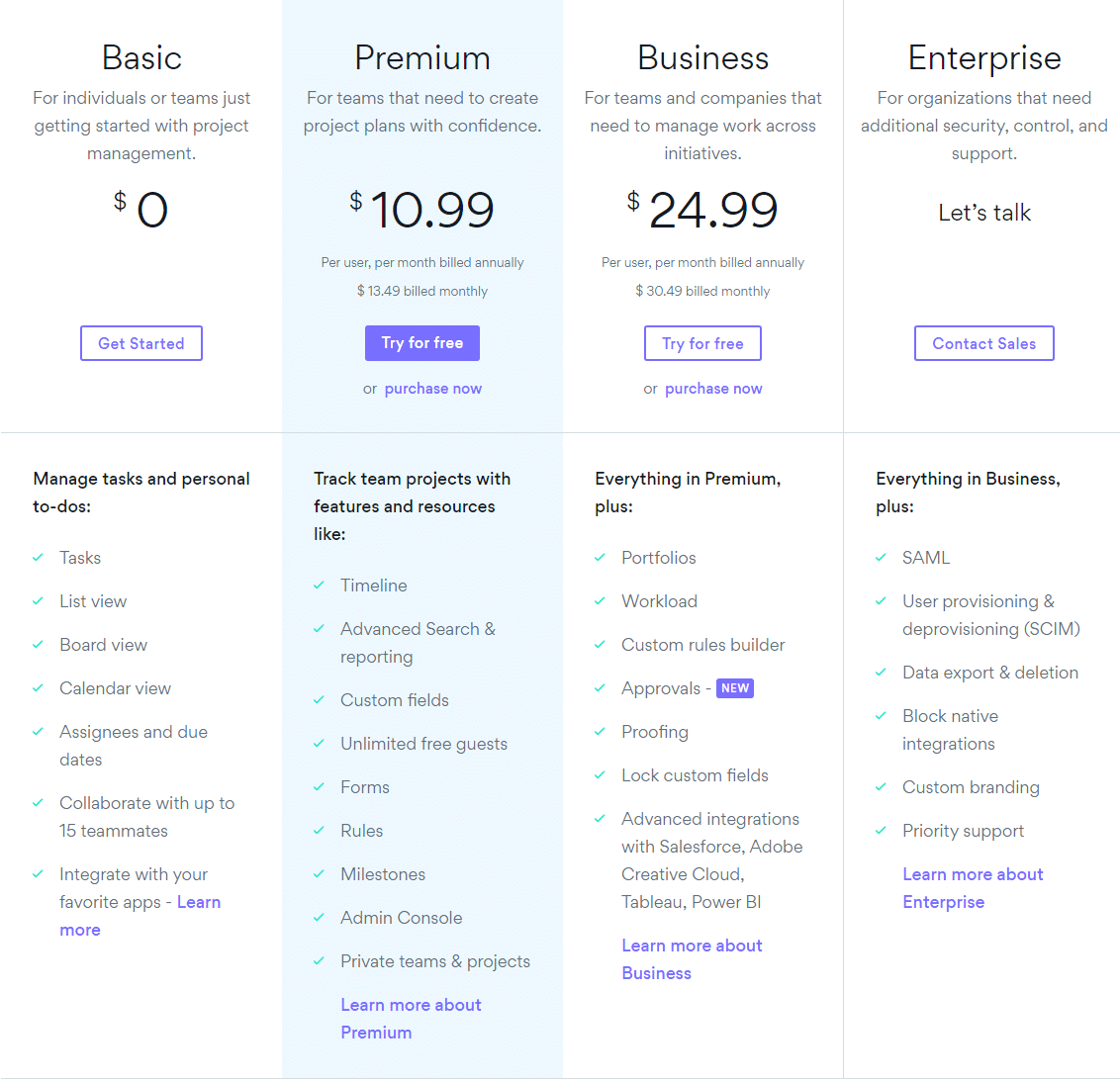 |  |
Asana vs Jobma: Other Details
Organization Types supported |
|
|
|---|---|---|
Platforms Supported |
|
|
Modes of support |
|
|
API Support |
|
|
Get help choosing | Get help choosing |
Asana User Reviews & Rating Comparison
User Ratings | ||
|---|---|---|
Rating Distribution | ||
Spotsaas Editor’s POV generated by AI | Buyer sentiment Overall positive sentiment highlights ease of use, collaboration features, and workflow customization, tempered by concerns over learning curve and pricing. What buyers like
Common complaints
| Buyer sentiment Users generally praise Jobma for its ease of use and efficiency in streamlining the video interview process, though some desire more advanced features and integrations. What buyers like
Common complaints
|
Pros and Cons |
|
|
Positive Reviews | No reviews available for the product | No reviews available for the product |
Integrations
Integration with other apps | No Integration information available. |
|---|



Asana and Jobma Customers
Customers |  Vodafone  Deloitte  |  Mayo Clinic  Lionsgate  Dynata |
|---|
Media and Screenshots
Screenshots | 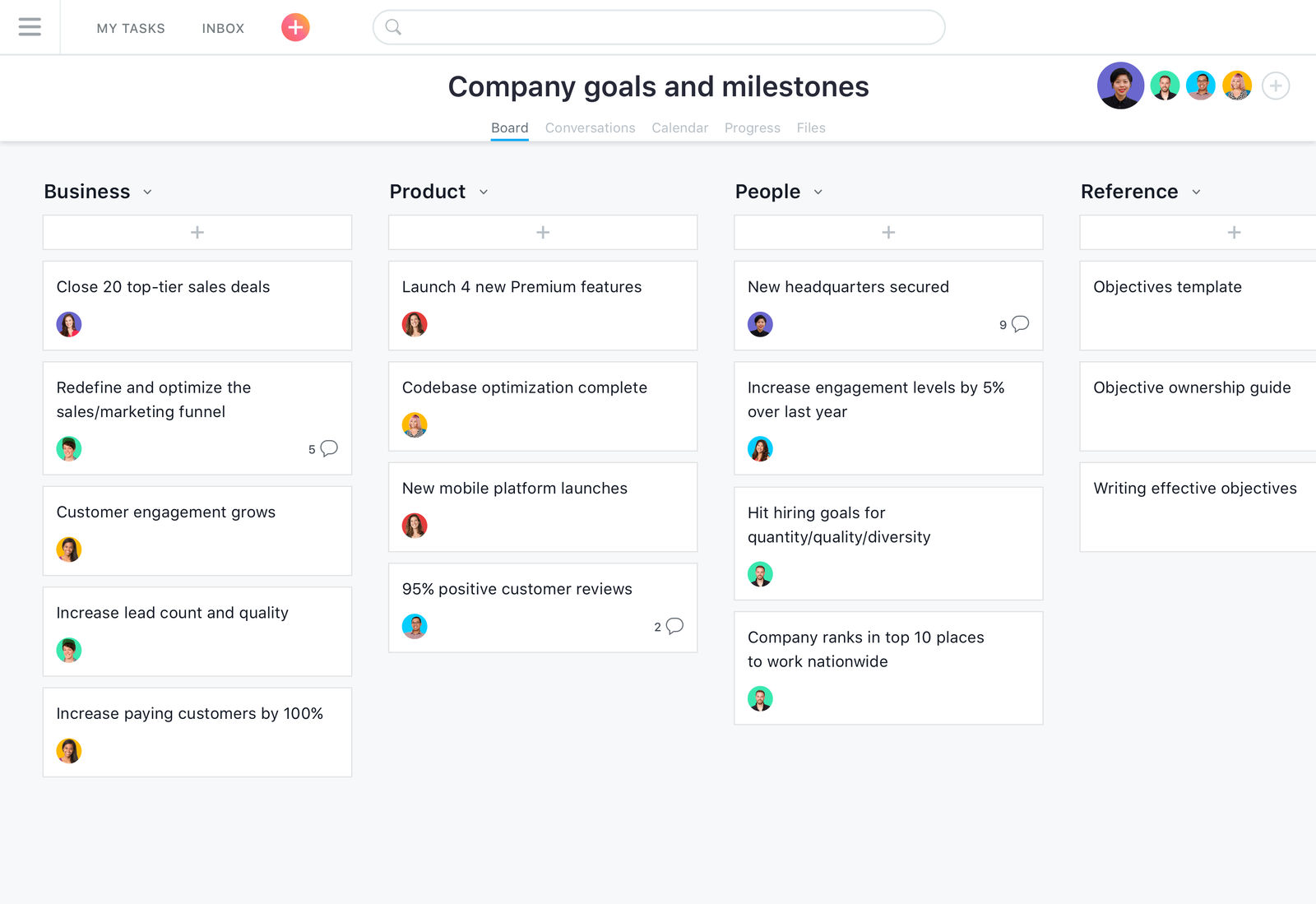 5 Screenshots |  5 Screenshots |
|---|---|---|
Videos |  3 Videos |  2 Videos |
Top Alternatives to Asana and Jobma in 2026
Alternatives |
|---|


Add another option to compare side by side
Search by product name to compare pricing, fit, and buyer feedback in one view.Compare similar software options


Related Blogs and Articles for Video Interviewing Software



Disclaimer: This research has been collated from a variety of authoritative sources. We welcome your feedback at [email protected].
Frequently asked questions
- Which is better, Asana or Jobma?
- Jobma edges out the other on user ratings (4.9 vs 4.6). That said, the best pick depends on your use case, so use the comparison tables above to evaluate each dimension.
- Do Asana and Jobma offer a free trial?
- Yes, both Asana and Jobma offer a free trial.
- What is the starting price of Asana vs Jobma?
- Asana starts at $6.92 /user/month. Jobma starts at Contact Sales /year.
- What are the top alternatives to Asana?
- Top alternatives to Asana include Quickbase, monday Work Management, Smartsheet, ClickUp, Clarizen One.
- What are the top alternatives to Jobma?
- Top alternatives to Jobma include Willo, FaceCruit, Adaface PairPro, myInterview, Haystack.
- Is Asana a safe bet?
- What buyers praise about Asana: intuitive and simple user interface enabling quick adoption; robust task and project management features including timelines, recurring tasks, and milestones. What they raise as reservations: steep learning curve for new users due to feature richness; key advanced features locked behind premium pricing, increasing cost for smaller teams. It does not include Accounts Payable and Bank Reconciliation.
- What is the catch with Jobma?
- The case for Jobma: user-friendly interface simplifying interview submission; ability for candidates to retake questions improving candidate performance. The case against: lack of advanced customization options; limited app and connector marketplace options. It also lacks Customer Support and Applicant Tracking.