
Wrike vs Swiftask vs Todoist Comparison
Wrike
Starting at $0 /user/month
- Free Trial
- Freelancers / Consultants
- Large Enterprises
Wrike is a web-based project management software designed to enhance team collaboration, streamline workflows, and boost productivity. It provides real-time visibility into project progress, ensuring teams stay aligned w…

Swiftask
Starting at $5.00 per user / month
- Large Enterprises
- Small Business
Swiftask is an all-in-one AI task platform covering content generation, image creation, OCR, audio transcription, collaborative document editing, and project task management from a single interface. It is designed for pr…

Todoist
Starting at $4 /Month
- Free Trial
- Large Enterprises
- Medium Business
Todoist is the practical, flexible way to manage your tasks and get more done. With Todoist, you can add tasks to projects, organize tasks with priorities and deadlines, set reminders for yourself, collaborate in shared…
Wrike leads on user satisfaction with a 4.5-star rating across 1,885 reviews.
Consider monday.com
Comparing Wrike, Swiftask and Todoist? monday.com is another option worth a look: visual boards, 200+ templates and a free plan for up to 2 seats.
We may earn a commission. Affiliate disclosure
Wrike vs Swiftask vs Todoist — at a glance
| Feature | Wrike | Swiftask | Todoist |
|---|---|---|---|
| Rating | 4.5 / 5 | — | 4.6 / 5 |
| Reviews | 1,885 | — | 315 |
| Starting price | $0 /user/month | $5.00 per user / month | $4 /Month |
| Free trial | Yes | No | Yes |
| Free version | No | No | No |
| Best for | Freelancers / Consultants, Large Enterprises, Medium Business | Large Enterprises, Small Business, Medium Business | Large Enterprises, Medium Business, Small Business |
| Category | Project Management Software | Task Management Software | Task Management Software |
| Platforms | SaaS/Web/Cloud, Mobile - Android, Mobile - iOS, Installed - Windows, Installed - Mac | Browser Based (Cloud) | SaaS/Web/Cloud, Mobile - Android, Mobile - iOS, Installed - Windows, Installed - Mac |
| API | Available | Available | Available |
| Support modes | 24/7 (Live rep), Online | Online | Online |
Key differences between Wrike and Swiftask
- Pricing: Wrike starts at $0 /user/month, while Swiftask starts at $5.00 per user / month.
- Free trial: Wrike offers a free trial; Swiftask does not.
- Target audience: Wrike is built for Freelancers / Consultants and Large Enterprises, while Swiftask targets Large Enterprises and Small Business.
- Deployment: Wrike supports SaaS/Web/Cloud, Mobile - Android, Mobile - iOS, Installed - Windows, Installed - Mac; Swiftask supports Browser Based (Cloud).
Compare Wrike vs Swiftask vs Todoist — and walk away knowing which one fits.
Which tool fits your team best
Which is actually cheaper for your team size
Where each product wins, per real buyers
Most Project Management Software tools look identical on paper. This comparison cuts to the differences that matter — pricing structure, team fit, and what real buyers found after signing up.
Biggest differences
Features
Pricing
Buying details
Security
Buyer feedback
Integrations
Product tour
Other options
Free PDF comparison
Download this Wrike vs Swiftask vs Todoist comparison
Get the full side-by-side as a PDF — these picks plus the top Project Management Software tools, with verified ratings, pricing and features.
- Side-by-side on pricing, features & ratings
- Plus the category top 10, scored & ranked
- Emailed to you — no on-screen download
No file downloads on screen — we email it to you. One-click unsubscribe anytime.
Wrike, Swiftask vs Todoist: Biggest differences
Start here before you go deeper into features.
Best for mid-sized teams needing flexible, collaborative project management.
- You manage projects in marketing, IT, or product teams within 50-5000 employees.
- You require customizable workflows with drag-and-drop task management and real-time updates.
- You want integrated time-tracking and comprehensive reporting for accountability and progress visibility.
- You are a freelancer or very small team needing a simple, minimal learning curve tool.
- You need advanced Gantt charting or multi-layered dashboards for complex project visualization.
Large Enterprises, Small Business, Medium Business
Best for flexible, user-friendly task management with natural language input.
- You need a simple, intuitive interface for managing tasks across devices.
- You want quick task entry using smart natural language processing.
- Your team size is medium (50-500 employees) and requires basic project management.
- You require advanced project management features like Kanban boards.
- You need highly customizable workflows beyond Todoist’s simpler interface.
Wrike typically suits Freelancers / Consultants and Large Enterprises. Swiftask tends to fit Large Enterprises and Small Business better. The right choice depends on your team size, workflow, and whether a free trial matters.
Description | Wrike is a web-based project management software designed to enhance team collaboration, streamline workflows, and boost productivity. It provides real-time visibility into project ... Read More about Wrike | Swiftask is an all-in-one AI task platform covering content generation, image creation, OCR, audio transcription, collaborative document editing, and project task management from a single ... Read More about Swiftask | Todoist is the practical, flexible way to manage your tasks and get more done. With Todoist, you can add tasks to projects, organize tasks with priorities and deadlines, set reminders for ... Read More about Todoist |
|---|---|---|---|
Entry Level Pricing |
|
|
|
Free Trial Availability |
| ||
SpotScoreWhat's this? ↗ | 9.2/10 | Not Available | 9.8/10 |
User RatingsBased on verified Spotsaas reviews | |||
Best Company Size | 50 to 500 employees501 to 5,000 employees | — | 50-500 employeesMedium Business |
Get pricing help | Get pricing help |
Where each option fits best
See where each product is strongest, which teams it fits, and what causes buyers to keep looking — before you commit.
Based on buyer reviews and verified product data collected by Spotsaas.
Key strengths
- Collaboration: Wrike lets teams communicate easily, keeping everyone informed. Real-time updates and comments reduce back-and-forth emails.
- Customizable Workflows: With Wrike’s flexible templates, you can tailor workflows to fit your team's unique processes. This means that whether you're managing a creative project or a technical rollout, you can adapt the software to work for you.
- Complete Reporting: As managers, you'll appreciate the in-depth reporting tools Wrike offers. From tracking project progress to analyzing team performance, these insights help you make informed decisions that drive results.
- Task Management: With Todoist, teams can organize tasks and projects in one centralized platform, letting managers assign responsibilities and track progress in real-time.
- Customizable Workflows: Whether you prefer a simple to-do list or a complex project management board, Todoist's flexible interface adapts to your needs, letting administrators create workflows that improve productivity.
- Cross-Platform Accessibility: We know how important it is to stay connected. Todoist syncs smoothly across devices, so team members can access their tasks anytime, anywhere—whether they're in the office or on the go.
Best fit
- 50 to 5,000 employees.
- Marketing Technology, Project Management, IT Services, Consulting, SaaS, Creative Agencies.
- Project Managers, Marketing Managers, Product Managers, Operations Managers, Team Leaders.
- 50 to 500 employees.
- Project Management, Marketing, Consulting, SaaS, Technology.
- Project Managers, Marketing Coordinators, Product Owners, Team Leaders, Consultants.
Reasons buyers look elsewhere
- Users may find Wrike's pricing structure to be higher than expected, prompting them to explore more budget-friendly project management tools that offer similar features without the additional costs.
- Some teams may require a more intuitive user interface, leading them to consider alternatives that prioritize ease of use and quick onboarding for new users.
- Organizations with specific integration needs might look for solutions that seamlessly connect with their existing software stack, as Wrike may lack compatibility with certain applications.
- Lacks real-time collaboration — teams sharing projects need Asana, Monday.com, or Notion for live updates and task assignments
- Missing visual task layouts — users wanting Kanban boards or calendar views switch to Trello, Asana, or Linear for task overview
- Limited third-party integrations — teams relying on Slack, Salesforce, or HubSpot connections need Zapier workarounds or alternative platforms
Software Demo
Demo |
|---|
Need a second opinion?
Get decision help from a software advisor
Share your priorities, budget, and team needs, and we’ll help you narrow the options and understand the tradeoffs before you talk to vendors.

- Independent advice — matched to your business
- Understand the tradeoffs before you talk to vendors
- Free 15-min call with a software advisor.
Step 1 of 4
How big is your team?
We tailor recommendations to companies your size.















How do Wrike, Swiftask and Todoist Compare on Features?
Total Features | 48 Features | 7 Features | 11 Features |
|---|---|---|---|
Unique Features | No unique features | No unique features | No unique features |
Get Quote | Get Quote |
Compare Wrike, Swiftask and Todoist on pricing
Review starting price, plan structure, and free-trial access side by side so you can see which option fits your budget and buying process.
Pricing Option | |||
|---|---|---|---|
Starting From |
|
|
|
Pricing Plans |
|
|
|
Pricing Page |  |  |  |
Wrike, Swiftask vs Todoist: Other Details
Organization Types supported |
|
|
|
|---|---|---|---|
Platforms Supported |
|
|
|
Modes of support |
|
|
|
API Support |
|
|
|
Get help choosing | Get help choosing |
Wrike vs Swiftask User Reviews & Rating Comparison
User Ratings | No reviews available for the product | ||
|---|---|---|---|
Rating Distribution | No reviews available for this product | ||
Spotsaas Editor’s POV generated by AI | Buyer sentiment Overall positive sentiment highlights Wrike's ease of use and flexibility, though some users find the learning curve steep and desire more advanced dashboard and charting features. What buyers like
Common complaints
| No expert review available for this product | Buyer sentiment Overall positive sentiment highlights Todoist’s ease of use, flexibility, and reliable cross-platform syncing, with minor concerns about feature limitations and learning curve. What buyers like
Common complaints
|
Pros and Cons |
| No pros or cons available for this product |
|
Positive Reviews | No reviews available for the product | No reviews available for the product | No reviews available for the product |
Wrike, Swiftask and Todoist Customers
Customers |  Walmart  Siemens  Airbnb | No Customers information available. |  Adobe  Amazon  |
|---|
Media and Screenshots
Screenshots |  3 Screenshots | 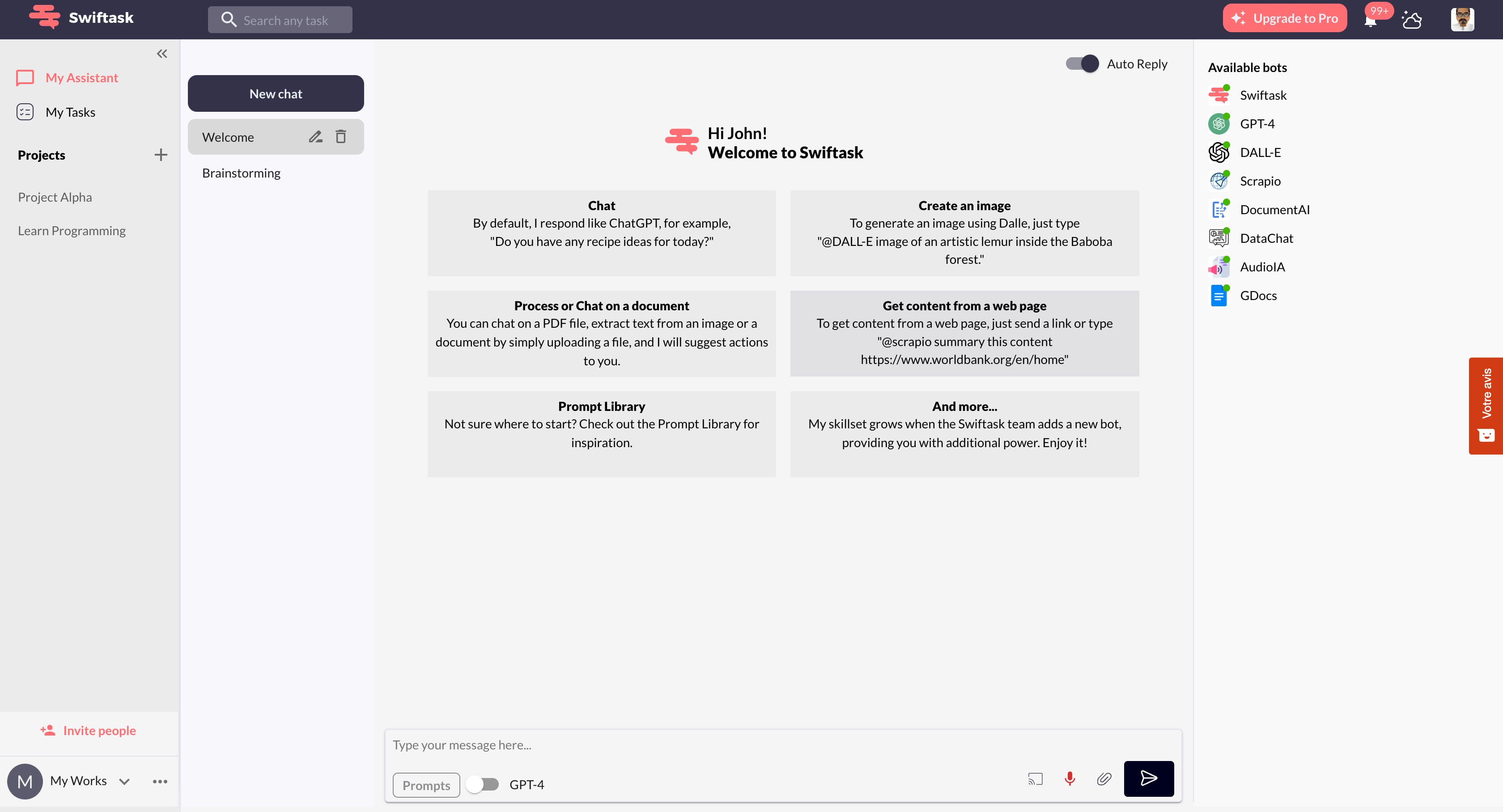 6 Screenshots |
|---|---|---|
Videos |  5 Videos |  1 Videos |
Alternatives to Wrike, Swiftask, Todoist
Alternatives |
|---|


Add another option to compare side by side
Search by product name to compare pricing, fit, and buyer feedback in one view.Compare similar software options


Related Blogs and Articles for Task Management Software
Disclaimer: This research has been collated from a variety of authoritative sources. We welcome your feedback at [email protected].
Frequently asked questions
- Which is better, Wrike or Swiftask?
- Wrike has a user rating of 4.5, while Swiftask has no user ratings yet. The right choice depends on your team size, budget, and specific Task Management Software needs.
- Do Wrike and Swiftask offer a free trial?
- Wrike offers a free trial. Swiftask does not.
- What is the starting price of Wrike vs Swiftask?
- Wrike starts at $0 /user/month. Swiftask starts at $5.00 per user / month.
- What are the top alternatives to Wrike?
- Top alternatives to Wrike include Quickbase, monday Work Management, Smartsheet, ClickUp, Trello.
- What are the top alternatives to Swiftask?
- Top alternatives to Swiftask include Todoist, Futuramo, TickTick, tada.team, Easynote.
- What is the catch with Wrike?
- Two things to weigh on Wrike. It does these well: easy-to-use interface with drag-and-drop task management; flexible customization of workflows and templates. These are the trade-offs: steep learning curve for beginners to master advanced features; limited high-level dashboard capabilities for managing complex team structures. It does not cover Accounts Payable and Bank Reconciliation.