
Pipedrive vs Act! vs Bigin by Zoho CRM vs Creatio CRM Comparison

Pipedrive
Starting at $14 /user/month
- Free Trial
- Large Enterprises
- Medium Business
Pipedrive is a user-friendly customer relationship management (CRM) software designed to help sales teams streamline their pipelines, manage leads efficiently, and close deals faster. Ideal for small to mid-sized busines…

Act!
Starting at $30 /User/Month
- Free Trial
- Freelancers / Consultants
- Medium Business
Act! is CRM software for small to medium-sized businesses that have outgrown contact spreadsheets and need centralized relationship tracking alongside sales pipeline management. It integrates with Microsoft Outlook, supp…

Bigin by Zoho CRM
Starting at $7 /User/Month
- Free Trial
- Small Business
Bigin is Zoho's lightweight CRM designed for small teams under 50 people running straightforward sales cycles. Its drag-and-drop pipeline and email sync with Gmail and Outlook allow reps to get productive within a day wi…

Creatio CRM
Starting at $40 /user/month
- Large Enterprises
- Medium Business
Creatio is an AI-native, no-code CRM and workflow automation platform designed to help organizations manage customer relationships and business processes on a single unified system. It brings together sales, marketing, c…
Pipedrive leads on user satisfaction with a 4.7-star rating across 3,106 reviews.
Consider monday CRM
Comparing Pipedrive, Act!, Bigin by Zoho CRM and Creatio CRM? monday CRM is another option worth a look: a visual deal pipeline, Gmail and Outlook email sync and a 14-day free trial.
We may earn a commission. Affiliate disclosure
Spotsaas Analysis
PipedriveAct!Bigin by Zoho CRM
The core difference between Pipedrive and Act! lies in Pipedrive's focus on small to mid-sized sales teams with an emphasis on user-friendly pipeline management, while Act! lacks specified target users and features. Pipedrive is ideal for small to medium businesses looking for an intuitive CRM, whereas Act! may appeal to organizations that require a more traditional CRM solution without specific size constraints.
- Best for small to mid-sized sales teams - Intuitive and easy-to-learn interface - AI-powered prompts for productivity - Automated follow-ups to enhance sales processes - Suitable for various industries including Martech and Fintech - Price starts at $14
- Traditional CRM solution - Price starts at $30 - No specific company size or user details provided - May suit businesses seeking a classic approach - Lacks emphasis on pipeline management features - Potentially versatile for various business needs
Pipedrive vs Act! vs Bigin by Zoho CRM vs Creatio CRM — at a glance
| Feature | Pipedrive | Act! | Bigin by Zoho CRM | Creatio CRM |
|---|---|---|---|---|
| Rating | 4.7 / 5 | 4.1 / 5 | 4.6 / 5 | — |
| Reviews | 3,106 | 356 | 243 | — |
| Starting price | $14 /user/month | $30 /User/Month | $7 /User/Month | $40 /user/month |
| Free trial | Yes | Yes | Yes | No |
| Free version | No | No | No | No |
| Best for | Large Enterprises, Medium Business, Small Business | Freelancers / Consultants, Medium Business, Small Business | Small Business | Large Enterprises, Medium Business |
| Category | CRM Software | CRM Software | CRM Software | CRM Software |
| Integrations | 10+ apps | — | — | 5+ apps |
| Platforms | SaaS/Web/Cloud, Mobile - Android, Mobile - iOS | SaaS/Web/Cloud, Mobile - Android, Mobile - iOS, Installed - Windows, Installed - Mac | SaaS/Web/Cloud, Mobile - Android, Mobile - iOS | SaaS/Web/Cloud, Mobile - Android, Mobile - iOS, Installed - Windows, Installed - Mac, Browser Based (Cloud), Mobile - Windows |
| API | Available | Available | Available | Available |
| Support modes | Business Hours, Online | Business Hours, Online | Business Hours, Online | Online |
| Certifications | SOC 2, GDPR | GDPR | — | SOC 2, HIPAA, GDPR, ISO 27001 |
| Data residency | US | US | Global | United States, United Kingdom, Australia, European Union |
Key differences between Pipedrive and Act!
- Pricing: Pipedrive starts at $14 /user/month, while Act! starts at $30 /User/Month.
- Target audience: Pipedrive is built for Large Enterprises and Medium Business, while Act! targets Freelancers / Consultants and Medium Business.
- User satisfaction: Pipedrive scores higher with a 4.7-star average.
- Deployment: Pipedrive supports SaaS/Web/Cloud, Mobile - Android, Mobile - iOS; Act! supports SaaS/Web/Cloud, Mobile - Android, Mobile - iOS, Installed - Windows, Installed - Mac.
Compare Pipedrive vs Act! vs Bigin by Zoho CRM vs Creatio CRM — and walk away knowing which one fits.
Which tool fits your team best
Which is actually cheaper for your team size
Where each product wins, per real buyers
Most CRM Software tools look identical on paper. This comparison cuts to the differences that matter — pricing structure, team fit, and what real buyers found after signing up.
Biggest differences
Features
Pricing
Buying details
Security
Buyer feedback
Integrations
Product tour
Other options
Free PDF comparison
Download this Pipedrive vs Act! vs Bigin by Zoho CRM vs Creatio CRM comparison
Get the full side-by-side as a PDF — these picks plus the top CRM Software tools, with verified ratings, pricing and features.
- Side-by-side on pricing, features & ratings
- Plus the category top 10, scored & ranked
- Emailed to you — no on-screen download
No file downloads on screen — we email it to you. One-click unsubscribe anytime.
Pipedrive, Act!, Bigin by Zoho CRM vs Creatio CRM: Biggest differences
Start here before you go deeper into features.
Best CRM for small to mid-sized sales teams needing streamlined pipeline management.
- You are a small or medium business seeking an intuitive, easy-to-learn CRM.
- Your sales team needs AI-powered prompts and automated follow-ups to boost productivity.
- You want cost-effective CRM with strong reporting and real-time sales analytics.
- Your enterprise requires highly complex CRM customizations and deep third-party integrations.
- You need extensive relationship linking beyond standard sales contacts.
Freelancers / Consultants, Medium Business, Small Business
Small Business
Large Enterprises, Medium Business
Pipedrive typically suits Large Enterprises and Medium Business. Act! tends to fit Freelancers / Consultants and Medium Business better. The right choice depends on your team size, workflow, and whether a free trial matters.
Description | Pipedrive is a user-friendly customer relationship management (CRM) software designed to help sales teams streamline their pipelines, manage leads efficiently, and close deals faster. Ideal ... Read More about Pipedrive | Act! is CRM software for small to medium-sized businesses that have outgrown contact spreadsheets and need centralized relationship tracking alongside sales pipeline management. It ... Read More about Act! | Bigin is Zoho's lightweight CRM designed for small teams under 50 people running straightforward sales cycles. Its drag-and-drop pipeline and email sync with Gmail and Outlook allow reps to ... Read More about Bigin by Zoho CRM | Creatio is an AI-native, no-code CRM and workflow automation platform designed to help organizations manage customer relationships and business processes on a single unified system. It ... Read More about Creatio CRM |
|---|---|---|---|---|
Entry Level Pricing |
|
|
|
|
Free Trial Availability |
|
| ||
SpotScoreWhat's this? ↗ | 9.6/10 | 9.1/10 | 9.0/10 | Not Available |
User RatingsBased on verified Spotsaas reviews | ||||
Best Company Size | 1-50 employees51-200 employees | — | — | 50–10,000+ employees |
Get pricing help | Get pricing help |
Where each option fits best
See where each product is strongest, which teams it fits, and what causes buyers to keep looking — before you commit.
Based on buyer reviews and verified product data collected by Spotsaas.
Key strengths
- Simplified Sales Processes: Pipedrive helps teams like yours visualize and manage the entire sales pipeline easily, letting you focus on closing deals instead of getting lost in administrative tasks.
- Intuitive User Interface: Users appreciate Pipedrive's clean and user-friendly design. Your team can start using it immediately without extensive training, saving time and resources.
- Reporting and Analytics: Pipedrive's reporting tools give you real-time insights into your sales performance. This lets executives make data-driven decisions that improve overall business strategy.
- Advanced Workflow Automation: Creatio supports end-to-end workflow automation through triggers, rules, approvals, and task orchestration. Repetitive actions such as follow-ups, lead routing, and status updates can run automatically. This reduces manual effort, minimizes errors, and keeps processes following defined standards, improving efficiency across departments.
- AI-Driven Insights and Analytics: Creatio uses AI-driven analytics to surface trends, predict outcomes, and recommend next actions. Teams can monitor performance, forecast revenue, and identify bottlenecks using real-time dashboards. These insights help decision-makers prioritize tasks, improve planning accuracy, and adjust strategies based on actual operational data rather than assumptions.
- Scalable for Growing Organizations: Creatio is designed to support growing teams, complex workflows, and increasing data volumes. Organizations can expand usage across departments, regions, and business units without changing platforms. Its modular structure allows teams to add features, integrations, and automation gradually as operational needs become more advanced.
Best fit
- 1-200 employees
- Martech, Revtech, Fintech, Sales Automation, SaaS, Consulting
- Sales Managers, Account Executives, Business Development Representatives, CRM Administrators
- 50–10,000+ employees
- Banking & Financial Services, Insurance, Telecommunications, Healthcare, Manufacturing, Real Estate, Professional Services, IT Services, Public Sector, Education
- Sales Manager, CRM Manager, Revenue Operations Manager, Marketing Operations Manager, Customer Service Manager, Business Process Manager, Digital Transformation Lead, CIO
Reasons buyers look elsewhere
- Users may seek alternatives to Pipedrive if they require more advanced customization options to tailor their CRM experience to specific business processes or unique sales workflows that Pipedrive doesn’t fully support.
- Businesses with larger teams might look for alternatives that offer better scalability and user management features, ensuring that collaboration remains efficient as their workforce grows beyond Pipedrive’s capabilities.
- Organizations needing comprehensive reporting and analytics tools may find Pipedrive lacking in depth, prompting them to explore alternatives that provide more robust insights into sales performance and customer behavior.
- While Creatio has integrations and a marketplace, users who require deep connectivity with certain niche tools or large ecosystems (e.g., extensive third-party apps) may choose alternatives with broader out-of-the-box integrations.
- Creatio’s pricing and feature tiers are structured for mid-sized to larger businesses. Smaller teams or budget-constrained startups may opt for alternatives offering essential CRM capabilities at lower costs without advanced automation overhead.
- Though no-code, Creatio’s workflow builder and extensive features can feel overwhelming without training. Teams with limited CRM experience might gravitate toward platforms with more intuitive interfaces or guided onboarding to reduce ramp-up time.
Software Demo
Demo |
|---|
Need a second opinion?
Get decision help from a software advisor
Share your priorities, budget, and team needs, and we’ll help you narrow the options and understand the tradeoffs before you talk to vendors.

- Independent advice — matched to your business
- Understand the tradeoffs before you talk to vendors
- Free 15-min call with a software advisor.
Step 1 of 4
How big is your team?
We tailor recommendations to companies your size.















How do Pipedrive, Act!, Bigin by Zoho CRM and Creatio CRM Compare on Features?
Total Features | 10 Features | 10 Features | 10 Features | 78 Features |
|---|---|---|---|---|
Unique Features | No unique features | No unique features | No unique features | No unique features |
Get Quote | Get Quote |
Compare Pipedrive, Act!, Bigin by Zoho CRM and Creatio CRM on pricing
Review starting price, plan structure, and free-trial access side by side so you can see which option fits your budget and buying process.
Pricing Option | ||||
|---|---|---|---|---|
Starting From |
|
|
|
|
Pricing Plans |
|
|
|
|
Pricing Page | 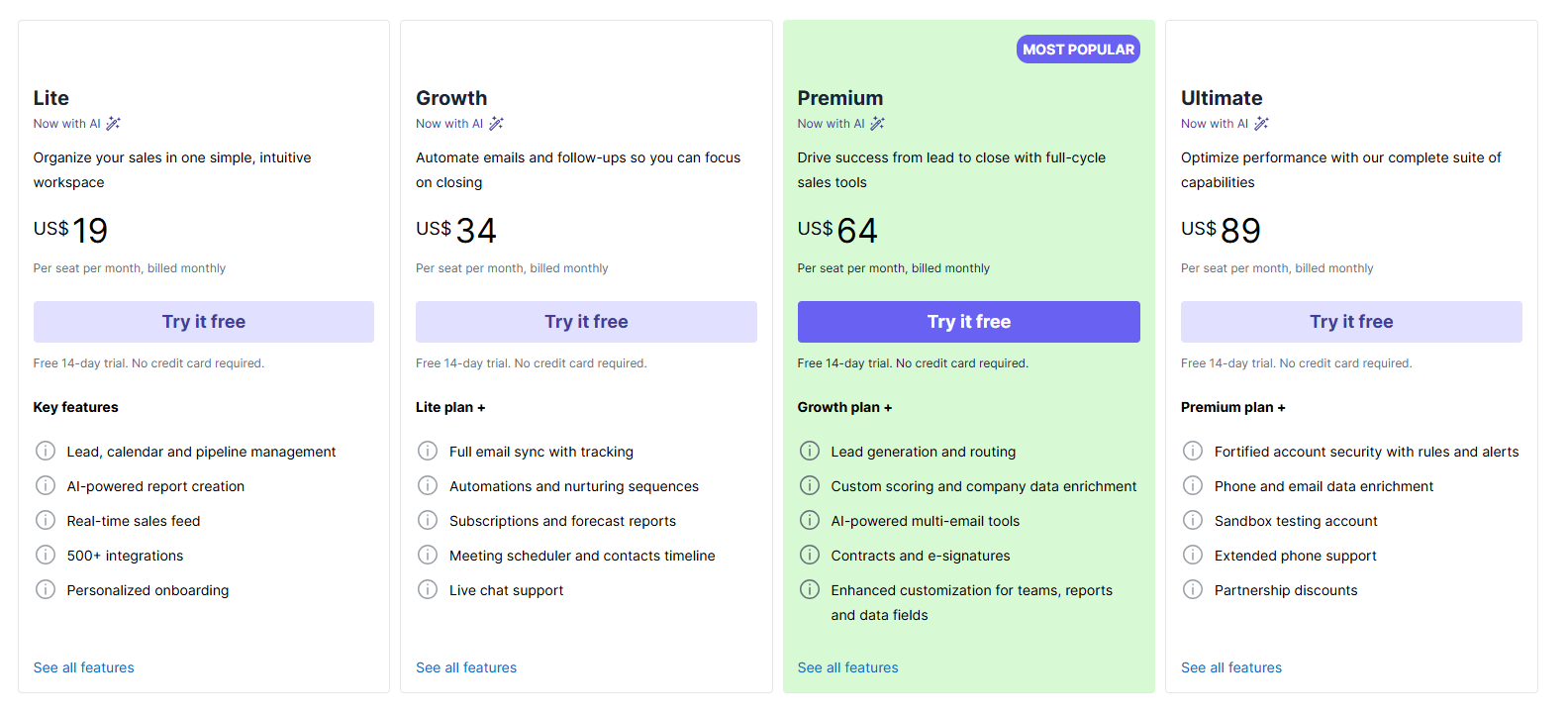 |  |  | 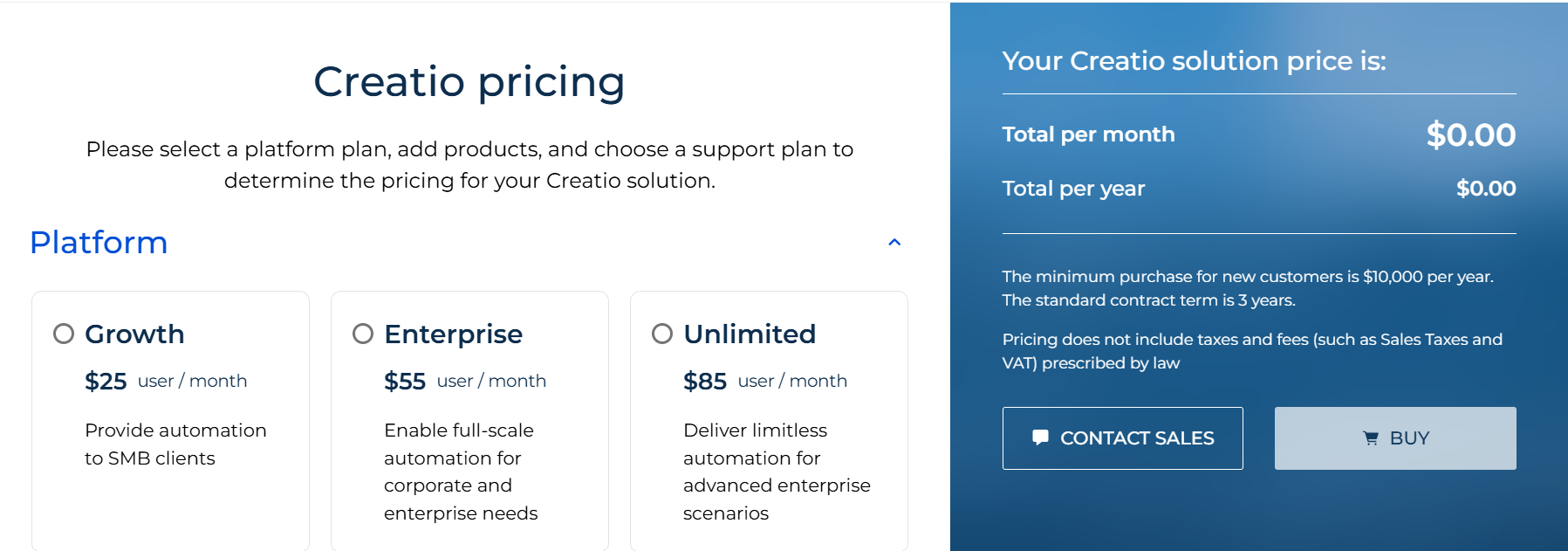 |
Pipedrive, Act!, Bigin by Zoho CRM vs Creatio CRM: Other Details
Organization Types supported |
|
|
|
|
|---|---|---|---|---|
Platforms Supported |
|
|
|
|
Modes of support |
|
|
|
|
API Support |
|
|
|
|
Get help choosing | Get help choosing |
Pipedrive, Act!, Bigin by Zoho CRM vs Creatio CRM Security & Compliance
Certifications, data handling, and security controls for IT and compliance evaluators.
SOC 2 | ✓ Yes | — |
|---|---|---|
HIPAA | ✗ No | — |
GDPR | ✓ Yes | ✓ Yes |
ISO 27001 | ✗ No | — |
Single Sign-On (SSO) | ✓ Yes | — |
Multi-Factor Auth (MFA) | ✓ Yes | — |
Data Encryption | ✓ Yes | — |
Audit Logs | ✓ Yes | — |
Data Residency | 🇺🇸 US | 🇺🇸 US |
Pipedrive vs Act! vs Bigin by Zoho CRM User Reviews & Rating Comparison
User Ratings | No reviews available for the product | |||
|---|---|---|---|---|
Rating Distribution | No reviews available for this product | |||
Spotsaas Editor’s POV generated by AI | Buyer sentiment Overall, users praise Pipedrive for its ease of use, visual sales pipeline management, and strong customer support, though some note limitations in advanced features and integrations. What buyers like
Common complaints
| Buyer sentiment Buyer sentiment is positive across 368 reviews, with strong overall satisfaction. What buyers like
Common complaints
| Buyer sentiment Buyer sentiment is very strong across 279 reviews, with consistently positive feedback. What buyers like
Common complaints
| What buyers like
Common complaints
|
Pros and Cons |
|
|
|
|
Positive Reviews | No reviews available for the product | No reviews available for the product | No reviews available for the product | No reviews available for the product |
Integrations
Integration with other apps | No Integration information available. | No Integration information available. |
|---|




Pipedrive, Act!, Bigin by Zoho CRM and Creatio CRM Customers
Customers |  Festo  Remax  Vimeo |  TSD Groep  INEX  The Sherman Sheet |  Antech Microsystem Pvt.Ltd  Investacc  Hire |  Nasdaq  Colgate-Palmolive  ENT Credit Union |
|---|
Media and Screenshots
Screenshots |  5 Screenshots | No screenshots available. |
|---|---|---|
Videos |  3 Videos |  5 Videos |
Alternatives to Pipedrive, Act!, Bigin by Zoho CRM, Creatio CRM
Alternatives |
|---|


Add another option to compare side by side
Search by product name to compare pricing, fit, and buyer feedback in one view.Compare similar software options


Disclaimer: This research has been collated from a variety of authoritative sources. We welcome your feedback at [email protected].
Frequently asked questions
- Which is better, Pipedrive or Act!?
- Pipedrive edges out the other on user ratings (4.7 vs 4.1). That said, the best pick depends on your use case, so use the comparison tables above to evaluate each dimension.
- Do Pipedrive and Act! offer a free trial?
- Yes, both Pipedrive and Act! offer a free trial.
- What is the starting price of Pipedrive vs Act!?
- Pipedrive starts at $14 /user/month. Act! starts at $30 /User/Month.
- What are the top alternatives to Pipedrive?
- Top alternatives to Pipedrive include Bigin by Zoho CRM, Creatio CRM, Team365, Onpipeline, ForceManager.
- What are the top alternatives to Act!?
- Top alternatives to Act! include Bigin by Zoho CRM, Creatio CRM, Pipedrive, UPilot, Pipeliner CRM.