
Quick answer: The best capacity planning tools in 2026 for teams planning people’s time are Float and Runn (dedicated resource planners from $7 per person per month), Resource Guru (simple scheduling from $5 per person per month), Smartsheet, Asana, monday.com, ClickUp and Jira (capacity features inside project management platforms, usually only on higher tiers), Productive for agencies, and Kantata for large professional services firms. Free options are limited: ClickUp and Asana have free plans, but their workload features sit on paid tiers. All prices are vendor-published, checked September 2026.
Key Takeaways
- Dedicated resource planners (Float, Runn, Resource Guru) are the fastest way to see who is over or under capacity.
- Project management suites (Asana, monday.com, ClickUp, Jira, Smartsheet) put capacity on their upper plans, so check which tier you need before comparing prices.
- Minimums matter: Runn starts at 20 resource seats and Productive at 3.
- Toggl Plan and Forecast have changed: Toggl Plan is being folded into Toggl’s main product, and Forecast now sits under Accelo with quote-based pricing.
What is Capacity Planning Software?
Definition
Capacity planning software shows how much work your team can take on, compares it with the work already scheduled or in the pipeline, and flags where people are overbooked or underused. In project and resource management, capacity is measured in people’s hours: available hours minus time off, meetings and non-project work.
Importance
Without it, teams find out they are overloaded when deadlines slip or people burn out. Capacity planning lets managers say yes or no to new work based on data, hire ahead of demand, and balance work across the team before it becomes a problem.
Best Capacity Planning Tools Compared
| Tool | Type | Starting price (per user or person per month) | Capacity features on | Free plan or trial | Best for |
|---|---|---|---|---|---|
| Float | Resource planner | $7 annual, $8.50 monthly (Starter) | All plans | 30-day trial | Agencies and project teams scheduling people |
| Runn | Resource planner | $7 annual, $9 monthly (Lite); 20-seat minimum | All plans | 30-day trial | Forecasting capacity and utilization |
| Resource Guru | Resource scheduler | $5 monthly, $4.16 annual (Grasshopper) | All plans | 30-day trial | Simple booking of people and equipment |
| Smartsheet | Work management | $19 yearly, $24 monthly (Business) | Workload tracking from Business; Resource Management add-on | 30-day trial | Spreadsheet-style teams |
| ClickUp | Project management | $12 yearly, $19 monthly (Business) | Workload view on Business (trial only on Free and Unlimited) | Free Forever plan | Teams wanting one all-in-one app |
| Asana | Project management | $24.99 annual, $30.49 monthly (Advanced) | Resource management on Advanced; capacity planning on Enterprise | Free Personal plan | Portfolio-level workload |
| monday.com | Work management | $19 per seat, billed annually (Pro) | Workload on Pro and Enterprise; resource management on Enterprise | Free plan (2 seats); 14-day Pro trial | Visual workload views |
| Jira | Agile project tracking | $14.54 (Premium) | Advanced planning and capacity on Premium and Enterprise | Free for 10 users; 7-day trial | Software and IT teams |
| Productive | Agency operations | $10 yearly, $12 monthly (Essential); 3-seat minimum | Resource planning from Essential | 14-day trial | Agencies tracking profitability |
| Kantata | Professional services automation | Quote only | Core product | Demo | Large consultancies and services firms |
Best 10 Capacity Planning Tools
1. Float
Float is a dedicated resource scheduling and capacity tool. Its Starter plan ($7 per scheduled person per month annually, $8.50 monthly) includes “resource scheduling” and “capacity & time off management”; Pro ($12 annually, $14 monthly) adds more planning and reporting. Enterprise is priced on request for 100+ seats. Trials default to Pro, free for 30 days with no credit card, and non-scheduled people can join as free guests. Float reviews.
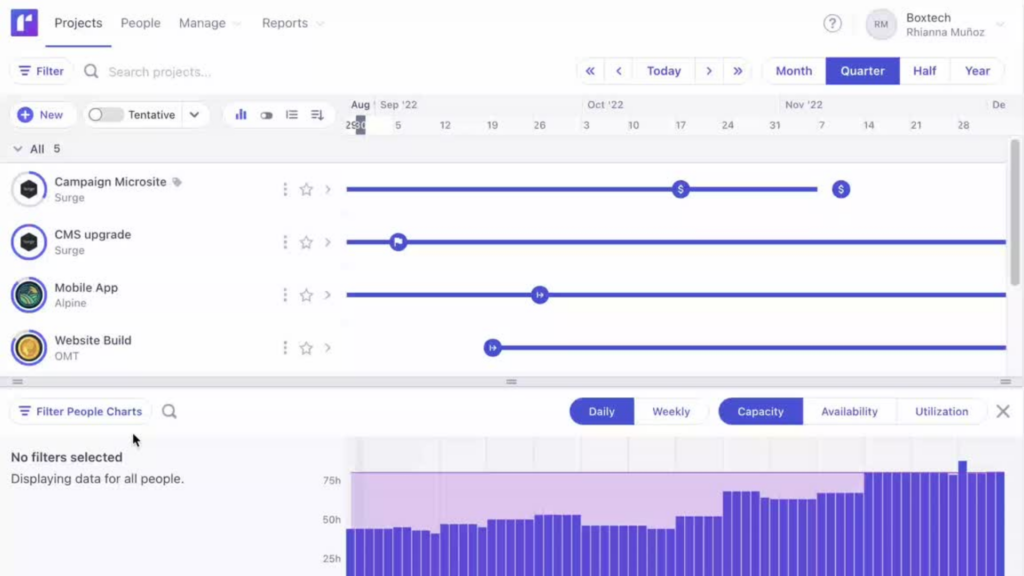
2. Runn
Runn focuses on forecasting: capacity, availability and utilization charts are included from the Lite plan. Lite costs $7 and Standard $11 per resource seat per month on annual billing ($9 and $13 monthly), Advanced is quoted, and plans start at 20 resource seats. There is a 30-day Standard trial with no credit card. Runn reviews.
3. Resource Guru
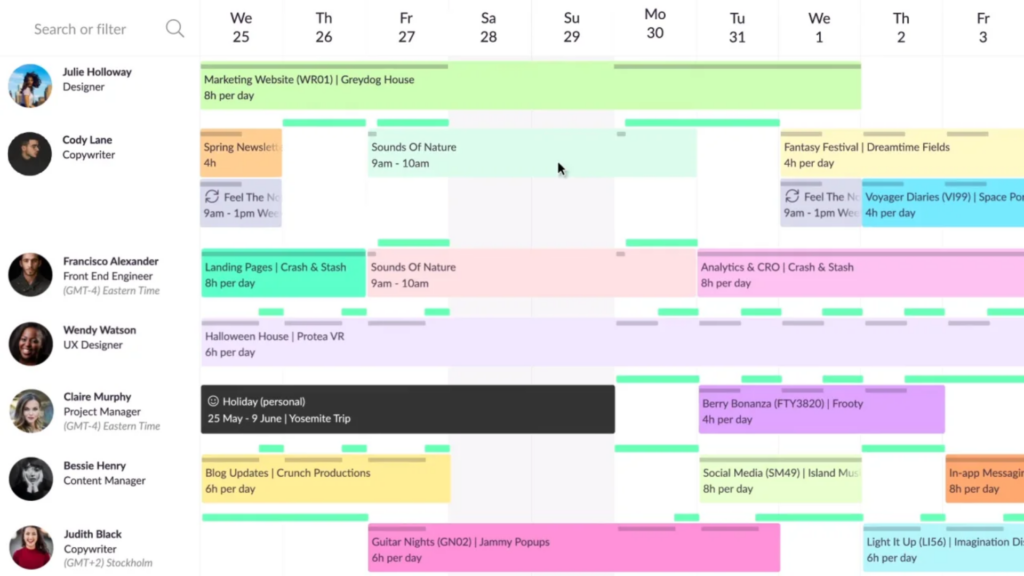
Resource Guru is a straightforward scheduler for people, meeting rooms and equipment. Monthly prices are $5 (Grasshopper), $8 (Blackbelt) and $12 (Master) per person, with other resources from $2.50; annual plans include two months free (Grasshopper works out to $4.16). Approval workflows are on Master and Enterprise. Resource Guru also publishes a free capacity planning template for Excel and Google Sheets. Resource Guru reviews.
4. Resource Management by Smartsheet
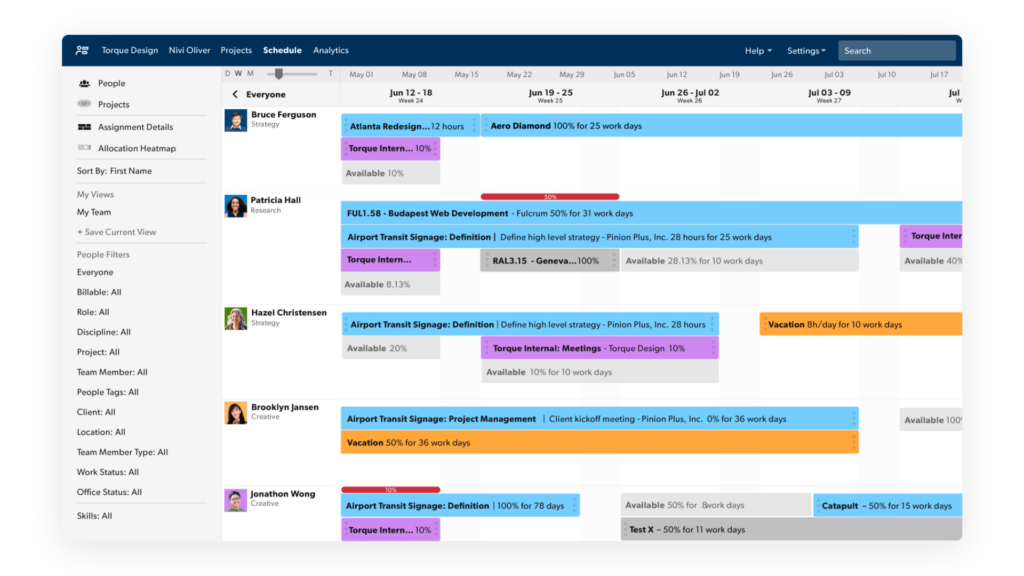
Smartsheet’s “workload tracking” (who is available and who is overallocated) is included from the Business plan ($19 per member per month yearly, $24 monthly). Its full Resource Management product, formerly 10,000ft, is an add-on for Business and Enterprise with pricing on request, and scenario planning is on Enterprise. There is a 30-day free trial. Smartsheet reviews.
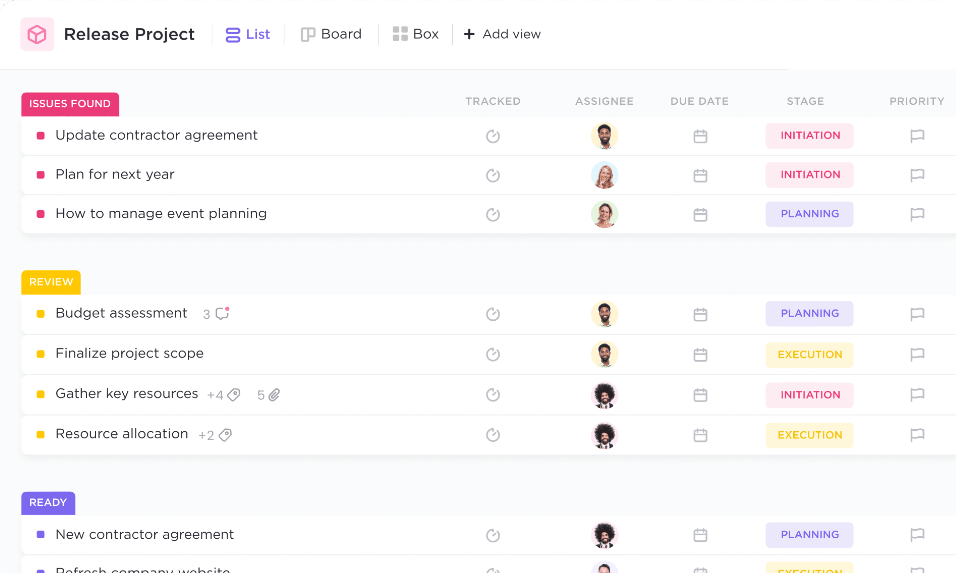
5. ClickUp
ClickUp’s Workload view is fully available on the Business plan ($12 per user per month yearly, $19 monthly) and trial-only on Free Forever and Unlimited. Enterprise adds custom capacity settings. Good for teams that want tasks, docs and capacity in one tool. ClickUp reviews.
6. Asana
Asana’s Advanced plan ($24.99 per user per month annually, $30.49 monthly) includes resource management within a portfolio, showing “who’s overloaded, who has capacity”. Organization-wide workload and dedicated capacity planning are Enterprise features, priced on request. The free Personal plan does not include them. Asana reviews.
7. monday.com
monday.com’s Workload view is available on Pro ($19 per seat per month, billed annually) and Enterprise; broader resource management is Enterprise only. A free plan covers 2 seats and there is a 14-day Pro trial. monday.com reviews.
8. Jira
For software and IT teams, Jira Premium ($14.54 per user per month on Atlassian’s pricing page, which varies with team size) adds advanced planning, where “deliverables are balanced against capacity”, and capacity management by person in hours, days or percentages. Jira is free for up to 10 users, and Standard and Premium have a 7-day trial. Jira reviews.
9. Productive
Productive combines resource planning with budgets and profitability for agencies. Essential costs $10 per seat per month yearly ($12 monthly) and includes resource planning and time off; Professional is $25 yearly ($29 monthly); Ultimate adds a scenario builder. Minimum 3 seats, 14-day trial. Productive reviews.
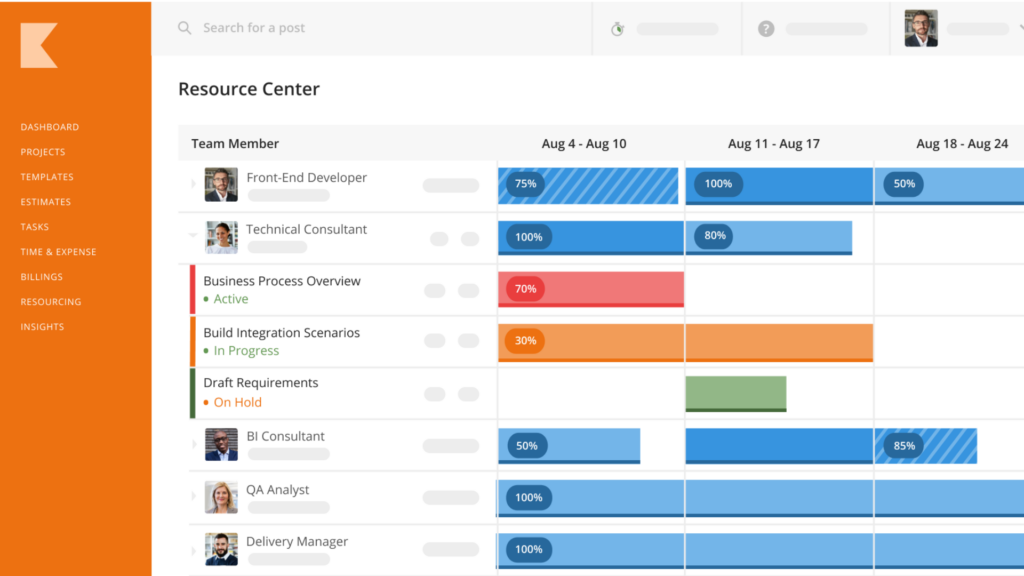
10. Kantata
Kantata is a professional services automation platform for consultancies and large services firms, with resource and capacity planning at its core. Pricing is by request only. Kantata reviews.
Also worth a look
- Saviom: enterprise workforce planning, quote only, with Power, Lite and Non-User licenses.
- Hub Planner: now sold as Resource Flow by Milient, from $7 per resource per month on annual pricing; its “Capacity Finder” is in the $54 Business Leader plan. Hub Planner reviews.
- Wrike: advanced resource and capacity planning is in the quote-only Pinnacle plan.
- Epicflow: multi-project capacity planning, Growth plan from €22.50 per person per month annually (euro prices shown), 20 to 50 users.
- Forecast: now part of Accelo (“Accelo – Now with Forecast”), quote only.
- Toggl Plan: being replaced by Toggl’s main product, which now includes capacity management; Toggl says Plan “will remain available for a while”.
Key Features to Look for in a Capacity Planning Tool
Resource allocation
Assign people to projects in hours or percentages and see the result against their available time immediately. Look for skills or role filters so you can find the right person, not just a free one.
Team scheduling
A timeline view of who is doing what, including time off, public holidays and part-time schedules. Float, Runn and Resource Guru all put this at the center.
Reporting and analytics
Utilization and capacity reports, forecasts of future demand against capacity, and the ability to model tentative projects before they are confirmed.
Other features worth checking
- Tentative or placeholder bookings for pipeline work and unfilled roles.
- Integrations with your project, time tracking and HR systems.
- Scenario planning for “what if we win this project” questions (Smartsheet Enterprise, Productive Ultimate, Epicflow Enterprise).
How Do You Perform Capacity Planning?
- Calculate available capacity: people x working hours x the share of time available for project work. Eight people x 40 hours x 80% = 256 hours a week.
- Estimate demand: hours needed for confirmed and likely projects, by role.
- Compare the two by week and by role, not just in total; shortages are usually role-specific.
- Act on the gap: reschedule, reassign, hire, bring in contractors or decline work.
- Review weekly and update as projects change.
Is There a Free Template for Capacity Planning in Excel?
Yes. Resource Guru publishes a free capacity planning template as an Excel (XLSX) download or for Google Sheets. A spreadsheet works for a small team; once you are juggling more than a handful of people and projects, or need time off and tentative work to update automatically, a dedicated tool saves time. Free plans such as ClickUp Free Forever or Asana Personal are an option, but their workload features are on paid tiers.
What Are the Capacity Planning Tools Available in Jira?
Jira Premium and Enterprise include advanced planning (Plans), which balances deliverables against team capacity, and capacity management that allocates each person’s time to epics and tasks in hours, days or percentages, flagging over-allocation early. Jira Free and Standard do not include these.
Looking for IT Infrastructure Capacity Planning Instead?
“Capacity planning” also means forecasting server, storage and network capacity. That is handled by infrastructure monitoring tools, not people schedulers. LogicMonitor includes data forecast visualizations from its Advanced package, and network monitors such as PRTG track bandwidth and resource trends. See our LogicMonitor pricing guide, PRTG pricing and SolarWinds alternatives.
Choosing the Right Capacity Planning Tool
Identify your organization’s needs
If you only need to see who is free, a scheduler like Resource Guru or Float is enough. If you need forecasting and utilization targets, look at Runn or Productive. If your team already lives in Asana, monday.com, ClickUp or Jira, check whether upgrading a tier is cheaper than adding a separate tool.
Consider budget and pricing
Compare on total cost: price per person x number of people, plus minimums (Runn 20 seats, Productive 3) and the plan tier that actually includes capacity features.
Read reviews and compare features
Read user reviews for the tools on your list and compare them in our resource management software category.
Take advantage of free trials
Most tools offer 14 to 30 days. Load one real month of projects and time off during the trial; that is when gaps in a tool show up.
Conclusion
For most teams planning people’s time, Float or Runn is the best dedicated capacity planner, Resource Guru is the simplest, and Productive suits agencies that also track profit. If you already pay for Asana, monday.com, ClickUp, Jira or Smartsheet, check what capacity features your current tier includes before buying another tool.
Frequently Asked Questions
What are capacity planning tools?
Software that compares your team’s available hours with scheduled and forecast work, so you can spot overload or spare capacity before it affects delivery.
Are there any free capacity planning tools available?
Partly. ClickUp and Asana have free plans, but workload views are on paid tiers. Resource Guru’s free spreadsheet template is the simplest free option. Float, Runn and Resource Guru offer 30-day trials.
What is the best capacity planning app?
For dedicated capacity planning, Float and Runn. Float is stronger on day-to-day scheduling; Runn on forecasting and utilization.
How much does capacity planning software cost?
Dedicated tools start around $5 to $7 per person per month (Resource Guru, Float, Runn). Capacity features in project management suites usually need higher tiers, such as Asana Advanced at $24.99 per user per month annually.
What is the difference between capacity planning and resource planning?
Capacity planning asks whether the team has enough hours for the work. Resource planning decides which specific people do which work and when. Most tools do both.
Can I switch from a free capacity planning tool to a paid one later on?
Yes. Most tools let you import projects and people by CSV, and suites like ClickUp or Asana let you upgrade in place without migrating data.
Compare alternatives to the tools in this post

- Independent picks for exactly what you just read about
- Matched to your team size & needs
- Vendors don't pay for placement
Step 1 of 4
How big is your team?
We tailor recommendations to companies your size.















Related Articles
IT Management
Microsoft Intune Pricing 2026: Plan 1, Plan 2, Suite and What Microsoft 365 Includes
Continue reading →
IT Management
Best Remote Access Software 2026: 11 Tools Compared by Price
Continue reading →
IT Management
Splashtop Pricing 2026: Solo, Pro, Performance and SOS Costs
Continue reading →
IT Management
Atera Pricing 2026: Every Plan, Per-Technician Cost and What You’ll Pay
Continue reading →