
Rippling vs Staffcloud vs Homebase Comparison

Rippling
Starting at $8 custom
- Medium Business
- Small Business
Rippling is an all-in-one global workforce management platform that integrates HR, IT, and finance into a unified system. Designed to improve business operations, Rippling offers comprehensive features for managing the e…

Staffcloud
Starting at Contact for pricing
- Large Enterprises
- Medium Business
StaffCloud is employee scheduling software that enables user to manage staff easily. It aids the process of hiring, scheduling, tracking hours, managing breaks and shifts, and much more. It allows managers to easily mana…

Homebase
Starting at $0 / location / month
- Free Trial
- Free Version
- Large Enterprises
- Medium Business
Homebase is a comprehensive time-tracking software developed by experienced people managers to improve team collaboration and efficiency. It simplifies employee time tracking, scheduling, and payroll management, reducing…
Rippling leads on user satisfaction with a 5.0-star rating across 1,829 reviews.
Rippling vs Staffcloud vs Homebase — at a glance
| Feature | Rippling | Staffcloud | Homebase |
|---|---|---|---|
| Rating | 5.0 / 5 | 4.3 / 5 | 4.4 / 5 |
| Reviews | 1,829 | 2 | 118 |
| Starting price | $8 custom | Contact for pricing | $0 / location / month |
| Free trial | No | No | Yes |
| Free version | No | No | Yes |
| Best for | Medium Business, Small Business | Large Enterprises, Medium Business, Small Business | Large Enterprises, Medium Business, Small Business |
| Category | HR Software | Employee Scheduling Software | Employee Scheduling Software |
| Integrations | — | — | 11+ apps |
| Platforms | SaaS/Web/Cloud, Mobile - Android, Mobile - iOS, Installed - Windows, Installed - Mac | SaaS/Web/Cloud, Mobile - Android, Mobile - iOS | SaaS/Web/Cloud, Mobile - Android, Mobile - iOS, Browser Based (Cloud) |
| API | Available | Available | Available |
| Support modes | Business Hours, Online | Business Hours, Online | 24/7 (Live rep), Business Hours, Online |
Key differences between Rippling and Staffcloud
- Pricing: Rippling starts at $8 custom. Staffcloud pricing is not publicly listed.
- Target audience: Rippling is built for Medium Business and Small Business, while Staffcloud targets Large Enterprises and Medium Business.
- User satisfaction: Rippling scores higher with a 5.0-star average.
- Deployment: Rippling supports SaaS/Web/Cloud, Mobile - Android, Mobile - iOS, Installed - Windows, Installed - Mac; Staffcloud supports SaaS/Web/Cloud, Mobile - Android, Mobile - iOS.
Compare Rippling vs Staffcloud vs Homebase — and walk away knowing which one fits.
Which tool fits your team best
Which is actually cheaper for your team size
Where each product wins, per real buyers
Most HR Software tools look identical on paper. This comparison cuts to the differences that matter — pricing structure, team fit, and what real buyers found after signing up.
Biggest differences
Features
Pricing
Buying details
Security
Buyer feedback
Integrations
Product tour
Other options
Talk to an expert Talk to an expert |
Free PDF comparison
Download this Rippling vs Staffcloud vs Homebase comparison
Get the full side-by-side as a PDF — these picks plus the top HR Software tools, with verified ratings, pricing and features.
- Side-by-side on pricing, features & ratings
- Plus the category top 10, scored & ranked
- Emailed to you — no on-screen download
No file downloads on screen — we email it to you. One-click unsubscribe anytime.
Rippling, Staffcloud vs Homebase: Biggest differences
Start here before you go deeper into features.
Best for unified HR, IT, and finance management in small to medium businesses.
- You need a single platform to manage HR, IT, and payroll smoothly.
- Your company requires strong compliance management for global workforce regulations.
- You want to automate onboarding, payroll, benefits, and device provisioning tasks.
- Your business demands highly customizable workflows and advanced reporting features.
- You are a very small business with a limited budget concerned about escalating costs.
Best for medium to large enterprises needing flexible, complex employee scheduling.
- You manage a workforce of 50-500 employees requiring adaptable scheduling complexity.
- You need integrated real-time analytics and reporting to optimize labor costs.
- You want built-in team communication tools to coordinate shifts.
- You run a very small business with fewer than 10 employees and simple scheduling needs.
- Your organization requires highly customized or industry-specific scheduling workflows.
Best for simple scheduling and payroll in small to mid-sized teams.
- You manage retail, hospitality, or food service teams with up to 500 employees.
- You need an easy-to-use platform for shift scheduling, time tracking, and payroll integration.
- You want built-in team communication tools like chat boards to improve collaboration.
- Your organization requires highly advanced schedule customization beyond basic features.
- You have complex scheduling needs that demand a more intuitive and flexible interface.
Rippling: Best for unified HR, IT, and finance management in small to medium businesses. Staffcloud: Best for medium to large enterprises needing flexible, complex employee scheduling.
Description | Rippling is an all-in-one global workforce management platform that integrates HR, IT, and finance into a unified system. Designed to improve business operations, Rippling offers ... Read More about Rippling | StaffCloud is employee scheduling software that enables user to manage staff easily. It aids the process of hiring, scheduling, tracking hours, managing breaks and shifts, and much more. It ... Read More about Staffcloud | Homebase is a comprehensive time-tracking software developed by experienced people managers to improve team collaboration and efficiency. It simplifies employee time tracking, scheduling, ... Read More about Homebase |
|---|---|---|---|
Entry Level Pricing |
|
|
|
Free Trial Availability |
|
| |
SpotScoreWhat's this? ↗ | 9.4/10 | 8.7/10 | 9.7/10 |
User RatingsBased on verified Spotsaas reviews | |||
Best Company Size | Small BusinessMedium Business | 50-500 employeesMedium to Large Enterprises | 1-50 employees51-500 employees |
Get pricing help | Get pricing help |
Where each option fits best
See where each product is strongest, which teams it fits, and what causes buyers to keep looking — before you commit.
Based on buyer reviews and verified product data collected by Spotsaas.
Key strengths
- HR Processes: With Rippling, it simplifies HR tasks like onboarding, payroll, and benefits management. It centralizes everything in one platform.
- Automated Compliance: Executives can breathe easier knowing that Rippling keeps you up-to-date with employment laws and regulations. This automation minimizes the risk of costly compliance errors.
- Customizable Employee Experience: Rippling lets you design the employee experience to match your company's needs. From personalized benefits packages to unique onboarding processes, it builds a culture that connects with your team.
- Workforce Management: Staffcloud simplifies the scheduling process, letting managers quickly allocate shifts and track employee availability. This maintains optimal staffing levels, reducing downtime and increasing productivity.
- With Staffcloud, administrators gain access to real-time analytics and reporting tools. This lets you make informed decisions based on actual data, helping you identify trends, optimize labor costs, and improve overall operational efficiency.
- Communication: Our platform allows team members to communicate through integrated messaging features. Employees can easily connect with one another and management, improving collaboration and workplace culture.
- Communication: Homebase allows smooth communication among team members, letting managers send updates and receive feedback in real-time. Keeping everyone on the same page is easier.
- Efficient Scheduling: With Homebase, scheduling shifts is easy. The intuitive interface lets you create schedules quickly, reducing the headache of manual planning. Your team will appreciate the clarity and predictability in their work hours.
- Time Tracking Made Simple: Homebase offers reliable time tracking features that help you monitor employee hours accurately, maintain compliance, and simplify payroll processing.
Best fit
- 1 to 1,000 employees
- HR Tech, Fintech, SaaS, Professional Services, and E-commerce
- HR Managers, Payroll Administrators, IT Managers, and Operations Directors
- 50 to 500 employees.
- Staffcloud is ideal for industries such as SaaS, Consulting, Human Resources, IT Services, and Healthcare. Typical users include HR Managers, Talent Acquisition Specialists, Operations Managers, and Project Coordinators.
- 1 to 500 employees
- Retail, Hospitality, Food Service, Healthcare, and Construction
- Managers, Shift Leaders, HR Personnel, and Business Owners
Reasons buyers look elsewhere
- Lacks specialized HR features like advanced recruitment tools and performance management — teams needing these typically add BambooHR or Workday
- Priced higher than competitors like Gusto or ADP — budget-conscious companies often choose lower-cost alternatives
- Doesn't provide industry-specific compliance features for niche sectors like healthcare or financial services
- Lacks customization options for complex workflows — teams needing role-based permissions or custom approval chains typically add Workday or BambooHR
- Pricing scales with headcount — organizations under 100 employees often find cheaper per-seat alternatives like Rippling or Deel
- Rapid growth requires additional modules — companies adding 200+ employees need workforce planning or advanced analytics not included in base plan
- Users may seek alternatives to Homebase if they require more advanced scheduling features or integrations with other software, as some businesses have unique operational needs that Homebase may not fully address.
- Companies with larger teams or more complex workforce management requirements might find that Homebase lacks scalability, prompting them to explore solutions that better accommodate growth and diverse employee roles.
- Businesses prioritizing reliable reporting and analytics tools may look for alternatives, as Homebase’s reporting capabilities might not meet the depth of insight required for informed decision-making.
Software Demo
Demo |  Staffcloud has not given any software demo yet If you're the owner of this profile, add your demo.Contact us |
|---|
Need a second opinion?
Get decision help from a software advisor
Share your priorities, budget, and team needs, and we’ll help you narrow the options and understand the tradeoffs before you talk to vendors.

- Independent advice — matched to your business
- Understand the tradeoffs before you talk to vendors
- Free 15-min call with a software advisor.
Step 1 of 4
How big is your team?
We tailor recommendations to companies your size.















How do Rippling, Staffcloud and Homebase Compare on Features?
Total Features | 41 Features | 11 Features | 32 Features |
|---|---|---|---|
Unique Features | No unique features | No unique features | No unique features |
Get Quote | Get Quote |
Compare Rippling, Staffcloud and Homebase on pricing
Review starting price, plan structure, and free-trial access side by side so you can see which option fits your budget and buying process.
Pricing Option | |||
|---|---|---|---|
Starting From |
|
|
|
Pricing Plans |
|
|
|
Pricing Page |  |  | 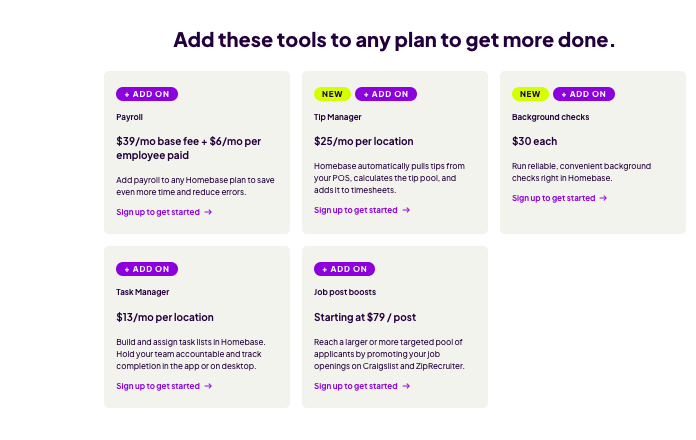 |
Rippling, Staffcloud vs Homebase: Other Details
Organization Types supported |
|
|
|
|---|---|---|---|
Platforms Supported |
|
|
|
Modes of support |
|
|
|
API Support |
|
|
|
Get help choosing | Get help choosing |
Rippling vs Staffcloud User Reviews & Rating Comparison
User Ratings | |||
|---|---|---|---|
Rating Distribution | |||
Spotsaas Editor’s POV generated by AI | Buyer sentiment Buyers overwhelmingly praise Rippling for its intuitive interface and comprehensive automation, though some note customization limits and cost concerns. What buyers like
Common complaints
| Buyer sentiment Overall positive sentiment highlighting ease of scheduling and communication, though limited review volume restricts comprehensive assessment. What buyers like
Common complaints
| Buyer sentiment Overall positive sentiment highlights ease of scheduling, communication features, and payroll integration, tempered by some interface usability concerns. What buyers like
Common complaints
|
Pros and Cons |
|
|
|
Positive Reviews | No reviews available for the product | No reviews available for the product | No reviews available for the product |
Integrations
Integration with other apps | No Integration information available. | No Integration information available. |
|---|



Rippling, Staffcloud and Homebase Customers
Customers |  Beam  Chess.com  Trash Butler |  EVZ  Cinerent  terbrueggen |  Antique Taco  Woodhouse  Souvla |
|---|
Media and Screenshots
Screenshots |  8 Screenshots |  5 Screenshots |
|---|---|---|
Videos |  2 Videos | No videos available. |
Alternatives to Rippling, Staffcloud, Homebase
Alternatives |
|---|





Add another option to compare side by side
Search by product name to compare pricing, fit, and buyer feedback in one view.Compare similar software options


Related Blogs and Articles for Employee Scheduling Software
Disclaimer: This research has been collated from a variety of authoritative sources. We welcome your feedback at [email protected].
Frequently asked questions
- Which is better, Rippling or Staffcloud?
- Rippling edges out the other on user ratings (5.0 vs 4.3). That said, the best pick depends on your use case, so use the comparison tables above to evaluate each dimension.
- Do Rippling and Staffcloud offer a free trial?
- Neither Rippling nor Staffcloud currently lists a free trial.
- What is the starting price of Rippling vs Staffcloud?
- Rippling starts at $8 custom. Staffcloud starts at Contact for pricing.
- What are the top alternatives to Rippling?
- Top alternatives to Rippling include Hibob HRIS, Oyster, Workday HCM, UZIO, Darwinbox.
- What are the top alternatives to Staffcloud?
- Top alternatives to Staffcloud include Homebase, TCP Humanity Scheduling, Deputy, ScheduleAnywhere, MySchedule.com.
- What is the catch with Rippling?
- Rippling is credited with the following: user-friendly interface with easy-to-navigate dashboards; automates onboarding, payroll, benefits, and device provisioning. The recurring reservations: limited customization in some workflows and reporting features; learning curve due to extensive feature set. It does not include Accounts Payable and Billing and Invoicing.
- What are the pros and cons of Staffcloud?
- It depends what you need. In its favour: shift allocation and employee availability tracking; real-time analytics and reporting for labor optimization. Against it: limited public pricing information may complicate budgeting; relatively low number of user reviews limits insight into long-term reliability. Note that it does not include Billing and Invoicing and Payroll.
More Employee Scheduling Software comparisons
Side by side breakdowns of the same products against other options in this category.