NEWJoin 1M+ SaaS Professionals|Get Weekly Insights, Trends & Expert PicksSubscribe Free →

Spotsaas logo

OnPay vs Payroller vs Patriot Payroll vs Paychex Flex Comparison

Last updated:

OnPay

4.8(822 reviews)

Starting at $40 /Month

  • Free Trial
  • Freelancers / Consultants
  • Large Enterprises

OnPay is an intuitive online payroll software designed to meet the needs of supervisors, managers, payroll specialists and people who manage pay for hourly or salaried staff. OnPay helps companies of all sizes reduce cos…

Payroller

Starting at $0.66 /user/month

  • Freelancers / Consultants
  • Medium Business

Payroll is easy with our powerful, yet simple-to-use desktop software. With options that help you manage taxes, reduce errors and cut labor costs, payroll can be an integral part of growing your business. Run payroll fas…

Patriot Payroll

4.7(3,876 reviews)

Starting at $14 /Month

  • Free Trial
  • Large Enterprises
  • Medium Business

The Patriot's secure payroll solution is designed to lower the total cost of payroll administration, while helping you reduce your staffs' workload. With its fully integrated interface with Patriot's fund accounting and…

Paychex Flex

3.7(3,034 reviews)

Starting at Contact for pricing

  • Freelancers / Consultants
  • Large Enterprises

Paychex Flex is a cloud-based payroll software for mid- to large-sized employers, delivering the tools you need to run your business and support your people. This payroll system provides everything you need in just one s…

OnPay leads on user satisfaction with a 4.8-star rating across 822 reviews.

SpotSaaS Analysis

OnPayPayrollerPatriot Payroll

The core difference between OnPay and Payroller lies in their pricing and target audience, with OnPay being ideal for small businesses seeking comprehensive payroll support at a fixed price, while Payroller caters to a broader range of businesses with a per-employee pricing model. OnPay is best suited for small businesses with straightforward payroll needs, while Payroller is ideal for businesses that require flexibility in payroll processing across various industries.

- Best for small businesses with 1-100 employees - Offers automated payroll processing and tax filings - Excellent customer support - Fixed monthly pricing at $40 - Ideal for HR Managers and Payroll Administrators - Focused on industries like Healthcare and Professional Services

- Suitable for businesses with 1-200 employees - Flexible per-employee pricing at $0.66 - Serves a diverse range of industries including Retail and Hospitality - Ideal for Business Owners and Accountants - Offers payroll solutions for various business sizes - Focused on providing cost-effective payroll management

OnPay vs Payroller vs Patriot Payroll vs Paychex Flex — at a glance

FeatureOnPayPayrollerPatriot PayrollPaychex Flex
Rating4.8 / 54.7 / 53.7 / 5
Reviews8223,8763,034
Starting price$40 /Month$0.66 /user/month$14 /MonthContact for pricing
Free trial Yes No Yes No
Free version No No No No
Best forFreelancers / Consultants, Large Enterprises, Medium BusinessFreelancers / Consultants, Medium Business, Small BusinessLarge Enterprises, Medium Business, Small BusinessFreelancers / Consultants, Large Enterprises, Medium Business
CategoryPayroll SoftwarePayroll SoftwarePayroll SoftwarePayroll Software
Integrations10+ apps1+ apps11+ apps
PlatformsSaaS/Web/CloudSaaS/Web/CloudSaaS/Web/CloudSaaS/Web/Cloud, Mobile - Android, Mobile - iOS
APIAvailable
Support modesBusiness Hours, OnlineOnlineBusiness Hours, Online24/7 (Live rep)
CertificationsSOC 2, GDPRSOC 2, GDPR
Data residencyUSUSUSUS

Key differences between OnPay and Payroller

  • Pricing: OnPay starts at $40 /Month, while Payroller starts at $0.66 /user/month.
  • Free trial: OnPay offers a free trial; Payroller does not.
  • Deployment: OnPay supports SaaS/Web/Cloud; Payroller supports SaaS/Web/Cloud.

Compare OnPay vs Payroller vs Patriot Payroll vs Paychex Flex — and walk away knowing which one fits.

01

Which tool fits your team best

02

Which is actually cheaper for your team size

03

Where each product wins, per real buyers

Most Payroll Software tools look identical on paper. This comparison cuts to the differences that matter — pricing structure, team fit, and what real buyers found after signing up.

OnPay - Payroll Software
Talk to an expert
Talk to an expert
Payroller - Payroll Software
Talk to an expert
Talk to an expert

Biggest differences

Start here before you go deeper into features.

OnPay

Best for small businesses seeking simple, automated payroll with excellent support.

Choose if
  • You run a small business with 1-100 employees needing straightforward payroll processing.
  • You want to automate payroll calculations and tax filings to reduce errors and save time.
  • You value exceptional, responsive customer service and easy integration with accounting tools.
Consider alternatives if
  • You are a large enterprise requiring complex payroll customizations and advanced features.
  • You need an all-in-one HR platform including recruitment or performance management.

Payroller

Best for

Freelancers / Consultants, Medium Business, Small Business

Patriot Payroll

Best payroll software for small businesses needing simple, affordable solutions.

Choose if
  • You run a small to medium business with up to 100 employees.
  • You want a user-friendly, streamlined payroll system with strong US-based support.
  • You need integration with fund accounting and compliance tools for payroll automation.
Consider alternatives if
  • You require advanced, highly customizable payroll features for complex business needs.
  • You are a large enterprise scaling beyond small to medium business capabilities.

Paychex Flex

Best for mid-sized businesses needing integrated payroll and HR compliance.

Choose if
  • You manage a company with 51-1000 employees requiring streamlined payroll and tax filing.
  • You want a cloud-based platform with employee self-service for paystubs and tax forms.
  • You value integrated payroll and HR management with strong customer support.
Consider alternatives if
  • You are a freelancer or very small business needing transparent, upfront pricing.
  • You require highly customizable payroll workflows to fit unique business processes.

OnPay typically suits Freelancers / Consultants and Large Enterprises. Payroller tends to fit Freelancers / Consultants and Medium Business better. The right choice depends on your team size, workflow, and whether a free trial matters.

Description

OnPay is an intuitive online payroll software designed to meet the needs of supervisors, managers, payroll specialists and people who manage pay for hourly or salaried staff. OnPay helps ... Read More about OnPay

Payroll is easy with our powerful, yet simple-to-use desktop software. With options that help you manage taxes, reduce errors and cut labor costs, payroll can be an integral part of growing ... Read More about Payroller

The Patriot's secure payroll solution is designed to lower the total cost of payroll administration, while helping you reduce your staffs' workload. With its fully integrated interface with ... Read More about Patriot Payroll

Paychex Flex is a cloud-based payroll software for mid- to large-sized employers, delivering the tools you need to run your business and support your people. This payroll system provides ... Read More about Paychex Flex

Entry Level Pricing

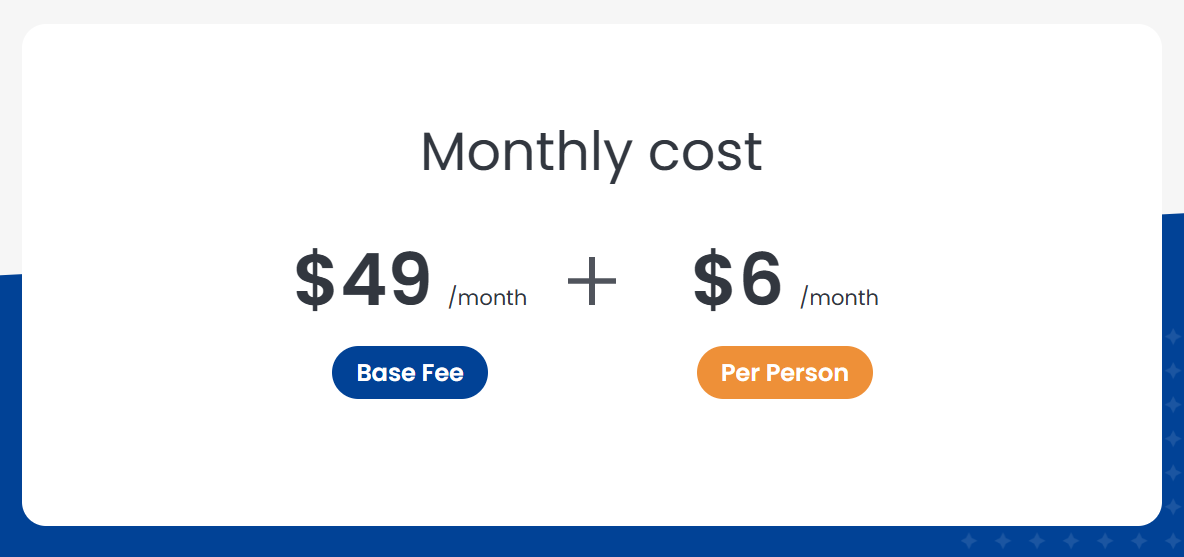
  • Starts from $40
  • Starts from $0.66 , monthly
  • Starts from $14
  • Not Available

Free Trial Availability

  • No free trial
  • No free trial

Spotsaas Score

What's this? ↗

9.4/10

8.1/10

8.8/10

9.2/10

User Ratings

Based on verified Spotsaas reviews

Best Company Size

1-100 employeesSmall Business
1–200 employees
1-100 employeesSmall to medium businesses
51-500 employees501-1000 employees
Get pricing help
Get pricing help

Where each option fits best

See where each product is strongest, which teams it fits, and what causes buyers to keep looking — before you commit.

Based on buyer reviews and verified product data collected by Spotsaas.

Strengths

Key strengths

OnPay

  • OnPay streamlines payroll processing, saving valuable hours each week by automating complex calculations and filings—so you can focus on running your business.
  • With a user-friendly interface and intuitive dashboards, your team can effortlessly manage payroll, benefits, and taxes without needing extensive training.
  • I appreciate how OnPay offers robust integration with popular accounting tools, enhancing efficiency and eliminating manual data entry headaches.

Payroller

  • Accessibility for Small Businesses: Payroller is designed to be easy to use, even for employers without payroll expertise. Its browser-based interface, guided workflows, and clear reporting make payroll accessible for microbusinesses and SMEs. Accountants and bookkeepers can also manage multiple clients through the agent portal. This accessibility lowers the barrier to adopting compliant payroll software while still providing the essential features businesses need to pay employees correctly and on time.
  • Seamless Accounting Alignment: Payroller integrates with accounting software like Xero, ensuring payroll data is synced with financial records. Wages, taxes, and superannuation entries are reflected accurately in the general ledger, reducing duplicate data entry. This alignment improves visibility into payroll costs and simplifies reconciliation during month-end or year-end close. Businesses benefit from cleaner accounting records and less coordination between payroll and finance teams.
  • Reduced Payroll Errors: Manual payroll processing often leads to mistakes in calculations, leave balances, or tax deductions. Payroller reduces these risks by applying standardized payroll rules and validations automatically. Attendance, leave, and earnings data are processed consistently, improving accuracy across pay runs. Fewer errors mean fewer corrections, less rework, and improved trust with employees. Accurate payroll also supports cleaner financial records and smoother reconciliation for accountants and bookkeepers.

Patriot Payroll

  • Flexible Payroll Options: Choose between basic and full-service payroll, depending on whether you want to handle tax filing yourself or let Patriot do it.
  • Easy-to-Use Interface: Designed with small business owners in mind, the platform simplifies payroll processing with intuitive navigation and clear workflows.
  • Affordable Pricing & U.S. Support: Offers competitive rates with no hidden fees and access to expert, U.S.-based customer support when needed.

Paychex Flex

  • Streamlined HR Management: With Paychex Flex, managers can effortlessly handle payroll, benefits, and compliance all in one platform. This not only saves time but also reduces the risk of errors—ensuring you can focus on strategic initiatives.
  • Employee Empowerment: Employees appreciate the self-service capabilities that allow them to access pay stubs, manage benefits, and request time off at their convenience. This not only boosts engagement but also fosters a culture of responsibility and ownership.
  • Scalable Solutions: Whether you’re a small business or a large enterprise, Paychex Flex grows with you. Its flexible architecture allows you to tailor features that fit your company’s unique needs, ensuring you’re always equipped for what lies ahead.
Best fit

Best fit

OnPay

  • 1-100 employees
  • Healthcare, SaaS, Consulting, Professional Services, Nonprofits, Financial Services, Marketing Agencies
  • HR Managers, Payroll Administrators, Office Managers, Finance Managers, Small Business Owners

Payroller

  • 1–200 employees
  • Retail, Hospitality, Construction, Trades, Healthcare, Professional Services, Education Services, Nonprofits, Accounting & Bookkeeping Firms
  • Business Owners, Payroll Officers, Office Managers, HR Managers, Finance Managers, Accountants, Bookkeepers, Operations Managers

Patriot Payroll

  • 1–100 employees
  • Retail, construction, professional services, healthcare, nonprofit, and manufacturing
  • Small Business Owners, Accountants, Payroll Managers, Office Managers, and HR Coordinators

Paychex Flex

  • 1 to 1,000 employees
  • HR Services, Professional Services, Retail, Healthcare, and Nonprofit Organizations
  • HR Managers, Payroll Administrators, Business Owners, and Operations Managers
Watchouts

Reasons buyers look elsewhere

OnPay

  • Users may explore alternatives if they require more advanced HR management features, such as extensive employee onboarding, robust benefit administration, or detailed performance tracking.
  • Companies seeking greater scalability might prefer alternatives that easily accommodate rapid growth, complex payroll structures, or increased employee counts without compromising system performance.
  • Businesses operating internationally or with global teams might consider alternatives offering broader international payroll support and compliance tools for multiple regions and currencies.

Payroller

No alternatives guidance available yet.

Patriot Payroll

  • Small businesses looking for simple payroll solutions with affordable, transparent pricing and U.S.-based support.
  • Companies needing basic or full-service payroll options with the flexibility to manage taxes internally or outsource.
  • Businesses prioritizing user-friendly software without the complexity of enterprise-level platforms.

Paychex Flex

  • Users may seek alternatives to Paychex Flex due to its pricing structure, as smaller businesses or startups often find the costs prohibitive compared to other payroll solutions that offer similar services at lower rates.
  • Some businesses might require more customizable features than Paychex Flex provides, leading them to explore platforms that allow for tailored payroll configurations to better meet their unique operational needs.
  • Integration capabilities with existing accounting or HR systems can be a concern; users may prefer alternatives that offer seamless connectivity to their preferred software tools for streamlined operations and data management.

Software Demo

Demo

Need a second opinion?

Get shortlist help from a software advisor

Share your priorities, budget, and team needs, and we’ll help you narrow the options and understand the tradeoffs before you talk to vendors.

How do OnPay, Payroller, Patriot Payroll and Paychex Flex Compare on Features?

Total Features

13 Features

11 Features

10 Features

29 Features

Unique Features

No unique features

No unique features

No unique features

No unique features

Get Quote
Get Quote

Compare OnPay, Payroller, Patriot Payroll and Paychex Flex on pricing

Review starting price, plan structure, and free-trial access side by side so you can see which option fits your budget and buying process.

Pricing Option

          Starting From

          • $40
          • $0.66 , monthly
          • $14
          • Not Available

          Pricing Plans

          • Not Available
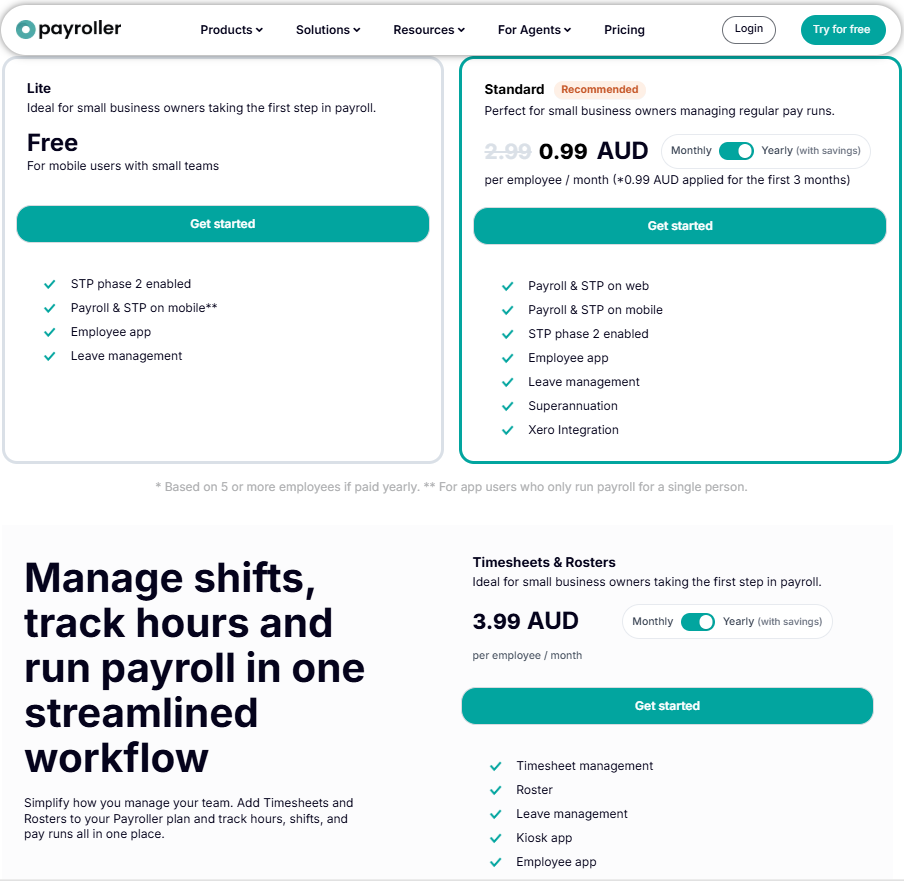
          • Lite

            /user/month

            • STP phase 2 enabled

            • Payroll & STP on mobile**

            • Employee app

            Show more +

          • Standard

            $0.66

            /user/month

            • Payroll & STP on web

            • Payroll & STP on mobile

            • STP phase 2 enabled

            Show more +

          • Timesheets & Rosters

            $4.02

            /user/month

            • Timesheet management

            • Roster

            • Leave management

            Show more +

          • Not Available
          • Not Available

          Pricing Page

          OnPay pricing
          Payroller pricing
          Patriot Payroll pricingPaychex Flex pricing

          Other Details

          Organization Types supported

          • Freelancers
          • Large Enterprises
          • Medium Business
          • Small Business
          • Individuals
          • Freelancers
          • Large Enterprises
          • Medium Business
          • Small Business
          • Individuals
          • Freelancers
          • Large Enterprises
          • Medium Business
          • Small Business
          • Individuals
          • Freelancers
          • Large Enterprises
          • Medium Business
          • Small Business
          • Individuals

          Platforms Supported

          • Browser Based (Cloud)
          • Mobile - Android
          • Mobile - iOS
          • Installed - Windows
          • Installed - Mac
          • Browser Based (Cloud)
          • Browser Based (Cloud)
          • Mobile - Android
          • Mobile - iOS
          • Installed - Windows
          • Installed - Mac
          • Browser Based (Cloud)
          • Browser Based (Cloud)
          • Mobile - Android
          • Mobile - iOS
          • Installed - Windows
          • Installed - Mac
          • Browser Based (Cloud)
          • Browser Based (Cloud)
          • Mobile - Android
          • Mobile - iOS
          • Installed - Windows
          • Installed - Mac
          • Browser Based (Cloud)

          Modes of support

          • 24/7 (Live rep)
          • Business Hours
          • Online
          • 24/7 (Live rep)
          • Business Hours
          • Online
          • 24/7 (Live rep)
          • Business Hours
          • Online
          • 24/7 (Live rep)
          • Business Hours
          • Online

          API Support

          • Not Available
          • Not Available
          • Available
          • Not Available
          Get help choosing
          Get help choosing

          Security & Compliance

          Certifications, data handling, and security controls for IT and compliance evaluators.

          SOC 2

          ✓ Yes

          HIPAA

          ✗ No
          ✗ No

          GDPR

          ✓ Yes

          Single Sign-On (SSO)

          ✓ Yes

          Multi-Factor Auth (MFA)

          ✓ Yes

          Data Encryption

          ✓ Yes

          Audit Logs

          ✓ Yes

          Data Residency

          🇺🇸 US
          🇺🇸 US

          OnPay vs Payroller vs Patriot Payroll User Reviews & Rating Comparison

          User Ratings

          No reviews available for the product

          Rating Distribution

          320

          2

          2

          0

          1

          No reviews available for this product

          2845

          164

          24

          15

          22

          568

          136

          25

          9

          33

          Spotsaas Editor’s POV generated by AI

          Buyer sentiment

          Buyers overwhelmingly praise OnPay for its ease of use, automation capabilities, and excellent customer support, especially among small businesses and nonprofits.

          What buyers like

          • Ease of use
          • Automation of payroll and tax filings
          • Customer support quality

          Common complaints

          • Limited customization for complex payroll
          • Lack of broader HR features

          What buyers like

          • The software offers a simple, desktop-based interface that caters to businesses looking for a straightforward payroll solution without cloud complexities.
          • With support for importing employee data and using pre-printed checks, it significantly reduces the time spent on manual data entry.
          • Built-in mechanisms to reduce errors make payroll processing more reliable and less prone to costly mistakes.

          Common complaints

          • Lack of integration with accounting, HR, or time-tracking software could hinder full automation and increase administrative overhead.
          • Being restricted to desktop use may limit accessibility for remote teams or multi-location operations that rely on cloud-based access.
          • The mention of pre-printed checks may suggest a reliance on outdated methods, potentially reducing modern payment flexibility.

          Buyer sentiment

          Overall, users praise Patriot Payroll for its ease of use, affordability, and strong customer support, with minor setup challenges noted.

          What buyers like

          • Ease of use
          • Customer support
          • Affordability

          Common complaints

          • Initial learning curve
          • Limited advanced features

          Buyer sentiment

          Overall positive sentiment highlights ease of use and comprehensive features, tempered by concerns about pricing transparency and some feature inflexibility.

          What buyers like

          • Ease of use
          • Comprehensive payroll and tax compliance
          • Employee self-service capabilities

          Common complaints

          • Pricing opacity
          • Limited payroll process flexibility

          Pros and Cons

          • Intuitive design that simplifies payroll tasks for supervisors and managers

          • Automates payroll calculations and tax filings, reducing time and errors

          • Robust integration with popular accounting tools to eliminate manual data entry

          • Limited customization options for complex payroll needs in larger companies

          • Focuses solely on payroll, lacking broader HR functionalities like recruitment

          • The software offers a simple, desktop-based interface that caters to businesses looking for a straightforward payroll solution without cloud complexities.

          • With support for importing employee data and using pre-printed checks, it significantly reduces the time spent on manual data entry.

          • Built-in mechanisms to reduce errors make payroll processing more reliable and less prone to costly mistakes.

          • Lack of integration with accounting, HR, or time-tracking software could hinder full automation and increase administrative overhead.

          • Being restricted to desktop use may limit accessibility for remote teams or multi-location operations that rely on cloud-based access.

          • User-friendly interface that simplifies payroll tasks

          • Excellent and responsive U.S.-based customer support

          • Affordable pricing with no hidden fees

          • Learning curve for newcomers during initial setup

          • Limited advanced features for larger or complex businesses

          • Comprehensive payroll and tax compliance support including federal and state regulations

          • Employee self-service portal for paystubs and tax forms

          • Accessible cloud-based platform allowing anytime, anywhere access

          • Pricing is quotation-based and not publicly disclosed, complicating budgeting

          • Some users report a learning curve requiring training to use all features effectively

          Positive Reviews

          No reviews available for the product

          No reviews available for the product

          No reviews available for the product

          No reviews available for the product

          Integrations

          Integration with other apps

          No Integration information available.

          List of Customers

          Customers

          BlueBird

          BlueBird

          Cartecay

          Cartecay

          Evergreen

          Evergreen

          No Customers information available.

          No Customers information available.

          Wells Fargo

          Wells Fargo

          First Citizens Bank

          First Citizens Bank

          Huntington National Bank

          Huntington National Bank

          Media and Screenshots

          Screenshots

          OnPay Dashboard

          7 Screenshots

          Payroller screenshot

          7 Screenshots

          Videos

          video-0

          3 Videos

          video-0

          1 Videos

          Expand your shortlist

          Add another option to compare side by side

          Search by product name to compare pricing, fit, and buyer feedback in one view.

          Disclaimer: This research has been collated from a variety of authoritative sources. We welcome your feedback at [email protected].

          Frequently asked questions

          Which is better, OnPay or Payroller?
          OnPay edges out the other on user ratings (4.8 vs -1.0). That said, the best pick depends on your use case — use the comparison tables above to evaluate each dimension.
          Do OnPay and Payroller offer a free trial?
          OnPay offers a free trial. Payroller does not.
          What is the starting price of OnPay vs Payroller?
          OnPay starts at $40 /Month. Payroller starts at $0.66 /user/month.
          What are the top alternatives to OnPay?
          Top alternatives to OnPay include Patriot Payroll, Paychex Flex, Paycor, SurePayroll, Square Payroll.
          What are the top alternatives to Payroller?
          Top alternatives to Payroller include Patriot Payroll, Paychex Flex, Paycor, Freshbooks, Rippling.

          Grow your pipeline with buyers who are already looking for you

          254,000+ buyers use Spotsaas every month to evaluate and shortlist software. Get in front of them — for free, or with a managed growth plan built around your category.