
ActiveCollab vs Harvest vs Homebase Comparison

ActiveCollab
Starting at Contact for pricing
- Free Trial
- Large Enterprises
- Medium Business
ActiveCollab is a web based project management software designed to make managing small business teams as simple as possible. The intuitive interface makes it easy to delegate tasks and kept track of projects. Features s…

Harvest
Starting at $10.80 /User/Month
- Free Trial
- Free Version
- Freelancers / Consultants
- Large Enterprises
Harvest makes time tracking simple so you can get back to doing the work that you love. It is easy to use, makes nearly all accounting and tax prep software integration a breeze, and is less expensive than most alternati…

Homebase
Starting at $0 / location / month
- Free Trial
- Free Version
- Large Enterprises
- Medium Business
Homebase is a comprehensive time-tracking software developed by experienced people managers to improve team collaboration and efficiency. It simplifies employee time tracking, scheduling, and payroll management, reducing…
Harvest leads on user satisfaction with a 4.5-star rating across 268 reviews.
ActiveCollab vs Harvest vs Homebase — at a glance
| Feature | ActiveCollab | Harvest | Homebase |
|---|---|---|---|
| Rating | 4.3 / 5 | 4.5 / 5 | 4.4 / 5 |
| Reviews | 104 | 268 | 118 |
| Starting price | Contact for pricing | $10.80 /User/Month | $0 / location / month |
| Free trial | Yes | Yes | Yes |
| Free version | No | Yes | Yes |
| Best for | Large Enterprises, Medium Business, Small Business | Freelancers / Consultants, Large Enterprises, Medium Business | Large Enterprises, Medium Business, Small Business |
| Category | Project Management Software | Time Tracking Software | Employee Scheduling Software |
| Integrations | — | — | 11+ apps |
| Platforms | SaaS/Web/Cloud, Mobile - Android, Mobile - iOS, Installed - Windows, Installed - Mac | SaaS/Web/Cloud, Mobile - Android, Mobile - iOS, Installed - Windows, Installed - Mac | SaaS/Web/Cloud, Mobile - Android, Mobile - iOS, Browser Based (Cloud) |
| API | Available | Available | Available |
| Support modes | Business Hours, Online | Business Hours, Online | 24/7 (Live rep), Business Hours, Online |
Key differences between ActiveCollab and Harvest
- Pricing: Harvest starts at $10.80 /User/Month. ActiveCollab pricing is not publicly listed.
- Target audience: ActiveCollab is built for Large Enterprises and Medium Business, while Harvest targets Freelancers / Consultants and Large Enterprises.
- User satisfaction: Harvest scores higher with a 4.5-star average.
- Deployment: ActiveCollab supports SaaS/Web/Cloud, Mobile - Android, Mobile - iOS, Installed - Windows, Installed - Mac; Harvest supports SaaS/Web/Cloud, Mobile - Android, Mobile - iOS, Installed - Windows, Installed - Mac.
Compare ActiveCollab vs Harvest vs Homebase — and walk away knowing which one fits.
Which tool fits your team best
Which is actually cheaper for your team size
Where each product wins, per real buyers
Most Project Management Software tools look identical on paper. This comparison cuts to the differences that matter — pricing structure, team fit, and what real buyers found after signing up.
Biggest differences
Features
Pricing
Buying details
Security
Buyer feedback
Integrations
Product tour
Other options
Talk to an expert Talk to an expert |
Free PDF comparison
Download this ActiveCollab vs Harvest vs Homebase comparison
Get the full side-by-side as a PDF — these picks plus the top Project Management Software tools, with verified ratings, pricing and features.
- Side-by-side on pricing, features & ratings
- Plus the category top 10, scored & ranked
- Emailed to you — no on-screen download
No file downloads on screen — we email it to you. One-click unsubscribe anytime.
ActiveCollab, Harvest vs Homebase: Biggest differences
Start here before you go deeper into features.
Large Enterprises, Medium Business, Small Business
Best for simple, integrated time tracking and invoicing in small to mid-sized teams.
- You need easy-to-use time tracking with minimal setup for marketing or consulting teams.
- You want integration with accounting and project management tools like QuickBooks and Jira.
- You require combined time tracking and invoicing within a single platform.
- Your organization demands advanced reporting and complex data analysis capabilities.
- You need highly customizable user interfaces and notification settings for your workflows.
Best for simple scheduling and payroll in small to mid-sized teams.
- You manage retail, hospitality, or food service teams with up to 500 employees.
- You need an easy-to-use platform for shift scheduling, time tracking, and payroll integration.
- You want built-in team communication tools like chat boards to improve collaboration.
- Your organization requires highly advanced schedule customization beyond basic features.
- You have complex scheduling needs that demand a more intuitive and flexible interface.
ActiveCollab typically suits Large Enterprises and Medium Business. Harvest tends to fit Freelancers / Consultants and Large Enterprises better. The right choice depends on your team size, workflow, and whether a free trial matters.
Description | ActiveCollab is a web based project management software designed to make managing small business teams as simple as possible. The intuitive interface makes it easy to delegate tasks and ... Read More about ActiveCollab | Harvest makes time tracking simple so you can get back to doing the work that you love. It is easy to use, makes nearly all accounting and tax prep software integration a breeze, and is ... Read More about Harvest | Homebase is a comprehensive time-tracking software developed by experienced people managers to improve team collaboration and efficiency. It simplifies employee time tracking, scheduling, ... Read More about Homebase |
|---|---|---|---|
Entry Level Pricing |
|
|
|
Free Trial Availability | |||
SpotScoreWhat's this? ↗ | 8.9/10 | 9.6/10 | 9.7/10 |
User RatingsBased on verified Spotsaas reviews | |||
Best Company Size | 1–50 Employees | 1-50 employees51-500 employees | 1-50 employees51-500 employees |
Get pricing help | Get pricing help |
Where each option fits best
See where each product is strongest, which teams it fits, and what causes buyers to keep looking — before you commit.
Based on buyer reviews and verified product data collected by Spotsaas.
Key strengths
- User-Friendly Interface: ActiveCollab is designed to be user-friendly, making it easy for teams to get started with project management without a steep learning curve.
- Integrated Time Tracking and Invoicing: The platform includes built-in time tracking and invoicing features, allowing users to manage project timelines and billing in one tool.
- Cloud-Based Accessibility: Being cloud-based, ActiveCollab provides teams with the flexibility to access project information from anywhere, facilitating remote work and collaboration.
- Time Tracking: With Harvest, you can track time across multiple projects and tasks, accounting for every hour. This lets you bill clients confidently and manage resources without guesswork.
- Intuitive Invoicing: Harvest allows us to create professional invoices in just a few clicks. I appreciate how it automates reminders and payment tracking, giving you peace of mind and allowing your team to focus on what really matters – delivering exceptional work.
- Reporting Tools: The reporting features in Harvest provide useful insights into project performance and team productivity. As a manager, you can quickly identify trends and make informed decisions to optimize workflows and improve overall efficiency.
- Communication: Homebase allows smooth communication among team members, letting managers send updates and receive feedback in real-time. Keeping everyone on the same page is easier.
- Efficient Scheduling: With Homebase, scheduling shifts is easy. The intuitive interface lets you create schedules quickly, reducing the headache of manual planning. Your team will appreciate the clarity and predictability in their work hours.
- Time Tracking Made Simple: Homebase offers reliable time tracking features that help you monitor employee hours accurately, maintain compliance, and simplify payroll processing.
Best fit
- 1–50 Employees
- Marketing, Advertising, Consulting, Design, IT Services
- Project Managers, Account Managers, Team Leads, Freelancers, Consultants
- 1-500 employees
- Martech, SaaS, Consulting, Creative Agencies, Marketing Agencies
- Project Managers, Account Managers, Finance Managers, Team Leads, Operations Managers
- 1 to 500 employees
- Retail, Hospitality, Food Service, Healthcare, and Construction
- Managers, Shift Leaders, HR Personnel, and Business Owners
Reasons buyers look elsewhere
- ActiveCollab restricts task assignments to a single user, lacking the ability to assign tasks to multiple team members simultaneously. This limitation can hinder collaboration, especially in complex projects requiring input from various team members.
- While ActiveCollab offers reporting features, they are primarily text-based and lack advanced visual analytics. Users seeking comprehensive, visual reports with charts and graphs may find these capabilities insufficient.
- The platform offers limited dashboard customization, which may not suit users who prefer a more personalized project management experience.
- Pricing is higher than competitors like Toggl Track or Clockify, which offer comparable time-tracking at 40-60% lower cost
- Lacks integrated task management — teams needing project planning typically add Asana, Monday.com, or Jira
- No native payroll integration — payroll-dependent users add Gusto, ADP, or Rippling
- Users may seek alternatives to Homebase if they require more advanced scheduling features or integrations with other software, as some businesses have unique operational needs that Homebase may not fully address.
- Companies with larger teams or more complex workforce management requirements might find that Homebase lacks scalability, prompting them to explore solutions that better accommodate growth and diverse employee roles.
- Businesses prioritizing reliable reporting and analytics tools may look for alternatives, as Homebase’s reporting capabilities might not meet the depth of insight required for informed decision-making.
Software Demo
Demo |
|---|
Need a second opinion?
Get decision help from a software advisor
Share your priorities, budget, and team needs, and we’ll help you narrow the options and understand the tradeoffs before you talk to vendors.

- Independent advice — matched to your business
- Understand the tradeoffs before you talk to vendors
- Free 15-min call with a software advisor.
Step 1 of 4
How big is your team?
We tailor recommendations to companies your size.















How do ActiveCollab, Harvest and Homebase Compare on Features?
Total Features | 38 Features | 10 Features | 32 Features |
|---|---|---|---|
Unique Features | No unique features | No unique features | No unique features |
Get Quote | Get Quote |
Compare ActiveCollab, Harvest and Homebase on pricing
Review starting price, plan structure, and free-trial access side by side so you can see which option fits your budget and buying process.
Pricing Option | |||
|---|---|---|---|
Starting From |
|
|
|
Pricing Plans |
|
| |
Pricing Page |  |  | 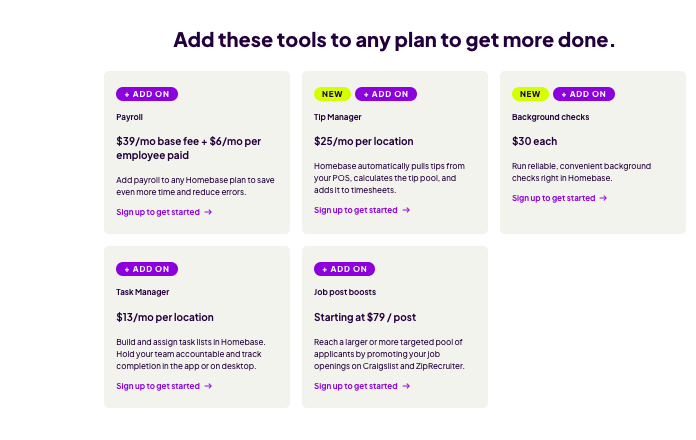 |
ActiveCollab, Harvest vs Homebase: Other Details
Organization Types supported |
|
|
|
|---|---|---|---|
Platforms Supported |
|
|
|
Modes of support |
|
|
|
API Support |
|
|
|
Get help choosing | Get help choosing |
ActiveCollab vs Harvest User Reviews & Rating Comparison
User Ratings | |||
|---|---|---|---|
Rating Distribution | |||
Spotsaas Editor’s POV generated by AI | Buyer sentiment Buyer sentiment is positive across 116 reviews, with strong overall satisfaction. What buyers like
Common complaints
| Buyer sentiment Users generally praise Harvest for its intuitive interface, integrations, and efficient invoicing, though some note limitations in reporting and customization. What buyers like
Common complaints
| Buyer sentiment Overall positive sentiment highlights ease of scheduling, communication features, and payroll integration, tempered by some interface usability concerns. What buyers like
Common complaints
|
Pros and Cons |
|
|
|
Positive Reviews | No reviews available for the product | No reviews available for the product | No reviews available for the product |
| Negative Reviews | No reviews available for the product | No reviews available for the product | No reviews available for the product |
Integrations
Integration with other apps | No Integration information available. | No Integration information available. |
|---|


ActiveCollab, Harvest and Homebase Customers
Customers |  Nike  Cisco  Honda |  Amnesty International  Dell  Happy Cog |  Antique Taco  Woodhouse  Souvla |
|---|
Media and Screenshots
Screenshots |  5 Screenshots |  3 Screenshots |
|---|---|---|
Videos |  3 Videos |  3 Videos |
Alternatives to ActiveCollab, Harvest, Homebase
Alternatives |
|---|





Add another option to compare side by side
Search by product name to compare pricing, fit, and buyer feedback in one view.Compare similar software options


Related Blogs and Articles for Time Tracking Software
Disclaimer: This research has been collated from a variety of authoritative sources. We welcome your feedback at [email protected].
Frequently asked questions
- Which is better, ActiveCollab or Harvest?
- Harvest edges out the other on user ratings (4.5 vs 4.3). That said, the best pick depends on your use case, so use the comparison tables above to evaluate each dimension.
- Do ActiveCollab and Harvest offer a free trial?
- Yes, both ActiveCollab and Harvest offer a free trial.
- What is the starting price of ActiveCollab vs Harvest?
- ActiveCollab starts at Contact for pricing. Harvest starts at $10.80 /User/Month.
- What are the top alternatives to ActiveCollab?
- Top alternatives to ActiveCollab include Quickbase, monday Work Management, Smartsheet, ClickUp, ProWorkflow.
- What are the top alternatives to Harvest?
- Top alternatives to Harvest include Homebase, TimeCamp, Time Doctor, Hyperlogs, Timely.
- What are the trade-offs with ActiveCollab?
- ActiveCollab is a reasonable choice given these strengths: easy to use with a simple interface, making task and project management intuitive for teams; facilitates collaboration between team members and clients, streamlining communication and updates. It is the wrong choice if these would block you: lacks modern UI aesthetics and advanced customization options like drag-and-drop features or improved visual dashboards. It does not include Accounts Payable and Bank Reconciliation.
- What is the honest verdict on Harvest?
- Strengths buyers report for Harvest: easy-to-use interface accessible to non-technical users; effective invoicing system tied directly to tracked time and expenses. Where buyers were disappointed: limited reporting capabilities for complex analysis or large organizations; freemium version lacks advanced features, requiring upgrade for full functionality. It does not include Expense Tracking and Multi-Currency.
More Time Tracking Software comparisons
Side by side breakdowns of the same products against other options in this category.