
9.2
SpotScore

Lookback Review: Is It The Right UX Software For Your Team?
Best for SMB teams · Mid-market · Enterprise
Free Trial Available
 GDPR
GDPRStarts from $99 / Month
 BMW
BMW lyft
lyft Spotify
 ebay
ebay NetFlix
Trusted by teams including BMW
Overview
Pricing
Features
Buyer feedback
Alternatives
Customers
Media
Security & Compliance
Support
FAQ
Blogs
Spotsaas Analysis for Lookback
Lookback at 4.0/5 from 73 reviews and SpotScore 9.2 serves UX researchers conducting remote usability tests with video capture and annotation tools. Product managers use it to centralize test recordings and add timestamped notes during playback. Design teams value the straightforward setup for live remote sessions, though some report connectivity interruptions that can pause testing.
Lookback is a remote usability testing platform for research teams that need to record, store, and analyze user sessions. It replaces manual note-taking during tests by letting teams annotate videos in real time and review sessions asynchronously.
Quick picks:
What is Lookback?
Lookback is a visual-diagramming tool, that enables anyone to easily capture the workflow of their team and provides insight into bottlenecks, miscommunication, and repetitive tasks. With Lookback, user can make hotspots in any image on userr screen, visualize user flows and create interactive stories
Pricing
Starts from $99 / Month
Free Trial available
Best For
Suited for small teams, SMBs, and enterprise
Security & Compliance
GDPRSingle Sign-On (SSO)
Data residency:🇺🇸
Platform
Web + mobile app (iOS & Android)
Lookback Screenshots

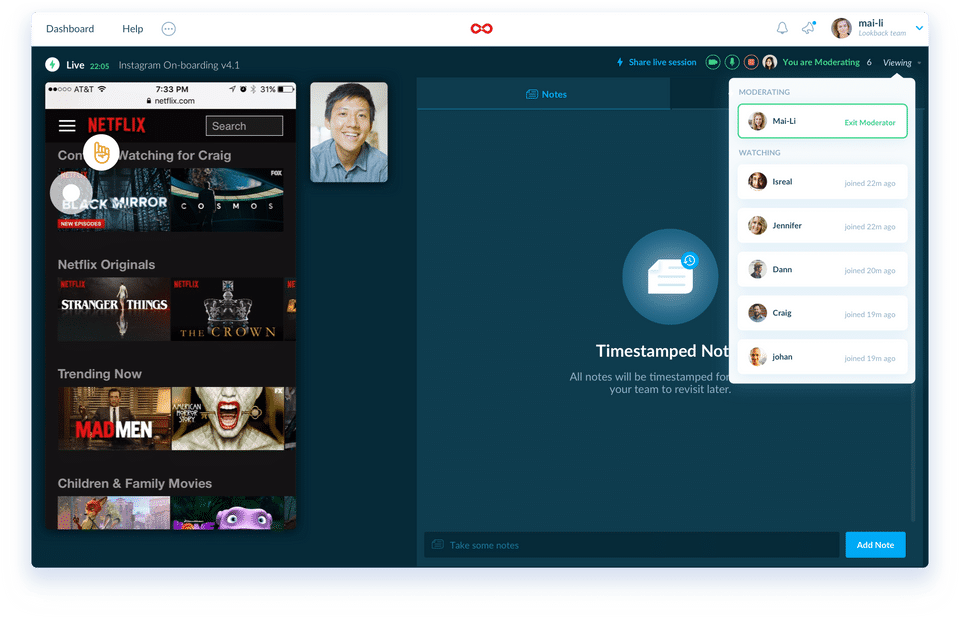
Lookback was reviewed internally using user feedback, in-house testing, and market research to assess its performance, reliability, and user experience. Learn how we review products and our evaluation process.

Who should consider Lookback
- Use cases
- User experience research teams, Product design teams, Remote usability testing
- Team types
- UX researchers, Product managers
- Company size
- Small Business, Medium Business
- Workflow style
- Simple and streamlined
- Setup complexity
- Low
Why teams choose Lookback
Easy setup and use for live, remote usability tests
Centralized storage of video recordings for easy access
Ability to add notes and comments to recordings for efficient analysis
Is Lookback right for you?
Best for remote UX research with easy usability testing and session recording.
Choose Lookback if
- You need simple, streamlined setup for live remote usability tests.
- Your team values centralized video recording storage with note-taking capabilities.
- You want interactive story creation and hotspot features on user screens.
Consider alternatives if
- Your workflows require extensive iOS mobile testing capabilities.
- You depend on deep integrations with other software tools for efficiency.
What buyers should know before shortlisting Lookback
Lookback is a versatile tool that offers great value for user testing and usability research. Users appreciate the convenience of inviting their own participants for testing, whether moderated or not, and the ability to record and store sessions easily.
The platform allows for creating different projects and adding descriptions, enhancing organization. While some users have encountered difficulties with the plug-in causing technical issues and occasional connectivity problems, Lookback generally provides a seamless user experience.
The platform's intuitive interface, easy integration into other platforms, and features like timestamped notes and live observation by multiple team members are highlighted as significant strengths. The ability to record sessions with high-quality video for analysis, real-time remote user research capabilities, and the option to invite team members to observe sessions are key benefits of Lookback.
While there are some areas for improvement, overall, Lookback proves to be a valuable tool for conducting remote usability testing and user interviews, offering a user-friendly and effective solution for gathering feedback.
Lookback pros and cons
- Lookback pros
Easy setup and use for live, remote usability tests
Centralized storage of video recordings for easy access
Ability to add notes and comments to recordings for efficient analysis
- Lookback cons
Technical issues such as connectivity problems during sessions
No iOS app limiting mobile testing capabilities
Ready to try it?
Get started with Lookback
Start your free trial — no credit card required.
Still comparing?
See how it stacks up
Compare Lookback side-by-side with top UX Software alternatives.


What is the pricing of Lookback?
Lookback Pricing Plans
Team
$99
/Month
100 Sessions per year
Moderated & Unmoderated
Remote & In-Person
iOS, Android & Desktop
Virtual Observation Room
Show more +
Insights Hub
$229
/Month
300 Sessions per year
Moderated & Unmoderated
Remote & In-Person
iOS, Android & Desktop
Virtual Observation Room
Show more +
Enterprise
Unlimited Sessions
Moderated & Unmoderated
Remote & In-Person
iOS, Android & Desktop
Virtual Observation Room
Show more +
Weighing your options?
Not sure if Lookback fits your budget?
Lookback reviews and ratings
Buyer sentiment
Users generally appreciate Lookback's ease of use and remote testing features but report occasional technical issues and limited mobile support.
What buyers like
- Ease of use
- Remote usability testing
- Video recording and centralized storage
Common complaints
- Technical/connectivity issues
- Lack of iOS app
Are you using Lookback?

- See if Lookback fits your business
- Real pricing — no sales pressure
- A demo or quick answers, your call
Step 1 of 4
How big is your team?
We tailor recommendations to companies your size.















What are the features of Lookback?
For mobile is a software feature that allows users to access and use software applications on their mobile devices. With the increasing use…
For Websites is a software feature that is designed specifically for websites to enhance their functionality and performance. This feature o…
A heat map (or heatmap) is a color-coded graphical representation of data. Heatmaps make it simple to see and understand complex data at a g…
Prototyping is a software feature that allows developers to create a working model or demo of their proposed software or application. It is…
Screen activity recording is a key feature found in various software that allows users to capture and save their on-screen activities. This…
Unmoderated testing is a software feature that allows users to test, evaluate, and provide feedback on a product or service without the pres…
The term "usability testing" refers to the process of evaluating a product or service by putting it to the test with real people. Participan…
When utilizing a website, a user journey is a path that a user can take to attain their goal. User journeys are used to identify multiple ro…
User research is a vital aspect of software development that involves understanding the needs, preferences, and expectations of the users. I…
Lookback security and data handling
Key compliance certifications and security features for IT and security teams evaluating Lookback.
Certifications

Security features
Developer & data
Alternatives to Lookback
Recommended
Sleek, stylish, and always ready to ...
9.8
Excellent





Lookback Customers
BMW
lyft
Spotify
ebay
NetFlix

Xero

Squarespace

MailChimp

Huge

ThoughtWorks
Lookback Support Options
Frequently Asked Questions About Lookback
Common questions buyers ask before choosing Lookback.
Lookback is a UX Software. Lookback offers User Research, User Journeys, Usability Testing, Unmoderated Testing, Screen Activity Recording and many more functionalities.
Lookback is a strong fit if: You need simple, streamlined setup for live remote usability tests.; Your team values centralized video recording storage with note-taking capabilities.. Consider alternatives if: Your workflows require extensive iOS mobile testing capabilities.; You depend on deep integrations with other software tools for efficiency..
Buyers commonly note the following limitations of Lookback: Technical issues such as connectivity problems during sessions; No iOS app limiting mobile testing capabilities; Occasional bugs causing sound or video interruptions.
Some top alternatives to Lookback includes Figma, UXCam, UserX, UXtweak and UserLook.
Lookback offers Free Trial, Subscription, Quotation Based pricing models
The starting price of Lookback is $99/Month
Ready to try it?
Get started with Lookback
Start your free trial — no credit card required.
About the reviewer
Rajat Gupta is the founder of Spotsaas. Over the past two years, he has reviewed 2,000+ tools across CRM, HR, AI, and finance — applying hands-on product research and a background in commerce and the CFA program to evaluate software through a business and ROI lens. His goal: help teams make software decisions they won't regret.
Disclaimer: This research has been collated from a variety of authoritative sources. We welcome your feedback at [email protected].