
WhenToWork vs QuickStaff Comparison

WhenToWork
Starting at Contact for pricing
- Free Trial
- Large Enterprises
- Medium Business
WhenToWork is a scheduling and tracking tool for small businesses. It also helps large companies with overtime, benefits, social club management and more. Employee scheduling software from WhenToWork is used by medium si…

QuickStaff
Starting at Contact for pricing
- Free Trial
- Medium Business
- Small Business
QuickStaff is the easy-to-use employee scheduling software that's perfect for restaurants, retail stores, offices, health care, and manufacturers. Store daily staff activities, client names, appointments, payments, and m…
WhenToWork leads on user satisfaction with a 4.4-star rating across 284 reviews.
SpotSaaS Analysis
WhenToWorkQuickStaff
The core difference between WhenToWork and QuickStaff is that WhenToWork specializes in straightforward employee scheduling with a focus on shift management, making it ideal for medium to large enterprises in sectors like retail and healthcare. QuickStaff, on the other hand, lacks specific details but may cater to businesses seeking a more flexible staffing solution.
- Best for straightforward employee scheduling - Efficient shift management capabilities - Ideal for medium to large enterprises - Suitable for retail, hospitality, healthcare, and education - User-friendly with color-coded shifts - Offers automated reports and real-time notifications
- Specific details about features are not available - Potentially flexible staffing solution - Target audience and company sizes are unclear - Pricing information is not listed - May cater to various industries - Further evaluation needed for ideal use cases
WhenToWork vs QuickStaff — at a glance
| Feature | WhenToWork | QuickStaff |
|---|---|---|
| Rating | 4.4 / 5 | — |
| Reviews | 284 | — |
| Starting price | Contact for pricing | Contact for pricing |
| Free trial | Yes | Yes |
| Free version | No | No |
| Best for | Large Enterprises, Medium Business, Small Business | Medium Business, Small Business |
| Category | Employee Scheduling Software | Employee Scheduling Software |
| Platforms | SaaS/Web/Cloud, Mobile - Android, Mobile - iOS | SaaS/Web/Cloud |
| API | — | — |
| Support modes | 24/7 (Live rep), Business Hours, Online | Business Hours, Online |
| Certifications | — | — |
| Data residency | US | US |
Key differences between WhenToWork and QuickStaff
- Target audience: WhenToWork is built for Large Enterprises and Medium Business, while QuickStaff targets Medium Business and Small Business.
- Deployment: WhenToWork supports SaaS/Web/Cloud, Mobile - Android, Mobile - iOS; QuickStaff supports SaaS/Web/Cloud.
WhenToWork vs QuickStaff — find the better fit before you commit.
Which tool fits your team best
Which is actually cheaper for your team size
Where each product wins, per real buyers
Most Employee Scheduling Software tools look identical on paper. This comparison cuts to the differences that matter — pricing structure, team fit, and what real buyers found after signing up.
Biggest differences
Features
Pricing
Buying details
Security
Buyer feedback
Integrations
Product tour
Other options
Talk to an expert Talk to an expert | Talk to an expert Talk to an expert |
Biggest differences
Start here before you go deeper into features.
Best for straightforward employee scheduling with efficient shift management.
- You need a simple, user-friendly scheduling tool with color-coded shifts.
- Your organization values automated reports and real-time schedule notifications.
- You want employee self-service for shift swaps and time-off requests.
- Your company requires extensive customization or advanced third-party integrations.
- You need a modern, visually updated user interface with advanced editing features.
Medium Business, Small Business
WhenToWork typically suits Large Enterprises and Medium Business. QuickStaff tends to fit Medium Business and Small Business better. The right choice depends on your team size, workflow, and whether a free trial matters.
Description | WhenToWork is a scheduling and tracking tool for small businesses. It also helps large companies with overtime, benefits, social club management and more. Employee scheduling software from ... Read More about WhenToWork | QuickStaff is the easy-to-use employee scheduling software that's perfect for restaurants, retail stores, offices, health care, and manufacturers. Store daily staff activities, client ... Read More about QuickStaff |
|---|---|---|
Free Trial Availability | ||
Spotsaas ScoreWhat's this? ↗ | 8.6/10 | 7.8/10 |
User RatingsBased on verified Spotsaas reviews | ||
Best Company Size | 10-500 employeesMedium to Large Enterprises | — |
Get pricing help | Get pricing help |
Where each option fits best
See where each product is strongest, which teams it fits, and what causes buyers to keep looking — before you commit.
Based on buyer reviews and verified product data collected by Spotsaas.
Key strengths
- Streamlined Scheduling: WhenToWork simplifies the scheduling process, allowing managers and administrators to create and modify shift schedules effortlessly. This means less time spent on administrative tasks and more focus on team productivity.
- Enhanced Communication: With WhenToWork, I can easily communicate schedule changes or updates to the entire team in real time, ensuring everyone stays informed. This fosters a culture of transparency and reduces miscommunication.
- Employee Self-Service: Empower your employees with self-service options. They can view their schedules, request time off, or swap shifts seamlessly, which enhances job satisfaction and reduces the burden on management.
No key benefits available yet.
Best fit
- 10 to 500 employees
- Retail, Hospitality, Healthcare, and Education
- Shift Managers, Store Managers, HR Coordinators, and Operations Supervisors
No best-fit guidance available yet.
Reasons buyers look elsewhere
- Users may seek alternatives to WhenToWork if they require more robust features for complex scheduling needs, such as advanced reporting, automated shift reminders, or integration with payroll systems to streamline their operations.
- Some organizations might find WhenToWork's user interface less intuitive, prompting them to explore alternatives that offer a more user-friendly design and enhanced mobile accessibility for both managers and employees.
- Businesses with specific compliance requirements may look for alternatives that provide tailored solutions for labor laws and scheduling regulations, ensuring they remain compliant while optimizing workforce management.
No alternatives guidance available yet.
Software Demo
Demo |
|---|
Need a second opinion?
Get shortlist help from a software advisor
Share your priorities, budget, and team needs, and we’ll help you narrow the options and understand the tradeoffs before you talk to vendors.
How do WhenToWork and QuickStaff Compare on Features?
Total Features | 9 Features | 6 Features |
|---|---|---|
Unique Features | No unique features | No unique features |
Get Quote | Get Quote |
Compare WhenToWork and QuickStaff on pricing
Review starting price, plan structure, and free-trial access side by side so you can see which option fits your budget and buying process.
Pricing Option | ||
|---|---|---|
Pricing Plans |
|
|
Pricing Page |  |  |
Other Details
Organization Types supported |
|
|
|---|---|---|
Platforms Supported |
|
|
Modes of support |
|
|
API Support |
|
|
Get help choosing | Get help choosing |
Security & Compliance
Certifications, data handling, and security controls for IT and compliance evaluators.
HIPAA | — | ✗ No |
|---|---|---|
Data Residency | 🇺🇸 US | 🇺🇸 US |
WhenToWork User Reviews & Rating Comparison
User Ratings | No reviews available for the product | |
|---|---|---|
Rating Distribution | No reviews available for this product | |
Spotsaas Editor’s POV generated by AI | Buyer sentiment Overall positive sentiment highlights ease of use and scheduling efficiency, tempered by concerns over outdated interface and limited customization. What buyers like
Common complaints
| What buyers like
Common complaints
|
Pros and Cons |
|
|
Positive Reviews | No reviews available for the product | No reviews available for the product |
List of Customers
Customers |  The Magic house  Extravagante  Laniar |  UCLA  Staff'd  Oxygen Event Works |
|---|
Media and Screenshots
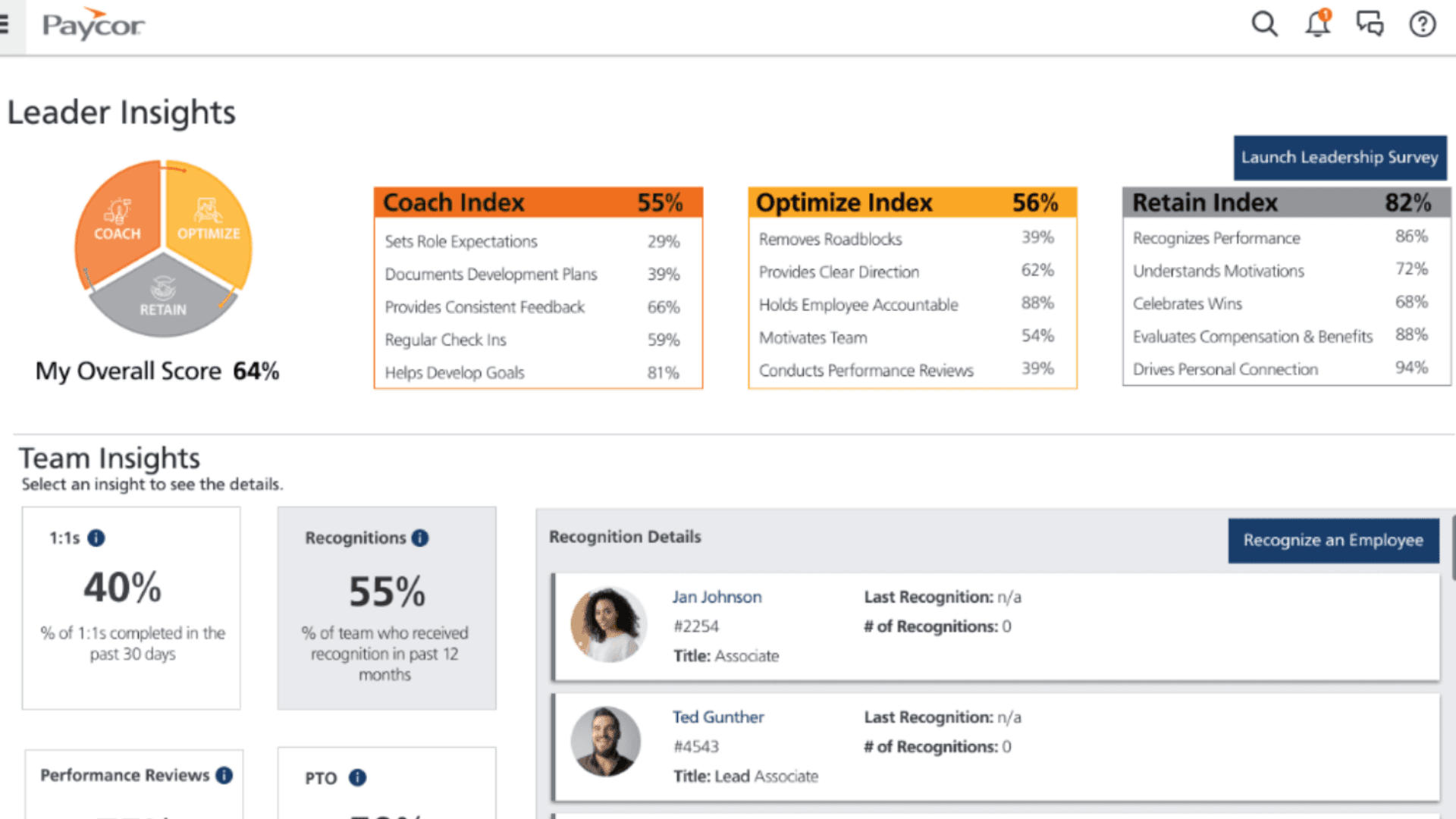
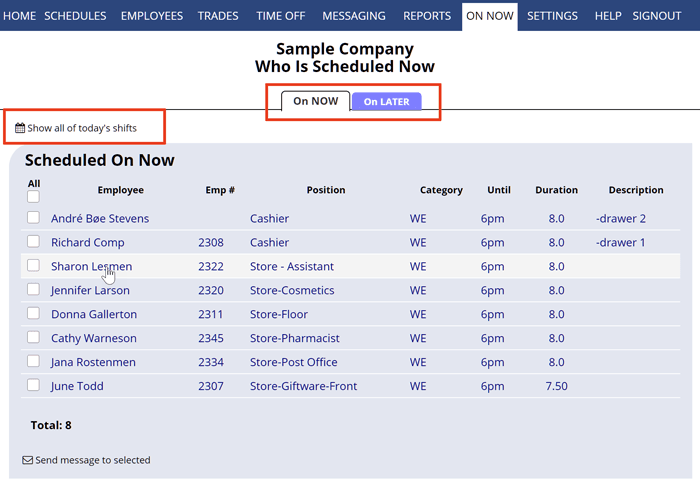
Screenshots |  1 Screenshots |  2 Screenshots |
|---|---|---|
Videos |  3 Videos |  2 Videos |
Top Alternatives to WhenToWork and QuickStaff in 2026
Alternatives |
|---|


Add another option to compare side by side
Search by product name to compare pricing, fit, and buyer feedback in one view.Compare similar software options





Related Blogs and Articles for Employee Scheduling Software



Disclaimer: This research has been collated from a variety of authoritative sources. We welcome your feedback at [email protected].
Frequently asked questions
- Which is better, WhenToWork or QuickStaff?
- WhenToWork edges out the other on user ratings (4.4 vs -1.0). That said, the best pick depends on your use case — use the comparison tables above to evaluate each dimension.
- Do WhenToWork and QuickStaff offer a free trial?
- Yes, both WhenToWork and QuickStaff offer a free trial.
- What is the starting price of WhenToWork vs QuickStaff?
- WhenToWork starts at Contact for pricing. QuickStaff starts at Contact for pricing.
- What are the top alternatives to WhenToWork?
- Top alternatives to WhenToWork include 7shifts, Findmyshift, Schedule it, TrackSmart Scheduling, ScheduleBase.
- What are the top alternatives to QuickStaff?
- Top alternatives to QuickStaff include Homebase, 7shifts, Schedulefly, TrackSmart Scheduling, eSchedule.