

HotSchedules is a tool built to take the hassle out of workforce management. Known for its quick scheduling features and clear interface, it changes how teams are managed and brings order to daily operations.
This post looks at how HotSchedules goes beyond basic scheduling. It covers the ways the platform simplifies daily operations, raises employee satisfaction, and improves overall productivity for teams in hospitality and retail.
Key Takeaways
- HotSchedules saves managers up to 75% of the time it takes to create employee schedules, making the process quick and straightforward.
- The platform improves staff morale by considering employees’ schedule preferences, which in turn can reduce turnover rates and increase loyalty.
- Clear communication through HotSchedules keeps everyone updated on shifts in real time and helps the team run smoothly.
- It integrates with POS systems for better forecasting and labor cost management, which improves efficiency and customer service.
- By using HotSchedules, businesses in hospitality or retail can improve both staffing plans and overall workforce engagement.
HotSchedules Review
HotSchedules brings efficiency to the hospitality industry and simplifies the often complex work of workforce scheduling, from building rosters to tracking who is available for each shift.
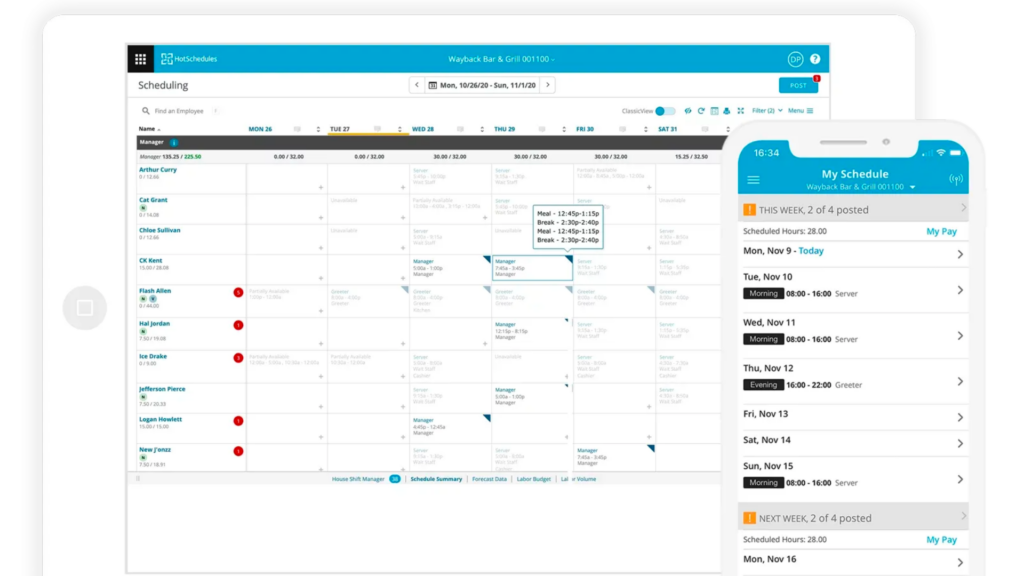
Built with both independent business owners and large operations in mind, this platform offers an online scheduling solution that handles the details of labor management.
Its features go beyond shift scheduling. HotSchedules supports full time-management practices and real-time tracking of business performance.
The value of the software shows up quickly as managers gain a clear lift in productivity. The days spent wrestling with spreadsheets or negotiating shift swaps by hand are largely over, and the time saved goes back into running the business.
Instead, HotSchedules delivers fast, efficient employee scheduling and cuts schedule creation time by up to 75%. That drop in administrative overhead lets managers put their attention back on staff engagement and overall performance.
Pros and cons of HotSchedules
| Pros | Cons |
|---|---|
| ✔ Intuitive and user-friendly interface | ✘ Higher cost for small businesses |
| ✔ Accessible from any device with internet | ✘ Limited integration with other software |
| ✔ Real-time tracking of business performance | ✘ Customer support response time varies |
| ✔ Simplifies shift swapping and time-off requests | ✘ The mobile app sometimes experiences glitches |
| ✔ Improves employee engagement and productivity | ✘ Some features are only in higher-priced plans |
| ✔ Accessible from any device with internet |
Is HotSchedule free?
No, HotSchedules is not free. It operates on a subscription-based pricing model, where businesses pay a set fee per employee or per location on a monthly basis.
Pricing Review
| Pricing/Plan | Essentials | Plus | Quote-Based |
|---|---|---|---|
| Monthly | $2 per employee per month | $4 per employee per month | Quote-based pricing |
| Features | – Mobile app (Android and iOS) | – Everything in Essentials Plus: | – Everything in Plus: |
| – Employee scheduling | – Attendance management | – POS integration | |
| – Swap, release, and pick up shifts | – Payroll management | – Sales and labor budget | |
| – Time-off management | – Meal and break enforcement | – Weather feeds and forecast adjustments | |
| – Merge work and personal calendar | – Multi-store administration | – Live training support | |
| – Overtime management | – 24/7 customer care (phone and online) | ||
| – Online/email support |
Additional Costs
- Setup Fees: Depending on the scale of implementation, there may be initial setup fees.
- Training and Onboarding: Some packages include training, but businesses may pay extra for full onboarding sessions.
- Add-ons: HotSchedules offers additional features that can be purchased as add-ons, such as enhanced analytics and team communication tools.
Benefits of Using HotSchedules
The HotSchedules app offers fast, efficient employee scheduling, which matters for managing a workforce in hospitality or retail. It also raises employee engagement through clear communication and labor management, which improves business performance.
Fast and Efficient Employee Scheduling
Creating a good work schedule can feel like solving a puzzle, but HotSchedules turns the task into an organized, simple process. Managers cut the hours spent arranging shifts thanks to a scheduling tool built for quick, convenient staff scheduling.
The platform simplifies the whole experience of workforce planning and makes fast roster creation possible in a few clicks.
Faster scheduling frees up time for managers so they can focus on other critical tasks such as team development, training, or customer service improvements. Managers report up to 75% time savings when building their employee rosters, which is a large share of the work that used to go into the task.
Efficiency is at the heart of HotSchedules
Check more The Benefits of Using Sling Schedule for Employee Shift Planning
Enhanced Employee Engagement
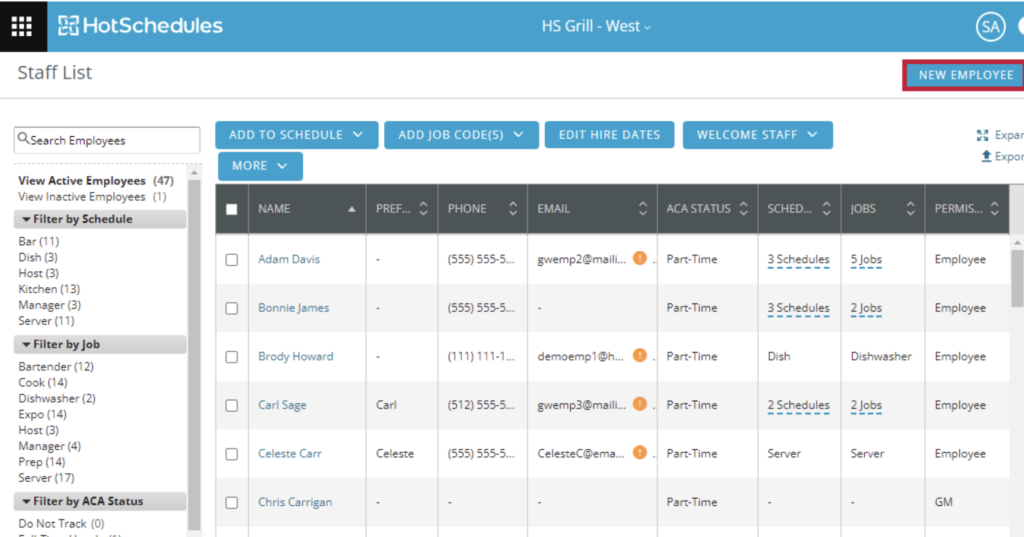
HotSchedules supports employee satisfaction with tools that promote engagement and productivity across the team. Its set of features helps managers build schedules that account for staff preferences and availability, which leads to a more motivated and focused workforce.
When individual needs are met, employees feel valued, which builds loyalty and reduces turnover rates.
HotSchedules improves managerial efficiency and also strengthens human resource management.
Employees can view their schedule and swap or release shifts with one click. Clear communication channels in the app keep everyone informed about shifts and changes in real time, so teams run smoothly.
HotSchedules Web App and Mobile App
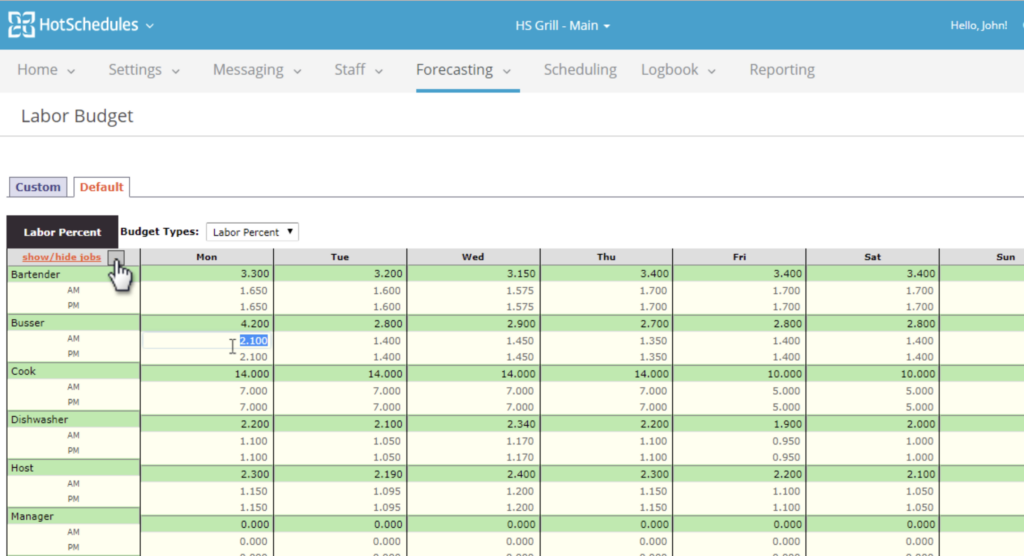
HotSchedules provides both a web app and a mobile app for workforce management and scheduling in the hospitality industry.
The HotSchedules web app offers a set of tools for managing scheduling, payroll integration, and real-time reporting, which suits managers who handle advanced workforce planning.
The mobile app is built for quick, on-the-go access to shift management, time-off requests, and push notifications, giving employees the flexibility to handle scheduling tasks from their devices.
| Feature | Web App | Mobile App |
|---|---|---|
| Advanced Scheduling | ✔ | ✖ |
| Shift Management (Swap, Release, Pick Up Shifts) | ✔ | ✔ |
| Attendance Tracking | ✔ | ✔ |
| Payroll Integration | ✔ | ✖ |
| Real-Time Reporting | ✔ | ✖ |
| Multi-Location Management | ✔ | ✔ |
| Push Notifications | ✖ | ✔ |
| Time-Off Requests | ✔ | ✔ |
| Sync with Personal Calendars | ✖ | ✔ |
| Communication Tools (Messaging) | ✔ | ✔ |
How HotSchedules Integrates with POS Systems
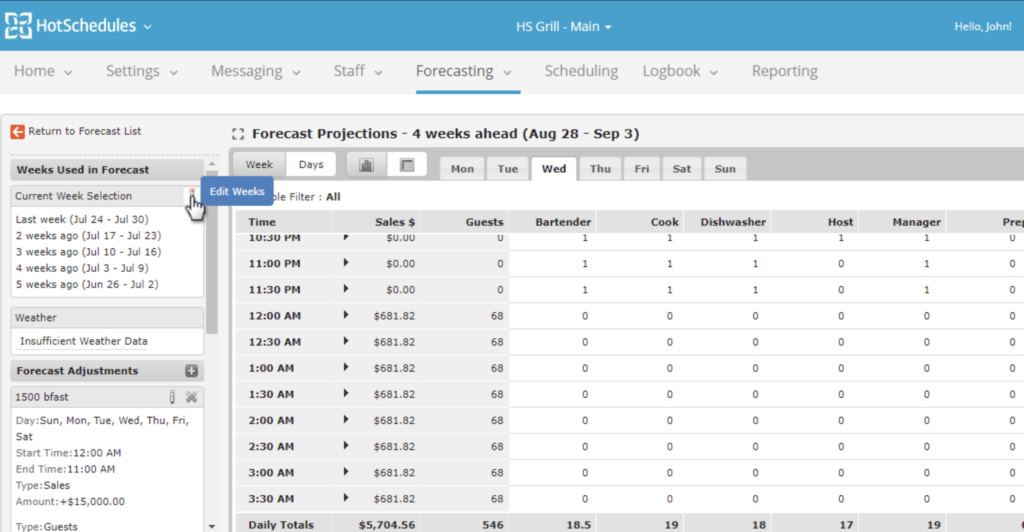
HotSchedules integrates with POS systems and improves efficiency and accuracy in workforce management. The POS integration connects employee scheduling software with point-of-sale systems and improves forecasting accuracy by 75%.
This connection automates scheduling tasks so that shifts line up with real-time sales data from the point of sale. Businesses can then control their labor costs more closely and keep staffing levels right during busy and slow periods, including peak hours.
The integration between HotSchedules and POS systems also improves overall operational efficiency. By combining scheduling software with point-of-sale systems, businesses predict customer traffic patterns more accurately and adjust staff schedules to match.
This leads to better customer service and helps businesses use their staff and resources well. With this combined approach, managers can address staffing needs ahead of time and react to changes in demand while keeping operations steady within their establishments.
Conclusion
The HotSchedules app is one of the fastest and easiest ways to manage your schedule and communicate with team members in 2024. It offers fast, efficient schedule management, and that speed carries through to improved workforce productivity and stronger business performance over time.
With HotSchedules, hospitality and retail businesses can build a productive, engaged workforce and free teams to focus on strong service and business growth.
Scheduling for Hourly and Shift-Based Teams
Quick Answer: Shift scheduling software builds rotas, publishes them to staff, handles swap and availability requests, tracks clock-in against the schedule, and forecasts labour cost before the week starts. For businesses where labour is the largest controllable cost, that forecast is the feature that pays for the tool.
The operational difference between a spreadsheet rota and scheduling software is not the building — it is everything after publication. Availability changes, swap requests, no-shows and last-minute cover are what consume a manager’s week, and those are the parts software actually removes.
Labour-cost forecasting deserves particular attention when comparing tools. Seeing projected cost as you build the rota, against budget and against forecast demand, changes decisions while they can still be changed. Reporting that only shows what a week cost after it happened is considerably less useful.
Frequently Asked Questions
How can Hotschedule improve employee scheduling?
Hotschedule improves employee scheduling by providing a central platform for creating, managing, and communicating schedules.
Can Hotschedule enhance employee engagement?
Yes, Hotschedule can raise employee engagement through features like shift swapping, instant communication, and access to important updates and announcements.
What are the key benefits of using Hotschedule for employees?
Employees can benefit from improved work-life balance, increased flexibility in managing their schedules, and better communication within the team.
Does Hotschedule offer tools for performance tracking?
Yes, Hotschedule provides tools for monitoring attendance, tracking hours worked, and evaluating overall workforce performance.
Is it easy to integrate Hotschedule with existing payroll systems?
Integrating Hotschedule with payroll systems is built to process time and attendance data smoothly for accurate payroll management.
How does scheduling software reduce labour cost?
Mainly by making cost visible while the rota is still editable — projected spend against budget as you build it. Secondary savings come from reducing overtime caused by poor coverage planning and cutting the manager hours spent on swaps and cover.
What businesses need shift scheduling software?
Restaurants, retail, hospitality, healthcare, logistics and any operation running variable shifts across days or sites. The trigger is usually a second location or a team large enough that availability changes become a daily task.
Can employees swap shifts in the app?
Most platforms let staff request swaps directly, with manager approval and rules preventing swaps that would breach overtime or qualification requirements. Self-service swaps typically remove more manager time than any other single feature.
Does scheduling software integrate with payroll?
Established tools export approved hours to payroll directly, which is where most of the administrative saving comes from. Without it, someone re-keys timesheets each cycle — slow, and a common source of pay errors.
How far ahead should schedules be published?
Predictive scheduling laws in some US jurisdictions require advance notice, commonly around fourteen days, with penalties for late changes. Even where not mandated, publishing earlier reduces no-shows and last-minute cover requests.
What is the difference between scheduling and time tracking?
Scheduling plans who should work when; time tracking records who actually did. They are complementary — comparing planned against actual is what surfaces overtime creep and habitual early clock-ins.
How much does scheduling software cost?
Most platforms price per employee per month, often in the low single digits, with free tiers available for single-location businesses. Advanced forecasting and multi-site features typically sit on higher tiers.
How long does it take to implement scheduling software?
Single-location businesses are usually running within a week or two. Multi-site rollouts take longer, mostly spent loading staff qualifications and site rules without configuring the software itself.
Can scheduling software forecast labour cost?
Better tools show projected cost as you build the rota, against budget and against forecast demand. Seeing the number while the schedule is still editable is what changes decisions; retrospective cost reporting arrives too late to act on.
How does scheduling handle multiple locations?
Multi-site tools let staff be scheduled across locations, show availability and qualifications per site, and consolidate labour reporting. Deputy and Connecteam both model per-site qualifications; simpler tools treat staff as interchangeable across locations, which produces rotas that look covered and are not.
What are predictive scheduling laws?
Regulations in some US jurisdictions requiring employers to publish schedules a set period in advance, commonly around fourteen days, with penalties for late changes. Scheduling software that tracks notice periods helps demonstrate compliance.
Can employees set their availability?
Most platforms let staff maintain availability and time-off preferences, which the scheduler then respects when building rotas. This removes a large share of the swap requests that would otherwise arrive after publication.
How do you reduce no-shows with scheduling software?
Publish earlier, send automated shift reminders, and make swap requests easy enough that people arrange cover, not simply not appearing. Most no-shows are cover problems that nobody had a low-friction way to solve.
How do you handle last-minute shift cover?
Publish open shifts to qualified staff and let them claim them, rather than a manager phoning round. Self-service cover fills gaps faster and removes the most disliked part of a scheduling manager’s week.

- Independent picks for exactly what you just read about
- Matched to your team size & needs
- Vendors don't pay for placement
Step 1 of 4
How big is your team?
We tailor recommendations to companies your size.















Related Articles
AI Software
AI Receptionist in 2026: What It Does, What It Costs and How to Choose
Continue reading →
Customer Support Software
Best Free Help Desk Software in 2026: Free Plans and Open Source Tools Compared
Continue reading →
AI Software
Best AI Voice Agents in 2026: Contact-Center and Developer Platforms Compared
Continue reading →
AI Software
AI Customer Service in 2026: Use Cases, Platforms, Pricing and Metrics
Continue reading →