

Managing a team can feel like juggling, and scheduling is usually the hardest part to keep steady. Between shift swaps, time off, and last-minute changes, a manager can lose hours to it every week. WhentoWork is a dedicated tool for online employee scheduling that aims to make that job simpler.
This review looks at how the tool’s latest features and pricing serve businesses that want to save time on scheduling in 2024. It also covers where WhentoWork works well, where it falls short, and how it stacks up against the main alternatives.
Key Takeaways
- WhentoWork is a user-friendly online employee scheduling platform with core features like shift reminders, automatic scheduling, and easy time off requests that can save managers hours of planning.
- The tool offers several subscription tiers for different business needs and sizes, folding functions like API access and mobile app use for on-the-go management into its pricing plans.
- Most users find WhenToWork intuitive and helpful for managing work schedules, though some point to limits in reporting and customization that lead them to weigh alternatives such as Shifts by Everhour, 7Shifts, DeskTime, Buddy Punch, or Deputy.
- Before choosing, businesses should compare WhenToWork against other tools on the features they need versus their budget, and pick the option that fits both.
- Employers in shift-based industries such as retail, hospitality, or healthcare may get the most out of WhentoWork’s automation and communication tools for managing their workforce.
Comprehensive Review of WhenToWork Features
WhenToWork offers a mix of basic and advanced features, including shift reminders, API access, time off requests, and automatic scheduling. The interface is built for ease of use and day-to-day workforce management.
Basic Features
WhentoWork is a straightforward online employee scheduling solution. Managers can build work schedules quickly, factoring in employee preferences and availability as they go.
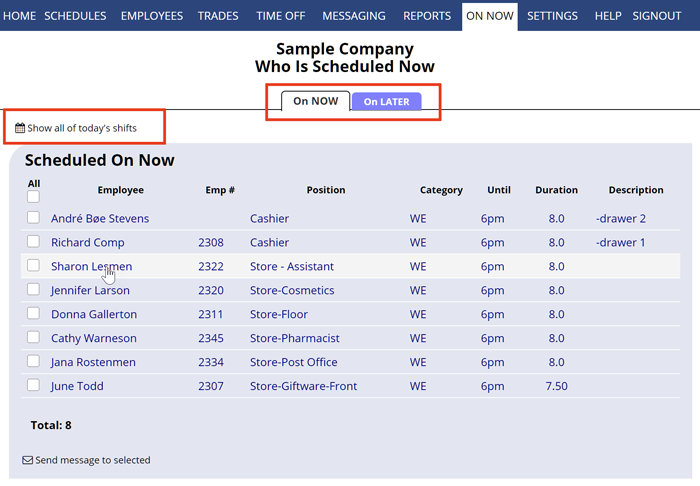
Employees submit time off requests directly through the platform, which makes it easier for managers to handle absences. Requests, approvals, and availability all sit in the same place, so managers do not have to track them across email or paper forms.
Another core part of WhentoWork is its automatic scheduling feature. It removes the manual work of planning shifts by accounting for variables like staff roles and available hours.
Shift reminders go out automatically so everyone stays on track, which cuts down no-shows and confusion about shift times. The mobile app extends this to both employees and managers, keeping them informed and able to communicate while on the go.
Advanced Features
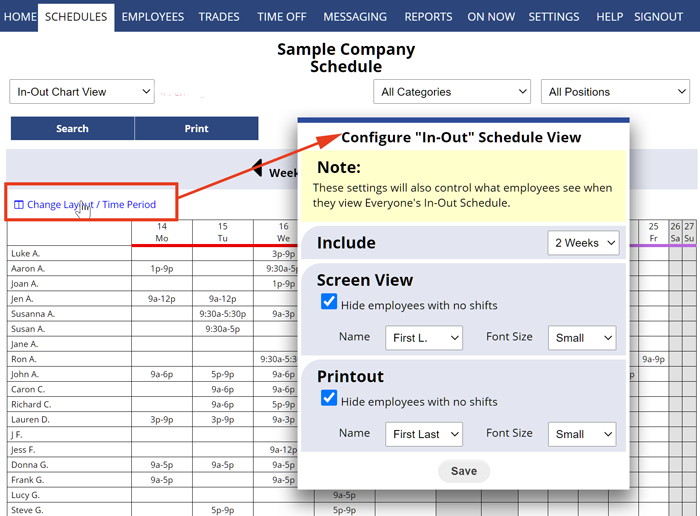
WhenToWork’s advanced features go further with employee management and workforce efficiency. Its automatic scheduling tools build shifts around staff availability and employee preferences, saving managers hours of planning each week.
These algorithms balance workloads, reduce conflicts, and keep shift distribution fair, so no one is repeatedly stuck with the least popular hours.
API access lets the platform share data in real time with your existing systems and other business tools. The mobile app keeps teams connected with instant updates on shift changes and time off requests.
This keeps communication open between staff and management and supports a more collaborative workplace, since changes reach people right away, not at the start of the next shift. Advanced reporting gives a closer look at labor costs, so businesses can make informed decisions about growth and profitability.
User Interface and Design
Beyond the advanced features, the interface and design matter too. A tool’s success often depends on how easily people can find their way around it, and WhenToWork keeps that experience clean.
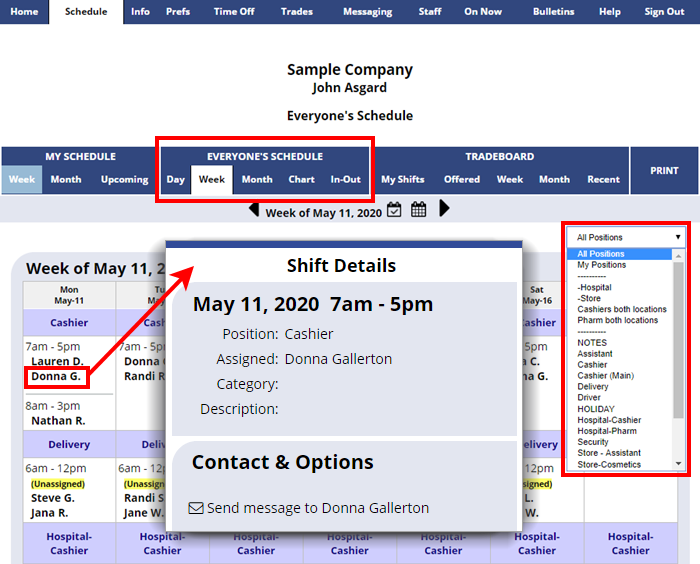
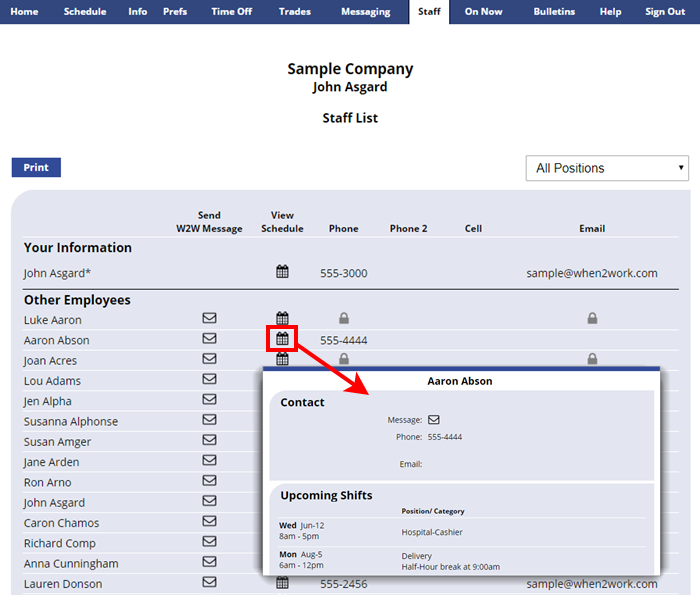
The layout is intuitive, with a clear structure that guides users through shift planning without clutter. Bold icons and color-coded tags make it easy to spot different job roles at a glance, which matters in fast-paced work environments.
A good scheduling tool needs more than function; it should be pleasant to use. WhenToWork answers that with a clean, readable platform that both managers and staff are comfortable working in.
Responsive design keeps the experience consistent whether you open the software on desktop or the mobile app, so a manager can start a schedule at a desk and finish it from a phone. Quick-access buttons for time off requests, shift reminders, and employee messaging speed up daily tasks and add to overall satisfaction with the software.
WhenToWork Pricing
WhenToWork uses subscription pricing with tiers for different business needs. Each plan lists the features it includes, so businesses can pick the package that fits their requirements and budget.
Subscription Pricing Details
Subscription pricing for WhenToWork starts at a competitive rate, with tiers for businesses of different sizes. Each tier bundles features such as employee scheduling, shift reminders, and time off requests.
The structure is clear and flexible, so businesses can select the plan that matches their needs and budget without paying for a tier they will not use. API access and mobile app use are also built into the plans for added functionality.
The features in each package add up to a full set of tools for online employee scheduling. Businesses get automatic scheduling, availability management, and in-platform employee communication.
Included Features in the Pricing
Beyond the pricing tiers, it helps to know what each plan includes. WhenToWork packs a useful set of features into its pricing that support day-to-day scheduling and management.
The plans cover shift reminders, time off requests, automatic scheduling, and API access. Users also get employee availability management tools, a mobile app for scheduling on the go, and communication channels for coordinating their workforce.
With these features included, WhenToWork gives users the tools they need to run scheduling smoothly and keep operations efficient.
User Experience of WhenToWork
WhenToWork has a user-friendly interface and customizable features that make it easy for employees to manage their schedules. Some users, though, run into limits with reporting and customization and start looking at other scheduling tools.
Advantages and Disadvantages
WhenToWork has a user-friendly interface that simplifies creating and managing staff schedules. It also gives managers tools for tracking employee availability, handling shift reminders, and processing time-off requests.
API access lets it connect with other workforce management systems, which helps if a business already runs payroll or HR software it wants to keep.
One drawback is the lack of advanced features next to some competing platforms. Some users find the absence of automatic scheduling or fuller communication tools limiting, especially larger teams that need more than the basics.
User Reviews
Looking at what users say, employees like the platform’s intuitive design and mobile access, which let them manage schedules from anywhere.
They also praise the shift reminder feature for helping them stay organized and on time, which keeps workflow steady.
Managers say WhenToWork makes scheduling simpler and improves communication with their teams, cutting down the back-and-forth around who works when. Still, some point to limits in customizing certain features and want stronger reporting options.
Top 5 Alternatives to WhenToWork
WhenToWork is a popular pick for online employee scheduling, but several alternatives are worth a look. Shifts by Everhour, 7Shifts, DeskTime, Buddy Punch, and Deputy are all solid options with their own features and pricing.
Each one has strengths and weaknesses that may fit your organization’s needs better, whether that comes down to price, ease of use, or the depth of its scheduling and reporting tools.
Shifts by Everhour
Shifts by Everhour is a clear, efficient way to manage employee schedules. Its user-friendly interface and its links to popular productivity tools keep the scheduling process moving.
The software makes shift management easy, letting supervisors assign shifts by employee availability and preference. It also includes shift reminders and time off requests to keep managers and employees in sync.
A key advantage is the mobile app, which lets employees check their schedules and message teammates from anywhere. That flexibility keeps workforce management running smoothly and keeps everyone informed.
Features & Pricing of Shifts by Everhour
Shifts by Everhour pairs a user-friendly interface with a full feature set for online employee scheduling. It handles employee messaging, automatic shift reminders, and time-off request management, which suits businesses of all sizes.
With API access and a mobile app, Shifts by Everhour gives managers room to handle employee availability and scheduling from wherever they happen to be.
Its subscription pricing is cost-effective for the value it provides, so smaller teams are not priced out. The included features cover the main parts of employee scheduling in one place, which fits how modern businesses work and cuts down on the number of separate tools a team has to run.
That makes Shifts by Everhour a strong option among online scheduling tools, especially for teams that want advanced functionality at a reasonable price.
7Shifts
7Shifts offers a user-friendly interface and a strong feature set for managing employee schedules. It handles quick schedule creation, shift management, time-off requests, and availability tracking.
With mobile app access, staff can message managers and co-workers about their schedule preferences or changes in availability without waiting until they are back on site.
Scheduling gets easier through 7Shifts’ automatic scheduling feature, which allocates shifts by employee availability and preference. That keeps workforce management efficient while meeting employee needs.
Features & Pricing of 7Shifts
7Shifts brings a solid feature set for online employee scheduling, including shift reminders, time off requests, and API access. Its user-friendly interface and mobile app support employee messaging and availability management.
Its automated scheduling feature also speeds up the process and saves managers time and effort, since the system drafts shifts instead of the manager filling every slot by hand.
On pricing, 7Shifts offers subscription plans that match its advanced features. That makes it a good fit for businesses that want a full scheduling solution without overspending.
The platform’s practical benefits keep workforce scheduling and staff management effective.
DeskTime
DeskTime is a versatile scheduling tool with a broad approach to online employee scheduling. With features like time tracking, productivity analysis, and project time management, it gives businesses a capable option for workforce scheduling.
Its user-friendly interface and mobile app support employee communication and availability management. API access also makes it easy to connect with other business software.
All told, DeskTime suits companies that want to simplify scheduling and lift workforce productivity, particularly those that care about how time is spent as much as when people are on shift.
DeskTime works well as an employee management tool, offering automatic scheduling, shift reminders, and time off request management in one platform. That takes the pain out of juggling employee preferences and keeps staffing needs covered.
Features & Pricing of DeskTime
DeskTime offers features that simplify employee scheduling and support productivity. Managers can track time and attendance, manage shifts, handle time-off requests, and message employees in one place.
The platform also surfaces employee availability and preferences, which helps businesses build schedules that meet operational needs and keep employees satisfied. That balance is easier to hit when the data sits in front of the manager as the schedule takes shape.
On pricing, DeskTime has competitive subscription options for small businesses through larger enterprises, so a team can start small and move up as it grows. The plans include API access, mobile app access for scheduling on the go, shift reminders, automatic scheduling, and more.
Buddy Punch
Buddy Punch is a user-friendly platform for online employee scheduling and time tracking. Its intuitive interface lets employees manage schedules, request time off, and message their team.
The mobile app gives employees an easy way to check their shifts and get shift reminders while on the go, so they are less likely to miss a change or show up at the wrong time.
Managers get an automatic scheduling feature that builds and manages shifts by employee availability. API access also connects it with other systems to keep operations efficient.
Features & Pricing of Buddy Punch
Buddy Punch has a user-friendly interface that makes it easy for employees to clock in and out on any device. It offers automatic scheduling and shift reminders and lets employees manage availability and submit time off requests.
With API access, companies can connect Buddy Punch to other systems. The mobile app supports real-time messaging between managers and staff for tighter coordination.
On pricing, Buddy Punch has flexible subscription plans for businesses of all sizes, so you pay in line with your headcount. Features like time tracking, scheduling tools, and mobile app access make it a cost-effective way to manage workforce scheduling.
Deputy
Deputy is a capable employee scheduling solution. It handles workforce management, automatic shift scheduling, and time tracking. With Deputy’s intuitive interface, supervisors can manage employee availability and keep communication simple.
The mobile app gives employees quick access to schedules and notifications while on the go, keeping the whole team on the same page about who is working.
Deputy provides API access for custom integrations with other business tools, so it adapts to a range of operational needs. Its features cover the shifting demands of businesses across industries, which makes it a flexible choice for online employee scheduling.
Features & Pricing of Deputy
Deputy offers a solid feature set for employee scheduling and management. Users can create and manage schedules, track time and attendance, handle shift changes, and message team members.
The platform’s intuitive interface is easy for both managers and employees to navigate, which helps teams adopt it quickly and use it well.
On pricing, Deputy has flexible subscription options for different businesses. Users can choose from plans with different levels of functionality and pay only for the features they need, which keeps the cost tied to what the team actually uses.
Comparing WhenToWork with Its Alternatives
When you compare WhenToWork with its alternatives, weigh the features, pricing, and user experience of each tool. Knowing where they line up and where they differ helps you make a choice that fits your business.
Key Similarities
WhenToWork and its top alternatives share a lot of common ground as online scheduling solutions. All of them offer shift reminders, time off requests, and API access for managing a workforce.
They also put mobile app access front and center, so employees can manage their schedules on the go. On top of that, each one includes tools for employee communication and availability management to keep scheduling organized.
These shared features show a common goal: meeting the range of business needs with full scheduling tools that favor ease of use, flexibility, and clear communication. For a buyer, it means the basics are covered no matter which of these tools you pick.
Key Differences
The platforms also differ in real ways. One is the level of flexibility each offers for shift scheduling and availability management.
Another is the range of features for employee communication and time off requests, where some tools go deeper than others. Their pricing models and subscription plans vary too, which is a difference worth checking when picking a scheduling tool, since two plans at a similar price can include very different features.
Comparing WhenToWork with the alternatives also shows clear gaps in interface design and integration options, each with its own advantages and limits for businesses shopping for a scheduling tool. The right pick usually depends on which of those gaps matters most to your team.
Who Should Use WhenToWork?
Employers and managers who want an efficient way to schedule staff, track time and attendance, and keep team communication in one place will get value from WhenToWork.
Businesses with shift-based operations or multiple locations can also use WhenToWork’s features to manage their workforce and keep coordination tight across sites, so a manager can see the whole schedule in one view.
Ideal Use Cases
For businesses with shift-based schedules, WhentoWork handles employee availability, time-off requests, and shift reminders in one place. It suits companies that want to automate scheduling while keeping employees in the loop through the mobile app.
Its API access also connects with other workforce management systems, which fits organizations that want scheduling and attendance tracking in a single flow, not spread across separate tools.
Small to mid-sized businesses in retail, hospitality, healthcare, and service industries can benefit from WhentoWork’s automatic scheduling feature, which builds shifts around employee preferences and availability. Those are the settings where schedules change often and reminders keep shifts covered.
Who Might Prefer Alternatives
Businesses that want a more visual, intuitive interface may want to look at the alternatives. So might employees who favor mobile-first scheduling tools with tighter communication features.
Organizations that need strong API access and close integration with other workforce systems may lean toward the alternatives as well. Teams that want more customization in automatic scheduling and time-off request workflows could also find value there.
The flexibility of these substitute platforms fits varied industries such as retail, healthcare, and hospitality, each with its own scheduling demands. Companies that want to add shift reminders to their existing calendar apps, or that need fuller availability management, may find a better match among the options above.
Conclusion: Is WhenToWork the Right Choice for You?
After reviewing the latest pricing, features, and alternatives for online employee scheduling in 2024, WhentoWork stands out as a full solution for managing a workforce.
Its range of features and user-friendly interface make it a good choice for businesses that want effective scheduling tools without a steep learning curve. Even so, knowing your organization’s specific needs and preferences should come first.
With a scheduling tool like WhentoWork, name your key priorities and match them to the features on offer; that comparison shows whether it fits or whether one of the alternatives is closer to the mark.
Reading user experiences also gives a fuller picture of the advantages and disadvantages of each platform. That makes for a clear comparison between WhenToWork and its alternatives, so businesses can find the solution that matches their needs.
(Image credit: WhentoWork)
Frequently Asked Questions
1. What features does WhentoWork offer for online employee scheduling?
WhentoWork offers features like shift scheduling, availability management, time-off requests, and communication tools for effective employee scheduling.
2. How much does WhentoWork cost in 2024?
The pricing for WhentoWork varies depending on the number of employees and additional features required. It is best to check their website or contact them directly for current pricing.
3. Are there any alternatives to WhentoWork for online employee scheduling?
Yes, alternatives to WhentoWork include platforms like When I Work, Deputy, Humanity, and Shiftboard that offer similar scheduling functionalities.
4. Can employees access their schedules through WhentoWork’s platform?
Yes, employees can easily access their schedules using the WhentoWork mobile app or web portal, allowing them to view shifts and make time-off requests.
5. Is it possible to integrate payroll systems with Whentowork?
Yes, Whentowork allows integration with various payroll systems for the transfer of worked hours and wages data.

- Independent picks for exactly what you just read about
- Matched to your team size & needs
- Vendors don't pay for placement
Step 1 of 4
How big is your team?
We tailor recommendations to companies your size.















Related Articles
Best Tools
Best Social Media Management Tools in 2026: Top Platforms for Scheduling, Analytics, and Engagement
Continue reading →

SaaS Insights
Best Social Media Management Software in 2026: Complete Guide for Every Team Size
Continue reading →
Social Media Tools
FastMoss Review 2026: Features, Pricing, and TikTok Shop Analytics Guide
Continue reading →
Best Tools
Best Social Media Management Tools for 2026: Top Picks for Smarter Campaigns
Continue reading →