
Salesforce vs ClickUp Comparison
Salesforce
Starting at $25 /user/month
- Free Trial
- Freelancers / Consultants
- Large Enterprises
Salesforce CRM software is a social enterprise application designed to help businesses of all sizes and industries like retail, health care, technology, financial services, consumer packaged goods (CPG), and many more. B…

ClickUp
Starting at $7 /User/Month
- Free Trial
- Freelancers / Consultants
- Large Enterprises
ClickUp is a versatile cloud-based project management platform designed to cater to both individual project needs and the complex demands of enterprise-level teams. Offering a customizable planning experience, it allows…
Salesforce leads on user satisfaction with a 4.5-star rating across 710 reviews.
Salesforce vs ClickUp — at a glance
| Feature | Salesforce | ClickUp |
|---|---|---|
| Rating | 4.5 / 5 | 4.4 / 5 |
| Reviews | 710 | 8,714 |
| Starting price | $25 /user/month | $7 /User/Month |
| Free trial | Yes | Yes |
| Free version | No | No |
| Best for | Freelancers / Consultants, Large Enterprises, Medium Business | Freelancers / Consultants, Large Enterprises, Medium Business |
| Category | CRM Software | Collaboration Software |
| Integrations | 13+ apps | 1+ apps |
| Platforms | SaaS/Web/Cloud, Mobile - Android, Mobile - iOS | SaaS/Web/Cloud, Mobile - Android, Mobile - iOS, Installed - Windows, Installed - Mac |
| API | Available | Available |
| Support modes | Business Hours, Online | 24/7 (Live rep), Business Hours, Online |
| Certifications | SOC 2, HIPAA, GDPR, ISO 27001 | SOC 2, HIPAA, GDPR |
| Data residency | Global | Global |
Key differences between Salesforce and ClickUp
- Pricing: Salesforce starts at $25 /user/month, while ClickUp starts at $7 /User/Month.
- User satisfaction: Salesforce scores higher with a 4.5-star average.
- Deployment: Salesforce supports SaaS/Web/Cloud, Mobile - Android, Mobile - iOS; ClickUp supports SaaS/Web/Cloud, Mobile - Android, Mobile - iOS, Installed - Windows, Installed - Mac.
Salesforce vs ClickUp — find the better fit before you commit.
Which tool fits your team best
Which is actually cheaper for your team size
Where each product wins, per real buyers
Most CRM Software tools look identical on paper. This comparison cuts to the differences that matter — pricing structure, team fit, and what real buyers found after signing up.
Biggest differences
Features
Pricing
Buying details
Security
Buyer feedback
Integrations
Product tour
Other options
Talk to an expert Talk to an expert |
Free PDF comparison
Download this Salesforce vs ClickUp comparison
Get the full side-by-side as a PDF — these picks plus the top CRM Software tools, with verified ratings, pricing and features.
- Side-by-side on pricing, features & ratings
- Plus the category top 10, scored & ranked
- Emailed to you — no on-screen download
No file downloads on screen — we email it to you. One-click unsubscribe anytime.
Biggest differences
Start here before you go deeper into features.
Best for medium to large enterprises needing highly customizable CRM solutions.
- You require extensive customization to fit unique industry workflows.
- Your team needs robust analytics and reporting for data-driven sales decisions.
- You want seamless integration with numerous third-party applications and APIs.
- You are a small business or startup with a limited budget.
- Your team lacks technical expertise or prior CRM experience.
Best for customizable, all-in-one project management in mid-to-large teams.
- You need highly customizable workflows adaptable to diverse project methods.
- Your team values an intuitive interface that streamlines task and workflow management.
- You want a single platform consolidating tasks, docs, goals, and chat.
- Your team lacks technical expertise and may struggle with a steep learning curve.
- You require extensive third-party app integrations and marketplace connectors.
Salesforce: Best for medium to large enterprises needing highly customizable CRM solutions. ClickUp: Best for customizable, all-in-one project management in mid-to-large teams.
Description | Salesforce CRM software is a social enterprise application designed to help businesses of all sizes and industries like retail, health care, technology, financial services, consumer ... Read More about Salesforce | ClickUp is a versatile cloud-based project management platform designed to cater to both individual project needs and the complex demands of enterprise-level teams. Offering a customizable ... Read More about ClickUp |
|---|---|---|
Entry Level Pricing |
|
|
Free Trial Availability | ||
SpotScoreWhat's this? ↗ | 9.8/10 | 9.8/10 |
User RatingsBased on verified Spotsaas reviews | ||
Best Company Size | 50 to 10,000 employeesMedium to Large Enterprises | 50-500 employeesLarge enterprises |
Get pricing help | Get pricing help |
Where each option fits best
See where each product is strongest, which teams it fits, and what causes buyers to keep looking — before you commit.
Based on buyer reviews and verified product data collected by Spotsaas.
Key strengths
- Simplified Sales Processes: Salesforce simplifies the entire sales cycle, allowing teams to manage leads, opportunities, and customer interactions smoothly. I've seen firsthand how this leads to increased efficiency and higher conversion rates.
- Analytics and Reporting: With Salesforce's analytics tools, managers can gain insights into performance metrics. This allows for informed decision-making based on real-time data, so strategies stay aligned with business goals.
- Customizable Solutions: One of Salesforce's key features is its adaptability. Whether you're in retail, healthcare, or finance, the platform can be designed for your specific industry needs. I often recommend using this flexibility for maximum impact.
- Streamlined Project Management: ClickUp offers an intuitive platform that simplifies project management, allowing teams to easily collaborate, set priorities, and track progress. As a manager, you’ll find that this clarity boosts productivity across your organization.
- Customizable Workflows: ClickUp's flexible features let you design workflows for your specific needs. Whether you're an administrator looking to speed up processes or an executive wanting a bird's-eye view of operations, this adaptability keeps everyone aligned.
- All-in-One Tool: Say goodbye to juggling multiple applications. ClickUp brings together tasks, docs, goals, and chat in one smooth experience. This means less time switching between tools and more time focusing on what truly matters—driving results.
Best fit
- 50 to 10,000 employees
- Martech, Revtech, Fintech, Sales Automation, SaaS, and Consulting
- Sales Managers, Account Executives, Business Development Representatives, and CRM Administrators
- 50 to 500 employees
- Martech, SaaS, Consulting, Fintech, Project Management, and Creative Agencies
- Project Managers, Product Managers, Marketing Coordinators, Team Leaders, and Operations Managers
Reasons buyers look elsewhere
- Pricing exceeds $165/month for most teams — buyers with <50 employees often switch to HubSpot CRM ($50/month) or Pipedrive ($59/month) for lower cost
- Lacks pre-built templates for specific industries like real estate or nonprofits — teams needing vertical solutions add Zoho CRM or industry-specific alternatives
- Requires 4–6 weeks of admin setup and training — companies wanting faster deployment choose Pipedrive or Monday.com Sales for quicker onboarding
- Simpler interfaces appeal to teams with low technical expertise — Asana and Monday.com both score higher on ease-of-use reviews
- Overwhelming feature set drives migration to Trello, Jira, or Notion for teams needing focused workflows without configuration overhead
- Lower-cost alternatives like Asana ($10.99/user/month) and Monday.com ($8/user/month) compete on price; ClickUp starts at $7/user/month but requires paid add-ons for core features
Software Demo
Demo |
|---|
Need a second opinion?
Get shortlist help from a software advisor
Share your priorities, budget, and team needs, and we’ll help you narrow the options and understand the tradeoffs before you talk to vendors.

- Independent advice — matched to your business
- Understand the tradeoffs before you talk to vendors
- Free 15-min call with a software advisor.
Step 1 of 4
How big is your team?
We tailor recommendations to companies your size.















How do Salesforce and ClickUp Compare on Features?
Total Features | 10 Features | 44 Features |
|---|---|---|
Unique Features | No unique features | No unique features |
Get Quote | Get Quote |
Compare Salesforce and ClickUp on pricing
Review starting price, plan structure, and free-trial access side by side so you can see which option fits your budget and buying process.
Pricing Option | ||
|---|---|---|
Starting From |
|
|
Pricing Plans |
|
|
Pricing Page | 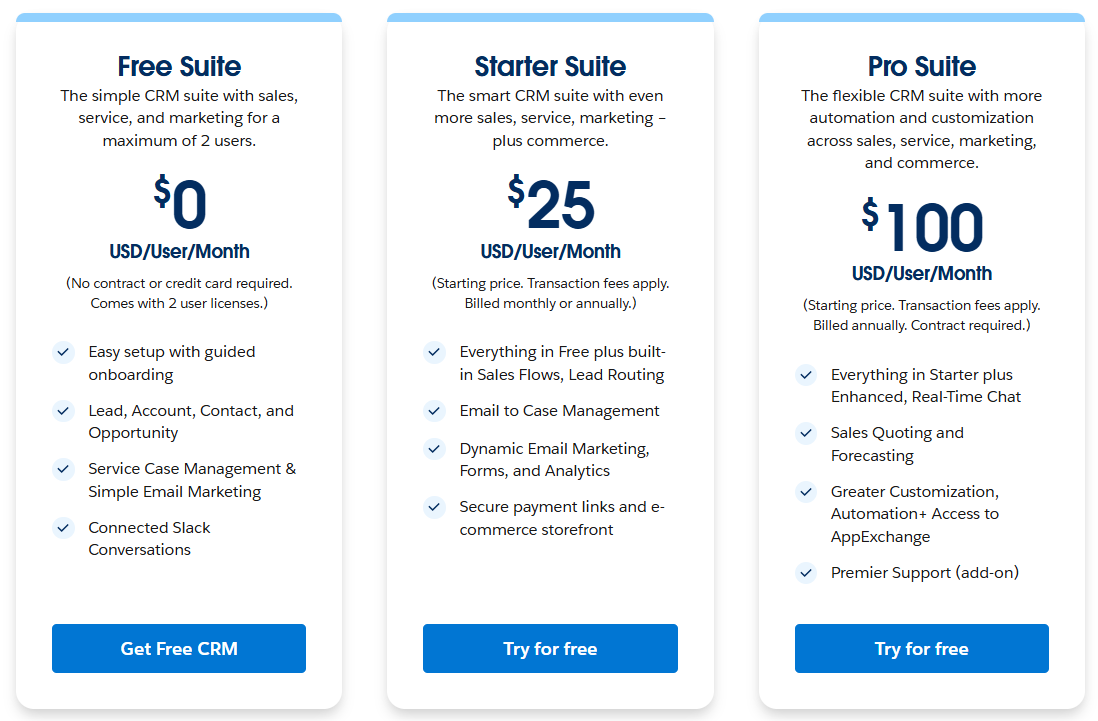 | 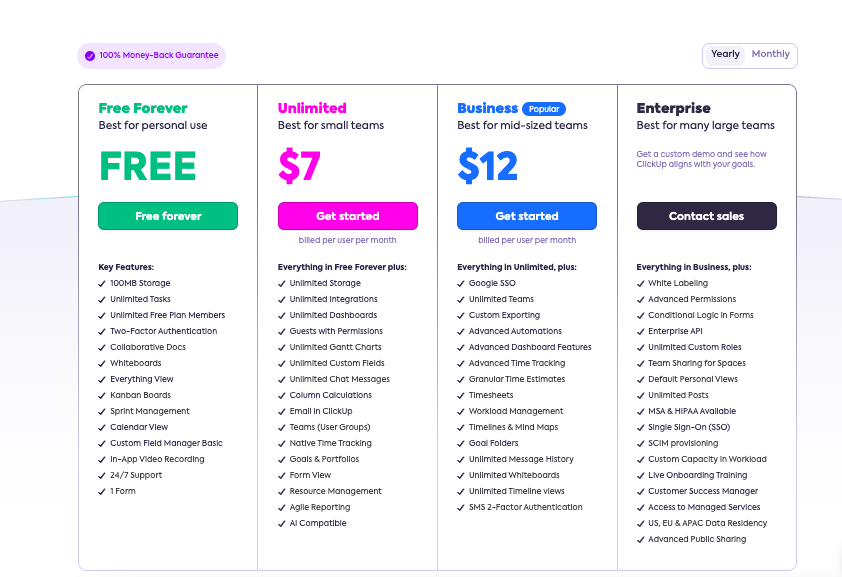 |
Other Details
Organization Types supported |
|
|
|---|---|---|
Platforms Supported |
|
|
Modes of support |
|
|
API Support |
|
|
Get help choosing | Get help choosing |
Security & Compliance
Certifications, data handling, and security controls for IT and compliance evaluators.
SOC 2 | ✓ Yes | ✓ Yes |
|---|---|---|
HIPAA | ✓ Yes | ✓ Yes |
GDPR | ✓ Yes | ✓ Yes |
ISO 27001 | ✓ Yes | ✗ No |
Single Sign-On (SSO) | ✓ Yes | ✓ Yes |
Multi-Factor Auth (MFA) | ✓ Yes | ✓ Yes |
Data Encryption | ✓ Yes | ✓ Yes |
Audit Logs | ✓ Yes | ✓ Yes |
Data Residency | 🌐 Global | 🌐 Global |
Salesforce User Reviews & Rating Comparison
User Ratings | ||
|---|---|---|
Rating Distribution | ||
Spotsaas Editor’s POV generated by AI | Buyer sentiment Overall positive sentiment highlights Salesforce's customization, analytics, and integration strengths, tempered by concerns about cost and complexity. What buyers like
Common complaints
| Buyer sentiment Overall positive sentiment highlighting versatility, customization, and strong customer support, tempered by concerns over initial learning difficulty and limited marketplace options. What buyers like
Common complaints
|
Pros and Cons |
|
|
Positive Reviews | No reviews available for the product | No reviews available for the product |
Integrations
Integration with other apps |
|---|


List of Customers
Customers |  BBVA  Brunello Cucinelli  Unilever |  Samsung  IBM  Booking.com |
|---|
Media and Screenshots
Screenshots | 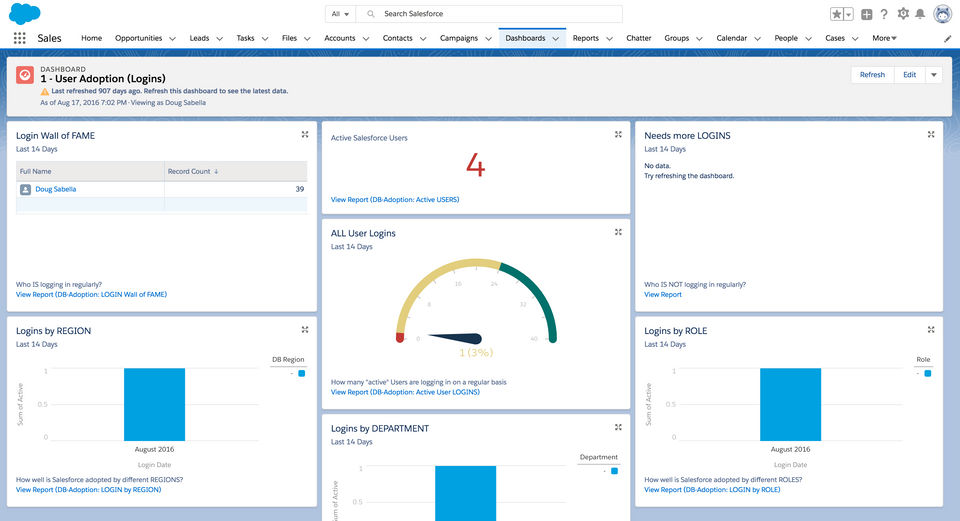 3 Screenshots |  5 Screenshots |
|---|---|---|
Videos |  5 Videos |  5 Videos |
Top Alternatives to Salesforce and ClickUp in 2026
Alternatives |
|---|


Add another option to compare side by side
Search by product name to compare pricing, fit, and buyer feedback in one view.Compare similar software options



Related Blogs and Articles for Collaboration Software


Disclaimer: This research has been collated from a variety of authoritative sources. We welcome your feedback at [email protected].
Frequently asked questions
- Which is better, Salesforce or ClickUp?
- Salesforce edges out the other on user ratings (4.5 vs 4.4). That said, the best pick depends on your use case — use the comparison tables above to evaluate each dimension.
- Do Salesforce and ClickUp offer a free trial?
- Yes, both Salesforce and ClickUp offer a free trial.
- What is the starting price of Salesforce vs ClickUp?
- Salesforce starts at $25 /user/month. ClickUp starts at $7 /User/Month.
- What are the top alternatives to Salesforce?
- Top alternatives to Salesforce include Bigin by Zoho CRM, Hubspot Marketing Hub, Dynamics 365 Marketing, ClickUp, Zoho CRM.
- What are the top alternatives to ClickUp?
- Top alternatives to ClickUp include Basecamp, Trello, TeamGantt, Asana, Teamwork.