
OfficeClip Timesheet vs stratustime vs Homebase Comparison

OfficeClip Timesheet
Starting at Free free
- Free Trial
- Medium Business
- Small Business
OfficeClip Timesheet is the ultimate solution for businesses to effectively manage Time, Expenses, and employee Time-off in one centralized platform. By automating the busywork, we help you boost productivity, accurately…

stratustime
Starting at Contact for pricing
- Large Enterprises
- Medium Business
Stratustime is a time tracking software designed for individuals and consultants to track their times, expenses and earnings. It provides a time tracking calendar to show how you spend your times throughout the day or we…

Homebase
Starting at $0 / location / month
- Free Trial
- Large Enterprises
- Medium Business
Homebase is a comprehensive time-tracking software developed by experienced people managers to enhance team collaboration and efficiency. It simplifies employee time tracking, scheduling, and payroll management, reducing…
OfficeClip Timesheet leads on user satisfaction with a 4.3-star rating across 10 reviews.
OfficeClip Timesheet vs stratustime vs Homebase — at a glance
| Feature | OfficeClip Timesheet | stratustime | Homebase |
|---|---|---|---|
| Rating | 4.3 / 5 | 3.8 / 5 | 4.4 / 5 |
| Reviews | 10 | 17 | 118 |
| Starting price | Free free | Contact for pricing | $0 / location / month |
| Free trial | Yes | No | Yes |
| Free version | No | No | No |
| Best for | Medium Business, Small Business, Freelancers | Large Enterprises, Medium Business, Small Business | Large Enterprises, Medium Business, Small Business |
| Category | Time Tracking Software | Time Tracking Software | Employee Scheduling Software |
| Integrations | 2+ apps | — | 11+ apps |
| Platforms | SaaS/Web/Cloud, Mobile - Android, Mobile - iOS, Installed - Mac, Mobile - Windows, Browser Based (Cloud), Installed - Windows | SaaS/Web/Cloud, Mobile - Android, Mobile - iOS | SaaS/Web/Cloud, Mobile - Android, Mobile - iOS, Browser Based (Cloud) |
| API | — | — | Available |
| Support modes | Online | Business Hours, Online | 24/7 (Live rep), Business Hours, Online |
| Certifications | HIPAA, GDPR | — | SOC 2 |
| Data residency | United States | US | United States, Canada |
Key differences between OfficeClip Timesheet and stratustime
- Pricing: OfficeClip Timesheet starts at Free free. stratustime pricing is not publicly listed.
- Free trial: OfficeClip Timesheet offers a free trial; stratustime does not.
- Target audience: OfficeClip Timesheet is built for Medium Business and Small Business, while stratustime targets Large Enterprises and Medium Business.
- User satisfaction: OfficeClip Timesheet scores higher with a 4.3-star average.
- Deployment: OfficeClip Timesheet supports SaaS/Web/Cloud, Mobile - Android, Mobile - iOS, Installed - Mac, Mobile - Windows, Browser Based (Cloud), Installed - Windows; stratustime supports SaaS/Web/Cloud, Mobile - Android, Mobile - iOS.
Compare OfficeClip Timesheet vs stratustime vs Homebase — and walk away knowing which one fits.
Which tool fits your team best
Which is actually cheaper for your team size
Where each product wins, per real buyers
Most Time Tracking Software tools look identical on paper. This comparison cuts to the differences that matter — pricing structure, team fit, and what real buyers found after signing up.
Biggest differences
Features
Pricing
Buying details
Security
Buyer feedback
Integrations
Product tour
Other options
Talk to an expert Talk to an expert | Talk to an expert Talk to an expert |
Free PDF comparison
Download this OfficeClip Timesheet vs stratustime vs Homebase comparison
Get the full side-by-side as a PDF — these picks plus the top Time Tracking Software tools, with verified ratings, pricing and features.
- Side-by-side on pricing, features & ratings
- Plus the category top 10, scored & ranked
- Emailed to you — no on-screen download
No file downloads on screen — we email it to you. One-click unsubscribe anytime.
OfficeClip Timesheet, stratustime vs Homebase: Biggest differences
Start here before you go deeper into features.
Medium Business, Small Business, Freelancers
Large Enterprises, Medium Business, Small Business
Best for simple, streamlined scheduling and payroll in small to mid-sized teams.
- You manage retail, hospitality, or food service teams with up to 500 employees.
- You need an easy-to-use platform for shift scheduling, time tracking, and payroll integration.
- You want built-in team communication tools like chat boards to improve collaboration.
- Your organization requires highly advanced schedule customization beyond basic features.
- You have complex scheduling needs that demand a more intuitive and flexible interface.
OfficeClip Timesheet typically suits Medium Business and Small Business. stratustime tends to fit Large Enterprises and Medium Business better. The right choice depends on your team size, workflow, and whether a free trial matters.
Description | OfficeClip Timesheet is the ultimate solution for businesses to effectively manage Time, Expenses, and employee Time-off in one centralized platform. By automating the busywork, we help you ... Read More about OfficeClip Timesheet | Stratustime is a time tracking software designed for individuals and consultants to track their times, expenses and earnings. It provides a time tracking calendar to show how you spend your ... Read More about stratustime | Homebase is a comprehensive time-tracking software developed by experienced people managers to enhance team collaboration and efficiency. It simplifies employee time tracking, scheduling, ... Read More about Homebase |
|---|---|---|---|
Entry Level Pricing |
|
|
|
Free Trial Availability |
| ||
SpotScoreWhat's this? ↗ | 8.1/10 | 8.6/10 | 9.7/10 |
User RatingsBased on verified Spotsaas reviews | |||
Best Company Size | — | — | 1-50 employees51-500 employees |
Get pricing help | Get pricing help |
Where each option fits best
See where each product is strongest, which teams it fits, and what causes buyers to keep looking — before you commit.
Based on buyer reviews and verified product data collected by Spotsaas.
Key strengths
- Streamlined Communication: Homebase allows smooth communication among team members, letting managers send updates and receive feedback in real-time. Keeping everyone on the same page is easier.
- Efficient Scheduling: With Homebase, scheduling shifts is easy. The intuitive interface lets you create schedules quickly, reducing the headache of manual planning. Your team will appreciate the clarity and predictability in their work hours.
- Time Tracking Made Simple: Say goodbye to manual time sheets! Homebase offers reliable time tracking features that help you monitor employee hours accurately, maintain compliance, and simplify payroll processing.
Best fit
- 1 to 500 employees
- Retail, Hospitality, Food Service, Healthcare, and Construction
- Managers, Shift Leaders, HR Personnel, and Business Owners
Reasons buyers look elsewhere
- Users may seek alternatives to Homebase if they require more advanced scheduling features or integrations with other software, as some businesses have unique operational needs that Homebase may not fully address.
- Companies with larger teams or more complex workforce management requirements might find that Homebase lacks scalability, prompting them to explore solutions that better accommodate growth and diverse employee roles.
- Businesses prioritizing robust reporting and analytics tools may look for alternatives, as Homebase’s reporting capabilities might not meet the depth of insight required for informed decision-making.
Software Demo
Demo |
|---|
Need a second opinion?
Get decision help from a software advisor
Share your priorities, budget, and team needs, and we’ll help you narrow the options and understand the tradeoffs before you talk to vendors.

- Independent advice — matched to your business
- Understand the tradeoffs before you talk to vendors
- Free 15-min call with a software advisor.
Step 1 of 4
How big is your team?
We tailor recommendations to companies your size.















How do OfficeClip Timesheet, stratustime and Homebase Compare on Features?
Total Features | 45 Features | 8 Features | 32 Features |
|---|---|---|---|
Unique Features | No unique features | No unique features | No unique features |
Get Quote | Get Quote |
Compare OfficeClip Timesheet, stratustime and Homebase on pricing
Review starting price, plan structure, and free-trial access side by side so you can see which option fits your budget and buying process.
Pricing Option | |||
|---|---|---|---|
Starting From |
|
|
|
Pricing Plans |
|
|
|
Pricing Page |  | Pricing information not available | 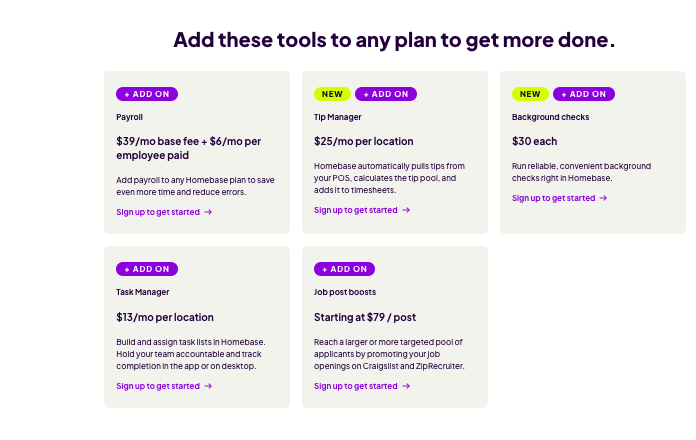 |
OfficeClip Timesheet, stratustime vs Homebase: Other Details
Organization Types supported |
|
|
|
|---|---|---|---|
Platforms Supported |
|
|
|
Modes of support |
|
|
|
API Support |
|
|
|
Get help choosing | Get help choosing |
OfficeClip Timesheet, stratustime vs Homebase Security & Compliance
Certifications, data handling, and security controls for IT and compliance evaluators.
SOC 2 | ✗ No | — |
|---|---|---|
HIPAA | ✓ Yes | ✗ No |
GDPR | ✓ Yes | — |
ISO 27001 | ✗ No | — |
Single Sign-On (SSO) | — | — |
Multi-Factor Auth (MFA) | — | — |
Data Encryption | — | — |
Audit Logs | — | — |
Data Residency | 🇺🇸 United States | 🇺🇸 US |
OfficeClip Timesheet vs stratustime User Reviews & Rating Comparison
User Ratings | |||
|---|---|---|---|
Rating Distribution | |||
Spotsaas Editor’s POV generated by AI | Buyer sentiment Buyer sentiment is positive across 10 reviews, with strong overall satisfaction. What buyers like
Common complaints
| Buyer sentiment Buyer sentiment is mixed to positive across 17 reviews, with clear strengths and a few common watchouts. What buyers like
Common complaints
| Buyer sentiment Overall positive sentiment highlights ease of scheduling, communication features, and payroll integration, tempered by some interface usability concerns. What buyers like
Common complaints
|
Pros and Cons |
|
|
|
Positive Reviews | No reviews available for the product | No reviews available for the product | No reviews available for the product |
| Negative Reviews | No reviews available for the product | No reviews available for the product | No reviews available for the product |
Integrations
Integration with other apps | No Integration information available. |
|---|




OfficeClip Timesheet, stratustime and Homebase Customers
Customers | No Customers information available. | No Customers information available. |  Antique Taco  Woodhouse  Souvla |
|---|
Media and Screenshots
Screenshots | 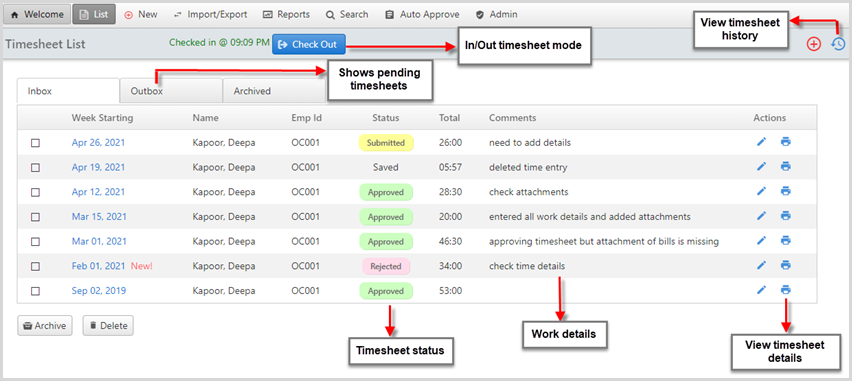 7 Screenshots | No screenshots available. |
|---|---|---|
Videos |  2 Videos |  2 Videos |
Alternatives to OfficeClip Timesheet, stratustime, Homebase
Alternatives |
|---|




Add another option to compare side by side
Search by product name to compare pricing, fit, and buyer feedback in one view.Compare similar software options


Related Blogs and Articles for Time Tracking Software
Disclaimer: This research has been collated from a variety of authoritative sources. We welcome your feedback at [email protected].
Frequently asked questions
- Which is better, OfficeClip Timesheet or stratustime?
- OfficeClip Timesheet edges out the other on user ratings (4.3 vs 3.8). That said, the best pick depends on your use case, so use the comparison tables above to evaluate each dimension.
- Do OfficeClip Timesheet and stratustime offer a free trial?
- OfficeClip Timesheet offers a free trial. stratustime does not.
- What is the starting price of OfficeClip Timesheet vs stratustime?
- OfficeClip Timesheet starts at Free free. stratustime starts at Contact for pricing.
- What are the top alternatives to OfficeClip Timesheet?
- Top alternatives to OfficeClip Timesheet include Homebase, stratustime, Hourly, OnTheClock, TMetric.
- What are the top alternatives to stratustime?
- Top alternatives to stratustime include Homebase, VeriClock, ClickTime, TimeSolv, Minute7.