
Built for Teams vs Payscale Comparison

Built for Teams
Starting at Contact for pricing
- Large Enterprises
- Medium Business
Built for Teams is a comprehensive, easy-to-use HR software designed specifically for small and medium businesses. It organizes all the day-to-day processes of your business and helps you to better manage your team by pr…

Payscale
Starting at Contact for pricing
- Free Version
- Large Enterprises
- Medium Business
Payscale combines diverse and dynamic data sources, experienced compensation services, and scalable software to help organizations make fair and appropriate pay decisions: Payfactor, designed for organizations focused…
Built for Teams leads on user satisfaction with a 4.5-star rating across 73 reviews.
Built for Teams vs Payscale — at a glance
| Feature | Built for Teams | Payscale |
|---|---|---|
| Rating | 4.5 / 5 | — |
| Reviews | 73 | — |
| Starting price | Contact for pricing | Contact for pricing |
| Free trial | No | No |
| Free version | No | Yes |
| Best for | Large Enterprises, Medium Business, Small Business | Large Enterprises, Medium Business, Small Business |
| Category | HR Software | Compensation Management Software |
| Integrations | — | 9+ apps |
| Platforms | SaaS/Web/Cloud, Mobile - Android, Mobile - iOS | SaaS/Web/Cloud |
| API | — | — |
| Support modes | Business Hours, Online | Business Hours, Online |
Key differences between Built for Teams and Payscale
- Deployment: Built for Teams supports SaaS/Web/Cloud, Mobile - Android, Mobile - iOS; Payscale supports SaaS/Web/Cloud.
Built for Teams vs Payscale — find the better fit before you commit.
Which tool fits your team best
Which is actually cheaper for your team size
Where each product wins, per real buyers
Most HR Software tools look identical on paper. This comparison cuts to the differences that matter — pricing structure, team fit, and what real buyers found after signing up.
Biggest differences
Features
Pricing
Buying details
Security
Buyer feedback
Integrations
Product tour
Other options
Talk to an expert Talk to an expert | Talk to an expert Talk to an expert |
Free PDF comparison
Download this Built for Teams vs Payscale comparison
Get the full side-by-side as a PDF — these picks plus the top HR Software tools, with verified ratings, pricing and features.
- Side-by-side on pricing, features & ratings
- Plus the category top 10, scored & ranked
- Emailed to you — no on-screen download
No file downloads on screen — we email it to you. One-click unsubscribe anytime.
Built for Teams vs Payscale: Biggest differences
Start here before you go deeper into features.
Large Enterprises, Medium Business, Small Business
Best for data-driven, scalable compensation management and pay strategy optimization.
- You need to benchmark salaries using diverse, crowdsourced and survey data.
- Your organization requires scalable software to manage complex pay structures.
- You want to build competitive, fair pay strategies with analytics support.
- You lack cloud infrastructure or prefer on-premise compensation tools.
- You need a solution focused solely on decentralized pay without integration.
Built for Teams typically suits Large Enterprises and Medium Business. Payscale tends to fit Large Enterprises and Medium Business better. The right choice depends on your team size, workflow, and whether a free trial matters.
Description | Built for Teams is a comprehensive, easy-to-use HR software designed specifically for small and medium businesses. It organizes all the day-to-day processes of your business and helps you ... Read More about Built for Teams | Payscale combines diverse and dynamic data sources, experienced compensation services, and scalable software to help organizations make fair and appropriate pay decisions: Payfactor, ... Read More about Payscale |
|---|---|---|
Free Trial Availability |
|
|
SpotScoreWhat's this? ↗ | 8.7/10 | Not Available |
User RatingsBased on verified Spotsaas reviews | ||
Get pricing help | Get pricing help |
Where each option fits best
See where each product is strongest, which teams it fits, and what causes buyers to keep looking — before you commit.
Based on buyer reviews and verified product data collected by Spotsaas.
Key strengths
- Better talent attraction and retention: Using accurate compensation data allows organizations to offer competitive salary packages. Companies that align pay with market benchmarks are more likely to attract qualified candidates and retain existing employees.
- Compensation workflow automation: Many compensation processes—such as salary benchmarking, job pricing, and pay adjustment planning—can be automated within the platform. This reduces manual spreadsheet work and allows HR teams to manage compensation cycles more efficiently.
- Pay equity and fairness analysis: Payscale includes tools that help organizations identify pay gaps and maintain fair compensation practices. HR teams can analyze pay distribution across departments and demographics, supporting compliance with pay transparency and equity initiatives.
Reasons buyers look elsewhere
- Some multinational companies need compensation data covering many global markets. Depending on their geographic footprint, organizations may prefer tools that offer broader global salary datasets and localization features.
- Organizations sometimes need to import HR data and match internal job titles with market benchmarks. This process can require additional setup and configuration, especially for companies with large job catalogs or multiple salary structures.
- Payscale specializes in salary benchmarking and compensation strategy rather than providing a full HR management system. Organizations that want payroll, performance management, and employee lifecycle tools in one platform may choose broader HR software suites.
Software Demo
Demo |  Built for Teams has not given any software demo yet If you're the owner of this profile, add your demo.Contact us |
|---|
Need a second opinion?
Get decision help from a software advisor
Share your priorities, budget, and team needs, and we’ll help you narrow the options and understand the tradeoffs before you talk to vendors.

- Independent advice — matched to your business
- Understand the tradeoffs before you talk to vendors
- Free 15-min call with a software advisor.
Step 1 of 4
How big is your team?
We tailor recommendations to companies your size.















How do Built for Teams and Payscale Compare on Features?
Total Features | 12 Features | 16 Features |
|---|---|---|
Unique Features | No unique features | No unique features |
Get Quote | Get Quote |
Compare Built for Teams and Payscale on pricing
Review starting price, plan structure, and free-trial access side by side so you can see which option fits your budget and buying process.
Pricing Option | ||
|---|---|---|
Pricing Plans |
|
|
Pricing Page | Pricing information not available | 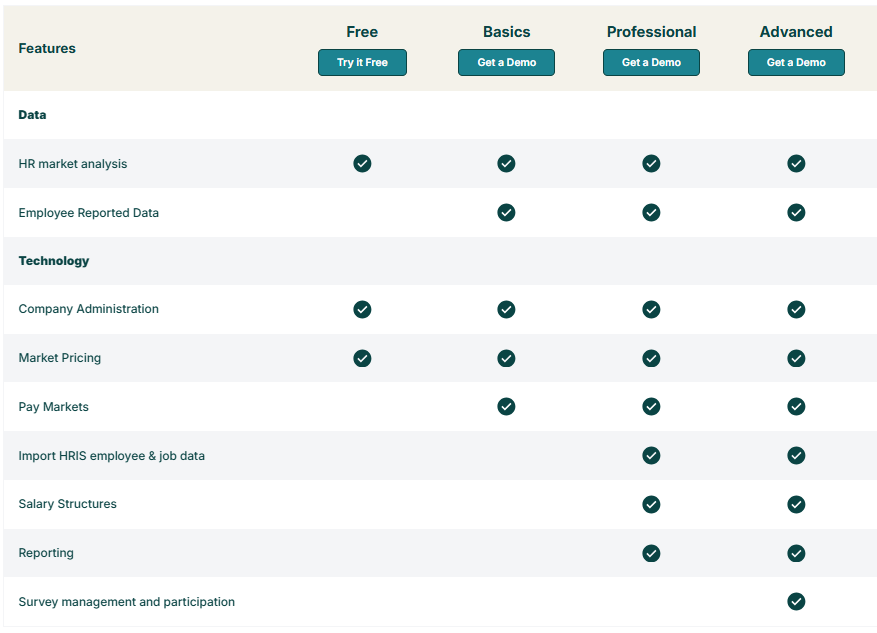 |
Built for Teams vs Payscale: Other Details
Organization Types supported |
|
|
|---|---|---|
Platforms Supported |
|
|
Modes of support |
|
|
API Support |
|
|
Get help choosing | Get help choosing |
Built for Teams User Reviews & Rating Comparison
User Ratings | No reviews available for the product | |
|---|---|---|
Rating Distribution | No reviews available for this product | |
Spotsaas Editor’s POV generated by AI | Buyer sentiment Buyer sentiment is positive across 103 reviews, with strong overall satisfaction. What buyers like
Common complaints
| What buyers like
Common complaints
|
Pros and Cons |
|
|
Positive Reviews | No reviews available for the product | No reviews available for the product |
Integrations
Integration with other apps | No Integration information available. |
|---|



Built for Teams and Payscale Customers
Customers |  Accenture  Serta  Mount Sinai |  Chipotle  Sage  HARVARD UNIVERSITY |
|---|
Media and Screenshots
Screenshots |  4 Screenshots |  7 Screenshots |
|---|
Top Alternatives to Built for Teams and Payscale in 2026
Alternatives |
|---|


Add another option to compare side by side
Search by product name to compare pricing, fit, and buyer feedback in one view.Compare similar software options




Related Blogs and Articles for Compensation Management Software
Disclaimer: This research has been collated from a variety of authoritative sources. We welcome your feedback at [email protected].
Frequently asked questions
- Which is better, Built for Teams or Payscale?
- Built for Teams has a user rating of 4.5, while Payscale has no user ratings yet. The right choice depends on your team size, budget, and specific Compensation Management Software needs.
- Do Built for Teams and Payscale offer a free trial?
- Neither Built for Teams nor Payscale currently lists a free trial.
- What is the starting price of Built for Teams vs Payscale?
- Built for Teams starts at Contact for pricing. Payscale starts at Contact for pricing.
- What are the top alternatives to Built for Teams?
- Top alternatives to Built for Teams include Hibob HRIS, Oyster, Grove HR, HRAPP, Namely.
- What are the top alternatives to Payscale?
- Top alternatives to Payscale include beqom, Payfactors, HRsoft Compensation Management, SimplyMerit, CompLogix Compensation.
- When is Built for Teams the wrong choice?
- It depends what you need. In its favour: user-friendly interface simplifies HR management; visually appealing dashboards improve user experience. Against it: limited features may not meet larger company needs; lacks advanced analytics capabilities. Note that it does not include Accounts Payable and Expense Tracking.
- What is the catch with Payscale?
- Payscale is credited with the following: the platform is used by thousands of organizations worldwide and supports compensation decisions for a significant portion of the workforce. The recurring reservations: the platform mainly supports desktop environments and may not offer the same experience on mobile devices. It does not include Billing and Invoicing and Self Service Portal.
More Compensation Management Software comparisons
Side by side breakdowns of the same products against other options in this category.
- Built for Teams vs Pequity
- Built for Teams vs beqom
- Built for Teams vs Payfactors
- Built for Teams vs HRsoft Compensation Management
- Built for Teams vs SimplyMerit
- Built for Teams vs CompLogix Compensation
- Built for Teams vs CompXL
- Built for Teams vs Barley
- Built for Teams vs Assemble
- Built for Teams vs CompUp