
Managing a remote workforce brings its own challenges, which makes HR software a critical investment for businesses running hybrid or fully remote operations. As more companies adopt flexible work models, the need for HR tools that handle payroll, performance tracking, and employee engagement keeps growing.
Traditional HR processes often depend on in-person contact, which makes onboarding, compliance, and communication harder for remote teams. Without the right technology, businesses can struggle to track attendance, process payroll across locations, or keep employees engaged and productive.
Remote-friendly HR software fills that gap. Built to centralize HR tasks, these platforms automate administrative work, give employees self-service options, and connect with communication tools like Slack and Microsoft Teams. The right solution improves efficiency and collaboration and keeps you compliant, no matter where employees work.
To help businesses find the best fit, we compiled a list of the top HR software for remote teams in 2026. Each option was selected based on its features, usability, and ability to support a distributed workforce. Below are the top choices that can improve how you handle remote HR management.
Must-Have Features in HR Software for Remote Teams
Choosing the best HR software for remote teams means looking closely at the features that simplify workforce management. Remote operations need tools that go beyond basic HR functions to support efficiency, compliance, and clear communication.
Here are five must-have features when evaluating HR solutions for a distributed workforce.
| Feature | Description |
|---|---|
| Cloud-Based Accessibility | Enables secure remote access to HR processes like payroll and benefits via web/mobile, and removes the need for on-site infrastructure. |
| Employee Self-Service Portals | Lets employees update info, access payslips, and request leave via a single portal, which improves transparency. |
| Automated Payroll & Compliance | Automates payroll, ensures tax compliance, and supports multi-currency payments for international teams with fewer errors. |
| Performance Management & Feedback Systems | Facilitates goal setting, KPI tracking, and real-time feedback to drive data-based decisions on employee performance. |
| Time Tracking & Attendance Management | Tracks work hours, attendance, and productivity with automated tools like GPS tracking and scheduling integration. |
Why Cloud-Based HR Software Is Essential for Remote Work
Remote teams work across time zones and locations, which makes cloud-based HR software a necessity. A fully cloud-hosted platform lets HR processes such as payroll, benefits administration, and employee records be accessed securely from anywhere.
This removes the need for on-premise installations and lets HR teams, managers, and employees stay connected through web or mobile access.
How Self-Service Portals Help Remote Employees
Giving employees self-service options reduces their dependence on HR staff and improves efficiency. A well-designed self-service portal lets team members update personal details, download payslips, request leave, and read company policies, all from a single dashboard.
This is especially valuable for remote teams because it improves transparency and gives employees direct access to the information they need.
Automating Payroll and Ensuring Compliance for Global Teams
Handling payroll for a remote workforce can be complex, especially when employees are spread across multiple states or countries with different tax laws and labor regulations. A strong HR software solution automates payroll calculations, ensures tax compliance, and pays salaries on time.
Many platforms also support multi-currency payments, which makes international payroll easier to manage without errors.
Performance Management Tools for Remote Team Productivity
Tracking employee performance in a remote setup requires more than occasional check-ins. HR software with built-in performance management tools allows companies to set goals, monitor key performance indicators (KPIs), and collect real-time feedback.
Some platforms also include 360-degree reviews and automated appraisal cycles that help managers make data-driven decisions on promotions, rewards, and skill development.
Time Tracking Features that Help Manage Remote Teams
Without a physical office, tracking work hours and attendance is harder. Remote-friendly HR software includes automated time tracking that keeps accurate work-hour records and cuts payroll discrepancies.
Features such as GPS-based attendance, project-based time tracking, and integration with scheduling tools allow businesses to manage productivity without micromanaging employees.
Top 5 Remote HR Software Platforms Compared (2026)
| Providers | Key Features | Best For |
|---|---|---|
| Deel | Global payroll, contractor payments, compliance management, self-service HR dashboard, time tracking & benefits administration | Businesses hiring international employees and contractors |
| BambooHR | Employee data management, time-off tracking, applicant tracking system, performance management, reporting & analytics | Small businesses needing simplified HR processes |
| Connecteam | Employee communication, task management, time tracking, mobile-first platform, training & onboarding | Small to mid-sized businesses with deskless or mobile employees |
| Workday | Human capital management suite, advanced analytics, integrated talent management, payroll & benefits administration, workforce planning | Enterprises managing workforce planning and HR automation |
| HiBob | People analytics, onboarding & performance management, self-service portal, collaboration tools, cultural engagement features | Mid-sized businesses focusing on employee engagement and HR efficiency |
Managing a remote workforce requires HR software that simplifies core processes such as payroll, performance management, and compliance while keeping employees engaged. Below are five top-rated HR solutions for remote teams, each with features that meet different business needs.
Deel: Best for Global Payroll and Contractor Management
Deel
- Spot Score: 8.5
- Platform Supported: Web, Cloud, Android, iOS
- Best For: Small, Mid-size, Large Business
Overview of Deel
Deel is a global HR and payroll platform that helps businesses hire, manage, and pay employees and contractors across multiple countries without the burden of local compliance. Established in 2019, the platform handles payroll, benefits, and legal requirements in over 150 countries, which simplifies international workforce management.
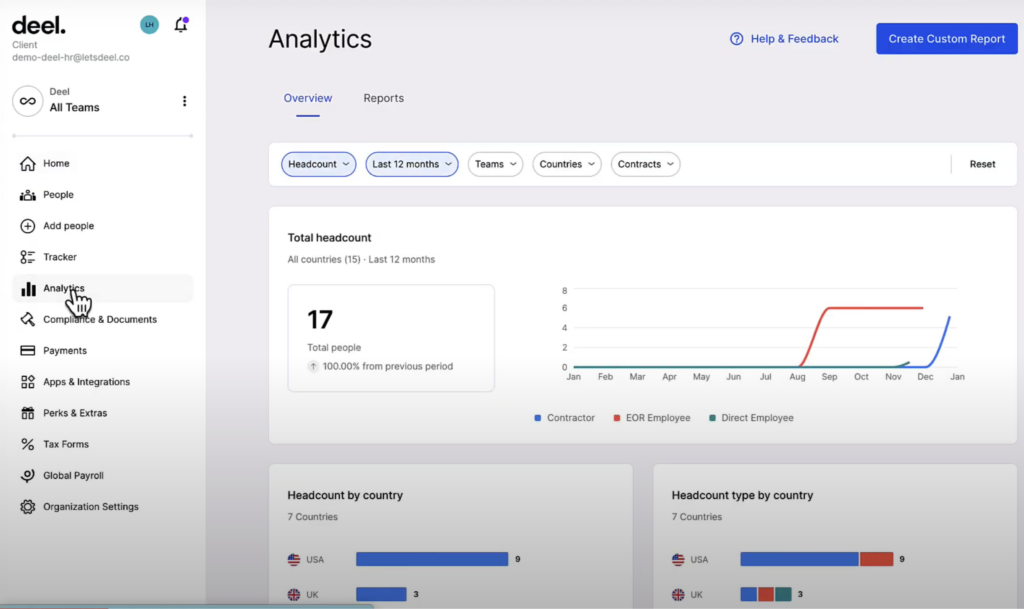
It is especially useful for companies with remote teams, with smooth onboarding and efficient payroll processing.
Key Features of Deel
| Feature | Description |
|---|---|
| Global Payroll & Contractor Payments | Automates payroll for international teams, supports multiple currencies, and ensures tax compliance. |
| Employer of Record (EOR) Services | Allows businesses to hire employees legally in different countries without setting up local entities. |
| Compliance & Contract Management | Provides localized contracts and worker classification management to meet legal requirements. |
| Self-Service HR Dashboard | Employees can access payroll, benefits, and HR documents in a centralized portal. |
| Time Tracking & Attendance Management | Enables remote teams to monitor work hours, attendance, and productivity with payroll integration. |
| Onboarding & Benefits Administration | Automates onboarding processes and offers country-specific benefits like health insurance and pensions. |
Deel Pricing
Deel pricing offers a variety of plans to fit different business needs:
- Deel Contractor: Starting at $49 per month, this plan assists with contractor compliance and payments across over 150 countries.
- Deel Employer of Record (EOR): Starting at $599 per month, this service enables businesses to hire international employees without establishing a local entity, covering local payroll, taxes, and benefits.
- Deel Global Payroll: Starting at $29 per employee per month, this plan manages payroll for companies with their own entities, ensuring compliance and efficiency.
- Deel US Payroll: Starting at $19 per employee per month, this plan offers smooth payroll processing within the United States.
These plans give businesses flexibility to manage and expand a global workforce.
Pricing shown is approximate; check vendor websites for current rates.
Why Choose Deel for Remote Teams?
Deel is built for companies hiring international employees and contractors. Its built-in compliance management lets businesses onboard global talent while meeting legal and tax requirements.
Automated payroll processing removes administrative bottlenecks and lets HR teams focus on employee experience rather than paperwork.
BambooHR: Best HR Software for Small Remote Teams
BambooHR
- Spot Score: 9.8
- Pricing: Custom pricing
- Best For: Small business
Overview of BambooHR
BambooHR is an intuitive, cloud-based HR platform that centralizes employee information and simplifies everyday HR tasks. Built for small and medium-sized businesses, BambooHR handles processes such as time-off tracking, performance management, recruitment, and reporting.
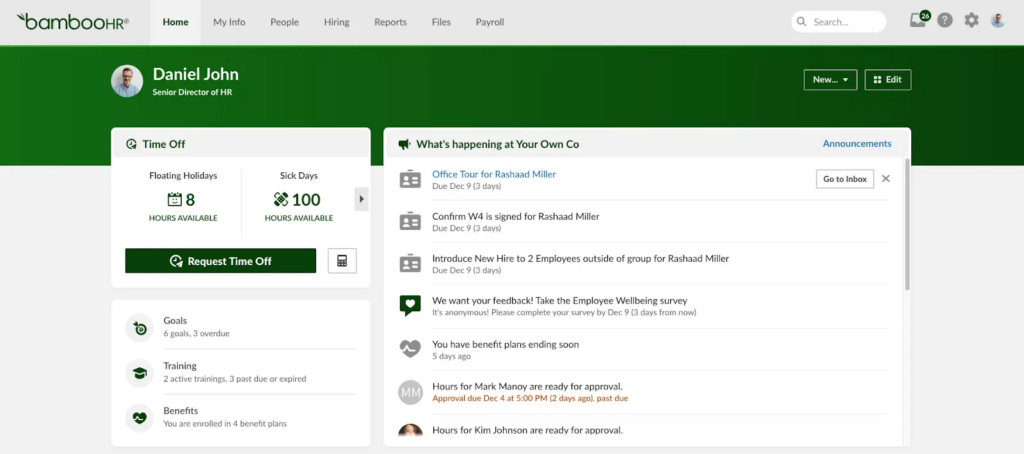
Its user-friendly interface and strong functionality make it especially valuable for remote teams, giving them reliable access to critical HR data regardless of location.
Key Features of BambooHR
| Feature | Description |
|---|---|
| Employee Data Management & Self-Service | Centralizes employee records and provides an easy self-service portal for updates. |
| Time-off Management | Simplifies tracking of vacation, sick leave, and other time-off requests. |
| Applicant Tracking System (ATS) | Simplifies recruitment with tools for job postings, candidate tracking, and interview scheduling. |
| Performance Management | Offers performance reviews, goal setting, and continuous feedback capabilities. |
| Reporting & Analytics | Provides customizable reports and insights to track HR metrics and support data-driven decisions. |
BambooHR Pricing
BambooHR pricing is based on company size, with per-employee, per-month rates for businesses over 25 employees and a flat monthly rate for smaller teams. Volume discounts apply, and no annual contracts are required.
Plan Options
Core Plan (Essential HR Tools)
- HR data management, reports, hiring & onboarding, time-off tracking, and integrations.
Pro Plan (Advanced HR Features)
- It includes core features plus performance management, compensation planning, advanced reporting, and HR benchmarks (coming soon).
Add-Ons
- Payroll – Tax filing, direct deposit, flexible pay schedules.
- Benefits Admin – Self-service enrollment and carrier connections.
- Time Tracking – Mobile/desktop time clocks, project tracking.
Pricing is custom; contact BambooHR for a quote.
Pricing shown is approximate; check vendor websites for current rates.
Why Choose BambooHR for Remote Teams?
BambooHR works well for remote teams because its cloud-based platform makes HR processes accessible from anywhere. With a centralized employee database, efficient time-off tracking, and intuitive recruitment tools, BambooHR reduces administrative overhead and improves transparency.
This focus on simplicity and efficiency helps HR teams concentrate on strategic work and employee engagement, so remote workforces stay connected and productive.
Connecteam: Ideal for Mobile and Deskless Workforces

Connecteam
- Platform supported: Web, Cloud, Android, iOS
- Pricing: Starts at $29 per month for up to 30 users
- Best For: Small to mid-sized business
Overview of Connecteam
Connecteam is a comprehensive workforce management solution built for mobile teams and deskless employees. It is designed to simplify operations for teams that are always on the move, and it brings communication, task management, time tracking, and employee training together into one intuitive platform.
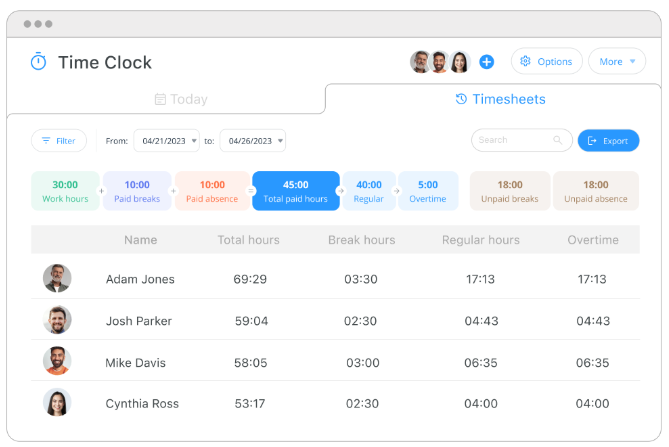
Its mobile-first design keeps every team member connected and productive regardless of location.
Key Features of Connecteam
| Feature | Description |
|---|---|
| Employee Communication & Announcements | Facilitates internal communication with chat, company news, and broadcast announcements to keep all team members informed. |
| Task Management & Scheduling | Provides tools for scheduling shifts, assigning tasks, and managing projects, ensuring that workflows remain organized. |
| Time Tracking & Attendance | Features GPS-enabled time tracking and attendance management, allowing accurate recording of work hours and locations. |
| Employee Training & Onboarding | Simplifies digital onboarding and offers e-learning modules, checklists, and training resources to build employee skills. |
| Mobile-First Platform | Optimized for smartphones, with smooth access and usability for remote and field employees on the go. |
Connecteam Pricing
Connecteam pricing offers flexible plans for businesses of various sizes and needs. Below is an overview of their pricing structure:
Small Business Plan
- Cost: $0 (Free for life)
- User Limit: Up to 10 users
- Features: Full access to all hubs and features essential for small businesses. Connecteam
Basic Plan
- Cost: $35/month for up to 30 users
- Additional Users: $0.60 per user/month
- Features: Includes time tracking with GPS, payroll integration, and shift management.
Advanced Plan
- Cost: $59/month for up to 30 users
- Additional Users: $1.80 per user/month
- Features: All Basic Plan features plus geofencing, recurring shifts, advanced filtering, and bulk actions.
Expert Plan
- Cost: $119/month for up to 30 users
- Additional Users: $3.60 per user/month
- Features: All Advanced Plan features plus auto-assign shifts, multi-branch management, live GPS tracking, and process automation.
Enterprise Plan
- Cost: Custom pricing
- Features: Includes all Expert Plan features with additional enterprise-level capabilities such as a personal account manager, Single Sign-On (SSO), Two-Factor Authentication (2FA), API access, and more.
Note: Annual subscriptions offer an 18% discount compared to monthly plans.
For more detailed information, please visit Connecteam’s pricing page.
Pricing shown is approximate; check vendor websites for current rates.
Why Choose Connecteam for Remote Teams?
Connecteam works best where mobility matters most. Its mobile-first design and broad feature set let remote and field employees stay connected, manage tasks efficiently, and keep accurate time records, all from their smartphones.
That makes it a strong fit for businesses that want to simplify operations and improve engagement across remote teams.
Workday: Best for Enterprises Needing HR Automation
Workday
- Spot Score: 8.4
- Best For: Enterprises managing workforce planning and HR automation
- Platforms: Cloud, Web, Android, iOS
Overview of Workday
Workday is a strong, cloud-based solution that unifies HR, payroll, financial management, and workforce planning in one system. Built for large organizations, Workday handles complex processes with real-time data insights and predictive analytics that support strategic decisions.
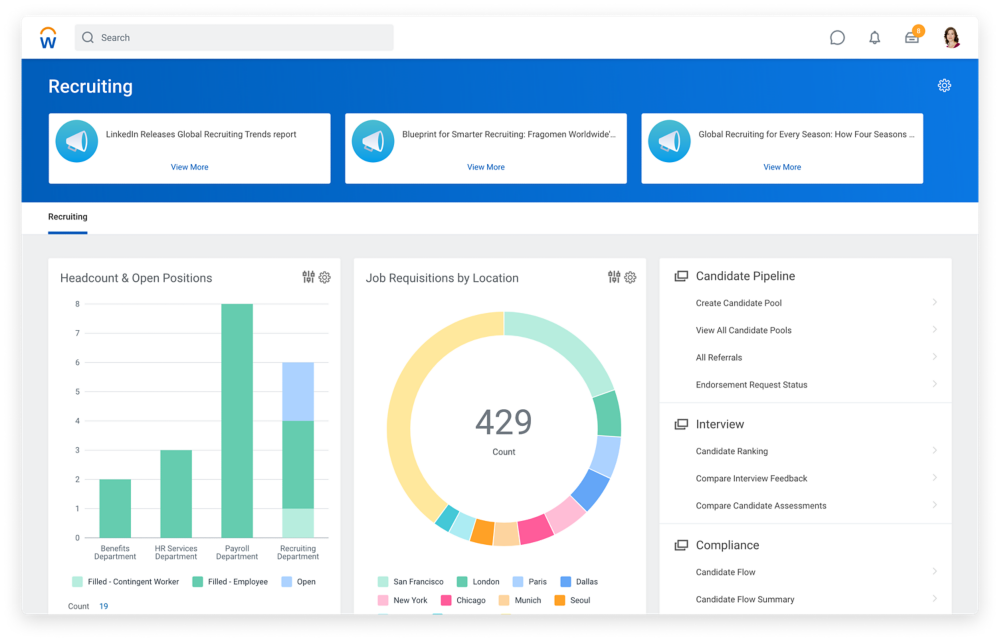
Its scalable architecture makes it especially valuable for remote teams, giving them centralized, up-to-date information that supports efficiency and compliance across global operations.
Key Features of Workday
| Feature | Description |
|---|---|
| Human Capital Management (HCM) Suite | Integrates core HR functions, from recruitment to employee data management, in a single, user-friendly system. |
| Advanced Analytics & Reporting | Provides real-time insights and predictive analytics to support strategic decision-making and performance optimization. |
| Integrated Talent Management & Recruitment | Simplifies the entire talent lifecycle, from attracting and hiring top talent to ongoing performance management and career development. |
| Payroll, Time Tracking & Benefits Administration | Automates payroll processes, ensures accurate time tracking, and manages benefits, reducing administrative overhead. |
| Financial Management & Workforce Planning | Consolidates financial processes with HR data, enabling comprehensive workforce planning and budgeting in one platform. |
Workday Pricing
Workday pricing is customized based on company size, selected modules, and implementation complexity.
- Per Employee Per Month (PEPM): $34 – $42
- Annual Costs:
- Under 500 employees: $150,000 – $300,000
- 500 to 2,500 employees: $300,000 – $500,000
- Implementation Fee: Typically, 100% of annual software costs
Recent changes allow smaller businesses to secure contracts in the $100,000 – $200,000 range. Pricing varies, so businesses should request a custom quote from Workday.
Pricing shown is approximate; check vendor websites for current rates.
Why Choose Workday for Remote Teams?
Workday’s integrated platform suits large, distributed teams. Its centralized system gives remote employees real-time access to critical HR and financial data, which supports better collaboration and informed decisions.
By automating routine processes and surfacing actionable insights, Workday reduces administrative burden and helps maintain global compliance.
HiBob: HR Software Focused on Engagement & Flexibility
HiBob
- Platform supported: Web, Cloud, Android, iOS
- Pricing: Custom
- Best For: Mid-sized business
Overview of HiBob
HiBob, often known simply as Bob, is a modern, cloud-based HR platform built to help mid-sized companies simplify HR processes and build a positive work culture. It offers a full set of tools to manage onboarding, performance reviews, and employee analytics in one place.
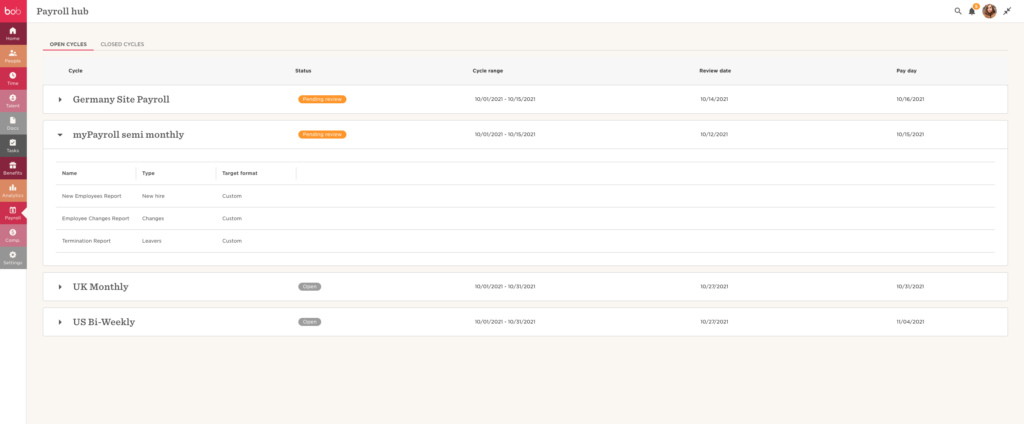
HiBob’s user-friendly interface and modern features make it effective for remote teams, giving employees access to essential HR resources, performance data, and communication channels regardless of location.
Key Features of HiBob
| Feature | Description |
|---|---|
| People Analytics & HR Reporting | Delivers customizable analytics and insights to monitor employee performance and engagement that enable data-driven HR decisions. |
| Onboarding & Performance Management | Simplifies onboarding with automated workflows and integrates performance reviews to support ongoing employee development. |
| Employee Self-Service Portal | Allows employees to update personal information, access benefits, and submit HR requests independently, which reduces administrative tasks. |
| Integrated Collaboration Tools | Connects with communication platforms like Slack and Microsoft Teams to support real-time collaboration and team engagement. |
| Cultural Engagement Features | Includes tools such as employee surveys, recognition programs, and feedback loops to strengthen company culture and drive employee satisfaction. |
HiBob Pricing
HiBob pricing offers custom plans built around the needs of mid-sized businesses. Exact details are provided on request, and HiBob is known for scalable plans that adjust to the size and requirements of your organization.
They also provide a free demo or trial period so companies can evaluate the platform before committing.
Pricing shown is approximate; check vendor websites for current rates.
Why Choose HiBob for Remote Teams?
HiBob suits remote teams because of its focus on employee engagement and simpler HR operations. Its cloud-based platform gives remote employees continuous access to key HR functions and real-time updates. The strong self-service portal and integration with popular collaboration tools help keep the workforce connected and engaged.
How to Select the Right HR Software Platform for Remote Workforces
When choosing an HR software solution for your remote team, it helps to weigh several key factors that align with your business goals and operational requirements. Here is how to approach the decision:
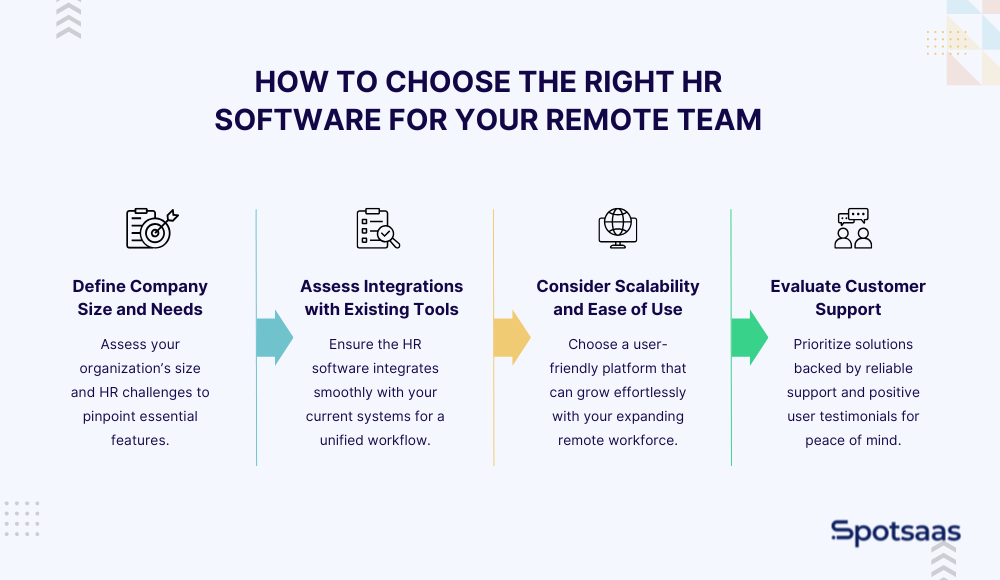
Step 1: Define Your Team Size and HR Needs
Start by assessing the current size of your organization and the specific HR challenges you face. Consider the number of remote employees, how often you hire, and the complexity of the HR processes you manage.
A clear picture of your company’s size and needs helps you identify the most critical features and choose a solution that fits your requirements.
Step 2: Check Software Integrations with Your Current Tech Stack
A smooth workflow is essential for remote teams. Check whether the HR software integrates with the tools you already use, such as payroll systems, communication platforms, or performance management tools.
Strong integrations reduce manual data entry and connect your digital tools, which makes it easier for teams to collaborate and share information without interruptions.
Step 3: Prioritize Scalability and User Experience
Look for a solution that can grow alongside your business. Scalability matters, especially if you plan to expand your remote workforce. The software should also have an intuitive interface that keeps the learning curve short for employees.
User-friendly systems improve adoption rates and let both HR professionals and employees use the platform effectively from day one.
Step 4: Evaluate Support and Read Trusted User Reviews
Reliable customer support can make a real difference, especially during HR software implementation and troubleshooting. Check for support options like live chat, phone assistance, and extensive knowledge bases.
Reviewing user feedback and testimonials also gives insight into how the platform performs in the real world and helps you gauge its reliability and customer satisfaction.
Final Thoughts on Choosing the Right HR Software for Remote Teams
HR software is essential for remote teams that want to simplify operations and support engagement. It handles tasks like payroll, compliance, and performance management while giving employees constant access to important resources. When choosing a solution, prioritize tools that match your business needs and integrate cleanly with your existing systems. A platform that scales with your organization helps your remote workforce do their best work.
HR Software for Remote Teams: FAQs Answered
What are the benefits of using HR software for remote teams?
It simplifies administrative tasks, improves communication, and ensures compliance across dispersed teams.
How do I choose the right HR software for my remote team?
Focus on features, integrations, scalability, ease of use, and strong customer support that match your business needs.
Can HR software manage global payroll and compliance?
Yes, many solutions support multi-currency payroll and localized compliance for international teams.
Do these HR tools integrate with other business applications?
Most HR software platforms integrate with payroll, communication, and performance management systems.
Are free trials available to test HR software?
Many providers offer free trials or demos so you can evaluate the platform before committing.

- Independent picks for exactly what you just read about
- Matched to your team size & needs
- Vendors don't pay for placement
Step 1 of 4
How big is your team?
We tailor recommendations to companies your size.















Related Articles

Finance & Billing Software
Best Payroll Software for Contractors and Freelancers in 2026
Continue reading →
HR software
Connecteam vs When I Work: Comparison Chart to Find the Best Choice for Your Business
Continue reading →
Buyers guide
How To Choose The Best Workforce Management Software For 2026
Continue reading →
HR software
Best HR Software for Tech Startups in 2026 (Top 5 Ranked Tools)
Continue reading →