
WhenToHelp vs Workable Comparison

WhenToHelp
Starting at $16 /month
- Free Trial
- Freelancers / Consultants
- Large Enterprises
WhenToHelp is an intuitive online volunteer scheduling platform designed to improve coordination for nonprofits, charities, event organizers, and community-based programs. The platform allows administrators to automatica…

Workable
Starting at $299 /month
- Free Trial
- Large Enterprises
- Medium Business
Workable is the simple, affordable Applicant Tracking System (ATS) purpose-built for small businesses. Features include Integrated Company Management (Shell), Receive, review and approve applicants from desktop or mobile…
Workable leads on user satisfaction with a 4.3-star rating across 225 reviews.
WhenToHelp vs Workable — at a glance
| Feature | WhenToHelp | Workable |
|---|---|---|
| Rating | — | 4.3 / 5 |
| Reviews | — | 225 |
| Starting price | $16 /month | $299 /month |
| Free trial | Yes | Yes |
| Free version | No | No |
| Best for | Freelancers / Consultants, Large Enterprises, Medium Business | Large Enterprises, Medium Business, Small Business |
| Category | HR Software | Applicant Tracking System (ATS) |
| Integrations | 2+ apps | — |
| Platforms | SaaS/Web/Cloud | SaaS/Web/Cloud, Mobile - Android, Mobile - iOS |
| API | — | Available |
| Support modes | Business Hours, Online | 24/7 (Live rep), Business Hours, Online |
Key differences between WhenToHelp and Workable
- Pricing: WhenToHelp starts at $16 /month, while Workable starts at $299 /month.
- Target audience: WhenToHelp is built for Freelancers / Consultants and Large Enterprises, while Workable targets Large Enterprises and Medium Business.
- Deployment: WhenToHelp supports SaaS/Web/Cloud; Workable supports SaaS/Web/Cloud, Mobile - Android, Mobile - iOS.
WhenToHelp vs Workable — find the better fit before you commit.
Which tool fits your team best
Which is actually cheaper for your team size
Where each product wins, per real buyers
Most HR Software tools look identical on paper. This comparison cuts to the differences that matter — pricing structure, team fit, and what real buyers found after signing up.
Biggest differences
Features
Pricing
Buying details
Security
Buyer feedback
Integrations
Product tour
Other options
Talk to an expert Talk to an expert |
Free PDF comparison
Download this WhenToHelp vs Workable comparison
Get the full side-by-side as a PDF — these picks plus the top HR Software tools, with verified ratings, pricing and features.
- Side-by-side on pricing, features & ratings
- Plus the category top 10, scored & ranked
- Emailed to you — no on-screen download
No file downloads on screen — we email it to you. One-click unsubscribe anytime.
WhenToHelp vs Workable: Biggest differences
Start here before you go deeper into features.
Best for nonprofits needing automated, balanced volunteer scheduling and mobile access.
- You want to save time with an AutoFill algorithm that creates conflict-free schedules.
- Your volunteers need real-time email and text notifications to reduce no-shows.
- You require a fully online platform accessible from any device, including mobile apps.
- Your organization needs payroll or payment processing for volunteer stipends.
- You require extensive integrations with productivity or communication tools.
Best for small to mid-sized businesses needing simple, automated applicant tracking.
- You want an intuitive ATS with minimal training required for HR teams.
- You need automation of manual recruitment tasks like job postings and offer issuance.
- You value integrated company management with real-time applicant review on desktop and mobile.
- Your organization requires extensive workflow customization and flexible approval pathways.
- You depend on advanced reporting, deep analytics, and reliable custom report generation.
WhenToHelp: Best for nonprofits needing automated, balanced volunteer scheduling and mobile access. Workable: Best for small to mid-sized businesses needing simple, automated applicant tracking.
Description | WhenToHelp is an intuitive online volunteer scheduling platform designed to improve coordination for nonprofits, charities, event organizers, and community-based programs. The platform ... Read More about WhenToHelp | Workable is the simple, affordable Applicant Tracking System (ATS) purpose-built for small businesses. Features include Integrated Company Management (Shell), Receive, review and approve ... Read More about Workable |
|---|---|---|
Entry Level Pricing |
|
|
Free Trial Availability | ||
SpotScoreWhat's this? ↗ | Not Available | 9.6/10 |
User RatingsBased on verified Spotsaas reviews | ||
Best Company Size | 1-50 employees51-200 employees | 1-50 employees51-500 employees |
Get pricing help | Get pricing help |
Where each option fits best
See where each product is strongest, which teams it fits, and what causes buyers to keep looking — before you commit.
Based on buyer reviews and verified product data collected by Spotsaas.
Key strengths
- Volunteer Communication Support: WhenToHelp supports notifications and updates to volunteers about schedule changes, reminders, or open shifts. This keeps everyone informed, improves participation rates, and supports smoother team coordination without extra messaging tools.
- Accessible from Anywhere: WhenToHelp runs in the browser and works on desktop and mobile. Volunteers and coordinators can check their assignments, view updates, and manage schedules from anywhere without needing complex software installations.
- Calendar Sync & Integration: Users can sync volunteer shifts with external calendars like Google Calendar and Microsoft Outlook. This keeps volunteers aware of their schedules on devices they already use, reducing missed shifts and making it easier to plan around personal commitments.
- Hiring Process Simplified: With Workable, you can simplify your recruitment workflow. This means less time spent on administrative tasks and more focus on finding the right candidates.
- Candidate Sourcing: Workable's candidate sourcing tools help you attract a diverse pool of talent. You can post jobs across multiple platforms easily, reaching potential candidates wherever they are.
- Intuitive Collaboration Tools: Workable improves team collaboration with features that allow for smooth feedback and communication among hiring stakeholders. This keeps everyone aligned throughout the hiring process, leading to better decision-making.
Best fit
- 1–200 staff and volunteers
- Nonprofit organizations, Charities, Religious Institutions, Community Services, Healthcare Volunteers, Educational Institutions
- Volunteer Coordinators, Program Managers, Event Planners, Nonprofit Administrators, Community Service Directors, Church Leaders
- 1-500 employees
- Tech, SaaS, Consulting, Marketing, Healthcare
- HR Managers, Recruiters, Talent Acquisition Specialists, Hiring Managers
Reasons buyers look elsewhere
- Some organizations prefer platforms with advanced reporting and analytics, which WhenToHelp currently offers in a limited capacity.
- Larger nonprofits may seek deeper integrations with CRM or donor management systems, which are not part of WhenToHelp’s feature set.
- Organizations that require payroll or stipend processing may choose platforms that include financial management tools.
- Users may seek alternatives to Workable if they require a more tailored recruitment solution that aligns closely with their specific industry needs or company size, as some platforms offer specialized features and templates.
- Budget constraints can prompt users to explore cost-effective options, as some alternatives provide similar functionalities at a lower price point, making them appealing for startups or smaller businesses.
- Companies experiencing rapid growth might look for alternatives that can easily scale with their hiring needs, offering advanced features such as automation and analytics that improve the recruitment process.
Software Demo
Demo |  WhenToHelp has not given any software demo yet If you're the owner of this profile, add your demo.Contact us |
|---|
Need a second opinion?
Get decision help from a software advisor
Share your priorities, budget, and team needs, and we’ll help you narrow the options and understand the tradeoffs before you talk to vendors.

- Independent advice — matched to your business
- Understand the tradeoffs before you talk to vendors
- Free 15-min call with a software advisor.
Step 1 of 4
How big is your team?
We tailor recommendations to companies your size.















How do WhenToHelp and Workable Compare on Features?
Total Features | 9 Features | 38 Features |
|---|---|---|
Unique Features | No unique features | No unique features |
Get Quote | Get Quote |
Compare WhenToHelp and Workable on pricing
Review starting price, plan structure, and free-trial access side by side so you can see which option fits your budget and buying process.
Pricing Option | ||
|---|---|---|
Starting From |
|
|
Pricing Plans |
|
|
Pricing Page |  | 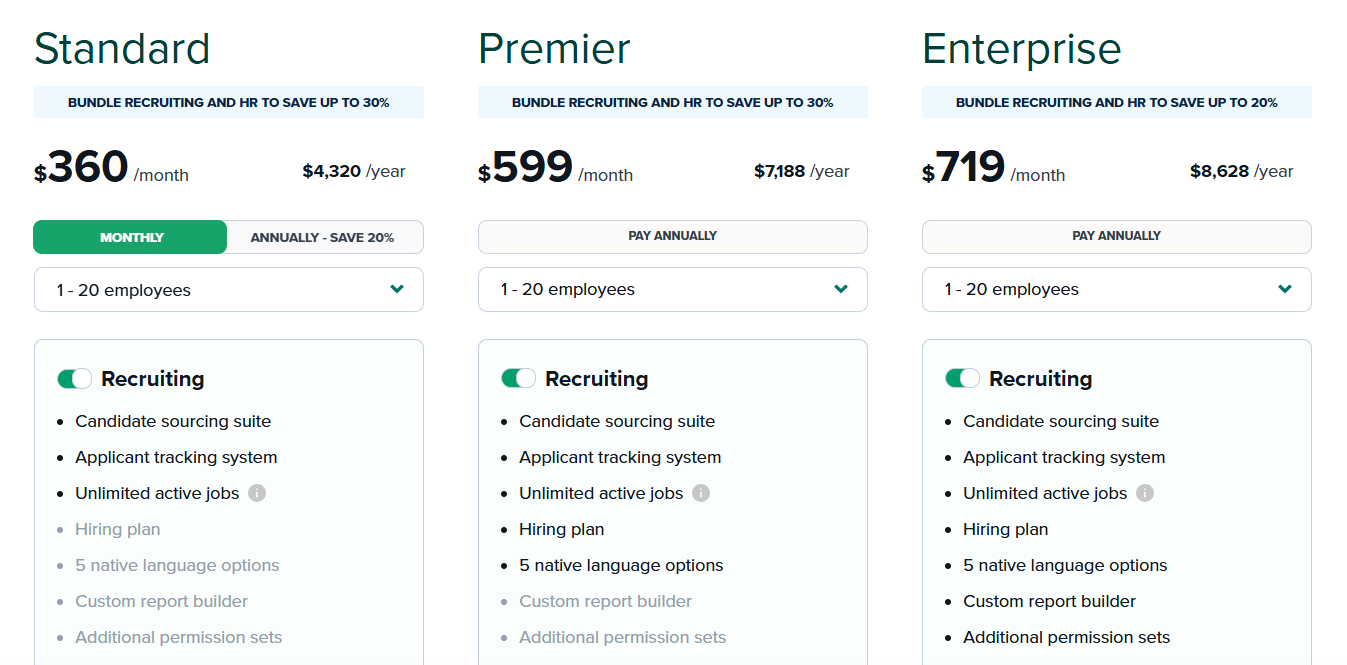 |
WhenToHelp vs Workable: Other Details
Organization Types supported |
|
|
|---|---|---|
Platforms Supported |
|
|
Modes of support |
|
|
API Support |
|
|
Get help choosing | Get help choosing |
WhenToHelp User Reviews & Rating Comparison
User Ratings | No reviews available for the product | |
|---|---|---|
Rating Distribution | No reviews available for this product | |
Spotsaas Editor’s POV generated by AI | Buyer sentiment Users appreciate the time-saving AutoFill scheduling, accessibility from any device, and reliable volunteer notifications, though some desire more integrations and payment features. What buyers like
Common complaints
| Buyer sentiment Overall positive sentiment highlights Workable's ease of use and efficiency, though some users note limitations in customization and reporting. What buyers like
Common complaints
|
Pros and Cons |
|
|
Positive Reviews | No reviews available for the product | No reviews available for the product |
| Negative Reviews | No reviews available for the product | No reviews available for the product |
Integrations
Integration with other apps | No Integration information available. |
|---|


WhenToHelp and Workable Customers
Customers | No Customers information available. |  Ogilvy  Reebok  Huawei |
|---|
Media and Screenshots
Screenshots | 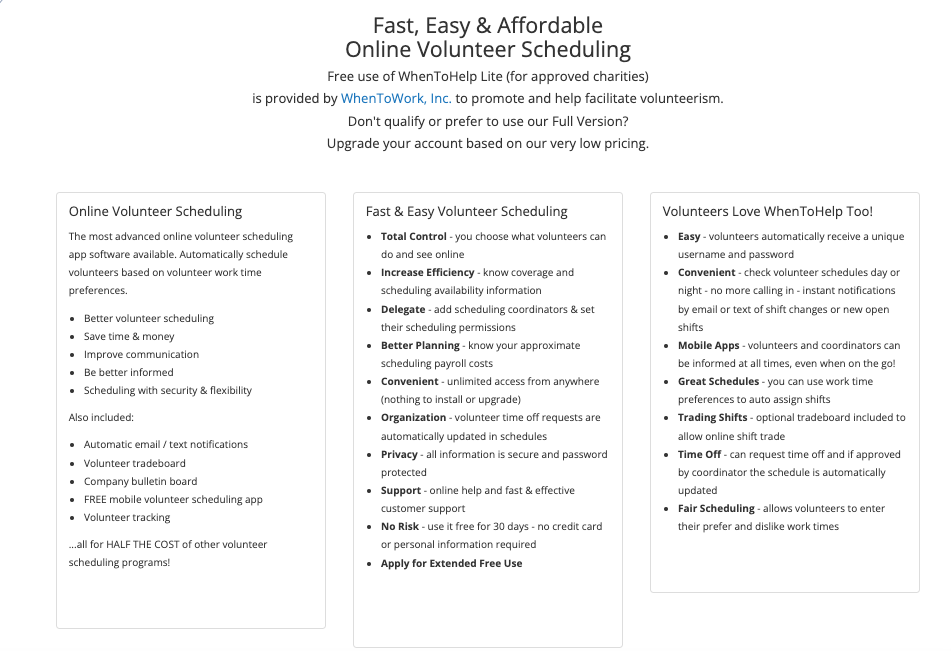 5 Screenshots |  8 Screenshots |
|---|---|---|
Videos | No videos available. |  2 Videos |
Top Alternatives to WhenToHelp and Workable in 2026
Alternatives |
|---|


Add another option to compare side by side
Search by product name to compare pricing, fit, and buyer feedback in one view.Compare similar software options




Related Blogs and Articles for Applicant Tracking System Ats
Disclaimer: This research has been collated from a variety of authoritative sources. We welcome your feedback at [email protected].
Frequently asked questions
- Which is better, WhenToHelp or Workable?
- Workable has a user rating of 4.3, while WhenToHelp has no user ratings yet. The right choice depends on your team size, budget, and specific Applicant Tracking System (ATS) needs.
- Do WhenToHelp and Workable offer a free trial?
- Yes, both WhenToHelp and Workable offer a free trial.
- What is the starting price of WhenToHelp vs Workable?
- WhenToHelp starts at $16 /month. Workable starts at $299 /month.
- What are the top alternatives to WhenToHelp?
- Top alternatives to WhenToHelp include Hibob HRIS, Oyster, Paylite HRMS, Pocket HRMS, IceHrm.
- What are the top alternatives to Workable?
- Top alternatives to Workable include Recruit CRM, Greenhouse, SmartRecruiters, Lever, Pinpoint.
- Does WhenToHelp live up to its claims?
- WhenToHelp rates highly on the following: proprietary AutoFill algorithm that quickly creates balanced volunteer schedules; automatic email and text notifications to keep volunteers informed and reduce no-shows. The common criticisms: no payroll or payment processing capabilities for stipends; initial learning curve for coordinators managing large or complex volunteer groups. It does not include Accounts Payable and Expense Tracking, which would need a separate product.
- What do reviewers criticise about Workable?
- Two things to weigh on Workable. It does these well: intuitive and user-friendly interface with minimal training required; automates manual recruitment tasks like job postings and offer issuance. These are the trade-offs: limited flexibility in editing workflows and approval pathways; insufficient reporting features for advanced analytics and delayed custom reports. It does not cover Accounts Payable and Billing and Invoicing.
More Applicant Tracking System (ATS) comparisons
Side by side breakdowns of the same products against other options in this category.