
Spendesk vs Zoho Expense vs RAMP Finance Comparison

Spendesk
Starting at Contact for pricing
- Large Enterprises
- Medium Business
Spendesk is an all-in-one spend management platform used by finance teams at mid-sized companies to control employee expenses, invoices, and corporate card spending from one dashboard. It replaces disconnected card progr…

Zoho Expense
Starting at $4 /user/month
- Free Trial
- Freelancers / Consultants
- Large Enterprises
Zoho Expense is an expense management tool for finance and operations teams at small to mid-size businesses who need receipt scanning, expense categorization, and reimbursement workflows integrated with their accounting…

RAMP Finance
Starting at $0 /user/month
- Free Trial
- Large Enterprises
- Medium Business
Ramp is a comprehensive financial management platform that simplifies and automates core finance operations for businesses. Offering corporate cards, expense management, bill payments, and vendor management tools, Ramp e…
Spendesk leads on user satisfaction with a 4.7-star rating across 164 reviews.
Spotsaas Analysis
SpendeskZoho ExpenseRAMP Finance
The core difference between Spendesk and Zoho Expense lies in Spendesk's focus on medium businesses seeking a straightforward, all-in-one solution, while Zoho Expense caters to a broader range of mid-sized teams looking for integrated automation. Ideal buyers for Spendesk are medium-sized businesses with 50-500 employees, whereas Zoho Expense is suited for a wider audience of 10-1,000 employees, particularly those already using Zoho products.
- Best for medium businesses with 50-500 employees - Intuitive platform for easy expense approvals - Mobile app convenience for on-the-go submissions - Ideal for finance managers and operations personnel - Focused on sectors like marketing and technology - Notable for its all-in-one expense management features
- Designed for mid-sized teams of 10-1,000 employees - Offers automatic receipt scanning, including handwritten receipts - Seamless integration with Zoho Books and other Zoho apps - Suitable for finance managers and small business owners - Ideal for sectors like IT services and healthcare - Priced competitively at $4 per user
Spendesk vs Zoho Expense vs RAMP Finance — at a glance
| Feature | Spendesk | Zoho Expense | RAMP Finance |
|---|---|---|---|
| Rating | 4.7 / 5 | 4.6 / 5 | — |
| Reviews | 164 | 270 | — |
| Starting price | Contact for pricing | $4 /user/month | $0 /user/month |
| Free trial | No | Yes | Yes |
| Free version | No | No | No |
| Best for | Large Enterprises, Medium Business, Small Business | Freelancers / Consultants, Large Enterprises, Medium Business | Large Enterprises, Medium Business, Small Business |
| Category | Expense Management Software | Expense Management Software | Expense Management Software |
| Platforms | SaaS/Web/Cloud, Mobile - Android, Mobile - iOS | SaaS/Web/Cloud, Mobile - Android, Mobile - iOS | SaaS/Web/Cloud |
| API | — | — | Available |
| Support modes | Business Hours, Online | Business Hours, Online | Online |
| Certifications | SOC 2, GDPR, ISO 27001 | SOC 2, GDPR | SOC 2 |
| Data residency | US | Global | US |
Key differences between Spendesk and Zoho Expense
- Pricing: Zoho Expense starts at $4 /user/month. Spendesk pricing is not publicly listed.
- Free trial: Zoho Expense offers a free trial; Spendesk does not.
- Target audience: Spendesk is built for Large Enterprises and Medium Business, while Zoho Expense targets Freelancers / Consultants and Large Enterprises.
- User satisfaction: Spendesk scores higher with a 4.7-star average.
- Deployment: Spendesk supports SaaS/Web/Cloud, Mobile - Android, Mobile - iOS; Zoho Expense supports SaaS/Web/Cloud, Mobile - Android, Mobile - iOS.
Compare Spendesk vs Zoho Expense vs RAMP Finance — and walk away knowing which one fits.
Which tool fits your team best
Which is actually cheaper for your team size
Where each product wins, per real buyers
Most Expense Management Software tools look identical on paper. This comparison cuts to the differences that matter — pricing structure, team fit, and what real buyers found after signing up.
Biggest differences
Features
Pricing
Buying details
Security
Buyer feedback
Integrations
Product tour
Other options
*sponsored |
Free PDF comparison
Download this Spendesk vs Zoho Expense vs RAMP Finance comparison
Get the full side-by-side as a PDF — these picks plus the top Expense Management Software tools, with verified ratings, pricing and features.
- Side-by-side on pricing, features & ratings
- Plus the category top 10, scored & ranked
- Emailed to you — no on-screen download
No file downloads on screen — we email it to you. One-click unsubscribe anytime.
Spendesk, Zoho Expense vs RAMP Finance: Biggest differences
Start here before you go deeper into features.
Best for medium businesses needing simple, all-in-one expense management.
- You want an intuitive platform with easy expense approvals and tracking.
- Your team values mobile app convenience for on-the-go expense submissions.
- You require seamless integration with popular accounting software.
- You need highly accurate, AI-driven receipt processing automation.
- Your business requires advanced fund transfer capabilities between wallets.
Best for mid-sized teams needing integrated, automated expense management.
- You require automatic receipt scanning including handwritten receipts for faster expense capture.
- Your company uses Zoho Books or other Zoho apps and needs seamless integration.
- You want configurable workflows and spending policies to control expenses efficiently.
- You are a solo freelancer needing full feature access without minimum user requirements.
- You run a very small business with a tight budget seeking a low-cost expense tool.
Large Enterprises, Medium Business, Small Business
Spendesk: Best for medium businesses needing simple, all-in-one expense management. Zoho Expense: Best for mid-sized teams needing integrated, automated expense management.
Description | Spendesk is an all-in-one spend management platform used by finance teams at mid-sized companies to control employee expenses, invoices, and corporate card spending from one dashboard. It ... Read More about Spendesk | Zoho Expense is an expense management tool for finance and operations teams at small to mid-size businesses who need receipt scanning, expense categorization, and reimbursement workflows ... Read More about Zoho Expense | Ramp is a comprehensive financial management platform that simplifies and automates core finance operations for businesses. Offering corporate cards, expense management, bill payments, and ... Read More about RAMP Finance |
|---|---|---|---|
Entry Level Pricing |
|
|
|
Free Trial Availability |
| ||
SpotScoreWhat's this? ↗ | 9.5/10 | 8.8/10 | Not Available |
User RatingsBased on verified Spotsaas reviews | |||
Best Company Size | 50-500 employeesMedium business | 10-50 employees51-1,000 employees | — |
Get pricing help |
Where each option fits best
See where each product is strongest, which teams it fits, and what causes buyers to keep looking — before you commit.
Based on buyer reviews and verified product data collected by Spotsaas.
Key strengths
- Streamlined Expense Management: Spendesk simplifies the expense management process by automating approvals, tracking spending, and providing real-time visibility, reducing administrative overhead and improving financial control.
- Reliable Budgeting and Forecasting Tools: The platform offers tools for setting and monitoring budgets, helping businesses plan effectively and keep spending aligned with financial goals.
- Integration with Accounting Software: Spendesk integrates with popular accounting platforms, synchronizing data automatically and reducing manual data entry to improve efficiency.
- Seamless Receipt Capture and Expense Reporting: Zoho Expense allows users to capture receipts on the go via mobile apps, automatically extracting data to simplify expense report generation.
- Integrated with Zoho Suite and Popular Accounting Tools: It integrates easily within the Zoho ecosystem and with major accounting software, helping simplify financial workflows.
- Automated Workflows and Policy Enforcement: The platform supports automated approval processes and configurable spending policies, giving better control over company expenses.
Best fit
- 50–500 employees
- Marketing, Advertising, Consulting, Technology, Retail
- Finance Manager, CFO, Operations Manager, Procurement Officer, Controller
- 10–1,000 employees
- IT Services, Consulting, Finance, Marketing Agencies, Healthcare, Education
- Finance Manager, Accountant, Expense Analyst, HR Manager, Operations Manager, Small Business Owner
Reasons buyers look elsewhere
- Lacks detailed analytics and customizable reporting — teams needing deep spending insights typically add Tableau or Power BI
- Integrates with 50+ apps but misses niche tools — companies with complex financial stacks often layer in Zapier or custom APIs
- Multi-currency support limited to EUR and USD — businesses handling 10+ currencies switch to Wise or Stripe for broader coverage
- Zoho Expense integrates well within the Zoho ecosystem and popular platforms, but businesses using specialized or legacy accounting software may prefer solutions with tailored integrations.
- While Zoho Expense offers automated receipt scanning and expense approval workflows, organizations seeking sophisticated fraud prevention may explore products with enhanced AI auditing capabilities.
- Companies with complex approval hierarchies or strict compliance standards may consider tools with more granular permission settings and advanced audit trails.
Software Demo
Demo |  Spendesk has not given any software demo yet If you're the owner of this profile, add your demo.Contact us |
|---|
Need a second opinion?
Get decision help from a software advisor
Share your priorities, budget, and team needs, and we’ll help you narrow the options and understand the tradeoffs before you talk to vendors.

- Independent advice — matched to your business
- Understand the tradeoffs before you talk to vendors
- Free 15-min call with a software advisor.
Step 1 of 4
How big is your team?
We tailor recommendations to companies your size.















How do Spendesk, Zoho Expense and RAMP Finance Compare on Features?
Total Features | 14 Features | 20 Features | 18 Features |
|---|---|---|---|
Unique Features | No unique features | No unique features | No unique features |
Get Quote |
Compare Spendesk, Zoho Expense and RAMP Finance on pricing
Review starting price, plan structure, and free-trial access side by side so you can see which option fits your budget and buying process.
Pricing Option | |||
|---|---|---|---|
Starting From |
|
|
|
Pricing Plans |
|
|
|
Pricing Page |  |  |  |
Spendesk, Zoho Expense vs RAMP Finance: Other Details
Organization Types supported |
|
|
|
|---|---|---|---|
Platforms Supported |
|
|
|
Modes of support |
|
|
|
API Support |
|
|
|
Get help choosing |
Spendesk, Zoho Expense vs RAMP Finance Security & Compliance
Certifications, data handling, and security controls for IT and compliance evaluators.
SOC 2 | ✓ Yes | ✓ Yes |
|---|---|---|
HIPAA | ✗ No | ✗ No |
GDPR | ✓ Yes | ✓ Yes |
ISO 27001 | ✓ Yes | — |
Single Sign-On (SSO) | ✓ Yes | ✓ Yes |
Multi-Factor Auth (MFA) | ✓ Yes | ✓ Yes |
Data Encryption | ✓ Yes | ✓ Yes |
Audit Logs | ✓ Yes | ✓ Yes |
Data Residency | 🇺🇸 US | 🌐 Global |
Spendesk vs Zoho Expense User Reviews & Rating Comparison
User Ratings | No reviews available for the product | ||
|---|---|---|---|
Rating Distribution | No reviews available for this product | ||
Spotsaas Editor’s POV generated by AI | Buyer sentiment Users generally express high satisfaction with Spendesk's ease of use and convenience, though some note limitations in AI receipt processing and virtual card acceptance. What buyers like
Common complaints
| Buyer sentiment Overall positive sentiment highlights ease of use, efficient receipt capture, and strong integration with Zoho Books, though some users desire more advanced features and integrations. What buyers like
Common complaints
| No expert review available for this product |
Pros and Cons |
|
| No pros or cons available for this product |
Positive Reviews | No reviews available for the product | No reviews available for the product | No reviews available for the product |
Spendesk, Zoho Expense and RAMP Finance Customers
Customers | No Customers information available. |  Scouts  Zomato  Samsonite |  Shopify  EventBrite  Glossier |
|---|
Media and Screenshots
Screenshots |  2 Screenshots | 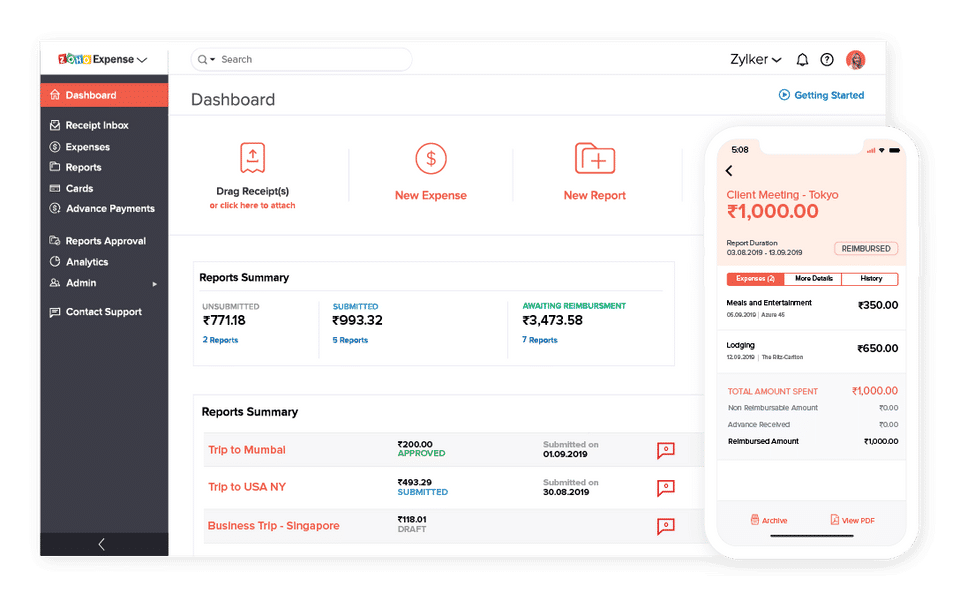 7 Screenshots |
|---|---|---|
Videos | No videos available. |  1 Videos |
Alternatives to Spendesk, Zoho Expense, RAMP Finance
Alternatives |
|---|


Add another option to compare side by side
Search by product name to compare pricing, fit, and buyer feedback in one view.Compare similar software options




Related Blogs and Articles for Expense Management Software
Disclaimer: This research has been collated from a variety of authoritative sources. We welcome your feedback at [email protected].
Frequently asked questions
- Which is better, Spendesk or Zoho Expense?
- Spendesk edges out the other on user ratings (4.7 vs 4.6). That said, the best pick depends on your use case, so use the comparison tables above to evaluate each dimension.
- Do Spendesk and Zoho Expense offer a free trial?
- Zoho Expense offers a free trial. Spendesk does not.
- What is the starting price of Spendesk vs Zoho Expense?
- Spendesk starts at Contact for pricing. Zoho Expense starts at $4 /user/month.
- What are the top alternatives to Spendesk?
- Top alternatives to Spendesk include RAMP Finance, Zoho Expense, Airbase, Brex, Emburse Nexonia Expenses.
- What are the top alternatives to Zoho Expense?
- Top alternatives to Zoho Expense include RAMP Finance, Brex, Emburse Nexonia Expenses, Chrome River Expense, Selenity Expenses.