
9.5
SpotScore

Spendesk Review: Is It The Right Expense Management Software For Your Team?
Best for SMB teams · Mid-market · Enterprise
 GDPR
GDPR SOC 2
SOC 2 ISO 27001
Spendesk offers custom pricing plan
Overview
Pricing
Features
Buyer feedback
Alternatives
Media
Security & Compliance
Support
FAQ
Blogs
Spotsaas Analysis for Spendesk
Spendesk is an expense management software tailored for finance managers and CFOs in medium-sized businesses, particularly within marketing agencies, consulting firms, and technology companies. A 4.7/5 rating from 267 reviews indicates broad validation and satisfaction among its users.
Users appreciate Spendesk for its intuitive interface and practical features that streamline expense management. The mobile app enhances convenience, allowing users to submit expenses effortlessly while on the move. However, a notable limitation is the limited vendor acceptance of virtual cards, which can hinder usability in certain scenarios.
Quick facts about Spendesk
What is Spendesk?
Spendesk is an all-in-one spend management platform used by finance teams at mid-sized companies to control employee expenses, invoices, and corporate card spending from one dashboard. It replaces disconnected card programs and manual expense reports by giving finance managers real-time visibility and approval workflows over every purchase. Card reader integrations can be inconsistent outside Western Europe, and receipt OCR extraction may need manual correction in compliance-heavy environments.
Pricing
Spendesk offers custom pricing plan
Best For
Suited for small teams, SMBs, and enterprise
Security & Compliance
SOC 2GDPRISO 27001SSO & MFA supported
Data residency:🇺🇸
Platform
Web + mobile app (iOS & Android)
Spendesk Screenshots

Spendesk was reviewed internally using user feedback, in-house testing, and market research to assess its performance, reliability, and user experience. Learn how we review products and our evaluation process.

Who should consider Spendesk
- Use cases
- Marketing agencies, Consulting firms, Technology companies
- Team types
- Finance managers, CFOs
- Company size
- 50-500 employees, Medium business
- Workflow style
- Simple and streamlined
- Setup complexity
- Medium
Why teams choose Spendesk
Intuitive and easy-to-use interface for efficient expense management
Mobile app enabling convenient on-the-go expense submission
Strong customer service with quick and clear responses
Is Spendesk right for you?
Best for medium businesses needing simple, all-in-one expense management.
Choose Spendesk if
- You want an intuitive platform with easy expense approvals and tracking.
- Your team values mobile app convenience for on-the-go expense submissions.
- You require seamless integration with popular accounting software.
Consider alternatives if
- You need highly accurate, AI-driven receipt processing automation.
- Your business requires advanced fund transfer capabilities between wallets.
What buyers should know before choosing Spendesk
Spendesk works best for teams that need real-time visibility into spending and quick approval workflows. Before shortlisting, verify that the platform's payment terminal integrations cover your region—users report inconsistent performance with certain card readers, particularly outside Western Europe.
Test receipt scanning accuracy in your demo, as OCR extraction of line items and vendor details has gaps that may require manual correction for compliance-heavy workflows. Check integration depth with your accounting system.
Spendesk connects to QuickBooks, Xero, and Sage, but custom field mapping and multi-entity consolidation often require manual setup or API work. Confirm pricing aligns with your user count and transaction volume—the per-user seat model can become expensive for large teams, and transaction fees apply to certain payment methods.
The mobile app handles expense submission and receipt capture well, but the desktop interface is where most reporting and policy configuration happens. If your team works primarily on mobile, test whether the limited dashboard and export options on the app meet your needs.
Ask the vendor about their roadmap for receipt processing improvements if accuracy is critical to your audit process.
Spendesk pros and cons
- Spendesk pros
Intuitive and easy-to-use interface for efficient expense management
Mobile app enabling convenient on-the-go expense submission
Strong customer service with quick and clear responses
- Spendesk cons
Limited vendor acceptance of virtual credit cards
Inaccurate and slow AI receipt reading requiring manual corrections
Ready to try it?
Get started with Spendesk
Connect with the team for a personalised demo.
Still comparing?
See how it stacks up
Compare Spendesk side-by-side with top Expense Management Software alternatives.



What is the pricing of Spendesk?
Spendesk uses custom pricing — plans are tailored to your team size and needs. Contact them for a quote.
Weighing your options?
Not sure if Spendesk fits your budget?
Spendesk reviews and ratings
Buyer sentiment
Users generally express high satisfaction with Spendesk's ease of use and convenience, though some note limitations in AI receipt processing and virtual card acceptance.
What buyers like
- Ease of use
- Mobile app convenience
- Customer service responsiveness
Common complaints
- AI receipt processing accuracy
- Virtual card vendor acceptance
Are you using Spendesk?

- See if Spendesk fits your business
- Real pricing — no sales pressure
- A demo or quick answers, your call
Step 1 of 4
How big is your team?
We tailor recommendations to companies your size.















What are the features of Spendesk?
Spendesk's Bank Feed Sync feature automatically connects business bank accounts with the platform to import transactions in real time. It el…
The Card Spending Tracker in Spendesk monitors all purchases made with company-issued physical and virtual cards. It provides real-time insi…
Spendesk's Expense Approval feature lets finance teams and managers review and authorize expenses before reimbursement or payment. Configura…
Spendesk's Mileage Tracking feature lets employees log business travel distances for accurate reimbursement. Users input start and end locat…
The Multi-level Approval feature in Spendesk supports hierarchical review structures by allowing expenses to pass through multiple layers of…
Multiple Reporting Currency is a feature found in various software programs and applications that allows users to view financial data and re…
Receipt Management in Spendesk lets users upload, store, and organize expense receipts in one central location. The platform matches receipt…
Spendesk’s Receipt Scanner feature uses OCR (Optical Character Recognition) to automatically extract data from photographed or uploaded rece…
The Reconciliation Summary feature in Spendesk provides a complete view of all transactions, categorized and matched with receipts or approv…
Spendesk's Reimbursement Management feature handles employee out-of-pocket expense claims from submission to payout. It automates approvals…
Spendesk’s Spend Control feature enforces spending limits through pre-approved budgets, custom rules, and real-time transaction monitoring.…
Tax Claim is a feature that allows users to claim tax deductions and credits on their income tax returns. This feature helps individuals and…
Spendesk integrates with accounting platforms, HR systems, and business tools like Xero, QuickBooks, and NetSuite. These integrations automa…
Spendesk's Time & Expense Tracking feature allows teams to record hours worked and related expenses in a centralized system. It links time e…
Spendesk security and data handling
Key compliance certifications and security features for IT and security teams evaluating Spendesk.
Certifications

Security features
Developer & data
Alternatives to Spendesk
Best for Small Businesses
All-in-One Platform for Smarter ...
Great for Growing Teams
Streamline your expense management ...
8.8
Excellent




Why buyers keep looking beyond Spendesk
Lacks detailed analytics and customizable reporting — teams needing deep spending insights typically add Tableau or Power BI
Integrates with 50+ apps but misses niche tools — companies with complex financial stacks often layer in Zapier or custom APIs
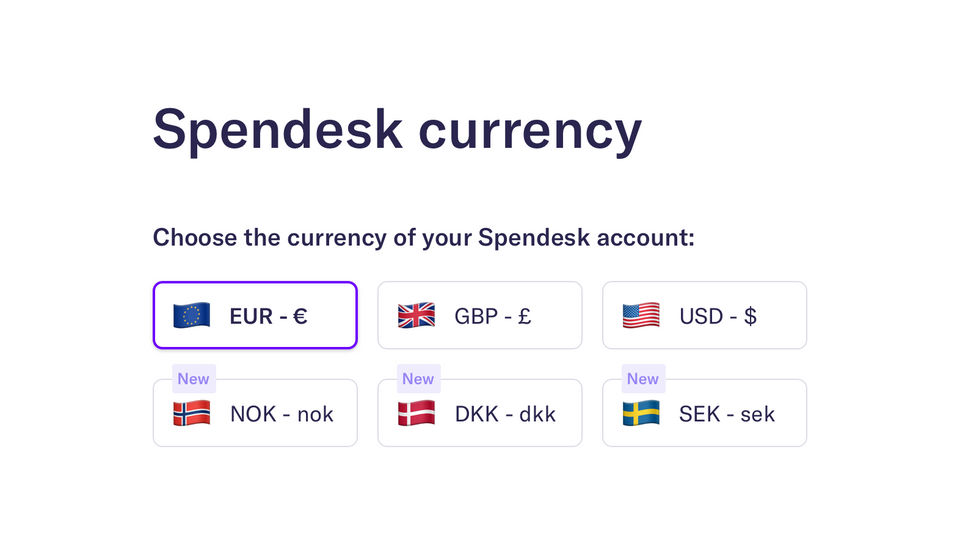
Multi-currency support limited to EUR and USD — businesses handling 10+ currencies switch to Wise or Stripe for broader coverage
Color scheme and UI customization options are fixed — users with color blindness or specific accessibility requirements choose Expensify or Divvy
Mobile app has sync delays and offline limitations — field teams and remote workers often pair it with Expense Manager or Concur
Pricing requires a quote — buyers comparing total cost of ownership prefer Brex or Ramp's transparent per-user or transaction-based models
Spendesk Support Options
Frequently Asked Questions About Spendesk
Common questions buyers ask before choosing Spendesk.
Spendesk is a Expense Management Software. Spendesk offers Time & Expense Tracking, Mileage Tracking, Third-party Integration, Expense Approval, Reimbursement Management and many more functionalities.
Spendesk is a strong fit if: You want an intuitive platform with easy expense approvals and tracking.; Your team values mobile app convenience for on-the-go expense submissions.. Consider alternatives if: You need highly accurate, AI-driven receipt processing automation.; Your business requires advanced fund transfer capabilities between wallets..
Buyers commonly note the following limitations of Spendesk: Limited vendor acceptance of virtual credit cards; Inaccurate and slow AI receipt reading requiring manual corrections; Delayed visibility of payments in some cases.
Some top alternatives to Spendesk includes RAMP Finance, Zoho Expense, Airbase, Brex and Soldo.
Spendesk offers Quotation Based pricing model
The starting price is not disclosed by Spendesk. You can visit Spendesk pricing page to get the latest pricing.
Free buyer scorecard
Evaluate Spendesk with the expense management software buyer scorecard
A weighted expense management software scorecard to assess Spendesk objectively and compare it against the alternatives.
- Weighted criteria you can edit
- Score vendors side-by-side
- Shareable with your buying committee
No file downloads on screen — we email it to you. One-click unsubscribe anytime.
Ready to try it?
Get started with Spendesk
Get connected with the team for a personalised demo.
About the reviewer
Rajat Gupta is the founder of Spotsaas. Over the past two years, he has reviewed 2,000+ tools across CRM, HR, AI, and finance — applying hands-on product research and a background in commerce and the CFA program to evaluate software through a business and ROI lens. His goal: help teams make software decisions they won't regret.
Expense Management Software by Country
Disclaimer: This research has been collated from a variety of authoritative sources. We welcome your feedback at [email protected].