
Remote.com vs Wagepoint Comparison

Remote.com
Starting at $29 per employee/month
- Large Enterprises
- Medium Business
Remote.com is a remote work management platform that simplifies global payroll, compliance, and workforce administration for businesses of all sizes. It seamlessly integrates with HR systems, centralizing payroll data fo…

Wagepoint
Starting at $22 /Month
- Freelancers / Consultants
- Medium Business
Wagepoint is payroll software for small and medium-sized businesses in Canada and the US, with particular depth in handling CRA tax filings, government remittances, and Canadian compliance requirements. It automates payr…
Wagepoint leads on user satisfaction with a 4.7-star rating across 60 reviews.
Remote.com vs Wagepoint — at a glance
| Feature | Remote.com | Wagepoint |
|---|---|---|
| Rating | 4.6 / 5 | 4.7 / 5 |
| Reviews | 50 | 60 |
| Starting price | $29 per employee/month | $22 /Month |
| Free trial | No | No |
| Free version | No | No |
| Best for | Large Enterprises, Medium Business, Small Business | Freelancers / Consultants, Medium Business, Small Business |
| Category | Payroll Software | Payroll Software |
| Platforms | SaaS/Web/Cloud | SaaS/Web/Cloud |
| API | Available | — |
| Support modes | Online | Business Hours, Online |
| Certifications | SOC 2, GDPR, ISO 27001 | SOC 2 |
| Data residency | Global | US |
Key differences between Remote.com and Wagepoint
- Pricing: Remote.com starts at $29 per employee/month, while Wagepoint starts at $22 /Month.
- Target audience: Remote.com is built for Large Enterprises and Medium Business, while Wagepoint targets Freelancers / Consultants and Medium Business.
- User satisfaction: Wagepoint scores higher with a 4.7-star average.
- Deployment: Remote.com supports SaaS/Web/Cloud; Wagepoint supports SaaS/Web/Cloud.
Remote.com vs Wagepoint — find the better fit before you commit.
Which tool fits your team best
Which is actually cheaper for your team size
Where each product wins, per real buyers
Most Payroll Software tools look identical on paper. This comparison cuts to the differences that matter — pricing structure, team fit, and what real buyers found after signing up.
Biggest differences
Features
Pricing
Buying details
Security
Buyer feedback
Integrations
Product tour
Other options
Talk to an expert Talk to an expert |
Free PDF comparison
Download this Remote.com vs Wagepoint comparison
Get the full side-by-side as a PDF — these picks plus the top Payroll Software tools, with verified ratings, pricing and features.
- Side-by-side on pricing, features & ratings
- Plus the category top 10, scored & ranked
- Emailed to you — no on-screen download
No file downloads on screen — we email it to you. One-click unsubscribe anytime.
Remote.com vs Wagepoint: Biggest differences
Start here before you go deeper into features.
Best for managing global payroll and compliance with strong support.
- You need comprehensive payroll and compliance across multiple countries.
- Your HR team values personalized, responsive customer support.
- You want a user-friendly platform that integrates with existing HR systems.
- You require fully self-service payroll workflows with minimal support dependency.
- You need transparent, publicly available pricing before engagement.
Freelancers / Consultants, Medium Business, Small Business
Remote.com typically suits Large Enterprises and Medium Business. Wagepoint tends to fit Freelancers / Consultants and Medium Business better. The right choice depends on your team size, workflow, and whether a free trial matters.
Description | Remote.com is a remote work management platform that simplifies global payroll, compliance, and workforce administration for businesses of all sizes. It seamlessly integrates with HR ... Read More about Remote.com | Wagepoint is payroll software for small and medium-sized businesses in Canada and the US, with particular depth in handling CRA tax filings, government remittances, and Canadian compliance ... Read More about Wagepoint |
|---|---|---|
Entry Level Pricing |
|
|
Free Trial Availability |
|
|
SpotScoreWhat's this? ↗ | 9.4/10 | 8.3/10 |
User RatingsBased on verified Spotsaas reviews | ||
Best Company Size | 50 to 500 employeesMedium to Large Enterprises | — |
Get pricing help | Get pricing help |
Where each option fits best
See where each product is strongest, which teams it fits, and what causes buyers to keep looking — before you commit.
Based on buyer reviews and verified product data collected by Spotsaas.
Key strengths
- Global Hiring: Remote.com lets managers access a diverse talent pool across the globe, removing geographical barriers and helping your organization find the right fit for every role.
- Simplified Compliance Management: Administrators can focus on core work while Remote.com handles complex international labor laws and compliance requirements, keeping your company aligned with regulations.
- Transparent Payment Solutions: Executives will appreciate the clarity and efficiency of Remote.com’s payment solutions, which facilitate seamless salary distribution in multiple currencies while keeping track of all transactions in one user-friendly platform.
No key benefits available yet.
Best fit
- 50 to 500 employees
- SaaS, Consulting, Fintech, and Martech
- HR Managers, Talent Acquisition Specialists, Remote Team Leaders, and Operations Managers
No best-fit guidance available yet.
Reasons buyers look elsewhere
- Users might seek alternatives to Remote.com due to the need for more tailored pricing models that better fit their budget and team size. Organizations may also require specific features, such as enhanced compliance tools or unique integrations with existing systems. Some businesses might find the user interface of Remote.com less intuitive, prompting them to explore more user-friendly platforms. Additionally, companies with specific regional needs may prefer alternatives that provide localized services or support in their preferred languages. Lastly, users may look for platforms that offer a more extensive talent pool or specialized recruitment features to meet their hiring goals effectively.
No alternatives guidance available yet.
Software Demo
Demo |
|---|
Need a second opinion?
Get decision help from a software advisor
Share your priorities, budget, and team needs, and we’ll help you narrow the options and understand the tradeoffs before you talk to vendors.

- Independent advice — matched to your business
- Understand the tradeoffs before you talk to vendors
- Free 15-min call with a software advisor.
Step 1 of 4
How big is your team?
We tailor recommendations to companies your size.















How do Remote.com and Wagepoint Compare on Features?
Total Features | 16 Features | 5 Features |
|---|---|---|
Unique Features | No unique features | No unique features |
Get Quote | Get Quote |
Compare Remote.com and Wagepoint on pricing
Review starting price, plan structure, and free-trial access side by side so you can see which option fits your budget and buying process.
Pricing Option | ||
|---|---|---|
Starting From |
|
|
Pricing Plans |
|
|
Pricing Page | 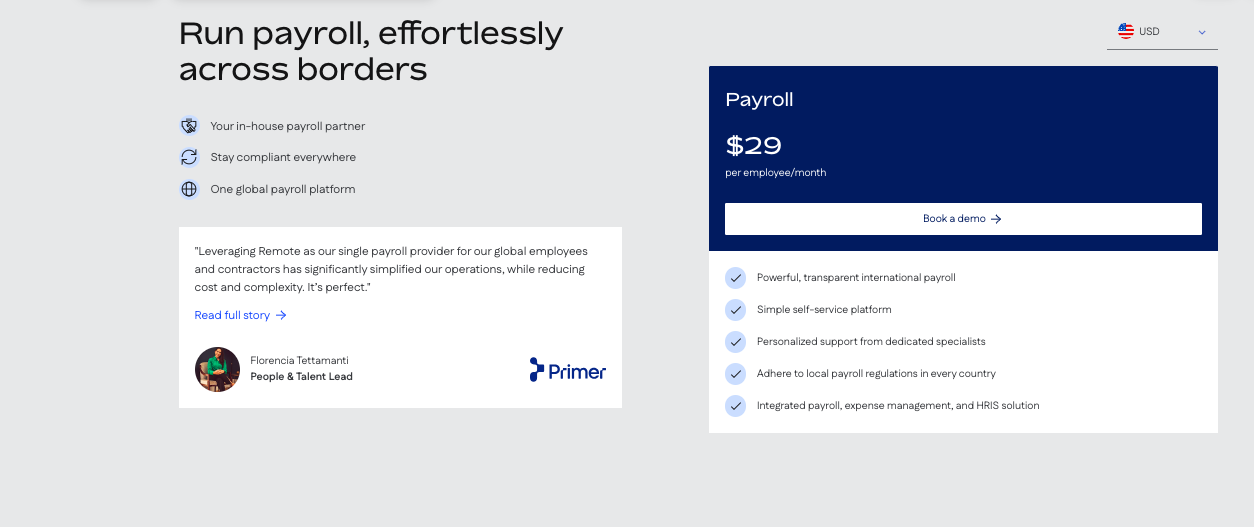 |  |
Remote.com vs Wagepoint: Other Details
Organization Types supported |
|
|
|---|---|---|
Platforms Supported |
|
|
Modes of support |
|
|
API Support |
|
|
Get help choosing | Get help choosing |
Remote.com vs Wagepoint Security & Compliance
Certifications, data handling, and security controls for IT and compliance evaluators.
SOC 2 | ✓ Yes | ✓ Yes |
|---|---|---|
HIPAA | ✗ No | ✗ No |
GDPR | ✓ Yes | — |
ISO 27001 | ✓ Yes | — |
Single Sign-On (SSO) | ✓ Yes | — |
Multi-Factor Auth (MFA) | ✓ Yes | — |
Data Encryption | ✓ Yes | — |
Audit Logs | ✓ Yes | — |
Data Residency | 🌐 Global | 🇺🇸 US |
Remote.com User Reviews & Rating Comparison
User Ratings | ||
|---|---|---|
Rating Distribution | ||
Spotsaas Editor’s POV generated by AI | Buyer sentiment Users generally praise Remote.com for its excellent customer support and ease of use, while noting some delays in support responsiveness and limited self-service flexibility. What buyers like
Common complaints
| Buyer sentiment Buyer sentiment is very strong across 61 reviews, with consistently positive feedback. What buyers like
Common complaints
|
Pros and Cons |
|
|
Positive Reviews | No reviews available for the product | No reviews available for the product |
Remote.com and Wagepoint Customers
Customers |  Mural  Arduino  GitLab | No Customers information available. |
|---|
Media and Screenshots
Screenshots |  1 Screenshots |  3 Screenshots |
|---|---|---|
Videos |  4 Videos |  3 Videos |
Top Alternatives to Remote.com and Wagepoint in 2026
Alternatives |
|---|

Add another option to compare side by side
Search by product name to compare pricing, fit, and buyer feedback in one view.Compare similar software options


Disclaimer: This research has been collated from a variety of authoritative sources. We welcome your feedback at [email protected].
Frequently asked questions
- Which is better, Remote.com or Wagepoint?
- Wagepoint edges out the other on user ratings (4.7 vs 4.6). That said, the best pick depends on your use case — use the comparison tables above to evaluate each dimension.
- Do Remote.com and Wagepoint offer a free trial?
- Neither Remote.com nor Wagepoint currently lists a free trial.
- What is the starting price of Remote.com vs Wagepoint?
- Remote.com starts at $29 per employee/month. Wagepoint starts at $22 /Month.
- What are the top alternatives to Remote.com?
- Top alternatives to Remote.com include OnPay, Square Payroll, APS Payroll, Heartland Payroll, QuickBooks Payroll.
- What are the top alternatives to Wagepoint?
- Top alternatives to Wagepoint include Pilot, Fingercheck, WavePayroll, Excelforce, APS Payroll.