
Quicken vs Rippling vs Hibob HRIS vs Oyster Comparison

Quicken
Starting at $2.99 /month
- Free Trial
- Large Enterprises
- Medium Business
Quicken is the personal finance software that makes it easy to set and manage personal finances. Its a mobile apps give users the ability to access their finances everywhere, anytime – whether they're at home or on-the-g…

Rippling
Starting at $8 custom
- Medium Business
- Small Business
Rippling is an all-in-one global workforce management platform that seamlessly integrates HR, IT, and finance into a unified system. Designed to streamline business operations, Rippling offers comprehensive tools for man…

Hibob HRIS
Starting at Contact for pricing
- Large Enterprises
- Medium Business
Hibob HRIS is a modern human resource information system designed to enhance employee engagement and streamline HR operations. It empowers HR teams to go beyond administrative tasks by making data-driven, personalized de…

Oyster
Starting at $25 /employee/month
- Free Trial
- Large Enterprises
- Medium Business
Oyster is a global employment platform that helps companies hire, onboard, pay, and manage international employees and contractors without setting up local entities. It automates compliant contract creation using region-…
Quicken leads on user satisfaction with a 5.0-star rating across 9,973 reviews.
Quicken vs Rippling vs Hibob HRIS vs Oyster — at a glance
| Feature | Quicken | Rippling | Hibob HRIS | Oyster |
|---|---|---|---|---|
| Rating | 5.0 / 5 | 5.0 / 5 | 4.5 / 5 | 4.4 / 5 |
| Reviews | 9,973 | 1,829 | 701 | 346 |
| Starting price | $2.99 /month | $8 custom | Contact for pricing | $25 /employee/month |
| Free trial | Yes | No | No | Yes |
| Free version | No | No | No | No |
| Best for | Large Enterprises, Medium Business, Small Business | Medium Business, Small Business | Large Enterprises, Medium Business, Small Business | Large Enterprises, Medium Business, Small Business |
| Category | Personal Finance Software | HR Software | HR Software | HR Software |
| Integrations | 4+ apps | — | 12+ apps | — |
| Platforms | SaaS/Web/Cloud, Mobile - Android, Mobile - iOS, Installed - Windows, Installed - Mac | SaaS/Web/Cloud, Mobile - Android, Mobile - iOS, Installed - Windows, Installed - Mac | SaaS/Web/Cloud, Mobile - Android, Mobile - iOS | SaaS/Web/Cloud |
| API | Available | Available | Available | Available |
| Support modes | Online | Business Hours, Online | Online | Business Hours, Online |
| Certifications | — | SOC 2, GDPR | SOC 2, GDPR | SOC 2, GDPR |
| Data residency | US | Global | UK | Global |
Key differences between Quicken and Rippling
- Pricing: Quicken starts at $2.99 /month, while Rippling starts at $8 custom.
- Free trial: Quicken offers a free trial; Rippling does not.
- Target audience: Quicken is built for Large Enterprises and Medium Business, while Rippling targets Medium Business and Small Business.
- User satisfaction: Quicken scores higher with a 5.0-star average.
- Deployment: Quicken supports SaaS/Web/Cloud, Mobile - Android, Mobile - iOS, Installed - Windows, Installed - Mac; Rippling supports SaaS/Web/Cloud, Mobile - Android, Mobile - iOS, Installed - Windows, Installed - Mac.
Compare Quicken vs Rippling vs Hibob HRIS vs Oyster — and walk away knowing which one fits.
Which tool fits your team best
Which is actually cheaper for your team size
Where each product wins, per real buyers
Most Personal Finance Software tools look identical on paper. This comparison cuts to the differences that matter — pricing structure, team fit, and what real buyers found after signing up.
Biggest differences
Features
Pricing
Buying details
Security
Buyer feedback
Integrations
Product tour
Other options
Free PDF comparison
Download this Quicken vs Rippling vs Hibob HRIS vs Oyster comparison
Get the full side-by-side as a PDF — these picks plus the top Personal Finance Software tools, with verified ratings, pricing and features.
- Side-by-side on pricing, features & ratings
- Plus the category top 10, scored & ranked
- Emailed to you — no on-screen download
No file downloads on screen — we email it to you. One-click unsubscribe anytime.
Quicken, Rippling, Hibob HRIS vs Oyster: Biggest differences
Start here before you go deeper into features.
Best for simple personal and small business finance tracking with tax focus.
- You need straightforward expense tracking and personal income tax management.
- You want a user-friendly interface with reliable customer support.
- You manage finances for a household, small business, or freelance work.
- You require advanced multi-user collaboration and role-based security controls.
- You need sophisticated automation, real-time analytics, or comprehensive bill payment features.
Best for unified HR, IT, and finance management in small to medium businesses.
- You need a single platform to manage HR, IT, and payroll seamlessly.
- Your company requires strong compliance management for global workforce regulations.
- You want to automate onboarding, payroll, benefits, and device provisioning tasks.
- Your business demands highly customizable workflows and advanced reporting features.
- You are a very small business with a limited budget concerned about escalating costs.
Large Enterprises, Medium Business, Small Business
Large Enterprises, Medium Business, Small Business
Quicken: Best for simple personal and small business finance tracking with tax focus. Rippling: Best for unified HR, IT, and finance management in small to medium businesses.
Description | Quicken is the personal finance software that makes it easy to set and manage personal finances. Its a mobile apps give users the ability to access their finances everywhere, anytime – ... Read More about Quicken | Rippling is an all-in-one global workforce management platform that seamlessly integrates HR, IT, and finance into a unified system. Designed to streamline business operations, Rippling ... Read More about Rippling | Hibob HRIS is a modern human resource information system designed to enhance employee engagement and streamline HR operations. It empowers HR teams to go beyond administrative tasks by ... Read More about Hibob HRIS | Oyster is a global employment platform that helps companies hire, onboard, pay, and manage international employees and contractors without setting up local entities. It automates compliant ... Read More about Oyster |
|---|---|---|---|---|
Entry Level Pricing |
|
|
|
|
Free Trial Availability |
|
| ||
SpotScoreWhat's this? ↗ | 9.8/10 | 9.4/10 | 9.1/10 | 8.4/10 |
User RatingsBased on verified Spotsaas reviews | ||||
Best Company Size | 1-50 employees51-200 employees | Small BusinessMedium Business | 50 to 1,000 employees. | 50 to 500 employees |
Get pricing help | Get pricing help |
Where each option fits best
See where each product is strongest, which teams it fits, and what causes buyers to keep looking — before you commit.
Based on buyer reviews and verified product data collected by Spotsaas.
Key strengths
- Pricing models aligned with usage and scale: Many alternatives offer flexible pricing tiers based on features, users, or transaction volume. This lets individuals start small and upgrade as their needs grow. Some tools include free plans or lower-cost entry tiers for budget-conscious users. Users often get better value compared to fixed annual subscriptions that may include unused features.
- More advanced automation and reporting: Modern finance tools often provide automated categorization, recurring transaction rules, cash-flow forecasts, and customizable reports. These features reduce repetitive manual work and give users clearer insights into spending patterns and financial trends. Compared to traditional desktop tools, alternatives tend to focus more on real-time dashboards and forward-looking analytics, helping users make faster and more informed financial decisions.
- Better support for business and multi-user needs: Many alternatives are designed with freelancers, startups, and small businesses in mind. They offer features like role-based access, approvals, audit logs, and multi-entity tracking. This allows multiple people—such as founders, finance managers, or external accountants—to work in the same system without sharing credentials. These controls improve security and accountability as financial operations grow beyond personal use.
- Streamlined HR Processes: With Rippling, I’ve seen firsthand how it simplifies HR tasks like onboarding, payroll, and benefits management. It centralizes everything in one platform, allowing managers to focus more on their teams rather than administrative hassles.
- Automated Compliance: Executives can breathe easier knowing that Rippling keeps you up-to-date with employment laws and regulations. This automation minimizes the risk of costly compliance errors, making it a smart choice for any organization.
- Customizable Employee Experience: Rippling lets you design the employee experience to match your company's needs. From personalized benefits packages to unique onboarding processes, it builds a culture that connects with your team.
- Employee Experience: Hibob HRIS uses user-friendly interfaces that simplify HR processes for managers and employees. A positive experience increases engagement and satisfaction across your workforce.
- Real-Time Analytics and Reporting: With Hibob, administrators can access powerful analytics tools that provide insights into workforce trends, performance metrics, and employee feedback. This data-driven approach lets you make informed decisions and refine your HR strategies effectively.
- Customizable Workflows: The flexibility of Hibob allows you to tailor workflows according to your organization’s unique needs. Whether it's onboarding, performance reviews, or offboarding, you can easily configure processes that resonate with your company culture.
- Streamlined Onboarding Process: With Oyster, onboarding is easy. Managers can quickly integrate new hires into the company, so they feel welcomed and productive from day one.
- Global Employment Compliance: We take the guesswork out of international hiring. Oyster keeps your organization compliant with local labor laws, so you can focus on growing your team without legal worries.
- Our platform gives employees personalized benefits packages designed for their unique needs. This means happier, more engaged team members who feel valued and understood.
Best fit
- 50–200
- Personal Finance, Accounting & Bookkeeping, Financial Services, Small Business, Freelancers & Self-Employed, Nonprofits, Real Estate, Consulting
- Small Business Owner, Finance Manager, Accountant, Bookkeeper, Operations Manager, Founder, Self-Employed Professional, Household Finance Manager
- 1 to 1,000 employees
- HR Tech, Fintech, SaaS, Professional Services, and E-commerce
- HR Managers, Payroll Administrators, IT Managers, and Operations Directors
- 50 to 1,000 employees.
- Industries: SaaS, Consulting, Technology, E-commerce, Healthcare, and Retail.
- Job Titles: HR Managers, Talent Acquisition Specialists, Employee Experience Managers, Payroll Administrators, and Compliance Officers.
- 50 to 500 employees
- SaaS, Fintech, Consulting, and Sales Automation
- HR Managers, Talent Acquisition Specialists, and Remote Team Leaders
Reasons buyers look elsewhere
- Quicken is primarily built around a desktop model. While it offers mobile and cloud sync, the experience isn’t fully browser-based or real-time. Users who expect instant access from any device, easy sharing with family members or accountants, and seamless collaboration often find modern cloud finance tools more convenient.
- Quicken does not provide an open API for developers. This limits how well it connects with payroll systems, CRMs, invoicing tools, and analytics platforms. Users running multiple software tools often prefer alternatives that fit more easily into a connected SaaS stack.
- Quicken is designed mainly for personal and household finance. Freelancers and small teams may outgrow it as they need features like role-based access, multi-entity tracking, approval workflows, and detailed audit history—areas where business-focused finance software performs better.
- Lacks specialized HR features like advanced recruitment tools and performance management — teams needing these typically add BambooHR or Workday
- Priced higher than competitors like Gusto or ADP — budget-conscious companies often choose lower-cost alternatives
- Doesn't provide industry-specific compliance features for niche sectors like healthcare or financial services
- Limited industry-specific features — manufacturing and healthcare teams often need vertical solutions like Workday or Namely
- Price-sensitive organizations under 100 employees gravitate toward BambooHR or Gusto for lower total cost of ownership
- Fast-growing companies (50+ new hires/year) need platforms that scale hiring workflows; Hibob's onboarding tools lag competitors like Workday
- Pricing is higher than competitors like Remote.com or Deel, which offer lower per-employee costs for distributed teams
- Missing advanced reporting and custom integrations that teams managing complex payroll or compliance workflows require
- Limited customization for team-specific processes — requires manual workarounds for non-standard hiring or onboarding flows
Software Demo
Demo |
|---|
Need a second opinion?
Get decision help from a software advisor
Share your priorities, budget, and team needs, and we’ll help you narrow the options and understand the tradeoffs before you talk to vendors.

- Independent advice — matched to your business
- Understand the tradeoffs before you talk to vendors
- Free 15-min call with a software advisor.
Step 1 of 4
How big is your team?
We tailor recommendations to companies your size.















How do Quicken, Rippling, Hibob HRIS and Oyster Compare on Features?
Total Features | 14 Features | 41 Features | 23 Features | 22 Features |
|---|---|---|---|---|
Unique Features | No unique features | No unique features | No unique features | No unique features |
Get Quote | Get Quote |
Compare Quicken, Rippling, Hibob HRIS and Oyster on pricing
Review starting price, plan structure, and free-trial access side by side so you can see which option fits your budget and buying process.
Pricing Option | ||||
|---|---|---|---|---|
Starting From |
|
|
|
|
Pricing Plans |
|
|
|
|
Pricing Page | 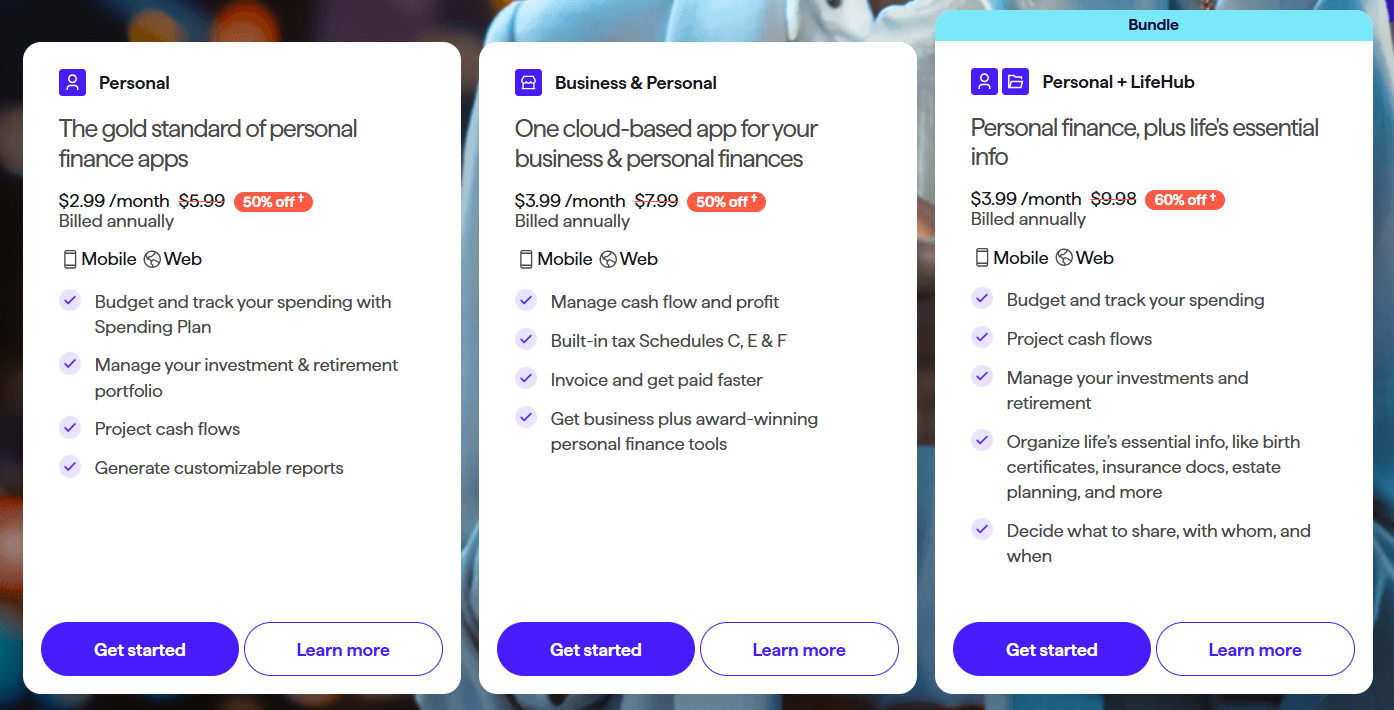 |  |  |  |
Quicken, Rippling, Hibob HRIS vs Oyster: Other Details
Organization Types supported |
|
|
|
|
|---|---|---|---|---|
Platforms Supported |
|
|
|
|
Modes of support |
|
|
|
|
API Support |
|
|
|
|
Get help choosing | Get help choosing |
Quicken, Rippling, Hibob HRIS vs Oyster Security & Compliance
Certifications, data handling, and security controls for IT and compliance evaluators.
SOC 2 | — | ✓ Yes |
|---|---|---|
HIPAA | ✗ No | ✗ No |
GDPR | — | ✓ Yes |
ISO 27001 | — | — |
Single Sign-On (SSO) | ✗ No | ✓ Yes |
Multi-Factor Auth (MFA) | ✓ Yes | ✓ Yes |
Data Encryption | ✓ Yes | ✓ Yes |
Audit Logs | ✗ No | ✓ Yes |
Data Residency | 🇺🇸 US | 🌐 Global |
Quicken vs Rippling vs Hibob HRIS User Reviews & Rating Comparison
User Ratings | ||||
|---|---|---|---|---|
Rating Distribution | ||||
Spotsaas Editor’s POV generated by AI | Buyer sentiment Users generally appreciate Quicken's ease of use and comprehensive financial tracking but note limitations in advanced features and file management. What buyers like
Common complaints
| Buyer sentiment Buyers overwhelmingly praise Rippling for its intuitive interface and comprehensive automation, though some note customization limits and cost concerns. What buyers like
Common complaints
| Buyer sentiment Buyer sentiment is positive across 761 reviews, with strong overall satisfaction. What buyers like
Common complaints
| Buyer sentiment Buyer sentiment is positive across 388 reviews, with strong overall satisfaction. What buyers like
Common complaints
|
Pros and Cons |
|
|
|
|
Positive Reviews | No reviews available for the product | No reviews available for the product | No reviews available for the product | No reviews available for the product |
| Negative Reviews | No reviews available for the product | No reviews available for the product | No reviews available for the product | No reviews available for the product |
Integrations
Integration with other apps | No Integration information available. | No Integration information available. |
|---|



Quicken, Rippling, Hibob HRIS and Oyster Customers
Customers |  Wells Fargo  Fidelity  Citi |  Beam  Chess.com  Trash Butler |  Fiverr  eToro  Monday.com |  wework  Grover  Quora |
|---|
Media and Screenshots
Screenshots | 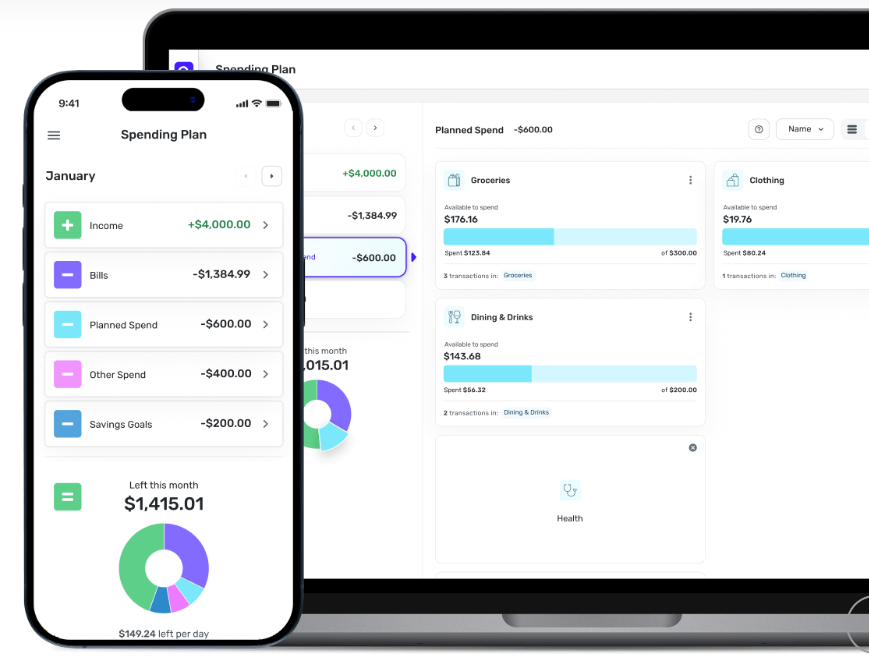 2 Screenshots |  8 Screenshots |
|---|---|---|
Videos |  2 Videos |  2 Videos |
Alternatives to Quicken, Rippling, Hibob HRIS, Oyster
Alternatives |
|---|


Add another option to compare side by side
Search by product name to compare pricing, fit, and buyer feedback in one view.Compare similar software options



Related Blogs and Articles for Hr Software
Disclaimer: This research has been collated from a variety of authoritative sources. We welcome your feedback at [email protected].
Frequently asked questions
- Which is better, Quicken or Rippling?
- Quicken edges out the other on user ratings (5.0 vs 5.0). That said, the best pick depends on your use case — use the comparison tables above to evaluate each dimension.
- Do Quicken and Rippling offer a free trial?
- Quicken offers a free trial. Rippling does not.
- What is the starting price of Quicken vs Rippling?
- Quicken starts at $2.99 /month. Rippling starts at $8 custom.
- What are the top alternatives to Quicken?
- Top alternatives to Quicken include Mint, You Need A Budget, Money Dashboard, Lunch Money, Pockett.
- What are the top alternatives to Rippling?
- Top alternatives to Rippling include Hibob HRIS, Oyster, Paychex Flex, Paycor, Workday HCM.