
Quickbooks vs Homebase Comparison

Quickbooks
Starting at $3.80 /month
- Free Trial
- Individuals
- Freelancers / Consultants
QuickBooks is a user-friendly financial management platform designed to help small businesses, freelancers, and growing teams handle accounting, invoicing, payroll, and reporting all in one place. Built for business owne…

Homebase
Starting at $0 / location / month
- Free Trial
- Large Enterprises
- Medium Business
Homebase is a comprehensive time-tracking software developed by experienced people managers to enhance team collaboration and efficiency. It simplifies employee time tracking, scheduling, and payroll management, reducing…
Quickbooks leads on user satisfaction with a 4.8-star rating across 8,154 reviews.
Quickbooks vs Homebase — at a glance
| Feature | Quickbooks | Homebase |
|---|---|---|
| Rating | 4.8 / 5 | 4.4 / 5 |
| Reviews | 8,154 | 118 |
| Starting price | $3.80 /month | $0 / location / month |
| Free trial | Yes | Yes |
| Free version | No | No |
| Best for | Individuals, Freelancers / Consultants, Medium Business | Large Enterprises, Medium Business, Small Business |
| Category | Accounting Software | Employee Scheduling Software |
| Integrations | — | 11+ apps |
| Platforms | SaaS/Web/Cloud, Mobile - Android, Mobile - iOS, Installed - Windows, Installed - Mac | SaaS/Web/Cloud, Mobile - Android, Mobile - iOS, Browser Based (Cloud) |
| API | Available | Available |
| Support modes | 24/7 (Live rep), Online | 24/7 (Live rep), Business Hours, Online |
| Certifications | SOC 2, GDPR | SOC 2 |
| Data residency | US | United States, Canada |
Key differences between Quickbooks and Homebase
- Pricing: Quickbooks starts at $3.80 /month, while Homebase starts at $0 / location / month.
- Target audience: Quickbooks is built for Individuals and Freelancers / Consultants, while Homebase targets Large Enterprises and Medium Business.
- User satisfaction: Quickbooks scores higher with a 4.8-star average.
- Deployment: Quickbooks supports SaaS/Web/Cloud, Mobile - Android, Mobile - iOS, Installed - Windows, Installed - Mac; Homebase supports SaaS/Web/Cloud, Mobile - Android, Mobile - iOS, Browser Based (Cloud).
Quickbooks vs Homebase — find the better fit before you commit.
Which tool fits your team best
Which is actually cheaper for your team size
Where each product wins, per real buyers
Most Accounting Software tools look identical on paper. This comparison cuts to the differences that matter — pricing structure, team fit, and what real buyers found after signing up.
Biggest differences
Features
Pricing
Buying details
Security
Buyer feedback
Integrations
Product tour
Other options
Talk to an expert Talk to an expert | *sponsored |
Free PDF comparison
Download this Quickbooks vs Homebase comparison
Get the full side-by-side as a PDF — these picks plus the top Accounting Software tools, with verified ratings, pricing and features.
- Side-by-side on pricing, features & ratings
- Plus the category top 10, scored & ranked
- Emailed to you — no on-screen download
No file downloads on screen — we email it to you. One-click unsubscribe anytime.
Biggest differences
Start here before you go deeper into features.
Best for small businesses needing simple, automated accounting and invoicing.
- You are a small business or freelancer seeking easy bookkeeping and invoicing.
- You want strong, responsive customer support to help resolve issues quickly.
- You value automation features like AI-powered invoicing and bank feed integration.
- You are a large enterprise with complex accounting and payroll requirements.
- You need specialized payroll or tax features such as maternity pay or VAT handling.
Best for simple, streamlined scheduling and payroll in small to mid-sized teams.
- You manage retail, hospitality, or food service teams with up to 500 employees.
- You need an easy-to-use platform for shift scheduling, time tracking, and payroll integration.
- You want built-in team communication tools like chat boards to improve collaboration.
- Your organization requires highly advanced schedule customization beyond basic features.
- You have complex scheduling needs that demand a more intuitive and flexible interface.
Quickbooks: Best for small businesses needing simple, automated accounting and invoicing. Homebase: Best for simple, streamlined scheduling and payroll in small to mid-sized teams.
Description | QuickBooks is a user-friendly financial management platform designed to help small businesses, freelancers, and growing teams handle accounting, invoicing, payroll, and reporting all in one ... Read More about Quickbooks | Homebase is a comprehensive time-tracking software developed by experienced people managers to enhance team collaboration and efficiency. It simplifies employee time tracking, scheduling, ... Read More about Homebase |
|---|---|---|
Entry Level Pricing |
|
|
Free Trial Availability | ||
SpotScoreWhat's this? ↗ | 9.8/10 | 9.7/10 |
User RatingsBased on verified Spotsaas reviews | ||
Best Company Size | 1-50 employees51-100 employees | 1-50 employees51-500 employees |
Get pricing help |
Where each option fits best
See where each product is strongest, which teams it fits, and what causes buyers to keep looking — before you commit.
Based on buyer reviews and verified product data collected by Spotsaas.
Key strengths
- Streamlined Financial Management: With QuickBooks, we can easily track income and expenses, keeping our financial records up to date and accurate. This helps us make informed decisions.
- Time-Saving Automation: Many repetitive tasks, such as invoicing and payroll processing, can be automated. This means we spend less time on administrative work and more time focusing on growing our business.
- User-Friendly Interface: QuickBooks is designed with the user in mind. Its intuitive layout lets us—regardless of our tech-savviness—work through features easily, reducing the learning curve for our teams.
- Streamlined Communication: Homebase allows smooth communication among team members, letting managers send updates and receive feedback in real-time. Keeping everyone on the same page is easier.
- Efficient Scheduling: With Homebase, scheduling shifts is easy. The intuitive interface lets you create schedules quickly, reducing the headache of manual planning. Your team will appreciate the clarity and predictability in their work hours.
- Time Tracking Made Simple: Say goodbye to manual time sheets! Homebase offers reliable time tracking features that help you monitor employee hours accurately, maintain compliance, and simplify payroll processing.
Best fit
- 1-100 employees
- Accounting, Retail, Construction, Nonprofits, E-commerce
- Accountants, Small Business Owners, Bookkeepers, Financial Managers, Office Administrators
- 1 to 500 employees
- Retail, Hospitality, Food Service, Healthcare, and Construction
- Managers, Shift Leaders, HR Personnel, and Business Owners
Reasons buyers look elsewhere
- Pricing starts at $15/month and scales to $180+/month for advanced plans — freelancers and teams under 10 employees often switch to Wave (free) or Zoho Books ($99/year) to reduce accounting costs
- QuickBooks' desktop interface requires navigation through multiple menus to complete basic tasks — users switching to Xero or FreshBooks cite faster workflows for invoice creation and expense categorization
- Construction, nonprofits, and legal firms need compliance features (lien waivers, grant tracking, trust accounting) that QuickBooks doesn't include — these buyers move to specialized platforms like Procore or Aplos
- Users may seek alternatives to Homebase if they require more advanced scheduling features or integrations with other software, as some businesses have unique operational needs that Homebase may not fully address.
- Companies with larger teams or more complex workforce management requirements might find that Homebase lacks scalability, prompting them to explore solutions that better accommodate growth and diverse employee roles.
- Businesses prioritizing robust reporting and analytics tools may look for alternatives, as Homebase’s reporting capabilities might not meet the depth of insight required for informed decision-making.
Software Demo
Demo |
|---|
Need a second opinion?
Get shortlist help from a software advisor
Share your priorities, budget, and team needs, and we’ll help you narrow the options and understand the tradeoffs before you talk to vendors.

- Independent advice — matched to your business
- Understand the tradeoffs before you talk to vendors
- Free 15-min call with a software advisor.
Step 1 of 4
How big is your team?
We tailor recommendations to companies your size.















How do Quickbooks and Homebase Compare on Features?
Total Features | 17 Features | 32 Features |
|---|---|---|
Unique Features | No unique features | No unique features |
Get Quote |
Compare Quickbooks and Homebase on pricing
Review starting price, plan structure, and free-trial access side by side so you can see which option fits your budget and buying process.
Pricing Option | ||
|---|---|---|
Starting From |
|
|
Pricing Plans |
|
|
Pricing Page | 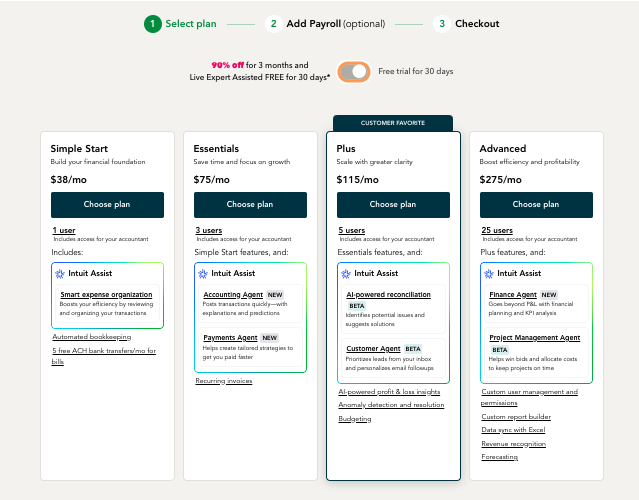 | 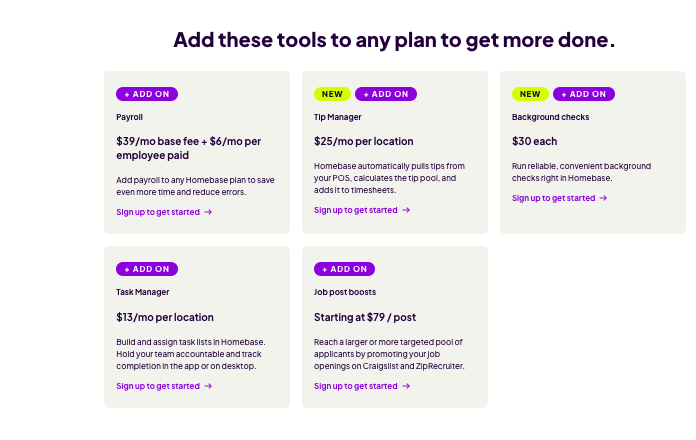 |
Other Details
Organization Types supported |
|
|
|---|---|---|
Platforms Supported |
|
|
Modes of support |
|
|
API Support |
|
|
Get help choosing |
Security & Compliance
Certifications, data handling, and security controls for IT and compliance evaluators.
SOC 2 | ✓ Yes | ✓ Yes |
|---|---|---|
HIPAA | ✗ No | ✗ No |
GDPR | ✓ Yes | ✗ No |
ISO 27001 | — | ✗ No |
Single Sign-On (SSO) | ✓ Yes | ✓ Yes |
Multi-Factor Auth (MFA) | ✓ Yes | ✓ Yes |
Data Encryption | ✓ Yes | ✓ Yes |
Audit Logs | ✓ Yes | ✓ Yes |
Data Residency | 🇺🇸 US | 🇺🇸 United States🇨🇦 Canada |
Quickbooks User Reviews & Rating Comparison
User Ratings | ||
|---|---|---|
Rating Distribution | ||
Spotsaas Editor’s POV generated by AI | Buyer sentiment Overall, buyers appreciate QuickBooks for its excellent customer support and ease of use, though some express frustration with technical issues and complex feature areas. What buyers like
Common complaints
| Buyer sentiment Overall positive sentiment highlights ease of scheduling, communication features, and payroll integration, tempered by some interface usability concerns. What buyers like
Common complaints
|
Pros and Cons |
|
|
Positive Reviews | No reviews available for the product | No reviews available for the product |
Integrations
Integration with other apps | No Integration information available. |
|---|


List of Customers
Customers | No Customers information available. |  Antique Taco  Woodhouse  Souvla |
|---|
Media and Screenshots
Screenshots |  4 Screenshots |  4 Screenshots |
|---|---|---|
Videos |  2 Videos |  4 Videos |
Top Alternatives to Quickbooks and Homebase in 2026
Alternatives |
|---|


Add another option to compare side by side
Search by product name to compare pricing, fit, and buyer feedback in one view.Compare similar software options


Related Blogs and Articles for Employee Scheduling Software
Disclaimer: This research has been collated from a variety of authoritative sources. We welcome your feedback at [email protected].
Frequently asked questions
- Which is better, Quickbooks or Homebase?
- Quickbooks edges out the other on user ratings (4.8 vs 4.4). That said, the best pick depends on your use case — use the comparison tables above to evaluate each dimension.
- Do Quickbooks and Homebase offer a free trial?
- Yes, both Quickbooks and Homebase offer a free trial.
- What is the starting price of Quickbooks vs Homebase?
- Quickbooks starts at $3.80 /month. Homebase starts at $0 / location / month.
- What are the top alternatives to Quickbooks?
- Top alternatives to Quickbooks include Xero, Zoho Books, Freshbooks, Sage Accounting (Sage One), easybook.io.
- What are the top alternatives to Homebase?
- Top alternatives to Homebase include OpenTimeClock, Time Clock Wizard, Sling, TrackSmart Scheduling, Shiftworkz.