
HubSpot CRM vs Textla Comparison

HubSpot CRM
Starting at $45 /Month
- Free Trial
- Individuals
- Freelancers / Consultants
HubSpot CRM is our all-in-one sales, marketing, and customer communication software. Built from the ground up with a modern design inspired by our top-rated marketing and sales tools, HubSpot CRM provides everything you…

Textla
Starting at $19 /month
- Large Enterprises
- Small Business
Introducing Textla, an innovative messaging platform that redefines the way SMBs and low-tech teams communicate. With its no-code approach, Textla offers enterprise-level functionality at wholesale prices, making it the…
HubSpot CRM leads on user satisfaction with a 4.4-star rating across 3,236 reviews.
Consider monday CRM
Comparing HubSpot CRM and Textla? monday CRM is another option worth a look: a visual deal pipeline, Gmail and Outlook email sync and a 14-day free trial.
We may earn a commission. Affiliate disclosure
HubSpot CRM vs Textla — at a glance
| Feature | HubSpot CRM | Textla |
|---|---|---|
| Rating | 4.4 / 5 | — |
| Reviews | 3,236 | — |
| Starting price | $45 /Month | $19 /month |
| Free trial | Yes | No |
| Free version | No | No |
| Best for | Individuals, Freelancers / Consultants, Large Enterprises | Large Enterprises, Small Business, Medium Business |
| Category | CRM Software | SMS Marketing Software |
| Integrations | — | 8+ apps |
| Platforms | SaaS/Web/Cloud, Mobile - Android, Mobile - iOS, Installed - Windows, Installed - Mac | Browser Based (Cloud) |
| API | Available | — |
| Support modes | 24/7 (Live rep), Business Hours, Online | Online |
| Certifications | SOC 2, HIPAA, GDPR, ISO 27001 | — |
| Data residency | US | US |
Key differences between HubSpot CRM and Textla
- Pricing: HubSpot CRM starts at $45 /Month, while Textla starts at $19 /month.
- Free trial: HubSpot CRM offers a free trial; Textla does not.
- Target audience: HubSpot CRM is built for Individuals and Freelancers / Consultants, while Textla targets Large Enterprises and Small Business.
- Deployment: HubSpot CRM supports SaaS/Web/Cloud, Mobile - Android, Mobile - iOS, Installed - Windows, Installed - Mac; Textla supports Browser Based (Cloud).
HubSpot CRM vs Textla — find the better fit before you commit.
Which tool fits your team best
Which is actually cheaper for your team size
Where each product wins, per real buyers
Most CRM Software tools look identical on paper. This comparison cuts to the differences that matter — pricing structure, team fit, and what real buyers found after signing up.
Biggest differences
Features
Pricing
Buying details
Security
Buyer feedback
Integrations
Product tour
Other options
Talk to an expert Talk to an expert | Talk to an expert Talk to an expert |
Free PDF comparison
Download this HubSpot CRM vs Textla comparison
Get the full side-by-side as a PDF — these picks plus the top CRM Software tools, with verified ratings, pricing and features.
- Side-by-side on pricing, features & ratings
- Plus the category top 10, scored & ranked
- Emailed to you — no on-screen download
No file downloads on screen — we email it to you. One-click unsubscribe anytime.
HubSpot CRM vs Textla: Biggest differences
Start here before you go deeper into features.
Individuals, Freelancers / Consultants, Large Enterprises
Large Enterprises, Small Business, Medium Business
HubSpot CRM typically suits Individuals and Freelancers / Consultants. Textla tends to fit Large Enterprises and Small Business better. The right choice depends on your team size, workflow, and whether a free trial matters.
Description | HubSpot CRM is our all-in-one sales, marketing, and customer communication software. Built from the ground up with a modern design inspired by our top-rated marketing and sales tools, ... Read More about HubSpot CRM | Introducing Textla, an innovative messaging platform that redefines the way SMBs and low-tech teams communicate. With its no-code approach, Textla offers enterprise-level functionality at ... Read More about Textla |
|---|---|---|
Entry Level Pricing |
|
|
Free Trial Availability |
| |
SpotScoreWhat's this? ↗ | 9.1/10 | Not Available |
User RatingsBased on verified Spotsaas reviews | ||
Best Company Size | 1-1,000 employees | 201–500 |
Get pricing help | Get pricing help |
Where each option fits best
See where each product is strongest, which teams it fits, and what causes buyers to keep looking — before you commit.
Based on buyer reviews and verified product data collected by Spotsaas.
Key strengths
- Streamlined Communication: HubSpot CRM lets your team centralize all customer interactions in one place, so everyone stays informed and miscommunication drops. You can collaborate more easily and respond to customer needs faster.
- User-Friendly Interface: HubSpot CRM is designed for simplicity, letting users of all technical levels work through it easily. This means less training time for your staff and more focus on building relationships with clients.
- Analytics and Reporting: Powerful analytics tools help you understand sales performance and customer behavior. This data-driven approach supports informed decisions that can increase conversions and revenue growth.
- Textla includes opt-out handling, unsubscribe tracking, and compliance features that help businesses meet regulatory requirements like TCPA. This foundation reduces legal risk and keeps messaging practices aligned with industry guidelines, especially in healthcare, education, and finance.
- Flexible connectivity via automation platforms: Because Textla integrates with Zapier, Make, Workato, and other workflow tools, it can connect with CRMs, calendars, forms, and support systems. This connectivity lets teams automate SMS based on actions in other apps — for example, sending appointment reminders when a Google Calendar event is created.
- Event-driven automation with tags and triggers: Textla supports automation workflows based on triggers like new contacts, tags, or activity events. These event-driven automations allow businesses to send reminders, follow-ups, confirmations, and nurturing messages without manual effort — saving time and improving consistency in engagement.
Best fit
- 1-1,000 employees
- Martech, SaaS, Consulting, Sales Automation, Revtech
- Sales Managers, Account Executives, Business Development Representatives, CRM Administrators
- 201–500
- Retail, E-commerce, Restaurants & Hospitality, Healthcare, Real Estate, Automotive, Professional Services, Events & Entertainment
- Marketing Manager, Customer Support Manager, Operations Manager, Sales Manager, Business Owner, Community Manager, CRM Manager
Reasons buyers look elsewhere
- Pricing scales quickly with advanced features — teams under 20 seats often switch to Pipedrive or Freshsales for lower per-user costs
- Customization requires API work or third-party apps — businesses with non-standard sales processes add Salesforce or Microsoft Dynamics instead
- Interface complexity deters small teams — companies under 10 people frequently choose Zoho CRM or Capsule for simpler workflows
- Organizations looking for unified messaging across email, SMS, push, and web notifications sometimes choose solutions that combine all channels under one roof. These alternatives reduce tool sprawl and centralize reporting, which appeals to marketers needing cross-channel orchestration beyond SMS.
- Companies with broad international audiences may require robust global routing, local sender ID support, and country-specific compliance. Some alternatives specialize in international coverage and cost optimization, whereas Textla’s focus is stronger in North America.
- Brands that send large promotional SMS blasts, multi-segment campaigns, and A/B tests often want specialized SMS marketing platforms. These systems offer extensive scheduling, optimization, and campaign analytics — use cases where Textla’s core messaging strength is conversation management rather than broadcast campaigns.
Software Demo
Demo |
|---|
Need a second opinion?
Get decision help from a software advisor
Share your priorities, budget, and team needs, and we’ll help you narrow the options and understand the tradeoffs before you talk to vendors.

- Independent advice — matched to your business
- Understand the tradeoffs before you talk to vendors
- Free 15-min call with a software advisor.
Step 1 of 4
How big is your team?
We tailor recommendations to companies your size.















How do HubSpot CRM and Textla Compare on Features?
Total Features | 38 Features | 2 Features |
|---|---|---|
Unique Features | No unique features | No unique features |
Get Quote | Get Quote |
Compare HubSpot CRM and Textla on pricing
Review starting price, plan structure, and free-trial access side by side so you can see which option fits your budget and buying process.
Pricing Option | ||
|---|---|---|
Starting From |
|
|
Pricing Plans |
|
|
Pricing Page | 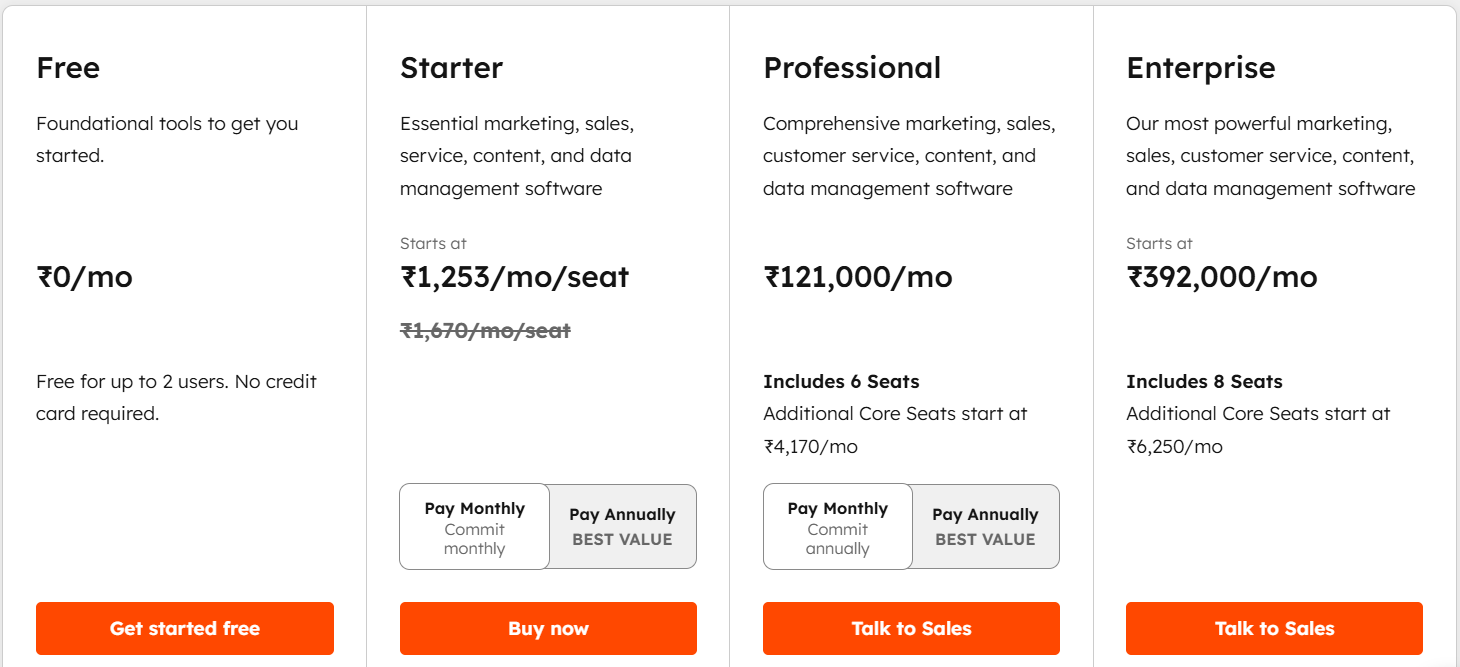 | 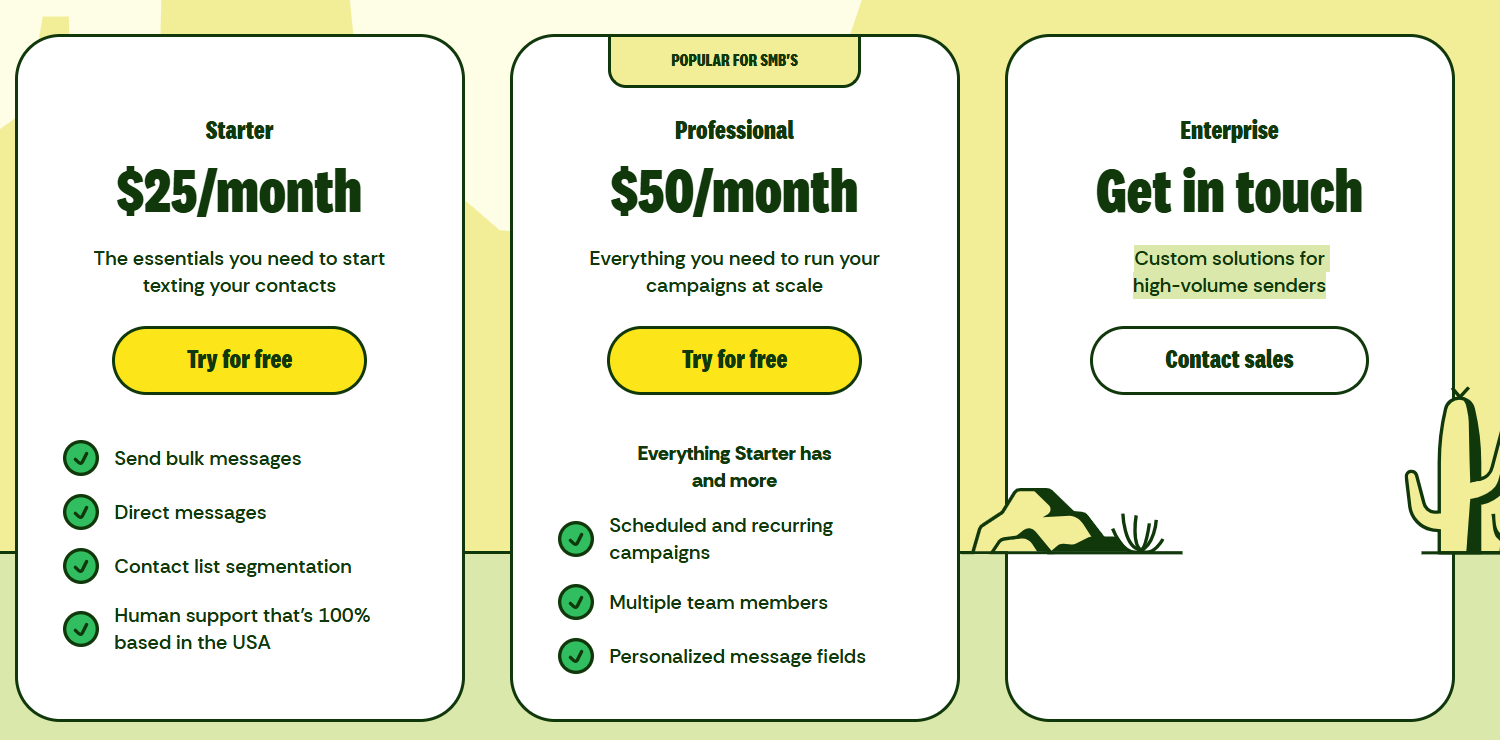 |
HubSpot CRM vs Textla: Other Details
Organization Types supported |
|
|
|---|---|---|
Platforms Supported |
|
|
Modes of support |
|
|
API Support |
|
|
Get help choosing | Get help choosing |
HubSpot CRM vs Textla Security & Compliance
Certifications, data handling, and security controls for IT and compliance evaluators.
SOC 2 | ✓ Yes | — |
|---|---|---|
HIPAA | ✓ Yes | ✗ No |
GDPR | ✓ Yes | — |
ISO 27001 | ✓ Yes | — |
Single Sign-On (SSO) | ✓ Yes | — |
Multi-Factor Auth (MFA) | ✓ Yes | — |
Data Encryption | ✓ Yes | — |
Audit Logs | ✓ Yes | — |
Data Residency | 🇺🇸 US | 🇺🇸 US |
HubSpot CRM User Reviews & Rating Comparison
User Ratings | No reviews available for the product | |
|---|---|---|
Rating Distribution | No reviews available for this product | |
Spotsaas Editor’s POV generated by AI | Buyer sentiment Buyer sentiment is positive across 3172 reviews, with strong overall satisfaction. What buyers like
Common complaints
| What buyers like
Common complaints
|
Pros and Cons |
|
|
Positive Reviews | No reviews available for the product | No reviews available for the product |
| Negative Reviews | No reviews available for the product | No reviews available for the product |
Integrations
Integration with other apps | No Integration information available. |
|---|


HubSpot CRM and Textla Customers
Customers |  Classpass  Avison Young  Crunch Fitness | No Customers information available. |
|---|
Media and Screenshots
Screenshots |  13 Screenshots | 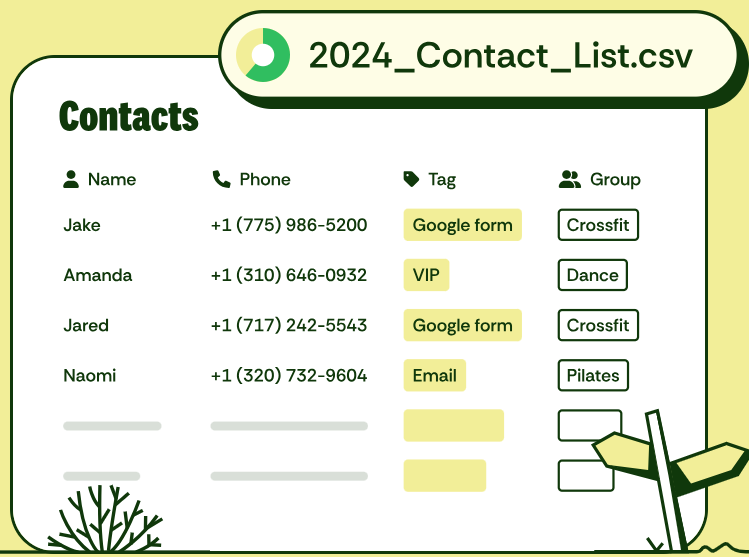 2 Screenshots |
|---|---|---|
Videos |  2 Videos |  2 Videos |
Top Alternatives to HubSpot CRM and Textla in 2026
Alternatives |
|---|



Add another option to compare side by side
Search by product name to compare pricing, fit, and buyer feedback in one view.Compare similar software options


Related Blogs and Articles for Sms Marketing Software
Disclaimer: This research has been collated from a variety of authoritative sources. We welcome your feedback at [email protected].
Frequently asked questions
- Which is better, HubSpot CRM or Textla?
- HubSpot CRM edges out the other on user ratings (4.4 vs -1.0). That said, the best pick depends on your use case, so use the comparison tables above to evaluate each dimension.
- Do HubSpot CRM and Textla offer a free trial?
- HubSpot CRM offers a free trial. Textla does not.
- What is the starting price of HubSpot CRM vs Textla?
- HubSpot CRM starts at $45 /Month. Textla starts at $19 /month.
- What are the top alternatives to HubSpot CRM?
- Top alternatives to HubSpot CRM include Bigin by Zoho CRM, Creatio CRM, Method CRM, Pipeline CRM, Atendare.
- What are the top alternatives to Textla?
- Top alternatives to Textla include Textdrip, SMSCountry, Call Loop, Voxie, GetITSMS.