
Enable vs Tide Comparison

Enable
Starting at Contact for pricing
- Large Enterprises
- Medium Business
Enable is rebate management software that improves the rebate management process. With powerful tools to compute, accumulate, and distribute rebates, Enable simplifies the complex setup and calculations. Our program prov…

Tide
Starting at $16 /month
- Free Version
- Large Enterprises
- Small Business
Tide is a business banking and financial management platform for sole traders, consultants, contractors, and limited companies. It offers invoicing directly from the app, Expense Cards for tracking spending, and tiered m…
Enable leads on user satisfaction with a 4.5-star rating across 108 reviews.
Enable vs Tide — at a glance
| Feature | Enable | Tide |
|---|---|---|
| Rating | 4.5 / 5 | — |
| Reviews | 108 | — |
| Starting price | Contact for pricing | $16 /month |
| Free trial | No | No |
| Free version | No | Yes |
| Best for | Large Enterprises, Medium Business, Small Business | Large Enterprises, Small Business, Medium Business |
| Category | Expense Management Software | Invoice Management Software |
| Integrations | — | 7+ apps |
| Platforms | SaaS/Web/Cloud | SaaS/Web/Cloud, Mobile - Android, Mobile - iOS |
| API | Available | — |
| Support modes | 24/7 (Live rep), Business Hours, Online | Online |
Key differences between Enable and Tide
- Pricing: Tide starts at $16 /month. Enable pricing is not publicly listed.
- Deployment: Enable supports SaaS/Web/Cloud; Tide supports SaaS/Web/Cloud, Mobile - Android, Mobile - iOS.
Enable vs Tide — find the better fit before you commit.
Which tool fits your team best
Which is actually cheaper for your team size
Where each product wins, per real buyers
Most Expense Management Software tools look identical on paper. This comparison cuts to the differences that matter — pricing structure, team fit, and what real buyers found after signing up.
Biggest differences
Features
Pricing
Buying details
Security
Buyer feedback
Integrations
Product tour
Other options
Free PDF comparison
Download this Enable vs Tide comparison
Get the full side-by-side as a PDF — these picks plus the top Expense Management Software tools, with verified ratings, pricing and features.
- Side-by-side on pricing, features & ratings
- Plus the category top 10, scored & ranked
- Emailed to you — no on-screen download
No file downloads on screen — we email it to you. One-click unsubscribe anytime.
Enable vs Tide: Biggest differences
Start here before you go deeper into features.
Large Enterprises, Medium Business, Small Business
Cost-effective digital banking for startups and small business financial management.
- You are a startup, freelancer, or small business owner needing zero monthly fees.
- You want integration with popular accounting software like Xero or QuickBooks.
- You need quick account setup with minimal paperwork and real-time expense tracking.
- Your business relies heavily on cash transactions requiring secure cash handling.
- You require advanced multi-user access and priority support included in free plans.
Enable typically suits Large Enterprises and Medium Business. Tide tends to fit Large Enterprises and Small Business better. The right choice depends on your team size, workflow, and whether a free trial matters.
Description | Enable is rebate management software that improves the rebate management process. With powerful tools to compute, accumulate, and distribute rebates, Enable simplifies the complex setup and ... Read More about Enable | Tide is a business banking and financial management platform for sole traders, consultants, contractors, and limited companies. It offers invoicing directly from the app, Expense Cards for ... Read More about Tide |
|---|---|---|
Entry Level Pricing |
|
|
Free Trial Availability |
|
|
User RatingsBased on verified Spotsaas reviews | ||
Best Company Size | — | 1-10 employees11-100 employees |
Get pricing help | Get pricing help |
Where each option fits best
See where each product is strongest, which teams it fits, and what causes buyers to keep looking — before you commit.
Based on buyer reviews and verified product data collected by Spotsaas.
Key strengths
- Supports growing teams with spend control features: Businesses can issue team cards, set spending limits, and monitor transactions instantly. This reduces reimbursement hassle and keeps spending transparent. Owners control permissions and track employee expenses in real time, making it useful for small teams scaling operations, managing projects, or handling field spending efficiently.
- Helps manage cash flow with better visibility: The Tide dashboard shows incoming payments, expenses, and account activity clearly, helping business owners stay aware of cash flow health. It supports spending controls, categorized transactions, scheduled payments, and downloadable reports. This makes planning, budgeting, and financial decision-making easier for teams running multiple payments.
- Saves bookkeeping time through automation: Automated bank feeds sync directly with accounting tools like Xero, Sage, FreeAgent, and QuickBooks. This reduces manual data entry, minimizes errors, and keeps books updated automatically. Business owners spend less time on admin work and more on growth, while accountants get cleaner records and exportable statements anytime.
Best fit
- 1–100 employees
- E-commerce, Retail, Digital agencies, Consultants, Freelancers, Creatives, Local services, Trades, Startups, Micro-enterprises
- Small business owners, Founders, Freelancers, Consultants, Accountants, Finance managers, Self-employed professionals, Startup operators
Reasons buyers look elsewhere
- Some users might prefer alternatives due to integration needs. Tide connects well with accounting software, yet businesses wanting direct integrations with payroll, ERP, analytics, subscription billing, or payment gateways may opt for platforms that offer broader plug-ins and API-driven automation for end-to-end workflows.
- Some users might pick other platforms for international operations. Tide focuses mainly on UK and India businesses, so companies dealing with multi-currency accounts, global payouts, or foreign teams may switch to banks offering wider cross-border support and better FX management to simplify global financial workflows.
- Some users might move to alternatives as their company grows, especially when multiple departments, approval hierarchies, or high transaction volumes come into play. Tide supports small teams effectively, but scaling organizations often look for more granular controls, expense automation, and enterprise-level finance tools offered by larger banking or spend-management platforms.
Software Demo
Demo |  Enable has not given any software demo yet If you're the owner of this profile, add your demo.Contact us |
|---|
Need a second opinion?
Get decision help from a software advisor
Share your priorities, budget, and team needs, and we’ll help you narrow the options and understand the tradeoffs before you talk to vendors.

- Independent advice — matched to your business
- Understand the tradeoffs before you talk to vendors
- Free 15-min call with a software advisor.
Step 1 of 4
How big is your team?
We tailor recommendations to companies your size.















How do Enable and Tide Compare on Features?
Total Features | 9 Features | 25 Features |
|---|---|---|
Unique Features | No unique features | No unique features |
Get Quote | Get Quote |
Compare Enable and Tide on pricing
Review starting price, plan structure, and free-trial access side by side so you can see which option fits your budget and buying process.
Pricing Option | ||
|---|---|---|
Starting From |
|
|
Pricing Plans |
|
|
Pricing Page |  | 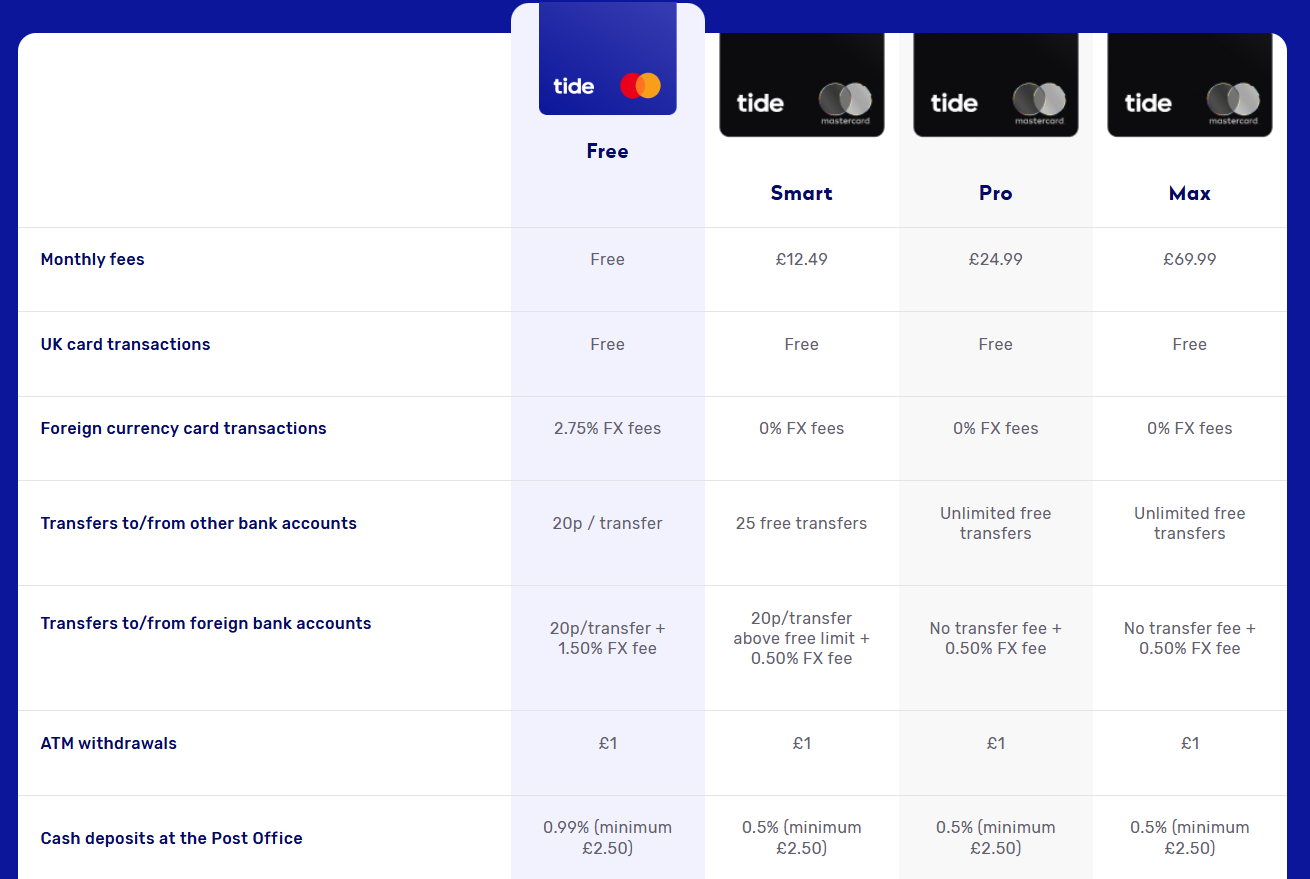 |
Enable vs Tide: Other Details
Organization Types supported |
|
|
|---|---|---|
Platforms Supported |
|
|
Modes of support |
|
|
API Support |
|
|
Get help choosing | Get help choosing |
Enable User Reviews & Rating Comparison
User Ratings | No reviews available for the product | |
|---|---|---|
Rating Distribution | No reviews available for this product | |
Spotsaas Editor’s POV generated by AI | Buyer sentiment Buyer sentiment is positive across 112 reviews, with strong overall satisfaction. What buyers like
Common complaints
| Buyer sentiment Overall positive sentiment highlights ease of use, cost savings, and accounting integration, with some concerns about limited cash handling and premium feature access. What buyers like
Common complaints
|
Pros and Cons |
|
|
Positive Reviews | No reviews available for the product | No reviews available for the product |
| Negative Reviews | No reviews available for the product | No reviews available for the product |
Integrations
Integration with other apps | No Integration information available. |
|---|


Enable and Tide Customers
Customers |  Wolseley  MKM Building  SIG | No Customers information available. |
|---|
Media and Screenshots
Screenshots | No screenshots available. |  5 Screenshots |
|---|---|---|
Videos | No videos available. |  2 Videos |
Top Alternatives to Enable and Tide in 2026
Alternatives |
|---|



Add another option to compare side by side
Search by product name to compare pricing, fit, and buyer feedback in one view.Compare similar software options




Related Blogs and Articles for Invoice Management Software
Disclaimer: This research has been collated from a variety of authoritative sources. We welcome your feedback at [email protected].
Frequently asked questions
- Which is better, Enable or Tide?
- Enable has a user rating of 4.5, while Tide has no user ratings yet. The right choice depends on your team size, budget, and specific Invoice Management Software needs.
- Do Enable and Tide offer a free trial?
- Neither Enable nor Tide currently lists a free trial.
- What is the starting price of Enable vs Tide?
- Enable starts at Contact for pricing. Tide starts at $16 /month.
- What are the top alternatives to Enable?
- Top alternatives to Enable include RAMP Finance, Zoho Expense, Airbase, Expend, Emburse Certify.
- What are the top alternatives to Tide?
- Top alternatives to Tide include Billdu, Invoice Simple, Receiptor AI, Koteshen, Afloat.
- Who should avoid Enable?
- It depends what you need. In its favour: reviewers consistently praise the knowledgeable, engaged implementation and support teams; Enable automates and centralizes complex rebate management that was previously handled manually in spreadsheets. Against it: several reviewers note implementation can take a long time; per-user licensing and chargeable add-on extras make the product feel expensive to some. Note that it does not include Accounts Payable and Billing and Invoicing.
- Where does Tide fall short?
- Tide is credited with the following: integration with popular accounting software (Xero, Sage, FreeAgent, QuickBooks); supports spend control with team cards and real-time expense tracking. The recurring reservations: limited support for cash transactions; advanced features like priority support and multi-user access require paid plans. It does not include Accounts Payable and Accounts Receivable.
More Invoice Management Software comparisons
Side by side breakdowns of the same products against other options in this category.