
actiTIME vs MaxScheduler Comparison

actiTIME
Starting at Free free
- Free Trial
- Free Version
- Freelancers / Consultants
- Large Enterprises
actiTIME is a time tracking and project management tool built for teams that need clear visibility into where work hours go and how projects perform financially. It was designed to help managers run projects better, not…

MaxScheduler
Starting at $60 /Month
- Free Trial
- Large Enterprises
- Medium Business
MaxScheduler is appointment scheduling software that puts availability viewing, booking, and invoice generation on a single screen for service business operators. It removes the need to switch between calendar and billin…
actiTIME leads on user satisfaction with a 4.5-star rating across 45 reviews.
actiTIME vs MaxScheduler — at a glance
| Feature | actiTIME | MaxScheduler |
|---|---|---|
| Rating | 4.5 / 5 | 4.0 / 5 |
| Reviews | 45 | 3 |
| Starting price | Free free | $60 /Month |
| Free trial | Yes | Yes |
| Free version | Yes | No |
| Best for | Freelancers / Consultants, Large Enterprises, Medium Business | Large Enterprises, Medium Business, Small Business |
| Category | Time Tracking Software | Appointment Scheduling Software |
| Integrations | 3+ apps | — |
| Platforms | SaaS/Web/Cloud, Mobile - Android, Mobile - iOS, Browser Based (Cloud) | SaaS/Web/Cloud |
| API | Available | — |
| Support modes | Business Hours, Online | 24/7 (Live rep), Business Hours, Online |
Key differences between actiTIME and MaxScheduler
- Pricing: actiTIME starts at Free free, while MaxScheduler starts at $60 /Month.
- Target audience: actiTIME is built for Freelancers / Consultants and Large Enterprises, while MaxScheduler targets Large Enterprises and Medium Business.
- User satisfaction: actiTIME scores higher with a 4.5-star average.
- Deployment: actiTIME supports SaaS/Web/Cloud, Mobile - Android, Mobile - iOS, Browser Based (Cloud); MaxScheduler supports SaaS/Web/Cloud.
actiTIME vs MaxScheduler — find the better fit before you commit.
Which tool fits your team best
Which is actually cheaper for your team size
Where each product wins, per real buyers
Most Time Tracking Software tools look identical on paper. This comparison cuts to the differences that matter — pricing structure, team fit, and what real buyers found after signing up.
Biggest differences
Features
Pricing
Buying details
Security
Buyer feedback
Integrations
Product tour
Other options
Talk to an expert Talk to an expert |
Free PDF comparison
Download this actiTIME vs MaxScheduler comparison
Get the full side-by-side as a PDF — these picks plus the top Time Tracking Software tools, with verified ratings, pricing and features.
- Side-by-side on pricing, features & ratings
- Plus the category top 10, scored & ranked
- Emailed to you — no on-screen download
No file downloads on screen — we email it to you. One-click unsubscribe anytime.
actiTIME vs MaxScheduler: Biggest differences
Start here before you go deeper into features.
Best for flexible, detailed time tracking and project management in mid to large teams.
- You need reliable customization for tasks, projects, and user permissions.
- Your team requires mobile-compatible time tracking for on-the-go productivity.
- You want comprehensive real-time reporting on productivity and resource allocation.
- You are a small business with a tight budget due to premium pricing.
- You prefer a modern, visually appealing desktop interface over a functional but outdated one.
Large Enterprises, Medium Business, Small Business
actiTIME typically suits Freelancers / Consultants and Large Enterprises. MaxScheduler tends to fit Large Enterprises and Medium Business better. The right choice depends on your team size, workflow, and whether a free trial matters.
Description | actiTIME is a time tracking and project management tool built for teams that need clear visibility into where work hours go and how projects perform financially. It was designed to help ... Read More about actiTIME | MaxScheduler is appointment scheduling software that puts availability viewing, booking, and invoice generation on a single screen for service business operators. It removes the need to ... Read More about MaxScheduler |
|---|---|---|
Entry Level Pricing |
|
|
Free Trial Availability | ||
SpotScoreWhat's this? ↗ | 9.4/10 | 7.6/10 |
User RatingsBased on verified Spotsaas reviews | ||
Best Company Size | 50-500 employeesLarge Enterprises | — |
Get pricing help | Get pricing help |
Where each option fits best
See where each product is strongest, which teams it fits, and what causes buyers to keep looking — before you commit.
Based on buyer reviews and verified product data collected by Spotsaas.
Key strengths
- Time Tracking: With actiTIME, you can easily monitor employee hours and project durations. Managers appreciate the intuitive interface that simplifies time entry, letting teams stay on track without complex processes.
- Reporting Tools: Get useful insights into productivity and resource allocation with actiTIME's reporting features. Executives can make informed decisions based on real-time data, verifying that strategic goals match operational efficiency.
- Flexible Project Management: Whether you’re overseeing multiple projects or focusing on a single initiative, actiTIME adapts to your needs. Administrators find it easy to manage tasks and deadlines, allowing for effective prioritization and team alignment.
Best fit
- 50 to 500 employees.
- Industries: Consulting, SaaS, Project Management, IT Services, and Marketing.
- Job Titles: Project Managers, Team Leaders, Financial Analysts, Operations Managers, and HR Professionals.
Reasons buyers look elsewhere
- Lacks advanced reporting and analytics — teams needing customizable dashboards for project visibility typically switch to Jira or Monday.com
- Missing integrations with specific tools — organizations using Xero, QuickBooks, or Asana often layer in alternatives for accounting or project management sync
- No mobile or offline tracking — field teams and remote workers frequently add Toggl Track or Clockify for smartphone time entry
Software Demo
Demo |
|---|
Need a second opinion?
Get decision help from a software advisor
Share your priorities, budget, and team needs, and we’ll help you narrow the options and understand the tradeoffs before you talk to vendors.

- Independent advice — matched to your business
- Understand the tradeoffs before you talk to vendors
- Free 15-min call with a software advisor.
Step 1 of 4
How big is your team?
We tailor recommendations to companies your size.















How do actiTIME and MaxScheduler Compare on Features?
Total Features | 22 Features | 5 Features |
|---|---|---|
Unique Features | No unique features | No unique features |
Get Quote | Get Quote |
Compare actiTIME and MaxScheduler on pricing
Review starting price, plan structure, and free-trial access side by side so you can see which option fits your budget and buying process.
Pricing Option | ||
|---|---|---|
Starting From |
|
|
Pricing Plans |
|
|
Pricing Page |  |  |
actiTIME vs MaxScheduler: Other Details
Organization Types supported |
|
|
|---|---|---|
Platforms Supported |
|
|
Modes of support |
|
|
API Support |
|
|
Get help choosing | Get help choosing |
actiTIME User Reviews & Rating Comparison
User Ratings | ||
|---|---|---|
Rating Distribution | ||
Spotsaas Editor’s POV generated by AI | Buyer sentiment Overall positive sentiment highlights actiTIME's reliable features and mobile app, though pricing and interface drawbacks. What buyers like
Common complaints
| Buyer sentiment Buyer sentiment is positive across 3 reviews, with strong overall satisfaction. What buyers like
Common complaints
|
Pros and Cons |
|
|
Positive Reviews | No reviews available for the product | No reviews available for the product |
Integrations
Integration with other apps | No Integration information available. |
|---|



actiTIME and MaxScheduler Customers
Customers |  Xerox  University of Amsterdam  PHILIPS |  GPO Company  Master Halco  Fairgreen |
|---|
Media and Screenshots
Screenshots | 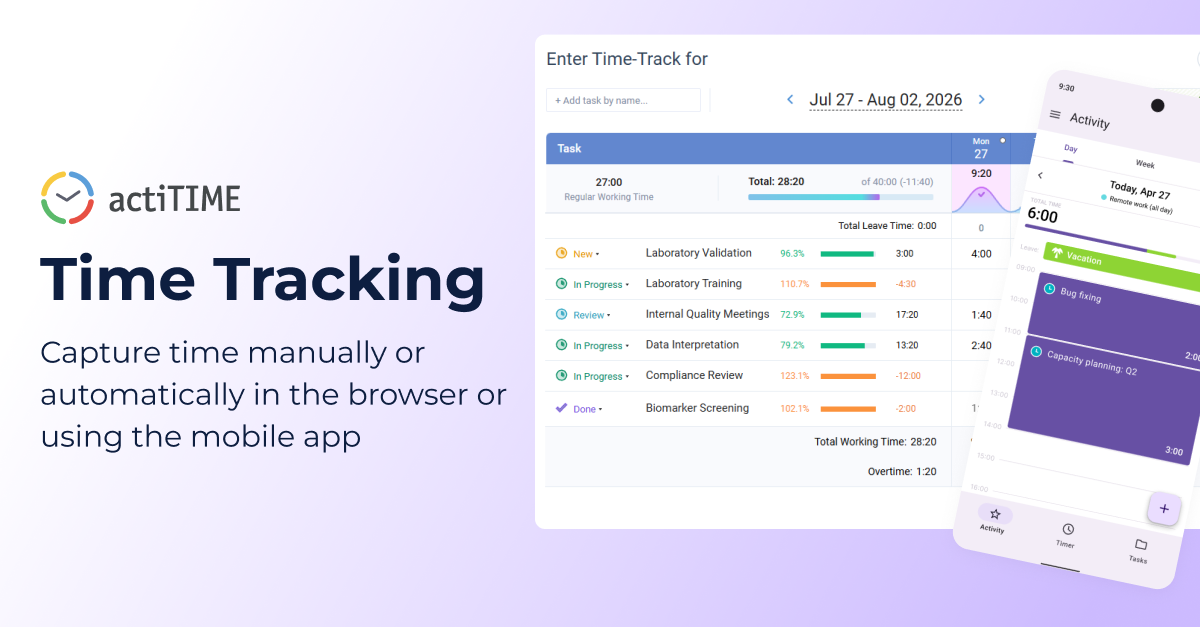 6 Screenshots |  1 Screenshots |
|---|---|---|
Videos |  1 Videos |  2 Videos |
Top Alternatives to actiTIME and MaxScheduler in 2026
Alternatives |
|---|



Add another option to compare side by side
Search by product name to compare pricing, fit, and buyer feedback in one view.Compare similar software options



Related Blogs and Articles for Appointment Scheduling Software
Disclaimer: This research has been collated from a variety of authoritative sources. We welcome your feedback at [email protected].
Frequently asked questions
- Which is better, actiTIME or MaxScheduler?
- actiTIME edges out the other on user ratings (4.5 vs 4.0). That said, the best pick depends on your use case, so use the comparison tables above to evaluate each dimension.
- Do actiTIME and MaxScheduler offer a free trial?
- Yes, both actiTIME and MaxScheduler offer a free trial.
- What is the starting price of actiTIME vs MaxScheduler?
- actiTIME starts at Free free. MaxScheduler starts at $60 /Month.
- What are the top alternatives to actiTIME?
- Top alternatives to actiTIME include Homebase, BeeBole, OnTheClock, TimeCloud Time and Attendance, Hourly.
- What are the top alternatives to MaxScheduler?
- Top alternatives to MaxScheduler include Online Appointment Scheduler, KORVUE, Skedify, SUMO Scheduler, Hapio.
- What is the balanced view of actiTIME?
- Strengths buyers report for actiTIME: user-friendly time tracking and reporting features with mobile compatibility; reliable customization options for project management and permissions. Where buyers were disappointed: premium plans are expensive for smaller companies; initial setup and learning curve can be complicated without guidance. It does not include Expense Tracking and Multi-Currency.
- Is MaxScheduler worth it?
- MaxScheduler is a reasonable choice given these strengths: combines scheduling and invoicing in one platform; user-friendly interface simplifies complex tasks. It is the wrong choice if these would block you: may be too complex for smaller businesses; costs can increase with advanced features. It does not include Billing and Invoicing and Expense Tracking.
More Appointment Scheduling Software comparisons
Side by side breakdowns of the same products against other options in this category.