
DocFly is a versatile online tool for working with PDF documents. It gives users the ability to create, convert, and edit files, and it keeps those files secure through Amazon Cloud.
It runs on any modern browser without needing an API, and it supports the English language. People with different needs can use its services, with options that range from a cost-free plan to several paid subscription models. Each plan is tailored with its own features, such as document control permissions, ample storage space, and annotation tools.
The platform is recognized for its straightforward approach to modifying forms and managing files. That reputation shows in the numbers: users have given DocFly a solid 4.3-star rating out of five across 112 reviews.
Among competing PDF solutions like Soda PDF or Adobe Acrobat, DocFly earns its place by offering distinct advantages of its own. It is also backed by a legally established company based in Spain, one that has since expanded its operations into the U.S.
Supporting customers is one of the company’s priorities. It helps users through email communications along with helpful FAQs and forums. Even so, some users identify areas for improvement, such as limited functionality when converting PDFs to Word format.
The sections ahead show how working with this tool can sharpen your document management skills. Whether you are looking at pricing details or comparing alternatives, the goal is to help you find exactly what you need for handling PDFs effectively.
Here is a closer look at what makes DocFly a practical part of a modern document toolkit, and how it holds up for everyday PDF work across the board.
Key Takeaways
- DocFly offers subscription plans including Free, Pro, and Business to suit individual users and teams.
- Key features include advanced PDF editing tools, form creation, file format conversion, and secure cloud storage for easy access and collaboration.
- Compared with Adobe Acrobat, iLovePDF, and Smallpdf, DocFly is an affordable alternative with similar functionality at a lower price.
- Customer reviews rate DocFly highly for its ease of use and its document management tools within one platform.
- The service is known for solid customer support, which includes email assistance and a help desk with FAQs.
A Closer Look at DocFly’s Pricing Structure
Understanding DocFly’s pricing structure helps you pick the subscription level that fits your specific PDF management needs. This section covers the financial side of adopting DocFly and walks through its options, which are designed for both individual professionals and businesses that need full document solutions.
Subscription options and what each tier offers
DocFly tailors its services to meet a variety of user needs through several subscription options. Each membership level comes with its own set of features and benefits, all designed to support the way you manage your documents.
- Free Plan: A good fit for casual users, the free tier lets you perform essential PDF tasks such as reading and basic document editing.
- You can create a DocFly account at no cost.
- The tools available include adding text, signing documents, and simple file conversions.
- Pro Plan: Aimed at professionals who need stronger capabilities, this tier adds advanced editing tools and more document storage.
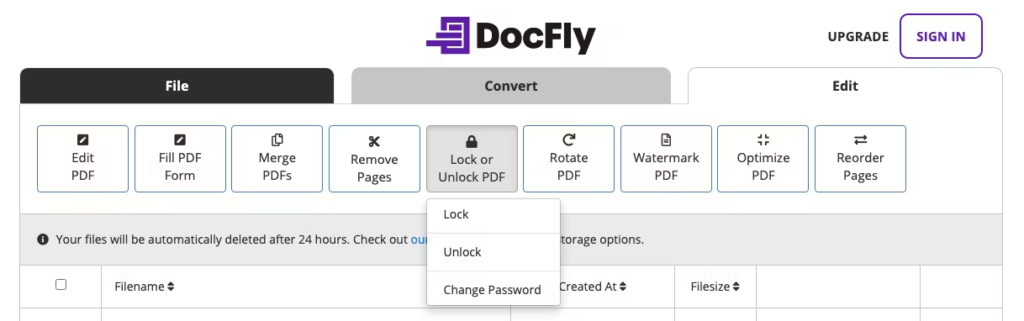
- Subscribers gain access to a wider set of editing functions like merging, splitting, and rotating PDFs.
- Added storage options make sure your important files are securely backed up.
- Business Plan: This level suits teams that need collaboration tools and user permissions to organize their workflow.
- It includes everything in the Pro Plan plus additional controls for document management among multiple users.
- Teams can set user access to protect sensitive information while still collaborating efficiently.
Exploring DocFly’s Features
DocFly’s features pair powerful PDF editing with a user-friendly interface, so you can handle document tasks with real ease. The sections below look at each part of the toolset in turn and explain what makes this tool useful for your day-to-day workflow.
Editing tools, form creation, file conversion, and storage capabilities
DocFly is a versatile PDF tool with features built for tech-savvy users. It handles document management with a suite of editing tools and file options, and it keeps the experience simple.
- Editing tools: DocFly includes a full set of editing tools for modifying PDF documents. Whether you need to alter text, resize images, or reorder pages, these tools make the work simple and clear.
- Form creation: DocFly comes with form creation tools. You can design custom forms from scratch or edit existing ones, adding fields such as text boxes, checkboxes, and radio buttons.
- File conversion: The platform supports file format conversion for maximum compatibility. Convert your documents into popular formats like Word, Excel, or image files without losing the original layout or formatting.
- Storage capabilities: With cloud storage options, you can save and access your PDFs anywhere, anytime. It adds convenience and lets you share documents with colleagues or clients securely.
User Reviews and Ratings: Analyzing Customer Feedback
Many customers have shared their experiences with DocFly online, and the average rating reflects broad user satisfaction. These ratings often note how easy it is to manage documents through DocFly’s interface.
People value the platform for its editing tools and the ability to create forms quickly. Both of these save time on repetitive work and simplify the overall workflow for regular users.
Feedback on features like access controls and annotations shows that users find these particularly useful for collaborating on PDFs securely. The overall consensus is that people value handling all their document management needs within one application, rather than juggling multiple separate tools for the same work.
Positive reviews often point to DocFly’s reliability in converting files accurately, with little disruption during important tasks. Next, here is how DocFly compares with other well-known solutions in the PDF software market.
Comparing DocFly to Popular Alternatives
Here is how DocFly holds its ground in a competitive field, with the details you need to judge whether it is the right choice for your document handling. Read on to make an informed decision.
How DocFly stacks up against Adobe Acrobat, iLovePDF, and Smallpdf
DocFly holds its own among PDF editing software, with a suite of tools for document management and manipulation. Its user-friendly interface gives quick access to functions like PDF merging, splitting, and file conversion.
You can edit, format, and transform documents with ease, and you do not need extensive experience in digital document processing to get useful results from the tool.
Adobe Acrobat is well known for its powerful features and market position, but it costs more. DocFly is an affordable alternative that keeps a high standard of functionality close to what Acrobat offers.
Compared with iLovePDF and Smallpdf, both popular online PDF tools known for their simplicity, DocFly provides additional storage capabilities. That extra room can matter a great deal for users who handle large volumes of documents on a regular basis.
With a rating that reflects customer satisfaction, DocFly proves itself as a solid document solution. It matches key offerings from these leading services and strikes a balance between performance and price.
DocFly FAQs: Common Questions Answered
Users often have questions about DocFly’s capabilities and support. This section addresses common inquiries to help you understand the platform better.
- Many ask whether the online document editing tools are easy to use. They are, with a user-friendly interface for quick PDF modifications.
- Potential subscribers wonder about PDF creation and conversion; DocFly transforms documents to and from PDF format with just a few clicks.
- Concerns about secure file storage are frequent; your files are protected with advanced encryption on Amazon Cloud hosting.
- Queries about customer support options arise; email, a help desk, and a full FAQs/forum are available for assistance.
- User ratings and reviews interest those considering DocFly; an average of 4.3 out of 5 stars reflects customer satisfaction.
- Registration details matter to some users; the company is officially registered in Spain and operates an office within the United States.
- Clients compare DocFly with competitors in the PDF software market and find a strong contender in features and value against brands like Adobe Acrobat.
- DocFly’s cloud-based document management is praised for its accessibility and convenience, with access from anywhere.
- Inquiries about PDF editing and management tools are common; users find that DocFly provides extensive features for managing PDF workflows efficiently.
Conclusion: Is DocFly the Right Choice for Your PDF Needs?
DocFly is a versatile PDF tool built for a range of users, from individual freelancers to large enterprises. Its competitive pricing and strong feature set make it a solid choice for anyone who needs dependable document management.
Consider your specific PDF tasks and compare them with what DocFly offers; it may well be the solution you are looking for. Take time to explore the plans and try out the tools that matter most to you. Whether you are manipulating pages or filling out forms, DocFly can simplify your document handling and keep your workflow moving.
(Image credit: Docfly)
Frequently Asked Questions
1. What does DocFly do?
DocFly is a tool that lets you edit, sign, and convert PDF files online.
2. How much does it cost to use DocFly?
The cost of using DocFly varies based on the subscription plan you choose; they offer both free and paid options.
3. Can I try DocFly for free before paying?
Yes, you can start with a basic free plan before deciding if you want to pay for advanced features.
4. What are some alternatives to using DocFly?
Some alternatives to DocFly include Adobe Acrobat, Foxit PhantomPDF, and Nitro Productivity Suite.
5. Does DocFly have a mobile app?
DocFly primarily operates through its website but check their official site or app store for any mobile application offerings.

- Independent picks for exactly what you just read about
- Matched to your team size & needs
- Vendors don't pay for placement
Step 1 of 4
How big is your team?
We tailor recommendations to companies your size.















Related Articles

Buyers guide
How To Choose The Best Online Learning Platform For 2026
Continue reading →

Education Software
Best LMS Software in 2026: Complete Guide for Every Team Size
Continue reading →

Education Software
Legends of Learning: 2,000+ K-8 Games, Free Teacher Plan
Continue reading →

Education Software
ThinkWave Educator 2026 Review: Gradebook, School Management Software, and Support Overview
Continue reading →