
Tax mistakes cost small businesses money, and they can also trigger audits, penalties, and lost growth opportunities. This guide covers the top tax software in 2026 for small business owners who want to simplify filing, stay compliant, and get valuable time back during tax season.
You’ll find which tax software options — TurboTax, Xero Tax, TaxSlayer, and others — fit small businesses best. From payroll tax integration and deduction tracking to multi-entity support and audit protection, this guide breaks down features, pricing, and ideal use cases so you can make the right choice.
It’s written for freelancers, small business owners, LLC operators, and accounting professionals who want efficient, cost-effective, compliance-ready tax solutions in 2026 — whether you’re filing solo or for multiple entities.
Small businesses need reliable tax software to handle compliance, track expenses, manage payroll taxes, and process deductions. Mistakes here can mean lost deductions, penalties, or an IRS audit — and for a small business, any of those can eat into cash flow that would otherwise go toward growth.
Key expenses to monitor include office supplies, travel, and wages. Payroll taxes and withholdings add complexity, so the software needs to stay current with federal and state regulations, since those rules shift from year to year and vary by location.
Good tax software automates calculations, tracks deductions, and connects with accounting tools like QuickBooks and Xero, so business owners can stay tax-compliant while focusing on running the business. That connection matters most at tax time, when pulling numbers manually from spreadsheets or bank statements is where errors tend to creep in.
Key Takeaways
- Small businesses need tax software that supports deductions, payroll integration, and multi-entity filing.
- Automated expense tracking, real-time tax calculations, and e-filing streamline tax management.
- Cloud-based solutions offer secure storage, accessibility, and compliance updates as tax laws change.
- Pricing varies by feature set, with tiered plans for different business sizes and needs.
- Strong customer support, audit assistance, and reporting tools help businesses manage taxes and avoid penalties.
Must-Have Features in Tax Software for Small Business Success in 2026
The right tax software makes filing easier, cuts down on mistakes, and helps you stay compliant with IRS regulations. The right features drive accurate reporting, maximize deductions, and set you up to streamline financial management down the line. Before comparing individual products, it helps to know which capabilities actually move the needle for a small business filer, versus which ones only matter for large enterprises.
Smart Expense Tracking & Deduction Tools for Maximizing Refunds
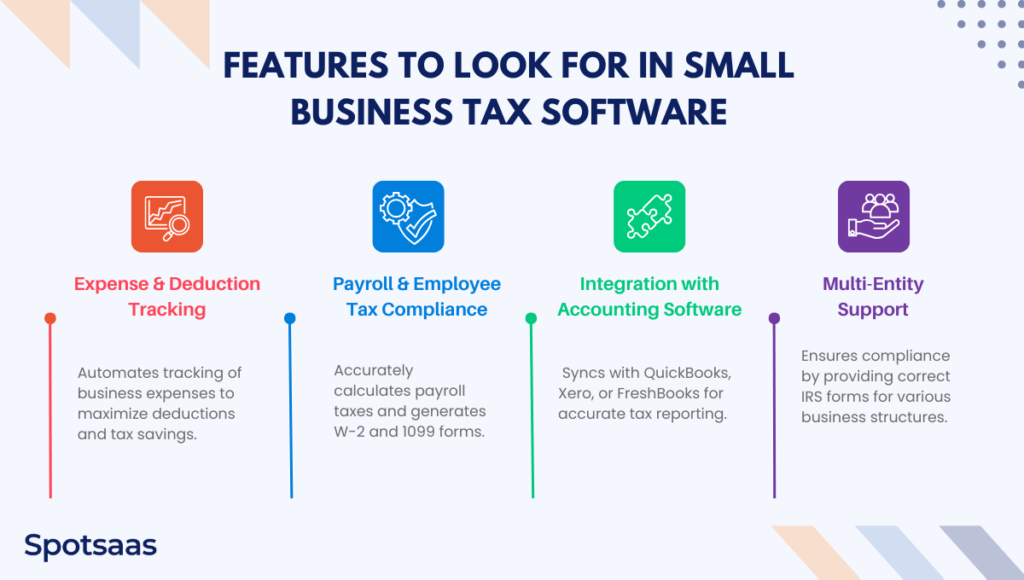
Small businesses have a long list of deductible expenses — office supplies, travel, marketing, equipment purchases, and more. Tax software that tracks expenses automatically lets owners sort transactions into deductible categories and pull reports without manual bookkeeping. Skip this step and it’s easy to lose track of smaller purchases that add up to real deductions by year end.
Payroll & Tax Compliance Tools Every Small Business Needs
For businesses with employees, payroll taxes, wage reporting, and tax withholdings get complicated fast. Tax software with payroll features calculates federal, state, and local payroll taxes accurately, and generates W-2 and 1099 forms along the way, which saves a lot of manual cross-checking at year end and reduces the odds of a filing error triggering a penalty notice.
Easy Accounting Integration with QuickBooks, Xero & More
Many small businesses already run QuickBooks, Xero, or FreshBooks for their finances. Picking tax software that connects directly to these platforms cuts out redundant manual data entry and keeps reporting and tax calculations accurate, instead of re-typing the same figures into a second system by hand every quarter.
Tax Filing for LLCs, S-Corps & Multi-Entity Businesses
Tax obligations vary by business structure — sole proprietorships, LLCs, S-corporations, and partnerships each need different IRS forms. Tax software with multi-entity support keeps you compliant by providing the right forms, such as Schedule C for sole proprietors, Form 1120 for corporations, and Form 1065 for partnerships. Getting this wrong is one of the more common ways small businesses end up filing an amended return.
Top-Rated Small Business Tax Software Options for 2026
| Tax Software | Best For | Key Features |
|---|---|---|
| TaxSlayer Self-Employed | Freelancers & contractors | Affordable, supports 1099s & deductions |
| Xero Tax | Accounting software users | Seamless integration with Xero, tax reports & calculations |
| TurboTax Business | LLCs & Corporations | QuickBooks integration, deduction tracking, payroll support |
| H&R Block Business | Small business owners | Expense tracking, audit support, step-by-step guidance |
| FreeTaxUSA Business | Cost-conscious filers | Free federal filing, low-cost state returns |
Each of these fits a different priority: TaxSlayer and FreeTaxUSA lean toward budget-conscious freelancers, TurboTax and H&R Block Business bring more hand-holding and payroll support for LLCs and corporations, and Xero Tax is built around businesses already living inside Xero’s accounting ecosystem. The reviews below break down pricing, features, and who each one fits best.
TaxSlayer Review: Best Budget Tax Software for Freelancers & Small Businesses

TaxSlayer
- Pricing: Starts from $27.95
- Federal Filing: Starts at $0 – $59.95
- Best For: Self-employed and freelancers
TaxSlayer is Best For
TaxSlayer is tax preparation software built for individuals and small business owners who want an affordable, easy-to-use way to file. It covers a range of tax situations while working to keep filings accurate and refunds maximized.
Pricing & Fees of TaxSlayer
TaxSlayer prices its plans by how complex your return is:
- Classic – $27.95 for all tax situations, covering all IRS forms, credits, and deductions.
- Premium – $49.95, includes all Classic features plus priority support, Ask a Tax Pro, and live chat.
- Self-Employed – $59.95, built for freelancers and business owners, with added support for 1099 and Schedule C filing.
State returns cost an additional $42.95. Prices can change and may vary with promotions, so it’s worth double-checking current rates before you commit to a plan.
Overview of TaxSlayer
TaxSlayer walks users through filing step by step with an intuitive interface. It handles a wide span of tax situations, from simple W-2 income to more complex self-employment income, so users can report their finances accurately without needing a background in tax law.
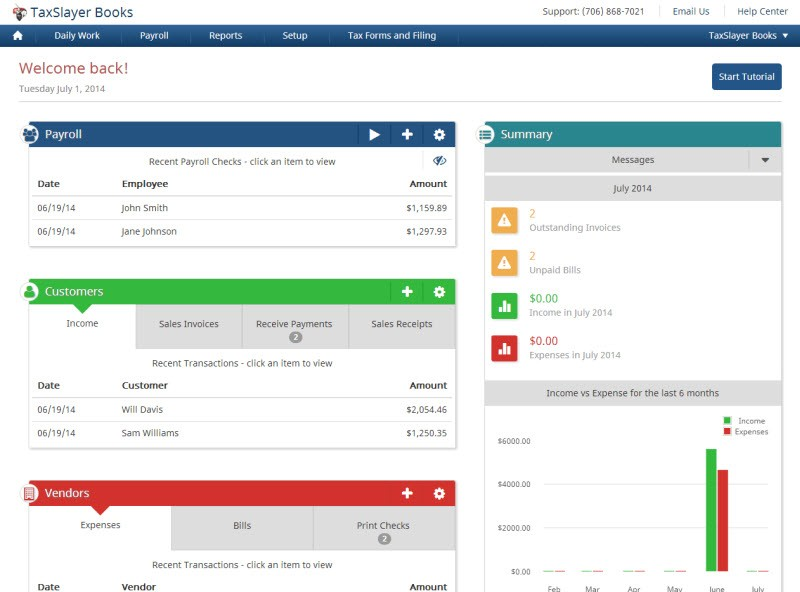
The platform also gives users several support options, including access to tax professionals, throughout the filing process — useful for anyone filing a Schedule C for the first time and unsure which expenses actually qualify.
Why I Choose TaxSlayer
TaxSlayer stands out for its affordability and how much it packs in. Unlike some tax software that charges extra for certain forms or schedules, TaxSlayer’s Classic edition includes every necessary form for one flat fee.
The platform also backs users up with support options like Ask a Tax Pro, giving people direct access to tax professionals for personalized help. Its user-friendly design and focus on maximizing refunds make it a strong option for a wide range of taxpayers, particularly those who don’t want to pay premium prices just to unlock every IRS form.
Key Features of TaxSlayer
Ask Tax Pro for unlimited support
TaxSlayer gives users access to tax professionals through its Ask a Tax Pro feature, providing personalized guidance. Users can get answers to complex tax questions, which helps with accuracy and compliance with IRS rules.
Full-scope tax filing
TaxSlayer supports all major IRS forms and schedules, so it fits a variety of tax situations. Whether users have W-2 income, self-employment earnings, rental properties, or investments, the platform helps them file accurately.
Maximum refund guarantee
The platform helps users claim every deduction and credit they qualify for to maximize their refund. TaxSlayer guarantees users get the maximum refund possible, or their filing fees are refunded.
Integrations of TaxSlayer
TaxSlayer connects with a handful of other tools to round out the tax prep experience:
- Accounting & Financial Management Integrations – QuickBooks Online, TaxDome
- Tax Document Management – Form8949.com
Customers of TaxSlayer
TaxSlayer serves a mix of individual taxpayers, self-employed professionals, and small business owners looking for efficient tax preparation. Specific client names aren’t publicly listed, but the platform has drawn positive feedback from a large user base, particularly people filing on a tight budget who still need every deduction covered.
Pros & Cons of TaxSlayer
| Pros | Cons |
|---|---|
| Affordable pricing for all plans | Limited features for complex returns |
| User-friendly interface | Extra fees for state filing |
| Free federal tax filing for simple returns | Fewer in-person support options |
| Strong customer support options | |
| Quick & accurate tax calculations |
Final Thoughts
TaxSlayer is a solid pick for individuals and small business owners who want affordable, feature-packed, user-friendly tax software. Its pricing, features, and support options make it a strong contender in the tax software market.
It doesn’t offer in-person support, but its online resources and access to tax professionals give most users what they need.
Xero Tax: Review: Ideal for Xero Users Needing Full Tax Automation
Xero Tax
- Pricing: Starts from $35
- Best For: Accounting software users
Best for
Xero Tax is an advanced tax preparation solution built for accountants, small businesses, and corporations that want a smoother filing experience. Its integration with Xero’s cloud accounting software lets businesses manage taxes, financial reports, and compliance from one platform.
Xero Pricing
Xero offers a range of pricing plans for different business needs. Here’s a breakdown of its current offerings:
Ignite Plan
- Regular Price: $35 AUD per month
- Promotional Price: $3.50 AUD per month (valid until 28 February 2025)
Grow Plan
- Regular Price: $70 AUD per month
- Promotional Price: $7 AUD per month (valid until 28 February 2025)
Comprehensive Plan
- Regular Price: $90 AUD per month
- Promotional Price: $9 AUD per month (valid until 28 February 2025)
Ultimate 10 Plan
- Regular Price: $115 AUD per month
- Promotional Price: $11.50 AUD per month (valid until 28 February 2025)
Prices are in AUD and include GST. Promotional pricing is available to new Xero subscribers in Australia who sign up by 28 February 2025. Standard rates apply once the promotional period ends, and Xero reserves the right to change pricing at any time.
For more detail, and to pick the plan that fits your business, visit Xero’s official pricing page.
Overview of Xero Tax
Xero Tax handles tax preparation and electronic lodgment for accountants and businesses juggling multiple clients. It automates tax calculations, builds compliance-ready reports, and works toward accurate tax lodgments.
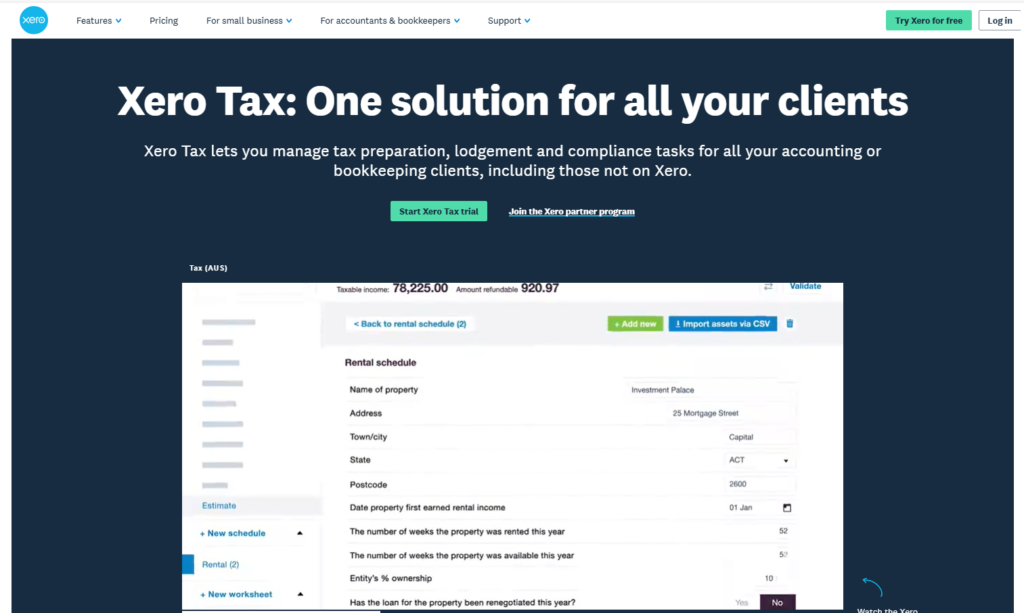
With cloud functionality, you can prepare and file tax return forms directly with tax agencies, cutting out manual work and keeping filings aligned with current regulations. Built-in collaboration also lets accountants and business owners review tax details in real time, which speeds up the whole tax prep workflow, especially during the weeks leading up to a filing deadline when back-and-forth email threads tend to pile up.
Why Choose Xero Tax
Xero Tax is a cloud-based tax solution that fits naturally alongside Xero Accounting and other financial tools. It supports automated tax filing, along with the ability to lodge and complete forms directly, moving client data from financial records into the software with minimal extra work.
Multi-entity support lets businesses and accounting firms manage tax obligations across multiple clients or business structures, from sole proprietorships to partnerships, LLCs, and corporations. Its compliance-first approach helps keep tax filings in line with current regulations, cutting down the risk of mistakes or audits, which matters more for firms managing several clients at once than it does for a single filer.
Xero Tax Features
Direct Integration with Xero Accounting
Xero Tax connects natively with Xero’s accounting system, letting companies pull in financial information automatically, which cuts down on errors and automates tax reporting.
Automated Tax Compliance & Electronic Lodgment
The tax software builds tax forms, computes liabilities, and lodges returns electronically to tax authorities, keeping filings accurate and compliant.
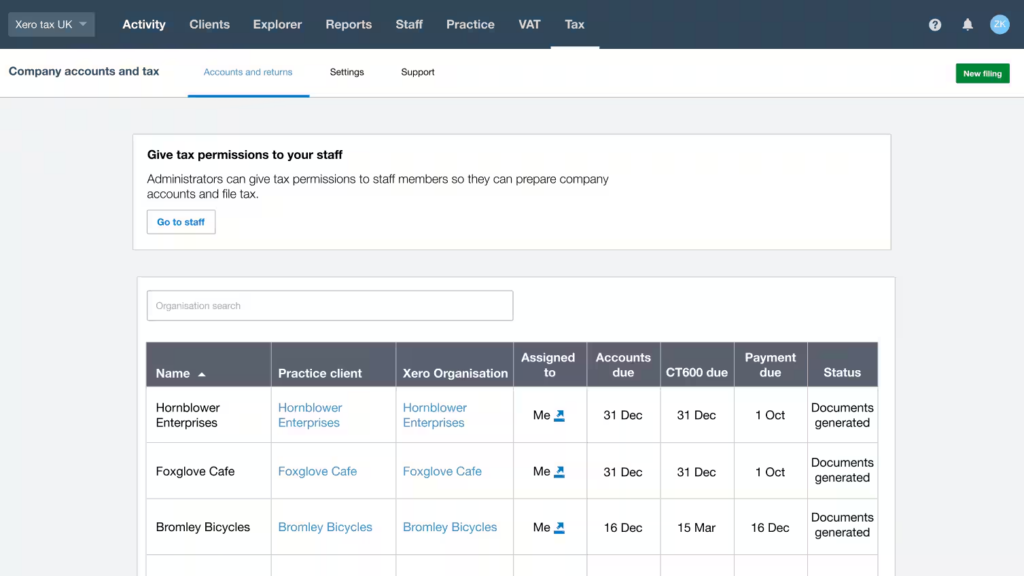
Multi-Entity Support for Businesses & Accountants
Xero Tax works for sole proprietors, partnerships, LLCs, and corporations, which suits tax professionals handling multiple business clients.
Integrations of Xero Tax
Xero Tax connects with other financial management and accounting tools to keep tax prep moving, so figures don’t need to be pulled and re-entered by hand from a separate system:
- Accounting Integration – Fully integrates with Xero Accounting for real-time access to financial data.
- Tax Agency Portals – Electronic lodgment directly with government tax agencies for quick, compliant lodgment.
- Document Management – Upload and store tax documents for simple audit preparation and review.
Customers of Xero Tax
Xero Tax is used by a range of companies across different industries. A few notable examples:
- Visual Contrast: An art and design studio aiming to make art accessible. xero.com
- Xendoo: A financial services company providing online accounting and bookkeeping solutions. xero.com
- Good Wood: A company dedicated to building equitable businesses. xero.com
- Frogtown Brewery: A Los Angeles-based brewery along the LA River. xero.com
- Take Tiny Action: A business emphasizing the impact of small, consistent actions. xero.com
- Butter&: A company known for its unique approach to business and confections. xero.com
- Olive and Poppy: A business inspired by wine country, creating related gifts. xero.com
Pros and Cons of Xero Tax
| Pros | Cons |
|---|---|
| Seamless integration with Xero Accounting | Custom pricing may not suit small businesses |
| Cloud-based access for real-time collaboration | Best suited for businesses already using Xero |
| Automated tax compliance and electronic lodgment | Limited support for freelancers and sole proprietors |
| Supports multiple business entities | |
| Direct filing with tax agencies |
Final Thoughts
Xero Tax is a strong tax solution for accountants, bookkeepers, and businesses that want automation and compliance-driven filing. Its tie to Xero Accounting, cloud access, and multi-entity handling make it a good fit for practices serving multiple clients.
Its dependence on Xero’s ecosystem and custom pricing won’t suit solo users as well, but companies and tax practitioners already on Xero get a fully automated, compliance-oriented tax filing process out of it.
TurboTax Review: Full-Service Tax Software with Expert Support
TurboTax
- Pricing: Varies on Filing Options
- State Filing: $39 per state
- Best For: In-depth tax guidance
TurboTax is Best For
Individuals and small business owners who want guided tax software with expert assistance, maximized deductions, and simple filing options.
Pricing & Fees of TurboTax
TurboTax offers a range of online tax filing options for different tax situations. Here’s a breakdown of its current offerings:
TurboTax Free Edition
- Cost: $0 Federal, $0 State, $0 to File
- Best For: Simple tax situations (W-2 income only)
TurboTax Live Assisted
- Starting Cost: $39 Federal (State additional)
- Best For: Taxpayers who want expert help while filing
TurboTax Live Full Service
- Starting Cost: $89 Federal (State additional)
- Best For: Individuals who’d rather have a tax expert handle the entire filing process
Prices can change and may vary with promotions. Starting prices are for federal returns; state returns may cost more. For current pricing, visit TurboTax’s official pricing page.
For more detail, and to find the plan that fits your tax situation, visit TurboTax’s official website.
Overview of TurboTax
TurboTax is a well-known tax software built to simplify filing for individuals, self-employed professionals, and small businesses. A step-by-step interface guides users through tax forms, helping them spot eligible deductions and maximize refunds.

The platform ranges from self-guided filing to expert-assisted and full-service tax preparation, so users at any experience level get the right level of support. Features like AI-powered audit detection, automatic error checks, and direct deposit refunds round out TurboTax as an option for hassle-free tax filing, whether someone is filing a simple return or juggling self-employment income for the first time.
Why Choose TurboTax
TurboTax stands out for its user-friendly design and expert-backed accuracy. Unlike tax software that expects users to already know tax rules, TurboTax simplifies the process with personalized guidance, real-time refund calculations, and audit protection.
TurboTax Live also gives users direct access to CPAs and tax professionals who can review returns or file taxes on their behalf. The software connects with financial platforms, payroll providers, and bookkeeping tools, which is especially useful for freelancers and small business owners who’d rather not re-enter the same numbers across multiple systems.
Key Features of TurboTax
Audit support and accuracy check
TurboTax automatically scans for potential errors and inconsistencies before users submit their returns. It provides explanations and suggested corrections to cut audit risk.
Step-by-step tax guidance
TurboTax breaks the filing process into easy-to-follow steps. Users answer simple questions about their income, deductions, and financial situation, and the software fills out the necessary forms automatically.
Max refund guarantee
TurboTax helps users maximize their tax refunds by finding every eligible deduction and credit. It analyzes income, expenses, and filing status to surface potential savings.
Integrations of TurboTax
- Payroll Integrations – QuickBooks Payroll, Gusto, ADP, Paychex, OnPay
- HR Software Integrations – BambooHR, Workday, Zenefits, Rippling
- Accounting & Financial Management Integrations – QuickBooks, Xero, NetSuite, Wave
- Investment & Banking Integrations – Robinhood, Coinbase, Fidelity, Charles Schwab
Customers of TurboTax
TurboTax serves individuals, self-employed professionals, and small business owners, and partners with various payroll providers and financial institutions to simplify tax filing, from freelancers filing a single Schedule C to owners running payroll for a small team.
Pros and Cons of TurboTax
| Pros | Cons |
|---|---|
| User-friendly interface | Higher pricing for premium features |
| Step-by-step guidance | Limited customer support options |
| Maximizes deductions & credits | Extra fees for state filings |
| Integrates with financial apps | |
| Supports multiple tax situations |
Final Thoughts
TurboTax is a top choice for individuals and business owners who want a guided, easy-to-use tax software experience. Its step-by-step approach, refund maximization tools, and expert support add up to accuracy and peace of mind.
Premium plans can get pricey, but the software’s extensive features, audit protection, and live expert assistance make it a solid investment for stress-free tax preparation.
H&R Block Review: Reliable DIY + In-Person Tax Help for Small Businesses

H&R Block
- Pricing: Varies on Filing Options
- State Filing: $37 per state
- Best For: In-person and virtual filing
H&R Block is Best For
Individuals and small business owners who want tax preparation software that balances affordability, ease of use, and expert-assisted filing options.
Pricing & Fees of H&R Block
H&R Block offers several tax filing options for different tax situations and preferences. Here’s an overview of its current offerings:
H&R Block Free Online
- Cost: $0 Federal, $0 State, $0 to File
- Best For: Simple tax situations
H&R Block Deluxe Online
- Starting Cost: $35 (State additional)
- Best For: Taxpayers with credits and deductions
Assisted Tax Preparation Services
- Starting Cost: $89 + additional state fee
- Best For: Individuals who want professional assistance
Prices can change and may vary with promotions, and state returns may cost extra. For current pricing, visit H&R Block’s official website.
For more detail, and to find the plan that fits your tax situation, visit H&R Block’s official website.
Overview of H&R Block
H&R Block is a well-established name in tax preparation, offering both DIY tax software and expert-assisted services. The platform gives users a guided, intuitive experience that helps maximize deductions and file accurately.
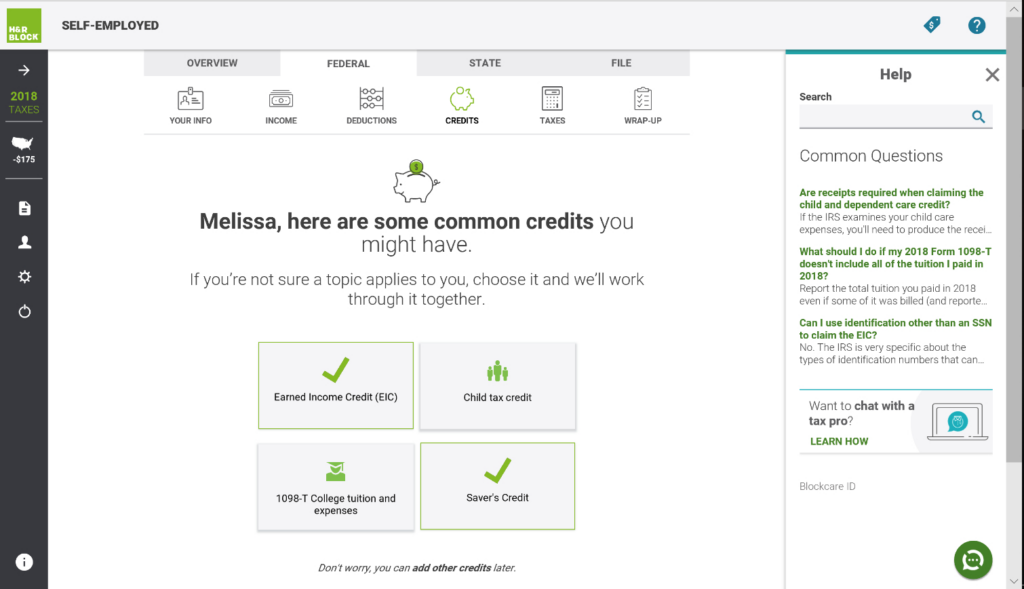
Users can pick self-filing, expert review, or full-service tax preparation depending on their needs. H&R Block also offers in-person tax help at physical locations, which makes it a flexible option for anyone who wants professional support and would rather sit down with someone than troubleshoot a return alone.
Why Choose H&R Block
H&R Block stands out for combining affordability, ease of use, and access to expert tax help. Unlike tax software that’s purely online, H&R Block gives users the option to visit local offices for in-person assistance.
Its Worry-Free Audit Support offers guidance if you get an IRS audit, and the Tax Pro Review service lets users have a professional check their return before submission. The software also connects with major financial and payroll platforms, making filing more straightforward for individuals and business owners who already keep their books in one of those systems.
Key Features of H&R Block
Max refund guarantee
H&R Block helps users maximize refunds by checking for every eligible deduction and credit. The tax software continuously looks for overlooked tax-saving opportunities and gives real-time refund updates.
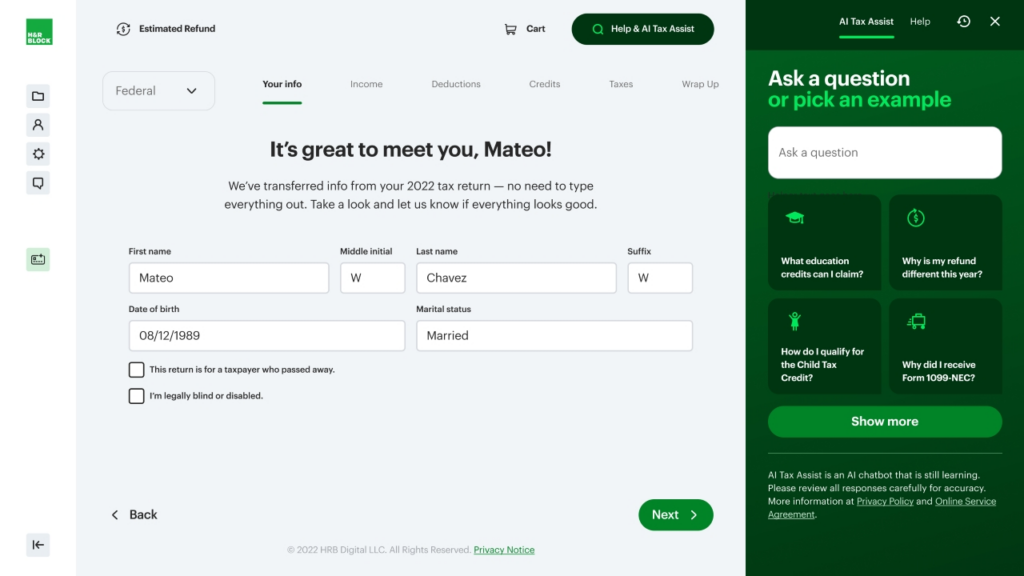
Step-by-step guidance
H&R Block is tax filing software that walks users through their returns with an intuitive, question-based process. The platform keeps things accurate by automatically selecting the correct tax forms based on user input.
Expert tax assistance
Users can reach tax professionals through live chat, expert reviews, and full-service tax filing. Whether someone needs a quick answer or wants a professional to review a return before submission, H&R Block makes expert help available. In-person assistance is also an option at nationwide retail locations.
Integrations of H&R Block
- Payroll Integrations – ADP, Gusto, Paychex, QuickBooks Payroll, Paycor
- HR Software Integrations – BambooHR, Workday, Zenefits, Rippling
- Accounting & Financial Management Integrations – QuickBooks, Xero, NetSuite, Wave
- Investment & Banking Integrations – Robinhood, Coinbase, Fidelity, Charles Schwab
Customers of H&R Block
H&R Block serves a mix of individuals, self-employed professionals, and small business owners. In fiscal year 2022, the company prepared 20.5 million U.S. tax returns, with 8.5 million clients using its DIY products — a scale that few competitors in this space can match.
Specific client names aren’t publicly listed, but H&R Block’s large network of tax professionals and broad service offerings make it a trusted choice for taxpayers who want reliable tax preparation help, whether that’s a quick DIY filing or a sit-down with someone at a local office.
Pros & Cons of H&R Block
| Pros | Cons |
|---|---|
| Easy-to-use interface | Extra fees for advanced features |
| In-person & online filing options | Limited support for complex tax situations |
| Affordable pricing for basic plans | Upsells for additional services |
| Strong customer support | |
| Accurate tax calculations |
Final Thoughts
H&R Block is a solid choice for individuals and small business owners who want easy-to-use tax software with the option of professional help. Premium features add to the cost, but the platform’s support and refund optimization tools make it a worthwhile investment.
Its mix of online and in-person tax support, plus a strong accuracy guarantee, makes it a reliable pick for a stress-free filing experience.
FreeTaxUSA Review: Affordable Online Tax Filing with Full IRS Support
FreeTaxUSA
- State Filing: $14.99 per state
- Federal Filing: Free
- Best For: Affordable and easy online tax filing
FreeTaxUSA is Best For
FreeTaxUSA is online tax software built for individuals and self-employed professionals who want an affordable, straightforward way to file. It packs in a full set of tax filing features at a fraction of what competitors charge, while working to keep filings accurate and refunds maximized.
Pricing & Fees of FreeTaxUSA
FreeTaxUSA keeps its pricing transparent, with no surprise upsells buried behind the filing flow:
- Federal Tax Return – $0.00 – All federal tax forms are free, regardless of complexity.
- State Tax Return – $14.99 per state return.
- Deluxe Edition – $7.99 – Includes priority support, unlimited amended returns, and audit assistance.
- Pro Support – $39.99 – Offers personalized advice from tax specialists via phone, live chat, or screen share.
Prices can change and may vary with promotions. For more detail, visit the official pricing page.
Overview of FreeTaxUSA
FreeTaxUSA keeps filing simple with a step-by-step interface that walks users through every section of their return. It supports a range of tax situations, from basic W-2 filings to more complex self-employment, investment, and rental income cases, without pushing users toward a pricier tier to unlock the relevant forms.
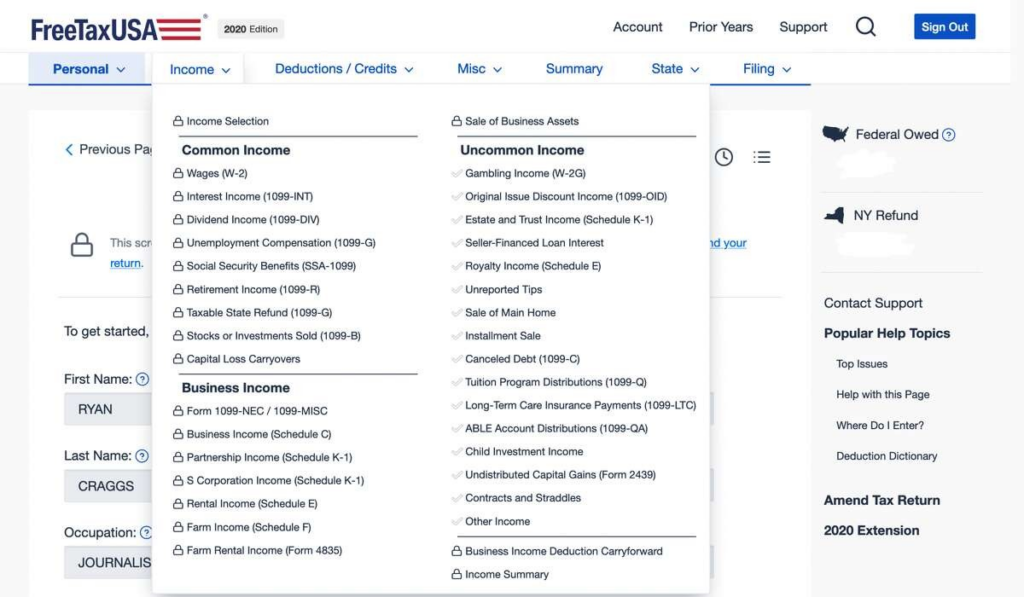
Its feature set and affordable pricing make it a good alternative to higher-cost tax software without giving up accuracy. The platform helps users maximize deductions, catch potential errors, and file efficiently, whether they file independently or with professional help, which is part of why it keeps showing up as a budget pick alongside pricier competitors.
Why Choose FreeTaxUSA
FreeTaxUSA stands out for being cost-effective while still supporting the full range of tax forms. Unlike competitors that charge extra for additional forms, FreeTaxUSA gives every user free federal filing, no matter their tax situation.
Users can also upgrade to the Deluxe or Pro Support packages for personalized expert help. Its user-friendly design, along with features like audit support and refund maximization tools, makes it a strong choice for individuals and business owners alike who want the core filing features without paying for extras they won’t use.
Key Features of FreeTaxUSA
Full-scope tax filing
FreeTaxUSA supports all major IRS forms and schedules, so users can file returns for a range of financial situations, including self-employment, investments, and rental income. Whether filing a basic return or reporting business deductions, the platform covers it without extra cost.
Maximum refund guarantee
The platform helps users claim every eligible deduction and credit so they get the highest refund possible. FreeTaxUSA continuously scans for tax-saving opportunities based on income, expenses, and filing status.
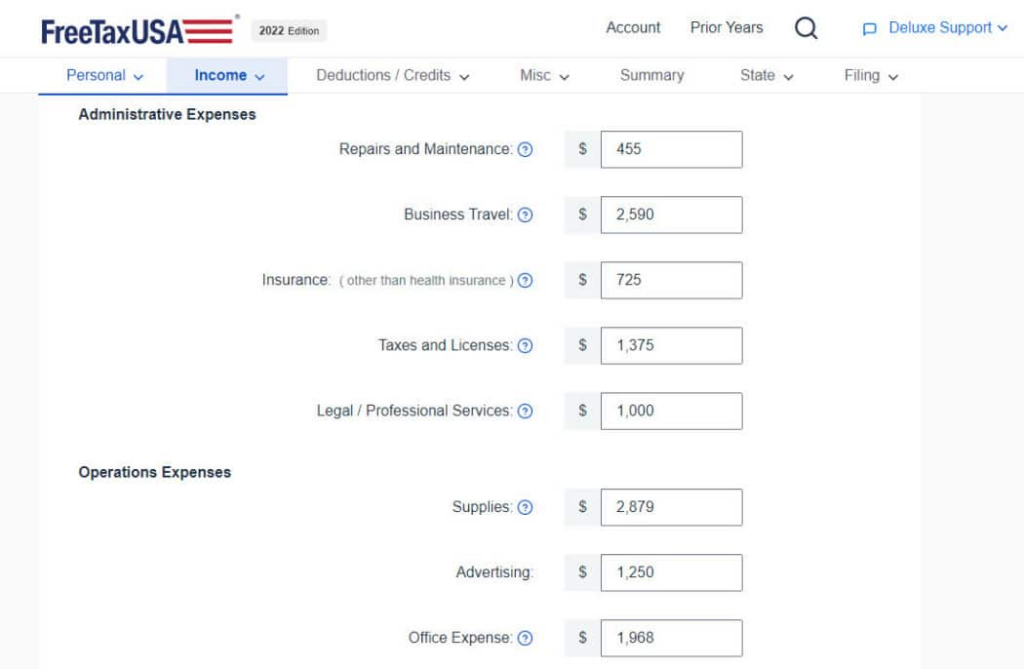
The real-time refund tracker gives users an instant estimate of their expected return. The tax software also includes a tax estimator tool, letting users plan ahead by forecasting their refund before starting the filing process.
Audit assistance
FreeTaxUSA includes audit assistance in its Deluxe package, giving users guidance if they get an IRS inquiry. This service walks through the audit process step by step and explains how to respond.
Integrations of FreeTaxUSA
FreeTaxUSA offers limited direct integrations, but it does let users import prior year tax data from other tax software platforms, which makes it easier for returning users to switch over without re-entering years of filing history by hand.
Customers of FreeTaxUSA
FreeTaxUSA serves a wide range of individual taxpayers and self-employed professionals looking for affordable, efficient tax preparation. Specific client names aren’t publicly listed, but the platform has drawn positive feedback from a large number of users, many of whom switched over after paying more elsewhere for the same basic filing.
Pros & Cons of FreeTaxUSA
| Pros | Cons |
|---|---|
| Free federal tax filing for all users | Limited customer support (no phone support in free version) |
| Low-cost state tax filing | Basic user interface compared to premium competitors |
| Supports all major tax forms and schedules | No direct W-2 or 1099 import from employers |
| Accuracy and maximum refund guarantee | |
| Affordable Deluxe edition with audit support |
Final Thoughts
FreeTaxUSA is a strong choice for individuals and self-employed professionals who want affordable, feature-rich tax software. Its low-cost pricing, support for all major tax forms, and user-friendly approach make it stand out in the tax software market.
It may lack some of the advanced integrations and high-end customer support of premium competitors, but its focus on cost, accuracy, and audit support makes it a solid option for a straightforward, budget-friendly tax filing experience.
Final Verdict: Best Tax Software Picks for Small Businesses in 2026
Picking the right tax software matters for small businesses that want to simplify filing, follow the rules, and get the full benefit of their deductions. The ideal solution streamlines expense tracking, handles payroll taxes, connects with accounting packages, and provides audit support.
Whether you’re a freelancer, a small business owner, or managing multiple entities, choosing tax software that fits your company’s needs can save time and cut down on tax-season stress. TurboTax Business and H&R Block Business bring strong support, while FreeTaxUSA and TaxSlayer are the more budget-friendly picks — free federal filing on the low end, up to roughly $89 for full-service, expert-assisted filing on the high end.
Companies already running Xero Accounting will likely find Xero Tax the easiest to plug in. With automation, compliance resources, and access to tax professionals, business owners can spend more time growing the business and stay ready to file all year, instead of scrambling to pull records together every spring.
Frequently Asked Questions About Small Business Tax Software
What is the best tax software for small businesses in 2026?
TurboTax Business, H and R Block Business, TaxSlayer Self-Employed, FreeTaxUSA Business, and Xero Tax are among the top options. The best choice depends on your business size, tax complexity, and budget — the comparison table above breaks down what each one is best suited for.
How does tax software help with expense tracking?
Most tax software automatically categorizes business expenses, tracks deductions, and connects with accounting platforms like QuickBooks and Xero, which makes it easier to file accurate tax returns.
Do small businesses need tax software with payroll support?
If you have employees, tax software with payroll tax support helps you manage withholdings, generate W-2s, and stay compliant with federal and state payroll tax rules — TurboTax and H and R Block both cover this through their payroll integrations.
Is free tax software a good option for small businesses?
Free options like FreeTaxUSA Business work well for basic business filings, but businesses with employees or multiple income streams may get more out of paid tax software with advanced features.
How can small businesses avoid tax penalties?
Keeping detailed expense records, filing quarterly estimated taxes, and connecting tax software with your bookkeeping system all help businesses stay compliant and avoid IRS penalties. Most of the platforms above build reminders and reporting tools around exactly these habits.
Compare alternatives to the tools in this post

- Independent picks for exactly what you just read about
- Matched to your team size & needs
- Vendors don't pay for placement
Step 1 of 4
How big is your team?
We tailor recommendations to companies your size.















Related Articles
401K Providers
IRS Tax Code Changes for 2026: Brackets, Deductions and Credits
Continue reading →

401K Providers
SECURE 2.0 Act Tax Changes for 2026: Roth Catch-Up, RMDs & More
Continue reading →
Finance & Billing Software
14 Best Tax Filing Software Platforms for 2026 (Ranked & Reviewed)
Continue reading →
Tax Software
How to Choose the Best Tax Software in 2026 (Save More, Stress Less)
Continue reading →