
Spotsaas Editorial
How to Choose the Best Tax Software in 2026 (Save More, Stress Less)
Why This Guide Matters in 2026
Tax season in 2026 brings real changes: the OBBBA new tax rules, expanded IRS Free File access, and rising audit scrutiny. Finding the right tax software is no longer optional – it is the difference between a smooth refund and a costly mistake.
What You Will Learn Here
How to compare TurboTax, H&R Block, FreeTaxUSA, and others based on your tax situation, cost, and support needs.
Who Should Read This
Perfect for first-time filers, freelancers and gig workers, small business owners, and corporate finance managers choosing the best tax preparation software for the 2026 tax season.
Tax season in 2026 is more complex than ever. New IRS rules, updated deduction limits, and changes from the One Big Beautiful Bill Act (OBBBA) have raised the stakes of filing incorrectly.
The right tax filing software does not just complete your return. It finds deductions you would miss, catches errors before submission, and protects you if the IRS asks questions.
This guide helps you choose the best tax software for your exact situation in 2026 – whether you are a W-2 employee or a business owner managing payroll taxes and depreciation.
Top 5 Key Takeaways
- The right tax software maximizes deductions and keeps you fully IRS-compliant in 2026.
- Automation, error detection, and accounting integrations simplify the filing process significantly.
- Cloud-based platforms offer real-time updates, secure storage, and multi-device access.
- Pricing ranges from free to several hundred dollars depending on complexity and support level.
- Comparing platforms on ease of use, support quality, and reporting depth leads to better savings.
What is Tax Software and How Does It Work?
Tax software is a digital application that guides taxpayers, freelancers, and businesses through preparing and submitting accurate tax returns. It automates calculations, enforces compliance with tax laws, and flags deductions that reduce your bill.
You enter your income, expenses, investments, and dependents. The software populates the correct IRS forms, checks for errors, and submits your return electronically.
Most platforms also import data directly from employers, banks, and investment accounts – cutting down manual entry time. The best tools go further by comparing your return to prior years to catch discrepancies and surface missed deductions.
Types of Tax Software: Personal vs Business
Tax software falls into two broad categories. Personal tax software serves individuals, freelancers, and self-employed professionals. Business tax software is built for LLCs, S-Corps, C-Corps, and enterprises with complex compliance needs.
Choosing the right category is the first decision you need to make. The wrong type will either over-charge you for features you do not need or fail to cover your actual filing requirements.
| Category | Personal Tax Software | Business Tax Software |
|---|---|---|
| Designed For | Individuals, freelancers, self-employed professionals | Small businesses, LLCs, S-Corps, C-Corps |
| Primary Features | W-2 filing, 1099 support, investment and rental income, state filing | Corporate filing, payroll tax, business deductions, multi-state support |
| Integration | Limited integration with banks and financial tools | Integrates with QuickBooks, payroll tools, and ERP systems |
| Tax Complexity | Simple to moderately complex situations | Complex business scenarios and multi-entity structures |
| State Filing | Add-on or included in premium plans | Multi-state filing for businesses across state lines |
| Pricing | Free for basic filers, paid tiers for self-employed | Higher cost due to advanced features and compliance tools |
| Examples | TurboTax, H&R Block, TaxSlayer | TurboTax Business, TaxAct Business, Drake Tax |
Key 2026 Tax Law Changes That Affect Your Software Choice
The One Big Beautiful Bill Act (OBBBA) introduced several provisions that directly affect what you can deduct and how you file in 2026. Not all platforms update their forms and guidance at the same speed.
New Charitable Deduction for Standard Filers
Starting in 2026, even if you take the standard deduction, you can deduct up to $1,000 in cash charitable contributions ($2,000 for joint filers). This is a meaningful change for millions of filers who previously could not benefit from charitable giving without itemizing.
Expanded Senior Tax Breaks
Taxpayers aged 65 and older benefit from expanded deductions and credits under the new rules. If you are filing for a senior household, confirm your software has been updated to reflect these changes before you start.
Updated IRS Free File Thresholds
The income threshold for IRS Free File eligibility was revised upward for 2026, meaning more taxpayers qualify for free guided filing. Check the current limit before paying for software you may not need.
How Tax Software Simplifies the Filing Process
Good tax software removes nearly all of the manual work from tax preparation. It automates calculations, generates the right forms, and catches errors before you hit submit.
Here is what a quality platform handles automatically:
- Automated calculations across all form types – W-2, Schedule C, 1099-DIV, and more.
- Step-by-step guidance so no field goes unfilled and no income source goes unreported.
- E-filing to the IRS and your state agency, with refunds typically arriving within 21 days.
- Deduction scanning that surfaces home office, student loan interest, educator expenses, and other often-missed write-offs.
- Audit protection with step-by-step assistance if your return is selected for IRS review.
- Integrations with payroll platforms, accounting software, and bank accounts for automatic data import.
Must-Have Features to Look for in Tax Software (2026 Edition)
Not all tax software is equal. Here are the five features that separate platforms worth paying for from those that will frustrate you mid-filing.
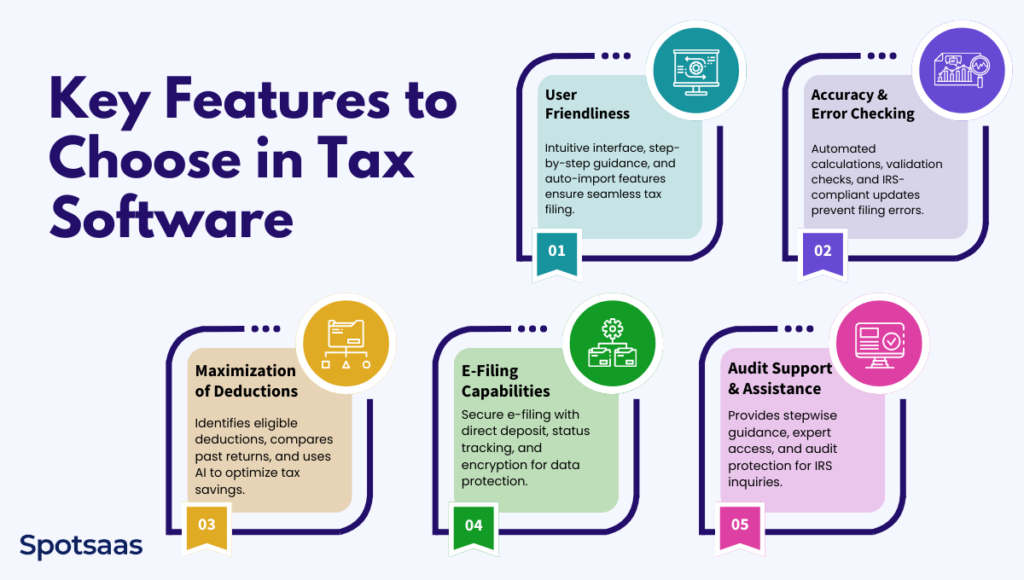
1. User-Friendly Interface and Ease of Use
The best platforms use an interview-style walkthrough – asking simple questions and filling in forms on your behalf. This works whether you are filing for the first time or handling complex investment income.
Auto-import from payroll systems, banks, and accounting tools saves time and reduces data entry errors. Look for searchable help sections and responsive support to handle unexpected questions.
2. Error Checking and Accuracy Tools
Errors in your return can trigger penalties, delayed refunds, or an audit. High-quality software continuously validates your entries against IRS rules and flags missing or inconsistent data before you submit.
Regular updates ensure the platform reflects the latest 2026 tax law changes. Many providers back their platform with a maximum refund guarantee and accuracy guarantee for added confidence. Learn more about common tax filing mistakes to avoid.
3. Deduction Maximization
One of the biggest advantages of tax software over paper filing is deduction discovery. Top platforms analyze your full financial profile and surface industry-specific write-offs that freelancers, investors, and business owners routinely miss.
AI-powered engines suggest lesser-known deductions – home office, vehicle mileage, self-employed health insurance premiums, qualified business income – that can meaningfully reduce your tax bill. Some tools even compare your current return to prior years to flag unusual drops. See the top tax deductions you might be missing.
4. E-Filing for Fast, Secure Returns
Electronic filing is now the standard. It speeds up processing, eliminates paperwork, and gets your refund faster than mailing a paper return. Most platforms support secure federal and state e-filing with direct deposit for refunds.
Built-in tracking shows your return’s status from submission to acceptance. Identity verification and encryption protect your financial data throughout the online filing process.
5. Built-In Audit Support and IRS Assistance
Audit rates are low, but the peace of mind from built-in audit support is worth having. Some platforms include audit defense as a standard feature with access to a tax professional if your return is selected for review.
Premium plans offer full IRS representation – a licensed expert who communicates with the IRS on your behalf. Audit checklists help you organize documentation so you are never caught unprepared.
Who Should Use Tax Software?
Tax software is the right choice for most filers – but the best platform depends entirely on your situation. Here is a breakdown by user type.
Individuals and W-2 Filers
If your income comes from a single employer and you take the standard deduction, a free tier handles your return accurately. Platforms like FreeTaxUSA and H&R Block Free Online cover W-2 income, dependents, and common credits like the Child Tax Credit or Earned Income Credit at no federal cost.
State filing is typically a small add-on. For a step-by-step walkthrough of the filing process, see our guide on how to file taxes online.
Freelancers and Gig Workers
Freelancers face more complexity – 1099 income, self-employment tax, quarterly estimated payments, home office deductions, and business expense tracking. You need a paid self-employed tier from platforms like TurboTax Self-Employed, H&R Block Self-Employed, or TaxSlayer Self-Employed.
Expense tracking integrations and mileage calculators can recover hundreds in missed deductions. Read our full breakdown of the best tax software for freelancers and gig workers.
Small Business Owners
Small businesses need software that handles Schedule C or K-1 preparation, payroll taxes, and asset depreciation. Integration with accounting tools like QuickBooks eliminates duplicate data entry and keeps books and taxes aligned.
Industry-specific deduction lists help businesses in real estate, retail, and healthcare claim every eligible write-off. Multi-state filing support is essential if you operate across state lines. See the best tax software for small businesses.
Self-Employed Professionals
Self-employed individuals need software that supports both personal and business income on the same return. Look for platforms with strong Schedule C support, self-employment tax calculations, and quarterly payment estimators.
See our detailed review of the best tax software for self-employed filers for a full comparison.
Corporations and Enterprises
Large organizations need enterprise-grade solutions for multi-entity reporting, payroll tax compliance, and ERP integration. Platforms like Drake Tax and TaxAct Business offer audit risk assessments and real-time analytics alongside compliance tools.
Built-in access to tax professionals helps enterprises navigate evolving federal and state regulations without costly surprises.
How to Select the Right Tax Software: Step-by-Step
Choosing the best tax preparation software comes down to four straightforward steps. Follow them before paying for any platform.
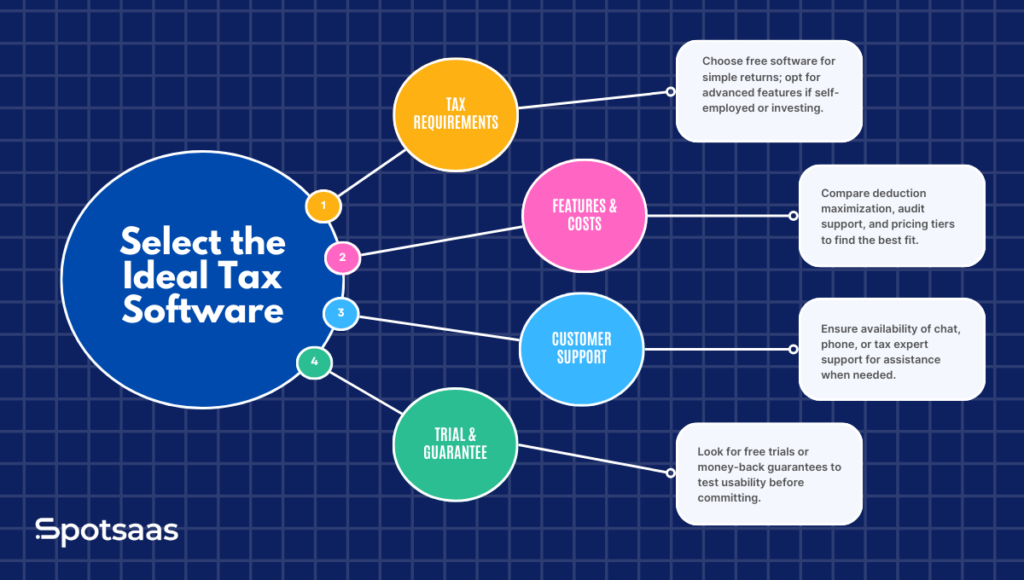
Step 1: Evaluate Your Tax Situation
Start by identifying what forms and schedules your return requires. A W-2 with the standard deduction needs almost nothing – free software works. But self-employment, rental income, investments, or crypto gains require a paid tier with specific support.
Be honest about your complexity upfront. Upgrading mid-filing is common and platforms charge a premium for it. Review the 2026 tax filing deadlines so you know how much time you have to choose and prepare.
Step 2: Compare Features and Pricing Tiers
Most platforms offer Free, Deluxe, Premium, and Self-Employed tiers. Lower tiers often block Schedule C, itemized deductions, or investment income reporting – so check what is actually included before committing.
Look beyond the headline price. Factor in state filing costs, whether live expert access is included, and whether audit support is bundled or an add-on.
Step 3: Consider Customer Support Options
Tax questions tend to surface at inconvenient times. TurboTax and H&R Block offer live chat and CPA access at higher tiers. FreeTaxUSA uses email-only support. TaxAct provides phone support.
If you anticipate needing expert help, factor that cost into your comparison. Paying a little more for live support can prevent a costly error or missed deduction.
Step 4: Test Before You Pay
Most reputable platforms let you complete your entire return for free and only charge when you file. Use this to verify the software handles your specific situation before committing money.
Look for platforms offering a maximum refund guarantee and accuracy guarantee. These protect you financially if the software makes an error that costs you money.
Top Tax Software Options in 2026
The 2026 market has a clear set of frontrunners. Here is a brief overview of each and who they suit best.
TurboTax
The most popular choice for individual filers, TurboTax offers the most polished interview-style walkthrough and an excellent mobile app. It leads on AI-driven deduction discovery and guided support access.
It is also the most expensive option for complex returns. Worth the price for users who want maximum guidance and are willing to pay for it.
H&R Block
H&R Block is the best choice if you want the option to walk into a local office for in-person help. Its free tier is one of the most generous in the market, covering a wider range of situations than TurboTax Free.
It consistently earns top marks for expert access and is a strong option for filers with moderately complex returns.
FreeTaxUSA
The budget champion. FreeTaxUSA offers free federal filing for almost all return types with a flat $14.99 state fee. It lacks the visual polish of TurboTax but handles personal returns accurately.
A strong pick for budget-conscious filers comfortable navigating a simpler interface without hand-holding.
TaxAct
A strong middle-ground option, especially for self-employed filers and small businesses. PCMag’s 2026 reader survey ranked TaxAct above TurboTax and H&R Block among paid providers for overall user satisfaction.
Competitive pricing and solid audit support make it a reliable choice for business owners. See our full H&R Block vs TaxAct comparison for a detailed breakdown.
TaxSlayer
A solid budget pick for experienced filers who do not need heavy guidance. TaxSlayer offers competitive pricing and strong self-employed support at a lower cost than TurboTax or H&R Block.
Drake Tax and TaxAct Business
The go-to options for professional tax preparers and large enterprises. These platforms handle high-volume returns, complex multi-entity structures, and corporate compliance requirements that consumer-grade software cannot support.
Best Alternatives to Tax Software in 2026
Tax software works for most people – but not everyone. Here are the three main alternatives and when each makes sense.
1. Work with a CPA or Tax Professional
If you have complex finances – multiple business entities, significant investment income, real estate holdings, or a major life change like divorce or inheritance – a CPA often pays for itself in savings and avoided errors.
A qualified professional provides year-round planning advice and full IRS representation if you are audited. The cost is higher than software but the value is real for genuinely complex situations.
2. IRS Free File Program
For taxpayers with adjusted gross income below approximately $84,000 in 2026, the IRS Free File program provides access to guided tax software at no cost through eight participating partners.
If you exceed the income threshold, IRS Free File Fillable Forms are available for manual completion with no guidance or error-checking included.
3. Manual Paper Filing
Manual filing is technically free and works for very simple returns where the filer understands tax rules well. However, it is slow, error-prone, and sacrifices the speed advantage of e-filed refunds.
For most people today, a free software option is a strictly better choice. Manual filing is worth considering only if you have a specific reason to avoid electronic systems. Read our guide on costly tax filing mistakes to avoid regardless of which method you choose.
Emerging Trends in Tax Software for 2026
AI-Powered Tax Filing
AI-driven deduction engines now analyze your full financial picture to identify write-offs you would likely miss manually. Natural language interfaces let you ask tax questions in plain English and receive accurate guidance.
AI accuracy reviews also flag anomalies that might raise IRS questions before you file. Expect AI features to become standard across all major platforms over the next two years.
Crypto-Ready Tax Software
Cryptocurrency taxation is no longer a niche concern. Expanded Form 1099-DA reporting rules make the paper trail mandatory for all crypto transactions in 2026.
Leading platforms now integrate directly with Coinbase, Kraken, and Gemini – and with tools like Koinly – to import transaction histories automatically. If you hold, trade, or earn crypto, verify your platform explicitly supports digital asset reporting.
Mobile Tax Filing Apps
All major platforms now offer fully functional mobile apps. TurboTax ran a 2026 promotion offering free filing specifically for mobile app users through a set deadline.
Mobile filing lets you photograph documents, check refund status in real time, and complete returns from anywhere. Confirm the app supports your full return complexity – some advanced features remain desktop-only.
Real-Time IRS Refund Tracking
Modern platforms now include real-time dashboards showing exactly where your return sits in the IRS processing queue – received, approved, or refund sent. Some send push notifications at each stage automatically.
This visibility eliminates the frustration of not knowing whether your return was accepted and reduces unnecessary calls to the IRS.
Final Thoughts: Make 2026 Your Easiest Tax Season Yet
The right tax software turns a stressful chore into a fast, accurate, and financially rewarding process. With 2026 bringing new deduction opportunities, smarter AI platforms, and expanded free filing options, the tools available are better than ever.
Match the platform to your actual situation – not the most advertised name. Test it for free, verify it covers your 2026 return complexity, and confirm it has been updated for the latest IRS rules.
Do that, and you will file accurately, claim every deduction you deserve, and receive your refund as fast as possible. Visit spotSaaS to compare the top-rated tax filing software platforms side by side.
FAQs About Tax Software and Filing in 2026
What is tax software, and how does it work?
Tax software is a digital tool that helps individuals and businesses file taxes by automating calculations, identifying deductions, and ensuring IRS compliance. Users input financial details, and the software generates accurate tax returns for e-filing.
Is tax software better than hiring a tax professional?
Tax software is cost-effective and ideal for simple to moderately complex situations. However, those with complex finances, multiple income streams, or pending audits may benefit more from a CPA or enrolled agent for personalized guidance and full IRS representation.
Can tax software help reduce my tax liability?
Yes. Tax software scans your financial data for deductions and credits you might otherwise miss. AI-driven recommendation engines surface lesser-known write-offs that can lower your tax bill and increase your refund meaningfully.
What is the difference between personal and business tax software?
Personal tax software handles W-2 and 1099 income for individuals and freelancers. Business tax software is built for LLCs, corporations, and enterprises, covering payroll taxes, multi-state filing, depreciation, and advanced compliance tools.
Is free tax software reliable for filing returns?
Yes, for straightforward returns. FreeTaxUSA and Hu0026amp;R Block Free Online handle W-2 income, standard deductions, and common credits at no federal cost. Self-employed filers and investors typically need a paid plan for full coverage.
What is the best tax software in 2026?
It depends on your situation. TurboTax leads on guided experience and AI features. Hu0026amp;R Block is best for in-person support. FreeTaxUSA offers the best value for budget filers. TaxAct rates highly for self-employed and small business users. All have been updated for 2026 tax law changes.
Is TurboTax free in 2026?
TurboTax offers a free tier for simple W-2 returns. In 2026, Intuit also offered free federal and state filing via its mobile app through a promotional deadline. Complex returns require a paid plan ranging from $69 to over $200 depending on features and state filing needs.
What are the new tax rules for 2026 I should know about?
Key 2026 changes from the OBBBA include a new charitable deduction for standard deduction filers (up to $1,000 individual, $2,000 joint), expanded senior tax breaks for those aged 65+, and updated IRS Free File income thresholds. Choose software explicitly updated for 2026 to capture all of these.
What is the best free tax software for 2026?
FreeTaxUSA is the top recommendation for most filers, offering free federal filing for nearly all return types with a flat $14.99 state fee. Hu0026amp;R Block Free Online is a strong alternative with a more polished interface. The IRS Free File program provides free guided software for taxpayers with AGI under approximately $84,000.
Does tax software support cryptocurrency reporting?
Yes. Major platforms including TurboTax, Hu0026amp;R Block, and TaxAct integrate with exchanges and crypto tax tools to import transaction histories and calculate gains automatically. With expanded Form 1099-DA reporting requirements in 2026, native crypto support is strongly recommended for any filer with digital asset activity.
Related Articles
Tax Software
TurboTax vs H&R Block: Best Tax Software for Filing Taxes Online in 2026
Continue reading →
401K Providers
IRS Free File 2026: Who Qualifies and How to File Federal Taxes for Free
Continue reading →
Finance & Billing Software
HR Block vs TaxAct: Which Tax Filing Software Should You Trust in 2026?
Continue reading →
Tax Software
TaxSlayer vs FreeTaxUSA (2026): Which Budget Tax Software Saves You More?
Continue reading →