
Trello vs Intelogos Comparison

Trello
Starting at $5 /User/Month
- Free Trial
- Individuals
- Freelancers / Consultants
Trello is a flexible project management application that organizes your projects into boards. Each card can be easily moved from one column to another to prioritize tasks and keep you in control of when things get done.…
Intelogos
Starting at $8 /user/month
- Free Trial
- Medium Business
- Small Business
Intelogos is an employee monitoring software that helps organizations track workforce productivity, analyze work activity, and measure performance through AI-driven insights. It monitors attendance, time usage, and compu…
Trello leads on user satisfaction with a 4.5-star rating across 3,851 reviews.
Consider monday.com
Comparing Trello and Intelogos? monday.com is another option worth a look: visual boards, 200+ templates and a free plan for up to 2 seats.
We may earn a commission. Affiliate disclosure
Trello vs Intelogos — at a glance
| Feature | Trello | Intelogos |
|---|---|---|
| Rating | 4.5 / 5 | — |
| Reviews | 3,851 | — |
| Starting price | $5 /User/Month | $8 /user/month |
| Free trial | Yes | Yes |
| Free version | No | No |
| Best for | Individuals, Freelancers / Consultants, Large Enterprises | Medium Business, Small Business |
| Category | Project Management Software | Employee Monitoring Software |
| Integrations | — | 10+ apps |
| Platforms | SaaS/Web/Cloud, Mobile - Android, Mobile - iOS, Installed - Windows, Installed - Mac | SaaS/Web/Cloud, Mobile - Android, Installed - Windows |
| API | Available | — |
| Support modes | Online | Online |
| Certifications | SOC 2, GDPR | — |
| Data residency | Global | Global |
Key differences between Trello and Intelogos
- Pricing: Trello starts at $5 /User/Month, while Intelogos starts at $8 /user/month.
- Target audience: Trello is built for Individuals and Freelancers / Consultants, while Intelogos targets Medium Business and Small Business.
- Deployment: Trello supports SaaS/Web/Cloud, Mobile - Android, Mobile - iOS, Installed - Windows, Installed - Mac; Intelogos supports SaaS/Web/Cloud, Mobile - Android, Installed - Windows.
Trello vs Intelogos — find the better fit before you commit.
Which tool fits your team best
Which is actually cheaper for your team size
Where each product wins, per real buyers
Most Project Management Software tools look identical on paper. This comparison cuts to the differences that matter — pricing structure, team fit, and what real buyers found after signing up.
Biggest differences
Features
Pricing
Buying details
Security
Buyer feedback
Integrations
Product tour
Other options
Free PDF comparison
Download this Trello vs Intelogos comparison
Get the full side-by-side as a PDF — these picks plus the top Project Management Software tools, with verified ratings, pricing and features.
- Side-by-side on pricing, features & ratings
- Plus the category top 10, scored & ranked
- Emailed to you — no on-screen download
No file downloads on screen — we email it to you. One-click unsubscribe anytime.
Trello vs Intelogos: Biggest differences
Start here before you go deeper into features.
Best for small to mid-sized teams needing simple, visual task management.
- You want an intuitive Kanban board with drag-and-drop task prioritization.
- Your team values real-time collaboration and easy project status visibility.
- You need a low-setup, flexible tool suitable for SaaS, marketing, or consulting teams.
- Your projects are large or highly complex requiring advanced features and deep analytics.
- You rely heavily on mobile app functionality that matches desktop experience.
Medium Business, Small Business
Trello typically suits Individuals and Freelancers / Consultants. Intelogos tends to fit Medium Business and Small Business better. The right choice depends on your team size, workflow, and whether a free trial matters.
Description | Trello is a flexible project management application that organizes your projects into boards. Each card can be easily moved from one column to another to prioritize tasks and keep you in ... Read More about Trello | Intelogos is an employee monitoring software that helps organizations track workforce productivity, analyze work activity, and measure performance through AI-driven insights. It monitors ... Read More about Intelogos |
|---|---|---|
Entry Level Pricing |
|
|
Free Trial Availability | ||
SpotScoreWhat's this? ↗ | 9.3/10 | Not Available |
User RatingsBased on verified Spotsaas reviews | ||
Best Company Size | 1-50 employees51-500 employees | Small BusinessMedium Business |
Get pricing help | Get pricing help |
Where each option fits best
See where each product is strongest, which teams it fits, and what causes buyers to keep looking — before you commit.
Based on buyer reviews and verified product data collected by Spotsaas.
Key strengths
- Better Collaboration: Trello creates an easy team environment where everyone can share ideas and updates in real-time. Your team can easily share feedback and track progress from anywhere.
- Visual Project Management: With its intuitive card and board system, Trello transforms complex projects into visual workflows. You’ll appreciate how this clarity allows your team to prioritize tasks effectively and stay aligned with project goals.
- Customizable Workflows: Trello's flexibility means you can design boards built for your specific needs, whether you're managing a marketing campaign or software development. This adaptability lets you create processes that work best for your organization.
- Automated time and attendance tracking: The software automatically records working hours, attendance patterns, and activity duration without requiring manual input. This reduces administrative workload for HR and managers while improving accuracy in payroll, reporting, and compliance tracking. Automated tracking also maintains consistent records across teams, making it easier to analyze productivity trends and maintain accountability.
- Predictive workforce planning: Intelogos analyzes historical performance and activity data to forecast future trends, project timelines, and staffing needs. These predictive insights help organizations plan resources more effectively, reduce delays, and improve project outcomes. By anticipating potential workload issues or burnout risks early, managers can proactively redistribute tasks and maintain team productivity over the long term.
- Real-time productivity visibility: The platform provides live dashboards showing employee activity levels, engagement metrics, and workload status. Managers can instantly see who is overloaded, underutilized, or performing efficiently. This real-time visibility helps leaders respond quickly to bottlenecks, adjust priorities, and maintain operational balance, especially for remote or distributed teams where direct oversight is limited.
Best fit
- 1 to 500 employees
- SaaS, Consulting, Marketing Technology (Martech), Project Management, and Education
- Project Managers, Team Leaders, Product Owners, Marketing Coordinators, and Software Developers
- 100+
- IT & Software, Marketing & Advertising, Finance, Healthcare, Education, Legal, Retail, Manufacturing, Consulting, Outsourcing, Call Centers, Government
- HR Managers, Operations Managers, Team Leaders, Project Managers, Executives, Department Heads, Remote Team Managers, Workforce Analysts, Business Owners
Reasons buyers look elsewhere
- Lacks native automation and reporting — teams managing complex workflows typically add Zapier or custom integrations
- Card-based layout doesn't fit all project types — teams needing Gantt charts, timelines, or kanban variants switch to Asana or Monday.com
- No built-in video conferencing or chat — distributed teams add Slack, Zoom, or Microsoft Teams for real-time discussion
- Even with privacy-focused design, monitoring software can raise trust or morale concerns among employees. Research shows unclear data-collection practices can reduce employee trust in monitoring systems.
- Analysts note that relying heavily on quantitative performance data can overshadow qualitative aspects like creativity or work style. Organizations wanting a more balanced evaluation approach may prefer tools with broader assessment models.
- Some feedback mentions slowdowns, crashes during complex tasks, or an unintuitive interface that requires onboarding time. These technical or learning-curve issues can push teams toward simpler or more stable alternatives.
Software Demo
Demo |
|---|
Need a second opinion?
Get decision help from a software advisor
Share your priorities, budget, and team needs, and we’ll help you narrow the options and understand the tradeoffs before you talk to vendors.

- Independent advice — matched to your business
- Understand the tradeoffs before you talk to vendors
- Free 15-min call with a software advisor.
Step 1 of 4
How big is your team?
We tailor recommendations to companies your size.















How do Trello and Intelogos Compare on Features?
Total Features | 17 Features | 14 Features |
|---|---|---|
Unique Features | No unique features | No unique features |
Get Quote | Get Quote |
Compare Trello and Intelogos on pricing
Review starting price, plan structure, and free-trial access side by side so you can see which option fits your budget and buying process.
Pricing Option | ||
|---|---|---|
Starting From |
|
|
Pricing Plans |
|
|
Pricing Page |  | 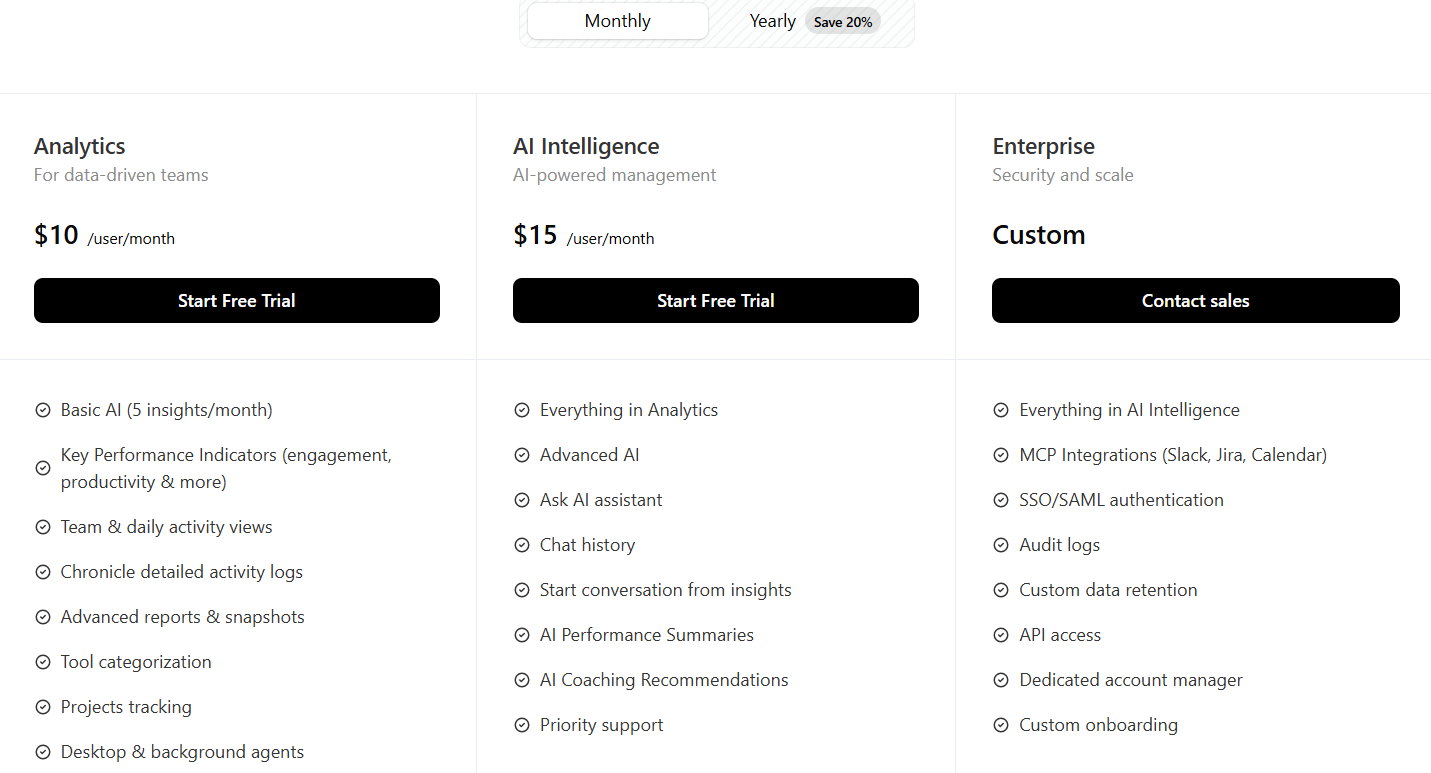 |
Trello vs Intelogos: Other Details
Organization Types supported |
|
|
|---|---|---|
Platforms Supported |
|
|
Modes of support |
|
|
API Support |
|
|
Get help choosing | Get help choosing |
Trello vs Intelogos Security & Compliance
Certifications, data handling, and security controls for IT and compliance evaluators.
SOC 2 | ✓ Yes | — |
|---|---|---|
HIPAA | ✗ No | ✗ No |
GDPR | ✓ Yes | — |
ISO 27001 | ✗ No | — |
Single Sign-On (SSO) | ✓ Yes | — |
Multi-Factor Auth (MFA) | ✓ Yes | — |
Data Encryption | ✓ Yes | — |
Audit Logs | ✓ Yes | — |
Data Residency | 🌐 Global | 🌐 Global |
Trello User Reviews & Rating Comparison
User Ratings | No reviews available for the product | |
|---|---|---|
Rating Distribution | No reviews available for this product | |
Spotsaas Editor’s POV generated by AI | Buyer sentiment Overall positive sentiment highlights Trello's ease of use, visual task management, and collaboration features, with some concerns about limitations for complex projects and mobile app inconsistencies. What buyers like
Common complaints
| Buyer sentiment Overall buyer sentiment is highly positive, with users appreciating the AI-driven insights and non-intrusive monitoring approach. What buyers like
Common complaints
|
Pros and Cons |
|
|
Positive Reviews | No reviews available for the product | No reviews available for the product |
Integrations
Integration with other apps | No Integration information available. |
|---|


Trello and Intelogos Customers
Customers |  Trello_customers_2  ebay  Trello_customers_0 | No Customers information available. |
|---|
Media and Screenshots
Screenshots |  3 Screenshots | 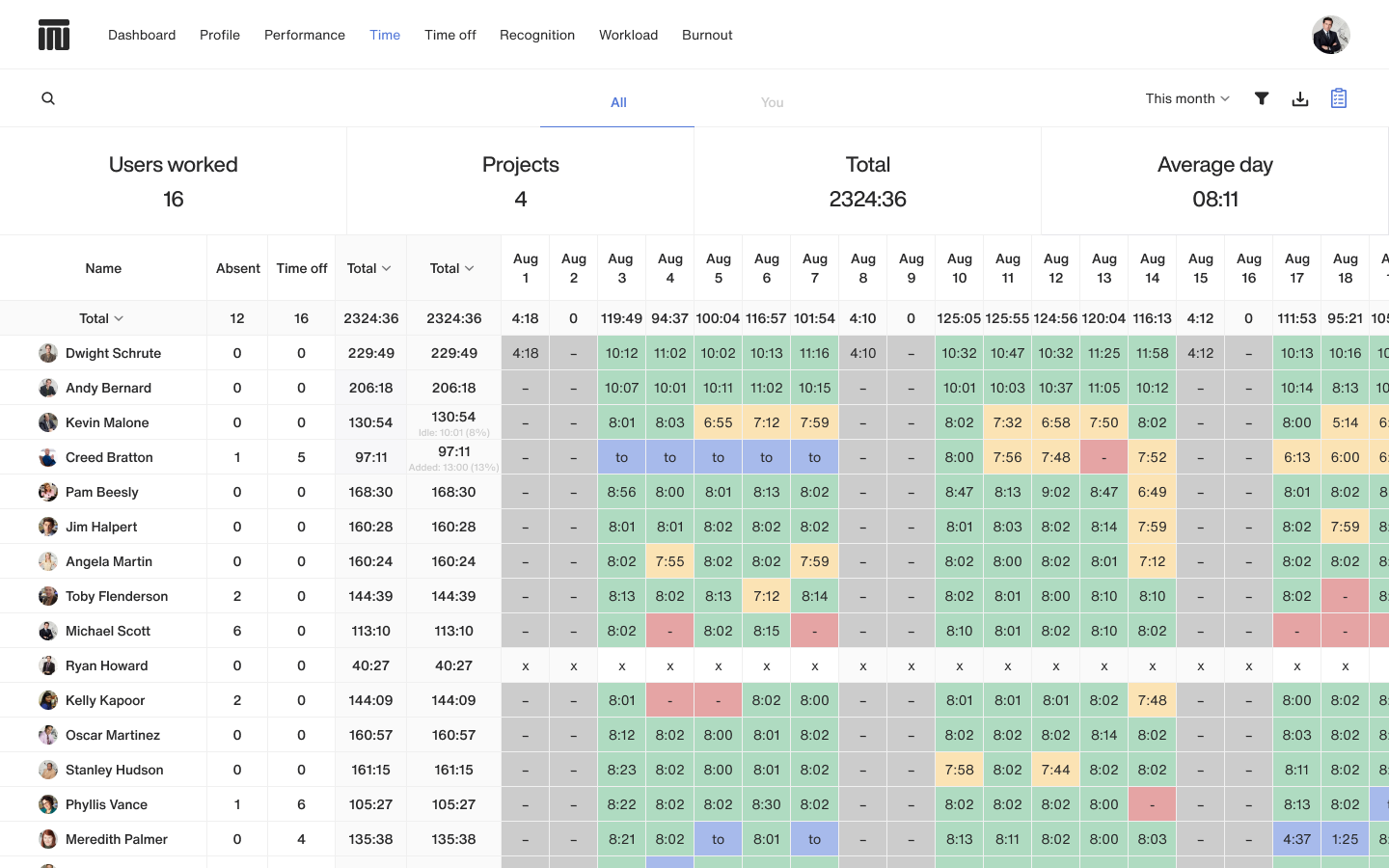 2 Screenshots |
|---|---|---|
Videos |  4 Videos | No videos available. |
Top Alternatives to Trello and Intelogos in 2026
Alternatives |
|---|


Add another option to compare side by side
Search by product name to compare pricing, fit, and buyer feedback in one view.Compare similar software options




Disclaimer: This research has been collated from a variety of authoritative sources. We welcome your feedback at [email protected].
Frequently asked questions
- Which is better, Trello or Intelogos?
- Trello edges out the other on user ratings (4.5 vs -1.0). That said, the best pick depends on your use case, so use the comparison tables above to evaluate each dimension.
- Do Trello and Intelogos offer a free trial?
- Yes, both Trello and Intelogos offer a free trial.
- What is the starting price of Trello vs Intelogos?
- Trello starts at $5 /User/Month. Intelogos starts at $8 /user/month.
- What are the top alternatives to Trello?
- Top alternatives to Trello include Quickbase, monday Work Management, Smartsheet, ClickUp, Nifty Project Management.
- What are the top alternatives to Intelogos?
- Top alternatives to Intelogos include Teramind, FocusRO, Kickidler, WorkTime, wAnywhere.