
Shyft vs ZoomShift Comparison

Shyft
Starting at Contact for pricing
- Large Enterprises
- Medium Business
Shyft helps businesses schedule employees, following workplace laws. This scheduling software is ideal for employee schedules that often change, or for businesses with multiple shifts. This software streamlines the entir…

ZoomShift
Starting at $2 /User/Month
- Free Trial
- Large Enterprises
- Medium Business
ZoomShift is employee scheduling software for retail, hospitality, and security businesses. It's the easiest to use employee scheduling software on the market because it allows to schedule employees up to 1 week in advan…
ZoomShift leads on user satisfaction with a 4.9-star rating across 29 reviews.
SpotSaaS Analysis
ShyftZoomShift
The core difference between Shyft and ZoomShift lies in Shyft's focus on complex, legally compliant scheduling for larger teams, while ZoomShift offers a simpler, real-time scheduling solution for smaller to mid-sized teams. Shyft is ideal for larger organizations in need of detailed compliance features, whereas ZoomShift is best suited for smaller businesses looking for an easy-to-use scheduling tool.
- Best for complex, multi-shift employee scheduling - Built-in compliance with workplace laws - Ideal for retail or hospitality teams - Suitable for companies with 50-500 employees or larger - Focuses on legal compliance in scheduling - Targets roles like Sales Managers and CRM Administrators
- Best for simple, real-time employee scheduling - Intuitive drag-and-drop interface - Ideal for retail, hospitality, and food service sectors - Suitable for companies with 10-500 employees - Focuses on ease of use and quick updates - Targets roles like Shift Managers and HR Coordinators
Shyft vs ZoomShift — at a glance
| Feature | Shyft | ZoomShift |
|---|---|---|
| Rating | 4.5 / 5 | 4.9 / 5 |
| Reviews | 11 | 29 |
| Starting price | Contact for pricing | $2 /User/Month |
| Free trial | No | Yes |
| Free version | No | No |
| Best for | Large Enterprises, Medium Business, Small Business | Large Enterprises, Medium Business, Small Business |
| Category | Employee Scheduling Software | Employee Scheduling Software |
| Platforms | SaaS/Web/Cloud, Mobile - Android, Mobile - iOS | SaaS/Web/Cloud, Mobile - Android, Mobile - iOS |
| API | — | Available |
| Support modes | Online | Business Hours, Online |
| Certifications | — | — |
| Data residency | US | US |
Key differences between Shyft and ZoomShift
- Pricing: ZoomShift starts at $2 /User/Month. Shyft pricing is not publicly listed.
- Free trial: ZoomShift offers a free trial; Shyft does not.
- User satisfaction: ZoomShift scores higher with a 4.9-star average.
- Deployment: Shyft supports SaaS/Web/Cloud, Mobile - Android, Mobile - iOS; ZoomShift supports SaaS/Web/Cloud, Mobile - Android, Mobile - iOS.
Shyft vs ZoomShift — find the better fit before you commit.
Which tool fits your team best
Which is actually cheaper for your team size
Where each product wins, per real buyers
Most Employee Scheduling Software tools look identical on paper. This comparison cuts to the differences that matter — pricing structure, team fit, and what real buyers found after signing up.
Biggest differences
Features
Pricing
Buying details
Security
Buyer feedback
Integrations
Product tour
Other options
Biggest differences
Start here before you go deeper into features.
Best for complex, multi-shift employee scheduling with legal compliance.
- You manage retail or hospitality teams with frequently changing shifts.
- You need built-in compliance with workplace laws in scheduling.
- You require flexible shift swapping, time-off requests, and real-time communication.
- Your business is very small with fewer than 10 employees and simple schedules.
- You have fixed schedules without shift-based work or need straightforward tools.
Best for simple, real-time employee scheduling in retail and hospitality.
- You manage 10-500 employees in retail, hospitality, or security sectors.
- You need an intuitive drag-and-drop scheduler with real-time shift updates.
- You want integrated communication tools to reduce no-shows and improve coordination.
- Your organization requires highly customizable scheduling interfaces.
- You depend on extensive third-party app integrations and a broad marketplace.
Shyft: Best for complex, multi-shift employee scheduling with legal compliance. ZoomShift: Best for simple, real-time employee scheduling in retail and hospitality.
Description | Shyft helps businesses schedule employees, following workplace laws. This scheduling software is ideal for employee schedules that often change, or for businesses with multiple shifts. This ... Read More about Shyft | ZoomShift is employee scheduling software for retail, hospitality, and security businesses. It's the easiest to use employee scheduling software on the market because it allows to schedule ... Read More about ZoomShift |
|---|---|---|
Entry Level Pricing |
|
|
Free Trial Availability |
| |
Spotsaas ScoreWhat's this? ↗ | 8.8/10 | 9.2/10 |
User RatingsBased on verified Spotsaas reviews | ||
Best Company Size | 50-500 employees500+ employees (large enterprises) | 10-50 employees51-500 employees |
Get pricing help | Get pricing help |
Where each option fits best
See where each product is strongest, which teams it fits, and what causes buyers to keep looking — before you commit.
Based on buyer reviews and verified product data collected by Spotsaas.
Key strengths
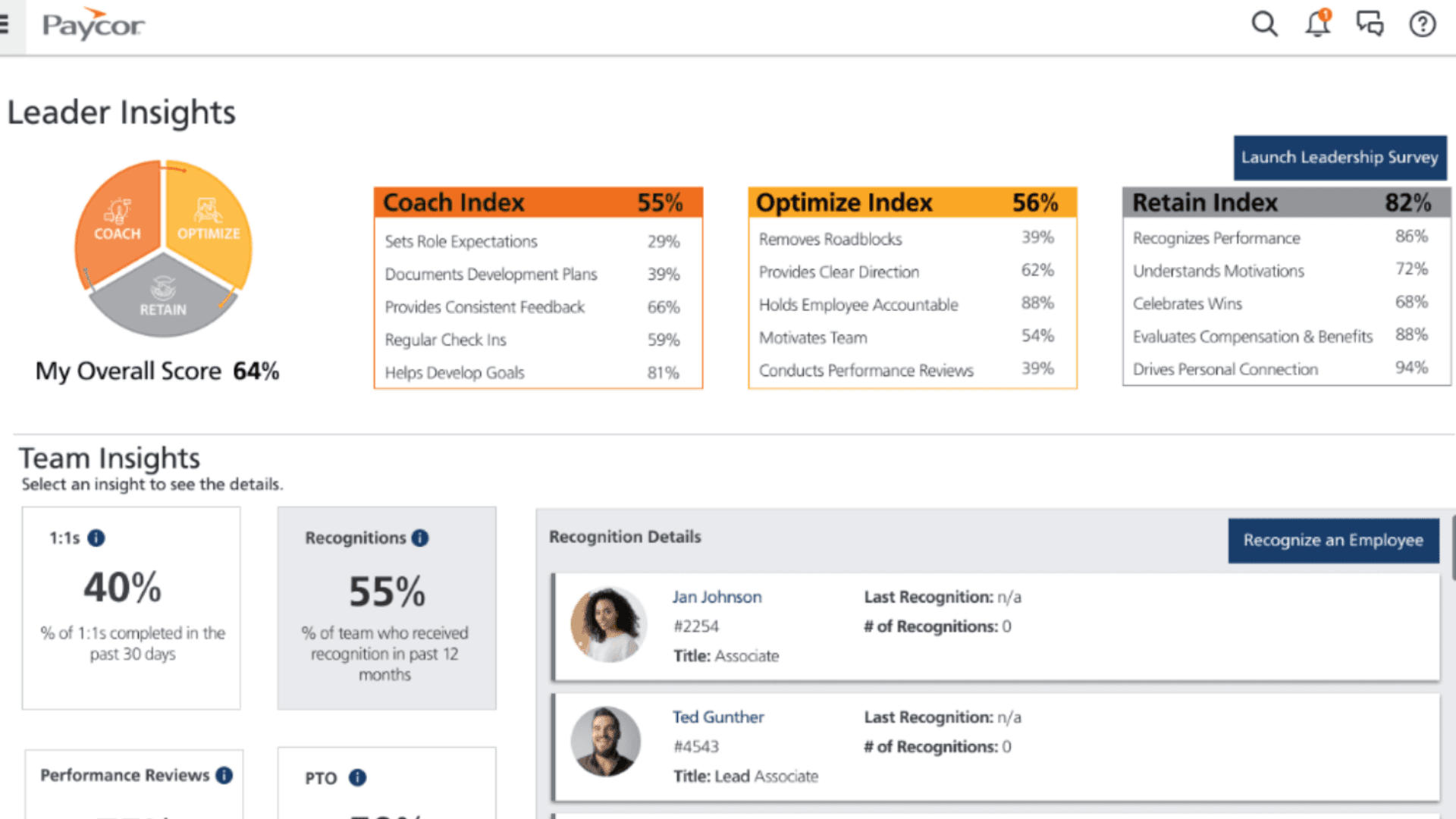
- Streamlined Communication: Shyft enhances team collaboration by providing a centralized platform for real-time messaging and document sharing, ensuring that everyone stays on the same page, no matter where they are.
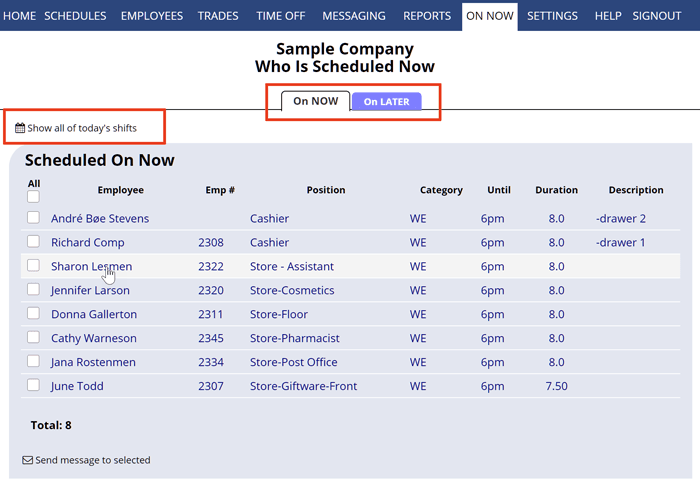
- Flexible Scheduling: We understand that managing shifts can be a headache. With Shyft, you can easily create, modify, and manage schedules, allowing your team to request swaps and time-off effortlessly, promoting work-life balance.
- Data-Driven Insights: Shyft equips managers with powerful analytics tools that track employee performance and scheduling trends, enabling informed decision-making that drives operational efficiency and boosts productivity.
- Streamlined Scheduling: With ZoomShift, managers can effortlessly create and adjust employee schedules, saving valuable time and minimizing scheduling conflicts. You’ll appreciate the intuitive drag-and-drop interface that makes adjustments a breeze.
- Real-time Communication: The platform fosters seamless communication among team members. You can send shift reminders and updates directly to employees, ensuring everyone is on the same page and reducing no-shows.
- Comprehensive Time Tracking: ZoomShift offers robust time clock functionality, allowing employees to clock in and out with ease. This feature not only simplifies payroll processing for administrators but also promotes accountability among staff.
Best fit
- 50 to 500 employees
- Martech, SaaS, Consulting, and Revtech
- Sales Managers, Account Executives, Business Development Representatives, and CRM Administrators
- 10 to 500 employees
- Retail, Hospitality, Food Services, Healthcare, and Education
- Typical users encompass roles such as Shift Managers, Operations Managers, HR Coordinators, and Team Leaders
Reasons buyers look elsewhere
- Users might seek alternatives to Shyft if they require a more comprehensive platform that integrates seamlessly with existing systems for enhanced operational efficiency and productivity.
- Some individuals may find Shyft's pricing structure less competitive and look for cost-effective solutions that still meet their needs without compromising on features or performance.
- Users experiencing limitations in customer support or user experience with Shyft may explore alternatives that offer more robust assistance and intuitive interfaces to facilitate smoother operations.
- Users may seek alternatives to ZoomShift due to budget constraints, as some competitors offer similar scheduling and time-tracking features at a lower price, making them attractive for smaller businesses or startups.
- Organizations with specific industry needs might look for alternatives that provide tailored functionalities, such as enhanced reporting or integrations with niche software, which ZoomShift may not fully support.
- Some users may prefer platforms that offer a more intuitive user interface, as a simpler design can improve team adoption and reduce the learning curve for new employees.
Software Demo
Demo |
|---|
Need a second opinion?
Get shortlist help from a software advisor
Share your priorities, budget, and team needs, and we’ll help you narrow the options and understand the tradeoffs before you talk to vendors.
How do Shyft and ZoomShift Compare on Features?
Total Features | 9 Features | 10 Features |
|---|---|---|
Unique Features | No unique features | No unique features |
Get Quote | Get Quote |
Compare Shyft and ZoomShift on pricing
Review starting price, plan structure, and free-trial access side by side so you can see which option fits your budget and buying process.
Pricing Option | ||
|---|---|---|
Starting From |
|
|
Pricing Plans |
|
|
Pricing Page | Pricing information not available |  |
Other Details
Organization Types supported |
|
|
|---|---|---|
Platforms Supported |
|
|
Modes of support |
|
|
API Support |
|
|
Get help choosing | Get help choosing |
Security & Compliance
Certifications, data handling, and security controls for IT and compliance evaluators.
HIPAA | ✗ No | ✗ No |
|---|---|---|
Data Residency | 🇺🇸 US | 🇺🇸 US |
Shyft User Reviews & Rating Comparison
User Ratings | 4.5 (based on 11 reviews) | |
|---|---|---|
Rating Distribution | ||
Spotsaas Editor’s POV generated by AI | Buyer sentiment Overall positive sentiment highlights Shyft's flexibility and communication features, though limited reviews and pricing opacity are noted concerns. What buyers like
Common complaints
| Buyer sentiment Users overwhelmingly praise ZoomShift for its ease of use, efficient scheduling, and effective communication features, though some note limited customization and initial setup challenges. What buyers like
Common complaints
|
Pros and Cons |
|
|
Positive Reviews | No reviews available for the product | No reviews available for the product |
List of Customers
Customers |  Walmart Canada  Anthropologie  Buffalo Wild Wings |  Amazon  Subway  Pier 290 |
|---|
Media and Screenshots
Screenshots |  2 Screenshots |  3 Screenshots |
|---|---|---|
Videos |  3 Videos |  3 Videos |
Top Alternatives to Shyft and ZoomShift in 2026
Alternatives |
|---|

Add another option to compare side by side
Search by product name to compare pricing, fit, and buyer feedback in one view.Compare similar software options



Related Blogs and Articles for Employee Scheduling Software



Disclaimer: This research has been collated from a variety of authoritative sources. We welcome your feedback at [email protected].
Frequently asked questions
- Which is better, Shyft or ZoomShift?
- ZoomShift edges out the other on user ratings (4.9 vs 4.5). That said, the best pick depends on your use case — use the comparison tables above to evaluate each dimension.
- Do Shyft and ZoomShift offer a free trial?
- ZoomShift offers a free trial. Shyft does not.
- What is the starting price of Shyft vs ZoomShift?
- Shyft starts at Contact for pricing. ZoomShift starts at $2 /User/Month.
- What are the top alternatives to Shyft?
- Top alternatives to Shyft include 7shifts, Shiftboard, Findmyshift, Planday, eSchedule.
- What are the top alternatives to ZoomShift?
- Top alternatives to ZoomShift include Homebase, TidyShift, 7shifts, Findmyshift, WhenToWork.