
Multiplier vs Excelforce Comparison

Multiplier
Starting at $20 /user/month
- Large Enterprises
- Medium Business
Multiplier is a global employment platform that helps businesses hire, pay, and manage talent across 160+ countries without setting up local entities. Through its Employer of Record, global payroll, contractor management…

Excelforce
Starting at Contact for pricing
- Large Enterprises
- Medium Business
Excelforce is an innovative, award-winning workforce solution designed to make managing payroll and tracking time & attendance easy. It is a mobile-friendly platform that adapts to the needs of growing companies, streaml…
Multiplier leads on user satisfaction with a 4.7-star rating across 567 reviews.
Multiplier vs Excelforce — at a glance
| Feature | Multiplier | Excelforce |
|---|---|---|
| Rating | 4.7 / 5 | 4.3 / 5 |
| Reviews | 567 | 4 |
| Starting price | $20 /user/month | Contact for pricing |
| Free trial | No | No |
| Free version | No | No |
| Best for | Large Enterprises, Medium Business, Small Business | Large Enterprises, Medium Business, Small Business |
| Category | Payroll Software | Payroll Software |
| Platforms | SaaS/Web/Cloud | SaaS/Web/Cloud |
| API | — | — |
| Support modes | Business Hours, Online | Online |
Key differences between Multiplier and Excelforce
- Pricing: Multiplier starts at $20 /user/month. Excelforce pricing is not publicly listed.
- User satisfaction: Multiplier scores higher with a 4.7-star average.
- Deployment: Multiplier supports SaaS/Web/Cloud; Excelforce supports SaaS/Web/Cloud.
Multiplier vs Excelforce — find the better fit before you commit.
Which tool fits your team best
Which is actually cheaper for your team size
Where each product wins, per real buyers
Most Payroll Software tools look identical on paper. This comparison cuts to the differences that matter — pricing structure, team fit, and what real buyers found after signing up.
Biggest differences
Features
Pricing
Buying details
Security
Buyer feedback
Integrations
Product tour
Other options
Talk to an expert Talk to an expert | Talk to an expert Talk to an expert |
Free PDF comparison
Download this Multiplier vs Excelforce comparison
Get the full side-by-side as a PDF — these picks plus the top Payroll Software tools, with verified ratings, pricing and features.
- Side-by-side on pricing, features & ratings
- Plus the category top 10, scored & ranked
- Emailed to you — no on-screen download
No file downloads on screen — we email it to you. One-click unsubscribe anytime.
Multiplier vs Excelforce: Biggest differences
Start here before you go deeper into features.
Large Enterprises, Medium Business, Small Business
Large Enterprises, Medium Business, Small Business
Multiplier typically suits Large Enterprises and Medium Business. Excelforce tends to fit Large Enterprises and Medium Business better. The right choice depends on your team size, workflow, and whether a free trial matters.
Description | Multiplier is a global employment platform that helps businesses hire, pay, and manage talent across 160+ countries without setting up local entities. Through its Employer of Record, global ... Read More about Multiplier | Excelforce is an innovative, award-winning workforce solution designed to make managing payroll and tracking time & attendance easy. It is a mobile-friendly platform that adapts to the ... Read More about Excelforce |
|---|---|---|
Entry Level Pricing |
|
|
Free Trial Availability |
|
|
SpotScoreWhat's this? ↗ | 7.6/10 | 7.8/10 |
User RatingsBased on verified Spotsaas reviews | ||
Best Company Size | 50 to 500 employees | — |
Get pricing help | Get pricing help |
Where each option fits best
See where each product is strongest, which teams it fits, and what causes buyers to keep looking — before you commit.
Based on buyer reviews and verified product data collected by Spotsaas.
Key strengths
- Streamlined Global Operations: Multiplier lets managers easily handle cross-border payroll and compliance, so you can focus on strategic initiatives instead of administrative details.
- Cost Efficiency: By using Multiplier's platform, administrators can reduce overhead costs associated with international hiring and compliance, allowing the organization to allocate resources more effectively.
- Employee Experience: Our users appreciate how Multiplier simplifies onboarding for international employees. A quick onboarding process leads to higher employee satisfaction and retention rates.
Best fit
- 50 to 500 employees
- Fintech, SaaS, Consulting, and Sales Automation
- roles such as Sales Managers, Account Executives, Business Development Representatives, and CRM Administrators
Reasons buyers look elsewhere
- Lacks industry-specific features — manufacturing and healthcare teams often need compliance modules that Multiplier doesn't include
- Pricing is per-employee only — companies with seasonal staff or contract workers can't use pay-as-you-go models offered by Rippling or Workday
- Missing multi-currency payroll — global teams managing 5+ currencies typically switch to platforms with built-in localization for tax codes and currency conversion
Software Demo
Demo |  Excelforce has not given any software demo yet If you're the owner of this profile, add your demo.Contact us |
|---|
Need a second opinion?
Get decision help from a software advisor
Share your priorities, budget, and team needs, and we’ll help you narrow the options and understand the tradeoffs before you talk to vendors.

- Independent advice — matched to your business
- Understand the tradeoffs before you talk to vendors
- Free 15-min call with a software advisor.
Step 1 of 4
How big is your team?
We tailor recommendations to companies your size.











How do Multiplier and Excelforce Compare on Features?
Total Features | 23 Features | 11 Features |
|---|---|---|
Unique Features | No unique features | No unique features |
Get Quote | Get Quote |
Compare Multiplier and Excelforce on pricing
Review starting price, plan structure, and free-trial access side by side so you can see which option fits your budget and buying process.
Pricing Option | ||
|---|---|---|
Starting From |
|
|
Pricing Plans |
|
|
Pricing Page |  | Pricing information not available |
Multiplier vs Excelforce: Other Details
Organization Types supported |
|
|
|---|---|---|
Platforms Supported |
|
|
Modes of support |
|
|
API Support |
|
|
Get help choosing | Get help choosing |
Multiplier User Reviews & Rating Comparison
User Ratings | ||
|---|---|---|
Rating Distribution | ||
Spotsaas Editor’s POV generated by AI | Buyer sentiment Buyer sentiment is very strong across 628 reviews, with consistently positive feedback. What buyers like
Common complaints
| Buyer sentiment Buyer sentiment is positive across 4 reviews, with strong overall satisfaction. What buyers like
Common complaints
|
Pros and Cons |
|
|
Positive Reviews | No reviews available for the product | No reviews available for the product |
Multiplier and Excelforce Customers
Customers |  Uber  pwc  The Economist |  Horizon  Smokers Choice  Tri County Care |
|---|
Media and Screenshots
Screenshots |  6 Screenshots | 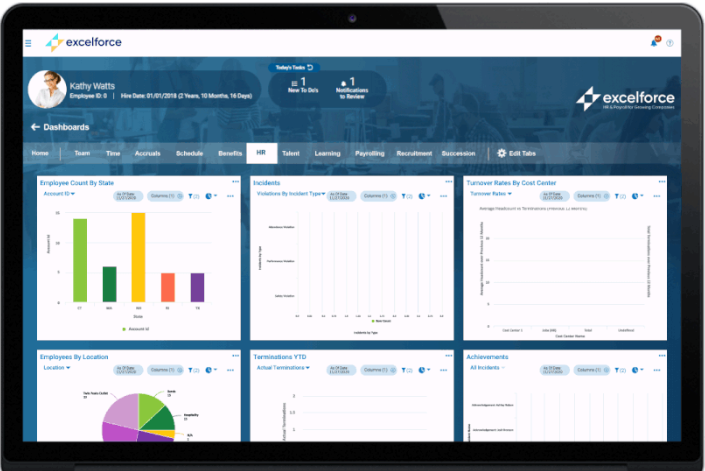 3 Screenshots |
|---|---|---|
Videos |  2 Videos | No videos available. |
Top Alternatives to Multiplier and Excelforce in 2026
Alternatives |
|---|



Add another option to compare side by side
Search by product name to compare pricing, fit, and buyer feedback in one view.Compare similar software options


Related Blogs and Articles for Payroll Software
Disclaimer: This research has been collated from a variety of authoritative sources. We welcome your feedback at [email protected].
Frequently asked questions
- Which is better, Multiplier or Excelforce?
- Multiplier edges out the other on user ratings (4.7 vs 4.3). That said, the best pick depends on your use case, so use the comparison tables above to evaluate each dimension.
- Do Multiplier and Excelforce offer a free trial?
- Neither Multiplier nor Excelforce currently lists a free trial.
- What is the starting price of Multiplier vs Excelforce?
- Multiplier starts at $20 /user/month. Excelforce starts at Contact for pricing.
- What are the top alternatives to Multiplier?
- Top alternatives to Multiplier include Paylocity Web Pay, Remofirst, Deel, Payce - Ramco Global Payroll, Zenefits.
- What are the top alternatives to Excelforce?
- Top alternatives to Excelforce include Papaya Global, Square Payroll, Remote.com, QuickBooks Payroll, Fingercheck.