
FL Studio vs Riverside.fm Comparison

FL Studio
Starting at $99
- Free Trial
- Large Enterprises
- Medium Business
FL Studio is a digital audio workstation that provides a powerful platform for musicians to transfer their creative beats and melodies into audible music. With its Mixer feature, users can mix and create audio to the fin…

Riverside.fm
Starting at $24 /month
- Free Trial
- Large Enterprises
- Medium Business
Riverside.FM is a highly advanced audio and video recording platform that helps podcasters and media agencies to record remote interviews of exceptional quality. With Riverside.FM, users can invite up to 8 guests to join…
Riverside.fm leads on user satisfaction with a 4.9-star rating across 891 reviews.
FL Studio vs Riverside.fm — at a glance
| Feature | FL Studio | Riverside.fm |
|---|---|---|
| Rating | 4.6 / 5 | 4.9 / 5 |
| Reviews | 83 | 891 |
| Starting price | $99 | $24 /month |
| Free trial | Yes | Yes |
| Free version | No | No |
| Best for | Large Enterprises, Medium Business, Small Business | Large Enterprises, Medium Business, Small Business |
| Category | Audio Editing Software | Audio Editing Software |
| Integrations | — | 6+ apps |
| Platforms | SaaS/Web/Cloud, Mobile - Android, Mobile - iOS, Installed - Windows, Installed - Mac | SaaS/Web/Cloud |
| API | — | — |
| Support modes | Online | Online |
| Certifications | — | GDPR |
| Data residency | — | US |
Key differences between FL Studio and Riverside.fm
- Pricing: FL Studio starts at $99, while Riverside.fm starts at $24 /month.
- User satisfaction: Riverside.fm scores higher with a 4.9-star average.
- Deployment: FL Studio supports SaaS/Web/Cloud, Mobile - Android, Mobile - iOS, Installed - Windows, Installed - Mac; Riverside.fm supports SaaS/Web/Cloud.
FL Studio vs Riverside.fm — find the better fit before you commit.
Which tool fits your team best
Which is actually cheaper for your team size
Where each product wins, per real buyers
Most Audio Editing Software tools look identical on paper. This comparison cuts to the differences that matter — pricing structure, team fit, and what real buyers found after signing up.
Biggest differences
Features
Pricing
Buying details
Security
Buyer feedback
Integrations
Product tour
Other options
Talk to an expert Talk to an expert |
Free PDF comparison
Download this FL Studio vs Riverside.fm comparison
Get the full side-by-side as a PDF — these picks plus the top Audio Editing Software tools, with verified ratings, pricing and features.
- Side-by-side on pricing, features & ratings
- Plus the category top 10, scored & ranked
- Emailed to you — no on-screen download
No file downloads on screen — we email it to you. One-click unsubscribe anytime.
FL Studio vs Riverside.fm: Biggest differences
Start here before you go deeper into features.
Best for music producers needing powerful, flexible audio mixing and composition tools.
- You require advanced piano roll features for complex score editing.
- You want a one-time license purchase instead of a subscription model.
- You need a highly customizable workflow with professional-grade mixing capabilities.
- You need extensive live collaboration and cloud-based project sharing features.
- You prefer a software with integrated project management tools for enterprise use.
Best for podcasters needing high-quality remote audio and video recordings.
- You require separate local audio and video tracks for each participant to enable detailed editing.
- You want an all-in-one browser-based platform combining recording, editing, live streaming, and content repurposing.
- You need to host remote interviews with up to 8 guests without requiring them to install software.
- You are a hobbyist or beginner with a limited budget seeking a low-cost solution.
- You need flawless automated transcription, audio processing, or show-note generation without manual correction.
FL Studio: Best for music producers needing powerful, flexible audio mixing and composition tools. Riverside.fm: Best for podcasters needing high-quality remote audio and video recordings.
Description | FL Studio is a digital audio workstation that provides a powerful platform for musicians to transfer their creative beats and melodies into audible music. With its Mixer feature, users can ... Read More about FL Studio | Riverside.FM is a highly advanced audio and video recording platform that helps podcasters and media agencies to record remote interviews of exceptional quality. With Riverside.FM, users ... Read More about Riverside.fm |
|---|---|---|
Entry Level Pricing |
|
|
Free Trial Availability | ||
User RatingsBased on verified Spotsaas reviews | ||
Best Company Size | Small BusinessMedium Business | Small businessMedium business |
Get pricing help | Get pricing help |
Where each option fits best
See where each product is strongest, which teams it fits, and what causes buyers to keep looking — before you commit.
Based on buyer reviews and verified product data collected by Spotsaas.
Key strengths
No key benefits available yet.
- Complete recording and editing workflow: The platform combines recording, editing, live streaming, and content repurposing in one place. This reduces the need for multiple tools and simplifies the overall content production process for creators and teams.
- Built-in transcription and AI tools: Riverside includes automatic transcription, clip generation, and text-based editing features. These tools help creators turn long recordings into short clips, social media content, and written transcripts more efficiently.
- Separate audio and video tracks: Each participant’s audio and video are recorded on separate tracks. This allows creators to edit speakers individually, adjust audio levels, remove mistakes, and improve overall production quality during post-production.
Best fit
No best-fit guidance available yet.
- 51–200
- Podcasting Software, Video Production Software, Content Creation Tools, Media & Entertainment, Digital Marketing, Broadcasting
- Podcaster, Video Content Creator, Podcast Producer, Media Producer, Digital Marketer, Content Strategist, Journalist, YouTuber, Marketing Manager, Social Media Manager
Reasons buyers look elsewhere
No alternatives guidance available yet.
- Lacks advanced audio and video editing tools — creators needing post-production workflows typically switch to DaVinci Resolve or Adobe Premiere
- Restricted browser support — Chrome and Edge work best; other browsers and mobile devices have limited feature access
- Audio distortion, out-of-sync tracks, and slow exports reported during recording and file transfer
Software Demo
Demo |
|---|
Need a second opinion?
Get decision help from a software advisor
Share your priorities, budget, and team needs, and we’ll help you narrow the options and understand the tradeoffs before you talk to vendors.

- Independent advice — matched to your business
- Understand the tradeoffs before you talk to vendors
- Free 15-min call with a software advisor.
Step 1 of 4
How big is your team?
We tailor recommendations to companies your size.















How do FL Studio and Riverside.fm Compare on Features?
Total Features | 4 Features | 8 Features |
|---|---|---|
Unique Features | No unique features | No unique features |
Get Quote | Get Quote |
Compare FL Studio and Riverside.fm on pricing
Review starting price, plan structure, and free-trial access side by side so you can see which option fits your budget and buying process.
Pricing Option | ||
|---|---|---|
Starting From |
|
|
Pricing Plans |
|
|
Pricing Page |  | 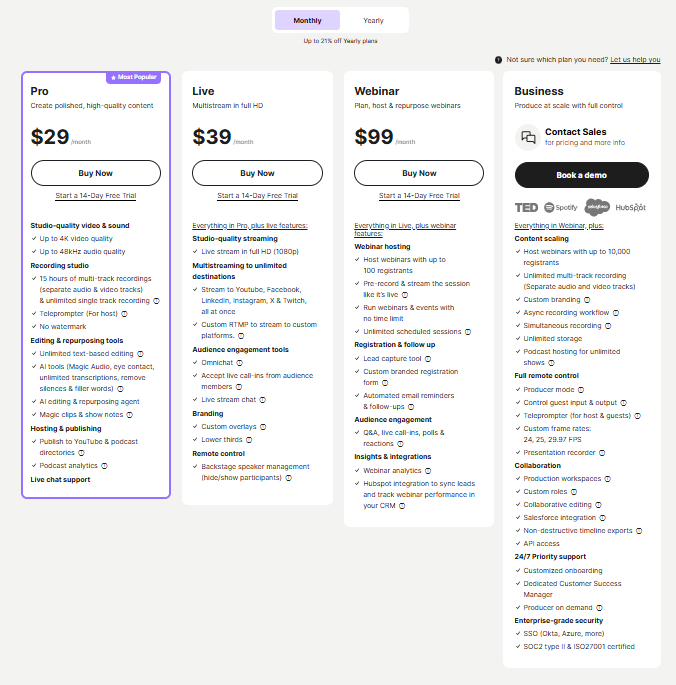 |
FL Studio vs Riverside.fm: Other Details
Organization Types supported |
|
|
|---|---|---|
Platforms Supported |
|
|
Modes of support |
|
|
API Support |
|
|
Get help choosing | Get help choosing |
FL Studio vs Riverside.fm Security & Compliance
Certifications, data handling, and security controls for IT and compliance evaluators.
HIPAA | — | ✗ No |
|---|---|---|
GDPR | — | ✓ Yes |
Data Encryption | — | ✓ Yes |
Data Residency | — | 🇺🇸 US |
FL Studio User Reviews & Rating Comparison
User Ratings | ||
|---|---|---|
Rating Distribution | ||
Spotsaas Editor’s POV generated by AI | Buyer sentiment Users generally praise FL Studio for its powerful features and flexibility, though some note a learning curve and limited collaboration options. What buyers like
Common complaints
| Buyer sentiment Users appreciate the high-quality local recordings and integrated editing tools but note occasional glitches and a higher price point for beginners. What buyers like
Common complaints
|
Pros and Cons |
|
|
Positive Reviews | No reviews available for the product | No reviews available for the product |
Integrations
Integration with other apps | No Integration information available. |
|---|



FL Studio and Riverside.fm Customers
Customers | No Customers information available. |  Microsoft  Shopify  Spotify |
|---|
Media and Screenshots
Screenshots |  1 Screenshots | No screenshots available. |
|---|---|---|
Videos |  3 Videos |  2 Videos |
Top Alternatives to FL Studio and Riverside.fm in 2026
Alternatives |
|---|


Add another option to compare side by side
Search by product name to compare pricing, fit, and buyer feedback in one view.Compare similar software options




Disclaimer: This research has been collated from a variety of authoritative sources. We welcome your feedback at [email protected].
Frequently asked questions
- Which is better, FL Studio or Riverside.fm?
- Riverside.fm edges out the other on user ratings (4.9 vs 4.6). That said, the best pick depends on your use case — use the comparison tables above to evaluate each dimension.
- Do FL Studio and Riverside.fm offer a free trial?
- Yes, both FL Studio and Riverside.fm offer a free trial.
- What is the starting price of FL Studio vs Riverside.fm?
- FL Studio starts at $99. Riverside.fm starts at $24 /month.
- What are the top alternatives to FL Studio?
- Top alternatives to FL Studio include Adobe Audition, FxSound, Zencastr, Rythmex, VocalRemover.
- What are the top alternatives to Riverside.fm?
- Top alternatives to Riverside.fm include Audacity, Soundation, Ableton Live, Adobe Audition, Auphonic.