
Confluence vs Jira Comparison

Confluence
Starting at $8.33 /User/Month
- Free Trial
- Large Enterprises
- Medium Business
Confluence is a web-based application that includes all the project management features of Confluence Server plus an added dose of new collaboration capabilities. You can play a central role in organizing your team's pro…

Jira
Starting at $7.53 /user/month
- Free Trial
- Large Enterprises
- Medium Business
Jira is every team's tool for project management, making it easy to track progress, priorities, and workload, while staying connected across teams. The platform helps plan, track, and launch world-class products. From si…
Jira leads on user satisfaction with a 4.8-star rating across 1,066 reviews.
Jira and Confluence are companions, not competitors
Both are Atlassian products and most teams that use one also use the other. Jira tracks work: issues, bugs, sprints and releases, each with a status someone moves along. Confluence holds the writing around that work: specs, meeting notes, decisions, runbooks and onboarding docs.
The question is almost never which to buy. It is whether you need the second one yet, and what the pair costs together.
Consider monday.com
Comparing Confluence and Jira? monday.com is another option worth a look: visual boards, 200+ templates and a free plan for up to 2 seats.
We may earn a commission. Affiliate disclosure
Which one does the thing you need
- A list of bugs with owners and due dates: Jira.
- A product specification several people comment on: Confluence.
- A sprint board the team stands around each morning: Jira.
- The decision record explaining why you built it that way: Confluence.
- A page that shows the live status of the tickets it describes: Confluence, with a Jira macro embedding them.
Buying both
This is the most searched part of the comparison, and the answer is that they are separate subscriptions. Our listing data (last refreshed August 2026) starts Jira at $7.53 per user per month and Confluence at $8.33 per user per month, with free tiers for small teams and free trials on both.
Running both for ten people is therefore roughly $159 a month at those entry rates, not $75. Atlassian prices by user tier and offers bundles, so get a quote for your real headcount before budgeting. Licence them separately too: not everyone who reads docs needs to move tickets.
Confluence vs Jira — at a glance
| Feature | Confluence | Jira |
|---|---|---|
| Rating | 4.1 / 5 | 4.8 / 5 |
| Reviews | 2,306 | 1,066 |
| Starting price | $8.33 /User/Month | $7.53 /user/month |
| Free trial | Yes | Yes |
| Free version | No | No |
| Best for | Large Enterprises, Medium Business, Small Business | Large Enterprises, Medium Business, Small Business |
| Category | Enterprise Wiki Software | Product Management Software |
| Platforms | SaaS/Web/Cloud, Mobile - Android, Mobile - iOS, Installed - Windows, Installed - Mac | SaaS/Web/Cloud, Mobile - Android, Mobile - iOS, Installed - Windows, Installed - Mac |
| API | Available | Available |
| Support modes | 24/7 (Live rep), Online | 24/7 (Live rep), Online |
Key differences between Confluence and Jira
- Pricing: Confluence starts at $8.33 /User/Month, while Jira starts at $7.53 /user/month.
- User satisfaction: Jira scores higher with a 4.8-star average.
- Deployment: Confluence supports SaaS/Web/Cloud, Mobile - Android, Mobile - iOS, Installed - Windows, Installed - Mac; Jira supports SaaS/Web/Cloud, Mobile - Android, Mobile - iOS, Installed - Windows, Installed - Mac.
Confluence vs Jira — find the better fit before you commit.
Which tool fits your team best
Which is actually cheaper for your team size
Where each product wins, per real buyers
Most Enterprise Wiki Software tools look identical on paper. This comparison cuts to the differences that matter — pricing structure, team fit, and what real buyers found after signing up.
Biggest differences
Features
Pricing
Buying details
Security
Buyer feedback
Integrations
Product tour
Other options
Talk to an expert Talk to an expert |
Free PDF comparison
Download this Confluence vs Jira comparison
Get the full side-by-side as a PDF — these picks plus the top Enterprise Wiki Software tools, with verified ratings, pricing and features.
- Side-by-side on pricing, features & ratings
- Plus the category top 10, scored & ranked
- Emailed to you — no on-screen download
No file downloads on screen — we email it to you. One-click unsubscribe anytime.
Confluence vs Jira: Biggest differences
Start here before you go deeper into features.
Best for centralized knowledge sharing and collaboration in mid-to-large remote teams.
- You need a flexible, centralized knowledge repository for project documentation.
- Your team requires strong collaboration tools tailored for remote and distributed work.
- You want seamless integration with Atlassian products and popular third-party tools.
- You are a very small team with minimal documentation or collaboration needs.
- You require highly specialized or industry-specific project management features out of the box.
Best for Agile teams needing customizable, robust project management.
- You manage SaaS product development or consulting projects with Agile methods.
- Your team requires highly configurable workflows and detailed real-time reporting.
- You need strong integration capabilities with popular development and collaboration tools.
- Your team prefers simple, minimal project management without complexity.
- You require extensive third-party app integrations beyond Jira Marketplace limits.
Confluence: Best for centralized knowledge sharing and collaboration in mid-to-large remote teams. Jira: Best for Agile teams needing customizable, robust project management.
Description | Confluence is a web-based application that includes all the project management features of Confluence Server plus an added dose of new collaboration capabilities. You can play a central ... Read More about Confluence | Jira is every team's tool for project management, making it easy to track progress, priorities, and workload, while staying connected across teams. The platform helps plan, track, and ... Read More about Jira |
|---|---|---|
Entry Level Pricing |
|
|
Free Trial Availability | ||
SpotScoreWhat's this? ↗ | Not Available | 9.8/10 |
User RatingsBased on verified Spotsaas reviews | ||
Best Company Size | 51-500 employees500+ employees | 50-500 employees501-5,000 employees |
Get pricing help | Get pricing help |
Where each option fits best
See where each product is strongest, which teams it fits, and what causes buyers to keep looking — before you commit.
Based on buyer reviews and verified product data collected by Spotsaas.
Key strengths
- Project Management: With Jira, teams can easily plan, track, and manage projects in one centralized platform. It improves collaboration and keeps everyone on the same page.
- Customizable Workflows: Jira offers the flexibility to tailor workflows according to your team's unique processes. This adaptability means you can optimize productivity without compromising your established practices.
- Real-Time Reporting & Analytics: Managers can use Jira's reporting features to track project progress and team performance. These metrics support decision-making and strategic planning.
Best fit
- 50 to 5,000 employees
- SaaS, Consulting, Fintech, Martech, and Revtech
- Project Managers, Software Developers, Agile Coaches, Product Owners, and QA Engineers
Reasons buyers look elsewhere
- Users may seek alternatives to Jira due to its complexity, particularly for smaller teams or projects that require a more straightforward, user-friendly interface without the steep learning curve associated with Jira's extensive features.
- Budget constraints can drive users to consider alternatives, as some options offer similar functionalities at a lower cost, making them more accessible for startups or smaller organizations with limited resources.
- Teams might look for solutions that better integrate with their existing tools and workflows, as Jira's integration capabilities can sometimes be limited or cumbersome compared to other platforms designed for seamless connectivity.
Software Demo
Demo |
|---|
Need a second opinion?
Get decision help from a software advisor
Share your priorities, budget, and team needs, and we’ll help you narrow the options and understand the tradeoffs before you talk to vendors.

- Independent advice — matched to your business
- Understand the tradeoffs before you talk to vendors
- Free 15-min call with a software advisor.
Step 1 of 4
How big is your team?
We tailor recommendations to companies your size.











How do Confluence and Jira Compare on Features?
Total Features | 8 Features | 41 Features |
|---|---|---|
Unique Features | No unique features | No unique features |
Get Quote | Get Quote |
Compare Confluence and Jira on pricing
Review starting price, plan structure, and free-trial access side by side so you can see which option fits your budget and buying process.
Pricing Option | ||
|---|---|---|
Starting From |
|
|
Pricing Plans |
|
|
Pricing Page |  | 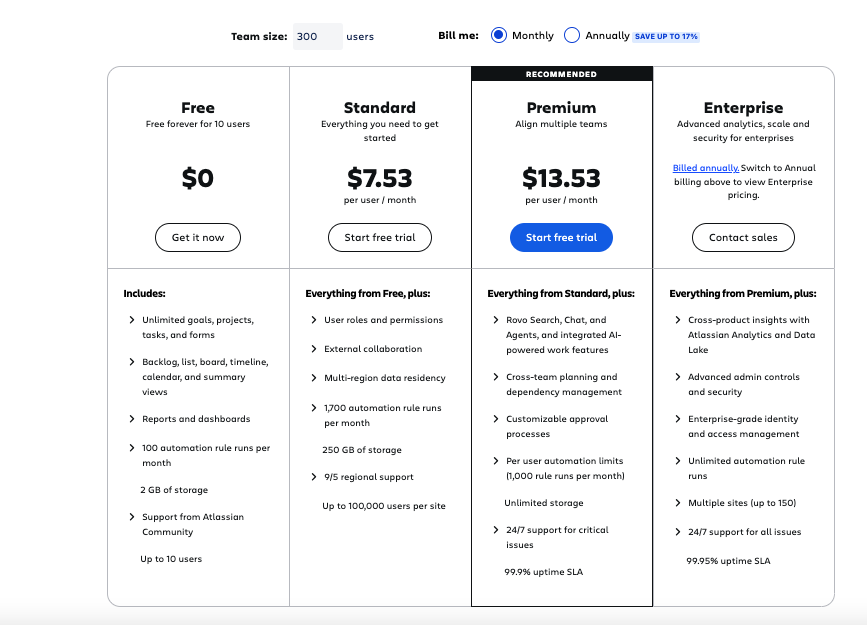 |
Confluence vs Jira: Other Details
Organization Types supported |
|
|
|---|---|---|
Platforms Supported |
|
|
Modes of support |
|
|
API Support |
|
|
Get help choosing | Get help choosing |
Confluence User Reviews & Rating Comparison
User Ratings | ||
|---|---|---|
Rating Distribution | ||
Spotsaas Editor’s POV generated by AI | Buyer sentiment Overall positive sentiment highlights Confluence's collaboration and knowledge management strengths, tempered by concerns about pricing transparency and complexity. What buyers like
Common complaints
| Buyer sentiment Overall, users highly value Jira for its powerful Agile support, customization, and integration, though some find it complex initially. What buyers like
Common complaints
|
Pros and Cons |
|
|
Positive Reviews | No reviews available for the product | No reviews available for the product |
Confluence and Jira Customers
Customers | No Customers information available. |  Cisco  ebay  Square |
|---|
Media and Screenshots
Screenshots |  5 Screenshots |  6 Screenshots |
|---|---|---|
Videos |  3 Videos |  1 Videos |


Add another option to compare side by side
Search by product name to compare pricing, fit, and buyer feedback in one view.Compare similar software options





Related Blogs and Articles for Product Management Software
Disclaimer: This research has been collated from a variety of authoritative sources. We welcome your feedback at [email protected].
If you can only have one
Start with Jira if the pain is work going missing: nobody knows what is in progress, or bugs get forgotten. Start with Confluence if the pain is knowledge going missing: the same questions get asked every month and the answers live in someone's head or a chat thread. Teams that pick Jira first usually add Confluence within the year, because tickets are a poor place to keep anything longer than a sprint.
Frequently asked questions
- What is the difference between Jira and Confluence?
- Jira tracks units of work that move through a status, such as issues, bugs and sprint tasks. Confluence stores the written material around that work, such as specs, notes and decisions. They are built to be used together.
- Do I need both Jira and Confluence?
- Not at first. Many teams run Jira alone and keep docs elsewhere. The pair earns its cost once written knowledge matters as much as the ticket queue, and the two link tightly so a page can show live ticket status.
- How much do Jira and Confluence cost together?
- They are separate subscriptions. Our data (August 2026) lists Jira from $7.53 per user per month and Confluence from $8.33, so ten people on both is roughly $159 a month at entry rates. Both have free tiers for small teams, and Atlassian prices by user tier, so check a quote for your headcount.
- Can Confluence replace Jira?
- No. Confluence pages have no workflow, so there is nothing to move from open to done and nothing to report on. It stores knowledge; Jira moves work.
- Can I use Confluence without Jira?
- Yes, it works as a standalone wiki and many non-engineering teams use it that way. You lose the Jira macros that embed live ticket data into pages.