
Cloudback vs Dr.Fone Comparison

Cloudback
Starting at $10 /Month
- Free Trial
- Free Version
- Freelancers / Consultants
- Large Enterprises
Cloudback is the ideal choice for ensuring the safety of your GitHub repositories. Our automated daily backups guarantee a secure, up-to-date version - including metadata and code - of your entire repository. Furthermore…

Dr.Fone
Starting at Contact for pricing
- Individuals
- Freelancers / Consultants
Dr.Fone Toolkit for iOS is a complete backup solution for iOS data. It helps to make a backup of all kinds of data on iOS devices in a split second, and recover them in a simple way in the future when needed. It also ena…
Cloudback leads on user satisfaction with a 4.7-star rating across 3 reviews.
Cloudback vs Dr.Fone — at a glance
| Feature | Cloudback | Dr.Fone |
|---|---|---|
| Rating | 4.7 / 5 | 4.0 / 5 |
| Reviews | 3 | 478 |
| Starting price | $10 /Month | Contact for pricing |
| Free trial | Yes | No |
| Free version | Yes | No |
| Best for | Freelancers / Consultants, Large Enterprises, Medium Business | Individuals, Freelancers / Consultants, Large Enterprises |
| Category | Backup Software | Backup Software |
| Platforms | SaaS/Web/Cloud | SaaS/Web/Cloud, Mobile - Android, Mobile - iOS, Installed - Windows, Installed - Mac |
| API | — | — |
| Support modes | Online | Online |
Key differences between Cloudback and Dr.Fone
- Pricing: Cloudback starts at $10 /Month. Dr.Fone pricing is not publicly listed.
- Free trial: Cloudback offers a free trial; Dr.Fone does not.
- Target audience: Cloudback is built for Freelancers / Consultants and Large Enterprises, while Dr.Fone targets Individuals and Freelancers / Consultants.
- User satisfaction: Cloudback scores higher with a 4.7-star average.
- Deployment: Cloudback supports SaaS/Web/Cloud; Dr.Fone supports SaaS/Web/Cloud, Mobile - Android, Mobile - iOS, Installed - Windows, Installed - Mac.
Cloudback vs Dr.Fone — find the better fit before you commit.
Which tool fits your team best
Which is actually cheaper for your team size
Where each product wins, per real buyers
Most Backup Software tools look identical on paper. This comparison cuts to the differences that matter — pricing structure, team fit, and what real buyers found after signing up.
Biggest differences
Features
Pricing
Buying details
Security
Buyer feedback
Integrations
Product tour
Other options
Free PDF comparison
Download this Cloudback vs Dr.Fone comparison
Get the full side-by-side as a PDF — these picks plus the top Backup Software tools, with verified ratings, pricing and features.
- Side-by-side on pricing, features & ratings
- Plus the category top 10, scored & ranked
- Emailed to you — no on-screen download
No file downloads on screen — we email it to you. One-click unsubscribe anytime.
Cloudback vs Dr.Fone: Biggest differences
Start here before you go deeper into features.
Freelancers / Consultants, Large Enterprises, Medium Business
Best for quick, reliable iOS data backup and cross-platform recovery.
- You need fast, straightforward backup and recovery for iOS devices.
- Your team requires cross-platform data transfer between iOS and Android.
- You want an intuitive interface with minimal setup and training.
- Your organization demands deep integration with enterprise third-party systems.
- You require advanced customization or complex workflow automation features.
Cloudback typically suits Freelancers / Consultants and Large Enterprises. Dr.Fone tends to fit Individuals and Freelancers / Consultants better. The right choice depends on your team size, workflow, and whether a free trial matters.
Description | Cloudback is the ideal choice for ensuring the safety of your GitHub repositories. Our automated daily backups guarantee a secure, up-to-date version - including metadata and code - of your ... Read More about Cloudback | Dr.Fone Toolkit for iOS is a complete backup solution for iOS data. It helps to make a backup of all kinds of data on iOS devices in a split second, and recover them in a simple way in the ... Read More about Dr.Fone |
|---|---|---|
Entry Level Pricing |
|
|
Free Trial Availability |
| |
SpotScoreWhat's this? ↗ | 7.8/10 | 8.9/10 |
User RatingsBased on verified Spotsaas reviews | ||
Best Company Size | — | 1-50 employees51-500 employees |
Get pricing help | Get pricing help |
Where each option fits best
See where each product is strongest, which teams it fits, and what causes buyers to keep looking — before you commit.
Based on buyer reviews and verified product data collected by Spotsaas.
Key strengths
- Multiple data recovery methods: The software offers several recovery approaches depending on how the data was lost. Users can scan the device directly to recover deleted photos, contacts, or messages. It also supports restoring data from existing iTunes backups or iCloud backups for iOS devices. Having multiple recovery options increases the likelihood of retrieving important files that were accidentally deleted, lost during system errors, or removed after a phone reset.
- Reliable data transfer between devices: Dr.Fone provides a dedicated phone-to-phone transfer feature that allows users to move contacts, photos, videos, messages, call logs, and other files from one device to another. It supports transfers between Android devices, between iOS devices, and even across platforms such as Android to iPhone or iPhone to Android.
- Cross-platform device support: Dr.Fone works with both Android and iOS devices, which makes it useful for people managing multiple smartphone ecosystems. Users can connect a wide range of devices including iPhones, iPads, and many Android brands such as Samsung, Xiaomi, and Google Pixel. This compatibility allows users to perform tasks like data recovery, backup, transfer, and system repair regardless of the device type.
Best fit
- 1,001–5,000
- Mobile Software, Data Recovery Software, Consumer Electronics Software, IT Management Software, Mobile Device Management, Utility Software
- Mobile Technician, IT Support Specialist, Data Recovery Specialist, System Administrator, Technical Support Engineer, Mobile Repair Technician, Digital Forensics Analyst, Device Support Specialist, IT Manager, Technology Consultant
Reasons buyers look elsewhere
- Support response times exceed 24 hours for non-critical issues, and refund requests outside the 30-day window are denied — teams needing faster resolution switch to competitors like EaseUS or Recuva
- Free trial limits users to scan and preview only; actual file recovery requires the paid plan, pushing users seeking full-featured trials toward alternatives like EaseUS Data Recovery Wizard
- Modular pricing requires separate purchases for advanced features (phone recovery, cloud backup recovery, etc.), making total cost 40–60% higher than single-license competitors like Stellar Data Recovery
Software Demo
Demo |  Cloudback has not given any software demo yet If you're the owner of this profile, add your demo.Contact us |
|---|
Need a second opinion?
Get decision help from a software advisor
Share your priorities, budget, and team needs, and we’ll help you narrow the options and understand the tradeoffs before you talk to vendors.

- Independent advice — matched to your business
- Understand the tradeoffs before you talk to vendors
- Free 15-min call with a software advisor.
Step 1 of 4
How big is your team?
We tailor recommendations to companies your size.















How do Cloudback and Dr.Fone Compare on Features?
Total Features | 8 Features | 10 Features |
|---|---|---|
Unique Features | No unique features | No unique features |
Get Quote | Get Quote |
Compare Cloudback and Dr.Fone on pricing
Review starting price, plan structure, and free-trial access side by side so you can see which option fits your budget and buying process.
Pricing Option | ||
|---|---|---|
Starting From |
|
|
Pricing Plans |
|
|
Pricing Page |  | 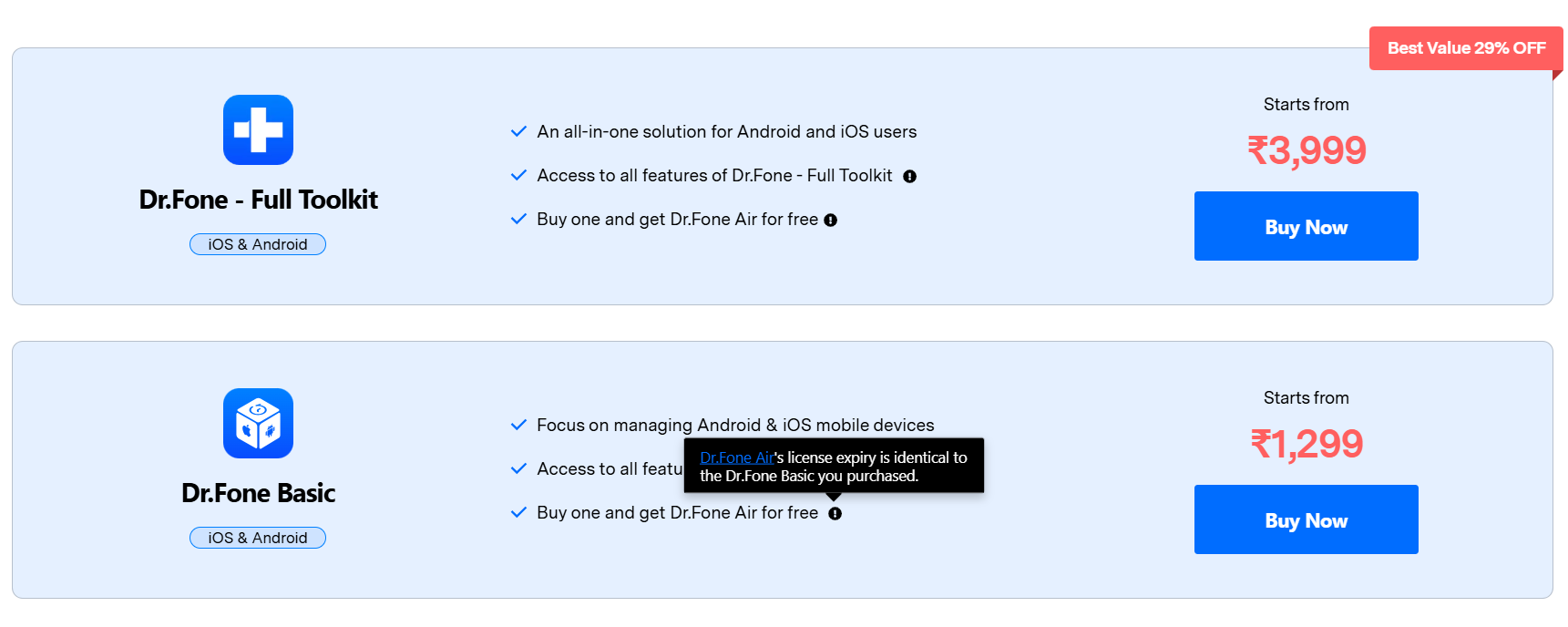 |
Cloudback vs Dr.Fone: Other Details
Organization Types supported |
|
|
|---|---|---|
Platforms Supported |
|
|
Modes of support |
|
|
API Support |
|
|
Get help choosing | Get help choosing |
Cloudback User Reviews & Rating Comparison
User Ratings | ||
|---|---|---|
Rating Distribution | ||
Spotsaas Editor’s POV generated by AI | Buyer sentiment Buyer sentiment is very strong across 3 reviews, with consistently positive feedback. What buyers like
Common complaints
| Buyer sentiment Users generally appreciate the software’s ease of use and effective data recovery but note limitations with older devices and feature complexity. What buyers like
Common complaints
|
Pros and Cons |
|
|
Positive Reviews | No reviews available for the product | No reviews available for the product |
Media and Screenshots
Screenshots |  3 Screenshots |  3 Screenshots |
|---|---|---|
Videos | No videos available. |  3 Videos |
Top Alternatives to Cloudback and Dr.Fone in 2026
Alternatives |
|---|


Add another option to compare side by side
Search by product name to compare pricing, fit, and buyer feedback in one view.Compare similar software options


Related Blogs and Articles for Backup Software
Disclaimer: This research has been collated from a variety of authoritative sources. We welcome your feedback at [email protected].
Frequently asked questions
- Which is better, Cloudback or Dr.Fone?
- Cloudback edges out the other on user ratings (4.7 vs 4.0). That said, the best pick depends on your use case, so use the comparison tables above to evaluate each dimension.
- Do Cloudback and Dr.Fone offer a free trial?
- Cloudback offers a free trial. Dr.Fone does not.
- What is the starting price of Cloudback vs Dr.Fone?
- Cloudback starts at $10 /Month. Dr.Fone starts at Contact for pricing.
- What are the top alternatives to Cloudback?
- Top alternatives to Cloudback include Iperius Backup, Asigra Cloud Backup, AOMEI Backupper, CloudAlly Office 365 backup, Microsoft System Center.
- What are the top alternatives to Dr.Fone?
- Top alternatives to Dr.Fone include MyPCBackup, Resilio Connect, NetApp, SimpleBackups, IDrive Online.
- Should I buy Cloudback?
- It depends what you need. In its favour: automated daily backups ensure data safety; supports various cloud storage options for flexibility. Against it: limited to GitHub, not suitable for other platforms; basic interface may not appeal to advanced users. Note that it does not include Multi-Account Management and Reporting.
- Is Dr.Fone worth paying for?
- Dr.Fone is credited with the following: multiple data recovery methods including direct device scan and backup restoration; reliable cross-platform data transfer between iOS and Android devices. The recurring reservations: limited support for certain older Android models and outdated systems; restricted marketplace with limited additional apps and connectors. It does not include Multi-Account Management and Reporting.
More Backup Software comparisons
Side by side breakdowns of the same products against other options in this category.