

Keeping data safe matters to almost everyone now, whether you store family photos, work documents, or business records. Backblaze is one of the better-known names in this space, an online backup service built around a simple approach to data protection that does not ask users to become storage experts first.
This review looks at why Backblaze may be a strong choice for keeping your files safe. It covers the pricing, the setup process, the desktop and mobile interfaces, the backup and restore workflow, and the security features that sit behind the service, so you can judge whether it fits your needs.
Key Takeaways
- Backblaze handles data protection with unlimited automatic backups and B2 Cloud Storage, a workable option for both personal use and businesses at a competitive cost.
- The service includes security features such as 2048 bit public/private key encryption and AES 128 bit encryption, plus options for users to manage their own encryption keys for added privacy.
- Through its interface on desktop clients, online platforms, and mobile apps, Backblaze makes it simple to run and manage backups, including scheduling, speed throttling, and file restoration options.
- Backblaze pricing uses flat rates per device for personal and business plans, with extra savings available through annual prepayment discounts.
- Restoring files works through the web platform or mailed drives from Backblaze, though download speeds may be slower than upload speeds during the process.
Overview of Backblaze
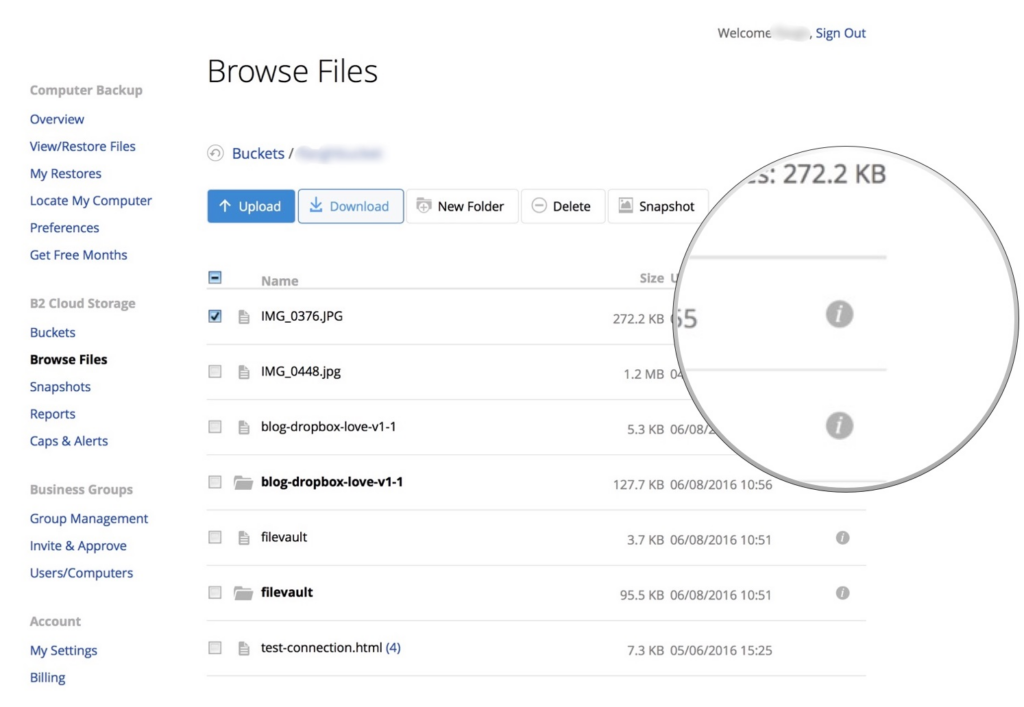
Backblaze offers B2 Cloud Storage and Computer Backup for individuals and businesses, pairing affordable object storage with unlimited automatic backups to the Backblaze Storage Cloud. The two products cover different needs: object storage for developers and teams that manage servers and media, and computer backup for people who want their whole machine protected without much setup.
The company is trusted by over 500,000 customers, including well-known brands such as Streamlabs and Canal +. That customer base spans personal users backing up a single laptop and larger organizations protecting many workstations at once.
Foundation and history of Backblaze
In 2007, the search for uncomplicated online storage and data backup led Gleb Budman and Brian Wilson to start Backblaze. They set up headquarters in San Mateo, California, with the goal of making cloud storage accessible to everyone.
Their early service stood out with an offer of unlimited data backup for a flat fee of just $5 a month at the time.
That approach quickly set Backblaze apart in data protection and recovery. By focusing on simplicity and affordability, they opened up cloud backup solutions that were usually reserved for tech-savvy users or businesses with large budgets.
That work has made secure file backup practical and easy for individuals and companies worldwide, and it set the flat-fee, unlimited model that many later services measured themselves against.
Key products and services
Backblaze builds on that foundation with products aimed at both individuals and companies. Its B2 Cloud Storage is a capable option for storing and managing data online, with S3 compatibility and smooth integration.
The platform works as a practical tool for creating, collaborating on, and securely managing content, and its S3 compatibility means teams can connect existing tools without rebuilding their workflows.
Backblaze also offers a Computer Backup service that delivers unlimited automatic backups to its secure cloud. Home users get a simple way to protect personal files, while businesses gain full workstation backups that support business continuity.
With enterprise-grade security measures in place, clients can trust that their data stays private and well-protected at every step of the backup process.
The Cost of Backblaze
Backblaze uses a clear and affordable pricing model for its online backup services. Unlimited data backup is available at a monthly cost that makes securing your files an easy decision.
The personal plan costs $9 per month on a month-to-month basis, or you can save by paying annually, which brings the price down to $8.25 per month, an option many pick for long-term cloud storage.
Users who want to cut costs further can take an annual prepayment that includes a 15% discount across all plans. This shows Backblaze aims to keep its services good value for both personal and business use, so data security does not carry a high price tag.
With unlimited storage capacity included, the service secures your files without straining your budget. Because the fee stays flat no matter how much you store, users with large photo libraries or big work archives pay the same as those with only a few gigabytes.
Getting Started with Backblaze
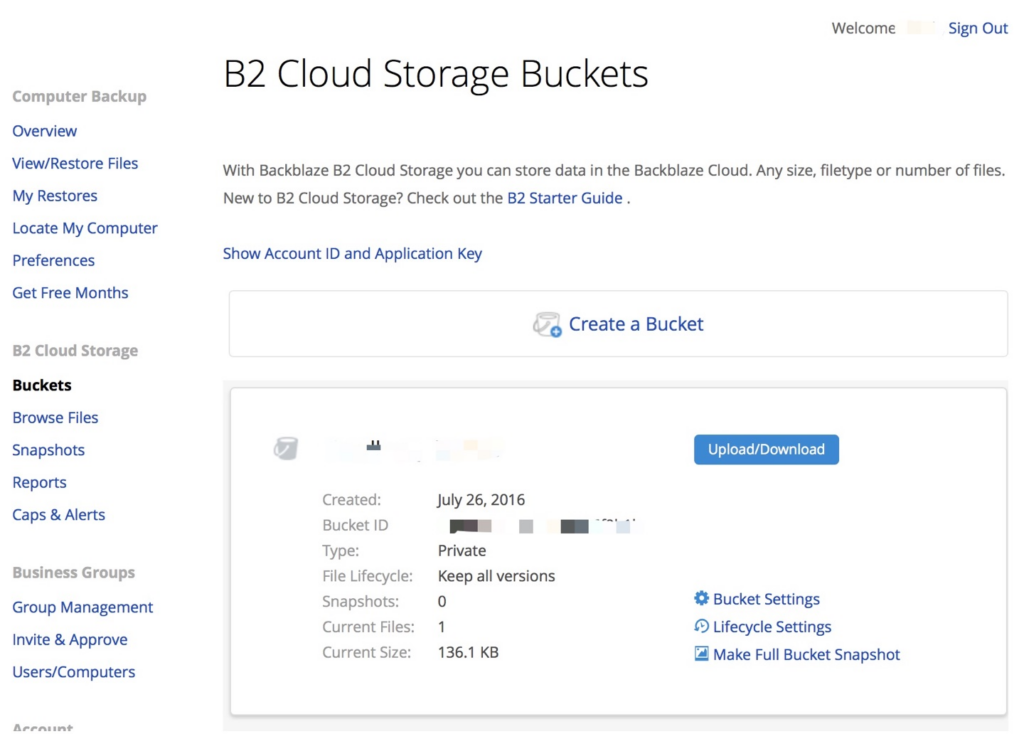
With the pricing covered, here is how to get started with Backblaze. The steps below walk through the setup and how to get the most out of the service:
- Sign up for a subscription on the Backblaze website by choosing a plan that best suits your needs.
- Download and install the Backblaze client on your device, making sure it is compatible with your operating system.
- Once installed, start the backup by selecting the files and folders you want to protect and setting any preferences or options Backblaze provides.
- Get familiar with accessing and restoring backed-up data through the interface, using either the desktop application or the mobile app.
- Explore extra features such as scheduled backups, bandwidth throttling, and managing multiple devices under one account.
- Set up multifactor authentication and private encryption keys for an added layer of security during the backup process.
User Interface of Backblaze
The Backblaze interface works well on both desktop and mobile. Navigation is straightforward, and accessing and managing your backed-up files is simple, which keeps the learning curve low for new users who have never run a backup service before.
The sections below cover how the desktop and mobile interfaces work in more detail, including what each one is best suited to and where their strengths and limits show up in daily use.
Desktop Interface
The Backblaze desktop interface uses a clear design that makes it easy to navigate and start backups. With accessible backup settings, you can adjust backup schedules and select specific file types for efficient data protection.
Real-time status updates keep you informed on backup progress, so you know your files are stored safely. Two-factor authentication adds another layer of security and makes the backup management interface more reliable.
Built with convenience in mind, the desktop interface lets you control your own data protection while using features such as customizable backup schedules and quick access to key information. You can set which file types to include, when backups run, and how much of your connection they use, all from the same screen.
Mobile App Interface
Moving from desktop to mobile, the Backblaze app gives you an easy and efficient way to run regular backups. The interface is simple to move through, with quick access to backup features.
You can run uploads on up to 100 separate threads for strong upload speed when backing up your data. Downloads, though, can be slower because of the sluggish downloader.
Even with that limit, the mobile app is a simple and efficient way to manage your backups. It is most useful for checking backup status on the go and for retrieving a file when you are away from your main computer.
Backblaze’s Security and Privacy Measures
Backblaze adds security with multi-factor authentication and integration with G-Suite single sign-on. The service uses 2048 bit public/private keys, AES 128 bit encryption, and lets users manage their own encryption keys.
Backblaze also protects data confidentiality with AES 128-bit encryption for data at rest and in transit. Its physical data centers use biometric security measures and protection against natural disasters.
Backblaze puts user privacy first, accessing files only with user consent for core functionality. It collects minimal user data, limited to the information provided, and complies with GDPR regulations and the EU/Swiss Privacy Shield for international data transfers. Taken together, the encryption, the physical safeguards, and the limited data collection give users several layers of protection rather than relying on any single one.
Next, here is how Backblaze handles data restoration.
How Backblaze Handles Data Restoration
With the security and privacy measures covered, it helps to know how Backblaze handles data restoration. Here is a closer look at the process:
- Backblaze lets you back up or restore via a mailed drive.
- To restore files from a backup, you log into the online platform.
- The download process can be sluggish and prone to crashing.
- Data recovery involves navigating the interface to retrieve files.
- Users have several recovery options for their online storage.
- The restore process includes checking the download speed before completion.
Speed of Backblaze’s Backup Process
In backup speed tests, Backblaze took around 27 minutes to upload 1GB files initially. After adjusting settings, the average backup time dropped to 13 minutes and 34 seconds.
That gain comes from Backblaze’s block-level algorithm, which backs up only the parts of files that have changed for faster, more efficient backups. After the first full backup, later runs move much less data, since unchanged files are skipped and only new or edited blocks are sent.
The tests also showed strong upload speeds, with uploads able to run on up to 100 separate threads. As noted, downloading may be slower because of the sluggish downloader.
For large backups, Backblaze offers a shipping service where users can receive a USB flash drive or external hard drive holding their data. This helps when a full download over the internet would take too long, since the drive arrives with the files already on it.
Next, this review covers the advanced features Backblaze offers and how they fit specific user needs.
Features of Backblaze
Backblaze offers advanced online backup features, unlimited backup for businesses, and the option to exclude specific files from backups. Here is a closer look at how Backblaze meets different data backup needs.
Advanced Online Backup Features
Backblaze offers advanced online backup features for both individual users and businesses. These are the key ones that help set it apart:
- B2 Cloud Storage: cost-effective object storage for servers, media, and more, with competitive pricing compared to traditional providers.
- Media Archive: an active media archive and workflows for content creation, collaboration, and managing media assets.
- Automatic Backups: unlimited, automatic backups to the Backblaze Storage Cloud for both personal and business workstations.
- Encryption: 2048-bit public/private keys and AES 128-bit keys that change with every backup session. Users can manage their encryption keys on their own.
- Physical Backups: alongside cloud storage, users can receive their data on a USB flash drive or external hard drive from Backblaze.
Unlimited Backup for Businesses
Backblaze gives businesses unlimited backup, so there is no cap on stored data. This supports flexible backup options, handles large files, and keeps the process simple for reliable data protection.
At $7.88 per month, businesses get affordable pricing and can store their data securely with no capacity limits.
Businesses can also back up large volumes of data through USB flash drives or external hard drives, which fits a range of needs. Backblaze’s support for regular, dependable backups lets businesses focus on data security and reliability while keeping operations efficient. For teams that manage several machines, the unlimited model removes the guesswork of estimating how much storage each device will need.
Backup Exclusions
To customize your backup and leave out specific files or folders, use these options from Backblaze:
- Selective Exclusions: leave out specific files or folders you do not want in the backup.
- Customized Backup: skip certain file types based on your preferences or needs for a backup that fits you.
- Exclude List Creation: build a list of specific items to skip during the backup, giving you full control over what gets backed up.
- Limiting Backup Scope: set the backup to include only specific data so you avoid backing up unnecessary files or directories.
- Specific Folder Exclusion: choose which folders to exclude for more flexibility over your data protection.
- Personalized Exclusions: pick particular folders or file types to exclude so only relevant data is included.
Backblaze’s Pricing Structure for Multiple Devices
Backblaze keeps pricing simple, with flat rates for unlimited data backup per device. Here is how it breaks down across multiple devices:
| Plan Type | Cost per Month | Cost per Year | Cost for 2 Years | Number of Devices |
|---|---|---|---|---|
| Personal Backup | $6 | $60 | $110 | 1 per plan |
| Business Backup | $6 | $60 | $110 | 1 per plan |
| B2 Cloud Storage | Varies | Varies | Varies | Unlimited |
Each device needs its own plan, and the personal and business backups are priced the same. If you have multiple devices, that means multiple plans, each with the same unlimited storage. The B2 Cloud Storage uses a pay-as-you-use model, which can work out cheaper for users with varying storage needs across devices. The choice comes down to how you use the service: per-device flat rates suit full-machine backups, while pay-as-you-use suits storing selected data at scale.
Beyond individual needs, Backblaze’s user experience spans a range of platforms.
Backblaze’s User Experience
Backblaze works across its desktop client, website, and mobile app. The interfaces are straightforward, so users can navigate and manage backups without hassle.
Windows & Mac Desktop Client
Backblaze offers a clear desktop client for both Windows and Mac, with a straightforward interface for data backup. Users can schedule backups, select specific files, and manage bandwidth limits from the client.
The customizable settings let users set their own backup preferences and check backup status easily.
The desktop client also supports quick file restoration, adding to the experience with a full set of features for managing data on both Windows and Mac. Whether you run one platform or a mix of both, the client keeps the same layout and options, so there is little to relearn when switching machines.
Website and Mobile App
Backblaze offers a clear website and mobile app for managing online backups. The interface is highly accessible and makes it easy for users to manage their data.
With a focus on simplicity and function, the website and mobile app let users upload data easily and manage their online storage well.
The interface stays accessible and supports efficient data management. Upload speeds are fast, though downloading data can take longer, which is worth planning around if you expect to restore a large amount of data at once.
File Backup & Restoration: An In-depth Look
Here is the step-by-step process for backing up files with Backblaze, including scheduling and speed throttling, followed by how data restoration works when you need to recover files.
The Backblaze Backup Process
The Backblaze backup process automatically backs up data to the Backblaze Storage Cloud for home and business workstations. It offers real-time file change monitoring for continuous backups, scheduled daily backups, and manual backup options. Encryption uses 2048-bit public/private keys and AES 128-bit keys that change for every backup session. Backblaze also shows strong upload speed, running uploads on up to 100 separate threads. Data restoration is efficient with this backup process.
Backup Scheduling and Speed Throttling
Backblaze offers automatic backups, so users can schedule them at set times for consistent data protection. Users can also control backup speed by throttling upload speeds, which keeps other internet activities from being disrupted. The benefits include:
- Automated Backup Scheduling: set up backup schedules based on your preferences and timeframes.
- Consistent Data Protection: scheduled backups keep data protected without manual intervention.
- Speed Throttling: manage upload speeds to avoid disrupting other internet activities during a backup.
- Bandwidth Management: speed throttling supports effective bandwidth management without impacting other online tasks.
- Upload Speed Control: control upload speed for flexibility based on available internet bandwidth.
- Internet Activity Interference Prevention: throttling helps prevent slowdowns in other internet activities during a backup.
- Backup Frequency Setting: define how often data is backed up to fit your requirements.
- Data Protection Scheduling: run backups on a set timetable for stronger overall data protection.
Restoring Your Backblaze Cloud Backup
Restoring your Backblaze cloud backup is straightforward, with a few key steps to keep in mind:
- Select the files or folders you want to restore from the Backblaze interface.
- Choose the method of restoration, either downloading files directly from the web interface or requesting a physical drive shipment for larger data sets.
- Use the real-time file change monitoring feature so recent modifications are included in the restored backup.
- Use Backblaze’s flexible scheduling options to start manual backups or set up automated daily backups.
- Rely on the encryption methods Backblaze uses to keep your restored data secure and intact.
- Use Backblaze’s continuous backup to keep an up-to-date copy of your files, so restoration is simple when you need it.
- Restore specific versions of files for more flexibility and control over the restoration process.
- Account for the privacy laws and regulations Backblaze follows, so your restored data is handled with strict privacy measures.
- Use the dedicated support systems from Backblaze for help with any questions or issues during restoration.
- Review your overall experience with Backblaze’s restoration features, weighing speed, ease of use, and reliability.
Review of Backblaze’s Security Measures
Backblaze uses solid security measures, including private encryption key handling and compliance with data privacy laws, to keep your data safe.
The section below covers how Backblaze protects your information in more detail.
Backblaze’s Private Encryption Key Handling
Backblaze uses 2048 bit public/private keys and an AES 128 bit key for encryption, which gives it a strong security setup. Users can manage their own encryption keys and keep full control over their data privacy.
Still, the flawed implementation of private keys by the company leaves potential vulnerabilities if networks or servers are compromised.
Zero-knowledge encryption is not enabled by default, which raises a data security concern. File restoration also requires users to provide Backblaze with their private encryption key through the web client, which is an extra step that can be inconvenient and raises some security questions. For most users the trade-off is manageable, but those handling highly sensitive data should weigh how the private key is entered during a restore.
Privacy Aspects of Backblaze
Backblaze takes data privacy seriously and follows strict privacy laws and policies. Knowing how it handles your personal information matters for keeping your data safe in the cloud, and the sections below set out both the laws it follows and what its privacy policy commits to in practice.
Privacy Laws Backblaze Adheres to
Backblaze follows privacy laws and regulations by collecting personal data for account setup and maintenance, keeping files confidential on its servers, and getting user consent before accessing files.
The company shares some data with third-party service providers but only discloses information when required by law. Backblaze also maintains GDPR compliance and follows the EU/Swiss Privacy Shield for international data transfers.
Its privacy policy spells out how personal information is handled, with an emphasis on protecting user data and being transparent about its practices. By prioritizing user consent, confidentiality, and compliance with privacy laws, Backblaze gives users a secure place to store important data while keeping control over their privacy settings.
Backblaze’s Privacy Policy
Backblaze’s Privacy Policy explains how personal data is collected and used to set up and maintain accounts. It also covers sharing data with third-party service providers and disclosing information when required by law.
Users get encryption technology, including 2048-bit public/private keys and an AES 128-bit key that changes during each backup session, for added security.
Backblaze also offers multi-factor authentication and integrates with G-Suite single sign-on to improve user security.
Backblaze’s Support Systems
Backblaze offers a responsive support ticket system with replies within 24 hours. It also provides live chat support during regular business hours on weekdays, answering customer questions in real time.
Its customer service focuses on prompt, efficient solutions for users, so most common questions can be resolved without a long wait or back-and-forth.
The service also includes advanced features such as real-time file change monitoring for continuous backup, scheduled daily backups, and manual backup options.
These give users flexible, reliable ways to preserve data based on their needs, and the mix of self-service help and direct support means users can pick whichever suits the problem in front of them.
The next section looks at why Backblaze holds a leading position in online backup services.
Poised to Excel: Why Backblaze is a Leader in Online Backup Services
Backblaze stands out as a leader in online backup services thanks to strong offerings for both personal and business use. Its competitive pricing, reliable performance, and strong security measures make it a top choice for cloud storage and data protection.
The company’s focus on user satisfaction shows in its easy-to-use interface and features like file sharing and multifactor authentication, which suit both individuals and businesses.
With over 500,000 trusted customers, including well-known companies such as Streamlabs and Canal+, Backblaze remains a leading provider of secure online backup services.
The conclusion below sums up how the full evaluation reflects Backblaze’s effectiveness as an online backup provider.
Conclusion
Choosing the best online backup service matters for keeping your data secure and accessible. With features like unlimited cloud storage, strong encryption methods, and cost-effective options, Backblaze stands out as a top choice for individuals and businesses.
Its clear user experience and reliable customer support add to the appeal. The main trade-offs to keep in mind are the slower download speeds during restores and the way private keys are handled, both of which matter more for large recoveries and sensitive data than for everyday backups. Choosing Backblaze means entrusting your data to a reputable online backup service that prioritizes both security and convenience.
For anyone comparing options, Backblaze stands out for its simple flat pricing, unlimited storage, and strong encryption, balanced against slower restore downloads.
(Image credit: Backblaze)
Frequently Asked Questions
What factors should I consider when choosing an online backup service?
Consider factors such as storage capacity, ease of use, security features, pricing plans, and customer support.
2. Is Backblaze a suitable option for personal data backup?
Yes, Backblaze is a popular choice for personal data backup with its unlimited storage space and user-friendly interface.
3. Can I access my backed-up files from anywhere with Backblaze?
Yes, you can access your backed-up files from anywhere with an internet connection using the Backblaze web application or mobile app.
4. How does Backblaze ensure the security of my backed-up data?
Backblaze secures your data through encryption during transmission and while stored in their servers. They also offer two-factor authentication for added security.
5. Does Backblaze offer any additional features apart from standard data backup services?
Apart from standard backups, Backblaze offers options like file versioning, which allows you to recover previous versions of files within a specified time frame.

- Independent picks for exactly what you just read about
- Matched to your team size & needs
- Vendors don't pay for placement
Step 1 of 4
How big is your team?
We tailor recommendations to companies your size.















Related Articles
IT Management
Microsoft Intune Pricing 2026: Plan 1, Plan 2, Suite and What Microsoft 365 Includes
Continue reading →
IT Management
Best Remote Access Software 2026: 11 Tools Compared by Price
Continue reading →
IT Management
Splashtop Pricing 2026: Solo, Pro, Performance and SOS Costs
Continue reading →
IT Management
Atera Pricing 2026: Every Plan, Per-Technician Cost and What You’ll Pay
Continue reading →