
Brick vs Showit vs Unbounce vs VWO Deploy Comparison

Brick
Starting at $5 /month
- Free Version
- Individuals
- Freelancers / Consultants
Brick is a minimalist, flexible document and website builder designed for creators, remote teams, educators, and marketers who need a fast and collaborative way to publish text-heavy content. With Brick, users can turn d…

Showit
Starting at $19 /month
- Free Trial
- Small Business
Showit is a drag-and-drop website builder designed for entrepreneurs, small business owners, creatives, and brands who want complete design freedom without needing coding skills. The platform makes it easy to create visu…

Unbounce
Starting at $81 /Month
- Free Trial
- Free Version
- Freelancers / Consultants
- Large Enterprises
Unbounce is a landing page builder for marketers that lets you design and publish high-converting landing pages -- without having to write a single line of code. Unbounce's powerful drag-and-drop editor means you don't h…

VWO Deploy
Starting at Contact for pricing
- Individuals
- Large Enterprises
VWO Deploy is a white-label website builder plugin for SaaS companies and digital agencies that want to offer a branded, customizable website builder as part of their own product offering. It lets teams configure fields,…
Brick vs Showit vs Unbounce vs VWO Deploy — at a glance
| Feature | Brick | Showit | Unbounce | VWO Deploy |
|---|---|---|---|---|
| Rating | — | — | 4.5 / 5 | — |
| Reviews | — | — | 338 | — |
| Starting price | $5 /month | $19 /month | $81 /Month | Contact for pricing |
| Free trial | No | Yes | Yes | No |
| Free version | Yes | No | Yes | No |
| Best for | Individuals, Freelancers / Consultants, Small Business | Small Business | Freelancers / Consultants, Large Enterprises, Medium Business | Individuals, Large Enterprises, Medium Business |
| Category | Website Builder Software | Website Builder Software | Landing Page Software | Website Builder Software |
| Integrations | — | 1+ apps | — | — |
| Platforms | SaaS/Web/Cloud | SaaS/Web/Cloud | SaaS/Web/Cloud | SaaS/Web/Cloud |
| API | — | — | Available | — |
| Support modes | Online | — | 24/7 (Live rep), Business Hours, Online | Online |
Key differences between Brick and Showit
- Pricing: Brick starts at $5 /month, while Showit starts at $19 /month.
- Free trial: Showit offers a free trial; Brick does not.
- Target audience: Brick is built for Individuals and Freelancers / Consultants, while Showit targets Small Business.
- Deployment: Brick supports SaaS/Web/Cloud; Showit supports SaaS/Web/Cloud.
Compare Brick vs Showit vs Unbounce vs VWO Deploy — and walk away knowing which one fits.
Which tool fits your team best
Which is actually cheaper for your team size
Where each product wins, per real buyers
Most Website Builder Software tools look identical on paper. This comparison cuts to the differences that matter — pricing structure, team fit, and what real buyers found after signing up.
Biggest differences
Features
Pricing
Buying details
Security
Buyer feedback
Integrations
Product tour
Other options
Free PDF comparison
Download this Brick vs Showit vs Unbounce vs VWO Deploy comparison
Get the full side-by-side as a PDF — these picks plus the top Website Builder Software tools, with verified ratings, pricing and features.
- Side-by-side on pricing, features & ratings
- Plus the category top 10, scored & ranked
- Emailed to you — no on-screen download
No file downloads on screen — we email it to you. One-click unsubscribe anytime.
Brick, Showit, Unbounce vs VWO Deploy: Biggest differences
Start here before you go deeper into features.
Individuals, Freelancers / Consultants, Small Business
Small Business
Best for marketers needing easy, code-free, high-converting landing pages.
- You want a drag-and-drop editor that non-developers can use easily.
- You need built-in A/B testing and conversion analytics to optimize campaigns.
- You require integration with popular CRMs like Hubspot and Salesforce.
- Your team needs extensive custom development or advanced third-party integrations.
- You want access to a large app marketplace for extended functionality.
Individuals, Large Enterprises, Medium Business
Brick typically suits Individuals and Freelancers / Consultants. Showit tends to fit Small Business better. The right choice depends on your team size, workflow, and whether a free trial matters.
Description | Brick is a minimalist, flexible document and website builder designed for creators, remote teams, educators, and marketers who need a fast and collaborative way to publish text-heavy ... Read More about Brick | Showit is a drag-and-drop website builder designed for entrepreneurs, small business owners, creatives, and brands who want complete design freedom without needing coding skills. The ... Read More about Showit | Unbounce is a landing page builder for marketers that lets you design and publish high-converting landing pages -- without having to write a single line of code. Unbounce's powerful ... Read More about Unbounce | VWO Deploy is a white-label website builder plugin for SaaS companies and digital agencies that want to offer a branded, customizable website builder as part of their own product offering. ... Read More about VWO Deploy |
|---|---|---|---|---|
Entry Level Pricing |
|
|
|
|
Free Trial Availability |
|
| ||
SpotScoreWhat's this? ↗ | Not Available | Not Available | 9.8/10 | 7.6/10 |
User RatingsBased on verified Spotsaas reviews | ||||
Best Company Size | 1–100 Employees | 1–50 Employees | Small BusinessMedium Business | — |
Get pricing help | Get pricing help |
Where each option fits best
See where each product is strongest, which teams it fits, and what causes buyers to keep looking — before you commit.
Based on buyer reviews and verified product data collected by Spotsaas.
Key strengths
- Instant Publishing with Full Customization: Brick allows users to convert text content into live web pages instantly, offering complete control through HTML, CSS, and JavaScript for power users who want precise customization.
- Built-in Anonymity and Security: The platform emphasizes privacy by default, with anonymous publishing and reliable encryption protocols, making it an ideal choice for users who prioritize data protection.
- Unlimited Pages and Workspaces on All Plans: Even free-tier users get unrestricted content creation and workspace organization, letting you scale without storage or quantity limits.
- Design Flexibility: Users have full creative control to design a website that matches their vision and brand identity.
- WordPress Blogging Power: By combining Showit's design freedom with WordPress's reliable blogging tools, users can easily manage content-heavy sites.
- Smooth Business Integrations: Works with Shopify, Flodesk, and WooCommerce so users can connect essential business tools without compromising on design.
Best fit
- 1–100 Employees
- Education, Technology, Marketing, Consulting, Content Creation, Publishing, Design
- Content Strategists, Technical Writers, Educators, Developers, Knowledge Managers, Product Marketers, Freelancers, UX Designers
- 1–50 Employees
- Creative Agencies, Marketing Firms, E-Commerce, Photography, Health & Wellness, Personal Coaching, Event Planning
- Web Designers, Creative Entrepreneurs, Marketing Managers, Small Business Owners, Content Creators, Brand Strategists
Reasons buyers look elsewhere
- Users looking for more advanced multimedia embedding and layout flexibility may find Brick’s minimalistic and text-focused design restrictive compared to feature-rich website builders like Webflow or Notion.
- Brick does not appear to offer built-in SEO management features, which may prompt marketers to choose platforms that allow granular control over metadata, indexing, and keyword optimization.
- While users can integrate third-party tools like Google Analytics, some prefer platforms with built-in real-time analytics and visitor tracking without external setup.
- Lacks native e-commerce features — teams needing shopping carts, inventory management, or payment processing typically add Shopify or BigCommerce
- Missing built-in analytics and email marketing — buyers wanting campaign tracking and subscriber management often layer Mailchimp or ConvertKit
- Lower price point needed — budget-constrained teams choose GoDaddy Website Builder or Hostinger at $2.99–$5.99/month vs. $12+/month
Software Demo
Demo |  Brick has not given any software demo yet If you're the owner of this profile, add your demo.Contact us |
|---|
Need a second opinion?
Get decision help from a software advisor
Share your priorities, budget, and team needs, and we’ll help you narrow the options and understand the tradeoffs before you talk to vendors.

- Independent advice — matched to your business
- Understand the tradeoffs before you talk to vendors
- Free 15-min call with a software advisor.
Step 1 of 4
How big is your team?
We tailor recommendations to companies your size.















How do Brick, Showit, Unbounce and VWO Deploy Compare on Features?
Total Features | 5 Features | 8 Features | 13 Features | 4 Features |
|---|---|---|---|---|
Unique Features | No unique features | No unique features | No unique features | No unique features |
Get Quote | Get Quote |
Compare Brick, Showit, Unbounce and VWO Deploy on pricing
Review starting price, plan structure, and free-trial access side by side so you can see which option fits your budget and buying process.
Pricing Option | ||||
|---|---|---|---|---|
Starting From |
|
|
|
|
Pricing Plans |
|
|
|
|
Pricing Page | 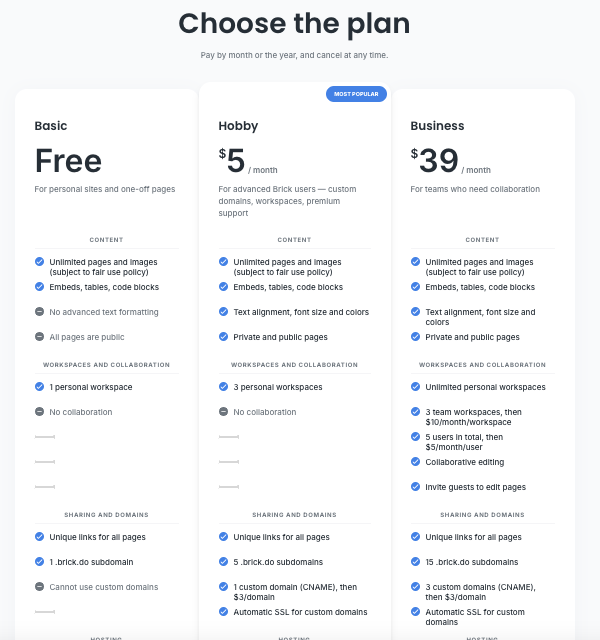 | 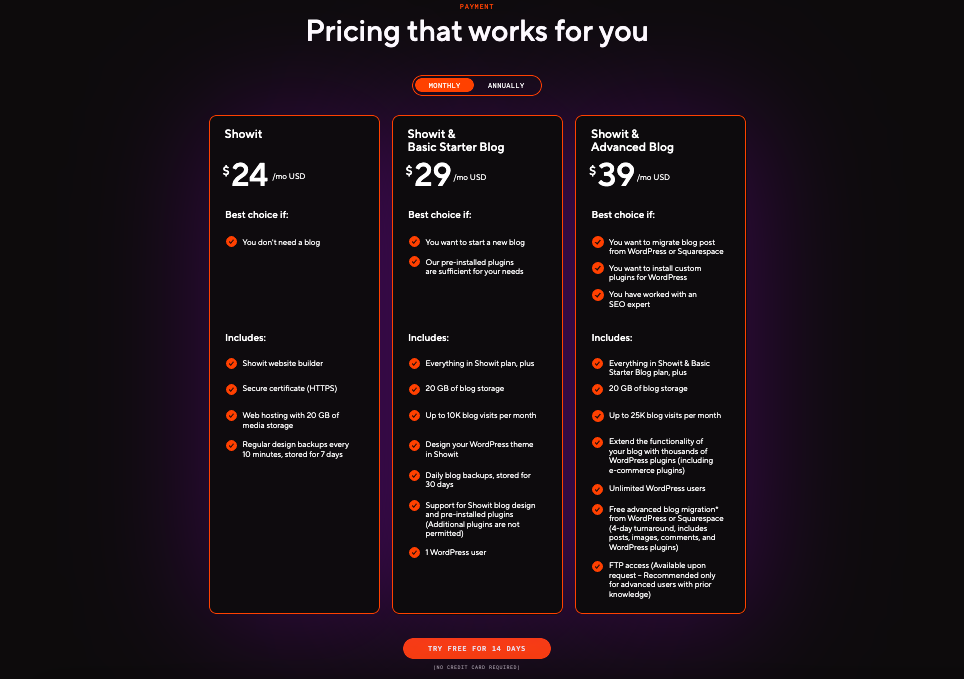 |  | Pricing information not available |
Brick, Showit, Unbounce vs VWO Deploy: Other Details
Organization Types supported |
|
|
|
|
|---|---|---|---|---|
Platforms Supported |
|
|
|
|
Modes of support |
|
|
|
|
API Support |
|
|
|
|
Get help choosing | Get help choosing |
Brick vs Showit vs Unbounce User Reviews & Rating Comparison
User Ratings | No reviews available for the product | No reviews available for the product | No reviews available for the product | |
|---|---|---|---|---|
Rating Distribution | No reviews available for this product | No reviews available for this product | No reviews available for this product | |
Spotsaas Editor’s POV generated by AI | What buyers like
Common complaints
| What buyers like
Common complaints
| Buyer sentiment Users generally praise Unbounce for its ease of use, powerful integrations, and effective A/B testing, though some find the feature set complex and the app marketplace limited. What buyers like
Common complaints
| What buyers like
Common complaints
|
Pros and Cons |
|
|
|
|
Positive Reviews | No reviews available for the product | No reviews available for the product | No reviews available for the product | No reviews available for the product |
Integrations
Integration with other apps | No Integration information available. | No Integration information available. | No Integration information available. |
|---|

Brick, Showit, Unbounce and VWO Deploy Customers
Customers | No Customers information available. | No Customers information available. |  Unbounce_customers_0  Unbounce_customers_1  Unbounce_customers_2 | No Customers information available. |
|---|
Media and Screenshots
Screenshots |  3 Screenshots | 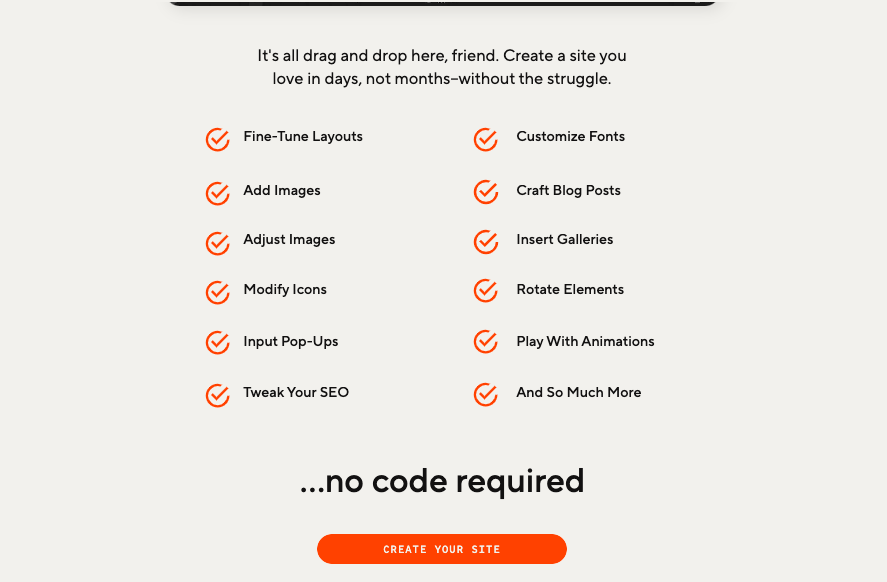 5 Screenshots |
|---|---|---|
Videos | No videos available. |  1 Videos |
Alternatives to Brick, Showit, Unbounce, VWO Deploy
Alternatives |
|---|





Add another option to compare side by side
Search by product name to compare pricing, fit, and buyer feedback in one view.Compare similar software options


Related Blogs and Articles for Website Builder Software
Disclaimer: This research has been collated from a variety of authoritative sources. We welcome your feedback at [email protected].
Frequently asked questions
- Which is better, Brick or Showit?
- The right choice depends on your team size, budget, and specific Website Builder Software needs.
- Do Brick and Showit offer a free trial?
- Showit offers a free trial. Brick does not.
- What is the starting price of Brick vs Showit?
- Brick starts at $5 /month. Showit starts at $19 /month.
- What are the top alternatives to Brick?
- Top alternatives to Brick include Unbounce, VWO Deploy, Simvoly, Zivro, Framer.
- What are the top alternatives to Showit?
- Top alternatives to Showit include Unbounce, VWO Deploy, Designmodo Startup Framework, POWR, Zoho Sites.
- What should I watch out for with Brick?
- Brick rates highly on the following: Brick makes the process of turning documents into public-facing web pages easier, reducing friction in content deployment. The common criticisms: users must rely on third-party services for page metrics, which adds complexity for those who want native data insights. It does not include Billing and Invoicing and Multi-Currency, which would need a separate product.
- What do users say about Showit?
- Two things to weigh on Showit. It does these well: the platform is designed to be simple and intuitive, making it accessible even for users without prior website-building experience, while still offering advanced customization for more skilled designers. These are the trade-offs: while the drag-and-drop editor is easy to use, first-time website builders may need time to understand all the customization options and available features. It does not cover Billing and Invoicing and Multi-Currency.
More Website Builder Software comparisons
Side by side breakdowns of the same products against other options in this category.