
Best Tax Software for Freelancers & Gig Workers in 2026 (Maximize Deductions & Save Time)
🚨 Why This Blog Matters
Freelancers and gig workers face complex tax challenges, from managing 1099 income to tracking deductions across multiple platforms. This blog cuts through the confusion to help you choose the best tax software in 2026 that simplifies filing, reduces stress, and maximizes your refund.
🧠 What You’ll Learn Here
Discover top-rated platforms with features like Self-Employment Tax Calculation, Automated Expense Tracking, Quarterly Tax Payment Support, 1099 Income Reporting, and Audit Protection. Compare tools like H&R Block, TaxSlayer, FreeTaxUSA, and Keeper Tax for the right fit.
🎯 Who Should Read This
Designed for freelancers, gig workers, consultants, side hustlers, and independent contractors who want to save time, avoid penalties, and confidently file taxes in 2026.
Freelancers and gig workers have a unique relationship with taxes. Unlike traditional employees who get their taxes automatically deducted from paychecks, self-employed individuals must manage everything themselves, tracking income, calculating deductions, and ensuring compliance with tax regulations.
This can feel overwhelming, especially when juggling multiple projects, clients, and payment platforms.
That’s where tax software designed for freelancers makes life easier. The right tool helps with accurate tax calculations, deduction tracking, and filing both federal and state taxes, all without the stress of manual calculations. Whether you’re a freelancer, consultant, content creator, or rideshare driver, choosing software that fits your needs can save time and maximize your tax savings.
This guide highlights the best tax software for freelancers and gig workers in 2026, focusing on features that simplify tax filing, reduce errors, and help you keep more of your hard-earned money. Whether you’re looking for an all-in-one solution, a budget-friendly option, or software with expert tax support, this list will help you make an informed choice.
Who Should Use This Guide (Freelancers, Gig Workers, and 1099 Earners)
✅ Freelancers, consultants, and independent contractors
✅ Gig workers, including rideshare drivers, delivery couriers, and online sellers
✅ Anyone earning 1099 income or needing to file a Schedule C
✅ Self-employed professionals looking for ways to maximize deductions and save time
Let’s explore the must-have features to look for when choosing tax software for self-employed professionals.
5 Must-Have Features in Tax Software for Freelancers & Independent Workers
Choosing the best tax software is essential for freelancers and gig workers to file taxes accurately, claim deductions, and escape IRS penalties. The following are five essential features to look for when selecting tax software for independent workers.
Self-Employment Tax Calculation
Freelancers pay both the employer and employee sides of Social Security and Medicare taxes, which amount to 15.3% of their net income. In contrast to W-2 employees who have these taxes withheld from their salaries, independent workers must compute and remit them themselves.
Expense & Deduction Tracking
One of the main benefits of tax software is that it can monitor deductible business expenses, which can reduce taxable income. Freelancers usually have various expenses, including home office expenses, internet and phone charges, travel expenses, and software subscription costs related to their business.
Quarterly Estimated Tax Payments
Because freelancers have no taxes withheld from their pay, they must make estimated tax payments to the IRS on a quarterly basis. The optimal tax software should have automatic estimated tax calculation by income and deductions, send timely reminders for impending due dates, and offer direct payment to the IRS.
Income Reporting for 1099 Forms
Unlike traditional employees who receive a single W-2 form, freelancers often receive multiple 1099-NEC or 1099-K forms from different clients and payment platforms. Managing and accurately reporting all sources of income can be challenging, and any mistakes may trigger IRS scrutiny.
Audit Support & IRS Assistance
Freelancers have a greater chance of being audited because they experience income fluctuations and claim deductions themselves. Having tax software that is equipped with audit assistance can add another level of protection. The best platforms have step-by-step advice to maintain compliance, professional review features to double-check accuracy, and direct IRS support in the event of an audit.
Top Tax Software for Freelancers & Gig Workers (2026 Review)
| Tax Software | Best For | Key Features |
|---|---|---|
| H&R Block Self-Employed | In-person + online support | Live tax expert assistance, easy import of 1099 forms |
| TaxSlayer Self-Employed | Affordable tax filing | Low-cost solution, all required IRS forms |
| FreeTaxUSA Self-Employed | Best free federal filing | Free federal returns, low-cost state returns |
| Keeper Tax | Best for automatic expense tracking | AI-powered tax write-offs, freelancer-friendly |
H&R Block: Best for Freelancers Who Want Online + In-Person Tax Help

H&R Block
- Pricing: Starts at $55
- Best For: In-person and virtual filing
H&R Block is Best For
Freelancers and gig workers are looking for tax preparation software that offers a balance of affordability, ease of use, and expert-assisted filing options.
Pricing & Fees of H&R Block
H&R Block offers a variety of tax filing options to accommodate different tax situations and preferences. Here’s an overview of their current offerings:
H&R Block Free Online
- Cost: $0 Federal, $0 State, $0 to File
- Best For: Simple tax situations
H&R Block Deluxe Online
- Starting Cost: $55 (State additional)
- Best For: Taxpayers with credits and deductions
Assisted Tax Preparation Services
- Starting Cost: $89 + additional state fee
- Best For: Individuals seeking professional assistance
(*Prices are subject to change and may vary based on promotions. State returns may incur additional fees. For the most current information, visit H&R Block’s official website.)
Overview of H&R Block
H&R Block is a trusted name in tax preparation. This offers both DIY tax software and expert-assisted services. The platform provides a guided experience with an intuitive interface. This helps users maximize deductions and file taxes accurately.
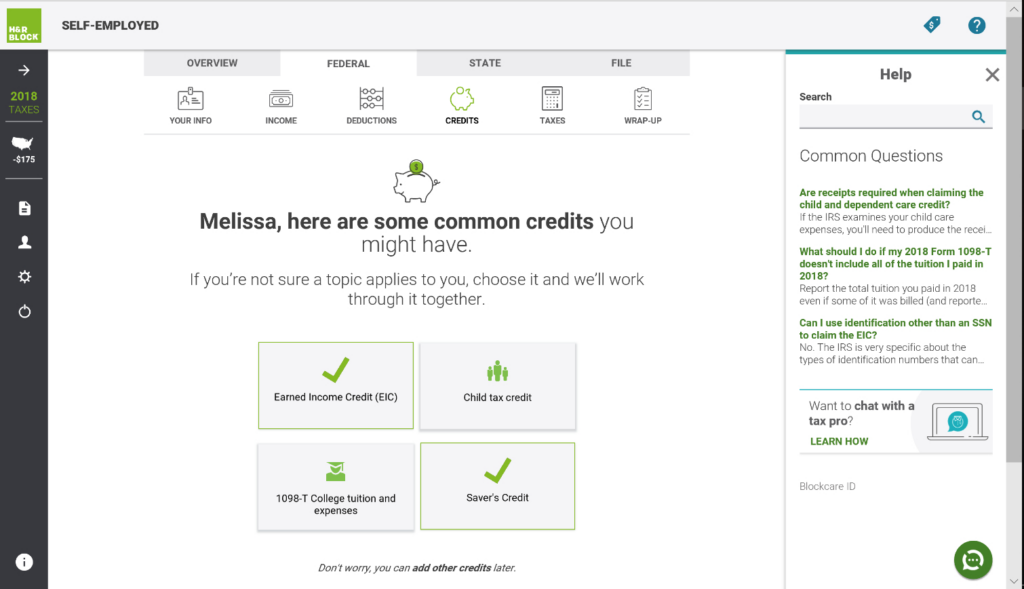
Users can choose between self-filing, expert review, or full-service tax preparation, depending on their needs. H&R Block also offers in-person tax assistance at physical locations. This makes it a flexible option for those who prefer professional support.
Why Choose H&R Block
H&R Block is known for its combination of affordability, ease of use, and access to expert tax help. Unlike some tax software that is purely online, H&R Block gives users the option to visit local offices for in-person assistance.
Key Features of H&R Block
Max refund guarantee
H&R Block helps users maximize refunds by searching for every eligible deduction and credit. The tax software continuously checks for overlooked tax-saving opportunities and provides real-time refund updates.
Step-by-step guidance
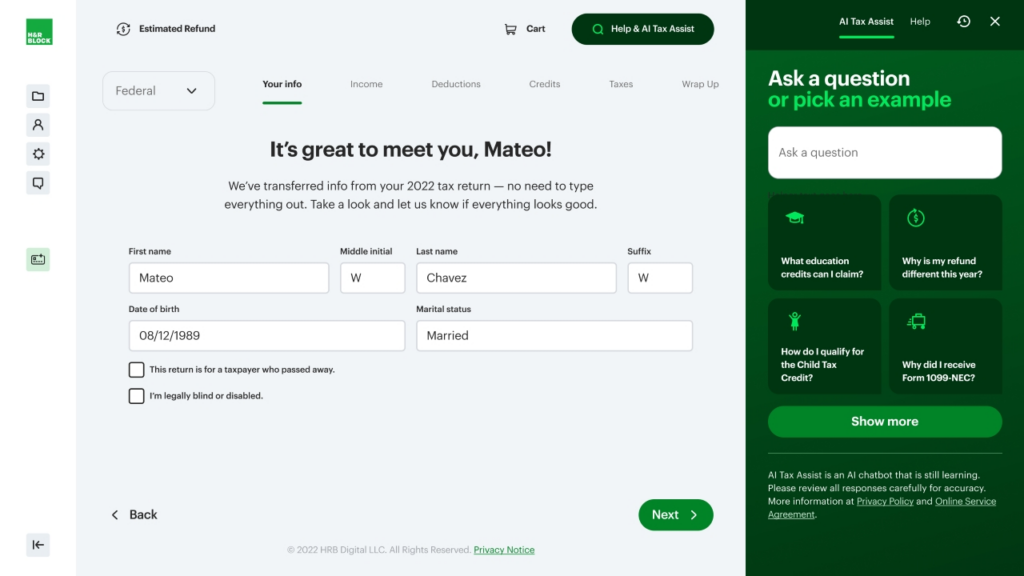
H&R Block is a tax filing software that simplifies with an intuitive, question-based process that guides users through their returns. The platform ensures accuracy by automatically selecting the correct tax forms based on user input.
Expert tax assistance
Users have access to tax professionals through live chat, expert reviews, and full-service tax filing software. Whether needing a quick answer or a professional to review a return before submission, H&R Block ensures that expert help is always available. In-person assistance is also an option at nationwide retail locations.
Integrations of H&R Block
- Payroll Integrations – ADP, Gusto, Paychex, QuickBooks Payroll, Paycor
- HR Software Integrations – BambooHR, Workday, Zenefits, Rippling
- Accounting & Financial Management Integrations – QuickBooks, Xero, NetSuite, Wave
- Investment & Banking Integrations – Robinhood, Coinbase, Fidelity, Charles Schwab
Customers of H&R Block
H&R Block serves a diverse clientele, including freelancers, self-employed professionals, and small business owners. In the fiscal year 2022, the company prepared 20.5 million U.S. tax returns, with 8.5 million clients utilizing their DIY products.
While specific client names are not publicly disclosed, H&R Block’s extensive network of tax professionals and complete service offerings make it a trusted choice for many taxpayers seeking reliable tax preparation assistance.
Pros & Cons of H&R Block
| Pros | Cons |
|---|---|
| Easy-to-use interface | Extra fees for advanced features |
| In-person & online filing options | Limited support for complex tax situations |
| Affordable pricing for basic plans | Upsells for additional services |
| Strong customer support | |
| Accurate tax calculations |
Final Thoughts
H&R Block is a solid choice for freelancers and gig workers who want easy-to-use tax software with the option for professional assistance. While premium features can add to the cost, the platform’s extensive support and refund optimization tools make it a valuable investment.
Its combination of online and in-person tax support, along with a strong accuracy guarantee, makes it a reliable option for those seeking a stress-free tax filing experience.
TaxSlayer: Best for Affordable, Full-Feature Tax Filing for Freelancers

TaxSlayer
- Pricing: Starts from $27.95
- Federal Filing: Starts at $0 – $59.95
- Best For: Freelancers and Gig Workers
TaxSlayer is Best For
TaxSlayer is a tax preparation software designed for freelancers and gig workers seeking an affordable and easy-to-use solution for filing their taxes. It offers a range of features to accommodate various tax situations. This ensures accuracy and maximizing refunds.
Pricing & Fees of TaxSlayer
TaxSlayer provides multiple pricing tiers based on the complexity of tax returns:
- Classic – $27.95 for all tax situations, covering all IRS forms, credits, and deductions.
- Premium – $49.95, includes all Classic features plus priority support, Ask a Tax Pro, and live chat.
- Self-Employed – $59.95, tailored for freelancers and business owners with additional support for 1099 and Schedule C filing.
State returns are an additional $42.95. Prices are subject to change and may vary based on promotions.
Overview of TaxSlayer
TaxSlayer simplifies the tax filing process with an intuitive interface that guides users through each step. It supports many tax situations, from simple W-2 income to complex self-employment income. This ensures users can accurately report their financial information.
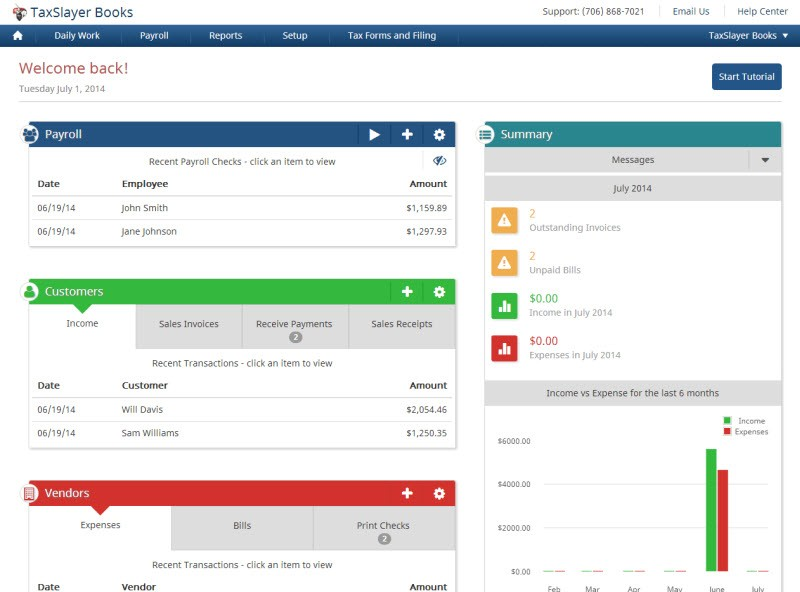
The platform offers various support options, including access to tax professionals, to assist users throughout the filing process.
Why I Choose TaxSlayer
TaxSlayer is known for its affordability and complete features. Unlike some tax software that charges extra for certain forms or schedules, TaxSlayer’s Classic edition includes all necessary forms for a flat fee.
The platform also offers strong support options, such as the Ask a Tax Pro feature. This provides users with access to tax professionals for personalized assistance. Its easy-to-use design and commitment to maximizing refunds make it a compelling choice for many taxpayers.
Key Features of TaxSlayer
Ask a Tax Pro for unlimited support
TaxSlayer offers access to tax professionals through its Ask a Tax Pro feature. This provides personalized guidance. Users can get answers to complex tax questions, ensuring accuracy and compliance with IRS rules.
Complete tax filing
TaxSlayer supports all major IRS forms and schedules. This makes it suitable for a variety of tax situations. Whether users have W-2 income, self-employment earnings, rental properties, or investments, the platform ensures they can file accurately.
Maximum refund guarantee
The platform helps users claim every deduction and credit they qualify for to maximize their refund. TaxSlayer guarantees that users will receive the maximum refund possible, or their filing fees will be refunded.
Integrations of TaxSlayer
TaxSlayer offers several integrations to enhance the tax preparation experience. Here’s a breakdown of its key integrations:
- Accounting & Financial Management Integrations – QuickBooks Online, TaxDome
- Tax Document Management – Form8949.com
Customers of TaxSlayer
TaxSlayer serves a diverse clientele, including individual taxpayers, self-employed professionals, and small business owners seeking efficient tax preparation solutions. While specific client names are not publicly disclosed, TaxSlayer has garnered positive feedback from numerous users.
Pros & Cons of TaxSlayer
| Pros | Cons |
|---|---|
| Affordable pricing for all plans | Limited features for complex returns |
| Easy-to-use interface | Extra fees for state filing |
| Free federal tax filing for simple returns | Fewer in-person support options |
| Strong customer support options | |
| Quick & accurate tax calculations |
Final Thoughts
TaxSlayer is an excellent option for freelancers and gig workers seeking affordable, complete, and easy-to-use tax preparation software. Its range of features, competitive pricing, and strong support options make it a strong contender in the tax software market.
While it may lack in-person support, its online resources and access to tax professionals provide ample assistance for most users.
FreeTaxUSA : Best Free Tax Software for 1099 Workers & Side Hustlers
FreeTaxUSA
- State Filing: $14.99 per state
- Federal Filing: Free
- Best For: Affordable and easy online tax filing
FreeTaxUSA is Best For
FreeTaxUSA is an online tax software designed for individuals and self-employed professionals looking for an affordable and straightforward way to file their taxes. It offers a full suite of tax filing features at a fraction of the cost of competitors while ensuring accuracy and maximizing refunds.
Pricing & Fees of FreeTaxUSA
FreeTaxUSA provides a transparent pricing structure:
- Federal Tax Return – $0.00 – All federal tax forms are free, regardless of complexity.
- State Tax Return – $14.99 per state return.
- Deluxe Edition – $7.99 – Includes priority support, unlimited amended returns, and audit assistance.
- Pro Support – $39.99 – Offers personalized advice from tax specialists via phone, live chat, or screen share.
(*Prices are subject to change and may vary based on promotions. For more details, visit the official pricing page)
Overview of FreeTaxUSA
FreeTaxUSA makes tax filing simple with a step-by-step interface that guides users through every section of their return. It supports various tax situations, from basic W-2 filings to more complex self-employment, investment, and rental income cases.
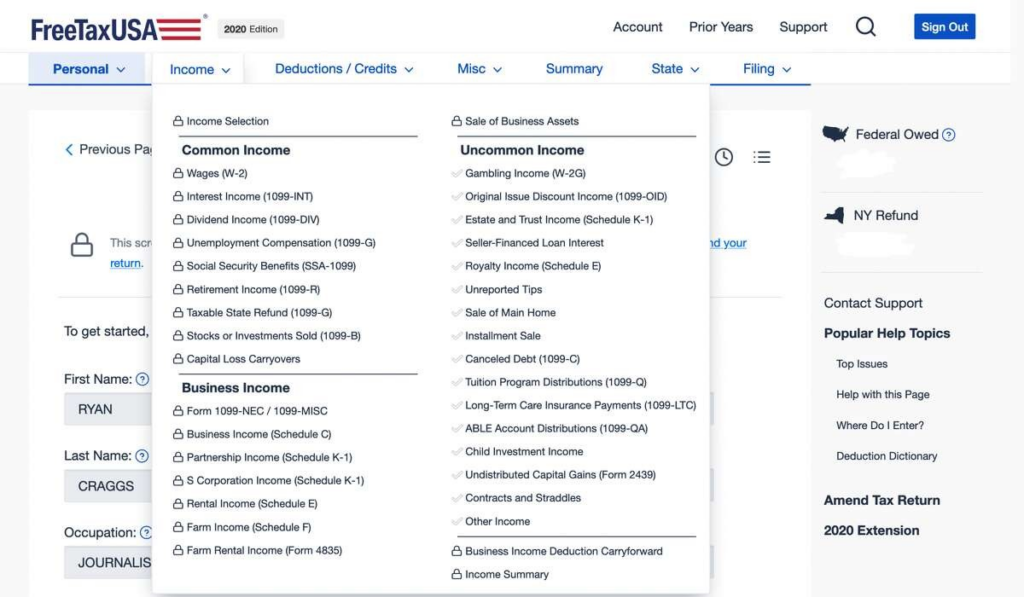
With strong features and affordable pricing, it provides an excellent alternative to higher-cost tax software without compromising accuracy. The platform ensures users can maximize deductions, track potential errors, and file their taxes efficiently, whether filing independently or with professional assistance.
Why Choose FreeTaxUSA
FreeTaxUSA is notable due to its cost-effectiveness and complete support for tax forms. Unlike some competitors that charge extra for additional forms, FreeTaxUSA allows all users to access federal filing for free, no matter their tax situation.
Additionally, users can upgrade to the Deluxe or Pro Support packages for personalized expert assistance. Its easy-to-use design and features, such as audit support and refund maximization tools, make it a strong choice for individuals and business owners alike.
Key Features of FreeTaxUSA
Complete tax filing
FreeTaxUSA supports all major IRS forms and schedules, ensuring users can file tax returns for various financial situations, including self-employment, investments, and rental income. Whether filing a basic return or reporting business deductions, the platform covers everything without additional costs.
Maximum refund guarantee
The platform helps users claim every eligible deduction and credit to ensure they receive the highest refund possible. FreeTaxUSA continuously scans for tax-saving opportunities based on income, expenses, and filing status.
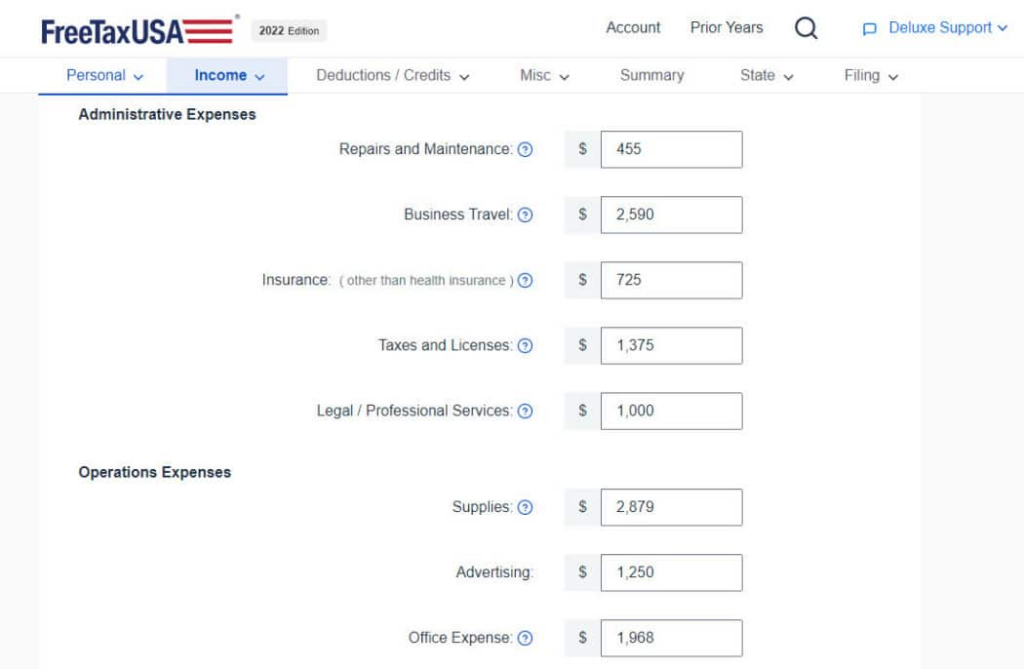
Additionally, the real-time refund tracker provides users with an instant estimate of their expected return. The tax software also includes a tax estimator tool. This allows users to plan ahead by forecasting their refund before they start the filing process.
Audit assistance
FreeTaxUSA includes audit assistance in its Deluxe package. This provides users with guidance in case of an IRS inquiry. This service offers step-by-step explanations of the audit process and instructions on how to respond effectively.
Integrations of FreeTaxUSA
FreeTaxUSA offers limited direct integrations but allows users to import prior year tax data from other tax software platforms. This makes it easier for returning users to transition smoothly.
Customers of FreeTaxUSA
FreeTaxUSA serves many individual taxpayers and self-employed professionals seeking affordable and efficient tax preparation solutions. While specific client names are not publicly disclosed, the platform has garnered positive feedback from numerous users.
Pros & Cons of FreeTaxUSA
| Pros | Cons |
|---|---|
| Free federal tax filing for all users | Limited customer support (no phone support in free version) |
| Low-cost state tax filing | Basic user interface compared to premium competitors |
| Supports all major tax forms and schedules | No direct W-2 or 1099 import from employers |
| Accuracy and maximum refund guarantee | |
| Affordable Deluxe edition with audit support |
Final Thoughts
FreeTaxUSA is an excellent choice for individuals and self-employed professionals looking for an affordable, feature-rich tax software. Its low-cost pricing, support for all major tax forms, and easy-to-use approach make it a standout option in the tax software market.
While it may lack some of the advanced integrations and high-end customer support of premium competitors, its focus on cost-effectiveness, accuracy, and audit support makes it a valuable option for anyone looking for a straightforward and budget-friendly tax filing experience.
Keeper Tax: Best Free Tax Software for 1099 Workers & Side Hustlers

Keeper Tax
- Pricing: Starts at $16 per month
- Best For: Affordable and easy online tax filing
Who is Keeper Tax Best For?
Keeper Tax is ideal for freelancers, independent contractors, and gig workers looking for an automated solution to track expenses and maximize deductions easily. With its AI-powered system, the platform automatically scans bank and credit card transactions, identifying write-offs that might otherwise be missed.
Pricing & Fees of Keeper Tax
Keeper Tax offers a subscription-based pricing model. This makes it a cost-effective option for self-employed individuals.
Keeper Tax Monthly Subscription
- Cost: Starts at $16 per month
- Best For: Freelancers and gig workers who want automated expense tracking with real-time tax savings calculations
Keeper Tax Annual Plan
- Cost: Varies based on promotions (billed annually)
- Best For: Self-employed individuals who want year-round tax support at a lower cost
Tax Filing with Keeper Tax
- Cost: Additional fee for tax filing assistance
- Best For: Users who want a simplified, all-in-one solution for filing and expense tracking
Prices are subject to change based on promotions. For the most up-to-date pricing, visit Keeper Tax’s official website.
Overview of Keeper Tax
Keeper Tax simplifies tax filing for freelancers and self-employed professionals by automating expense tracking and categorization. The platform connects to a user’s bank account and uses AI to detect potential tax deductions in real-time.
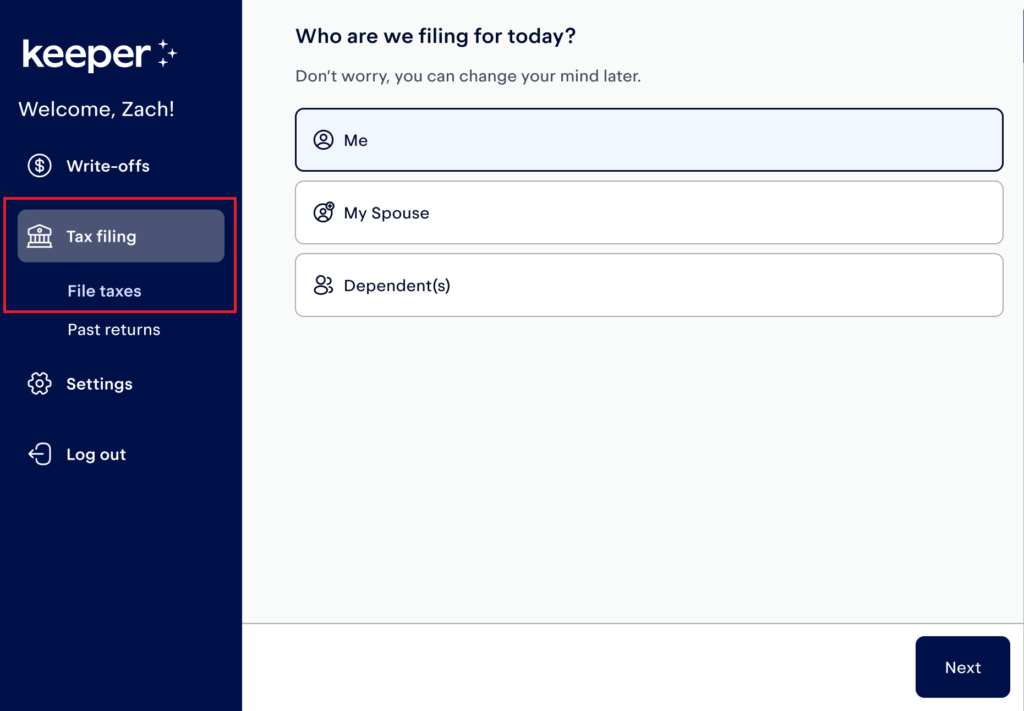
This hands-off approach makes it particularly useful for gig workers and freelancers with multiple income streams who want to minimize taxable income without extensive bookkeeping.
Why Choose Keeper Tax?
Keeper Tax is known for its AI-driven tax deduction tracking and mobile-friendly interface. This makes it one of the easiest tax tools for freelancers. Instead of manually sorting through transactions, users receive automated categorizations. This helps them claim every possible tax write-off.
Unlike standard tax software, Keeper Tax provides ongoing tax estimates. This allows users to plan ahead for quarterly tax payments and optimize deductions throughout the year.
Key Features of Keeper Tax
Automated Expense Tracking
Keeper Tax scans transactions from linked bank accounts and credit cards, identifying tax-deductible expenses automatically. Users receive alerts when a transaction qualifies as a write-off. This reduces the time spent on manual bookkeeping.
Real-Time Tax Savings Estimation
Unlike standard tax software that calculates tax liability only at the time of filing, Keeper Tax provides ongoing tax estimates. This allows freelancers to plan ahead for quarterly tax payments and optimize deductions throughout the year.
AI-Powered Deduction Finder
The AI categorizes expenses into standard IRS tax deduction categories, ensuring freelancers don’t miss out on common deductions like home office expenses, internet costs, software subscriptions, and business travel.
Smooth Tax Filing Integration
Keeper Tax offers optional tax filing services that integrate with its expense tracking system. This allows freelancers to file returns without manually inputting deductions.
Mobile-Friendly Platform
Designed for freelancers managing taxes on the go, Keeper Tax offers a mobile app that lets users track write-offs from their smartphones.
Integrations of Keeper Tax
Keeper Tax integrates with major financial platforms and payment processors. This ensures freelancers can easily sync their income and expenses.
- Banking & Payment Integrations – PayPal, Venmo, Stripe, Cash App, Square
- Gig Platform Integrations – Uber, Lyft, Instacart, DoorDash, Fiverr, Upwork
- Accounting Software Integrations – QuickBooks, FreshBooks, Wave
Customers of Keeper Tax
Keeper Tax primarily serves freelancers, gig workers, and self-employed professionals who need an automated way to track deductions. It is particularly beneficial for those who earn income from multiple gig platforms, have a high volume of business expenses, want a hands-off approach to tax tracking, and need real-time tax savings insights.
With thousands of users trusting Keeper Tax for automated deduction tracking, it has become a go-to solution for freelancers looking to reduce tax liability without the hassle of manual record-keeping.
| Pros | Cons |
|---|---|
| Automated tax deduction tracking | Subscription-based pricing |
| Real-time tax savings estimates | No free filing option |
| Mobile-friendly for freelancers | Not ideal for complex taxes |
| Integrates with gig platforms | |
| Saves time on manual tracking |
Final Thoughts on Keeper Tax
Keeper Tax is a practical choice for freelancers who want an automated way to track deductions without the hassle of manual bookkeeping. The AI-powered deduction finder, real-time tax savings insights, and smooth tax filing options make it an effective tool for self-employed individuals looking to reduce tax liability.
For freelancers who struggle with organizing receipts, missing deductions, or estimating quarterly taxes, Keeper Tax offers a simple, hands-off solution that maximizes tax savings year-round.
How to Choose the Right Tax Software (For Freelancers & Gig Workers)
The best tax software as a freelancer is determined by various factors such as cost, simplicity, audit protection, mobile access, and compatibility with gig platforms. The ideal one should make tax filing easy while being accurate and compliant with IRS rules.
| Criteria | Details |
|---|---|
| Budget-Friendly vs. Feature-Rich | Free tax software suits simple returns, while paid options offer advanced features like expense tracking, audit support, and state filing. |
| Ease of Use | Choose software with a easy-to-use interface, guided filing, and live support to simplify tax preparation. |
| Audit Protection | Freelancers at risk of audits should select software with IRS notice assistance, audit defense, and expert tax support. |
| Mobile Access | Mobile-friendly tax software lets freelancers manage taxes, track expenses, and file returns from anywhere. |
| Integration with Gig Platforms | Tax tools that sync with Uber, Fiverr, PayPal, and DoorDash simplify 1099 income reporting and reduce errors. |
Top 5 Tax Mistakes Freelancers Must Avoid in 2026
Freelancers and gig workers face unique tax challenges, and small errors can lead to costly penalties, missed deductions, or IRS scrutiny. Avoiding these common tax filing mistakes can help independent workers save money and stay compliant with tax laws.
Forgetting to Pay Quarterly Taxes
Unlike traditional employees, freelancers don’t have taxes automatically withheld from their earnings. Instead, they must estimate and pay taxes every quarter based on their income.
Not Tracking Expenses Properly
One of the biggest tax advantages of freelancing is the ability to deduct business expenses. However, failing to track expenses throughout the year can lead to missed deductions and higher taxable income.
Mixing Personal & Business Finances
Many freelancers make the mistake of using their personal bank accounts and credit cards for business transactions. This makes tax filing more complicated and raises red flags during an IRS audit.
Ignoring State & Local Taxes
Freelancers often focus on federal tax obligations but overlook state and local tax requirements. Some states impose additional self-employment taxes, while others have unique tax rules for independent contractors.
Skipping Health Insurance Deductions
Self-employed individuals can deduct health insurance premiums for themselves, their spouses, and dependents. Many freelancers miss this deduction, which can significantly lower taxable income.
Final Thoughts: Which Tax Software Is Right for Freelancers Like You?
The right tax software for freelancers and gig workers depends on what you need most. Some people care most about keeping costs low, others want expert guidance on hand, and others need the tool to plug directly into the financial software they already use. Your best pick comes down to your priority, whether that’s catching every deduction, keeping expense tracking simple, or filing federal and state returns without headaches.
Which Tax Software is Right for You?
• Best for Budget-Conscious Freelancers: Pick software with a free version or a low-cost plan that still covers the essentials, like 1099 filing and basic deduction tracking.
• Best for Maximizing Deductions: Look for a tool that offers real-time deduction tracking and categorization so you don’t leave savings on the table.
• Best for Expert Support: Some platforms give you live tax professional assistance, a good fit if you’d rather have a person walk you through complicated tax situations.
• Best for Easy Integration: If you already use QuickBooks, Wave, or FreshBooks, pick tax software that connects directly with it so your financial records stay in sync.
• Best for Mobile Access: If you manage your work on the go, look for software with a mobile app that’s easy to use, so you can check your tax data anytime.
Try Before You Commit
Most tax software providers offer free trials or demos, so freelancers can try out the platform before committing to it. Testing a tool first helps you confirm it actually fits your needs, whether you’re after straightforward tax filing or more detailed financial tracking.
Final Thoughts: Which Tax Software Is Right for Freelancers Like You?
Good tax software does more than get your return filed. It saves you time, cuts down on stress, and keeps you compliant with tax laws while helping you claim the deductions you’re owed. With this many solid options on the market, freelancers and gig workers can find a tool that makes tax season simpler and lets them get back to their actual work.
FAQs About Tax Software for Freelancers, Contractors & Side Hustlers
What is the best tax software for freelancers and gig workers?
Do freelancers need to file quarterly taxes?
Can tax software help maximize deductions for freelancers?
Is there free tax software for self-employed individuals?
What happens if I miss a quarterly tax payment?

- Independent picks for exactly what you just read about
- Matched to your team size & needs
- Vendors don't pay for placement
Step 1 of 4
How big is your team?
We tailor recommendations to companies your size.















Related Articles

Tax Software
Best Tax Software for Small Businesses in 2026
Continue reading →
Tax Software
TaxSlayer vs FreeTaxUSA (2026): Which Budget Tax Software Saves You More?
Continue reading →
401K Providers
IRS Tax Code Changes for 2026: Key Updates That Could Save or Cost You Thousands
Continue reading →

401K Providers
SECURE 2.0 Act Tax Implications for 2026: Key Changes That Affect Retirement & Tax Filing
Continue reading →