
Deciding between Miro and Mural for your team’s online collaboration can be a hard call. Both digital whiteboard tools support effective remote work, but they’re not interchangeable, and picking the wrong one can mean fighting the tool instead of using it day to day.
This article compares features, pricing, integrations, and stability to help you decide between them, based on how each tool actually behaves once a team starts using it day to day rather than just what the marketing pages promise.
Key Takeaways
- Miro and Mural are two popular whiteboard software tools used for online collaboration.
- Miro is known for an easy-to-use interface and useful features, making it a flexible, customizable option.
- Mural provides a friendly interface with rich visual elements, plus facilitation tools built for remote workshops.
- Both tools integrate with other work applications like Zoom, Slack, JIRA, and Trello.
Overview of Miro vs Mural
Miro and Mural are two popular whiteboard software tools built for online collaboration, each with a set of features aimed at supporting team communication and teamwork. Both grew out of the same shift toward remote and hybrid work, and both try to recreate what an in-person whiteboard session feels like, just with more structure baked in.
What is Miro?
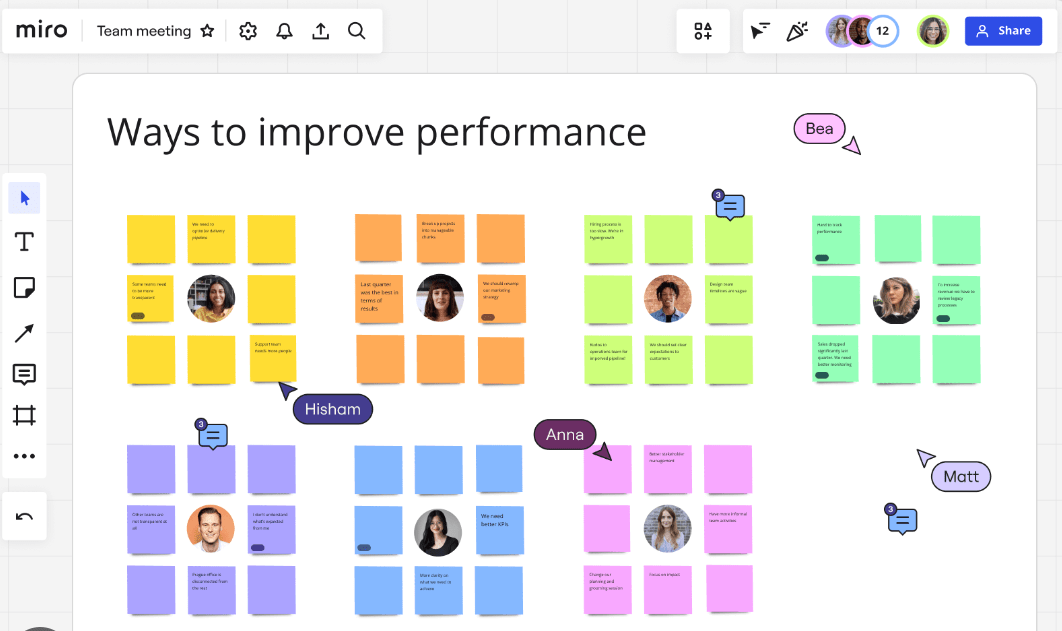
Miro is a tool teams use to work together on a digital whiteboard: drawing, writing, and adding elements like sticky notes that everyone on the team can see from their own computer.
Team members can make changes or add their own input directly on the board. Miro connects well with other tools teams already use, like Zoom and Microsoft Teams, and works for a range of use cases, from planning projects to brainstorming ideas to teaching something new.
Users tend to like Miro because it’s straightforward to pick up and comes with a useful set of features.
What is Mural?
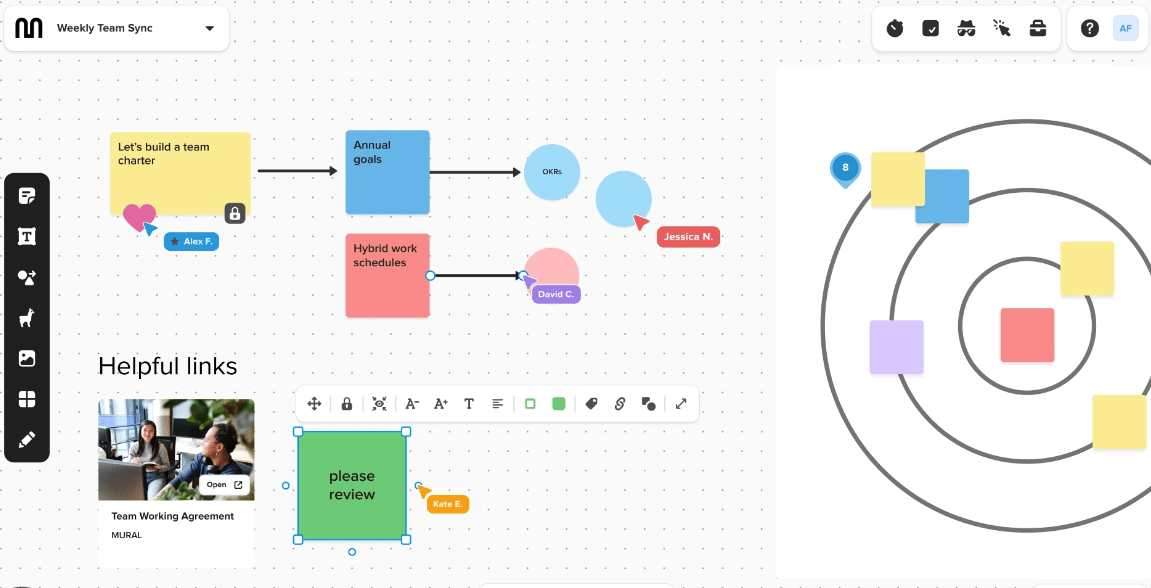
Mural is an online whiteboard tool that lets teams collaborate and share ideas both visually and interactively. It works as a digital facilitation tool, letting users build custom apps, templates, and layouts for their projects.
With Mural, you can organize information using icons, buttons, and other features to make collaboration more engaging. It also integrates with work tools like Zoom, which helps teams communicate effectively while working remotely.
Mural is known for its friendly interface and its ability to support group work and remote workshops. Overall, it gives teams a virtual space to come together and brainstorm ideas collaboratively.
Main features and pros and cons
Miro and Mural both offer a solid set of features that support team collaboration and creativity, but each has its own strengths and potential drawbacks. Here’s how the two compare on features, pros, and cons.
| Miro | Mural | |
|---|---|---|
| Main Features |
|
|
| Pros |
|
|
| Cons |
|
|
In short, both Miro and Mural help teams collaborate and innovate effectively, but your team’s specific needs and preferences will ultimately decide which is the better fit. Weigh integration capabilities, interface, and pricing when making the call.
Pricing and rating
Miro and Mural have different pricing structures and have picked up different ratings from users, so it’s worth looking at both the sticker price and what actual customers say once they’ve been using the tool for a while.
| Software | Pricing | User Rating |
|---|---|---|
| Miro | Miro offers a free plan and three premium plans: Team ($8 per user/month), Business ($16 per user/month), and Enterprise (custom pricing). | On platforms like Capterra and G2, Miro is often rated above 4.5 out of 5, with users praising its friendly interface and extensible integrations. |
| Mural | Mural offers a free plan and three premium plans: Team ($9.99 per user/month), Business ($17.99 per user/month), and Enterprise (custom pricing). | Mural also earns high ratings from users, often above 4.5 out of 5, with people praising its facilitation features and how smoothly it handles remote collaboration. |
This pricing and rating comparison should help potential users weigh which tool fits their needs and budget best, especially once team size starts to grow past a handful of seats.
Miro vs. Mural: Features Comparison
Here’s how layout tools, facilitation and workshops, integrations and extensibility, collaboration and communication, and stability and cost compare between Miro and Mural, to help you choose the best whiteboard software for your needs.
Read on for the full details.
Layout tools
Miro and Mural both offer a range of layout tools that let users organize ideas visually, which supports creative brainstorming and strategic planning sessions. Here’s how these tools compare:
| Aspect | Miro | Mural |
|---|---|---|
| Canvas Size | Miro gives users an infinite canvas, letting them expand their work area as needed. | Mural also provides an unlimited workspace to accommodate large projects and complex ideas. |
| Templates | Miro offers a broad range of templates covering everything from user story mapping to project planning. | Mural provides pre-built templates designed for specific use cases, such as product development and agile workflows. |
| Visual Elements | Miro lets users add visual elements like sticky notes, shapes, and images to their boards. | Mural also supports visual components, including icons, images, and sticky notes, to help users express ideas visually. |
| Customization | With Miro, users can customize boards, adding personalized elements and branding. | Mural also offers customization options, letting users tailor their workspace to their style. |
Both tools offer solid layout features. Miro tends to get praised for its friendly interface and layout capabilities, feeling more like a dedicated layout app, while Mural’s use-case-specific templates can simplify planning for certain kinds of projects.
Facilitation and workshops
Miro and Mural are both popular choices for facilitating group work and hosting remote workshops. Their interactive whiteboard features let teams collaborate and share ideas in real time, and both offer templates, icons, buttons, and layout options for building engaging visual presentations. Users can also integrate communication tools like Zoom to support collaboration during workshops. Which one to choose comes down to your team’s specific needs, since both provide solid facilitation capabilities for team collaboration.
Integrations and extensibility
Both Miro and Mural offer deep integrations with other work tools, letting users bring everything together in one visual hub. Miro’s API supports integration with over 100 tools, offering a lot of flexibility and customization, so you can connect your favorite apps and share information between them easily. Mural also provides integrations that support collaboration by connecting with popular work applications like Slack, JIRA, and Trello. With either platform, you can extend the functionality of your whiteboard software by connecting it to the tools you already use for work.
Collaboration and communication
Miro and Mural are both designed to support collaboration and communication among team members. With either tool, users can share ideas, collaborate on projects, and work together remotely. Both platforms support real-time collaboration, including the ability to leave comments and make edits in a shared workspace, plus chat functions to communicate while working on a project. These tools integrate well with communication apps like Zoom, making it easier for teams to connect. Whether Miro or Mural is the better fit ultimately depends on your personal preferences and your team’s or project’s specific needs.
Stability and cost
Both Miro and Mural are stable and reliable whiteboard tools, widely used by teams for online collaboration with minimal technical issues reported. On cost, it’s worth weighing your specific needs and budget: Miro offers pricing plans ranging from a free version up to higher tiers for larger teams or organizations, while Mural runs on a subscription-based model that can get costly for some users. Ultimately, the choice between stability and cost comes down to which features you need and how much you’re willing to invest in your whiteboard software.
Which Tool Should You Choose?
Choose the tool that lines up best with your specific needs and preferences to support collaboration and get the most out of your team. Read on for the key factors to weigh when deciding between Miro and Mural, since the right pick often comes down to how your team already runs meetings and workshops rather than a single standout feature.
Reasons to use Miro
Miro is a popular choice for whiteboard software because of its friendly interface and layout capabilities. It offers a wide range of tools and features that make it feel like a dedicated layout app. Its deep integrations with other work tools, including over 100 through its API, add flexibility and customization. Miro also works well for facilitating group work and hosting remote workshops, keeping collaboration smooth. Its collaboration features make it a solid choice for teams looking to strengthen their online collaboration.
Reasons to use Mural
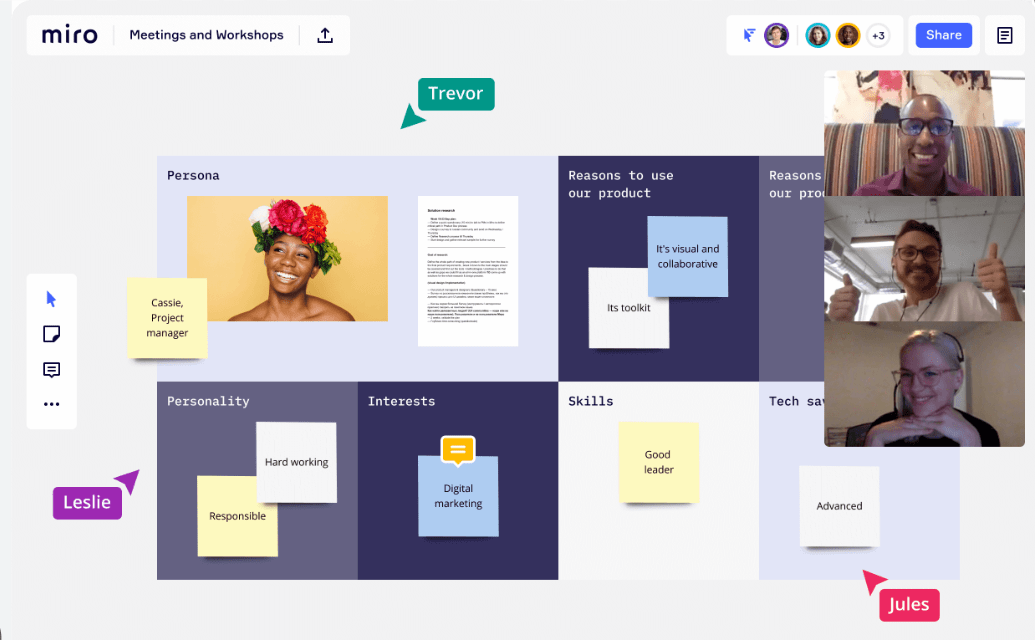
Mural is a strong whiteboard tool that offers several benefits for team collaboration and visual communication. Here are some reasons to consider it:
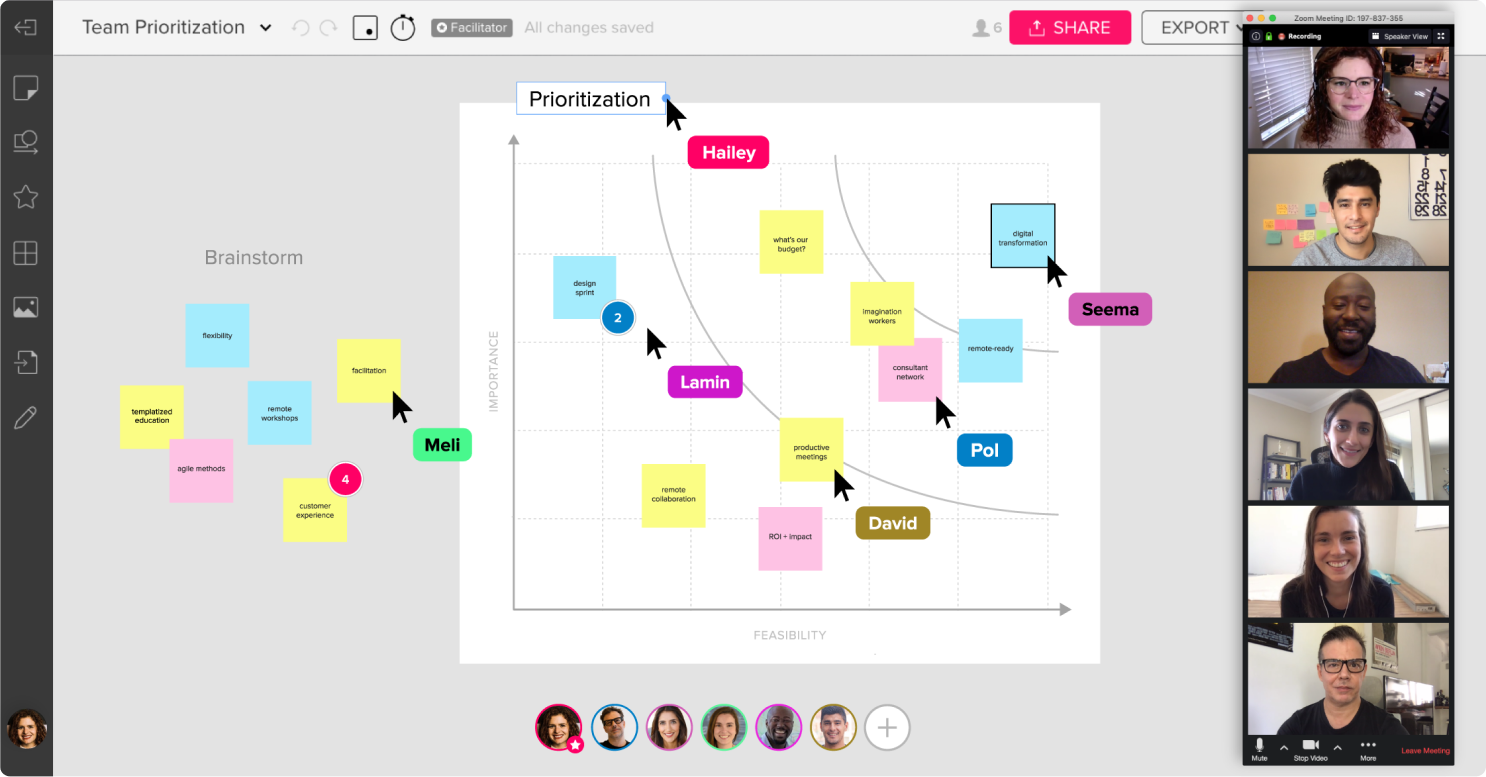
| Reason | Description |
|---|---|
| Intuitive Interface | Mural provides a friendly interface that makes it easy for teams to get started quickly and work together smoothly. |
| Flexible Customization | With Mural, you can customize boards and templates to suit your specific needs, giving you flexibility in designing collaborative spaces. |
| Rich Visual Elements | Mural offers a wide range of icons, buttons, and other visual elements that let users build engaging, interactive whiteboards. |
| Powerful Facilitation Tools | Mural provides tools for facilitating workshops and brainstorming sessions, such as voting options, timers, and sticky notes, making it a good fit for remote digital facilitation. |
| Extensive Integrations | Mural integrates with popular applications like Slack, Jira, and Trello, letting you connect your workflow across different platforms. |
| Real-time Collaboration | Mural enables real-time collaboration on whiteboard projects, so team members can work together at the same time from anywhere in the world. |
| Versatile Use Cases | Mural can be used for a wide range of purposes, such as project planning, design thinking, agile workflows, and user journey mapping. |
| Mobile Accessibility | With the mobile app version of Mural available on iOS devices, you can collaborate on the go and access your boards from anywhere at any time. |
| Team Engagement | Mural supports team engagement by giving everyone an interactive platform to contribute their ideas visually. |
| Security Features | Mural prioritizes data security with features like single sign-on (SSO) integration and end-to-end encryption to protect sensitive information shared on the platform. |
Final verdict
In the end, it comes down to your team’s specific needs and budget when choosing between Miro and Mural. Both tools offer solid collaboration features, deep integrations with other work tools, and support for remote work.
Miro stands out for its friendly interface and layout capabilities, feeling more like a dedicated layout app. Mural, on the other hand, is known for how well it supports group work and remote workshops.
Ultimately, the choice comes down to personal preference and what best suits your team or project goals going forward.
Miro Vs. Mural: Analysis by AI Tools
AI tools have analyzed and ranked Miro, giving some insight into its performance and how the market views it, which can be a useful second data point alongside direct user reviews.
Miro’s ranking
Miro ranks as one of the top whiteboard software tools for online collaboration. It’s highly regarded for its friendly interface and layout capabilities, which make it feel more like a dedicated layout app.
Miro’s API integration with over 100 tools gives it flexibility and customization that users appreciate. Combined with its deep integration capabilities and broad feature set, Miro has proven to be a valuable tool for teams looking to strengthen their remote collaboration.
Its popularity speaks to how well it facilitates group work and remote workshops. Whether you need a digital whiteboard for brainstorming or a visual communication platform, Miro stands out as a strong choice among whiteboard software tools.
Market opinions
The broader market view is that Miro and Mural are both well-regarded whiteboard software tools, considered leaders in online collaboration with a strong following among teams and businesses. Many users appreciate Miro’s friendly interface and layout capabilities, which make it feel like a dedicated layout app. Mural, on the other hand, gets praised for its versatility and ease of use in facilitating group work and remote workshops. Both tools offer solid collaboration features that can boost team productivity and creativity.
Conclusion
Miro and Mural are versatile whiteboard tools that offer strong features for online collaboration, making them popular choices among teams. Both provide a visual hub for sharing ideas, customizing layouts, and running remote workshops.
With their deep integrations and broad functionality, Miro and Mural are both valuable resources for supporting team collaboration in a remote-first world.
How Miro and Mural can benefit different types of users
Miro and Mural are whiteboard tools that suit different types of users. For designers, they offer layout capabilities and customizable apps that make it easier to present ideas visually.
Teams working on projects can use Miro or Mural to share ideas and collaborate in real time, even remotely. Both tools also integrate with communication platforms like Zoom, which strengthens team collaboration.
Both Miro and Mural give users a visual hub to bring their work tools together, which is convenient for project management. Whether you’re a designer or part of a team, both offer real value for online collaboration and visual communication.
Considerations for choosing Miro or Mural
When choosing between Miro and Mural, keep a few important considerations in mind, since getting these wrong up front usually means a harder switch later once boards and templates are already built out.
| Consideration | Description |
|---|---|
| Budget | Weigh the pricing plans of both Miro and Mural and choose the option that fits your budget. |
| Collaboration Needs | Consider the specific collaboration features your team or project requires. Evaluate whether Miro or Mural offers the functionality that best meets those needs. |
| Ease of Use | Think about how user-friendly and intuitive each tool is, including interface, layout capabilities, and customization options. |
| Integration Possibilities | Assess how well each tool integrates with the work tools you use regularly, and whether Miro’s 100+ tool integration is worth it for your workflow. |
| Design Preferences | Consider which tool’s design aesthetics your team prefers, including icons, buttons, and the overall visual communication platform. |
Other options like ClickUp
Beyond Miro and Mural, another option worth considering for whiteboard software is ClickUp. It’s a versatile project management platform that includes visual collaboration features, letting teams create tasks, set deadlines, and track progress all in one place.
ClickUp also provides a customizable layout where users can add boards and lists to organize their work visually. With its intuitive interface and user-friendly design, ClickUp makes it easy for teams to collaborate, share ideas, and stay organized.
While it’s not built specifically as a dedicated whiteboard tool like Miro or Mural, ClickUp can still be a viable option for teams looking for an all-in-one platform that combines project management with collaborative visualization features.
Other options like Whiteboard Fox
If Miro and Mural feel like more than your team actually needs, Whiteboard Fox is worth a look. It’s a free, no-account, browser-based whiteboard built for fast, frictionless sessions rather than structured workshops — open a tab, share a link, and start drawing.
It doesn’t have Miro’s template library or Mural’s facilitation tooling, so it’s not a fit for recurring, structured workshops. But for quick brainstorms, teaching, or one-off diagramming where setup time is the enemy, it’s a lighter option worth considering before committing to a heavier platform.
Final thoughts
Both Miro and Mural are excellent options for whiteboard software that help teams collaborate online. They share similar features, such as layout tools and remote digital whiteboards, that make them valuable for group work and workshops.
The choice between the two ultimately depends on personal preference and specific project needs. Miro is known for its friendly interface and flexibility with integrations, while Mural offers a smooth experience for visual collaboration.
Both tools offer customizable apps and deep integrations with other work tools, giving you a comprehensive solution for team collaboration. Whichever you choose, these whiteboard software options can strengthen your online collaboration experience.
Overall, Miro and Mural are trusted by many teams to support remote work and effective communication. With their versatile features and customizability, they offer real value across different industries and team sizes.
Weigh your specific requirements when choosing between the two so you land on the tool that actually fits your needs, rather than the one with the longer feature list. It’s also worth exploring alternatives like ClickUp or Whiteboard Fox if neither Miro nor Mural fully matches your preferences or requirements.
Frequently Asked Questions
What is the difference between Miro and Mural?
Miro and Mural are both whiteboard software, but they have different features and user interfaces.
Can I use Miro or Mural for free?
Both Miro and Mural offer free plans with limited features, as well as paid plans with more advanced options.
Which whiteboard software is easier to learn?
The ease of learning depends on personal preference and familiarity with similar tools. Some users may find one software more intuitive than the other.
Are there any collaborative features in Miro or Mural?
Yes, both Miro and Mural have collaborative features that allow multiple users to work together on a shared virtual whiteboard in real-time.
Which whiteboard software is better for remote teams?
Both Miro and Mural are popular choices for remote teams due to their collaborative nature, but it ultimately depends on the specific needs of your team.
Compare alternatives to the tools in this post

- Independent picks for exactly what you just read about
- Matched to your team size & needs
- Vendors don't pay for placement
Step 1 of 4
How big is your team?
We tailor recommendations to companies your size.















Related Articles
IT Management
Microsoft Intune Pricing 2026: Plan 1, Plan 2, Suite and What Microsoft 365 Includes
Continue reading →
IT Management
Best Remote Access Software 2026: 11 Tools Compared by Price
Continue reading →
IT Management
Splashtop Pricing 2026: Solo, Pro, Performance and SOS Costs
Continue reading →
IT Management
Atera Pricing 2026: Every Plan, Per-Technician Cost and What You’ll Pay
Continue reading →