
What is Linkello?
Linkello is a free browser-based tool that lets you start one-on-one audio or video calls instantly. No account, no downloads, no setup required. You simply create a link, share it, and both parties can connect directly through their web browser.
It is designed for people who want a fast, no-hassle way to communicate, whether for work, support, or personal use. Linkello is especially useful for remote collaboration and quick calls with clients, colleagues, or anyone who is not tech-savvy.
The platform is built on WebRTC technology, the same open standard that powers real-time communication across billions of browsers worldwide. According to Statista, the global video conferencing market surpassed $7.8 billion in 2026 as remote and hybrid work became standard for most knowledge workers. Linkello positions itself in this market not by competing on features, but by removing every possible barrier to starting a call.
Who Is Linkello For?
Linkello is built for people who want to skip the tech hassle and get straight to the conversation. If you need a simple, fast way to connect personally or professionally, this tool fits right in.
Freelancers
Freelancers often juggle multiple clients with different levels of tech comfort. Linkello helps speed up communication by allowing instant browser-based calls, so client projects move faster without the awkward setup steps. It is especially useful for first-time clients who may not be familiar with other tools. No need to explain how to join — just send the link and start talking.
Teachers
Whether you are doing virtual tutoring or quick parent-teacher check-ins, Linkello keeps it simple. You do not need a shared platform or complicated scheduling — just send a link and start teaching. This is a great option for ad-hoc lessons or quick feedback sessions, especially when working with young students or busy parents who value time and simplicity.
Remote Professionals
For remote teams, Linkello is great for those unplanned moments when a quick face-to-face is better than a Slack message. It does not replace full team meetings but fills the gap for spontaneous, productive touchpoints. Because it runs in any browser, there is no need to worry about compatibility, making it perfect for teams using a mix of devices or operating systems.
Customer Support Teams
Support teams can use Linkello to instantly jump on a call with a customer who needs hands-on help. There is no need to walk users through downloading anything, which reduces friction and gets problems solved faster. According to Forbes, 86% of remote workers say video calls are essential for maintaining effective team collaboration and client relationships. For companies that value a personal, human touch, Linkello removes the tech barriers that often delay support interactions.
Families and Seniors
Some tools are just too complicated for casual use. Linkello is perfect for seniors or anyone who just wants to click a link and see a familiar face. It brings people together without the usual tech stress or setup steps. This makes it especially helpful for checking in with parents or grandparents, where ease of use is more important than extra features.
Key Features of Linkello
Linkello is simple on the surface, but every feature is designed to remove barriers and make communication smoother. Whether you are in a rush, dealing with someone non-technical, or just want a stress-free call, here is what makes it stand out.
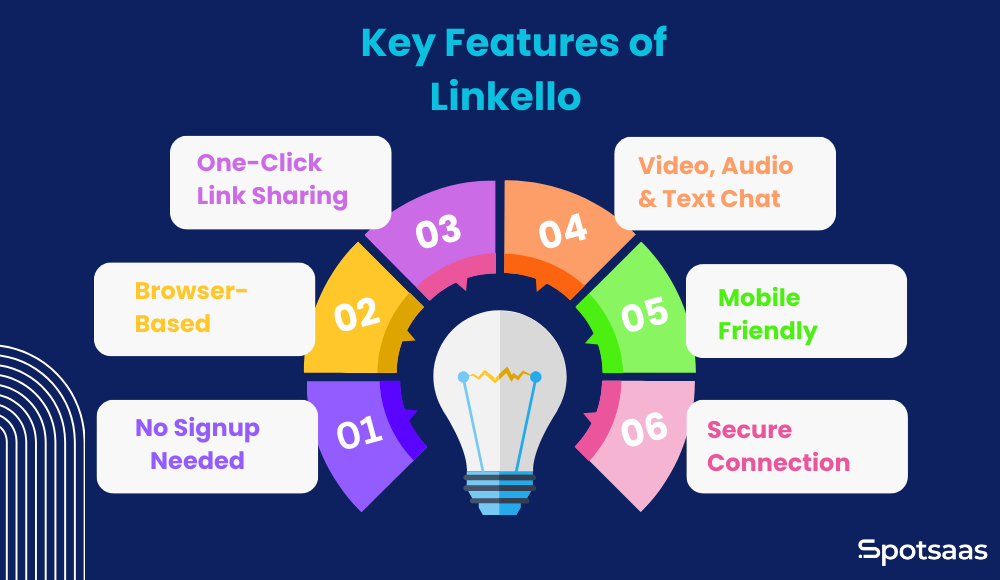
No Signup Needed
You do not need to create an account, remember a password, or go through verification steps to use Linkello. It is ready the moment you are. This saves time, reduces resistance from first-time users, and makes it ideal for quick, one-off calls. It is especially useful in professional settings where you are working with new clients or external contacts who do not want to register just to talk.
Browser-Based
Because it works entirely in your web browser, there is no installation or setup involved. That means fewer compatibility issues, no app updates, and no worries about system requirements. This makes it reliable on both personal and shared devices and especially useful in environments where downloads are restricted — like schools, offices, or public computers.
One-Click Link Sharing
Creating and sharing a call is as easy as clicking a button. A unique call link is generated instantly, and you can send it via email, text, or chat. There is no scheduling, no invite codes, and no waiting room confusion. This makes it great for spontaneous conversations, quick team syncs, or last-minute support calls when you need to move fast.
Video, Audio and Text Chat
Linkello supports clear video and audio communication, plus a simple chat feature built into the same window. This flexibility allows you to adapt in real time — whether you want a face-to-face talk, a voice-only call, or to type messages during the conversation. It is useful when one person has mic or camera issues, or if you want to drop a link or quick note mid-call.
Mobile Friendly
Linkello works on smartphones and tablets without needing to download an app. That means you or the person you are calling can join from wherever you are — whether you are working remotely, on the move, or helping someone who only has access to a mobile device. It supports Safari 11+ on iOS and Chrome or Firefox on Android.
Secure Peer-to-Peer Connection
Linkello uses peer-to-peer communication built on WebRTC, which means your call data does not pass through central servers. This adds an extra layer of privacy and minimizes the risk of data being stored or intercepted. It is a solid choice for anyone who values secure, private conversations — whether you are handling sensitive client information or just want peace of mind. WebRTC itself is used in over 5 billion devices globally according to the WebRTC project documentation.
Screen Sharing
Linkello now supports screen sharing, a feature many users requested. This opens up more use cases like showing a document, giving a product walkthrough, or presenting something visually in real time. While the platform is still designed for one-on-one calls, screen sharing makes it far more useful for things like client demos, support calls, or virtual tutoring sessions.
Secure Document Exchange
You can now share files securely during a Linkello call. This is helpful when you want to send over a proposal, share images, or provide documents while speaking. The exchange is encrypted and private, which gives peace of mind — especially for freelancers, consultants, or professionals working with sensitive information.
Benefits of Using Linkello
Linkello is not trying to be the most feature-packed video tool — it is built to be the most frictionless. Its biggest strength lies in how easy it is to start a conversation. For anyone who values speed, simplicity, and accessibility in remote communication, these are the core benefits.
| Benefit | What It Means |
|---|---|
| No Login Required | Start a call without creating an account. Saves time and avoids login hassles for you and your guests. |
| Instant Access | Create a call link and join within seconds. No downloads, no waiting — just fast communication. |
| Easy for Anyone | Simple interface that even non-tech users can understand. No training or instructions needed. |
| Cross-Device Support | Works on phones, tablets, and computers. Connect from wherever you are, using whatever device you have. |
| Privacy-Friendly | Peer-to-peer WebRTC connection means no server-side data storage. No tracking, no account data. |
| Perfect for Quick Calls | Great for check-ins, support calls, or short meetings where speed and simplicity are key. |
Linkello vs Other Video Call Tools
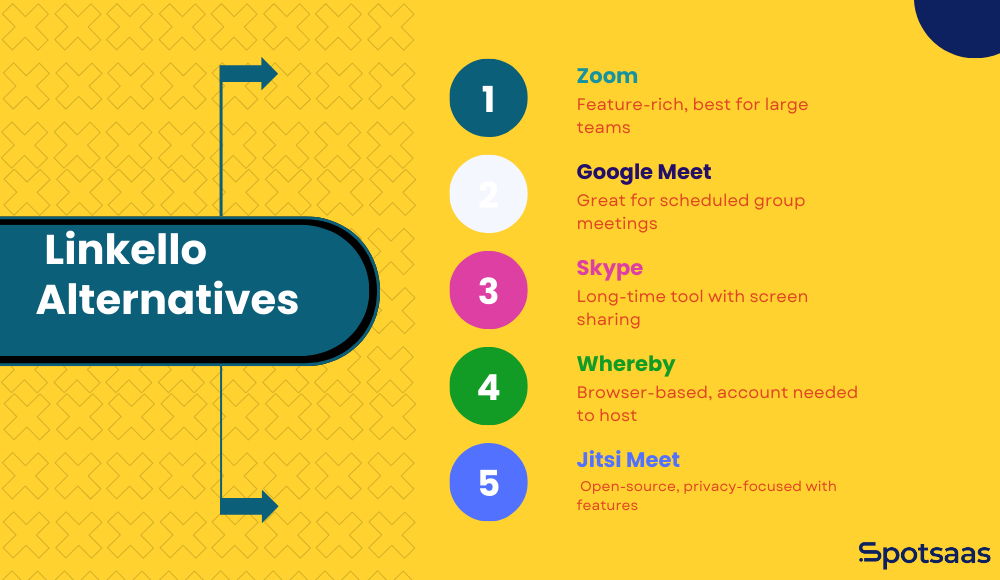
Not all video call tools are built for speed and simplicity. While platforms like Zoom, Google Meet, and Skype pack in many more features, they often come with logins, downloads, and extra steps. Linkello takes a different path: instant one-on-one calls with no signups and no software to install. Here is how it stacks up against the main alternatives.
Linkello vs Zoom
Zoom is the go-to platform for many businesses, schools, and remote teams. It offers screen sharing, breakout rooms, background filters, and recording. But with all that power comes complexity. You need to create an account, download the app, and update it regularly. For someone just trying to have a quick one-on-one conversation, it can feel like overkill. Linkello strips all that away — ideal for people who do not need a full meeting suite, just a fast, private way to talk.
Linkello vs Google Meet
Google Meet is tightly integrated with Gmail and Google Calendar, which is useful for anyone already in the Google ecosystem. However, joining a call often requires signing in or navigating through several clicks. Linkello does not require a login or calendar integration — generate a link and you are connected right away. It is especially useful when talking to someone outside your usual team or helping someone who is not tech savvy.
Linkello vs Skype
Skype has been around for years and is known for both personal and professional use. But Skype requires you to create an account, download software, and deal with occasional UI complexity. Linkello is much more direct. There is nothing to install, no username or password to remember, and no contact list to manage. Just send a link and start the call.
Linkello vs Whereby
Whereby is a browser-based video call platform similar in spirit to Linkello. It does not require downloads, and it is relatively easy to use. However, it still requires you to sign up for an account if you want to host a meeting. Linkello goes even lighter — no signup at all. It is ready the moment you land on the site.
Linkello vs Jitsi Meet
Jitsi Meet is an open-source video conferencing tool that is also browser-based and does not require signup. It supports group calls, screen sharing, and even livestreaming. However, the interface can be more technical and the experience can vary depending on the server instance being used. Linkello simplifies this further with a consistent, extremely user-friendly experience. Jitsi Meet is better if you want more flexibility; Linkello is better if you want zero complications.
| Tool | Free to Use | Requires Signup | Easy for Beginners | Screen Sharing | Group Calls |
|---|---|---|---|---|---|
| Linkello | ✓ Yes | ✗ No | ✓ Very Easy | ✓ Yes (added 2026) | ✗ No |
| Zoom | ⚠ Basic only | ✓ Yes | ⚠ Medium | ✓ Yes | ✓ Yes |
| Google Meet | ⚠ Basic only | ✓ Yes (Google account) | ⚠ Medium | ✓ Yes | ✓ Yes |
| Whereby | ⚠ Basic only | ✓ Yes | ✓ Easy | ✓ Yes | ⚠ Limited |
| Jitsi Meet | ✓ Yes | ✗ No | ✓ Easy | ✓ Yes | ✓ Yes |
| Skype | ✓ Yes | ✓ Yes | ⚠ Medium | ✓ Yes | ✓ Yes |
Linkello Office: The Paid Plan
For professionals and business teams who use Linkello regularly, Linkello Office is the paid upgrade that removes the limitations of the free tier. Here is what it adds.
Pricing shown is approximate; check vendor websites for current rates.
Permanent and Unlimited Links
Standard Linkello links expire after 24 hours. Linkello Office users can create permanent call links that never expire. This is perfect if you have recurring meetings or want a dedicated room link you can reuse. It saves time and gives clients or collaborators a consistent place to meet you online — no new link generation required each time.
Custom Branding
Linkello Office lets you customize the look of your call interface. You can match your brand colors, logo, or theme — helping you present a more professional appearance during client calls. It is a subtle upgrade that adds credibility and consistency for customer-facing teams.
Enhanced Camera Interface and File Sharing
Linkello Office also includes an improved video experience with a more stable and responsive camera interface, plus the ability to exchange files securely during calls. For freelancers, consultants, or client-service professionals, this makes the platform substantially more useful than the free tier for ongoing business communication.
Limitations to Keep in Mind
Linkello keeps things intentionally light. That minimalism is its biggest strength, but it also means there are clear trade-offs. If you need advanced meeting features or team collaboration tools, it is worth knowing where Linkello draws the line before committing to it as your primary video tool.
One-on-One Calls Only
Linkello is designed strictly for one-on-one video or audio calls. If you are planning to host meetings with multiple participants, it will not be the right fit. There is no group call support, even for small teams. For personal check-ins, solo client calls, or quick remote troubleshooting sessions, its focused design keeps the whole experience smooth and direct.
No Calendar or Scheduling Integrations
Linkello does not connect with your calendar or any productivity apps. You will not find reminders, meeting links automatically generated in calendar invites, or integration with platforms like Google Workspace or Microsoft Teams. It is meant for spontaneous, one-off calls — when you just need to talk right now.
Links Expire After 24 Hours (Free Plan)
Free plan links expire after 24 hours. If you are sending a call link in advance for a meeting scheduled tomorrow or later in the week, you will need to generate a new link closer to the time. Linkello Office removes this limitation with permanent links.
Not Built for Ongoing Team Collaboration
There are no persistent rooms, shared chat histories, or team spaces. Linkello is not meant to be part of your long-term remote workflow or replace a full collaboration stack. If you need to manage a team or work within shared projects, you will want tools designed for daily collaboration. Linkello’s value lies in its minimalism — one conversation at a time, no clutter, no maintenance.
Is Linkello Safe?
This is one of the most common questions about Linkello and the answer is yes — for most use cases. Linkello is built on WebRTC, a peer-to-peer communication protocol that is open-source, widely audited, and used across billions of devices. Call data travels directly between participants rather than through a central server, which significantly limits exposure to interception or data collection.
No account is required, so no personal data is stored on Linkello’s servers by default. Links expire, calls are not recorded, and there is no persistent call history. For general-purpose professional and personal calls, Linkello is considered safe. For highly sensitive regulatory environments such as healthcare or legal (where HIPAA or similar compliance is required), users should verify whether Linkello’s privacy terms meet their specific requirements before use.
Conclusion
Linkello is not trying to compete with Zoom or Google Meet — and that is exactly what makes it useful. It is built for people who want to start a conversation without jumping through hoops. No logins. No downloads. No tech confusion.
If you are hosting a quick client call, helping a family member connect, or solving a problem in real time, Linkello gets out of the way so you can just talk. It is ideal for one-on-one communication when simplicity and speed matter more than features. For anyone who wants recurring links, custom branding, or file sharing, Linkello Office is a practical paid upgrade worth evaluating.
Frequently Asked Questions
What is Linkello?
Linkello is a free browser-based tool for one-on-one audio and video calls. It requires no account, no download, and no app installation. You create a link, share it with the other person, and both parties connect directly through their web browser. It supports video, audio, and text chat within the same call window.
Is Linkello really free to use?
Yes, Linkello is completely free for one-on-one audio and video calls. No signup or downloads are required for the free version. Links expire after 24 hours on the free plan. Linkello Office is a paid upgrade that adds permanent links, custom branding, and enhanced business features.
Is Linkello safe to use?
Yes. Linkello uses WebRTC peer-to-peer technology, which means call data travels directly between participants rather than through a central server. No account is required, so no personal data is stored. Calls are not recorded and no persistent history is maintained. For most professional and personal use cases, Linkello is considered safe and private.
Can I use Linkello for group meetings?
No. Linkello is designed specifically for one-on-one calls. It does not support group video conferencing, even for small teams. If you need group calls, alternatives like Zoom, Google Meet, or Jitsi Meet are better options.
Does Linkello work on mobile devices?
Yes. You can start or join a Linkello call directly from your mobile browser without installing anything. It works on iOS using Safari 11 or later, and on Android using Chrome or Firefox. No app download is required on either platform.
Does Linkello support screen sharing?
Yes. Linkello added screen sharing capability in a recent update. This allows you to share your screen during a one-on-one call, making it useful for client demos, walkthroughs, support calls, and virtual tutoring sessions in addition to standard video calls.
What is the difference between Linkello and Linkello Office?
The free version of Linkello provides one-on-one audio and video calls with links that expire after 24 hours. Linkello Office is the paid plan that adds permanent reusable links, custom branding and interface theming, enhanced camera quality, and secure document exchange during calls. It is designed for professionals and client-facing business teams who need a more polished, consistent experience.
How long do Linkello links last?
Free Linkello call links expire after 24 hours. If you need a link that does not expire, Linkello Office users can create permanent links that can be reused indefinitely. This is useful for recurring meetings or sending a link to clients in advance.
What are the best Linkello alternatives?
The best Linkello alternatives include Jitsi Meet (free, browser-based, supports group calls and screen sharing), Whereby (browser-based, easy to use, requires signup for hosting), Google Meet (free with Google account, supports groups and screen sharing), and Zoom (feature-rich, requires download and account). Linkello is the simplest of these with zero signup requirements.
Does Linkello store my call data?
No. Linkello uses peer-to-peer WebRTC connections, meaning call data travels directly between participants and is not routed through or stored on Linkello servers. No account is required, so no personal data is collected by default. Calls are not recorded unless you use separate recording software on your own device.
Can I use Linkello without the internet?
No. Linkello requires an active internet connection to function. It is a browser-based communication tool that relies on WebRTC for peer-to-peer connectivity. Both participants need a stable internet connection for a clear call.
Is Linkello useful for customer support teams?
Yes. Customer support teams use Linkello to instantly jump on calls with customers who need hands-on help. Because no download or signup is required, customers can join immediately from any browser. This reduces friction, speeds up resolution, and provides a more personal support experience compared to email or chat.
How does Linkello work?
You enter your email address on Linkello’s site and it generates a single-use call link. Share that link with the other person and you both join straight from a browser, with no account, download, or installed app. The link covers one-to-one audio or video and expires after 24 hours.
Can someone watch my video call?
Linkello routes calls peer-to-peer over WebRTC, so audio and video travel directly between the two browsers instead of sitting on a central server. That design limits who could intercept or store a call. Anyone holding the link can join, though, so treat the link itself as the credential.
Compare alternatives to the tools in this post

- Independent picks for exactly what you just read about
- Matched to your team size & needs
- Vendors don't pay for placement
Step 1 of 4
How big is your team?
We tailor recommendations to companies your size.















Related Articles
AI Software
Fireflies vs Otter 2026: Pricing, Limits and Which to Pick
Continue reading →
AI Software
7 Best AI Meeting Assistants for Teams (2026)
Continue reading →
SaaS Buying Guides
Best Podcast Hosting Platforms in 2026: 9 Hosts Compared by Price
Continue reading →

Video Conferencing
Best Video Conferencing Software Platforms: Top 5 Picks for 2026
Continue reading →