
Questys Capture vs ClipDrop Comparison

Questys Capture
Starting at Contact for pricing
- Free Trial
- Large Enterprises
- Medium Business
Questys Capture is an easy-to-use data entry for desktop and mobile devices that allows to manage and record business and personal contacts and transactions, electronic books and more. Using the Q Crew Module, more than…

ClipDrop
Starting at $22 /month
- Individuals
- Medium Business
ClipDrop is a browser-based AI-powered visual editing platform designed to simplify complex image tasks for creatives, marketers, ecommerce teams, real estate professionals, and developers. The platform offers an intuiti…
Questys Capture vs ClipDrop — at a glance
| Feature | Questys Capture | ClipDrop |
|---|---|---|
| Rating | — | — |
| Reviews | — | — |
| Starting price | Contact for pricing | $22 /month |
| Free trial | Yes | No |
| Free version | No | No |
| Best for | Large Enterprises, Medium Business, Small Business | Individuals, Medium Business, Small Business |
| Category | Workflow Automation Software | AI Image Generators |
| Platforms | SaaS/Web/Cloud | SaaS/Web/Cloud, Mobile - Android, Mobile - iOS, Installed - Windows, Installed - Mac |
| API | — | — |
| Support modes | Business Hours, Online | Online |
| Certifications | — | GDPR |
| Data residency | US | — |
Key differences between Questys Capture and ClipDrop
- Pricing: ClipDrop starts at $22 /month. Questys Capture pricing is not publicly listed.
- Free trial: Questys Capture offers a free trial; ClipDrop does not.
- Target audience: Questys Capture is built for Large Enterprises and Medium Business, while ClipDrop targets Individuals and Medium Business.
- Deployment: Questys Capture supports SaaS/Web/Cloud; ClipDrop supports SaaS/Web/Cloud, Mobile - Android, Mobile - iOS, Installed - Windows, Installed - Mac.
Questys Capture vs ClipDrop — find the better fit before you commit.
Which tool fits your team best
Which is actually cheaper for your team size
Where each product wins, per real buyers
Most Workflow Automation Software tools look identical on paper. This comparison cuts to the differences that matter — pricing structure, team fit, and what real buyers found after signing up.
Biggest differences
Features
Pricing
Buying details
Security
Buyer feedback
Integrations
Product tour
Other options
Talk to an expert Talk to an expert | Talk to an expert Talk to an expert |
Free PDF comparison
Download this Questys Capture vs ClipDrop comparison
Get the full side-by-side as a PDF — these picks plus the top Workflow Automation Software tools, with verified ratings, pricing and features.
- Side-by-side on pricing, features & ratings
- Plus the category top 10, scored & ranked
- Emailed to you — no on-screen download
No file downloads on screen — we email it to you. One-click unsubscribe anytime.
Questys Capture vs ClipDrop: Biggest differences
Start here before you go deeper into features.
Best for streamlined multi-user document capture without barcode needs.
- You need simple, efficient document digitization with advanced OCR accuracy.
- Your team requires simultaneous multi-user access via the Q Crew Module.
- You want to avoid costs of barcode equipment and paper labels.
- Your organization requires integrated barcode or label printing capabilities.
- You need highly customizable or complex workflow automation features.
Best for quick, AI-powered image edits without advanced design skills.
- You need fast background removal and object cleanup for marketing or e-commerce visuals.
- You want an easy browser-based tool for resizing and upscaling images across platforms.
- Your team lacks advanced design expertise but requires professional-quality image edits.
- You require advanced layering, masking, or vector editing capabilities for complex designs.
- You need offline editing or have unreliable internet connectivity.
Questys Capture: Best for streamlined multi-user document capture without barcode needs. ClipDrop: Best for quick, AI-powered image edits without advanced design skills.
Description | Questys Capture is an easy-to-use data entry for desktop and mobile devices that allows to manage and record business and personal contacts and transactions, electronic books and more. ... Read More about Questys Capture | ClipDrop is a browser-based AI-powered visual editing platform designed to simplify complex image tasks for creatives, marketers, ecommerce teams, real estate professionals, and developers. ... Read More about ClipDrop |
|---|---|---|
Entry Level Pricing |
|
|
Free Trial Availability |
|
|
SpotScoreWhat's this? ↗ | 7.5/10 | Not Available |
Best Company Size | 50-500 employeesMedium to Large Enterprises | 1–200 Employees |
Get pricing help | Get pricing help |
Where each option fits best
See where each product is strongest, which teams it fits, and what causes buyers to keep looking — before you commit.
Based on buyer reviews and verified product data collected by Spotsaas.
Key strengths
- Streamlined Document Management: Questys Capture simplifies the process of digitizing and organizing documents, allowing your team to access critical information quickly and efficiently. Imagine reducing the time spent searching for files—it's a game-changer for productivity.
- Improved Accuracy: Questys Capture uses advanced OCR (Optical Character Recognition) technology to reduce errors in data entry. Accurate information supports better decision-making across your organization.
- This software integrates easily with your existing systems, allowing a smooth transition without disrupting your current workflows. Your IT team will appreciate how quickly they can get you up and running without complicated installations.
- Instant Background Removal: Quickly isolate subjects with a single click, saving hours of manual editing and making images ready for presentations, ads, or e-commerce listings.
- Smart Image Cleanup: Remove unwanted objects, people, or text from images smoothly, improving visual quality without extensive retouching skills.
- Universal Resizing & Upscaling: Adapt visuals for multiple platforms and improve quality with AI-powered upscaling that restores detail while keeping file sizes manageable.
Best fit
- 50 to 500 employees.
- Industries include document management, healthcare, finance, legal services, education, and government.
- Typical users are Document Control Specialists, Compliance Officers, IT Managers, Administrative Assistants, and Records Managers.
- 1–200 Employees
- E-commerce, Marketing & Advertising, Real Estate, Technology, Education, Media & Publishing
- Social Media Managers, E-commerce Managers, Marketing Specialists, Real Estate Agents, Content Creators, Graphic Designers, Freelancers
Reasons buyers look elsewhere
- Lacks industry-specific compliance features — healthcare and financial services firms often switch to specialized platforms like Kofax or ABBYY
- Struggles with high-volume processing — teams processing 10,000+ documents monthly report performance degradation and move to solutions built for scale
- Pricing exceeds alternatives — competitors offer comparable OCR and document classification at 30–50% lower cost with usage-based tiers
- Designers using advanced layer-based workflows switch to Photoshop or Affinity Photo for greater control over complex compositions
- Offline editing is unavailable — teams without consistent internet access need desktop alternatives
- Adobe Creative Cloud integration is limited compared to competitors like Photoshop or Substance 3D
Software Demo
Demo |  Questys Capture has not given any software demo yet If you're the owner of this profile, add your demo.Contact us |
|---|
Need a second opinion?
Get decision help from a software advisor
Share your priorities, budget, and team needs, and we’ll help you narrow the options and understand the tradeoffs before you talk to vendors.

- Independent advice — matched to your business
- Understand the tradeoffs before you talk to vendors
- Free 15-min call with a software advisor.
Step 1 of 4
How big is your team?
We tailor recommendations to companies your size.















How do Questys Capture and ClipDrop Compare on Features?
Total Features | 3 Features | 3 Features |
|---|---|---|
Unique Features | No unique features | No unique features |
Get Quote | Get Quote |
Compare Questys Capture and ClipDrop on pricing
Review starting price, plan structure, and free-trial access side by side so you can see which option fits your budget and buying process.
Pricing Option | ||
|---|---|---|
Starting From |
|
|
Pricing Plans |
|
|
Pricing Page | Pricing information not available | 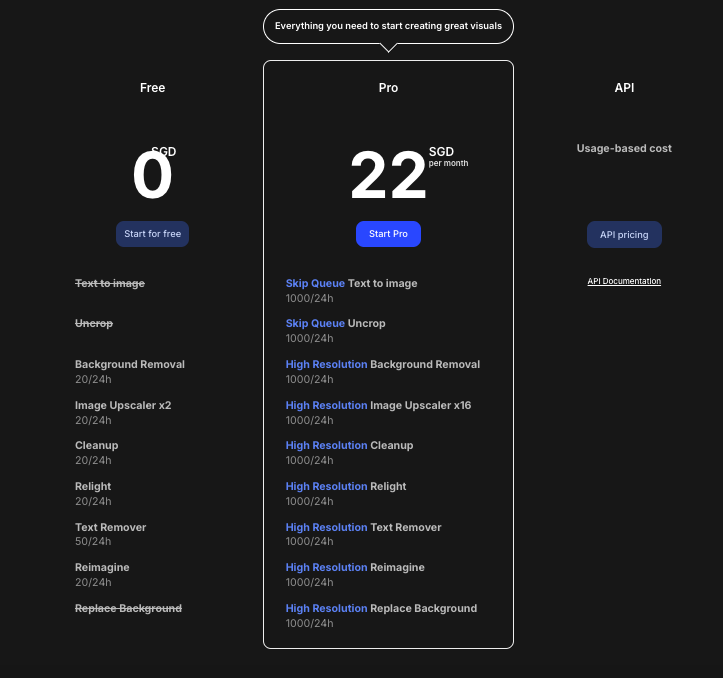 |
Questys Capture vs ClipDrop: Other Details
Organization Types supported |
|
|
|---|---|---|
Platforms Supported |
|
|
Modes of support |
|
|
API Support |
|
|
Get help choosing | Get help choosing |
Questys Capture vs ClipDrop Security & Compliance
Certifications, data handling, and security controls for IT and compliance evaluators.
HIPAA | — | ✗ No |
|---|---|---|
GDPR | — | ✓ Yes |
Data Encryption | — | ✓ Yes |
Data Residency | 🇺🇸 US | — |
Questys Capture User Reviews & Rating Comparison
Spotsaas Editor’s POV generated by AI | Buyer sentiment Insufficient user rating and review data available to determine overall buyer sentiment. What buyers like
Common complaints
| What buyers like
Common complaints
|
|---|---|---|
Pros and Cons |
|
|
Questys Capture and ClipDrop Customers
Customers |  Questys Capture_customers_0  Questys Capture_customers_1  Questys Capture_customers_2 | No Customers information available. |
|---|
Media and Screenshots
Screenshots |  1 Screenshots |  3 Screenshots |
|---|---|---|
Videos | No videos available. |  1 Videos |
Top Alternatives to Questys Capture and ClipDrop in 2026
Alternatives |
|---|



Add another option to compare side by side
Search by product name to compare pricing, fit, and buyer feedback in one view.Compare similar software options


Related Blogs and Articles for Ai Image Generators

Disclaimer: This research has been collated from a variety of authoritative sources. We welcome your feedback at [email protected].
Frequently asked questions
- Which is better, Questys Capture or ClipDrop?
- Questys Capture and ClipDrop are closely matched with equal user ratings of -1.0. The right choice depends on your team size, budget, and specific AI Image Generators needs.
- Do Questys Capture and ClipDrop offer a free trial?
- Questys Capture offers a free trial. ClipDrop does not.
- What is the starting price of Questys Capture vs ClipDrop?
- Questys Capture starts at Contact for pricing. ClipDrop starts at $22 /month.
- What are the top alternatives to Questys Capture?
- Top alternatives to Questys Capture include monday.com, DOCBOT, MoreApp Forms, Blosm, Zerion Software.
- What are the top alternatives to ClipDrop?
- Top alternatives to ClipDrop include CloudApp, Capture, GrabzIt, Snapup, Questys Capture.