

Clipdrop AI is one of the fastest ways to remove backgrounds, erase unwanted objects, and generate images from text without opening a full editing program — its Stable Diffusion integration turns a text prompt into a usable image in seconds, and the core editing tools work directly from a phone camera. The free plan covers the essentials; the $15-per-month Pro plan skips processing queues and unlocks higher-resolution exports for anyone editing images regularly.
This guide covers exactly how Clipdrop AI works, what it’s actually good at, where it falls short, and how it stacks up against Canva, Remove.bg, and Photoshop.
Key Takeaways
- Clipdrop AI is designed for everyone, making image creation and editing simple, whether you’re a beginner or experienced user.
- It offers many useful tools, like image editing, background removal, object removal, and a text-to-image feature using Stable Diffusion.
- You can edit images directly from your device, capture objects with your camera, and manipulate visuals quickly.
- Clipdrop has a free plan with basic features and a Pro plan for $15 per month that offers more advanced tools and faster access.
Clipdrop AI: Power of AI for Visual Creation
Clipdrop AI helps you create and edit images easily. It lets you capture objects or scenes using your device’s camera and then edit them without complicated software. With features like background removal and object cropping, Clipdrop AI makes visual creation quick and straightforward for beginners and experienced editors alike.
Clipdrop AI is widely recognized as an effective AI tool for designers that simplifies image creation and editing.
Key Features of Clipdrop AI
Clipdrop offers several helpful features that make image creation and editing easy for everyone, from casual users to design professionals. Here are the key features that stand out:
Image Editing
With Clipdrop AI, you can edit your images quickly and easily. You don’t need complicated software or a lot of time to learn how to use it. Just upload your photo, and you can start making changes right away.
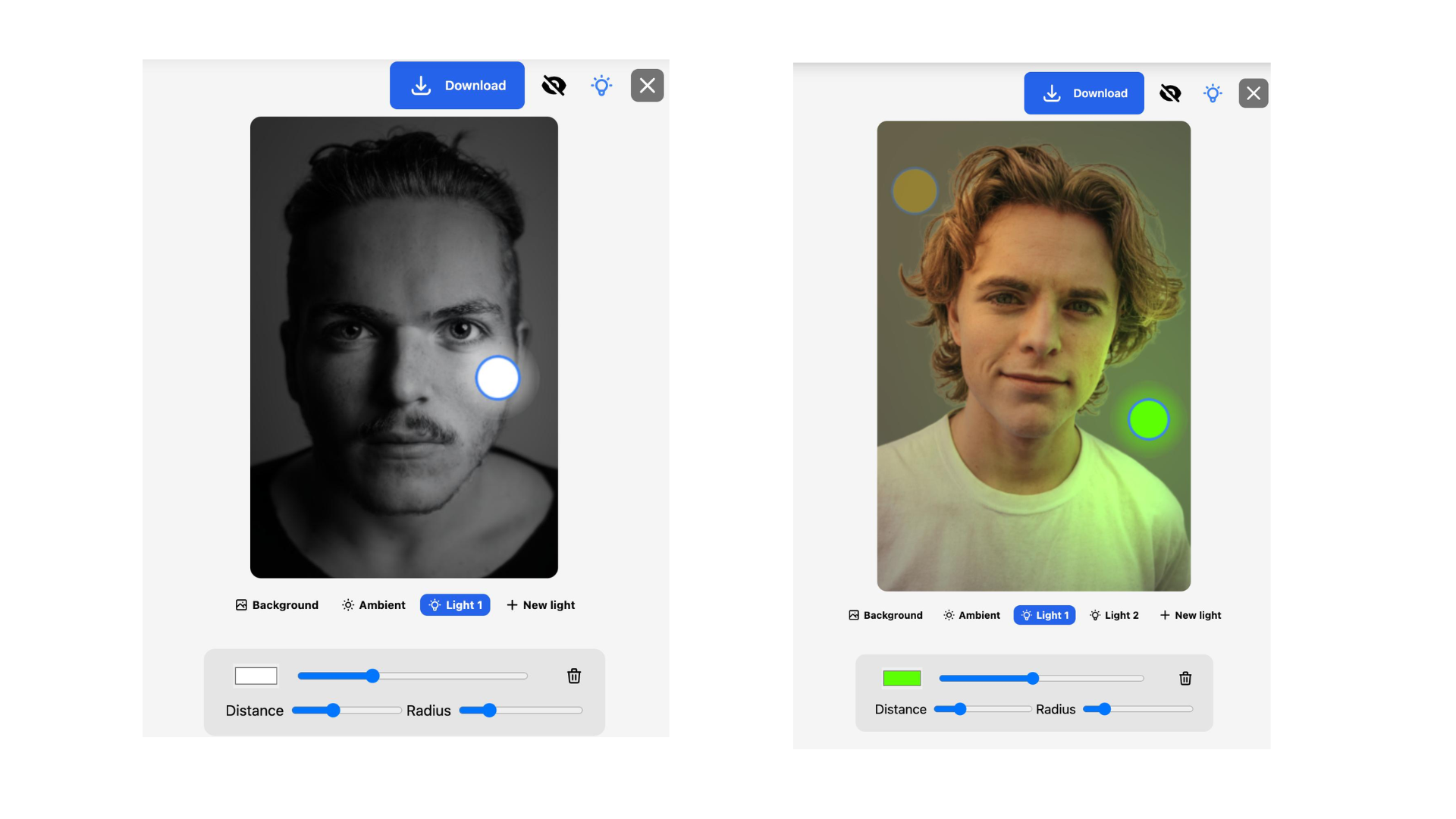
(Image Source: Clipdrop AI)
Text-to-Image
Clipdrop is connected to Stable Diffusion, a type of AI technology that generates images from text descriptions. Clipdrop’s Stable Diffusion integration lets you create images from text prompts — just type what you want to see, and the AI generates a unique image based on your words.
Object Removal
One of the main features of Clipdrop AI is its ability to remove unwanted objects from your photos. If something in the image distracts from the main subject, you can easily get rid of it.

(Source: Clipdrop AI)
Background Removal
Clipdrop AI lets you change or remove the background of your images in just a few seconds. This is great for graphic design projects or creating unique visuals for social media. You can swap out a dull background for something more eye-catching, helping your images stand out.
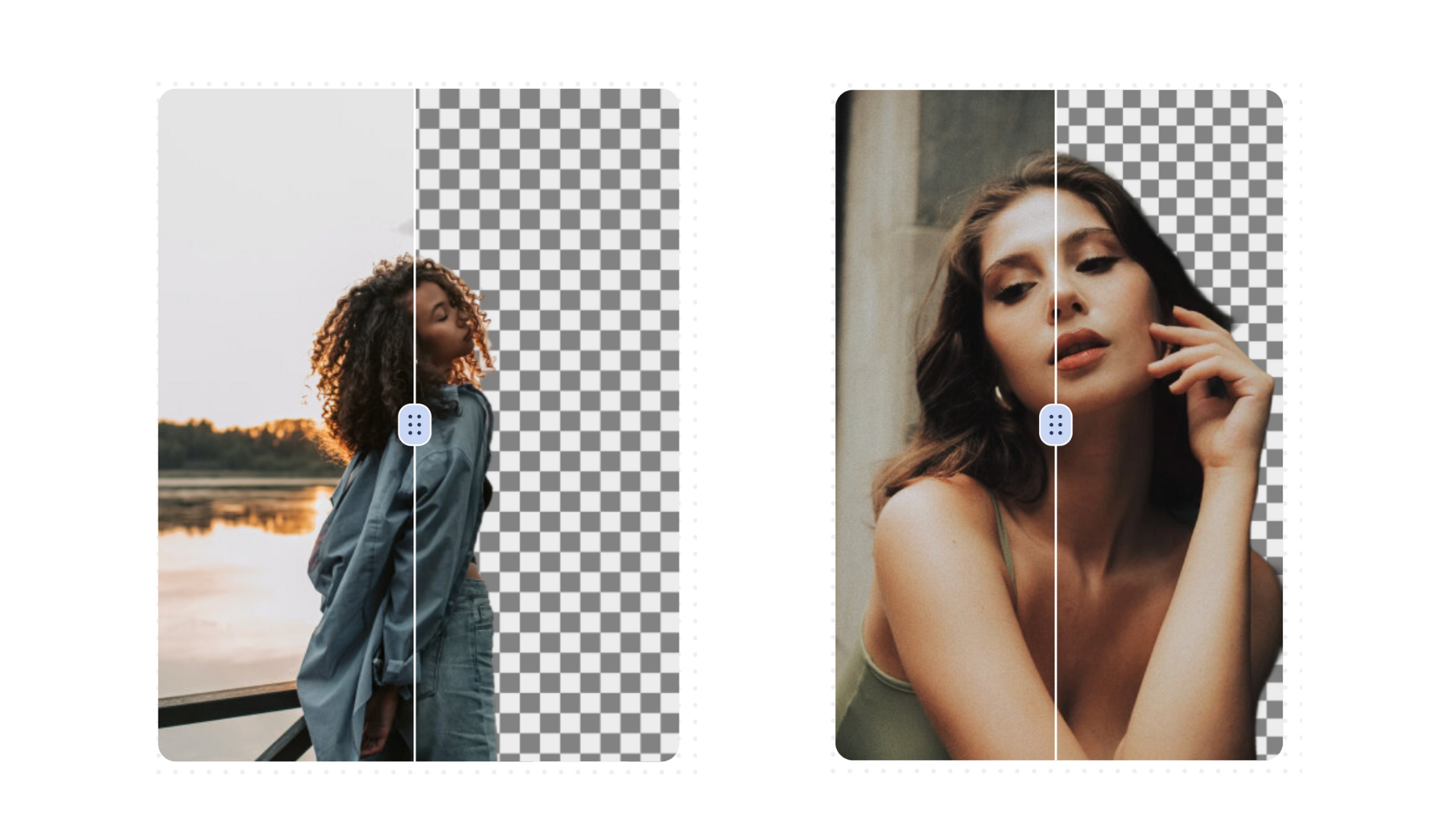
(Image Source: Clipdrop AI)
Cropping Tools
You can trim your photos to focus on the most important parts. The AI understands the context of your image and can suggest the best way to crop it for the most impact.
Compatibility Across Devices
Clipdrop works on smartphones, tablets, and computers, so you can use it wherever you are. This lets you capture and edit images on the go, which is convenient for busy users.
Export Options
Once you finish editing, Clipdrop lets you export your images easily. You can save them to your device or share them directly with other platforms, making it simple to showcase your work and share your creativity with others.
How Clipdrop AI Works
Here’s how this tool handles visual creation and editing through artificial intelligence, step by step:
- Download the app: Users download the Clipdrop app on their devices, which works on smartphones, tablets, and computers.
- Capture content: After opening the app, you select an object or scene to capture with your device’s camera.
- AI processing: The AI scans the visual content and uses advanced image processing to recognize and isolate objects.
- Real-time edits: With a simple tap or click, you can remove unwanted backgrounds or objects from your images instantly.
- Easy object manipulation: The interface lets you move, resize, or rotate captured elements without much effort.
- Image cropping: Clipdrop includes a cropping feature that lets you trim photos to focus on your chosen subject.
- Export your work: Once you finish editing, you can export your final images directly from Clipdrop to other platforms or devices.
- API integration: For developers looking to extend their apps or services, Clipdrop AI can be integrated via its API.
Clipdrop AI Pricing
Clipdrop offers both a free and a paid plan:
- The free plan lets you explore the basic features of Clipdrop. You can use tools like Generative Fill and Stable Diffusion Turbo a limited number of times each day, plus access features such as Background Removal, Image Upscaler, and Cleanup.
- The Pro plan, at $15 per month, skips the queue for popular tools like Stable Diffusion and Generative Fill, so you can work faster. You also get advanced features, like high-resolution tools and unlimited use of many features.
If you want to integrate Clipdrop into your own apps or services, the API is available on a usage-based cost, meaning you only pay for what you use.
| Plan | Cost | Key Features |
|---|---|---|
| Free Plan | $0 | Generative fill Stable Diffusion turbo Swap Background Removal Image Upscaler x2 Cleanup and more |
| Pro Plan | $15 per month | Skip Queue Stable Diffusion Fast Queue Generative fill Stable Diffusion turbo Skip Queue Uncrop Skip Queue Swap High Resolution Background Removal and more. |
Compare Clipdrop AI with Other Editing Tools
Here’s a comparison of Clipdrop AI with three image editing tools: Canva, Remove.bg, and Adobe Photoshop.
Clipdrop AI vs. Canva
Clipdrop AI is all about image editing. It uses AI technology to help you remove backgrounds, edit images, and even create new visuals from text. The tools are easy to use, making it a good choice for anyone, even beginners. If you need fast edits or want to enhance your images, Clipdrop AI is a solid option.
On the other hand, Canva is a popular graphic design platform. It provides many templates and design tools for various projects, like social media posts or presentations. Canva is best for people who want to design from scratch rather than just edit photos.
Clipdrop AI vs. Remove.bg
Clipdrop AI offers a range of image editing tools, including background removal, object removal, and image enhancement. This means you can do more than just remove backgrounds — you can also tweak your images to make them look better.
Remove.bg specializes in background removal only. It’s very fast and easy to use if all you need is to get rid of backgrounds. However, Remove.bg doesn’t offer other editing features, which makes it less versatile.
Clipdrop AI vs. Adobe Photoshop
Clipdrop AI focuses on providing basic editing features. You can remove backgrounds and edit images without needing professional skills.
On the other hand, Adobe Photoshop is powerful software used by professionals. It has many advanced tools for editing photos, layers, and special effects. Photoshop is best suited for experienced users who need detailed editing capabilities.
Is Clipdrop Worth It?
Clipdrop AI has a user-friendly interface that works well for both beginners and experienced users. This makes it simple for anyone to start creating and editing images. Clipdrop also lets users edit images, create images from text prompts, and remove backgrounds without much friction.
The integration of Stable Diffusion is also a major benefit here. This technology helps generate high-quality images from text, making the resulting visuals look professional and appealing.
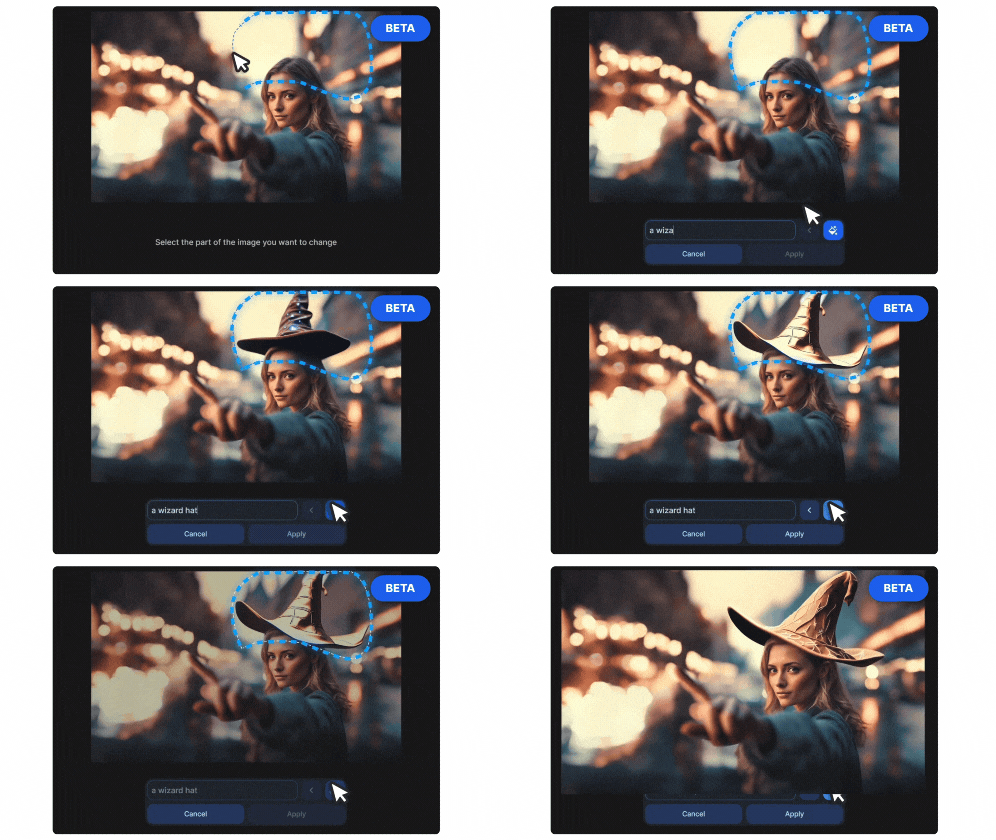
(Source: Clipdrop AI)
That said, some users may find the free version limited in terms of features and daily usage caps. It’s great for trying out the software, but those needing advanced capabilities will likely need to move to the paid plan.
Another concern is processing time for generating images — depending on the complexity of the image and current server load, it may take longer than expected. And while Clipdrop AI offers a good range of features, it may not have the same depth in specific areas compared to standalone tools that focus solely on editing or generating images.
Conclusion
Clipdrop AI is a capable tool for creating and editing images. It changes how you make and edit visuals by folding AI technology into your workflow, which improves the quality of your content and makes editing faster and easier than working with traditional editing software.
With Clipdrop AI, you get the tools you need to bring your visual ideas to life quickly.
Frequently Asked Questions
How does Clipdrop AI enhance visual creation and editing?
Clipdrop AI enhances visual creation and editing by allowing users to capture images of real-world objects and transfer them into digital formats for further manipulation.
Can I use Clipdrop AI on any device?
Yes, Clipdrop AI is compatible with both Android and iOS devices, as well as Windows and macOS computers.
What types of visual content can be processed using Clipdrop AI?
Clipdrop AI can process various types of visual content such as photographs, printed documents, illustrations, artwork, and even three-dimensional objects.
Is internet connectivity required for using Clipdrop AI?
Yes, a stable internet connection is necessary to utilize the features of Clipdrop AI as it relies on cloud-based processing for image recognition and rendering.
Do I need prior experience in graphic design or photo editing to use Clipdrop AI effectively?
No prior experience in graphic design or photo editing is required to use Clipdrop AI effectively. Its intuitive interface makes it accessible for users with varying levels of expertise.
Compare alternatives to the tools in this post

- Independent picks for exactly what you just read about
- Matched to your team size & needs
- Vendors don't pay for placement
Step 1 of 4
How big is your team?
We tailor recommendations to companies your size.















Related Articles
AI Software
Fireflies vs Otter 2026: Pricing, Limits and Which to Pick
Continue reading →
AI Software
AI in Finance: 12 Use Cases for Corporate Finance Teams in 2026
Continue reading →
AI Software
Copilot vs ChatGPT for Business (2026): Price, Security and Use Cases
Continue reading →
AI Software
AI in Procurement in 2026: 10 Use Cases, Tools and How to Start
Continue reading →