
iClicker vs SchoolCues Comparison

iClicker
Starting at $15.99 /Year
- Large Enterprises
- Medium Business
iClicker is an intuitive and flexible student engagement system designed to make learning interactive. With iClicker, instructors have the power to engage their students in the learning process by creating polls, quizzes…

SchoolCues
Starting at $1 /Month
- Large Enterprises
- Medium Business
Introducing SchoolCues - a school management software that improves administrative tasks and promotes a safe school environment through its electronic Covid screening app. Our all-in-one platform includes a student infor…
SchoolCues leads on user satisfaction with a 4.7-star rating across 48 reviews.
iClicker vs SchoolCues — at a glance
| Feature | iClicker | SchoolCues |
|---|---|---|
| Rating | 4.1 / 5 | 4.7 / 5 |
| Reviews | 17 | 48 |
| Starting price | $15.99 /Year | $1 /Month |
| Free trial | No | No |
| Free version | No | No |
| Best for | Large Enterprises, Medium Business, Small Business | Large Enterprises, Medium Business, Small Business |
| Category | Learning Management System (LMS) Software | School Management Software |
| Integrations | 4+ apps | — |
| Platforms | SaaS/Web/Cloud, Mobile - Android, Mobile - iOS, Installed - Windows, Installed - Mac | SaaS/Web/Cloud, Mobile - iOS |
| API | Available | — |
| Support modes | Online | Online |
Key differences between iClicker and SchoolCues
- Pricing: iClicker starts at $15.99 /Year, while SchoolCues starts at $1 /Month.
- User satisfaction: SchoolCues scores higher with a 4.7-star average.
- Deployment: iClicker supports SaaS/Web/Cloud, Mobile - Android, Mobile - iOS, Installed - Windows, Installed - Mac; SchoolCues supports SaaS/Web/Cloud, Mobile - iOS.
iClicker vs SchoolCues — find the better fit before you commit.
Which tool fits your team best
Which is actually cheaper for your team size
Where each product wins, per real buyers
Most Learning Management System (LMS) Software tools look identical on paper. This comparison cuts to the differences that matter — pricing structure, team fit, and what real buyers found after signing up.
Biggest differences
Features
Pricing
Buying details
Security
Buyer feedback
Integrations
Product tour
Other options
Talk to an expert Talk to an expert |
Free PDF comparison
Download this iClicker vs SchoolCues comparison
Get the full side-by-side as a PDF — these picks plus the top Learning Management System (LMS) Software tools, with verified ratings, pricing and features.
- Side-by-side on pricing, features & ratings
- Plus the category top 10, scored & ranked
- Emailed to you — no on-screen download
No file downloads on screen — we email it to you. One-click unsubscribe anytime.
iClicker vs SchoolCues: Biggest differences
Start here before you go deeper into features.
Best for engaging higher education students via integrated polls and quizzes.
- You need integration with major LMS platforms like Canvas or Blackboard.
- You want to support both physical clickers and mobile app responses for flexibility.
- You require automatic attendance tracking and participation logging during lectures.
- Your organization operates primarily in corporate training or non-academic environments.
- Students lack access to devices or cannot afford additional clicker or subscription costs.
Large Enterprises, Medium Business, Small Business
iClicker typically suits Large Enterprises and Medium Business. SchoolCues tends to fit Large Enterprises and Medium Business better. The right choice depends on your team size, workflow, and whether a free trial matters.
Description | iClicker is an intuitive and flexible student engagement system designed to make learning interactive. With iClicker, instructors have the power to engage their students in the learning ... Read More about iClicker | Introducing SchoolCues - a school management software that improves administrative tasks and promotes a safe school environment through its electronic Covid screening app. Our all-in-one ... Read More about SchoolCues |
|---|---|---|
Entry Level Pricing |
|
|
Free Trial Availability |
|
|
SpotScoreWhat's this? ↗ | Not Available | 8.0/10 |
User RatingsBased on verified Spotsaas reviews | ||
Best Company Size | 50-5000 employeesMedium Business | — |
Get pricing help | Get pricing help |
Where each option fits best
See where each product is strongest, which teams it fits, and what causes buyers to keep looking — before you commit.
Based on buyer reviews and verified product data collected by Spotsaas.
Key strengths
- Encourages Anonymous Participation: Many students hesitate to answer questions aloud in class due to fear of making mistakes. iClicker solves this issue by allowing students to respond privately through their devices. Anonymous responses help create a comfortable learning environment where students feel more confident sharing their answers. This often leads to higher participation rates and more honest feedback, giving instructors a clearer understanding of how well the class understands the material.
- Integration with LMS Platforms: The platform works easily with widely used learning management systems such as Canvas, Blackboard, Moodle, and Brightspace. These integrations let instructors sync student rosters, manage courses, and automatically transfer participation scores and quiz results to the LMS gradebook. This cuts administrative work and keeps all course data organized in one place, making it easier for instructors to manage grading and track student progress.
- Simple Attendance Tracking: iClicker simplifies attendance management by automatically recording participation during sessions. When students respond to polls or questions, the system logs their presence and engagement. This is particularly helpful in large lecture halls where manually tracking attendance can be time-consuming and inaccurate. Instructors can easily review attendance reports and participation data, which helps maintain accountability and encourages students to attend classes regularly.
Best fit
- 50–5000
- Higher Education, Education Management, E-Learning, Universities
- Professor, Lecturer, Instructor, Teaching Assistant, Instructional Designer, Academic Director, Director of Learning and Development, Department Head, Faculty Member, Course Coordinator
Reasons buyers look elsewhere
- Institutions and trainers may want tools that support hybrid learning, corporate training, or presentations, areas where newer engagement platforms provide wider functionality.
- Some tools focus mainly on polling and quizzes. Competing platforms offer additional capabilities such as word clouds, Q&A sessions, interactive presentations, and deeper analytics.
- Traditional systems rely on dedicated clicker devices. Students may forget them or experience battery or connectivity issues, while modern platforms work directly on smartphones or laptops.
Software Demo
Demo |  SchoolCues has not given any software demo yet If you're the owner of this profile, add your demo.Contact us |
|---|
Need a second opinion?
Get decision help from a software advisor
Share your priorities, budget, and team needs, and we’ll help you narrow the options and understand the tradeoffs before you talk to vendors.

- Independent advice — matched to your business
- Understand the tradeoffs before you talk to vendors
- Free 15-min call with a software advisor.
Step 1 of 4
How big is your team?
We tailor recommendations to companies your size.















How do iClicker and SchoolCues Compare on Features?
Total Features | 9 Features | 10 Features |
|---|---|---|
Unique Features | No unique features | No unique features |
Get Quote | Get Quote |
Compare iClicker and SchoolCues on pricing
Review starting price, plan structure, and free-trial access side by side so you can see which option fits your budget and buying process.
Pricing Option | ||
|---|---|---|
Starting From |
|
|
Pricing Plans |
|
|
Pricing Page | 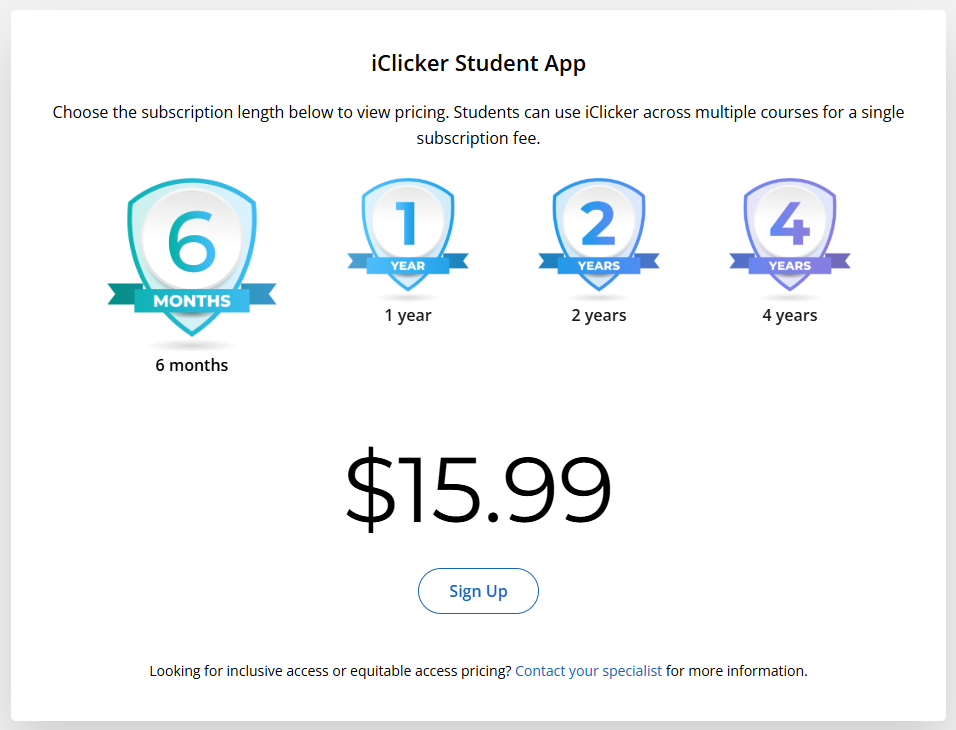 | Pricing information not available |
iClicker vs SchoolCues: Other Details
Organization Types supported |
|
|
|---|---|---|
Platforms Supported |
|
|
Modes of support |
|
|
API Support |
|
|
Get help choosing | Get help choosing |
iClicker User Reviews & Rating Comparison
User Ratings | 4.7 (based on 48 reviews) | |
|---|---|---|
Rating Distribution | ||
Spotsaas Editor’s POV generated by AI | Buyer sentiment Overall positive sentiment highlights ease of use, reliable large-class engagement, and effective LMS integration, with concerns about device dependency and extra costs for students. What buyers like
Common complaints
| Buyer sentiment Buyer sentiment is very strong across 48 reviews, with consistently positive feedback. |
Pros and Cons |
| No pros or cons available for this product |
Positive Reviews | No reviews available for the product | No reviews available for the product |
Integrations
Integration with other apps | No Integration information available. |
|---|


iClicker and SchoolCues Customers
Customers |  UTEP  University Of Waterloo  ASU |  vinta  london  ivy |
|---|
Media and Screenshots
Videos |  3 Videos | No videos available. |
|---|
Top Alternatives to iClicker and SchoolCues in 2026
Alternatives |
|---|



Add another option to compare side by side
Search by product name to compare pricing, fit, and buyer feedback in one view.Compare similar software options


Related Blogs and Articles for School Management Software
Disclaimer: This research has been collated from a variety of authoritative sources. We welcome your feedback at [email protected].
Frequently asked questions
- Which is better, iClicker or SchoolCues?
- SchoolCues edges out the other on user ratings (4.7 vs 4.1). That said, the best pick depends on your use case, so use the comparison tables above to evaluate each dimension.
- Do iClicker and SchoolCues offer a free trial?
- Neither iClicker nor SchoolCues currently lists a free trial.
- What is the starting price of iClicker vs SchoolCues?
- iClicker starts at $15.99 /Year. SchoolCues starts at $1 /Month.
- What are the top alternatives to iClicker?
- Top alternatives to iClicker include Trainual, Citavi, Axonify, iSpring Market, Parchment.
- What are the top alternatives to SchoolCues?
- Top alternatives to SchoolCues include Skolaro, Campus On Click, School Loop, Gradelink, BigSIS.
- Is iClicker worth the switch?
- Two things to weigh on iClicker. It does these well: integrates with major LMS platforms (Canvas, Blackboard, Moodle, Brightspace); supports anonymous student participation increasing engagement. These are the trade-offs: primarily designed for academic institutions, limited use outside education; dependence on students having physical clickers or mobile devices. It does not cover Tax Management and Attendance Tracking.
More School Management Software comparisons
Side by side breakdowns of the same products against other options in this category.