
Deskera vs Google Sheets Comparison

Deskera
Starting at Contact for pricing
- Free Trial
- Medium Business
- Small Business
Deskera is a comprehensive business management software designed for small-scale organizations. It offers a range of features such as Accounting, CRM, Payroll, and HR to help improve revenue and enhance day-to-day operat…
Google Sheets
Starting at $9.40 /user/month
- Free Version
- Individuals
- Large Enterprises
Google Sheets is a cloud-based spreadsheet platform designed to help teams create, manage, and analyze data collaboratively from any device. Built for professionals across industries — from business analysts and project…
Google Sheets leads on user satisfaction with a 4.7-star rating across 340 reviews.
Deskera vs Google Sheets — at a glance
| Feature | Deskera | Google Sheets |
|---|---|---|
| Rating | 4.2 / 5 | 4.7 / 5 |
| Reviews | 70 | 340 |
| Starting price | Contact for pricing | $9.40 /user/month |
| Free trial | Yes | No |
| Free version | No | Yes |
| Best for | Medium Business, Small Business | Individuals, Large Enterprises, Medium Business |
| Category | ERP Software | Spreadsheets Software |
| Platforms | SaaS/Web/Cloud, Mobile - Android, Mobile - iOS | SaaS/Web/Cloud, Mobile - Android, Mobile - iOS, Installed - Windows, Installed - Mac |
| API | Available | Available |
| Support modes | Online | 24/7 (Live rep) |
Key differences between Deskera and Google Sheets
- Pricing: Google Sheets starts at $9.40 /user/month. Deskera pricing is not publicly listed.
- Free trial: Deskera offers a free trial; Google Sheets does not.
- Target audience: Deskera is built for Medium Business and Small Business, while Google Sheets targets Individuals and Large Enterprises.
- User satisfaction: Google Sheets scores higher with a 4.7-star average.
- Deployment: Deskera supports SaaS/Web/Cloud, Mobile - Android, Mobile - iOS; Google Sheets supports SaaS/Web/Cloud, Mobile - Android, Mobile - iOS, Installed - Windows, Installed - Mac.
Deskera vs Google Sheets — find the better fit before you commit.
Which tool fits your team best
Which is actually cheaper for your team size
Where each product wins, per real buyers
Most ERP Software tools look identical on paper. This comparison cuts to the differences that matter — pricing structure, team fit, and what real buyers found after signing up.
Biggest differences
Features
Pricing
Buying details
Security
Buyer feedback
Integrations
Product tour
Other options
Talk to an expert Talk to an expert |
Free PDF comparison
Download this Deskera vs Google Sheets comparison
Get the full side-by-side as a PDF — these picks plus the top ERP Software tools, with verified ratings, pricing and features.
- Side-by-side on pricing, features & ratings
- Plus the category top 10, scored & ranked
- Emailed to you — no on-screen download
No file downloads on screen — we email it to you. One-click unsubscribe anytime.
Deskera vs Google Sheets: Biggest differences
Start here before you go deeper into features.
Best all-in-one ERP for small to medium businesses needing integrated finance and HR.
- You run a small or medium business with 11-500 employees seeking unified accounting, CRM, payroll, and HR.
- You need multi-currency support and customizable billing rates for diverse financial operations.
- You want real-time dashboards and customizable financial reports for better decision-making.
- You require highly customizable ERP solutions tailored for large enterprises.
- You depend heavily on advanced recurring billing features and flexible invoice editing.
Best for collaborative, cloud-based spreadsheet work with AI-powered insights.
- You need real-time multi-user collaboration across devices.
- You want AI assistance for formula generation and data pattern detection.
- Your workflows benefit from integrations with tools like Salesforce and BigQuery.
- You require advanced macros and complex data modeling beyond Google Sheets’ capabilities.
- You work regularly with extremely large datasets causing performance issues.
Deskera: Best all-in-one ERP for small to medium businesses needing integrated finance and HR. Google Sheets: Best for collaborative, cloud-based spreadsheet work with AI-powered insights.
Description | Deskera is a comprehensive business management software designed for small-scale organizations. It offers a range of features such as Accounting, CRM, Payroll, and HR to help improve ... Read More about Deskera | Google Sheets is a cloud-based spreadsheet platform designed to help teams create, manage, and analyze data collaboratively from any device. Built for professionals across industries — from ... Read More about Google Sheets |
|---|---|---|
Entry Level Pricing |
|
|
Free Trial Availability |
|
|
SpotScoreWhat's this? ↗ | 9.7/10 | Not Available |
User RatingsBased on verified Spotsaas reviews | ||
Best Company Size | 11-50 employees51-500 employees | Small BusinessLarge Enterprises |
Get pricing help | Get pricing help |
Where each option fits best
See where each product is strongest, which teams it fits, and what causes buyers to keep looking — before you commit.
Based on buyer reviews and verified product data collected by Spotsaas.
Key strengths
- Operations: Deskera simplifies your business processes by integrating accounting, CRM, and project management into one platform. This means that your team can spend less time juggling multiple tools and more time focusing on what truly matters—driving growth.
- Real-Time Insights: Deskera's reporting features give you access to real-time data analytics. This lets you make informed decisions quickly, so you can adapt to market changes and seize opportunities as they arise.
- User-Friendly Interface: Designed with the end-user in mind, Deskera offers an intuitive interface that minimizes the learning curve. This allows your employees to get up to speed fast, increasing productivity from day one.
- Real-Time Collaboration for Smooth Teamwork: Google Sheets allows multiple users to edit, comment, and collaborate on the same document simultaneously, keeping teams aligned and moving projects forward without delays.
- AI-Powered Data Insights for Smarter Decisions: With built-in Gemini AI assistance, Google Sheets helps users create formulas, analyze patterns, and generate visualizations quickly, reducing errors and accelerating decision-making.
- Secure and Integrated Access Across All Devices: Google Sheets provides reliable data protection, multi-device accessibility, and smooth integrations with popular business tools, making it dependable for both everyday tasks and large-scale projects.
Best fit
- 11 to 500 employees
- Fintech, SaaS, Consulting, eCommerce, and Manufacturing
- roles such as Finance Managers, Operations Managers, Business Analysts, Marketing Executives, and Small Business Owners
- 10–5000+ Employees
- Education, Finance, Marketing, Healthcare, Technology, Retail, Nonprofits, Consulting
- Business Analysts, Data Scientists, Project Managers, Educators, Financial Advisors, Marketing Managers, Operations Directors
Reasons buyers look elsewhere
- Users may seek alternatives to Deskera due to specific industry needs that require tailored features not offered by the platform, leading them to explore solutions with greater customization options.
- Some businesses might find Deskera's pricing structure unaligned with their budget constraints, prompting them to look for more cost-effective tools that deliver similar functionalities without compromising on quality.
- Organizations experiencing rapid growth may require scalability that Deskera struggles to provide, leading them to consider platforms designed to smoothly expand as their operations evolve.
- Businesses handling massive datasets often choose platforms with higher performance capacity to avoid lag in real-time collaboration.
- Companies requiring industry-specific compliance reporting sometimes turn to niche spreadsheet tools with built-in regulatory frameworks.
- Certain users look for offline-first solutions, as Google Sheets’ offline mode can be limited compared to fully desktop-based alternatives.
Software Demo
Demo |
|---|
Need a second opinion?
Get decision help from a software advisor
Share your priorities, budget, and team needs, and we’ll help you narrow the options and understand the tradeoffs before you talk to vendors.

- Independent advice — matched to your business
- Understand the tradeoffs before you talk to vendors
- Free 15-min call with a software advisor.
Step 1 of 4
How big is your team?
We tailor recommendations to companies your size.















How do Deskera and Google Sheets Compare on Features?
Total Features | 12 Features | 16 Features |
|---|---|---|
Unique Features | No unique features | No unique features |
Get Quote | Get Quote |
Compare Deskera and Google Sheets on pricing
Review starting price, plan structure, and free-trial access side by side so you can see which option fits your budget and buying process.
Pricing Option | ||
|---|---|---|
Starting From |
|
|
Pricing Plans |
|
|
Pricing Page |  | 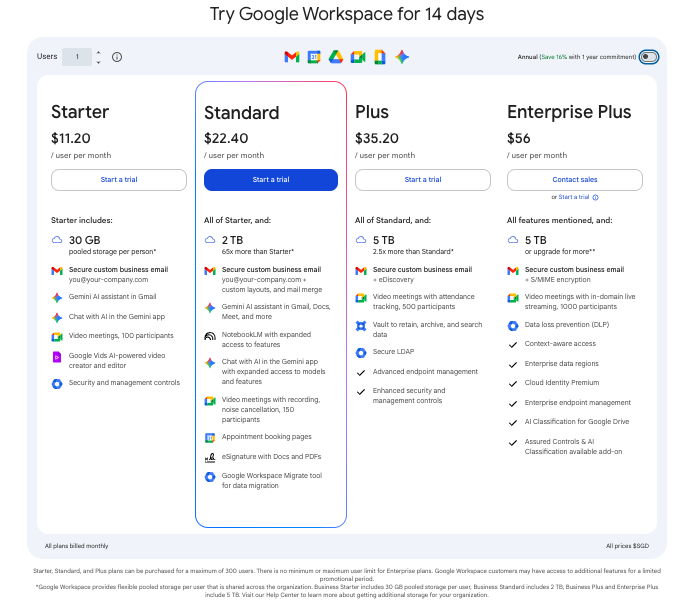 |
Deskera vs Google Sheets: Other Details
Organization Types supported |
|
|
|---|---|---|
Platforms Supported |
|
|
Modes of support |
|
|
API Support |
|
|
Get help choosing | Get help choosing |
Deskera User Reviews & Rating Comparison
User Ratings | ||
|---|---|---|
Rating Distribution | ||
Spotsaas Editor’s POV generated by AI | Buyer sentiment Users appreciate Deskera's integrated features and ease of use but express concerns about billing accuracy and customer support responsiveness. What buyers like
Common complaints
| Buyer sentiment Users appreciate Google Sheets for its ease of collaboration, AI-powered features, and integrations, though some note performance limitations with large datasets and advanced functionality gaps. What buyers like
Common complaints
|
Pros and Cons |
|
|
Positive Reviews | No reviews available for the product | No reviews available for the product |
| Negative Reviews | No reviews available for the product | No reviews available for the product |
Media and Screenshots
Screenshots |  5 Screenshots |  4 Screenshots |
|---|---|---|
Videos |  3 Videos |  1 Videos |
Top Alternatives to Deskera and Google Sheets in 2026
Alternatives |
|---|


Add another option to compare side by side
Search by product name to compare pricing, fit, and buyer feedback in one view.Compare similar software options


Related Blogs and Articles for Spreadsheets Software
Disclaimer: This research has been collated from a variety of authoritative sources. We welcome your feedback at [email protected].
Frequently asked questions
- Which is better, Deskera or Google Sheets?
- Google Sheets edges out the other on user ratings (4.7 vs 4.2). That said, the best pick depends on your use case, so use the comparison tables above to evaluate each dimension.
- Do Deskera and Google Sheets offer a free trial?
- Deskera offers a free trial. Google Sheets does not.
- What is the starting price of Deskera vs Google Sheets?
- Deskera starts at Contact for pricing. Google Sheets starts at $9.40 /user/month.
- What are the top alternatives to Deskera?
- Top alternatives to Deskera include Sage Business cloud X3, SAP ERP, Epicor ERP, GlassManager, Alloy ERP.
- What are the top alternatives to Google Sheets?
- Top alternatives to Google Sheets include Tiller Money, Rows, Jotform Tables, Zoho Sheet, Handsontable.
- Where does Deskera fall short?
- It depends what you need. In its favour: integrated platform combining accounting, CRM, payroll, and HR; user-friendly interface with real-time business insights. Against it: billing accuracy issues including incorrect dates and limited post-invoice editing; slow customer support response times causing delays in issue resolution. Note that it does not include Accounts Payable and Accounts Receivable.
- What would make me regret choosing Google Sheets?
- Google Sheets is credited with the following: real-time multi-user collaboration enabling teamwork; aI-powered formula generation and data insights through Gemini integration. The recurring reservations: performance issues and lag when handling very large spreadsheets; limited advanced functions compared to Microsoft Excel, especially for complex macros. It does not include Mobile App and Search.
More Spreadsheets Software comparisons
Side by side breakdowns of the same products against other options in this category.