
ClickUp vs Google Sheets Comparison

ClickUp
Starting at $7 /User/Month
- Free Trial
- Freelancers / Consultants
- Large Enterprises
ClickUp is a versatile cloud-based project management platform designed to cater to both individual project needs and the complex demands of enterprise-level teams. Offering a customizable planning experience, it allows…
Google Sheets
Starting at $9.40 /user/month
- Individuals
- Large Enterprises
Google Sheets is a cloud-based spreadsheet platform designed to help teams create, manage, and analyze data collaboratively from any device. Built for professionals across industries — from business analysts and project…
Google Sheets leads on user satisfaction with a 4.6-star rating across 1,301 reviews.
ClickUp vs Google Sheets — at a glance
| Feature | ClickUp | Google Sheets |
|---|---|---|
| Rating | 4.4 / 5 | 4.6 / 5 |
| Reviews | 8,714 | 1,301 |
| Starting price | $7 /User/Month | $9.40 /user/month |
| Free trial | Yes | No |
| Free version | No | No |
| Best for | Freelancers / Consultants, Large Enterprises, Medium Business | Individuals, Large Enterprises, Medium Business |
| Category | Collaboration Software | Spreadsheets Software |
| Integrations | 1+ apps | — |
| Platforms | SaaS/Web/Cloud, Mobile - Android, Mobile - iOS, Installed - Windows, Installed - Mac | SaaS/Web/Cloud, Mobile - Android, Mobile - iOS, Installed - Windows, Installed - Mac |
| API | Available | Available |
| Support modes | 24/7 (Live rep), Business Hours, Online | 24/7 (Live rep) |
| Certifications | SOC 2, HIPAA, GDPR | SOC 2, HIPAA, GDPR, ISO 27001 |
| Data residency | Global | Global |
Key differences between ClickUp and Google Sheets
- Pricing: ClickUp starts at $7 /User/Month, while Google Sheets starts at $9.40 /user/month.
- Free trial: ClickUp offers a free trial; Google Sheets does not.
- Target audience: ClickUp is built for Freelancers / Consultants and Large Enterprises, while Google Sheets targets Individuals and Large Enterprises.
- User satisfaction: Google Sheets scores higher with a 4.6-star average.
- Deployment: ClickUp supports SaaS/Web/Cloud, Mobile - Android, Mobile - iOS, Installed - Windows, Installed - Mac; Google Sheets supports SaaS/Web/Cloud, Mobile - Android, Mobile - iOS, Installed - Windows, Installed - Mac.
ClickUp vs Google Sheets — find the better fit before you commit.
Which tool fits your team best
Which is actually cheaper for your team size
Where each product wins, per real buyers
Most Collaboration Software tools look identical on paper. This comparison cuts to the differences that matter — pricing structure, team fit, and what real buyers found after signing up.
Biggest differences
Features
Pricing
Buying details
Security
Buyer feedback
Integrations
Product tour
Other options
Talk to an expert Talk to an expert |
Free PDF comparison
Download this ClickUp vs Google Sheets comparison
Get the full side-by-side as a PDF — these picks plus the top Collaboration Software tools, with verified ratings, pricing and features.
- Side-by-side on pricing, features & ratings
- Plus the category top 10, scored & ranked
- Emailed to you — no on-screen download
No file downloads on screen — we email it to you. One-click unsubscribe anytime.
Biggest differences
Start here before you go deeper into features.
Best for customizable, all-in-one project management in mid-to-large teams.
- You need highly customizable workflows adaptable to diverse project methods.
- Your team values an intuitive interface that streamlines task and workflow management.
- You want a single platform consolidating tasks, docs, goals, and chat.
- Your team lacks technical expertise and may struggle with a steep learning curve.
- You require extensive third-party app integrations and marketplace connectors.
Best for collaborative, cloud-based spreadsheet work with AI-powered insights.
- You need seamless real-time multi-user collaboration across devices.
- You want AI assistance for formula generation and data pattern detection.
- Your workflows benefit from integrations with tools like Salesforce and BigQuery.
- You require advanced macros and complex data modeling beyond Google Sheets’ capabilities.
- You work regularly with extremely large datasets causing performance issues.
ClickUp: Best for customizable, all-in-one project management in mid-to-large teams. Google Sheets: Best for collaborative, cloud-based spreadsheet work with AI-powered insights.
Description | ClickUp is a versatile cloud-based project management platform designed to cater to both individual project needs and the complex demands of enterprise-level teams. Offering a customizable ... Read More about ClickUp | Google Sheets is a cloud-based spreadsheet platform designed to help teams create, manage, and analyze data collaboratively from any device. Built for professionals across industries — from ... Read More about Google Sheets |
|---|---|---|
Entry Level Pricing |
|
|
Free Trial Availability |
| |
SpotScoreWhat's this? ↗ | 9.8/10 | Not Available |
User RatingsBased on verified Spotsaas reviews | ||
Best Company Size | 50-500 employeesLarge enterprises | Small BusinessLarge Enterprises |
Get pricing help | Get pricing help |
Where each option fits best
See where each product is strongest, which teams it fits, and what causes buyers to keep looking — before you commit.
Based on buyer reviews and verified product data collected by Spotsaas.
Key strengths
- Streamlined Project Management: ClickUp offers an intuitive platform that simplifies project management, allowing teams to easily collaborate, set priorities, and track progress. As a manager, you’ll find that this clarity boosts productivity across your organization.
- Customizable Workflows: ClickUp's flexible features let you design workflows for your specific needs. Whether you're an administrator looking to speed up processes or an executive wanting a bird's-eye view of operations, this adaptability keeps everyone aligned.
- All-in-One Tool: Say goodbye to juggling multiple applications. ClickUp brings together tasks, docs, goals, and chat in one smooth experience. This means less time switching between tools and more time focusing on what truly matters—driving results.
- Real-Time Collaboration for Smooth Teamwork: Google Sheets allows multiple users to edit, comment, and collaborate on the same document simultaneously, keeping teams aligned and moving projects forward without delays.
- AI-Powered Data Insights for Smarter Decisions: With built-in Gemini AI assistance, Google Sheets helps users create formulas, analyze patterns, and generate visualizations quickly, reducing errors and accelerating decision-making.
- Secure and Integrated Access Across All Devices: Google Sheets provides reliable data protection, multi-device accessibility, and smooth integrations with popular business tools, making it dependable for both everyday tasks and large-scale projects.
Best fit
- 50 to 500 employees
- Martech, SaaS, Consulting, Fintech, Project Management, and Creative Agencies
- Project Managers, Product Managers, Marketing Coordinators, Team Leaders, and Operations Managers
- 10–5000+ Employees
- Education, Finance, Marketing, Healthcare, Technology, Retail, Nonprofits, Consulting
- Business Analysts, Data Scientists, Project Managers, Educators, Financial Advisors, Marketing Managers, Operations Directors
Reasons buyers look elsewhere
- Simpler interfaces appeal to teams with low technical expertise — Asana and Monday.com both score higher on ease-of-use reviews
- Overwhelming feature set drives migration to Trello, Jira, or Notion for teams needing focused workflows without configuration overhead
- Lower-cost alternatives like Asana ($10.99/user/month) and Monday.com ($8/user/month) compete on price; ClickUp starts at $7/user/month but requires paid add-ons for core features
- Businesses handling massive datasets often choose platforms with higher performance capacity to avoid lag in real-time collaboration.
- Companies requiring industry-specific compliance reporting sometimes turn to niche spreadsheet tools with built-in regulatory frameworks.
- Certain users look for offline-first solutions, as Google Sheets’ offline mode can be limited compared to fully desktop-based alternatives.
Software Demo
Demo |
|---|
Need a second opinion?
Get shortlist help from a software advisor
Share your priorities, budget, and team needs, and we’ll help you narrow the options and understand the tradeoffs before you talk to vendors.

- Independent advice — matched to your business
- Understand the tradeoffs before you talk to vendors
- Free 15-min call with a software advisor.
Step 1 of 4
How big is your team?
We tailor recommendations to companies your size.















How do ClickUp and Google Sheets Compare on Features?
Total Features | 44 Features | 16 Features |
|---|---|---|
Unique Features | No unique features | No unique features |
Get Quote | Get Quote |
Compare ClickUp and Google Sheets on pricing
Review starting price, plan structure, and free-trial access side by side so you can see which option fits your budget and buying process.
Pricing Option | ||
|---|---|---|
Starting From |
|
|
Pricing Plans |
|
|
Pricing Page | 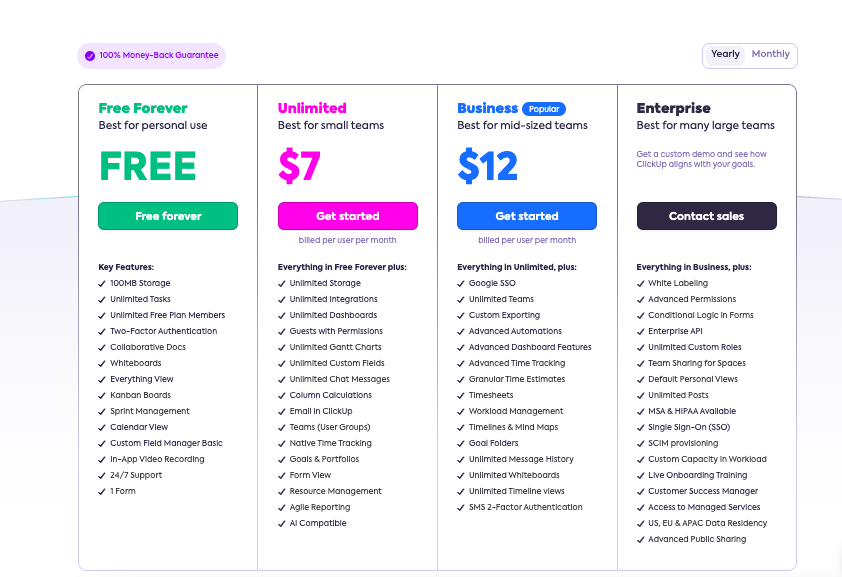 | 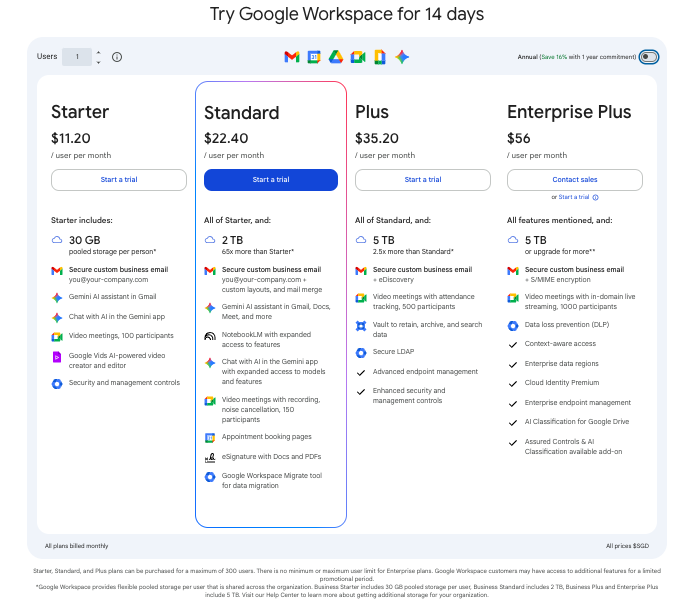 |
Other Details
Organization Types supported |
|
|
|---|---|---|
Platforms Supported |
|
|
Modes of support |
|
|
API Support |
|
|
Get help choosing | Get help choosing |
Security & Compliance
Certifications, data handling, and security controls for IT and compliance evaluators.
SOC 2 | ✓ Yes | ✓ Yes |
|---|---|---|
HIPAA | ✓ Yes | ✓ Yes |
GDPR | ✓ Yes | ✓ Yes |
ISO 27001 | ✗ No | ✓ Yes |
Single Sign-On (SSO) | ✓ Yes | ✓ Yes |
Multi-Factor Auth (MFA) | ✓ Yes | ✓ Yes |
Data Encryption | ✓ Yes | ✓ Yes |
Audit Logs | ✓ Yes | ✓ Yes |
Data Residency | 🌐 Global | 🌐 Global |
ClickUp User Reviews & Rating Comparison
User Ratings | ||
|---|---|---|
Rating Distribution | ||
Spotsaas Editor’s POV generated by AI | Buyer sentiment Overall positive sentiment highlighting versatility, customization, and strong customer support, tempered by concerns over initial learning difficulty and limited marketplace options. What buyers like
Common complaints
| Buyer sentiment Users appreciate Google Sheets for its ease of collaboration, AI-powered features, and integrations, though some note performance limitations with large datasets and advanced functionality gaps. What buyers like
Common complaints
|
Pros and Cons |
|
|
Positive Reviews | No reviews available for the product | No reviews available for the product |
Integrations
Integration with other apps | No Integration information available. |
|---|

List of Customers
Customers |  Samsung  IBM  Booking.com | No Customers information available. |
|---|
Media and Screenshots
Screenshots |  5 Screenshots |  4 Screenshots |
|---|---|---|
Videos |  5 Videos |  1 Videos |
Top Alternatives to ClickUp and Google Sheets in 2026
Alternatives |
|---|



Add another option to compare side by side
Search by product name to compare pricing, fit, and buyer feedback in one view.Compare similar software options


Disclaimer: This research has been collated from a variety of authoritative sources. We welcome your feedback at [email protected].
Frequently asked questions
- Which is better, ClickUp or Google Sheets?
- Google Sheets edges out the other on user ratings (4.6 vs 4.4). That said, the best pick depends on your use case — use the comparison tables above to evaluate each dimension.
- Do ClickUp and Google Sheets offer a free trial?
- ClickUp offers a free trial. Google Sheets does not.
- What is the starting price of ClickUp vs Google Sheets?
- ClickUp starts at $7 /User/Month. Google Sheets starts at $9.40 /user/month.
- What are the top alternatives to ClickUp?
- Top alternatives to ClickUp include Basecamp, Trello, TeamGantt, Asana, Teamwork.
- What are the top alternatives to Google Sheets?
- Top alternatives to Google Sheets include SpreadsheetWEB, Google Workspace, Microsoft Excel, Zoho Sheet, Google Docs.