
Checksub vs Zoom vs Livestorm Comparison

Checksub
Starting at Contact for pricing
- Free Trial
- Large Enterprises
- Small Business
Checksub, the platform, is changing video editing with its commitment to precision, adaptability, and linguistic expertise. At Checksub, the latest advancements in artificial intelligence are utilized to exceed user expe…

Zoom
Starting at $13.33 /user/month
- Free Trial
- Free Version
- Large Enterprises
- Medium Business
Zoom is a comprehensive communication platform designed to bring teams, clients, and partners together through video conferencing, messaging, and collaboration tools. Built for organizations of all sizes, it supports pro…

Livestorm
Starting at $88 /Month
- Free Trial
- Free Version
- Large Enterprises
- Medium Business
Livestorm is the perfect online software for hosting live events using web conferencing. It features a fully-customizable interface, mobile compatibility and a host of helpful features. It is a powerful webinar platform…
Checksub leads on user satisfaction with a 4.8-star rating across 6 reviews.
Checksub vs Zoom vs Livestorm — at a glance
| Feature | Checksub | Zoom | Livestorm |
|---|---|---|---|
| Rating | 4.8 / 5 | 4.4 / 5 | 4.6 / 5 |
| Reviews | 6 | 5,971 | 136 |
| Starting price | Contact for pricing | $13.33 /user/month | $88 /Month |
| Free trial | Yes | Yes | Yes |
| Free version | No | Yes | Yes |
| Best for | Large Enterprises, Small Business, Medium Business | Large Enterprises, Medium Business, Small Business | Large Enterprises, Medium Business, Small Business |
| Category | Transcription Software | Video Conferencing Software | Video Conferencing Software |
| Platforms | Browser Based (Cloud) | SaaS/Web/Cloud, Mobile - Android, Mobile - iOS, Installed - Windows, Installed - Mac | SaaS/Web/Cloud |
| API | Available | Available | Available |
| Support modes | Online | 24/7 (Live rep), Business Hours, Online | 24/7 (Live rep), Business Hours, Online |
Key differences between Checksub and Zoom
- Pricing: Zoom starts at $13.33 /user/month. Checksub pricing is not publicly listed.
- User satisfaction: Checksub scores higher with a 4.8-star average.
- Deployment: Checksub supports Browser Based (Cloud); Zoom supports SaaS/Web/Cloud, Mobile - Android, Mobile - iOS, Installed - Windows, Installed - Mac.
Compare Checksub vs Zoom vs Livestorm — and walk away knowing which one fits.
Which tool fits your team best
Which is actually cheaper for your team size
Where each product wins, per real buyers
Most Transcription Software tools look identical on paper. This comparison cuts to the differences that matter — pricing structure, team fit, and what real buyers found after signing up.
Biggest differences
Features
Pricing
Buying details
Security
Buyer feedback
Integrations
Product tour
Other options
Free PDF comparison
Download this Checksub vs Zoom vs Livestorm comparison
Get the full side-by-side as a PDF — these picks plus the top Transcription Software tools, with verified ratings, pricing and features.
- Side-by-side on pricing, features & ratings
- Plus the category top 10, scored & ranked
- Emailed to you — no on-screen download
No file downloads on screen — we email it to you. One-click unsubscribe anytime.
Checksub, Zoom vs Livestorm: Biggest differences
Start here before you go deeper into features.
Best for AI-driven, highly accurate video subtitling and translation workflows.
- You need machine translation specifically optimized for video subtitles.
- Your team includes video editors or localization specialists focused on subtitling.
- You require flexible, configurable workflows tailored to video editing and media localization.
- You need offline transcription tools or extensive audio transcription features.
- Transparent pricing and abundant user reviews are critical for your decision-making.
Best for scalable, high-quality video meetings with strong integrations.
- You need reliable HD video and audio for large group meetings.
- Your organization uses Google Workspace, Microsoft Teams, Salesforce, or Slack.
- You require AI-powered tools like automated meeting summaries and task suggestions.
- You need extensive app marketplace options for advanced customization.
- Your users prefer very simple, minimal feature sets due to low technical expertise.
Best for easy-to-use, browser-based webinars and virtual learning events.
- You need a simple, quick setup for professional webinars or training sessions.
- Your team values strong customer support and responsive service.
- You want a fully browser-based platform requiring no downloads for attendees.
- You require extensive customization of registration pages and webinar room design.
- Your workflows depend on deep integrations with a wide variety of third-party tools.
Checksub: Best for AI-driven, highly accurate video subtitling and translation workflows. Zoom: Best for scalable, high-quality video meetings with strong integrations.
Description | Checksub, the platform, is changing video editing with its commitment to precision, adaptability, and linguistic expertise. At Checksub, the latest advancements in artificial intelligence ... Read More about Checksub | Zoom is a comprehensive communication platform designed to bring teams, clients, and partners together through video conferencing, messaging, and collaboration tools. Built for ... Read More about Zoom | Livestorm is the perfect online software for hosting live events using web conferencing. It features a fully-customizable interface, mobile compatibility and a host of helpful features. It ... Read More about Livestorm |
|---|---|---|---|
Entry Level Pricing |
|
|
|
Free Trial Availability |
| ||
SpotScoreWhat's this? ↗ | Not Available | 9.8/10 | 9.0/10 |
User RatingsBased on verified Spotsaas reviews | |||
Best Company Size | Small BusinessLarge Enterprises | 50-500 employees500-5,000+ employees | Small BusinessMedium Business |
Get pricing help | Get pricing help |
Where each option fits best
See where each product is strongest, which teams it fits, and what causes buyers to keep looking — before you commit.
Based on buyer reviews and verified product data collected by Spotsaas.
Key strengths
- Scalable Collaboration for Any Business Size: Zoom adapts to businesses of all sizes, from small teams hosting quick check-ins to large enterprises running global webinars and conferences. Its reliable infrastructure maintains solid performance regardless of participant numbers, while features like breakout rooms, webinar hosting, and cloud phone services let organizations expand their collaboration efforts as they grow. This makes it a dependable solution for long-term business communication needs.
- Unified Workflows Through Strong Integrations: Zoom integrates with Google Workspace, Microsoft Teams, Salesforce, and Slack, letting businesses manage all communication and collaboration needs in one place. This approach reduces switching between applications, improving efficiency and reducing errors. Teams can easily schedule meetings, share documents, track progress, and communicate within their existing software ecosystems.
- Clear Cross-Industry Communication: Zoom lets organizations across various industries connect easily with reliable video, audio, and chat features. Whether it's a healthcare consultation, an educational lecture, or a financial services meeting, the platform keeps communication clear without interruptions. Its AI-enhanced productivity tools, such as automated meeting summaries and smart task suggestions, simplify workflows and help teams save time and focus on what matters most.
Best fit
- 50–5,000+ Employees
- Education, Healthcare, Financial Services, Government, Retail, Manufacturing, Technology
- Business Executives, Project Managers, Educators, Healthcare Professionals, HR Managers, Sales Executives, IT Administrators, Customer Support Leads
Reasons buyers look elsewhere
- Some organizations opt for Microsoft Teams due to its tighter integration with Office 365 and enterprise-level controls.
- Companies in regulated industries may prefer Cisco Webex for its enhanced security and compliance features.
- Businesses already using Google Workspace often choose Google Meet for its built-in access and simpler pricing model.
Software Demo
Demo |
|---|
Need a second opinion?
Get decision help from a software advisor
Share your priorities, budget, and team needs, and we’ll help you narrow the options and understand the tradeoffs before you talk to vendors.

- Independent advice — matched to your business
- Understand the tradeoffs before you talk to vendors
- Free 15-min call with a software advisor.
Step 1 of 4
How big is your team?
We tailor recommendations to companies your size.















How do Checksub, Zoom and Livestorm Compare on Features?
Total Features | 5 Features | 19 Features | 15 Features |
|---|---|---|---|
Unique Features | No unique features | No unique features | No unique features |
Get Quote | Get Quote |
Compare Checksub, Zoom and Livestorm on pricing
Review starting price, plan structure, and free-trial access side by side so you can see which option fits your budget and buying process.
Pricing Option | |||
|---|---|---|---|
Starting From |
|
|
|
Pricing Plans |
|
|
|
Pricing Page |  | 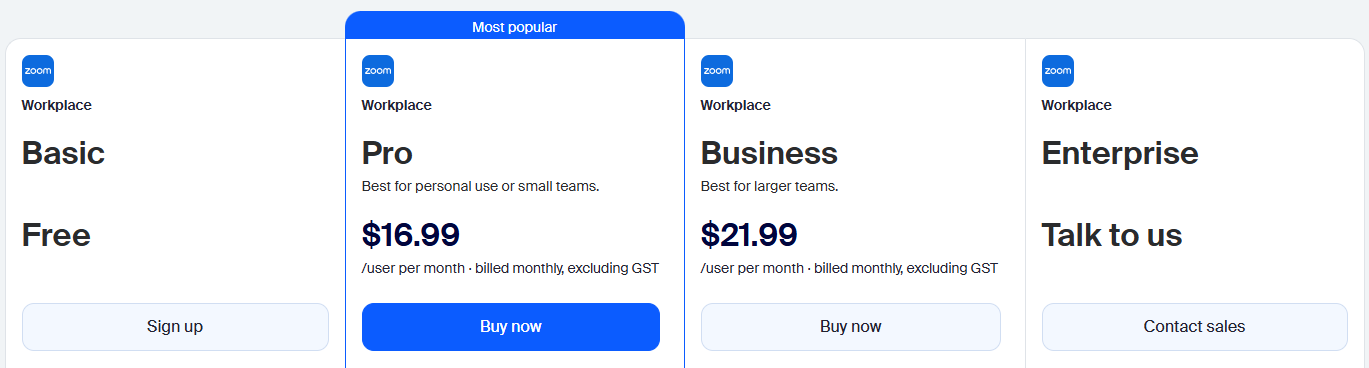 |  |
Checksub, Zoom vs Livestorm: Other Details
Organization Types supported |
|
|
|
|---|---|---|---|
Platforms Supported |
|
|
|
Modes of support |
|
|
|
API Support |
|
|
|
Get help choosing | Get help choosing |
Checksub vs Zoom User Reviews & Rating Comparison
User Ratings | |||
|---|---|---|---|
Rating Distribution | |||
Spotsaas Editor’s POV generated by AI | Buyer sentiment Insufficient user feedback and ratings available to determine overall buyer sentiment. What buyers like
Common complaints
| Buyer sentiment Overall positive sentiment highlights Zoom's high-quality video/audio and ease of use, though some users find the feature set complex and customization options limited. What buyers like
Common complaints
| Buyer sentiment Users generally praise Livestorm for its ease of use, browser-based accessibility, and strong customer support, while noting some limitations in customization and integrations. What buyers like
Common complaints
|
Pros and Cons |
|
|
|
Positive Reviews | No reviews available for the product | No reviews available for the product | No reviews available for the product |
Checksub, Zoom and Livestorm Customers
Customers |  Stripe  Michelin  Novo Nordisk |  Zendesk  Veeva  Splunk |  WPP  AB Tasty  PayFit |
|---|
Media and Screenshots
Screenshots | No screenshots available. |  4 Screenshots |
|---|---|---|
Videos |  1 Videos |  6 Videos |
Alternatives to Checksub, Zoom, Livestorm
Alternatives |
|---|




Add another option to compare side by side
Search by product name to compare pricing, fit, and buyer feedback in one view.Compare similar software options


Related Blogs and Articles for Video Conferencing Software

Disclaimer: This research has been collated from a variety of authoritative sources. We welcome your feedback at [email protected].
Frequently asked questions
- Which is better, Checksub or Zoom?
- Checksub edges out the other on user ratings (4.8 vs 4.4). That said, the best pick depends on your use case, so use the comparison tables above to evaluate each dimension.
- Do Checksub and Zoom offer a free trial?
- Yes, both Checksub and Zoom offer a free trial.
- What is the starting price of Checksub vs Zoom?
- Checksub starts at Contact for pricing. Zoom starts at $13.33 /user/month.
- What are the top alternatives to Checksub?
- Top alternatives to Checksub include Transcriptmate, Reveal, alugha, AmberScript, Scribba.
- What are the top alternatives to Zoom?
- Top alternatives to Zoom include Livestorm, GotoMeeting, FreeConferenceCall.com, Lifesize, Pexip.
- Where does Checksub fall short?
- What buyers praise about Checksub: high accuracy in subtitling translations; tailored machine translation for video subtitles. What they raise as reservations: pricing is not publicly disclosed, requiring sales contact; limited information on transcription beyond subtitling. It does not include Customer Support and Contact Database.
- Does Zoom live up to its claims?
- The case for Zoom: high-quality audio and video even with large groups; intuitive interface and user-friendly experience for organizers and participants. The case against: limited marketplace selection restricting advanced functionality customization; feature richness can be overwhelming for newcomers without adequate support. It also lacks Self Service Portal and Contact Management.
More Video Conferencing Software comparisons
Side by side breakdowns of the same products against other options in this category.