
Avo vs Browserflow vs monday.com Comparison

Avo
Starting at Contact for pricing
- Large Enterprises
- Medium Business
Avo is workflow automation software for operations teams managing document-heavy processes that involve spreadsheets, approvals, and cross-functional handoffs between people. It automates the flow of tasks and documents…

Browserflow
Starting at Contact for pricing
- Individuals
- Large Enterprises
Welcome to Browserflow, the ultimate tool for automating work on any website. With our cutting-edge technology, you can save time and effort by automating repetitive tasks in your own browser or even in the cloud. Best o…

monday.com
Starting at $9 seat/month
- Free Trial
- Freelancers / Consultants
- Large Enterprises
Monday.com is a flexible work operating system designed to help teams plan, execute, and track all types of projects and workflows in one place. Ideal for marketing teams, product managers, sales professionals, developer…
Try monday.com free
See how it fits your team before you decide. Free for up to 2 seats, no credit card needed.
We may earn a commission. Affiliate disclosure
Avo vs Browserflow vs monday.com — at a glance
| Feature | Avo | Browserflow | monday.com |
|---|---|---|---|
| Rating | — | — | 4.6 / 5 |
| Reviews | — | — | 1,531 |
| Starting price | Contact for pricing | Contact for pricing | $9 seat/month |
| Free trial | No | No | Yes |
| Free version | No | No | No |
| Best for | Large Enterprises, Medium Business, Small Business | Individuals, Large Enterprises, Medium Business | Freelancers / Consultants, Large Enterprises, Medium Business |
| Category | Workflow Automation Software | Workflow Automation Software | Project Management Software |
| Platforms | SaaS/Web/Cloud | SaaS/Web/Cloud | SaaS/Web/Cloud, Mobile - Android, Mobile - iOS, Installed - Windows, Installed - Mac |
| API | Available | — | Available |
| Support modes | Online | Online | 24/7 (Live rep), Online |
| Certifications | SOC 2, GDPR | — | SOC 2, HIPAA, GDPR, ISO 27001 |
| Data residency | US | US | Global |
Key differences between Avo and Browserflow
- Target audience: Avo is built for Large Enterprises and Medium Business, while Browserflow targets Individuals and Large Enterprises.
- Deployment: Avo supports SaaS/Web/Cloud; Browserflow supports SaaS/Web/Cloud.
Compare Avo vs Browserflow vs monday.com — and walk away knowing which one fits.
Which tool fits your team best
Which is actually cheaper for your team size
Where each product wins, per real buyers
Most Workflow Automation Software tools look identical on paper. This comparison cuts to the differences that matter — pricing structure, team fit, and what real buyers found after signing up.
Biggest differences
Features
Pricing
Buying details
Security
Buyer feedback
Integrations
Product tour
Other options
Talk to an expert Talk to an expert | Talk to an expert Talk to an expert |
Free PDF comparison
Download this Avo vs Browserflow vs monday.com comparison
Get the full side-by-side as a PDF — these picks plus the top Workflow Automation Software tools, with verified ratings, pricing and features.
- Side-by-side on pricing, features & ratings
- Plus the category top 10, scored & ranked
- Emailed to you — no on-screen download
No file downloads on screen — we email it to you. One-click unsubscribe anytime.
Avo, Browserflow vs monday.com: Biggest differences
Start here before you go deeper into features.
Best for automating repetitive workflows involving people, spreadsheets, and documents.
- You need to streamline collaboration across sales or CRM teams.
- Your workflows involve repetitive manual tasks suitable for automation.
- You want integrated real-time analytics to drive data-informed decisions.
- Your automation needs are highly complex or industry-specific beyond Avo’s scope.
- You require transparent pricing and extensive user feedback before purchase.
Best for no-code browser-based automation of repetitive web tasks.
- You need to automate repetitive tasks directly in your browser without coding.
- Your team uses Google Sheets and benefits from integrated data workflows.
- You want a simple, low-complexity setup for sales or marketing automation.
- Your workflows require complex, enterprise-grade orchestration beyond web automation.
- You need deep native integrations with non-web applications or systems.
Best for medium to large teams needing flexible, customizable project management.
- You require a highly configurable platform adaptable to diverse workflows and industries.
- Your team benefits from automation of repetitive tasks to boost productivity and reduce errors.
- You need comprehensive real-time collaboration features to keep cross-department teams aligned.
- You are a freelancer or very small team with limited budget and simpler needs.
- Your workflows depend heavily on deep native integrations with tools like Google Drive.
Avo: Best for automating repetitive workflows involving people, spreadsheets, and documents. Browserflow: Best for no-code browser-based automation of repetitive web tasks.
Description | Avo is workflow automation software for operations teams managing document-heavy processes that involve spreadsheets, approvals, and cross-functional handoffs between people. It automates ... Read More about Avo | Welcome to Browserflow, the ultimate tool for automating work on any website. With our cutting-edge technology, you can save time and effort by automating repetitive tasks in your own ... Read More about Browserflow | Monday.com is a flexible work operating system designed to help teams plan, execute, and track all types of projects and workflows in one place. Ideal for marketing teams, product managers, ... Read More about monday.com |
|---|---|---|---|
Entry Level Pricing |
|
|
|
Free Trial Availability |
|
| |
SpotScoreWhat's this? ↗ | 8.8/10 | 8.4/10 | 9.7/10 |
User RatingsBased on verified Spotsaas reviews | |||
Best Company Size | 50-500 employeesMedium Business | 50 to 500 employeesLarge enterprises | 50-1,000 employeesMedium to large businesses |
Get pricing help | Get pricing help | Get pricing help |
Where each option fits best
See where each product is strongest, which teams it fits, and what causes buyers to keep looking — before you commit.
Based on buyer reviews and verified product data collected by Spotsaas.
Key strengths
- Smooth Collaboration: Avo lets your team members communicate and collaborate easily on projects. Coordinating tasks and sharing insights is straightforward.
- Increased Productivity: By automating routine processes, Avo lets your team focus on high-impact work. You'll see improved efficiency, which means faster project completion and better resource allocation.
- Data-Driven Insights: Avo provides reliable analytics that help you make informed decisions. With real-time data available, you can confidently steer your projects toward success and identify areas for improvement.
- Workflow Automation: With Browserflow, your team can easily automate repetitive tasks across web applications. This means less time spent on routine processes and more focus on strategic work.
- User-Friendly Interface: Designed for both technical and non-technical users, Browserflow has an intuitive drag-and-drop interface. This lets everyone in your organization create custom workflows without needing extensive coding knowledge.
- Data Collection: Browserflow's scraping capabilities let you gather data from multiple sources quickly and accurately. You get the insights needed to make informed decisions without manual data entry.
- Project Management: With monday.com, you can easily organize tasks and projects in a clear, visual format, letting your teams prioritize effectively. I've seen managers turn chaotic workflows into structured plans that deliver results.
- Customizable Workflows: The platform’s flexibility lets us tailor workflows to fit our specific needs, whether we’re managing marketing campaigns or product launches. This adaptability means every team can work in a way that feels natural and efficient.
- Real-Time Collaboration: Communication is key, and monday.com lets teams collaborate effectively. Team members can share updates, tag each other, and provide feedback instantly, which keeps everyone aligned and improves overall productivity.
Best fit
- 50 to 500 employees
- Martech, Revtech, Fintech, Sales Automation, SaaS, and Consulting
- Sales Managers, Account Executives, Business Development Representatives, and CRM Administrators
- 50 to 500 employees
- Martech, SaaS, Consulting, Sales Automation, and Fintech
- Sales Managers, Account Executives, Business Development Representatives, Marketing Specialists, and CRM Administrators
- 50 to 1,000 employees
- Martech, SaaS, Consulting, Project Management, Marketing Agencies, and Tech Startups
- Typical users encompass Project Managers, Team Leaders, Marketing Coordinators, Product Managers, and Operations Managers
Reasons buyers look elsewhere
- Lacks advanced analytics capabilities — teams needing predictive modeling or custom dashboards typically add Mixpanel or Amplitude
- Pricing starts higher than competitors like Segment or mParticle for equivalent event tracking volume
- Performance degrades with datasets over 10M events per day — users requiring sub-second query speeds migrate to specialized warehouses
- Lacks advanced automation and customization for complex workflows — teams needing conditional logic or multi-step sequences often switch to Zapier or Make
- Pricing starts at $50/month for basic automation — organizations with tight budgets typically evaluate Selenium or open-source RPA alternatives first
- No-code interface requires learning Browserflow's specific syntax — users accustomed to drag-and-drop builders like Integromat or n8n report steeper onboarding
- Users may seek alternatives due to specific project management needs that monday.com doesn't fully address, such as advanced reporting features or specialized integrations that better suit their workflow requirements.
- Cost considerations can drive users to explore alternatives, especially if they find similar functionalities in other platforms at a lower price point, making budgeting for tools more manageable.
- Teams looking for a more intuitive user interface or simpler onboarding experience might consider options that offer a more straightforward setup process and user-friendly design to enhance team adoption.
Software Demo
Demo |
|---|
Need a second opinion?
Get decision help from a software advisor
Share your priorities, budget, and team needs, and we’ll help you narrow the options and understand the tradeoffs before you talk to vendors.

- Independent advice — matched to your business
- Understand the tradeoffs before you talk to vendors
- Free 15-min call with a software advisor.
Step 1 of 4
How big is your team?
We tailor recommendations to companies your size.















How do Avo, Browserflow and monday.com Compare on Features?
Total Features | 7 Features | 5 Features | 41 Features |
|---|---|---|---|
Unique Features | No unique features | No unique features | No unique features |
Get Quote | Get Quote | Get Quote |
Compare Avo, Browserflow and monday.com on pricing
Review starting price, plan structure, and free-trial access side by side so you can see which option fits your budget and buying process.
Pricing Option | |||
|---|---|---|---|
Starting From |
|
|
|
Pricing Plans |
|
| |
Pricing Page |  |  | 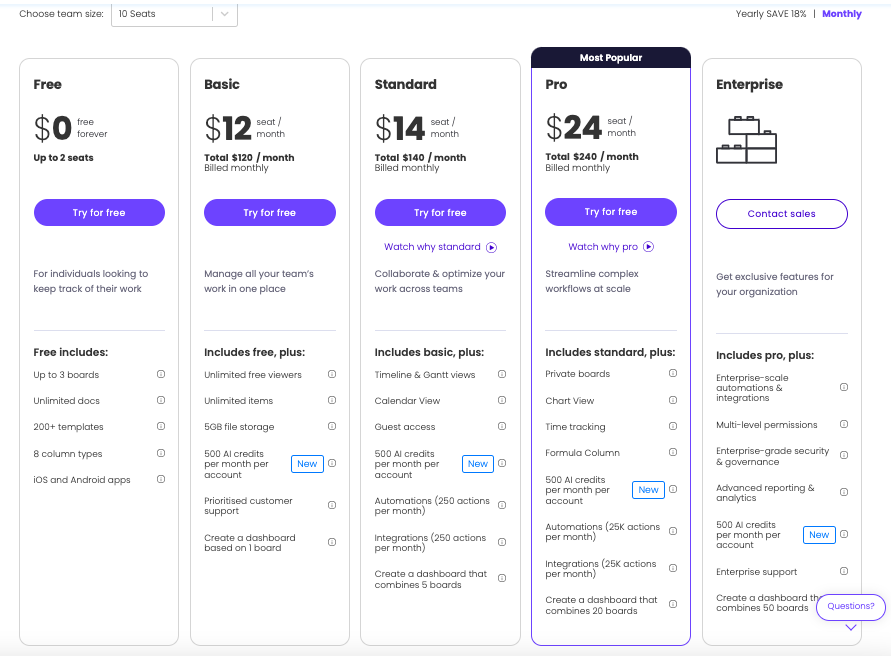 |
Avo, Browserflow vs monday.com: Other Details
Organization Types supported |
|
|
|
|---|---|---|---|
Platforms Supported |
|
|
|
Modes of support |
|
|
|
API Support |
|
|
|
Get help choosing | Get help choosing | Get help choosing |
Avo, Browserflow vs monday.com Security & Compliance
Certifications, data handling, and security controls for IT and compliance evaluators.
SOC 2 | ✓ Yes | — |
|---|---|---|
HIPAA | ✗ No | ✗ No |
GDPR | ✓ Yes | — |
ISO 27001 | — | — |
Single Sign-On (SSO) | ✓ Yes | — |
Multi-Factor Auth (MFA) | ✓ Yes | — |
Data Encryption | ✓ Yes | — |
Audit Logs | ✓ Yes | — |
Data Residency | 🇺🇸 US | 🇺🇸 US |
Avo vs Browserflow User Reviews & Rating Comparison
User Ratings | No reviews available for the product | No reviews available for the product | |
|---|---|---|---|
Rating Distribution | No reviews available for this product | No reviews available for this product | |
Spotsaas Editor’s POV generated by AI | Buyer sentiment Overall sentiment is positive regarding collaboration and productivity gains, but limited user feedback and unclear ratings create uncertainty. What buyers like
Common complaints
| Buyer sentiment Buyer sentiment is generally positive about ease of use and automation capabilities, though detailed user feedback is limited. What buyers like
Common complaints
| Buyer sentiment Overall, buyers appreciate monday.com’s flexibility, ease of use, and collaboration features but note a learning curve and pricing concerns for smaller teams. What buyers like
Common complaints
|
Pros and Cons |
|
|
|
Positive Reviews | No reviews available for the product | No reviews available for the product | No reviews available for the product |
Avo, Browserflow and monday.com Customers
Customers |  Sothebys  Doodle  fullstory | No Customers information available. |  Walmart  Uber  Adobe |
|---|
Media and Screenshots
Screenshots |  1 Screenshots |  1 Screenshots |
|---|---|---|
Videos |  1 Videos |  5 Videos |
Alternatives to Avo, Browserflow, monday.com
Alternatives |
|---|


Add another option to compare side by side
Search by product name to compare pricing, fit, and buyer feedback in one view.Compare similar software options



Disclaimer: This research has been collated from a variety of authoritative sources. We welcome your feedback at [email protected].
Frequently asked questions
- Which is better, Avo or Browserflow?
- Avo and Browserflow are closely matched with equal user ratings of -1.0. The right choice depends on your team size, budget, and specific Workflow Automation Software needs.
- Do Avo and Browserflow offer a free trial?
- Neither Avo nor Browserflow currently lists a free trial.
- What is the starting price of Avo vs Browserflow?
- Avo starts at Contact for pricing. Browserflow starts at Contact for pricing.
- What are the top alternatives to Avo?
- Top alternatives to Avo include monday.com, Process Street, Qntrl, Fluix, Yoroflow.
- What are the top alternatives to Browserflow?
- Top alternatives to Browserflow include monday.com, Process Street, karbon, Qntrl, TAP Workflow Automation.