

Managing employee records, payroll, attendance, and onboarding through disconnected spreadsheets gets slower and messier as a company grows, and small errors start compounding. HR software fixes that by pulling those tasks into one system, so teams spend less time on manual admin and more time on work that actually needs a person.
Picking the platform is only half the job, though. Roll it out without a clear implementation plan and you’re looking at delays, low adoption, and workflows that don’t quite fit how the team actually operates. A structured rollout avoids most of that, keeps employees engaged through the transition, and lets the team feel the payoff of the new system from the first week rather than months later.
What You’ll Learn: Key Steps to Implement HR Software in 2026
This guide walks through what an HR software rollout actually involves, covering:
- Each stage of the implementation process, in order
- What needs to happen before, during, and after go-live
- How to handle data migration, onboarding, and training without dropping the ball
- The pitfalls that trip up most rollouts, and how to sidestep them
- What to do after launch to keep getting value from the system
Whether you’re moving off spreadsheets or swapping out an old system, this is a practical roadmap for getting the rollout right.
Step 1: Plan Ahead – Pre-Implementation Checklist for HR Software
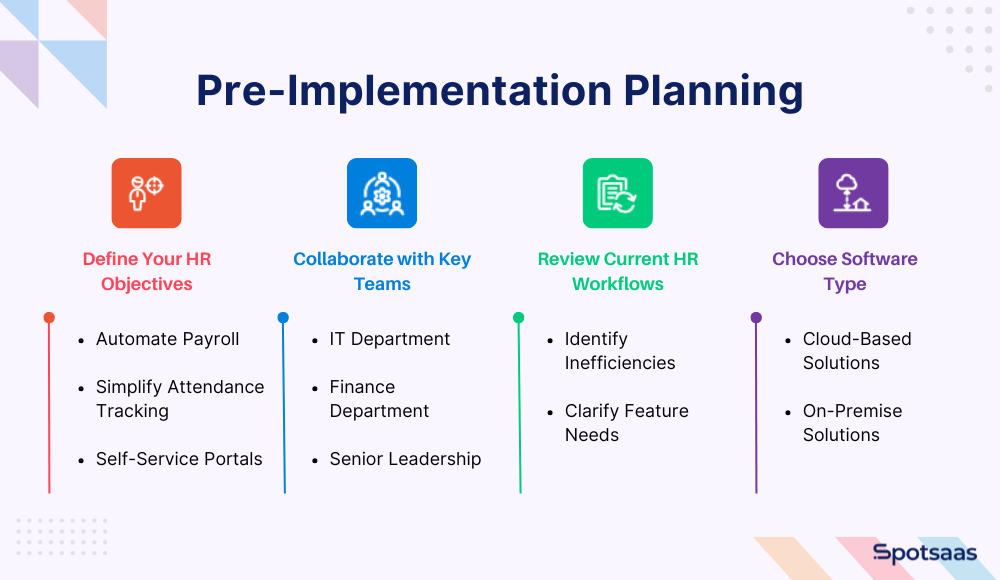
Define Your HR Goals Before Implementation
Start by pinning down what the HR team actually wants out of the new system. Automating payroll, simplifying attendance tracking, or letting employees pull their own records through a self-service portal are all different problems with different feature requirements. Naming the goal upfront makes every later decision easier.
Build a Cross-Functional Team for HR Software Success
This isn’t a project HR should run alone. Loop in IT, finance, and senior leadership early, since each brings something the others can’t: IT flags the technical constraints, finance keeps the budget honest, and leadership makes sure the software actually serves where the company is headed.
Audit Your Existing HR Workflows Before Rollout
Before shopping for software, look hard at what’s already broken. Which tasks eat up too much time? Is employee data scattered across five different spreadsheets? Mapping out these inefficiencies tells you what to prioritize fixing and which features the new platform genuinely needs to have.
Decide Between Cloud vs On-Premise HR Software
Whether cloud-based or on-premise software makes more sense depends on the company’s resources and requirements.
- Cloud-based HR tools can be reached from anywhere, ask less of internal IT, and update themselves automatically.
- On-premise solutions fit organizations that need tight control over their data or run custom IT setups, but they tend to cost more upfront and demand ongoing maintenance.
Working through these questions early cuts down on surprises later, and gets you to a solution that holds up for both immediate needs and where the company is going.
Step 2: Choose the Right HR Software for Your Business Needs
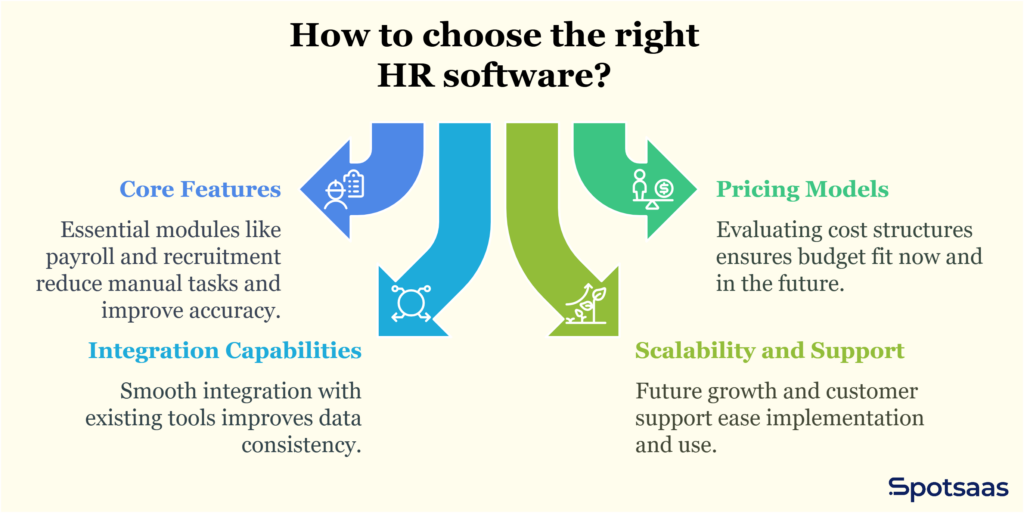
Identify Must-Have HR Features (Payroll, Leave, Recruitment)
Focus on the essentials first. Most businesses need modules covering payroll, leave management, recruitment, employee self-service, and reporting. These are what actually cut down on manual work, tighten accuracy, and free up HR to focus on higher-value tasks instead of paperwork.
Understand HR Software Pricing Models & Budgeting in 2026
Pricing varies a lot between vendors. Some charge per employee per month, others use tiered or flat-rate plans. Weigh each model against your current headcount and where it’s likely to grow, so the software fits your budget both now and a couple of years out.
Ensure Integration with Payroll, CRM, and Other Tools
How well the software connects with what you already run, payroll systems, CRMs, accounting software, matters more day-to-day than most people expect. Picking a platform that plugs cleanly into your existing tools cuts out duplicate data entry and keeps records consistent across departments.
Plan for Scalability and Support: Future-Proof Your HR System
Growing teams need software that grows with them. Look for a platform that can absorb more users, features, or locations without forcing a full switch-over later. Check the customer support on offer too: fast access to help, training, and updates makes both the rollout and everyday use far less painful.
Step 3: Work with Your Vendor – Timeline, Training, & SLAs
| Task | Description |
|---|---|
| Set a Clear Project Timeline with Milestones | Outline all stages such as setup, data migration, testing, and go-live. Assign responsibilities and include estimated completion dates to keep the project on track. |
| Discuss Onboarding and Training with the Vendor | Confirm if the vendor offers onboarding sessions, training resources, and dedicated support specialists to help HR teams and employees adopt the software efficiently. |
| Review SLAs, Downtime Policies, and Migration Timelines | Review service-level agreements for uptime, support, and resolution timelines. Clarify migration duration, data format requirements, and any downtime expectations. |
Build a Project Timeline with key Milestones
With the software chosen, map out a timeline for the rollout itself: initial setup, data migration, testing, and go-live, each with a realistic completion date.
Put a name against each stage so internal teams know exactly who owns what. That keeps the project moving and leaves room to adjust the schedule if something runs long.
Discuss Training, Onboarding & Vendor Support Options
The vendor’s support quality shapes how smooth this whole process feels. Ask directly whether they run onboarding sessions, product walkthroughs, or provide training materials for HR staff and employees.
Some vendors assign a dedicated onboarding specialist or give you access to a knowledge base, either of which speeds up the learning curve and cuts down on confusion once the rollout starts.
Review SLAs, Downtime Policies & Migration Timelines
Read the vendor’s service-level agreements before committing. They spell out system uptime, how fast support responds, and how issues get resolved.
Also nail down how long data migration will actually take, what format your data needs to be in, and whether any downtime is expected during the switch. Getting these expectations straight upfront heads off delays and gives your team a realistic picture to plan around.
Step 4: Migrate & Secure Your HR Data Effectively
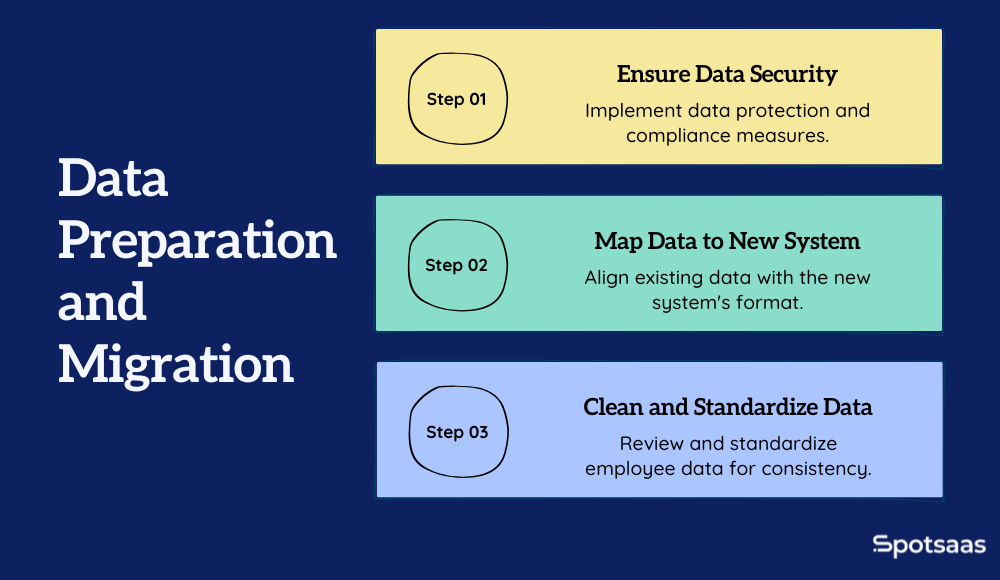
Clean and Format Employee Data for Import
Before anything gets imported, go through your current HR data and clear out duplicates, stale records, and gaps. Standardize how job titles, department names, and contact details are formatted, since a consistent data set is far easier to work with once it’s actually moved over.
Map Old HR Data to New System Format
Every HR platform stores information in its own structure, so your existing data won’t drop in as-is. Expect to rename fields, split combined values apart, or reorganize categories to match. Getting this mapping right heads off migration errors and makes the whole transition less rocky for your team.
Ensure Data Security and Compliance During Migration
Employee data comes with real obligations attached. Confirm the data migration process meets whatever standards apply to your business, GDPR or HIPAA among them, depending on where you operate. Ask the vendor directly how data gets encrypted, stored, and backed up during the move, and confirm access controls are set correctly before the system goes live.
Step 5: Configure and Customize Your HR Software
| Task | Description |
|---|---|
| Set Up Core Company Settings | Configure the system to reflect your company’s structure by setting up HR policies, job roles, holiday calendars, and approval workflows for processes like leave and expenses. |
| Customize Dashboards, Notifications, and Access Levels | Tailor dashboards for different user roles, set up relevant notifications, and define access controls to ensure users see only what’s necessary for their responsibilities. |
| Configure Key Integrations | Connect the HR system with other business tools like payroll, accounting, and time tracking platforms. Confirm API availability and test integration compatibility. |
Configure Core Company Settings (Policies, Roles, Approvals)
Once the software’s installed and the data’s ready, configure it to actually match how your company runs. Add HR policies, holiday calendars, job roles, and reporting lines, then set up approval workflows for leave requests, expense claims, and performance reviews so these move through the right people automatically instead of needing manual chasing.
Personalize Dashboards, Alerts & Role-Based Access
Most platforms let you tailor dashboards by user type. HR needs analytics and reports; managers mostly care about team attendance and pending approvals. Set up email or in-app notifications that inform without flooding inboxes, and scope user roles carefully so people only see what’s relevant to their job.
Connect HR Software with Payroll, Time Tracking & More
Getting real value out of the rollout means connecting it to the tools your business already runs. Integrations with payroll systems, time-tracking apps, accounting software, and communication platforms cut down on manual data entry and reduce mistakes. Check the vendor’s integration library or API documentation to confirm the connections you need actually exist.
Step 6: Train Teams for Successful HR Software Adoption
| Task | Description |
|---|---|
| Start with the HR Team and Department Heads | Train HR and managers first to lead system adoption company-wide. |
| Provide Easy-to-Follow Resources for Employees | Share guides and videos to help employees learn core tasks independently. |
| Choose the Right Training Format | Use in-person or virtual sessions based on team size and structure. |
Train HR Teams and Managers First
Start training with the people who’ll live in the system daily, your HR team. They need the full picture, from managing records to pulling reports.
Once they’re up to speed, extend training to department heads, who’ll be approving requests and overseeing team activity. This builds a support layer employees across the company can lean on.
Create Training Materials for Employee Self-Onboarding
For everyone else, put together short guides or videos covering the basics: submitting leave requests, updating personal details, pulling up payslips. These cut down how often employees need to ask HR for help and let people figure things out on their own.
Pick the Best Training Format: Virtual vs In-Person
Which format works best depends on team size and how the company operates. Smaller teams often do fine with in-person walkthroughs; larger or remote teams tend to need virtual sessions or recorded demos instead. Whatever you pick, keep the content focused on real daily tasks rather than a full feature tour, so people can get up to speed fast.
Step 7: Test Your HR Software Before Going Live
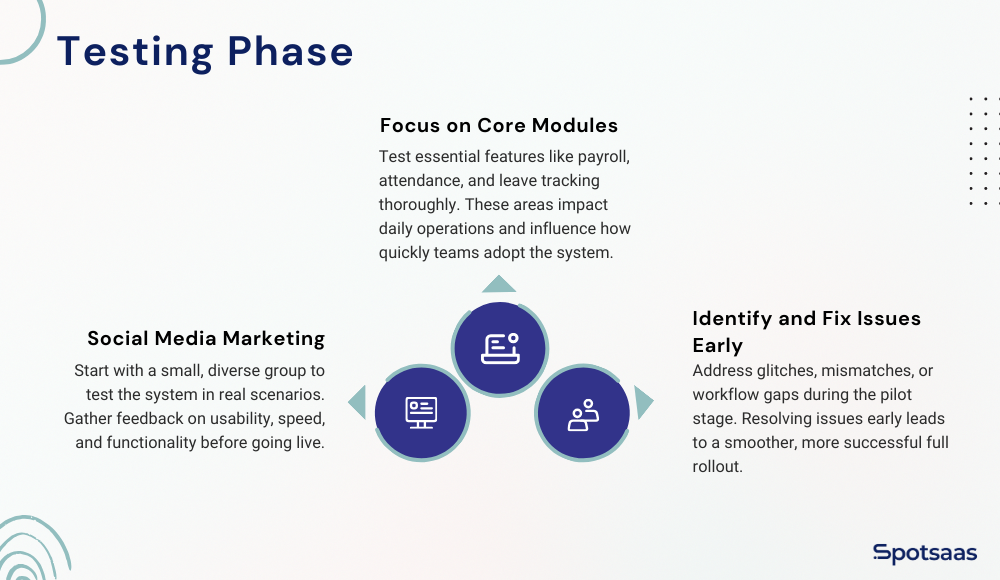
Launch a Pilot Program to Test Features and Adoption
Before rolling the software out company-wide, run it past a smaller pilot group first, a mix of HR staff, a few department managers, and employees from different teams. Watching how the system actually holds up in daily use tells you a lot more than a demo ever will, and surfaces usability issues you’d otherwise miss.
Prioritize Testing of Key HR Modules
Focus testing on the features people will actually touch every day: attendance tracking, leave requests, payroll processing, performance review workflows. Problems in these areas hit adoption and daily operations the hardest, so they deserve the closest look.
Gather Feedback and Resolve Issues Before Launch
Ask the pilot group to flag anything that feels confusing, slow, or off. Use this window to catch glitches, gaps in the workflow, or data that doesn’t line up, before the whole company depends on it. Fix what needs fixing and tighten up processes so the full launch goes down easier for everyone.
Step 8: Go Live – Communicate, Support & Launch Your HR System
| Task | Description |
|---|---|
| Announce the Go-Live Date Across the Company | Communicate the official go-live date using internal emails, newsletters, or meetings to build awareness and prepare teams for the transition. |
| Explain What’s Changing and What to Expect | Share login steps, key features, and usage instructions. Provide a checklist or FAQ to help employees adapt to the new system smoothly. |
| Set Up a Support Channel for Early Questions | Create a helpdesk, Slack group, or internal support email to answer employee questions quickly and encourage early engagement. |
Announce Launch Date to All Teams
Once the system’s configured and tested, it’s time to bring everyone in. Share the go-live date well ahead of time, through email, internal newsletters, or team meetings, so the transition doesn’t catch anyone off guard.
Communicate HR System Changes and Key Features
Spell out exactly what’s changing. Employees need to know where to log in, how to reach must-have features like attendance, leave, and payslips, and who to contact if something goes wrong. A short checklist or FAQ makes the change easier to absorb.
Set Up a Helpdesk or Slack Channel for Early Support
Expect a wave of questions in the first few weeks after launch. Set up a dedicated channel, an internal email alias, Slack group, or helpdesk, so employees have somewhere to go. Fast answers cut down on frustration and get people using the new system with confidence from day one.
Step 9: Post-Launch Support and HR System Evaluation
| Task | Description |
|---|---|
| Schedule Feedback Sessions at Key Intervals | Conduct check-ins at 1 week, 1 month, and 3 months post-launch to gather feedback, spot issues, and understand user experience. |
| Monitor Key Performance Metrics | Track time saved, data accuracy, and platform adoption rates to measure the impact and effectiveness of the new HR system. |
| Collaborate with the Vendor for Ongoing Improvements | Share feedback with the vendor and explore updates or feature enhancements that can better align with evolving business needs. |
Plan Check-ins After 1 Week, 1 Month & 3 Months
Once the software’s live, stay close to how people are actually using it. Check in after the first week, again at one month, and once more at three months. These touchpoints surface lingering issues, show you how teams are really using the system, and collect suggestions worth acting on.
Track Success Metrics: Time Saved, Accuracy & Usage
Measure the rollout against real outcomes: how much manual work the HR team is no longer doing, how accurate the data has gotten, and how many employees are actually using the platform day to day. These numbers tell you whether the software is delivering and where it still falls short.
Partner with Vendor to Optimize & Evolve Your HR System
As the team settles in, you’ll likely spot features worth fine-tuning or capabilities worth adding. Pass that feedback to your vendor and ask about configuration changes or updates that better fit your workflows. Staying in close collaboration with them keeps the software useful as the business changes shape.
Common HR Implementation Challenges & How to Avoid Them
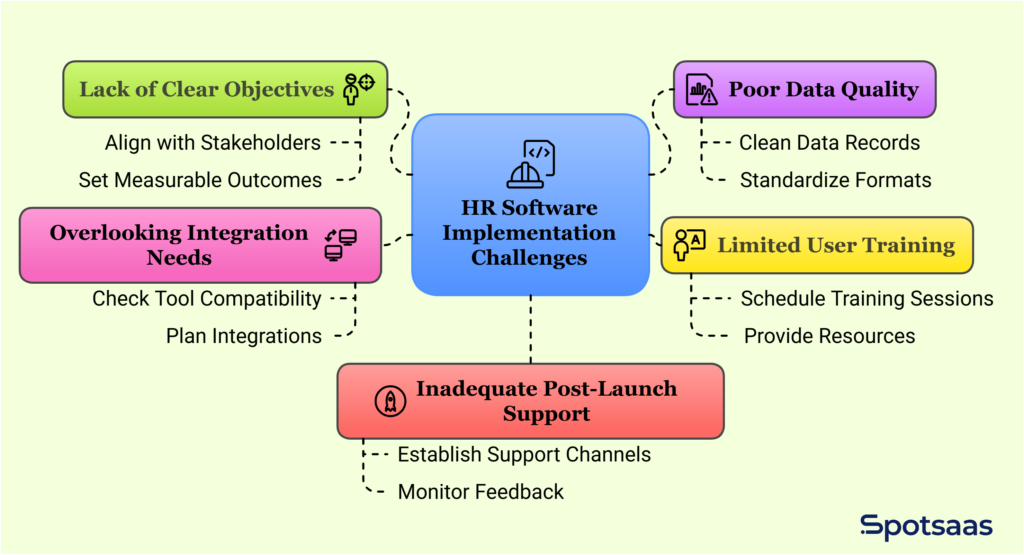
Challenge: No Clear Implementation Goals
The most common failure point is starting the rollout without defined goals. If nobody’s agreed on whether the point is cutting admin time, tightening payroll accuracy, or centralizing employee data, there’s no way to judge whether it worked. Fix this by aligning stakeholders early and setting specific, measurable outcomes before anything gets configured.
Challenge: Inaccurate or Incomplete Employee Data
Messy or outdated employee data slows down migration and drags on system performance once it’s live. Clean up records, standardize formats, and strip out duplicates before any of it gets imported. A clean data set means fewer errors and a faster path through onboarding.
Challenge: Insufficient Employee Training
Skip proper training and adoption suffers, no matter how good the software is. It might save time short term, but it just pushes confusion down the road. Schedule training for HR teams, department heads, and employees, and leave behind simple resources people can come back to later.
Challenge: Missed Integration Requirements
Some companies pick HR software without checking how it fits alongside the tools they already run, and end up with disconnected systems and extra manual work as a result. Confirm the software integrates with payroll, accounting, or project management tools early, during evaluation, not after signing.
Challenge: Weak Support After System Launch
Going live isn’t the finish line. Without a post-launch support plan, small hiccups turn into real problems fast. Stand up a temporary support channel, watch for early feedback, and be ready to troubleshoot on short notice. Regular check-ins with your team and vendor keep things running the way they should.
Catching these issues early makes for a smoother transition and gets your HR software delivering value from the start, instead of months in.
Best Tools to Support HR Software Rollout (Trello, Loom, Sheets)
A handful of simple tools can make the project management and communication side of an HR software rollout much easier to handle.
- Trello works well for visual project boards. Break the rollout down into phases, planning, configuration, testing, training, and assign tasks across the team so nothing gets missed and everyone stays on the same page.
- Loom is useful for explaining how the new system works. Record short walkthrough videos instead of repeating the same one-on-one training over and over, and give people something they can rewatch whenever they need a refresher.
- Google Sheets fits well for tracking migration progress, cleaning up employee records, and keeping checklists that the whole team can view and update in real time.
Used together, these tools keep the rollout organized, visible, and easier to manage end to end.
Pre-Go-Live Checklist: 5 Must-Do Steps for HR Software Rollout
Here’s a comparison checklist of the five things every business should nail down before launching HR software:
- Clean and Organize Employee Data: Make sure every employee record is accurate, complete, and formatted correctly for migration.
- Align Internal Teams and Responsibilities: Get HR, IT, finance, and leadership on the same page about goals, timelines, and who owns which part of the rollout.
- Set Up Core System Configurations: Configure company policies, approval workflows, job roles, and access permissions to match how the organization is structured.
- Complete Training and Share Resources: Train HR teams and managers, and hand out guides or videos so employees know how to use the system.
- Announce Go-Live and Open Support Channels: Communicate the go-live date clearly and give employees a dedicated place to get help during the first few weeks.
These five steps lay the groundwork for a rollout that sticks, and for adoption that holds up past the first week.
Final Thoughts: Launching HR Software the Right Way
Getting HR software implementation right isn’t really about picking the best tool, it’s about having a solid plan and getting the right people involved at every stage. From setting clear goals to training teams and tracking results, every step along the way contributes to whether the rollout sticks. Companies that treat this seriously tend to see stronger adoption, fewer headaches, and better efficiency for it.
Think of HR software implementation less as a one-time purchase and more as an ongoing investment, in better workflows, sharper decisions, and a workforce that’s actually equipped to do its job. Get the foundation right, and the payoff keeps compounding.
FAQS About HR Software Implementation
How long does it take for HR software implementation?
Most HR software implementations take between 4 to 8 weeks, depending on company size and system complexity.
Can we migrate data from spreadsheets or old systems?
Yes, most HR platforms support data imports from spreadsheets or legacy tools with proper formatting.
Do employees need training to use the new system?
Basic training is recommended to help employees navigate features like leave requests and profile updates.
Is cloud-based HR software implementation secure?
Reputable cloud providers use encryption, access controls, and compliance protocols to protect data.
What if we need help after going live?
Vendors typically offer ongoing support through email, chat, or dedicated account managers.
Is there an HR software implementation template?
A workable one is short. Phase one, four to six weeks out: name a single owner, export employee data, list every integration that must survive the change, and agree the go-live date away from a pay period or year-end boundary. Phase two, two to four weeks out: load data, configure permissions and approval chains, set up pay and leave rules, and run a parallel cycle. Phase three, go-live week: communicate to employees, run in parallel once more, verify outputs line by line, and keep read access to the old system until year-end filings are complete.
Most published templates fail on the same point: they schedule the data work last when it is the part that determines whether the project succeeds. Put the export and the data audit first.
What does an HR software implementation actually look like in practice?
For a 50-person company on a mid-market platform, expect four to eight weeks of elapsed time and perhaps fifteen to thirty hours of internal effort, concentrated in one person. The bulk of that is not configuration — it is chasing missing or inconsistent employee data that nobody knew was wrong until a system demanded it in a fixed format.
Enterprise implementations run months rather than weeks, and the difference is rarely the software. It is the number of exceptions: legacy contract terms, country-specific rules, and processes that exist only in someone’s head.

- Independent picks for exactly what you just read about
- Matched to your team size & needs
- Vendors don't pay for placement
Step 1 of 4
How big is your team?
We tailor recommendations to companies your size.















Related Articles
Applicant Tracking Software
monday.com for HR and Recruiting (2026): Hiring Pipelines, Onboarding and When You Need an ATS
Continue reading →
HR software
Gusto vs QuickBooks Payroll 2026: Prices, Features and Verdict
Continue reading →
Best Tools
Best PEO for Small Business in 2026: 8 Providers, Prices and Certification
Continue reading →
HR software
Gusto vs Paychex 2026: Published Prices vs Quote-Based Payroll
Continue reading →