

Gathering information through paper forms, email threads, and spreadsheets tends to get messy fast. Cognito Forms handles that problem with a platform built around data collection and form creation. This guide walks through how to build online forms that improve your data management and fit into your day-to-day operations without extra manual work.
Here is a practical look at what the platform does and how to set it up.
Key Takeaways
- Cognito Forms is an all-in-one tool that lets you customize forms with a drag-and-drop editor, automated workflows, and secure online payment options.
- Features like advanced data fields and real-time validation help Cognito Forms keep collected information accurate, and it connects with tools such as Zapier and Microsoft Power Automate.
- The platform supports several payment processors, including Stripe and PayPal, so you can handle financial transactions inside your forms.
- Its integration options let you connect third-party applications and pass data between the systems you already use.
- Cognito Forms follows international standards such as HIPAA, GDPR, and CCPA, and hosts data in the cloud on Microsoft Azure.
Overview of Cognito Forms
Cognito Forms is a full-featured online form builder aimed at technology teams that want a dependable way to collect data and automate workflows in one place.
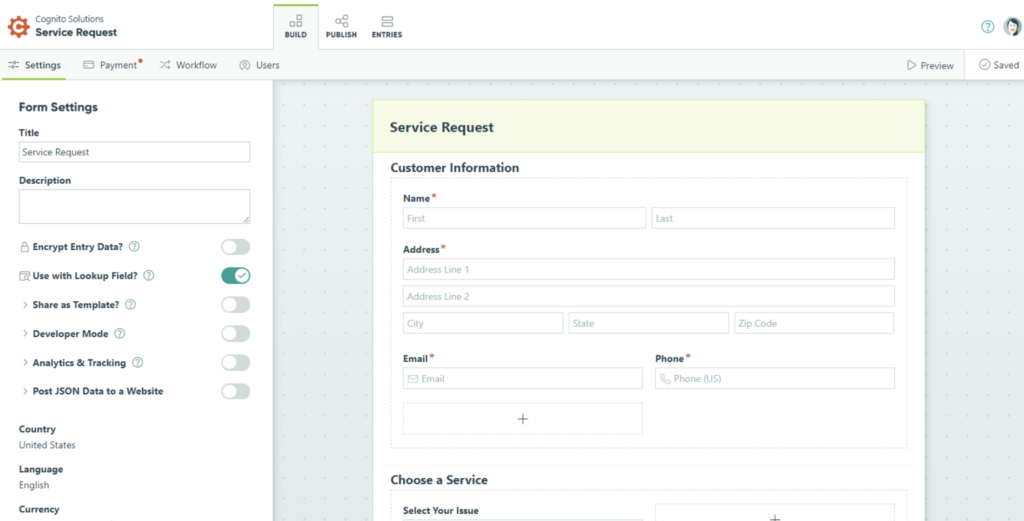
Its interface is straightforward enough that anyone—from small business owners to developers—can build custom forms, whether that means a short survey or a detailed registration process.
The formatting options give you control over each element of a form, so it looks professional while still capturing what you need, including electronic signatures and file uploads.
The platform changes how you work with the data you gather. It goes past plain data collection and lets you build interactive paths that respond to how people fill out the form.
You can sort responses or filter them by specific criteria instead of working through stacks of paperwork by hand. The platform also connects with popular tools like Zapier and Microsoft Power Automate, so automated workflows can move data between thousands of applications.
If you need to collect money through a form, Cognito Forms works with processors like Square and Stripe, which keeps payments and data management together in a single tool.
(Image Source: Cognito Forms)
Key Features of Cognito Forms
Cognito Forms covers a range of useful features, including advanced data collection, workflow automation, secure online payment processing, and connections to other applications.
Together, these make it a solid choice for building flexible, easy-to-use online forms and surveys.
Data Collection
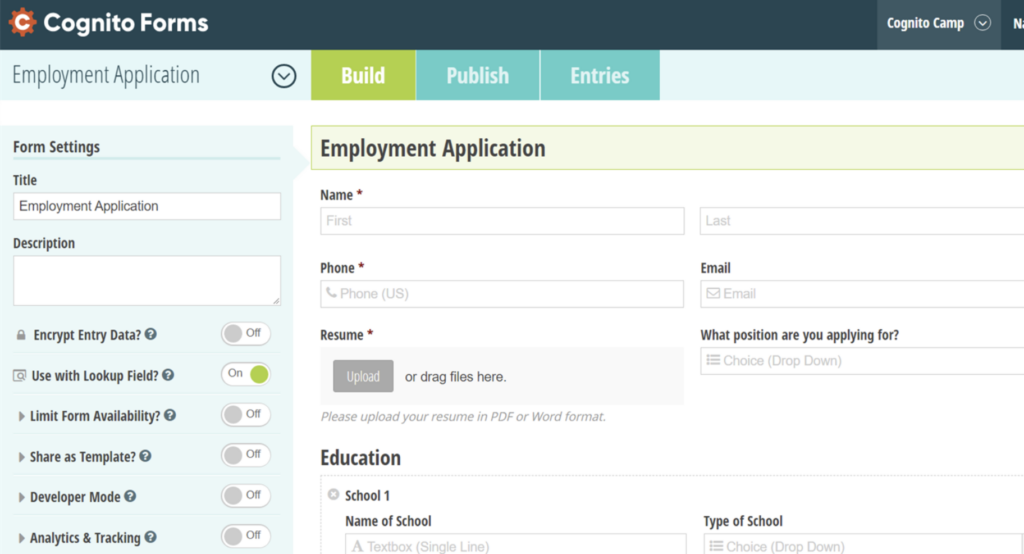
Accurate data collection changes how you work with the people filling out your forms. Cognito Forms supports detailed information gathering through a wide set of field types that fit different needs.
From simple text boxes to complex calculations, you can shape forms that capture the details you need while keeping the results organized and correct. The same set of fields can hold electronic signatures, file uploads, and structured entries, so a single form covers everything from a quick contact request to a detailed intake.
A form can do more than record input—it can check that input as it’s entered, which protects data integrity from the first field. You can also take payments in the same form, so collection and checkout happen together.
With fields set up for consistent formatting and validation rules in place, you get fewer errors and less rework. Beyond collecting information, this lets you streamline processes and automate parts of your business workflow.
Workflow Automation
Automating your workflow is straightforward with Cognito Forms and its logic and automation tools. The platform turns multi-part processes into automated steps that run in the background.
Whether you’re scheduling appointments, managing event registrations, or handling customer inquiries, Cognito Forms routes your data along customized paths that keep multi-step processes moving.
The result is fewer hours spent on administrative tasks and fewer mistakes along the way. Automation gives you a more efficient way to manage financial details and avoid the gaps where work slips through unnoticed.
These tools save time and improve accuracy across your processes. Next, here’s how flexible online payments add to that efficiency by bringing transactions into your automated workflows.
(Image Source: Cognito Forms)
Online Payment
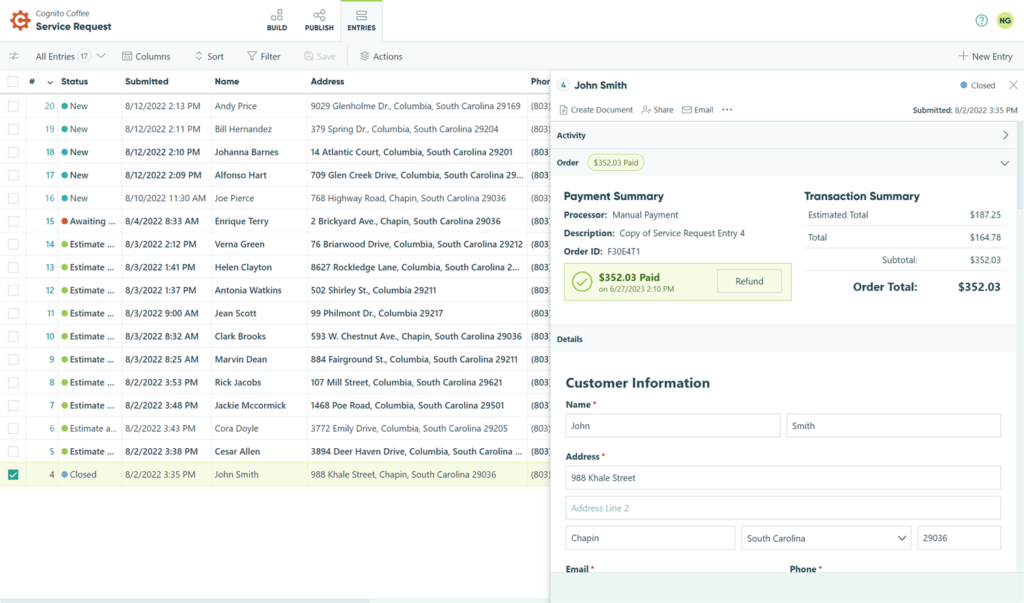
Cognito Forms handles secure online transactions through payment partners such as Square, Stripe, and PayPal. That lets you process online payments and give customers a choice of payment options.
Because you can add payment gateways directly to your forms, Cognito Forms makes it simple to collect digital payments for e-commerce or online invoicing, which suits businesses that run electronic transactions.
The platform keeps financial information secure during checkout, so both businesses and their clients can trust the process. Because payment sits inside the same form that collects the request, you avoid sending people to a separate page or tool to complete a purchase, which keeps the experience short and reduces the drop-off that comes with extra steps.
(Image Source: Cognito Forms)
Integration Capabilities
Cognito Forms works with a range of native applications and supports third-party connections that extend what it can do. You can tune forms for better results by using these integrations to gather and validate data across different field types.
These connections improve the platform’s data connectivity and help tie your workflow steps together across the tools you rely on.
Cognito Forms also shares guidance on connecting forms with other applications, which helps you get more out of its integrations while keeping data collection and validation accurate. In practice, that means a form submission can trigger an action in another system—adding a record, sending a notification, or updating a spreadsheet—without anyone copying the data over by hand.
How to Create Forms with Cognito

Building a form in Cognito Forms is a simple, step-by-step process with plenty of room to customize. Here’s how to do it:
- Sign in to your Cognito Forms account, or register for a new one if you don’t have it yet.
- Once you’re logged in, click the “New Form” button to start a new form.
- Use the drag-and-drop editor to add fields and shape the form around your specific data collection needs.
- Work through the available options—text fields, checkboxes, dropdown menus, and file uploads—to build a complete, easy-to-use form.
- Set up advanced options like conditional logic and calculations to automate steps inside the form itself.
- Use Cognito Forms’ integrations to connect with the other platforms and tools that keep your operations running.
- Once the design is ready, embed it into your website or share it with a direct link to start collecting data.
- Check Cognito Forms’ support and best-practice resources for tips on getting more out of your forms.
Advantages of Using Cognito Forms
Beyond building forms, Cognito Forms brings advantages that help in several ways. From tutorials and customer stories that make form building easier to secure online payment collection, the platform gives you the resources and functions you need to manage forms well.
Organizations such as VaxRegistration, United Way of the Midlands, and Money Fit have used Cognito Forms to streamline their processes and support financial stability.
Along with its no-code approach to workflow automation, Cognito Forms follows privacy regulations such as HIPAA, GDPR, and CCPA. That compliance protects data, and the platform hosts it in the cloud through Microsoft Azure.
Taken together, Cognito Forms gives you a single place to build online forms shaped around what your work actually requires. Whether you need a simple survey, a registration form with payments, or a multi-step approval process, the same platform handles the design, the automation, and the data behind it.
Conclusion
Cognito Forms makes it practical to build online forms without heavy setup. You can simplify data collection, automate workflow steps, and accept online payments in one place. You can also keep brand consistency across your forms and meet security requirements under HIPAA, GDPR, and CCPA.
On top of that, you can extend what your forms do through native apps and third-party integrations, joining the many organizations that use Cognito Forms for their form-building needs.
Frequently Asked Questions
How do I get started with creating online forms using Cognito Forms?
To start building forms with Cognito Forms, sign up for an account on their website and follow the step-by-step instructions.
Can I customize the design and layout of my online forms in Cognito Forms?
Yes. You can adjust the design and layout of your online forms in Cognito Forms to match your branding or style preferences.
Are there any advanced features available for adding complexity to my online forms in Cognito Forms?
Yes. You can add advanced features such as calculated fields, conditional logic, file uploads, and electronic signatures to expand what your online forms can do.
Is it possible to embed my created form onto a website or share it via social media using Cognito Forms?
Yes. You can embed your form on a website or share it through channels such as email or social media directly from Cognito Forms.
What kind of support is available if I encounter issues while creating online forms with Cognito Forms?
Cognito Forms offers documentation, tutorials, user forums, and direct customer support to help you when you build online forms.
Compare alternatives to the tools in this post

- Independent picks for exactly what you just read about
- Matched to your team size & needs
- Vendors don't pay for placement
Step 1 of 4
How big is your team?
We tailor recommendations to companies your size.















Related Articles
Buyers guide
Twilio Alternatives 2026: 6 Compared and What They Cost
Continue reading →
IT Management
RMM Software: 25 Tools Ranked by 1,843 Reviews
Continue reading →

Buyers guide
How To Choose The Best Freelance Platforms For 2026
Continue reading →
Best Tools
SaveFrom.net: Norton Clears It, the Ads Are the Risk
Continue reading →